Antonio	
  Musarra's	
  Blog	
  
The	
  ideal	
  solution	
  for	
  a	
  problem	
                                                          Blog:	
  http://musarra.wordpress.com	
  
                                                                                                           Mail:	
  antonio.musarra@gmail.com	


HOW	
  TO	
  SAML	
  Password	
  
Management	
  (Note)	
  	
  
Hi	
  Freddy,	
  
Today	
  I	
  got	
  to	
  spend	
  about	
  2	
  hours	
  to	
  the	
  issue	
  of	
  configuring	
  SAML	
  analyzing	
  
the	
  source	
  code	
  of	
  SugarCRM.	
  I	
  got	
  some	
  interesting	
  information,	
  so	
  I	
  decided	
  to	
  
gather	
  all	
  the	
  information	
  in	
  this	
  document	
  that	
  might	
  help	
  you.	


       1. Official	
  documentation	
  that	
  describes	
  how	
  to	
  setup	
  SAML	
  is	
  
          http://www.sugarcrm.com/crm/support/documentation/SugarEnterprise
          /6.2/-­‐docs-­‐Application_Guides-­‐
          Sugar_Enterprise_Application_Guide_6.2.0RC3-­‐Administration.html	
  -­‐	
  	
  
          1916827	
  
       2. I	
  analyzed	
  the	
  classes	
  in	
  modules/Users/authentication/	
  
          SAMLAuthenticate	


The	
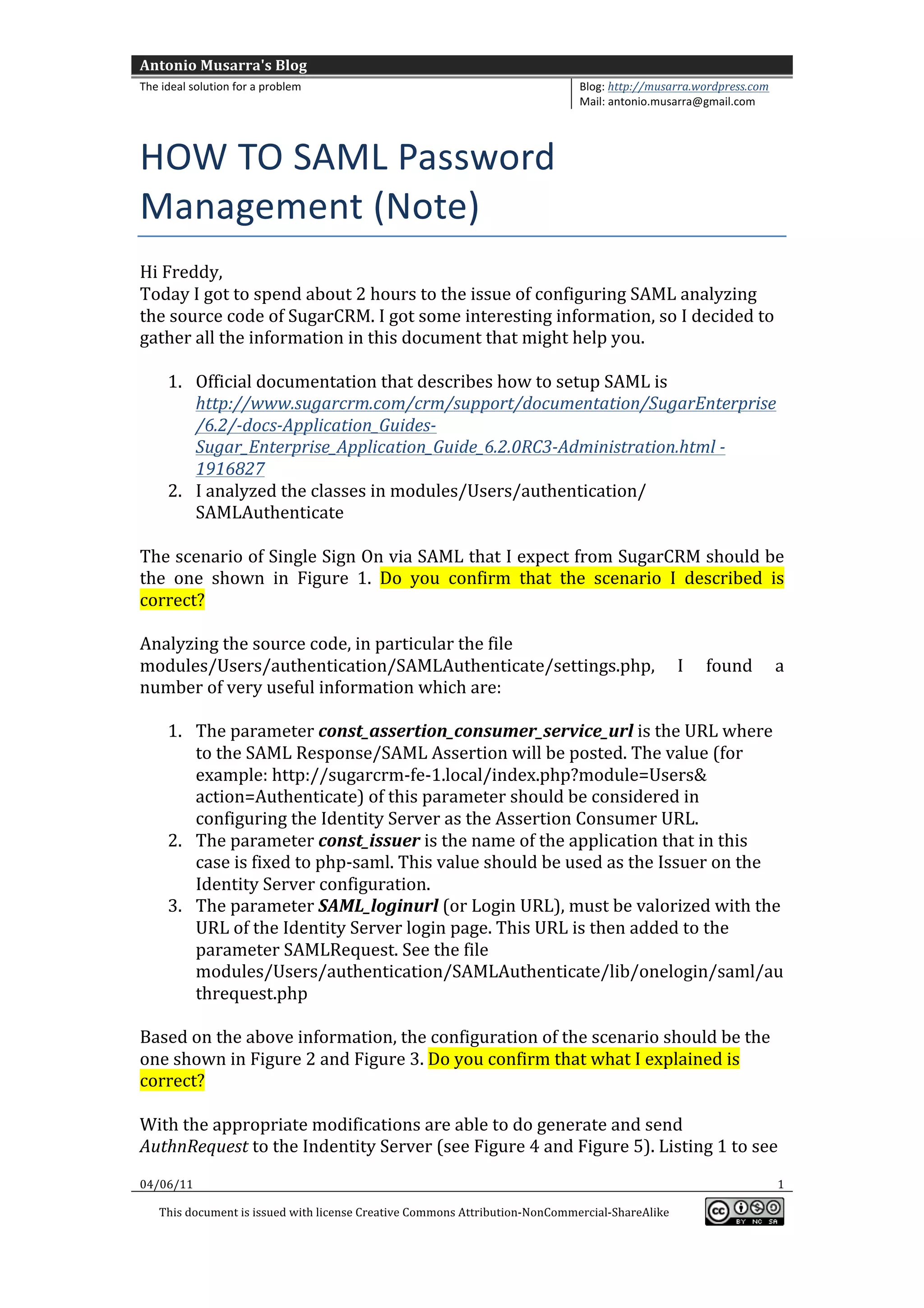
  scenario	
  of	
  Single	
  Sign	
  On	
  via	
  SAML	
  that	
  I	
  expect	
  from	
  SugarCRM	
  should	
  be	
  
the	
   one	
   shown	
   in	
   Figure	
   1.	
   Do	
   you	
   confirm	
   that	
   the	
   scenario	
   I	
   described	
   is	
  
correct?	


Analyzing	
  the	
  source	
  code,	
  in	
  particular	
  the	
  file	
  
modules/Users/authentication/SAMLAuthenticate/settings.php,	
   I	
   found	
   a	
  
number	
  of	
  very	
  useful	
  information	
  which	
  are:	


       1. The	
  parameter	
  const_assertion_consumer_service_url	
  is	
  the	
  URL	
  where	
  
          to	
  the	
  SAML	
  Response/SAML	
  Assertion	
  will	
  be	
  posted.	
  The	
  value	
  (for	
  
          example:	
  http://sugarcrm-­‐fe-­‐1.local/index.php?module=Users&	
  
          action=Authenticate)	
  of	
  this	
  parameter	
  should	
  be	
  considered	
  in	
  
          configuring	
  the	
  Identity	
  Server	
  as	
  the	
  Assertion	
  Consumer	
  URL.	
  	
  
       2. The	
  parameter	
  const_issuer	
  is	
  the	
  name	
  of	
  the	
  application	
  that	
  in	
  this	
  
          case	
  is	
  fixed	
  to	
  php-­‐saml.	
  This	
  value	
  should	
  be	
  used	
  as	
  the	
  Issuer	
  on	
  the	
  
          Identity	
  Server	
  configuration.	
  
       3. The	
  parameter	
  SAML_loginurl	
  (or	
  Login	
  URL),	
  must	
  be	
  valorized	
  with	
  the	
  
          URL	
  of	
  the	
  Identity	
  Server	
  login	
  page.	
  This	
  URL	
  is	
  then	
  added	
  to	
  the	
  
          parameter	
  SAMLRequest.	
  See	
  the	
  file	
  
          modules/Users/authentication/SAMLAuthenticate/lib/onelogin/saml/au
          threquest.php	


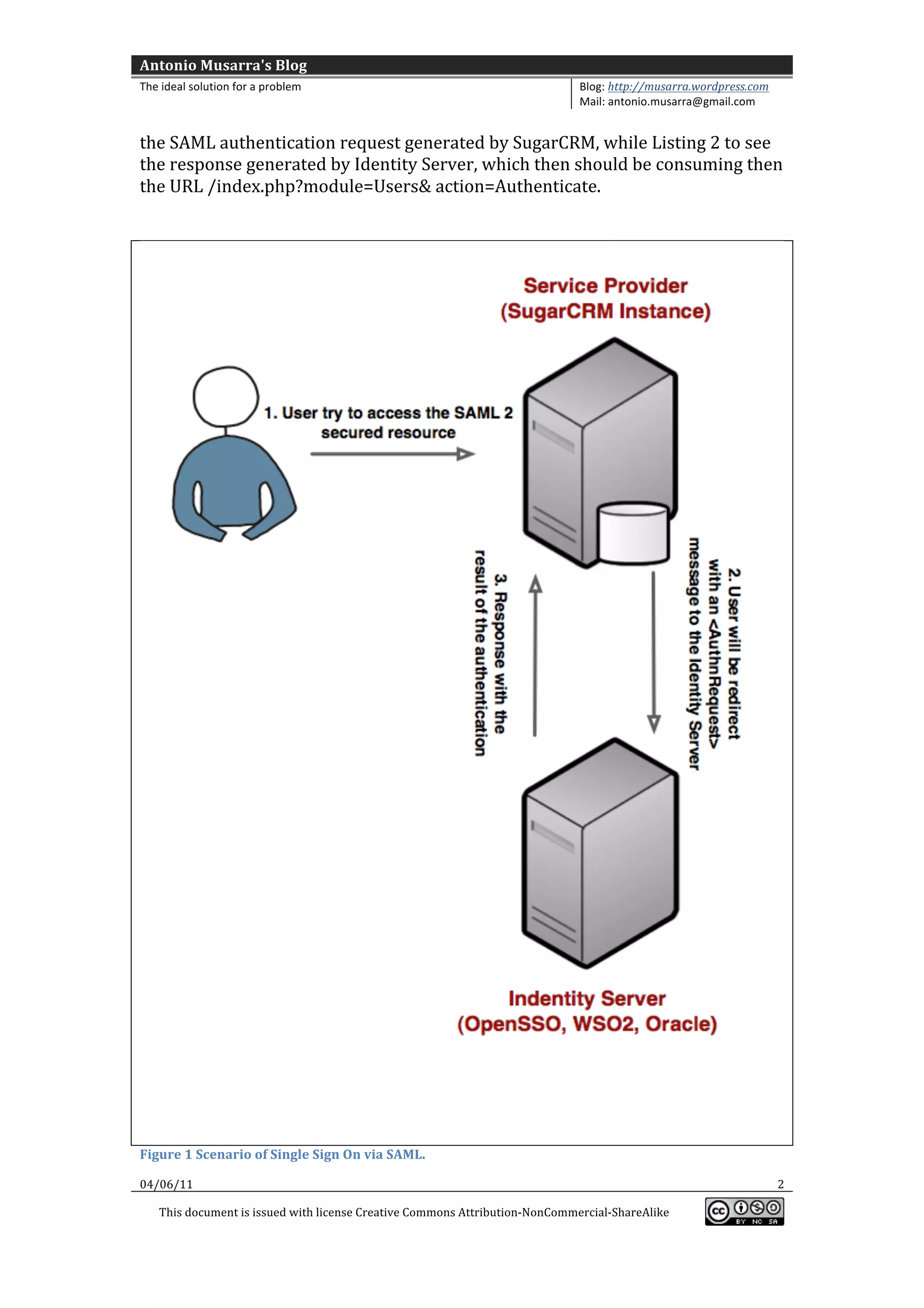
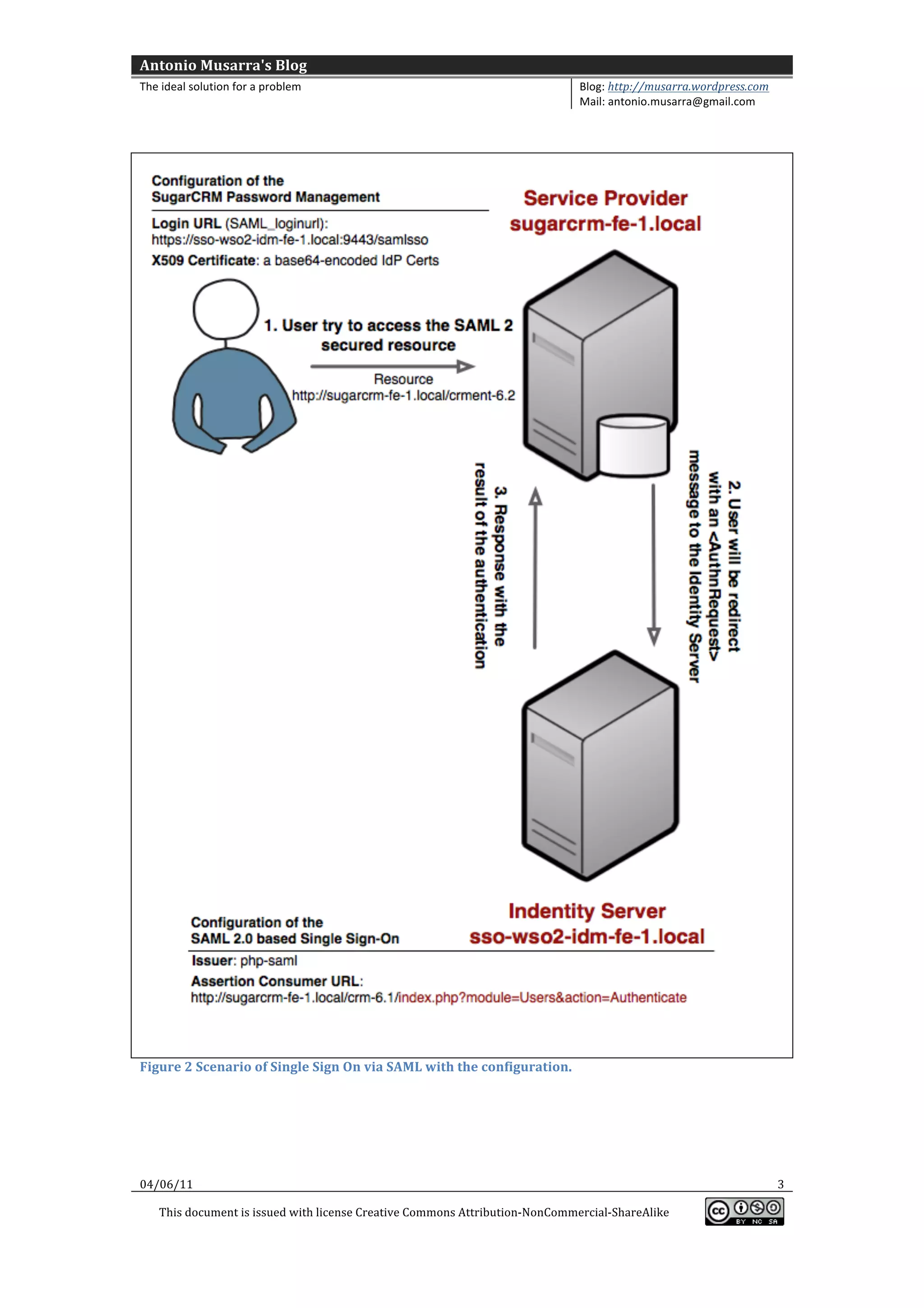
Based	
  on	
  the	
  above	
  information,	
  the	
  configuration	
  of	
  the	
  scenario	
  should	
  be	
  the	
  
one	
  shown	
  in	
  Figure	
  2	
  and	
  Figure	
  3.	
  Do	
  you	
  confirm	
  that	
  what	
  I	
  explained	
  is	
  
correct?	


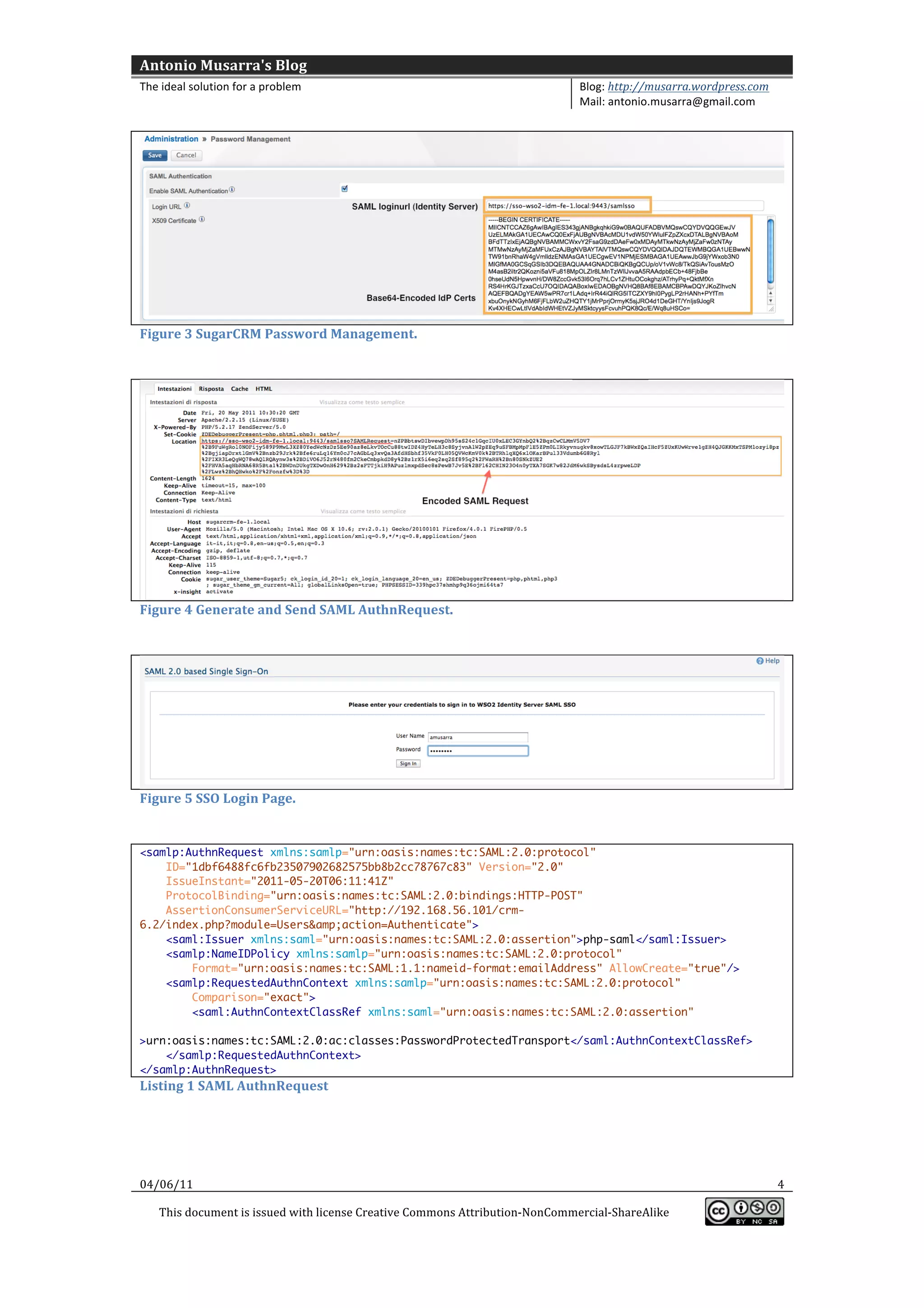
With	
  the	
  appropriate	
  modifications	
  are	
  able	
  to	
  do	
  generate	
  and	
  send	
  
AuthnRequest	
  to	
  the	
  Indentity	
  Server	
  (see	
  Figure	
  4	
  and	
  Figure	
  5).	
  Listing	
  1	
  to	
  see	
  
04/06/11	
                                                                                                                                             1	
  

       This	
  document	
  is	
  issued	
  with	
  license	
  Creative	
  Commons	
  Attribution-­‐NonCommercial-­‐ShareAlike	


Antonio	
  Musarra's	
  Blog	
  
The	
  ideal	
  solution	
  for	
  a	
  problem	
                                                          Blog:	
  http://musarra.wordpress.com	
  
                                                                                                           Mail:	
  antonio.musarra@gmail.com	


the	
  SAML	
  authentication	
  request	
  generated	
  by	
  SugarCRM,	
  while	
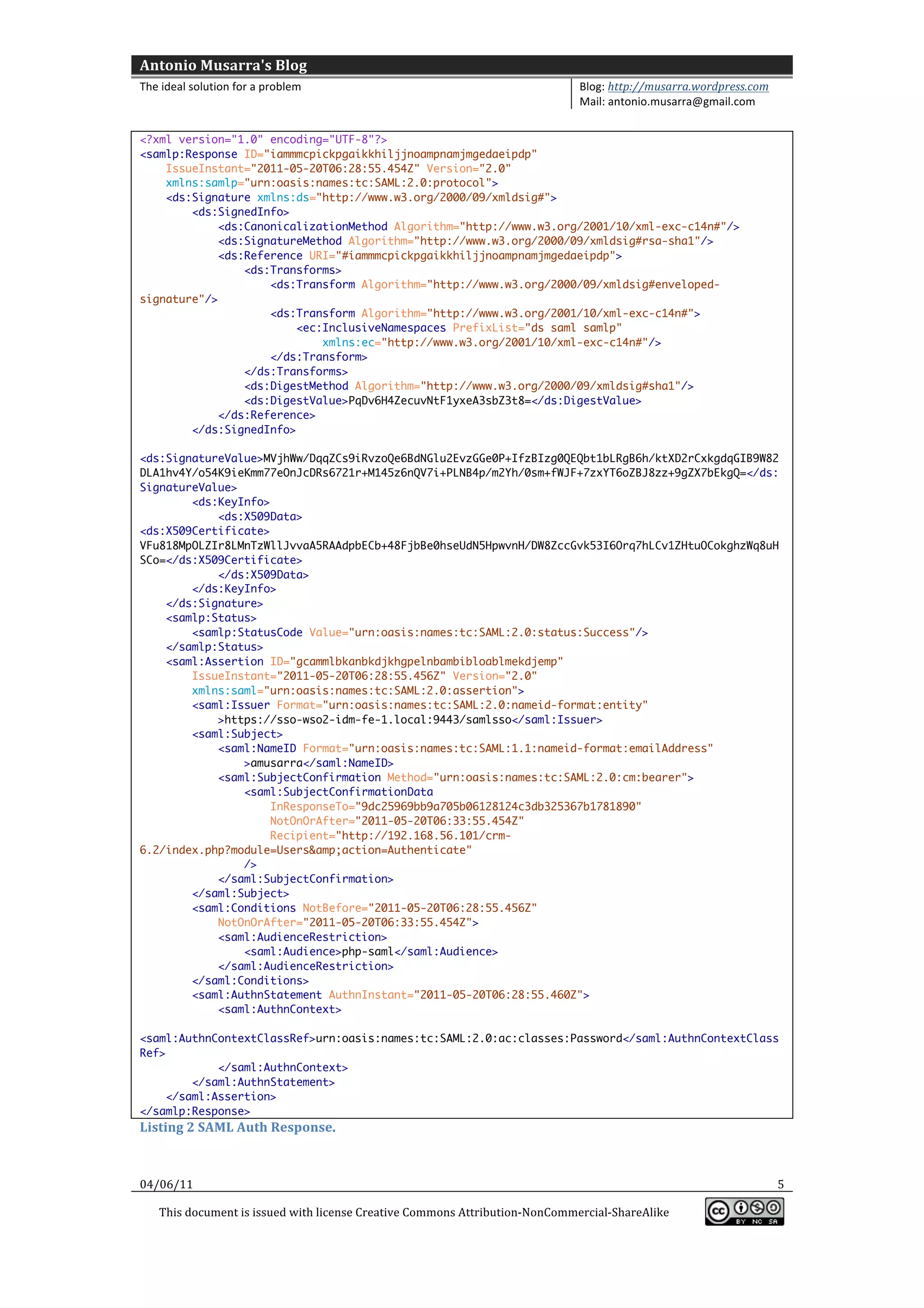
  Listing	
  2	
  to	
  see	
  
the	
  response	
  generated	
  by	
  Identity	
  Server,	
  which	
  then	
  should	
  be	
  consuming	
  then	
  
the	
  URL	
  /index.php?module=Users&	
  action=Authenticate.	


Figure	
  1	
  Scenario	
  of	
  Single	
  Sign	
  On	
  via	
  SAML.	
  

04/06/11	
                                                                                                                                             2	
  

       This	
  document	
  is	
  issued	
  with	
  license	
  Creative	
  Commons	
  Attribution-­‐NonCommercial-­‐ShareAlike	


Antonio	
  Musarra's	
  Blog	
  
The	
  ideal	
  solution	
  for	
  a	
  problem	
                                                           Blog:	
  http://musarra.wordpress.com	
  
                                                                                                            Mail:	
  antonio.musarra@gmail.com	


Figure	
  2	
  Scenario	
  of	
  Single	
  Sign	
  On	
  via	
  SAML	
  with	
  the	
  configuration.	


04/06/11	
                                                                                                                                              3	
  

       This	
  document	
  is	
  issued	
  with	
  license	
  Creative	
  Commons	
  Attribution-­‐NonCommercial-­‐ShareAlike	


Antonio	
  Musarra's	
  Blog	
  
The	
  ideal	
  solution	
  for	
  a	
  problem	
                                                          Blog:	
  http://musarra.wordpress.com	
  
                                                                                                           Mail:	
  antonio.musarra@gmail.com	


Figure	
  3	
  SugarCRM	
  Password	
  Management.	


Figure	
  4	
  Generate	
  and	
  Send	
  SAML	
  AuthnRequest.	


Figure	
  5	
  SSO	
  Login	
  Page.	


<samlp:AuthnRequest xmlns:samlp="urn:oasis:names:tc:SAML:2.0:protocol"
    ID="1dbf6488fc6fb23507902682575bb8b2cc78767c83" Version="2.0"
    IssueInstant="2011-05-20T06:11:41Z"
    ProtocolBinding="urn:oasis:names:tc:SAML:2.0:bindings:HTTP-POST"
    AssertionConsumerServiceURL="http://192.168.56.101/crm-
6.2/index.php?module=Users&amp;action=Authenticate">
    <saml:Issuer xmlns:saml="urn:oasis:names:tc:SAML:2.0:assertion">php-saml</saml:Issuer>
    <samlp:NameIDPolicy xmlns:samlp="urn:oasis:names:tc:SAML:2.0:protocol"
        Format="urn:oasis:names:tc:SAML:1.1:nameid-format:emailAddress" AllowCreate="true"/>
    <samlp:RequestedAuthnContext xmlns:samlp="urn:oasis:names:tc:SAML:2.0:protocol"
        Comparison="exact">
        <saml:AuthnContextClassRef xmlns:saml="urn:oasis:names:tc:SAML:2.0:assertion"

>urn:oasis:names:tc:SAML:2.0:ac:classes:PasswordProtectedTransport</saml:AuthnContextClassRef>
    </samlp:RequestedAuthnContext>
</samlp:AuthnRequest>
Listing	
  1	
  SAML	
  AuthnRequest	


04/06/11	
                                                                                                                                             4	
  

       This	
  document	
  is	
  issued	
  with	
  license	
  Creative	
  Commons	
  Attribution-­‐NonCommercial-­‐ShareAlike	


Antonio	
  Musarra's	
  Blog	
  
The	
  ideal	
  solution	
  for	
  a	
  problem	
                                                          Blog:	
  http://musarra.wordpress.com	
  
                                                                                                           Mail:	
  antonio.musarra@gmail.com	


<?xml version="1.0" encoding="UTF-8"?>
<samlp:Response ID="iammmcpickpgaikkhiljjnoampnamjmgedaeipdp"
    IssueInstant="2011-05-20T06:28:55.454Z" Version="2.0"
    xmlns:samlp="urn:oasis:names:tc:SAML:2.0:protocol">
    <ds:Signature xmlns:ds="http://www.w3.org/2000/09/xmldsig#">
        <ds:SignedInfo>
             <ds:CanonicalizationMethod Algorithm="http://www.w3.org/2001/10/xml-exc-c14n#"/>
             <ds:SignatureMethod Algorithm="http://www.w3.org/2000/09/xmldsig#rsa-sha1"/>
             <ds:Reference URI="#iammmcpickpgaikkhiljjnoampnamjmgedaeipdp">
                 <ds:Transforms>
                     <ds:Transform Algorithm="http://www.w3.org/2000/09/xmldsig#enveloped-
signature"/>
                     <ds:Transform Algorithm="http://www.w3.org/2001/10/xml-exc-c14n#">
                         <ec:InclusiveNamespaces PrefixList="ds saml samlp"
                             xmlns:ec="http://www.w3.org/2001/10/xml-exc-c14n#"/>
                     </ds:Transform>
                 </ds:Transforms>
                 <ds:DigestMethod Algorithm="http://www.w3.org/2000/09/xmldsig#sha1"/>
                 <ds:DigestValue>PqDv6H4ZecuvNtF1yxeA3sbZ3t8=</ds:DigestValue>
             </ds:Reference>
        </ds:SignedInfo>

<ds:SignatureValue>MVjhWw/DqqZCs9iRvzoQe6BdNGlu2EvzGGe0P+IfzBIzg0QEQbt1bLRgB6h/ktXD2rCxkgdqGIB9W82
DLA1hv4Y/o54K9ieKmm77eOnJcDRs6721r+M145z6nQV7i+PLNB4p/m2Yh/0sm+fWJF+7zxYT6oZBJ8zz+9gZX7bEkgQ=</ds:
SignatureValue>
        <ds:KeyInfo>
            <ds:X509Data>
<ds:X509Certificate>
VFu818MpOLZIr8LMnTzWllJvvaA5RAAdpbECb+48FjbBe0hseUdN5HpwvnH/DW8ZccGvk53I6Orq7hLCv1ZHtuOCokghzWq8uH
SCo=</ds:X509Certificate>
            </ds:X509Data>
        </ds:KeyInfo>
    </ds:Signature>
    <samlp:Status>
        <samlp:StatusCode Value="urn:oasis:names:tc:SAML:2.0:status:Success"/>
    </samlp:Status>
    <saml:Assertion ID="gcammlbkanbkdjkhgpelnbambibloablmekdjemp"
        IssueInstant="2011-05-20T06:28:55.456Z" Version="2.0"
        xmlns:saml="urn:oasis:names:tc:SAML:2.0:assertion">
        <saml:Issuer Format="urn:oasis:names:tc:SAML:2.0:nameid-format:entity"
            >https://sso-wso2-idm-fe-1.local:9443/samlsso</saml:Issuer>
        <saml:Subject>
            <saml:NameID Format="urn:oasis:names:tc:SAML:1.1:nameid-format:emailAddress"
                >amusarra</saml:NameID>
            <saml:SubjectConfirmation Method="urn:oasis:names:tc:SAML:2.0:cm:bearer">
                <saml:SubjectConfirmationData
                     InResponseTo="9dc25969bb9a705b06128124c3db325367b1781890"
                     NotOnOrAfter="2011-05-20T06:33:55.454Z"
                     Recipient="http://192.168.56.101/crm-
6.2/index.php?module=Users&amp;action=Authenticate"
                />
            </saml:SubjectConfirmation>
        </saml:Subject>
        <saml:Conditions NotBefore="2011-05-20T06:28:55.456Z"
            NotOnOrAfter="2011-05-20T06:33:55.454Z">
            <saml:AudienceRestriction>
                <saml:Audience>php-saml</saml:Audience>
            </saml:AudienceRestriction>
        </saml:Conditions>
        <saml:AuthnStatement AuthnInstant="2011-05-20T06:28:55.460Z">
            <saml:AuthnContext>

<saml:AuthnContextClassRef>urn:oasis:names:tc:SAML:2.0:ac:classes:Password</saml:AuthnContextClass
Ref>
             </saml:AuthnContext>
         </saml:AuthnStatement>
     </saml:Assertion>
</samlp:Response>                 	
  
Listing	
  2	
  SAML	
  Auth	
  Response.	


04/06/11	
                                                                                                                                             5	
  

       This	
  document	
  is	
  issued	
  with	
  license	
  Creative	
  Commons	
  Attribution-­‐NonCommercial-­‐ShareAlike	


HOW TO SAML Password Management (Note)

  • 1.
    Antonio  Musarra's  Blog   The  ideal  solution  for  a  problem   Blog:  http://musarra.wordpress.com   Mail:  antonio.musarra@gmail.com     HOW  TO  SAML  Password   Management  (Note)     Hi  Freddy,   Today  I  got  to  spend  about  2  hours  to  the  issue  of  configuring  SAML  analyzing   the  source  code  of  SugarCRM.  I  got  some  interesting  information,  so  I  decided  to   gather  all  the  information  in  this  document  that  might  help  you.     1. Official  documentation  that  describes  how  to  setup  SAML  is   http://www.sugarcrm.com/crm/support/documentation/SugarEnterprise /6.2/-­‐docs-­‐Application_Guides-­‐ Sugar_Enterprise_Application_Guide_6.2.0RC3-­‐Administration.html  -­‐     1916827   2. I  analyzed  the  classes  in  modules/Users/authentication/   SAMLAuthenticate     The  scenario  of  Single  Sign  On  via  SAML  that  I  expect  from  SugarCRM  should  be   the   one   shown   in   Figure   1.   Do   you   confirm   that   the   scenario   I   described   is   correct?     Analyzing  the  source  code,  in  particular  the  file   modules/Users/authentication/SAMLAuthenticate/settings.php,   I   found   a   number  of  very  useful  information  which  are:     1. The  parameter  const_assertion_consumer_service_url  is  the  URL  where   to  the  SAML  Response/SAML  Assertion  will  be  posted.  The  value  (for   example:  http://sugarcrm-­‐fe-­‐1.local/index.php?module=Users&   action=Authenticate)  of  this  parameter  should  be  considered  in   configuring  the  Identity  Server  as  the  Assertion  Consumer  URL.     2. The  parameter  const_issuer  is  the  name  of  the  application  that  in  this   case  is  fixed  to  php-­‐saml.  This  value  should  be  used  as  the  Issuer  on  the   Identity  Server  configuration.   3. The  parameter  SAML_loginurl  (or  Login  URL),  must  be  valorized  with  the   URL  of  the  Identity  Server  login  page.  This  URL  is  then  added  to  the   parameter  SAMLRequest.  See  the  file   modules/Users/authentication/SAMLAuthenticate/lib/onelogin/saml/au threquest.php     Based  on  the  above  information,  the  configuration  of  the  scenario  should  be  the   one  shown  in  Figure  2  and  Figure  3.  Do  you  confirm  that  what  I  explained  is   correct?     With  the  appropriate  modifications  are  able  to  do  generate  and  send   AuthnRequest  to  the  Indentity  Server  (see  Figure  4  and  Figure  5).  Listing  1  to  see   04/06/11   1   This  document  is  issued  with  license  Creative  Commons  Attribution-­‐NonCommercial-­‐ShareAlike      
  • 2.
    Antonio  Musarra's  Blog   The  ideal  solution  for  a  problem   Blog:  http://musarra.wordpress.com   Mail:  antonio.musarra@gmail.com     the  SAML  authentication  request  generated  by  SugarCRM,  while  Listing  2  to  see   the  response  generated  by  Identity  Server,  which  then  should  be  consuming  then   the  URL  /index.php?module=Users&  action=Authenticate.         Figure  1  Scenario  of  Single  Sign  On  via  SAML.   04/06/11   2   This  document  is  issued  with  license  Creative  Commons  Attribution-­‐NonCommercial-­‐ShareAlike      
  • 3.
    Antonio  Musarra's  Blog   The  ideal  solution  for  a  problem   Blog:  http://musarra.wordpress.com   Mail:  antonio.musarra@gmail.com         Figure  2  Scenario  of  Single  Sign  On  via  SAML  with  the  configuration.       04/06/11   3   This  document  is  issued  with  license  Creative  Commons  Attribution-­‐NonCommercial-­‐ShareAlike      
  • 4.
    Antonio  Musarra's  Blog   The  ideal  solution  for  a  problem   Blog:  http://musarra.wordpress.com   Mail:  antonio.musarra@gmail.com       Figure  3  SugarCRM  Password  Management.       Figure  4  Generate  and  Send  SAML  AuthnRequest.       Figure  5  SSO  Login  Page.     <samlp:AuthnRequest xmlns:samlp="urn:oasis:names:tc:SAML:2.0:protocol" ID="1dbf6488fc6fb23507902682575bb8b2cc78767c83" Version="2.0" IssueInstant="2011-05-20T06:11:41Z" ProtocolBinding="urn:oasis:names:tc:SAML:2.0:bindings:HTTP-POST" AssertionConsumerServiceURL="http://192.168.56.101/crm- 6.2/index.php?module=Users&amp;action=Authenticate"> <saml:Issuer xmlns:saml="urn:oasis:names:tc:SAML:2.0:assertion">php-saml</saml:Issuer> <samlp:NameIDPolicy xmlns:samlp="urn:oasis:names:tc:SAML:2.0:protocol" Format="urn:oasis:names:tc:SAML:1.1:nameid-format:emailAddress" AllowCreate="true"/> <samlp:RequestedAuthnContext xmlns:samlp="urn:oasis:names:tc:SAML:2.0:protocol" Comparison="exact"> <saml:AuthnContextClassRef xmlns:saml="urn:oasis:names:tc:SAML:2.0:assertion" >urn:oasis:names:tc:SAML:2.0:ac:classes:PasswordProtectedTransport</saml:AuthnContextClassRef> </samlp:RequestedAuthnContext> </samlp:AuthnRequest> Listing  1  SAML  AuthnRequest         04/06/11   4   This  document  is  issued  with  license  Creative  Commons  Attribution-­‐NonCommercial-­‐ShareAlike      
  • 5.
    Antonio  Musarra's  Blog   The  ideal  solution  for  a  problem   Blog:  http://musarra.wordpress.com   Mail:  antonio.musarra@gmail.com     <?xml version="1.0" encoding="UTF-8"?> <samlp:Response ID="iammmcpickpgaikkhiljjnoampnamjmgedaeipdp" IssueInstant="2011-05-20T06:28:55.454Z" Version="2.0" xmlns:samlp="urn:oasis:names:tc:SAML:2.0:protocol"> <ds:Signature xmlns:ds="http://www.w3.org/2000/09/xmldsig#"> <ds:SignedInfo> <ds:CanonicalizationMethod Algorithm="http://www.w3.org/2001/10/xml-exc-c14n#"/> <ds:SignatureMethod Algorithm="http://www.w3.org/2000/09/xmldsig#rsa-sha1"/> <ds:Reference URI="#iammmcpickpgaikkhiljjnoampnamjmgedaeipdp"> <ds:Transforms> <ds:Transform Algorithm="http://www.w3.org/2000/09/xmldsig#enveloped- signature"/> <ds:Transform Algorithm="http://www.w3.org/2001/10/xml-exc-c14n#"> <ec:InclusiveNamespaces PrefixList="ds saml samlp" xmlns:ec="http://www.w3.org/2001/10/xml-exc-c14n#"/> </ds:Transform> </ds:Transforms> <ds:DigestMethod Algorithm="http://www.w3.org/2000/09/xmldsig#sha1"/> <ds:DigestValue>PqDv6H4ZecuvNtF1yxeA3sbZ3t8=</ds:DigestValue> </ds:Reference> </ds:SignedInfo> <ds:SignatureValue>MVjhWw/DqqZCs9iRvzoQe6BdNGlu2EvzGGe0P+IfzBIzg0QEQbt1bLRgB6h/ktXD2rCxkgdqGIB9W82 DLA1hv4Y/o54K9ieKmm77eOnJcDRs6721r+M145z6nQV7i+PLNB4p/m2Yh/0sm+fWJF+7zxYT6oZBJ8zz+9gZX7bEkgQ=</ds: SignatureValue> <ds:KeyInfo> <ds:X509Data> <ds:X509Certificate> VFu818MpOLZIr8LMnTzWllJvvaA5RAAdpbECb+48FjbBe0hseUdN5HpwvnH/DW8ZccGvk53I6Orq7hLCv1ZHtuOCokghzWq8uH SCo=</ds:X509Certificate> </ds:X509Data> </ds:KeyInfo> </ds:Signature> <samlp:Status> <samlp:StatusCode Value="urn:oasis:names:tc:SAML:2.0:status:Success"/> </samlp:Status> <saml:Assertion ID="gcammlbkanbkdjkhgpelnbambibloablmekdjemp" IssueInstant="2011-05-20T06:28:55.456Z" Version="2.0" xmlns:saml="urn:oasis:names:tc:SAML:2.0:assertion"> <saml:Issuer Format="urn:oasis:names:tc:SAML:2.0:nameid-format:entity" >https://sso-wso2-idm-fe-1.local:9443/samlsso</saml:Issuer> <saml:Subject> <saml:NameID Format="urn:oasis:names:tc:SAML:1.1:nameid-format:emailAddress" >amusarra</saml:NameID> <saml:SubjectConfirmation Method="urn:oasis:names:tc:SAML:2.0:cm:bearer"> <saml:SubjectConfirmationData InResponseTo="9dc25969bb9a705b06128124c3db325367b1781890" NotOnOrAfter="2011-05-20T06:33:55.454Z" Recipient="http://192.168.56.101/crm- 6.2/index.php?module=Users&amp;action=Authenticate" /> </saml:SubjectConfirmation> </saml:Subject> <saml:Conditions NotBefore="2011-05-20T06:28:55.456Z" NotOnOrAfter="2011-05-20T06:33:55.454Z"> <saml:AudienceRestriction> <saml:Audience>php-saml</saml:Audience> </saml:AudienceRestriction> </saml:Conditions> <saml:AuthnStatement AuthnInstant="2011-05-20T06:28:55.460Z"> <saml:AuthnContext> <saml:AuthnContextClassRef>urn:oasis:names:tc:SAML:2.0:ac:classes:Password</saml:AuthnContextClass Ref> </saml:AuthnContext> </saml:AuthnStatement> </saml:Assertion> </samlp:Response>   Listing  2  SAML  Auth  Response.   04/06/11   5   This  document  is  issued  with  license  Creative  Commons  Attribution-­‐NonCommercial-­‐ShareAlike