HOW TO PERFORM
META-ANALYSIS IN
STATA
PRESENTATION
A Complete Homework Help Guide
PREPARED BY:
WWW.STATISTICSHELPDESK.COM
STATISTICS HELP DESK
STATA HOMEWORK HELP EXPERTS
INTRODUCTION
Meta-analysis is another statistical procedure that integrates
outcomes of various different independent studies so as to
obtain comprehensive conclusions. This approach becomes
useful in subjects like econometrics, statistics, or social
sciences where authors seek to integrate evidence and
determine unexplored patterns within varied data sets. It
acts as a crucial element for resolving discrepancies between
studies, for raising statistical power, and for arriving at robust
conclusions.
To students learning econometrics and statistics, grasping
meta-analysis provides critical insights and knowledge in
synthesizing evidence, as well as helping sharpen their
analytical skills.
WHY USE STATA FOR META-
ANALYSIS
STATA is one of the widely used programs for meta-
analysis and it comprises a number of powerful
commands along with flexibility on features. It is easy
to operate, contains features for statistical analysis and
offers a active online user community that is available
to assist students in data analysis, research and
academics. For instance, STATA makes it easy for
pooling effect sizes, heterogeneity testing, or
generating graphical results such as the forest plot or
the funnel plot. Students who are struggling with
performing meta analysis in stata, must opt for stata
homework help to get immediate assistance with their
coursework assignments. This will not only help them
improve their analytical skills but provides a much
needed support in tacking complex stata homework
problems involving advanced analysis.
Step-by-Step Guide
HOW TO PERFORM META-ANALYSIS IN
STATA
STATISTICS HELP DESK
STATA HOMEWORK HELP EXPERTS
To perform meta-analysis in STATA, you typically need three key
components from the studies you are analyzing:
(e.g., mean differences,
odds ratios).
(sometimes optional,
calculated from
sample size or degree
of precision).
Effect Sizes The Standard Errors or
Confidence Intervals
linking to the effect
sizes.
Study Weights
META ANALAYSIS IN STATA
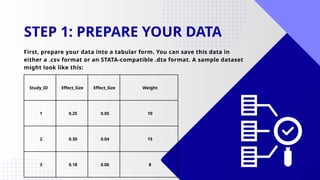
Study_ID Effect_Size Effect_Size Weight
1 0.25 0.05 10
2 0.30 0.04 15
3 0.18 0.06 8
STEP 1: PREPARE YOUR DATA
First, prepare your data into a tabular form. You can save this data in
either a .csv format or an STATA-compatible .dta format. A sample dataset
might look like this:
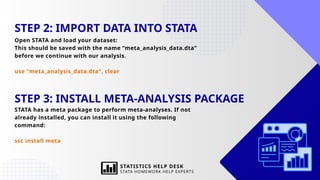
STEP 2: IMPORT DATA INTO STATA
Open STATA and load your dataset:
This should be saved with the name “meta_analysis_data.dta”
before we continue with our analysis.
use "meta_analysis_data.dta", clear
STEP 3: INSTALL META-ANALYSIS PACKAGE
STATA has a meta package to perform meta-analyses. If not
already installed, you can install it using the following
command:
ssc install meta
STATISTICS HELP DESK
STATA HOMEWORK HELP EXPERTS
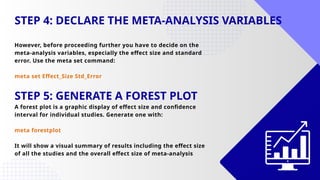
STEP 4: DECLARE THE META-ANALYSIS VARIABLES
However, before proceeding further you have to decide on the
meta-analysis variables, especially the effect size and standard
error. Use the meta set command:
meta set Effect_Size Std_Error
STEP 5: GENERATE A FOREST PLOT
A forest plot is a graphic display of effect size and confidence
interval for individual studies. Generate one with:
meta forestplot
It will show a visual summary of results including the effect size
of all the studies and the overall effect size of meta-analysis
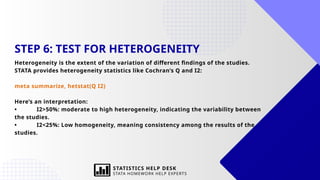
STEP 6: TEST FOR HETEROGENEITY
Heterogeneity is the extent of the variation of different findings of the studies.
STATA provides heterogeneity statistics like Cochran’s Q and I2:
meta summarize, hetstat(Q I2)
Here’s an interpretation:
• I2>50%: moderate to high heterogeneity, indicating the variability between
the studies.
• I2<25%: Low homogeneity, meaning consistency among the results of the
studies.
STATISTICS HELP DESK
STATA HOMEWORK HELP EXPERTS
STEP 7: PERFORM FIXED-EFFECT OR RANDOM-
EFFECTS META-ANALYSIS
Based on heterogeneity, choose the appropriate model:
• Fixed-effect model assumes that all studies estimate the same underlying
effect.
• Random-effects model accounts for variability across studies.
Fixed-effect meta-analysis:
meta summarize, fixed
Random-effects meta-analysis:
meta summarize, random
STATISTICS HELP DESK
STATA HOMEWORK HELP EXPERTS
STEP 8: USE A FUNNEL PLOT AND PERFORM THE
PUBLICATION BIAS TEST
In order to look for publication bias, a funnel plot is useful since studies with
significant results are more likely to be published. Generate a funnel plot with:
meta funnel plot
Perform Egger’s test for publication bias:
meta bias
A statistically significant result shows publication bias and hence should be
interpreted with care.
WHY CHOOSE OUR
STATA HOMEWORK
HELP FOR META-
ANALYSIS?
performing meta-analysis in STATA can be
difficult for students especially in handling
heterogeneity, fixed and random effects
models, and publication bias. Our
STATA homework help comes in handy to offer
the best help to solve such complications and
achieve the best grades. Here’s why you should
choose our service:
1. Expert Assistance: Get professional
statisticians with specialized knowledge in STATA
and econometric analysis. We offer you end-to-
end support to guide you on how to conduct an
efficient meta-analysis.
2. Customized Solutions: Every assignment
comes with unique set of instructions and
questions. Our services are tailored to the needs
of your coursework and meets your academic
comprehension level.
3. Hands-On Coding Help: Are you stuck with
STATA code writing or interpreting the results, we
ensure breaking down the codes and analytical
process for easy understanding.
4. Timely Delivery: Deadlines matter. We assure
our clients of on-time submission of their
assignments without compromising on the
quality.
5. Error-Free Analysis: We ensure that our
analysis is error free at every step, starting from
data preparation to advance statistical modeling.
If you're struggling with your
coursework, our STATA homework
help will accelerate your
understanding and allow you to
graduate to more advanced
statistical learning. Keep in mind
that meta-analysis not only allows
you to improve your academic work
quality, but more importantly,
arming you with tools for meaningful
research.
FINAL THOUGHTS
The ability to conduct a meta-analysis using STATA
becomes an essential skill for students studying
econometrics and statistics.
Once the students have mastered the meta
commands, they can tackle their assignments and
projects with confidence in finding insights from
multiple studies.
STATISTICS HELP DESK
STATA HOMEWORK HELP EXPERTS
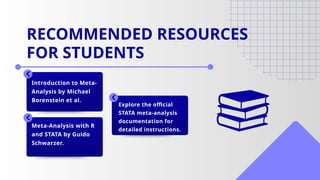
Introduction to Meta-
Analysis by Michael
Borenstein et al.
Meta-Analysis with R
and STATA by Guido
Schwarzer.
Explore the official
STATA meta-analysis
documentation for
detailed instructions.
RECOMMENDED RESOURCES
FOR STUDENTS
THANK YOU
FOR YOUR ATTENTION
WWW.STATISTICSHELPDESK.COM
MORE INFORMATION
homework@statisticshelpdesk.com +44-166-626-0813
STATISTICS HELP DESK
STATA HOMEWORK HELP EXPERTS

How to Perform Meta-Analysis in STATA: A Complete Homework Help Guide

  • 1.
    HOW TO PERFORM META-ANALYSISIN STATA PRESENTATION A Complete Homework Help Guide PREPARED BY: WWW.STATISTICSHELPDESK.COM STATISTICS HELP DESK STATA HOMEWORK HELP EXPERTS
  • 2.
    INTRODUCTION Meta-analysis is anotherstatistical procedure that integrates outcomes of various different independent studies so as to obtain comprehensive conclusions. This approach becomes useful in subjects like econometrics, statistics, or social sciences where authors seek to integrate evidence and determine unexplored patterns within varied data sets. It acts as a crucial element for resolving discrepancies between studies, for raising statistical power, and for arriving at robust conclusions. To students learning econometrics and statistics, grasping meta-analysis provides critical insights and knowledge in synthesizing evidence, as well as helping sharpen their analytical skills.
  • 3.
    WHY USE STATAFOR META- ANALYSIS STATA is one of the widely used programs for meta- analysis and it comprises a number of powerful commands along with flexibility on features. It is easy to operate, contains features for statistical analysis and offers a active online user community that is available to assist students in data analysis, research and academics. For instance, STATA makes it easy for pooling effect sizes, heterogeneity testing, or generating graphical results such as the forest plot or the funnel plot. Students who are struggling with performing meta analysis in stata, must opt for stata homework help to get immediate assistance with their coursework assignments. This will not only help them improve their analytical skills but provides a much needed support in tacking complex stata homework problems involving advanced analysis.
  • 4.
    Step-by-Step Guide HOW TOPERFORM META-ANALYSIS IN STATA STATISTICS HELP DESK STATA HOMEWORK HELP EXPERTS
  • 5.
    To perform meta-analysisin STATA, you typically need three key components from the studies you are analyzing: (e.g., mean differences, odds ratios). (sometimes optional, calculated from sample size or degree of precision). Effect Sizes The Standard Errors or Confidence Intervals linking to the effect sizes. Study Weights META ANALAYSIS IN STATA
  • 6.
    Study_ID Effect_Size Effect_SizeWeight 1 0.25 0.05 10 2 0.30 0.04 15 3 0.18 0.06 8 STEP 1: PREPARE YOUR DATA First, prepare your data into a tabular form. You can save this data in either a .csv format or an STATA-compatible .dta format. A sample dataset might look like this:
  • 7.
    STEP 2: IMPORTDATA INTO STATA Open STATA and load your dataset: This should be saved with the name “meta_analysis_data.dta” before we continue with our analysis. use "meta_analysis_data.dta", clear STEP 3: INSTALL META-ANALYSIS PACKAGE STATA has a meta package to perform meta-analyses. If not already installed, you can install it using the following command: ssc install meta STATISTICS HELP DESK STATA HOMEWORK HELP EXPERTS
  • 8.
    STEP 4: DECLARETHE META-ANALYSIS VARIABLES However, before proceeding further you have to decide on the meta-analysis variables, especially the effect size and standard error. Use the meta set command: meta set Effect_Size Std_Error STEP 5: GENERATE A FOREST PLOT A forest plot is a graphic display of effect size and confidence interval for individual studies. Generate one with: meta forestplot It will show a visual summary of results including the effect size of all the studies and the overall effect size of meta-analysis
  • 9.
    STEP 6: TESTFOR HETEROGENEITY Heterogeneity is the extent of the variation of different findings of the studies. STATA provides heterogeneity statistics like Cochran’s Q and I2: meta summarize, hetstat(Q I2) Here’s an interpretation: • I2>50%: moderate to high heterogeneity, indicating the variability between the studies. • I2<25%: Low homogeneity, meaning consistency among the results of the studies. STATISTICS HELP DESK STATA HOMEWORK HELP EXPERTS
  • 10.
    STEP 7: PERFORMFIXED-EFFECT OR RANDOM- EFFECTS META-ANALYSIS Based on heterogeneity, choose the appropriate model: • Fixed-effect model assumes that all studies estimate the same underlying effect. • Random-effects model accounts for variability across studies. Fixed-effect meta-analysis: meta summarize, fixed Random-effects meta-analysis: meta summarize, random STATISTICS HELP DESK STATA HOMEWORK HELP EXPERTS
  • 11.
    STEP 8: USEA FUNNEL PLOT AND PERFORM THE PUBLICATION BIAS TEST In order to look for publication bias, a funnel plot is useful since studies with significant results are more likely to be published. Generate a funnel plot with: meta funnel plot Perform Egger’s test for publication bias: meta bias A statistically significant result shows publication bias and hence should be interpreted with care.
  • 12.
    WHY CHOOSE OUR STATAHOMEWORK HELP FOR META- ANALYSIS? performing meta-analysis in STATA can be difficult for students especially in handling heterogeneity, fixed and random effects models, and publication bias. Our STATA homework help comes in handy to offer the best help to solve such complications and achieve the best grades. Here’s why you should choose our service: 1. Expert Assistance: Get professional statisticians with specialized knowledge in STATA and econometric analysis. We offer you end-to- end support to guide you on how to conduct an efficient meta-analysis. 2. Customized Solutions: Every assignment comes with unique set of instructions and questions. Our services are tailored to the needs of your coursework and meets your academic comprehension level. 3. Hands-On Coding Help: Are you stuck with STATA code writing or interpreting the results, we ensure breaking down the codes and analytical process for easy understanding. 4. Timely Delivery: Deadlines matter. We assure our clients of on-time submission of their assignments without compromising on the quality. 5. Error-Free Analysis: We ensure that our analysis is error free at every step, starting from data preparation to advance statistical modeling.
  • 13.
    If you're strugglingwith your coursework, our STATA homework help will accelerate your understanding and allow you to graduate to more advanced statistical learning. Keep in mind that meta-analysis not only allows you to improve your academic work quality, but more importantly, arming you with tools for meaningful research. FINAL THOUGHTS The ability to conduct a meta-analysis using STATA becomes an essential skill for students studying econometrics and statistics. Once the students have mastered the meta commands, they can tackle their assignments and projects with confidence in finding insights from multiple studies. STATISTICS HELP DESK STATA HOMEWORK HELP EXPERTS
  • 14.
    Introduction to Meta- Analysisby Michael Borenstein et al. Meta-Analysis with R and STATA by Guido Schwarzer. Explore the official STATA meta-analysis documentation for detailed instructions. RECOMMENDED RESOURCES FOR STUDENTS
  • 15.
    THANK YOU FOR YOURATTENTION WWW.STATISTICSHELPDESK.COM MORE INFORMATION homework@statisticshelpdesk.com +44-166-626-0813 STATISTICS HELP DESK STATA HOMEWORK HELP EXPERTS