How To Give A Technical
Presentation
Dr. Abhi Mukherjee
Department of Chemical Engineering
Contai Polytechnic
Outline
➢The importance of proper presentation
➢The types of technical presentations
➢Tools for technical presentations
➢Generalized Contents of a technical presentation
➢Choosing a background
➢The font
➢The overall slide
➢Using images, animation and videos
➢Concluding Tips
The Importance Of Proper Presentation
Presenting while a student
Presenting as an employee
Presenting as a teacher
Presentation skill comes handy
In many walks of life
1. Improves grasp of language.
2. Enhances spoken and interpersonal skill
3. Great for career prospects and making friends
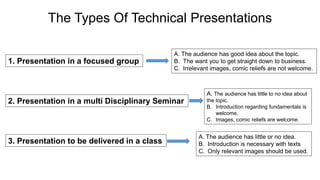
The Types Of Technical Presentations
1. Presentation in a focused group
2. Presentation in a multi Disciplinary Seminar
3. Presentation to be delivered in a class
A. The audience has good idea about the topic.
B. The want you to get straight down to business.
C. Irrelevant images, comic reliefs are not welcome.
A. The audience has little to no idea about
the topic.
B. Introduction regarding fundamentals is
welcome.
C. Images, comic reliefs are welcome.
A. The audience has little or no idea.
B. Introduction is necessary with texts
C. Only relevant images should be used.
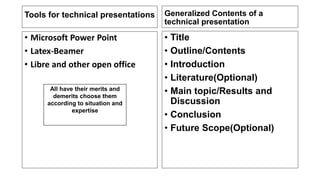
Tools for technical presentations
• Microsoft Power Point
• Latex-Beamer
• Libre and other open office
Generalized Contents of a
technical presentation
• Title
• Outline/Contents
• Introduction
• Literature(Optional)
• Main topic/Results and
Discussion
• Conclusion
• Future Scope(Optional)
All have their merits and
demerits choose them
according to situation and
expertise
Choosing a Background
• Know your audience
• Be consistent
• Don’t chose a background
where the content is not
properly visible
The Font
• Fonts with rounded ages
are preferred.
• Be consistent with the font
• Be careful about the size
and colour of the font
All have their merits and
demerits choose them
according to situation and
expertise
All have their merits and
demerit
s
choose them according to
situation and expertise
Overall Slides
• Not too much vacant space
• Not too cramped
• Content should be visible
• Arrange content in such a way
that people do not get bored.
Using Images and Videos
• Place the images/videos in
relevant sections.
• Use caption
• Don’t distort aspect ratio.
• Use simple animation
Earth Earth with distorted aspect ratio
Concluding Tips
1. Know your audience
2. Speak in one language (Preferably English)
3. Avoid writing full sentences
4. Don’t read from the slides
5. Make the presentation compact
6. Develop your own style.

How To Give A Technical Presentation.pdf

  • 1.
    How To GiveA Technical Presentation Dr. Abhi Mukherjee Department of Chemical Engineering Contai Polytechnic
  • 2.
    Outline ➢The importance ofproper presentation ➢The types of technical presentations ➢Tools for technical presentations ➢Generalized Contents of a technical presentation ➢Choosing a background ➢The font ➢The overall slide ➢Using images, animation and videos ➢Concluding Tips
  • 3.
    The Importance OfProper Presentation Presenting while a student Presenting as an employee Presenting as a teacher Presentation skill comes handy In many walks of life 1. Improves grasp of language. 2. Enhances spoken and interpersonal skill 3. Great for career prospects and making friends
  • 4.
    The Types OfTechnical Presentations 1. Presentation in a focused group 2. Presentation in a multi Disciplinary Seminar 3. Presentation to be delivered in a class A. The audience has good idea about the topic. B. The want you to get straight down to business. C. Irrelevant images, comic reliefs are not welcome. A. The audience has little to no idea about the topic. B. Introduction regarding fundamentals is welcome. C. Images, comic reliefs are welcome. A. The audience has little or no idea. B. Introduction is necessary with texts C. Only relevant images should be used.
  • 5.
    Tools for technicalpresentations • Microsoft Power Point • Latex-Beamer • Libre and other open office Generalized Contents of a technical presentation • Title • Outline/Contents • Introduction • Literature(Optional) • Main topic/Results and Discussion • Conclusion • Future Scope(Optional) All have their merits and demerits choose them according to situation and expertise
  • 6.
    Choosing a Background •Know your audience • Be consistent • Don’t chose a background where the content is not properly visible The Font • Fonts with rounded ages are preferred. • Be consistent with the font • Be careful about the size and colour of the font All have their merits and demerits choose them according to situation and expertise All have their merits and demerit s choose them according to situation and expertise
  • 7.
    Overall Slides • Nottoo much vacant space • Not too cramped • Content should be visible • Arrange content in such a way that people do not get bored. Using Images and Videos • Place the images/videos in relevant sections. • Use caption • Don’t distort aspect ratio. • Use simple animation Earth Earth with distorted aspect ratio
  • 8.
    Concluding Tips 1. Knowyour audience 2. Speak in one language (Preferably English) 3. Avoid writing full sentences 4. Don’t read from the slides 5. Make the presentation compact 6. Develop your own style.