

How to decompile APK
Prepared by: Sokngim Sa
Content
1. Tools
2. Apktool to get xml File
3. Dex2jar to get java file
4. Jd-gui to show and save source code in java
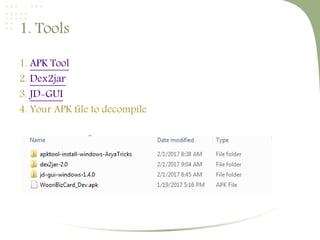
1. Tools
1. APK Tool
2. Dex2jar
3. JD-GUI
4. Your APK file to decompile
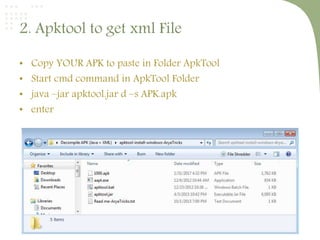
2. Apktool to get xml File
• Copy YOUR APK to paste in Folder ApkTool
• Start cmd command in ApkTool Folder
• java –jar apktool.jar d –s APK.apk
• enter
The result
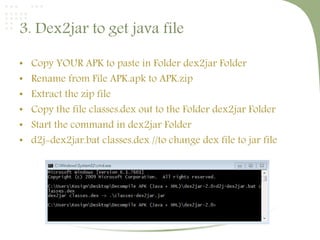
3. Dex2jar to get java file
• Copy YOUR APK to paste in Folder dex2jar Folder
• Rename from File APK.apk to APK.zip
• Extract the zip file
• Copy the file classes.dex out to the Folder dex2jar Folder
• Start the command in dex2jar Folder
• d2j-dex2jar.bat classes.dex //to change dex file to jar file
The result
4. Jd-gui to show and save source code in java
• Goto Folder jd-gui and run jd-gui.exe file
• File  Open File  Go to the directory dex2jar  select the
file that you create  Open
Jd-gui to save source code in java
• File  Save All Source Browse directory to store that file

How to decompile apk

  • 1.
    How to decompileAPK Prepared by: Sokngim Sa
  • 2.
    Content 1. Tools 2. Apktoolto get xml File 3. Dex2jar to get java file 4. Jd-gui to show and save source code in java
  • 3.
    1. Tools 1. APKTool 2. Dex2jar 3. JD-GUI 4. Your APK file to decompile
  • 4.
    2. Apktool toget xml File • Copy YOUR APK to paste in Folder ApkTool • Start cmd command in ApkTool Folder • java –jar apktool.jar d –s APK.apk • enter
  • 5.
  • 6.
    3. Dex2jar toget java file • Copy YOUR APK to paste in Folder dex2jar Folder • Rename from File APK.apk to APK.zip • Extract the zip file • Copy the file classes.dex out to the Folder dex2jar Folder • Start the command in dex2jar Folder • d2j-dex2jar.bat classes.dex //to change dex file to jar file
  • 7.
  • 8.
    4. Jd-gui toshow and save source code in java • Goto Folder jd-gui and run jd-gui.exe file • File  Open File  Go to the directory dex2jar  select the file that you create  Open
  • 9.
    Jd-gui to savesource code in java • File  Save All Source Browse directory to store that file