2/13/2018
1
How to Data Mine Your
Print Reports
About Jim Kaplan, CIA, CFE
 President and Founder of AuditNet®,
the global resource for auditors
(available on iOS, Android and
Windows devices)
 Auditor, Web Site Guru,
 Internet for Auditors Pioneer
 IIA Bradford Cadmus Memorial Award
Recipient
 Local Government Auditor’s Lifetime
Award
 Author of “The Auditor’s Guide to
Internet Resources” 2nd Edition
Page 2
2/13/2018
2
ABOUT AUDITNET® LLC
• AuditNet®, the global resource for auditors, serves the global audit
community as the primary resource for Web-based auditing content. As the first online
audit portal, AuditNet® has been at the forefront of websites dedicated to promoting the
use of audit technology.
• Available on the Web, iPad, iPhone, Windows and Android devices and
features:
• Over 2,800 Reusable Templates, Audit Programs, Questionnaires, and
Control Matrices
• Webinars focusing on fraud, data analytics, IT audit, and internal audit
with free CPE for subscribers and site license users.
• Audit guides, manuals, and books on audit basics and using audit
technology
• LinkedIn Networking Groups
• Monthly Newsletters with Expert Guest Columnists
• Surveys on timely topics for internal auditors
Introductions
Page 3
HOUSEKEEPING
This webinar and its material are the property of AuditNet® and its Webinar partners. Unauthorized
usage or recording of this webinar or any of its material is strictly forbidden.
• If you logged in with another individual’s confirmation email you will not receive CPE as the
confirmation login is linked to a specific individual
• This Webinar is not eligible for viewing in a group setting. You must be logged in with your unique join
link.
• We are recording the webinar and you will be provided access to that recording after the webinar.
Downloading or otherwise duplicating the webinar recording is expressly prohibited.
• If you have indicated you would like CPE you must attend the entire Webinar to receive CPE (no
partial CPE will be awarded).
• If you meet the criteria for earning CPE you will receive a link via email to download your certificate.
The official email for CPE will be issued via NoReply@gensend.io and it is important to white list this
address. It is from this email that your CPE credit will be sent. There is a processing fee to have your
CPE credit regenerated post event.
• Submit questions via the chat box on your screen and we will answer them either during or at the
conclusion.
• You must answer the survey questions after the Webinar or before downloading your certificate.
2/13/2018
3
IMPORTANT INFORMATION
REGARDING CPE!
• SUBSCRIBERS/SITE LICENSE USERS - If you attend the entire Webinar you will receive an
email with the link to download your CPE certificate. The official email for CPE will be issued
via NoReply@gensend.io and it is important to white list this address. It is from this email that
your CPE credit will be sent. There is a processing fee to have your CPE credit regenerated
post event.
• NON-SUBSCRIBERS/NON-SITE LICENSE USERS - If you attend the entire Webinar and
requested CPE you must pay a fee to receive your CPE. No exceptions!
• We cannot manually generate a CPE certificate as these are handled by our 3rd party provider.
We highly recommend that you work with your IT department to identify and correct any email
delivery issues prior to attending the Webinar. Issues would include blocks or spam filters in
your email system or a firewall that will redirect or not allow delivery of this email from
Gensend.io
• Anyone may register, attend and view the Webinar without fees if they opted out of receiving
CPE.
• We are not responsible for any connection, audio or other computer related issues. You must
have pop-ups enabled on you computer otherwise you will not be able to answer the polling
questions which occur approximately every 20 minutes. We suggest that if you have any
pressing issues to see to that you do so immediately after a polling question.
The views expressed by the presenters do not necessarily represent the views,
positions, or opinions of AuditNet® LLC. These materials, and the oral presentation
accompanying them, are for educational purposes only and do not constitute
accounting or legal advice or create an accountant-client relationship.
While AuditNet® makes every effort to ensure information is accurate and complete,
AuditNet® makes no representations, guarantees, or warranties as to the accuracy or
completeness of the information provided via this presentation. AuditNet® specifically
disclaims all liability for any claims or damages that may result from the information
contained in this presentation, including any websites maintained by third parties and
linked to the AuditNet® website.
Any mention of commercial products is for information only; it does not imply
recommendation or endorsement by AuditNet® LLC
2/13/2018
4
HOW TO DATA MINE YOUR
PRINT REPORTS
Donald E Sparks, CIA, CISA, ARM
Don@SmartCAATTs.com
407-756-0375
Sources:
 ISACA
 AuditNet
 CaseWare
 Audimation Services
 ACL version 11
Why Should Internal Auditing Care?
IPPF Standards require all internal auditors must:
2120.A1 – evaluate risk exposures relating to the organization’s governance,
operations, and information systems regarding:
• Achievement of the organization’s strategic objectives.
• Reliability and integrity of financial and
operational information.
• Effectiveness and efficiency of operations and programs.
• Safeguarding of assets.
• Compliance with laws, regulations, policies, procedures, and contracts.
2120.A2 – The internal audit activity must evaluate the potential for the
occurrence of fraud and how the organization manages fraud risk.
2/13/2018
5
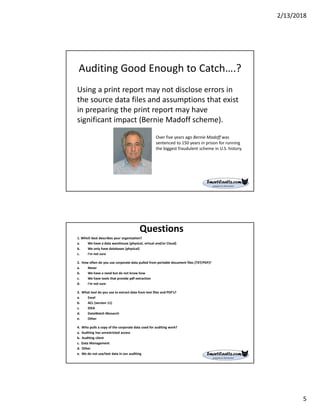
Auditing Good Enough to Catch….?
Using a print report may not disclose errors in
the source data files and assumptions that exist
in preparing the print report may have
significant impact (Bernie Madoff scheme).
Over five years ago Bernie Madoff was
sentenced to 150 years in prison for running
the biggest fraudulent scheme in U.S. history.
Questions
1. Which best describes your organization?
a. We have a data warehouse (physical, virtual and/or Cloud)
b. We only have databases (physical)
c. I'm not sure
2. How often do you use corporate data pulled from portable document files (TXT/PDF)?
a. Never
b. We have a need but do not know how
c. We have tools that provide pdf extraction
d. I'm not sure
3. What tool do you use to extract data from text files and PDF’s?
a. Excel
b. ACL (version 11)
c. IDEA
d. DataWatch Monarch
e. Other
4. Who pulls a copy of the corporate data used for auditing work?
a. Auditing has unrestricted access
b. Auditing client
c. Data Management
d. Other
e. We do not use/test data in our auditing
2/13/2018
6
Common Audit Client Pushback
 You do not need the data for your audit
 You have never asked for this before
 Client does not know how to access the data
 Client does not know how to provide the data
in the format requested
To avoid delays in conducting the audit, be sure to
complete the data request in advance as specified
by the of the organizations data
governance policy
What are Print Reports
• Mainframe text reports
• Minicomputer text reports
• DOS print to disk files
• Generic/Text only files (Windows)
• Word processor Text-only files
• Text-only accounting reports
• E-mail reports
• Online communications text captures
• Print to Files (PRN)
• Tab Separated Variables files
• Standard Data Format (SDF)
2/13/2018
7
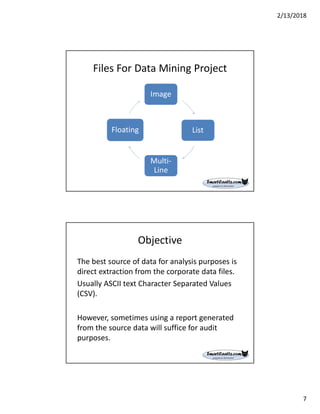
Files For Data Mining Project
Image
List
Multi-
Line
Floating
Objective
The best source of data for analysis purposes is
direct extraction from the corporate data files.
Usually ASCII text Character Separated Values
(CSV).
However, sometimes using a report generated
from the source data will suffice for audit
purposes.
2/13/2018
8
Solution
Report Reader extracts data from plain text
reports, print reports saved to file, and Adobe
Acrobat PDF files and imports it into IDEA. The
plain text and print reports might have come
from an application on the computer or from a
mainframe computer.
Results
Successfully importing a print report will result
in a “template”. The next time you need to
import the same print report, you will use the
template. If the format changes or you need to
import additional data not originally selected,
you will “edit” the template.
2/13/2018
9
Definitions
• What is Data Analysis vs Data Mining?
• Do you need a Data Warehouse?
• What is a Data Warehouse?
• What is the difference between Data
Management and Data Governance?
• What is a Data Asset mean?
• What is the difference between Structured
data and Unstructured data?
Data Analysis vs Data Mining
• Data Analytics (DA) is the science of examining
raw data. The purpose is to determine if this data
contains information. Sampling is a legitimate
process.
• Data Mining is the science of finding specific
information (i.e., gold). Based on analysis the
auditor may have identified anomalies and would
like to know all other anomalies in population. A
process would include 100% of the data available.
2/13/2018
10
Do you need a data warehouse?
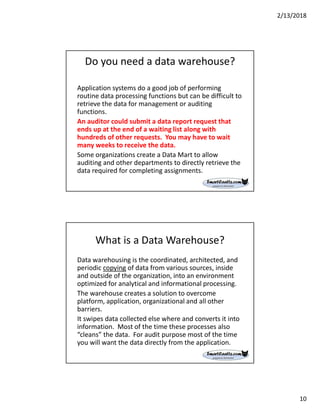
Application systems do a good job of performing
routine data processing functions but can be difficult to
retrieve the data for management or auditing
functions.
An auditor could submit a data report request that
ends up at the end of a waiting list along with
hundreds of other requests. You may have to wait
many weeks to receive the data.
Some organizations create a Data Mart to allow
auditing and other departments to directly retrieve the
data required for completing assignments.
What is a Data Warehouse?
Data warehousing is the coordinated, architected, and
periodic copying of data from various sources, inside
and outside of the organization, into an environment
optimized for analytical and informational processing.
The warehouse creates a solution to overcome
platform, application, organizational and all other
barriers.
It swipes data collected else where and converts it into
information. Most of the time these processes also
“cleans” the data. For audit purpose most of the time
you will want the data directly from the application.
2/13/2018
11
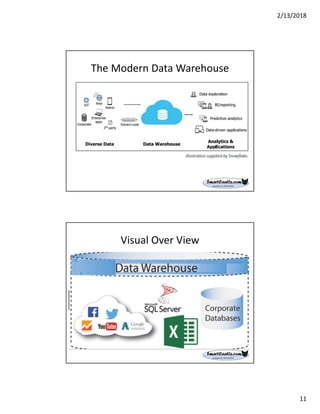
The Modern Data Warehouse
Visual Over View
2/13/2018
12
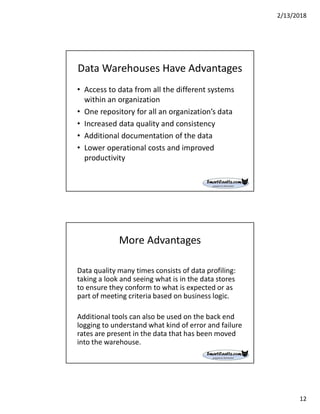
Data Warehouses Have Advantages
• Access to data from all the different systems
within an organization
• One repository for all an organization’s data
• Increased data quality and consistency
• Additional documentation of the data
• Lower operational costs and improved
productivity
More Advantages
Data quality many times consists of data profiling:
taking a look and seeing what is in the data stores
to ensure they conform to what is expected or as
part of meeting criteria based on business logic.
Additional tools can also be used on the back end
logging to understand what kind of error and failure
rates are present in the data that has been moved
into the warehouse.
2/13/2018
13
Why Do We Care?
Today, companies have a much greater collection of more relevant data than
ever before. This includes a diverse range of sources, internal and external,
including data marts, cloud-based applications, and machine-generated data.
Unfortunately, the data warehouse architecture of the past strains under the
burden of extremely large, diverse data sets. Analysts often wait 24 hours or
more for data to flow into the data warehouse before it’s available for
analysis. They can wait even longer for complex queries to run on that data. In
many cases, the storage and compute resources required to process and
analyze that data are insufficient. This leads to systems hanging or crashing.
To avoid this, users and workloads must be queued, which results in even
longer delays. To remain efficient and competitive, organizations must be
able to harness the power of the vast amounts of data constantly being
generated and conduct complex analysis on that data. Fortunately, advances
in computer hardware, architecture, and software can help your organization
meet this challenge and exceed your expectations.
Access To The Data Warehouse
• Create custom reports for use in your department with
ODBC tools
• Create queries for trending and analysis
• Create queries for one-time use or to save and rerun
on a regular schedule
• Create automated data downloads to populate your
local databases
• Retrieve data for use in your department's applications
Note: First Time access approval can take a long time –
weeks or months.
2/13/2018
14
Management vs Governance
• Management refers to the people that have business
roles to manage the corporate assets simply referred
to “data”.
• Governance comprises of the “rules” implemented
by management to best protect the corporate “data”
such as data usage, transport, etc rules.
What is a Data Asset?
Data can be classified into three groups:
Run-the-business data: Produced by corporate applications in the
day to day transactions. This could be orders for product or
services and the associated financial transactions . The raw
materials for a data warehouse.
Integrate-the-business data: Built to improve the quality of and
synchronize two or more applications that were not designed to
work with each other.
Monitor-the-business data: Presented to end users for reporting
and decision Support, such as your financial dashboard . The
data is cleansed to enable users To better understand progress
and and evaluate cause-and-effect relationships In the data.
Source: “Data Warehousing for Dummies”
2/13/2018
15
Structured vs Unstructured data
Structured data is easily searchable by basic
algorithms. Examples include spreadsheets and
data from machine applications and sensors.
Unstructured data is more like human language.
It doesn't fit nicely into relational databases like
SQL, and searching it based on the old
algorithms ranges from difficult to completely
impossible.
Successful Data Analytics Integration:
1. Start with a high-priority, high-return project
2. Focus on efficiency and effectiveness
3. Communicate
4. Be brief; be thorough; be gone
5. Exercise patience
6. Use the Tool Provider Help Desk
2/13/2018
16
Designing an Analytic Program
Step-by-step high-level walk through - Assumption: the auditor must have
some knowledge of the organization, systems, processes, data files and tools
available, as well as the capabilities of those tools.
• Do Data Governance protocols exist?
• Data Management, Who are the key players?
• What are the purpose and scope of the testing?
• What data are needed (tables and fields)?
• Who will get the report?
• Where are the data residing?
• How will data be requested and/or obtained?
• What tools will be used to perform data analytic tests or procedures and
why? Do an inventory of tools used in the company.
• How will the tools selected be used (processes, tests)?
Scope
The process begins with defining the scope of what needs to be done.
This can be done by answering these questions:
• What is the purpose of the audit? Assurance or Consultation
• What is the objective of the audit’s conclusions?
• What parameters need to be applied to the data to accomplish that
purpose? Do you know enough about the processes being
reviewed?
• Where are the data found in the financial or other system?
• What is the risk (e.g., in data reliability)?
• What does the scope of the source data need to be in order to
meet the objective and address risk?
• What other information will impact the nature, timing and extent of
the procedures to be performed? External Data?
2/13/2018
17
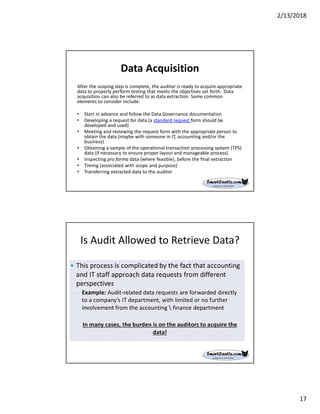
Data Acquisition
After the scoping step is complete, the auditor is ready to acquire appropriate
data to properly perform testing that meets the objectives set forth. Data
acquisition can also be referred to as data extraction. Some common
elements to consider include:
• Start in advance and follow the Data Governance documentation
• Developing a request for data (a standard request form should be
developed and used)
• Meeting and reviewing the request form with the appropriate person to
obtain the data (maybe with someone in IT, accounting and/or the
business)
• Obtaining a sample of the operational transaction processing system (TPS)
data (if necessary to ensure proper layout and manageable process)
• Inspecting pro forma data (where feasible), before the final extraction
• Timing (associated with scope and purpose)
• Transferring extracted data to the auditor
Is Audit Allowed to Retrieve Data?
2/13/2018
18
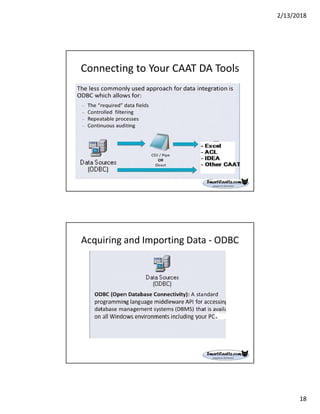
Connecting to Your CAAT DA Tools
Acquiring and Importing Data - ODBC
2/13/2018
19
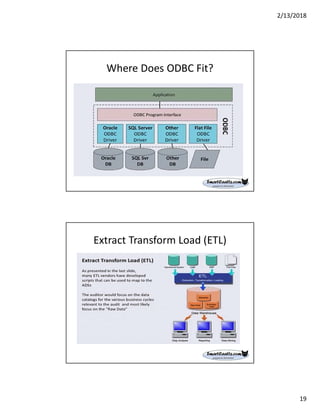
Where Does ODBC Fit?
Extract Transform Load (ETL)
2/13/2018
20
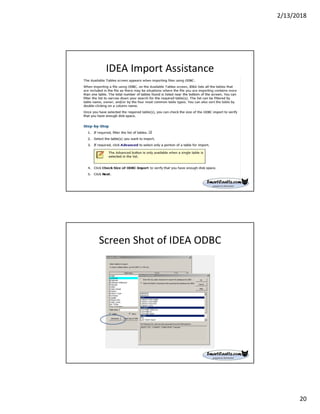
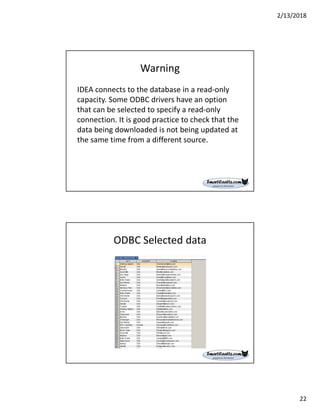
IDEA Import Assistance
Screen Shot of IDEA ODBC
2/13/2018
21
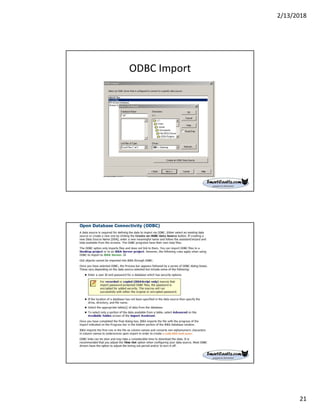
ODBC Import
2/13/2018
22
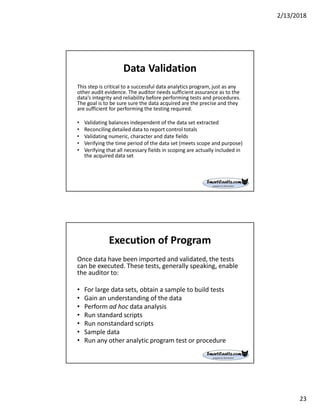
Warning
IDEA connects to the database in a read-only
capacity. Some ODBC drivers have an option
that can be selected to specify a read-only
connection. It is good practice to check that the
data being downloaded is not being updated at
the same time from a different source.
ODBC Selected data
2/13/2018
23
Data Validation
This step is critical to a successful data analytics program, just as any
other audit evidence. The auditor needs sufficient assurance as to the
data’s integrity and reliability before performing tests and procedures.
The goal is to be sure sure the data acquired are the precise and they
are sufficient for performing the testing required.
• Validating balances independent of the data set extracted
• Reconciling detailed data to report control totals
• Validating numeric, character and date fields
• Verifying the time period of the data set (meets scope and purpose)
• Verifying that all necessary fields in scoping are actually included in
the acquired data set
Execution of Program
Once data have been imported and validated, the tests
can be executed. These tests, generally speaking, enable
the auditor to:
• For large data sets, obtain a sample to build tests
• Gain an understanding of the data
• Perform ad hoc data analysis
• Run standard scripts
• Run nonstandard scripts
• Sample data
• Run any other analytic program test or procedure
2/13/2018
24
Documentation of Results
Documentation provides a clear understanding
of the testing purpose, data sources and
conclusions reached.
The good news is that most CAATs provide some
automated recording of tests run and their
results. It could be a simple matter of copying
and pasting to generate much of the
documentation
Repeatability
The tests should be repeatable.
The information contained in the
documentation should allow an experienced
auditor, with no previous experience with the
particular testing, the ability to understand and
re-perform the testing and get the same results.
2/13/2018
25
Review
All work performed should be reviewed to ensure that
the testing procedures have been adequately performed
and the results analyzed to look for consistency with
conclusions documented. The review should be
performed by a qualified person (i.e., an SME).
Possibilities include:
• Self-review (not recommended)
• Technical review (for scripts and should be performed
in conjunction with an independent review)
• Independent review by a team lead (in charge)
• Independent review by someone not on the team
Retention and Archiving
Retention provides several benefits and fulfills multiple
purposes, including:
• Regulatory requirements
• Contractual requirements
• Re-performance needs
• Litigation (which often includes re-performance)
• Also the nature of things to be retained should be carefully
considered. Items to consider include:
• Program files
• Scripts
• Macros/automated command tests
• Data files
2/13/2018
26
How It Works
Report Reader displays your entire original file in a section of the Report
Reader window called the Report View. Using the scroll bars, you can scroll
through the report to view the details of the data and the layout. Data to be
extracted can be selected with a simple point-and-click operation. Special
knowledge of the file structure or command language is not needed to use
Report Reader.
Report Reader extracts the data you select to an IDEA database. Your
selections and instructions for extracting the data can be saved as a template.
This template can be re-used to convert other files in the same layout. Using
templates saves you time, particularly if you need to extract data from the
same or similar reports on a regular basis.
Report Reader does more than simply extract data from one file type to
another. It distinguishes between numeric and non-numeric information and
handles both appropriately.
Step-by-Step IDEA
1. Examine the data and its layout
2. Select a sample of the required data (called the Anchor Line)
3. Define a trap to anchor similar lines in the report
4. Capture the data that will become the fields and records
5. Save the layer
6. Scan for errors
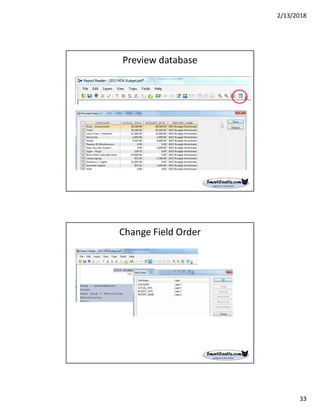
7. Preview the database (optional)
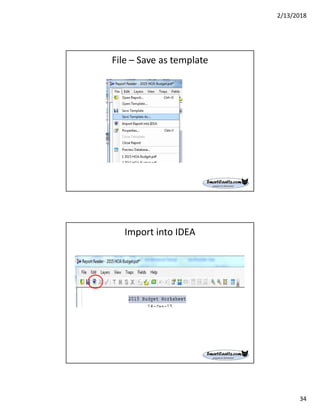
8. Re-arrange the field order (optional)
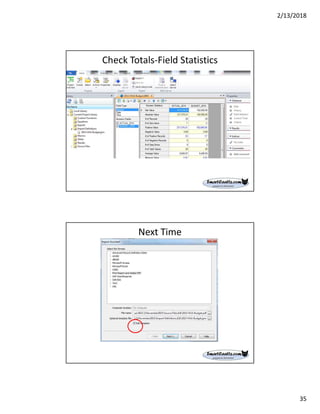
9. Save the template
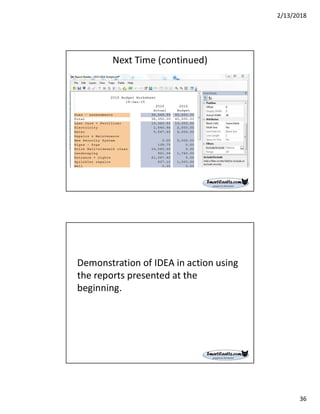
10. Convert the file to an IDEA database
2/13/2018
27
Limitations Of IDEA
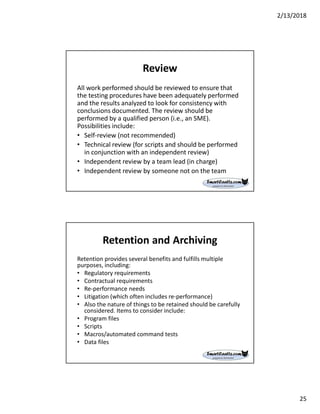
Select Sample Line and an Anchor Line .Select a
sample of the required data. It can be a single line
or multiple lines (up to a maximum of 30). If the
sample is a single line, it is also the Anchor Line.
However, if the sample is made up of multiple lines,
one of the lines must be selected as the Anchor
Line. Based on the characteristics of the
Anchor Line, a trap must be defined to anchor
similar lines in the report.
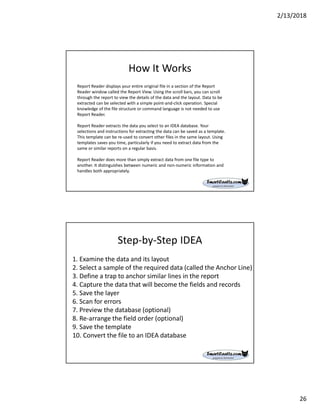
Exclude Line
In cases where a unique trap cannot be defined to select the required
lines while excluding unwanted lines, the Exclude Line task can be used
to exclude unwanted data.
An Exclude Line cannot be applied in the following cases:
• l Before the Base Layer has been defined.
• l To a line that was selected as the sample line for the Base Layer.
• l To a line in which an Append Layer field is defined. It can only be
applied to lines without defined fields or with fields that are part of
the Base Layer. Check the Layer Information area in the Field Details
window to determine the layer the field belongs to.
• l To a line that is already being excluded with a filter on a field.
2/13/2018
28
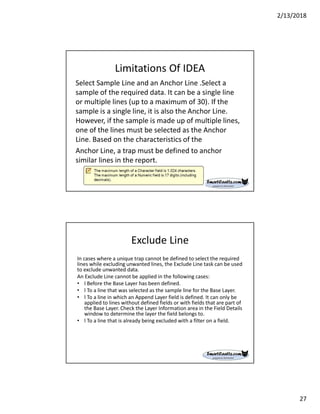
IDEA Pre-Defined Generic Traps
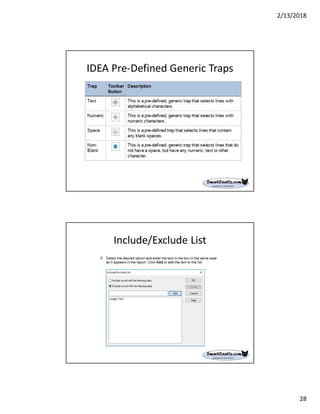
Include/Exclude List
2/13/2018
29
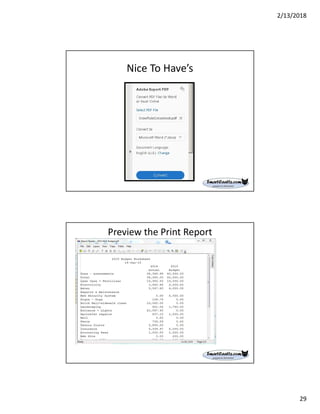
Nice To Have’s
Preview the Print Report
2/13/2018
30
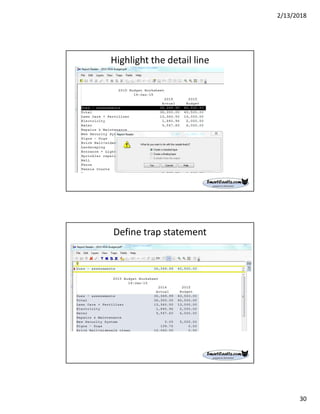
Highlight the detail line
Define trap statement
2/13/2018
31
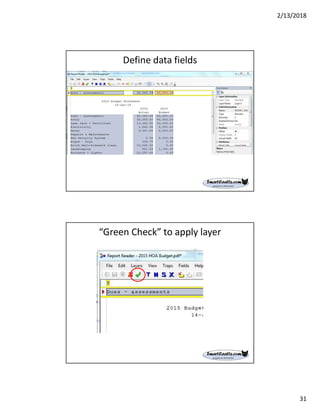
Define data fields
“Green Check” to apply layer
2/13/2018
32
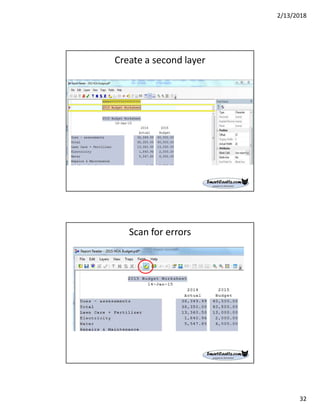
Create a second layer
Scan for errors
2/13/2018
33
Preview database
Change Field Order
2/13/2018
34
File – Save as template
Import into IDEA
2/13/2018
35
Check Totals-Field Statistics
Next Time
2/13/2018
36
Next Time (continued)
Demonstration of IDEA in action using
the reports presented at the
beginning.
2/13/2018
37
Questions?
• Any Questions?
Don’t be Shy!
Page 73
AuditNet® and cRisk Academy
• If you would like forever
access to this webinar
recording
• If you are watching the
recording, and would
like to obtain CPE credit
for this webinar
• Previous AuditNet®
webinars are also
available on-demand
for CPE credit
http://criskacademy.com
http://ondemand.criskacademy.com
Use coupon code: 50OFF for a
discount on this webinar for one week
2/13/2018
38
Thank You!
Page 75
Jim Kaplan
AuditNet® LLC
1-800-385-1625
Email:info@auditnet.org
www.auditnet.org
Don Sparks
SmartCAATTs, LLC
+1-407-756-0375 cell
Don@smartcaatts.com

How to data mine your print reports

  • 1.
    2/13/2018 1 How to DataMine Your Print Reports About Jim Kaplan, CIA, CFE  President and Founder of AuditNet®, the global resource for auditors (available on iOS, Android and Windows devices)  Auditor, Web Site Guru,  Internet for Auditors Pioneer  IIA Bradford Cadmus Memorial Award Recipient  Local Government Auditor’s Lifetime Award  Author of “The Auditor’s Guide to Internet Resources” 2nd Edition Page 2
  • 2.
    2/13/2018 2 ABOUT AUDITNET® LLC •AuditNet®, the global resource for auditors, serves the global audit community as the primary resource for Web-based auditing content. As the first online audit portal, AuditNet® has been at the forefront of websites dedicated to promoting the use of audit technology. • Available on the Web, iPad, iPhone, Windows and Android devices and features: • Over 2,800 Reusable Templates, Audit Programs, Questionnaires, and Control Matrices • Webinars focusing on fraud, data analytics, IT audit, and internal audit with free CPE for subscribers and site license users. • Audit guides, manuals, and books on audit basics and using audit technology • LinkedIn Networking Groups • Monthly Newsletters with Expert Guest Columnists • Surveys on timely topics for internal auditors Introductions Page 3 HOUSEKEEPING This webinar and its material are the property of AuditNet® and its Webinar partners. Unauthorized usage or recording of this webinar or any of its material is strictly forbidden. • If you logged in with another individual’s confirmation email you will not receive CPE as the confirmation login is linked to a specific individual • This Webinar is not eligible for viewing in a group setting. You must be logged in with your unique join link. • We are recording the webinar and you will be provided access to that recording after the webinar. Downloading or otherwise duplicating the webinar recording is expressly prohibited. • If you have indicated you would like CPE you must attend the entire Webinar to receive CPE (no partial CPE will be awarded). • If you meet the criteria for earning CPE you will receive a link via email to download your certificate. The official email for CPE will be issued via NoReply@gensend.io and it is important to white list this address. It is from this email that your CPE credit will be sent. There is a processing fee to have your CPE credit regenerated post event. • Submit questions via the chat box on your screen and we will answer them either during or at the conclusion. • You must answer the survey questions after the Webinar or before downloading your certificate.
  • 3.
    2/13/2018 3 IMPORTANT INFORMATION REGARDING CPE! •SUBSCRIBERS/SITE LICENSE USERS - If you attend the entire Webinar you will receive an email with the link to download your CPE certificate. The official email for CPE will be issued via NoReply@gensend.io and it is important to white list this address. It is from this email that your CPE credit will be sent. There is a processing fee to have your CPE credit regenerated post event. • NON-SUBSCRIBERS/NON-SITE LICENSE USERS - If you attend the entire Webinar and requested CPE you must pay a fee to receive your CPE. No exceptions! • We cannot manually generate a CPE certificate as these are handled by our 3rd party provider. We highly recommend that you work with your IT department to identify and correct any email delivery issues prior to attending the Webinar. Issues would include blocks or spam filters in your email system or a firewall that will redirect or not allow delivery of this email from Gensend.io • Anyone may register, attend and view the Webinar without fees if they opted out of receiving CPE. • We are not responsible for any connection, audio or other computer related issues. You must have pop-ups enabled on you computer otherwise you will not be able to answer the polling questions which occur approximately every 20 minutes. We suggest that if you have any pressing issues to see to that you do so immediately after a polling question. The views expressed by the presenters do not necessarily represent the views, positions, or opinions of AuditNet® LLC. These materials, and the oral presentation accompanying them, are for educational purposes only and do not constitute accounting or legal advice or create an accountant-client relationship. While AuditNet® makes every effort to ensure information is accurate and complete, AuditNet® makes no representations, guarantees, or warranties as to the accuracy or completeness of the information provided via this presentation. AuditNet® specifically disclaims all liability for any claims or damages that may result from the information contained in this presentation, including any websites maintained by third parties and linked to the AuditNet® website. Any mention of commercial products is for information only; it does not imply recommendation or endorsement by AuditNet® LLC
  • 4.
    2/13/2018 4 HOW TO DATAMINE YOUR PRINT REPORTS Donald E Sparks, CIA, CISA, ARM Don@SmartCAATTs.com 407-756-0375 Sources:  ISACA  AuditNet  CaseWare  Audimation Services  ACL version 11 Why Should Internal Auditing Care? IPPF Standards require all internal auditors must: 2120.A1 – evaluate risk exposures relating to the organization’s governance, operations, and information systems regarding: • Achievement of the organization’s strategic objectives. • Reliability and integrity of financial and operational information. • Effectiveness and efficiency of operations and programs. • Safeguarding of assets. • Compliance with laws, regulations, policies, procedures, and contracts. 2120.A2 – The internal audit activity must evaluate the potential for the occurrence of fraud and how the organization manages fraud risk.
  • 5.
    2/13/2018 5 Auditing Good Enoughto Catch….? Using a print report may not disclose errors in the source data files and assumptions that exist in preparing the print report may have significant impact (Bernie Madoff scheme). Over five years ago Bernie Madoff was sentenced to 150 years in prison for running the biggest fraudulent scheme in U.S. history. Questions 1. Which best describes your organization? a. We have a data warehouse (physical, virtual and/or Cloud) b. We only have databases (physical) c. I'm not sure 2. How often do you use corporate data pulled from portable document files (TXT/PDF)? a. Never b. We have a need but do not know how c. We have tools that provide pdf extraction d. I'm not sure 3. What tool do you use to extract data from text files and PDF’s? a. Excel b. ACL (version 11) c. IDEA d. DataWatch Monarch e. Other 4. Who pulls a copy of the corporate data used for auditing work? a. Auditing has unrestricted access b. Auditing client c. Data Management d. Other e. We do not use/test data in our auditing
  • 6.
    2/13/2018 6 Common Audit ClientPushback  You do not need the data for your audit  You have never asked for this before  Client does not know how to access the data  Client does not know how to provide the data in the format requested To avoid delays in conducting the audit, be sure to complete the data request in advance as specified by the of the organizations data governance policy What are Print Reports • Mainframe text reports • Minicomputer text reports • DOS print to disk files • Generic/Text only files (Windows) • Word processor Text-only files • Text-only accounting reports • E-mail reports • Online communications text captures • Print to Files (PRN) • Tab Separated Variables files • Standard Data Format (SDF)
  • 7.
    2/13/2018 7 Files For DataMining Project Image List Multi- Line Floating Objective The best source of data for analysis purposes is direct extraction from the corporate data files. Usually ASCII text Character Separated Values (CSV). However, sometimes using a report generated from the source data will suffice for audit purposes.
  • 8.
    2/13/2018 8 Solution Report Reader extractsdata from plain text reports, print reports saved to file, and Adobe Acrobat PDF files and imports it into IDEA. The plain text and print reports might have come from an application on the computer or from a mainframe computer. Results Successfully importing a print report will result in a “template”. The next time you need to import the same print report, you will use the template. If the format changes or you need to import additional data not originally selected, you will “edit” the template.
  • 9.
    2/13/2018 9 Definitions • What isData Analysis vs Data Mining? • Do you need a Data Warehouse? • What is a Data Warehouse? • What is the difference between Data Management and Data Governance? • What is a Data Asset mean? • What is the difference between Structured data and Unstructured data? Data Analysis vs Data Mining • Data Analytics (DA) is the science of examining raw data. The purpose is to determine if this data contains information. Sampling is a legitimate process. • Data Mining is the science of finding specific information (i.e., gold). Based on analysis the auditor may have identified anomalies and would like to know all other anomalies in population. A process would include 100% of the data available.
  • 10.
    2/13/2018 10 Do you needa data warehouse? Application systems do a good job of performing routine data processing functions but can be difficult to retrieve the data for management or auditing functions. An auditor could submit a data report request that ends up at the end of a waiting list along with hundreds of other requests. You may have to wait many weeks to receive the data. Some organizations create a Data Mart to allow auditing and other departments to directly retrieve the data required for completing assignments. What is a Data Warehouse? Data warehousing is the coordinated, architected, and periodic copying of data from various sources, inside and outside of the organization, into an environment optimized for analytical and informational processing. The warehouse creates a solution to overcome platform, application, organizational and all other barriers. It swipes data collected else where and converts it into information. Most of the time these processes also “cleans” the data. For audit purpose most of the time you will want the data directly from the application.
  • 11.
    2/13/2018 11 The Modern DataWarehouse Visual Over View
  • 12.
    2/13/2018 12 Data Warehouses HaveAdvantages • Access to data from all the different systems within an organization • One repository for all an organization’s data • Increased data quality and consistency • Additional documentation of the data • Lower operational costs and improved productivity More Advantages Data quality many times consists of data profiling: taking a look and seeing what is in the data stores to ensure they conform to what is expected or as part of meeting criteria based on business logic. Additional tools can also be used on the back end logging to understand what kind of error and failure rates are present in the data that has been moved into the warehouse.
  • 13.
    2/13/2018 13 Why Do WeCare? Today, companies have a much greater collection of more relevant data than ever before. This includes a diverse range of sources, internal and external, including data marts, cloud-based applications, and machine-generated data. Unfortunately, the data warehouse architecture of the past strains under the burden of extremely large, diverse data sets. Analysts often wait 24 hours or more for data to flow into the data warehouse before it’s available for analysis. They can wait even longer for complex queries to run on that data. In many cases, the storage and compute resources required to process and analyze that data are insufficient. This leads to systems hanging or crashing. To avoid this, users and workloads must be queued, which results in even longer delays. To remain efficient and competitive, organizations must be able to harness the power of the vast amounts of data constantly being generated and conduct complex analysis on that data. Fortunately, advances in computer hardware, architecture, and software can help your organization meet this challenge and exceed your expectations. Access To The Data Warehouse • Create custom reports for use in your department with ODBC tools • Create queries for trending and analysis • Create queries for one-time use or to save and rerun on a regular schedule • Create automated data downloads to populate your local databases • Retrieve data for use in your department's applications Note: First Time access approval can take a long time – weeks or months.
  • 14.
    2/13/2018 14 Management vs Governance •Management refers to the people that have business roles to manage the corporate assets simply referred to “data”. • Governance comprises of the “rules” implemented by management to best protect the corporate “data” such as data usage, transport, etc rules. What is a Data Asset? Data can be classified into three groups: Run-the-business data: Produced by corporate applications in the day to day transactions. This could be orders for product or services and the associated financial transactions . The raw materials for a data warehouse. Integrate-the-business data: Built to improve the quality of and synchronize two or more applications that were not designed to work with each other. Monitor-the-business data: Presented to end users for reporting and decision Support, such as your financial dashboard . The data is cleansed to enable users To better understand progress and and evaluate cause-and-effect relationships In the data. Source: “Data Warehousing for Dummies”
  • 15.
    2/13/2018 15 Structured vs Unstructureddata Structured data is easily searchable by basic algorithms. Examples include spreadsheets and data from machine applications and sensors. Unstructured data is more like human language. It doesn't fit nicely into relational databases like SQL, and searching it based on the old algorithms ranges from difficult to completely impossible. Successful Data Analytics Integration: 1. Start with a high-priority, high-return project 2. Focus on efficiency and effectiveness 3. Communicate 4. Be brief; be thorough; be gone 5. Exercise patience 6. Use the Tool Provider Help Desk
  • 16.
    2/13/2018 16 Designing an AnalyticProgram Step-by-step high-level walk through - Assumption: the auditor must have some knowledge of the organization, systems, processes, data files and tools available, as well as the capabilities of those tools. • Do Data Governance protocols exist? • Data Management, Who are the key players? • What are the purpose and scope of the testing? • What data are needed (tables and fields)? • Who will get the report? • Where are the data residing? • How will data be requested and/or obtained? • What tools will be used to perform data analytic tests or procedures and why? Do an inventory of tools used in the company. • How will the tools selected be used (processes, tests)? Scope The process begins with defining the scope of what needs to be done. This can be done by answering these questions: • What is the purpose of the audit? Assurance or Consultation • What is the objective of the audit’s conclusions? • What parameters need to be applied to the data to accomplish that purpose? Do you know enough about the processes being reviewed? • Where are the data found in the financial or other system? • What is the risk (e.g., in data reliability)? • What does the scope of the source data need to be in order to meet the objective and address risk? • What other information will impact the nature, timing and extent of the procedures to be performed? External Data?
  • 17.
    2/13/2018 17 Data Acquisition After thescoping step is complete, the auditor is ready to acquire appropriate data to properly perform testing that meets the objectives set forth. Data acquisition can also be referred to as data extraction. Some common elements to consider include: • Start in advance and follow the Data Governance documentation • Developing a request for data (a standard request form should be developed and used) • Meeting and reviewing the request form with the appropriate person to obtain the data (maybe with someone in IT, accounting and/or the business) • Obtaining a sample of the operational transaction processing system (TPS) data (if necessary to ensure proper layout and manageable process) • Inspecting pro forma data (where feasible), before the final extraction • Timing (associated with scope and purpose) • Transferring extracted data to the auditor Is Audit Allowed to Retrieve Data?
  • 18.
    2/13/2018 18 Connecting to YourCAAT DA Tools Acquiring and Importing Data - ODBC
  • 19.
    2/13/2018 19 Where Does ODBCFit? Extract Transform Load (ETL)
  • 20.
  • 21.
  • 22.
    2/13/2018 22 Warning IDEA connects tothe database in a read-only capacity. Some ODBC drivers have an option that can be selected to specify a read-only connection. It is good practice to check that the data being downloaded is not being updated at the same time from a different source. ODBC Selected data
  • 23.
    2/13/2018 23 Data Validation This stepis critical to a successful data analytics program, just as any other audit evidence. The auditor needs sufficient assurance as to the data’s integrity and reliability before performing tests and procedures. The goal is to be sure sure the data acquired are the precise and they are sufficient for performing the testing required. • Validating balances independent of the data set extracted • Reconciling detailed data to report control totals • Validating numeric, character and date fields • Verifying the time period of the data set (meets scope and purpose) • Verifying that all necessary fields in scoping are actually included in the acquired data set Execution of Program Once data have been imported and validated, the tests can be executed. These tests, generally speaking, enable the auditor to: • For large data sets, obtain a sample to build tests • Gain an understanding of the data • Perform ad hoc data analysis • Run standard scripts • Run nonstandard scripts • Sample data • Run any other analytic program test or procedure
  • 24.
    2/13/2018 24 Documentation of Results Documentationprovides a clear understanding of the testing purpose, data sources and conclusions reached. The good news is that most CAATs provide some automated recording of tests run and their results. It could be a simple matter of copying and pasting to generate much of the documentation Repeatability The tests should be repeatable. The information contained in the documentation should allow an experienced auditor, with no previous experience with the particular testing, the ability to understand and re-perform the testing and get the same results.
  • 25.
    2/13/2018 25 Review All work performedshould be reviewed to ensure that the testing procedures have been adequately performed and the results analyzed to look for consistency with conclusions documented. The review should be performed by a qualified person (i.e., an SME). Possibilities include: • Self-review (not recommended) • Technical review (for scripts and should be performed in conjunction with an independent review) • Independent review by a team lead (in charge) • Independent review by someone not on the team Retention and Archiving Retention provides several benefits and fulfills multiple purposes, including: • Regulatory requirements • Contractual requirements • Re-performance needs • Litigation (which often includes re-performance) • Also the nature of things to be retained should be carefully considered. Items to consider include: • Program files • Scripts • Macros/automated command tests • Data files
  • 26.
    2/13/2018 26 How It Works ReportReader displays your entire original file in a section of the Report Reader window called the Report View. Using the scroll bars, you can scroll through the report to view the details of the data and the layout. Data to be extracted can be selected with a simple point-and-click operation. Special knowledge of the file structure or command language is not needed to use Report Reader. Report Reader extracts the data you select to an IDEA database. Your selections and instructions for extracting the data can be saved as a template. This template can be re-used to convert other files in the same layout. Using templates saves you time, particularly if you need to extract data from the same or similar reports on a regular basis. Report Reader does more than simply extract data from one file type to another. It distinguishes between numeric and non-numeric information and handles both appropriately. Step-by-Step IDEA 1. Examine the data and its layout 2. Select a sample of the required data (called the Anchor Line) 3. Define a trap to anchor similar lines in the report 4. Capture the data that will become the fields and records 5. Save the layer 6. Scan for errors 7. Preview the database (optional) 8. Re-arrange the field order (optional) 9. Save the template 10. Convert the file to an IDEA database
  • 27.
    2/13/2018 27 Limitations Of IDEA SelectSample Line and an Anchor Line .Select a sample of the required data. It can be a single line or multiple lines (up to a maximum of 30). If the sample is a single line, it is also the Anchor Line. However, if the sample is made up of multiple lines, one of the lines must be selected as the Anchor Line. Based on the characteristics of the Anchor Line, a trap must be defined to anchor similar lines in the report. Exclude Line In cases where a unique trap cannot be defined to select the required lines while excluding unwanted lines, the Exclude Line task can be used to exclude unwanted data. An Exclude Line cannot be applied in the following cases: • l Before the Base Layer has been defined. • l To a line that was selected as the sample line for the Base Layer. • l To a line in which an Append Layer field is defined. It can only be applied to lines without defined fields or with fields that are part of the Base Layer. Check the Layer Information area in the Field Details window to determine the layer the field belongs to. • l To a line that is already being excluded with a filter on a field.
  • 28.
    2/13/2018 28 IDEA Pre-Defined GenericTraps Include/Exclude List
  • 29.
  • 30.
    2/13/2018 30 Highlight the detailline Define trap statement
  • 31.
  • 32.
    2/13/2018 32 Create a secondlayer Scan for errors
  • 33.
  • 34.
    2/13/2018 34 File – Saveas template Import into IDEA
  • 35.
  • 36.
    2/13/2018 36 Next Time (continued) Demonstrationof IDEA in action using the reports presented at the beginning.
  • 37.
    2/13/2018 37 Questions? • Any Questions? Don’tbe Shy! Page 73 AuditNet® and cRisk Academy • If you would like forever access to this webinar recording • If you are watching the recording, and would like to obtain CPE credit for this webinar • Previous AuditNet® webinars are also available on-demand for CPE credit http://criskacademy.com http://ondemand.criskacademy.com Use coupon code: 50OFF for a discount on this webinar for one week
  • 38.
    2/13/2018 38 Thank You! Page 75 JimKaplan AuditNet® LLC 1-800-385-1625 Email:info@auditnet.org www.auditnet.org Don Sparks SmartCAATTs, LLC +1-407-756-0375 cell Don@smartcaatts.com