Bring your Domino applications into
the Activity Stream

Frank van der Linden
Roadmap
•   Introduction
•   IBM Connections 4
•   Open standards
•   Setup the environment
•   Connect to the Activity Stream
•   Q and A


                      Joost van Dongen   11/28/20
                                         12
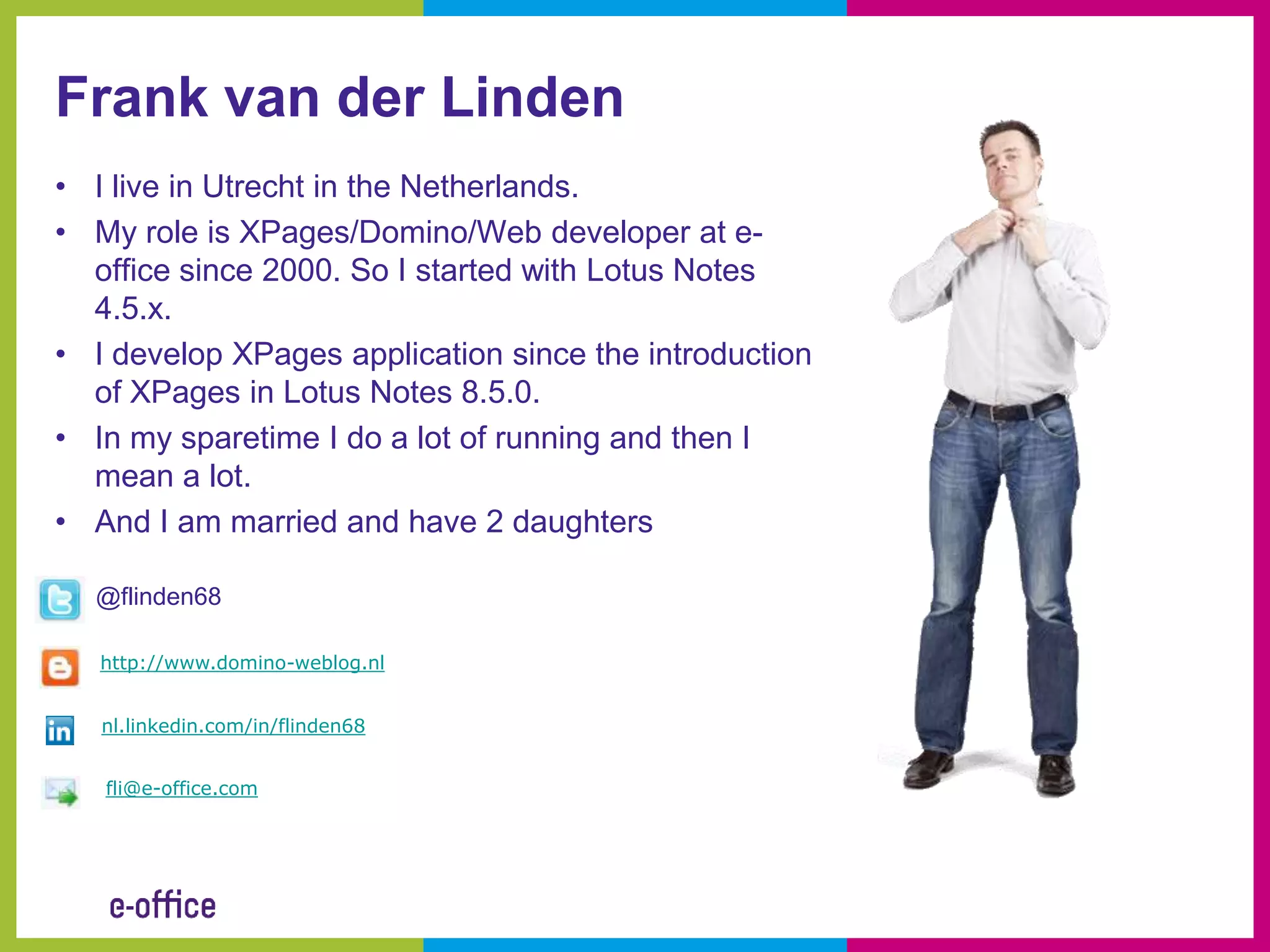
Frank van der Linden
• I live in Utrecht in the Netherlands.
• My role is XPages/Domino/Web developer at e-
  office since 2000. So I started with Lotus Notes
  4.5.x.
• I develop XPages application since the introduction
  of XPages in Lotus Notes 8.5.0.
• In my sparetime I do a lot of running and then I
  mean a lot.
• And I am married and have 2 daughters

  @flinden68

   http://www.domino-weblog.nl


   nl.linkedin.com/in/flinden68


   fli@e-office.com
And he works at e-office
• Celebrated in 2011 it’s 20ste
  anniversary
• First Lotus Business Partner in
  the Netherlands
• E-office is IBM Premier
  Business Partner, Microsoft
  Gold Partner and RIM Alliance
  Elite partner
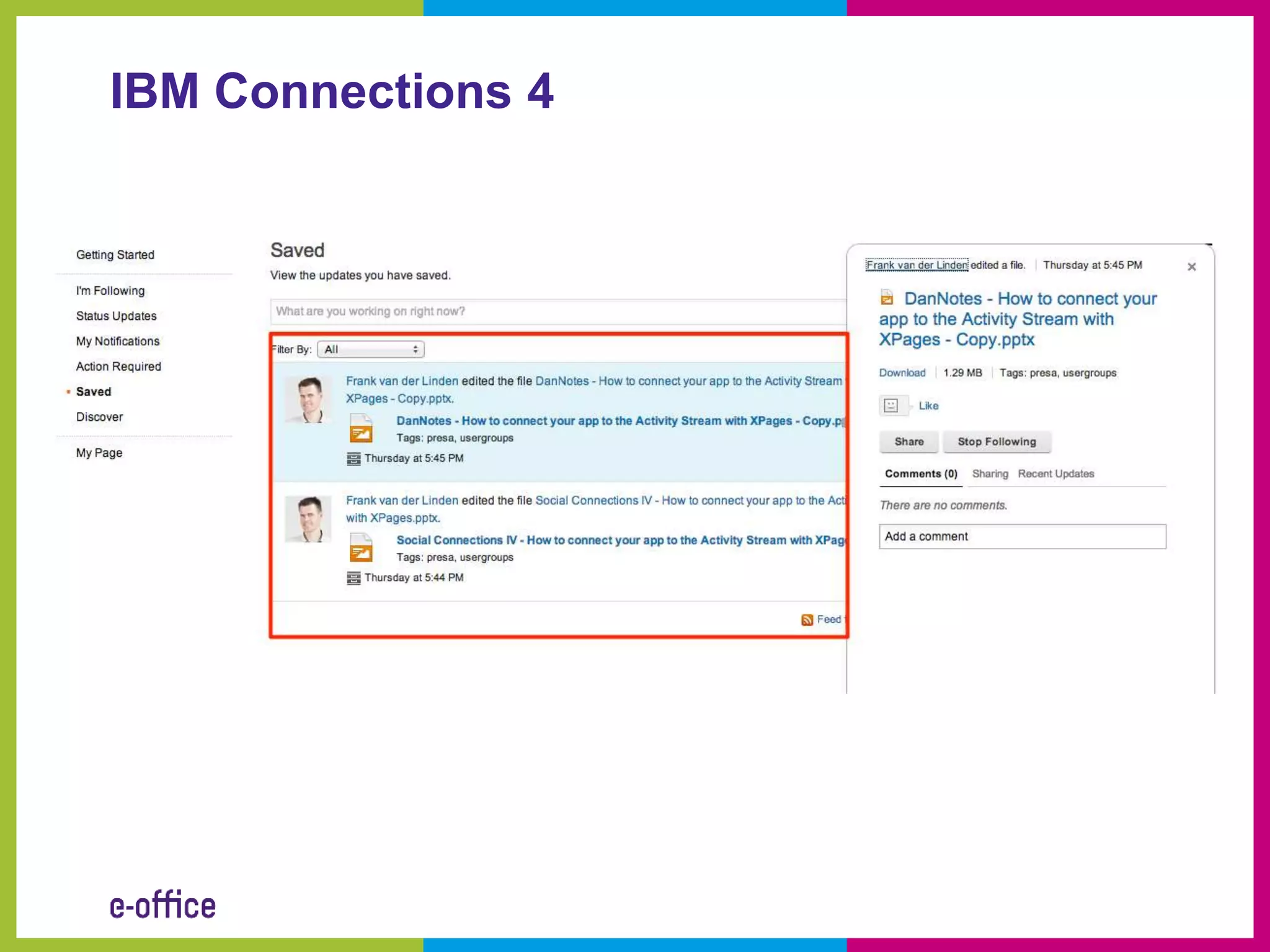
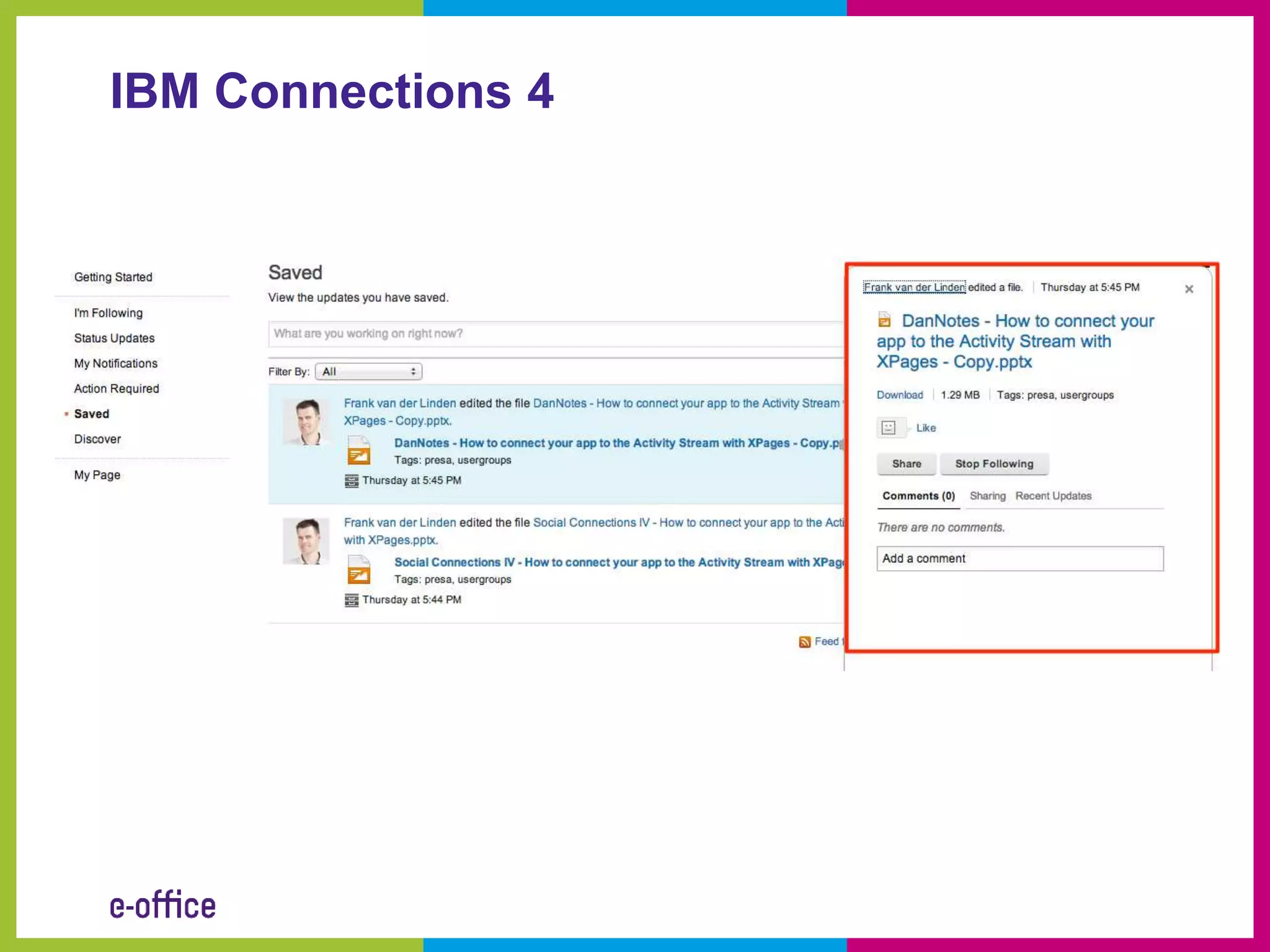
IBM Connections 4
IBM Connections 4
What is oAuth
• OAuth (Open Authorization) is an open
  standard for authorization
• It allows users to share their resources stored
  on one site with another site without having to
  hand out their credentials
• OAuth allows users to hand out tokens
  instead of credentials to their data hosted by a
  given service provider.


Source: http://en.wikipedia.org/wiki/OAuth
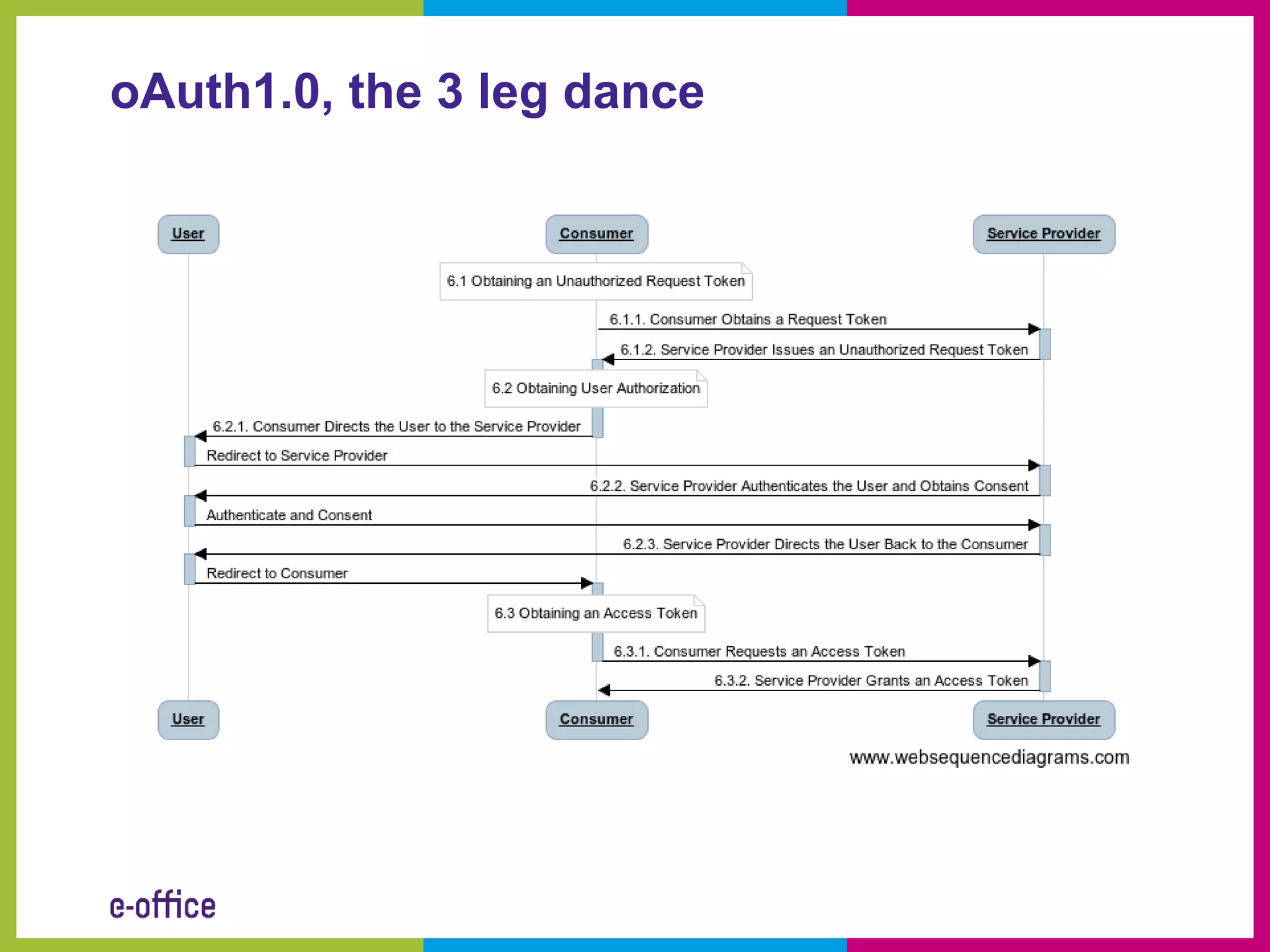
oAuth1.0, the 3 leg dance
oAuth in the real world
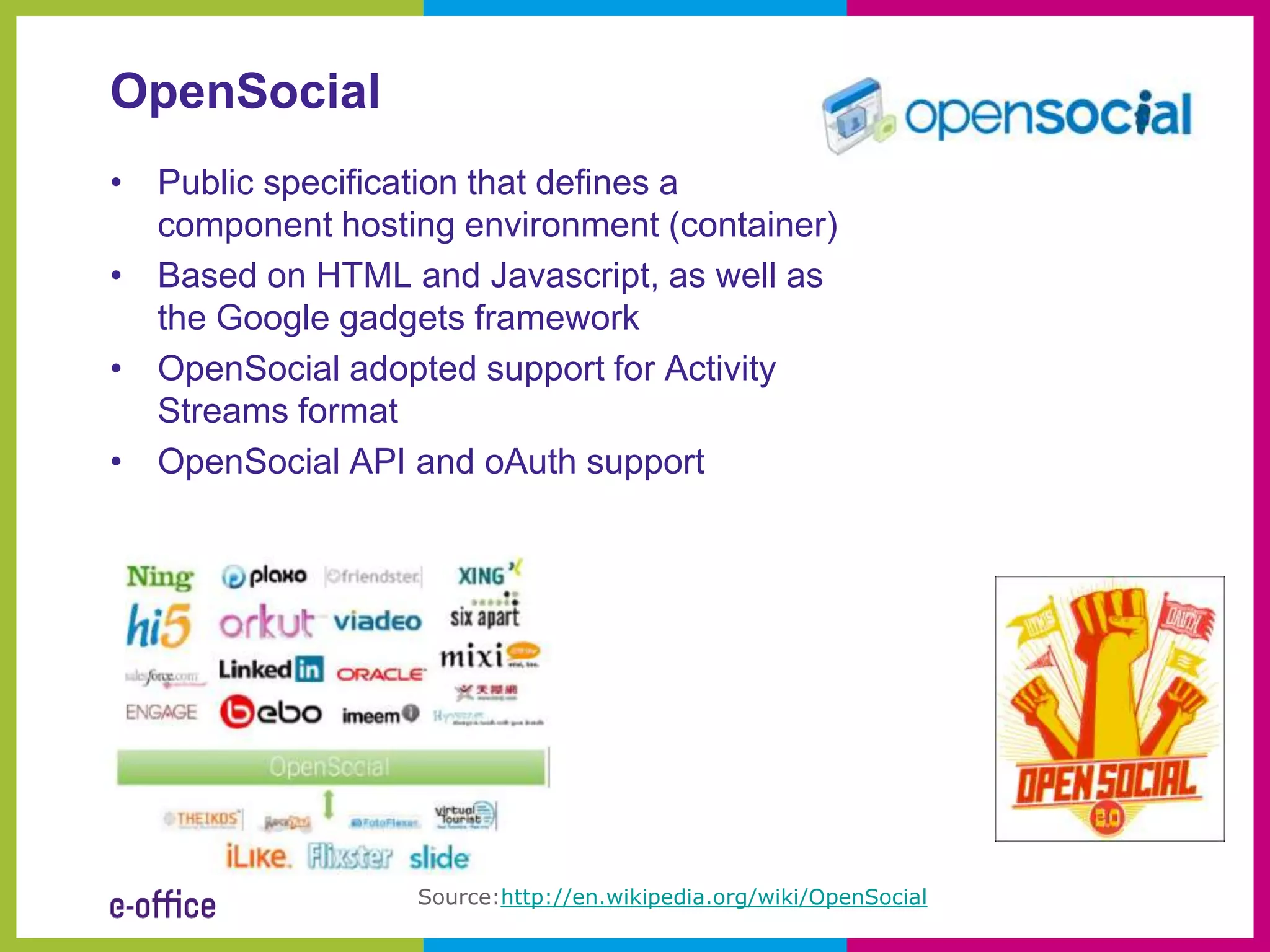
OpenSocial
• Public specification that defines a
  component hosting environment (container)
• Based on HTML and Javascript, as well as
  the Google gadgets framework
• OpenSocial adopted support for Activity
  Streams format
• OpenSocial API and oAuth support


                  Source:http://en.wikipedia.org/wiki/OpenSocial
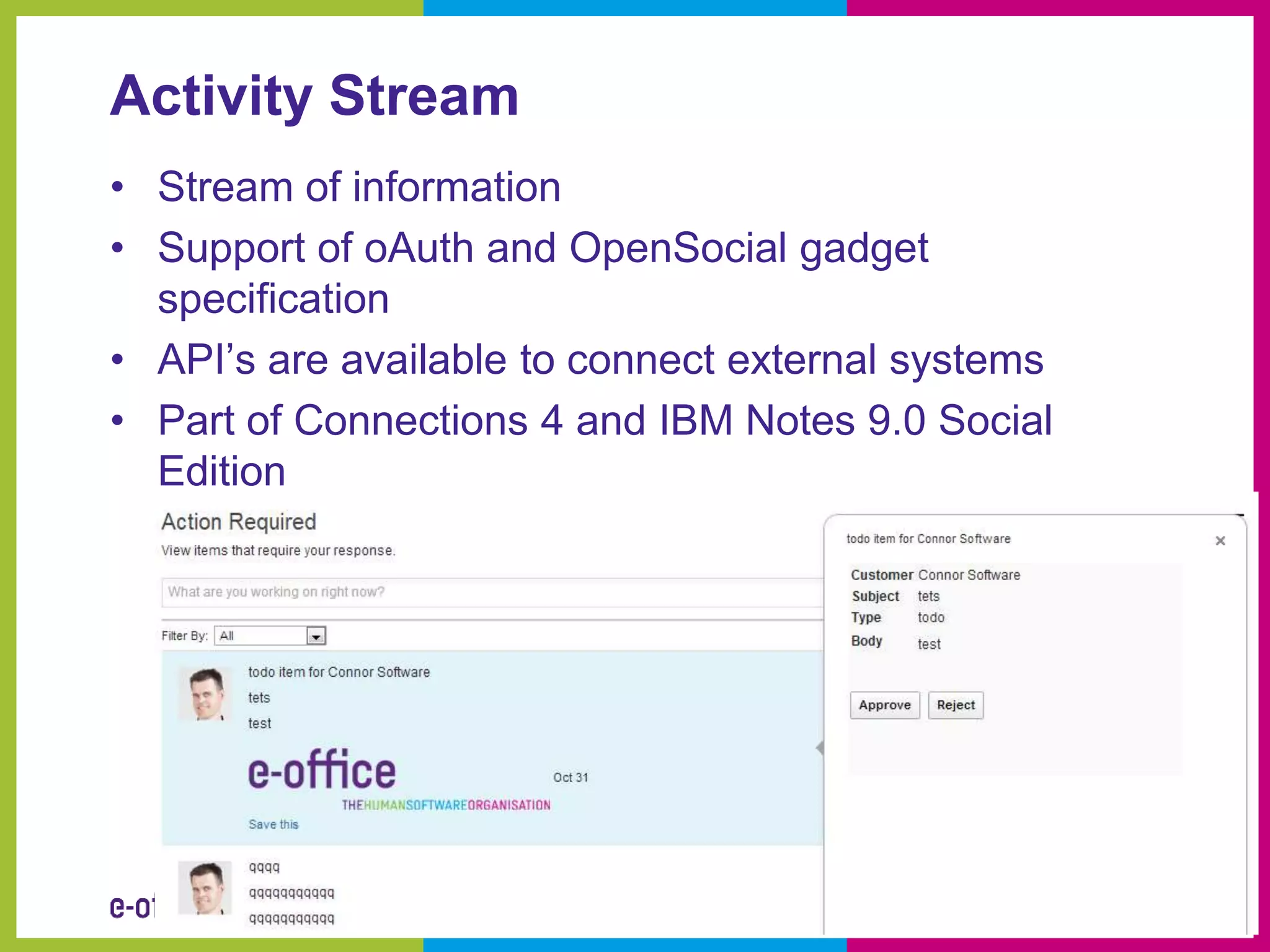
Activity Stream
• Stream of information
• Support of oAuth and OpenSocial gadget
  specification
• API’s are available to connect external systems
• Part of Connections 4 and IBM Notes 9.0 Social
  Edition
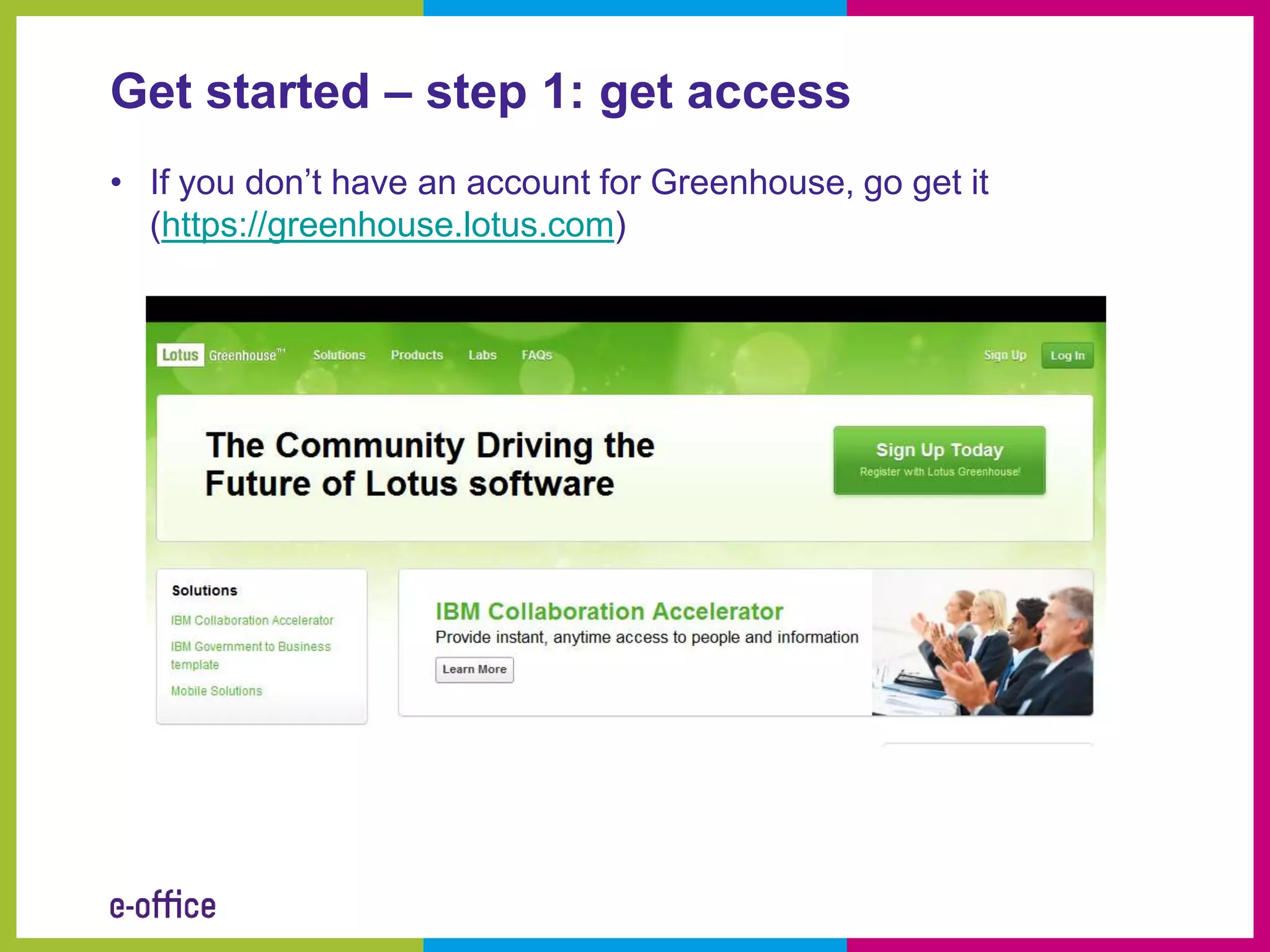
Get started – step 1: get access
• If you don’t have an account for Greenhouse, go get it
  (https://greenhouse.lotus.com)
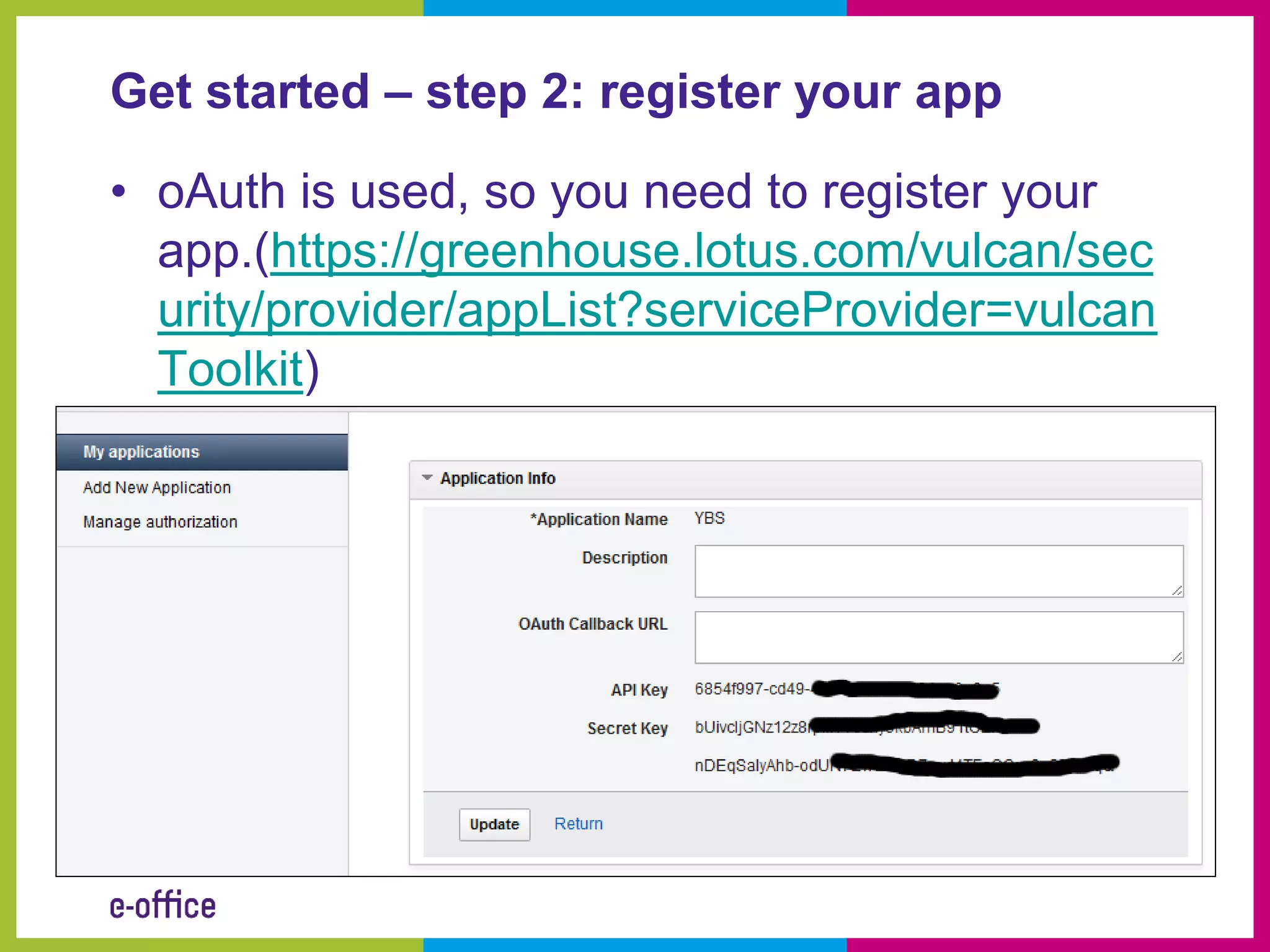
Get started – step 2: register your app

• oAuth is used, so you need to register your
  app.(https://greenhouse.lotus.com/vulcan/sec
  urity/provider/appList?serviceProvider=vulcan
  Toolkit)
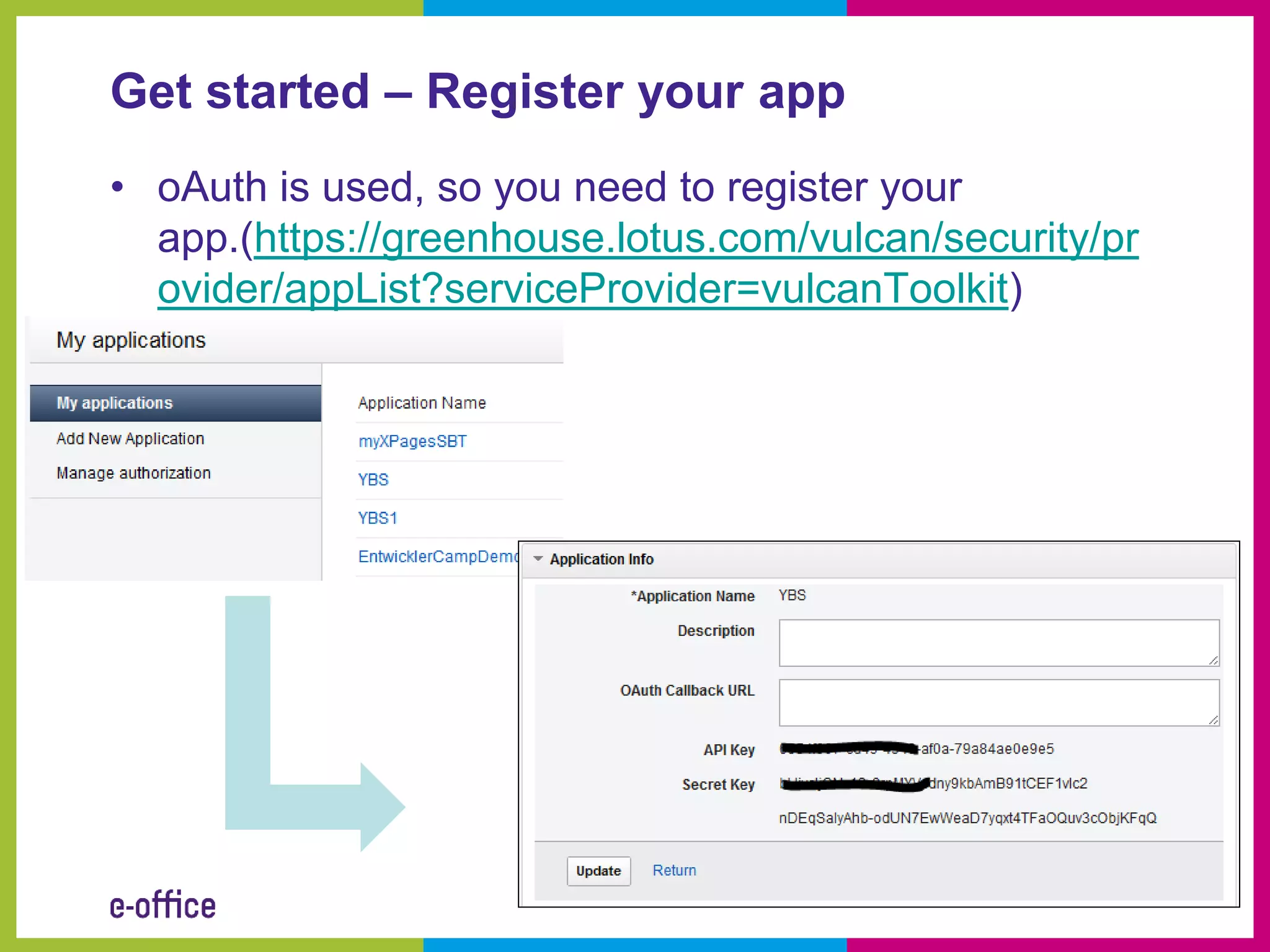
Get started – Register your app
• oAuth is used, so you need to register your
  app.(https://greenhouse.lotus.com/vulcan/security/pr
  ovider/appList?serviceProvider=vulcanToolkit)
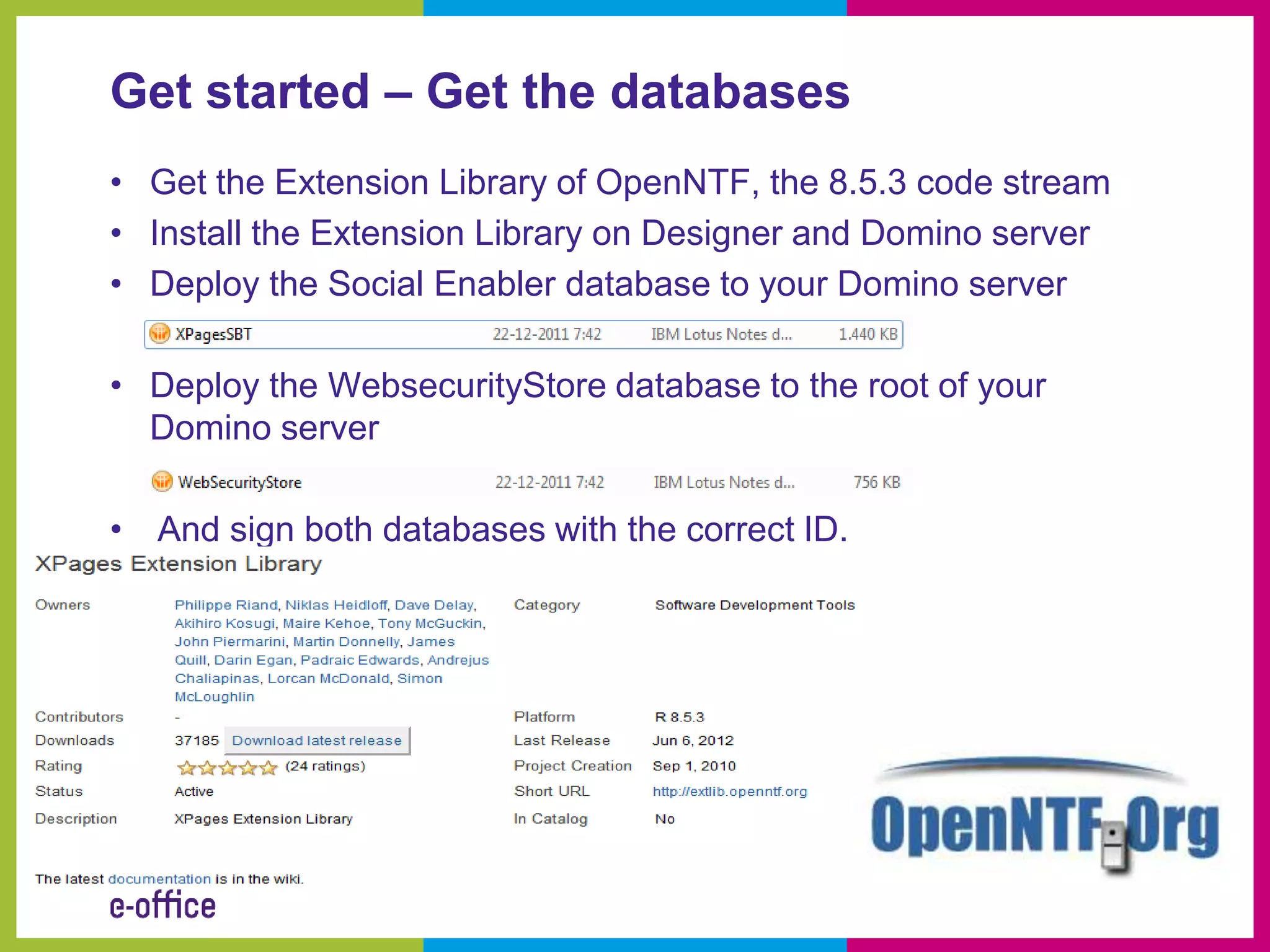
Get started – Get the databases
• Get the Extension Library of OpenNTF, the 8.5.3 code stream
• Install the Extension Library on Designer and Domino server
• Deploy the Social Enabler database to your Domino server

• Deploy the WebsecurityStore database to the root of your
  Domino server

• And sign both databases with the correct ID.
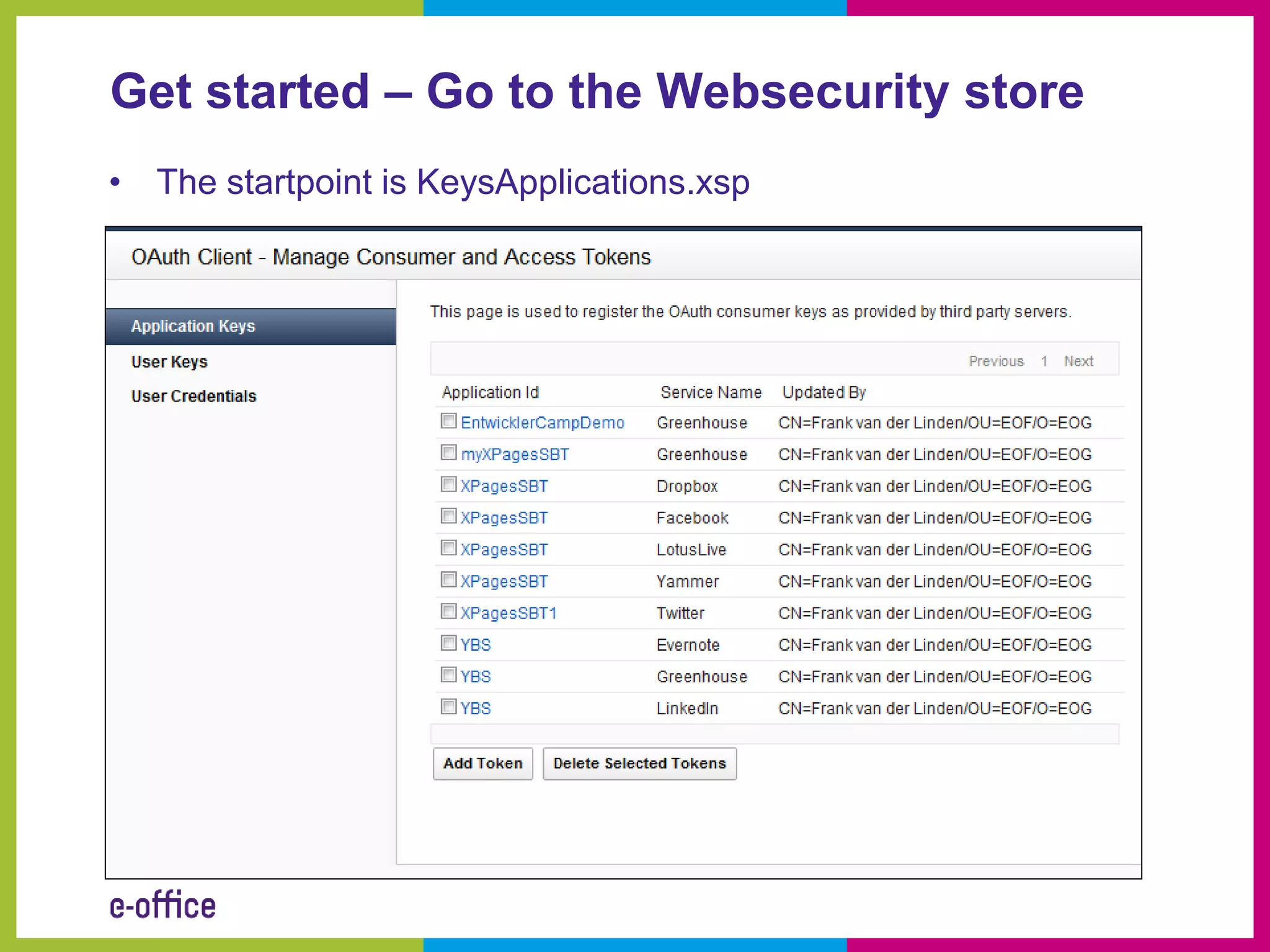
Get started – Go to the Websecurity store
• The startpoint is KeysApplications.xsp
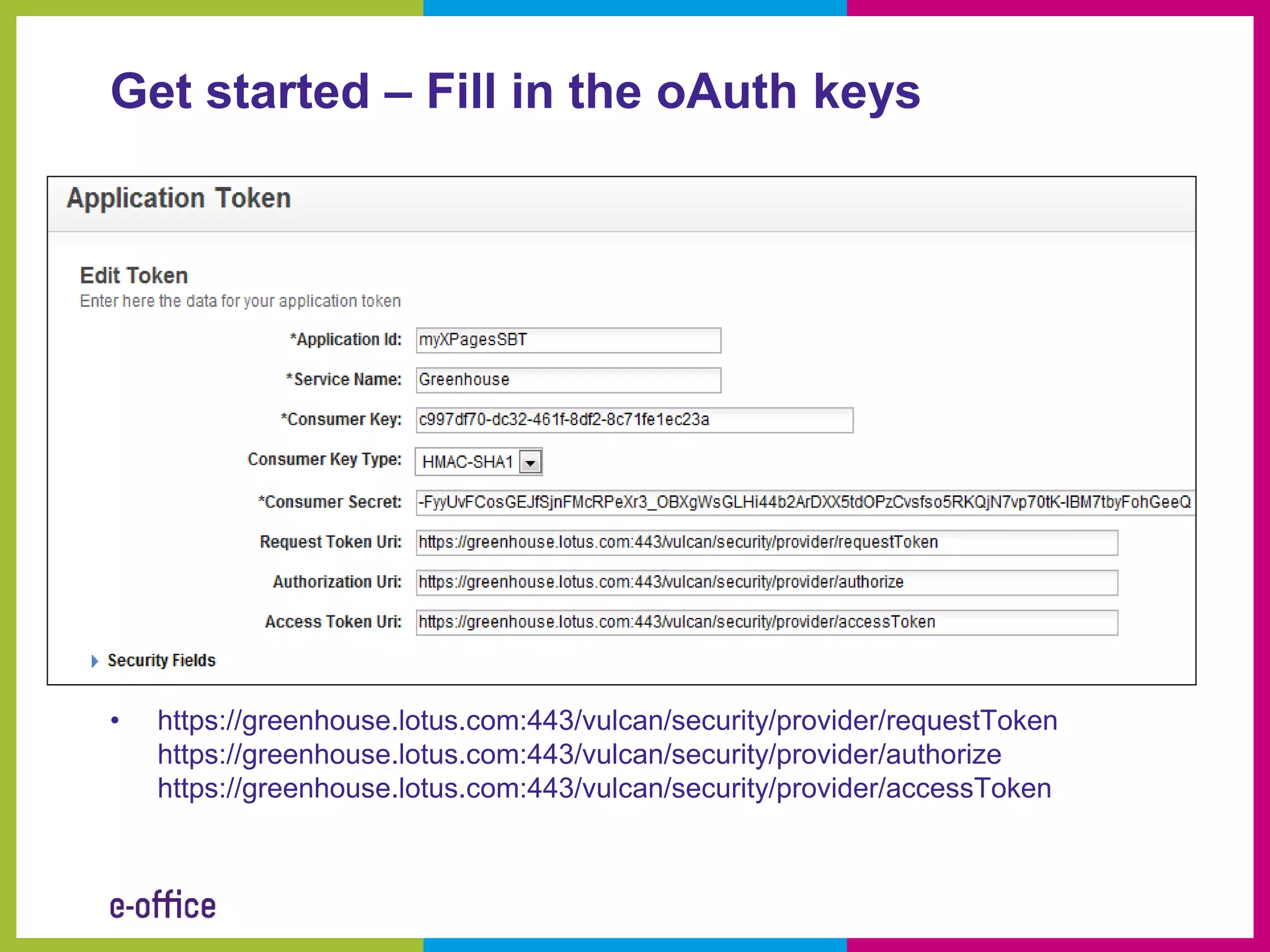
Get started – Fill in the oAuth keys


•   https://greenhouse.lotus.com:443/vulcan/security/provider/requestToken
    https://greenhouse.lotus.com:443/vulcan/security/provider/authorize
    https://greenhouse.lotus.com:443/vulcan/security/provider/accessToken
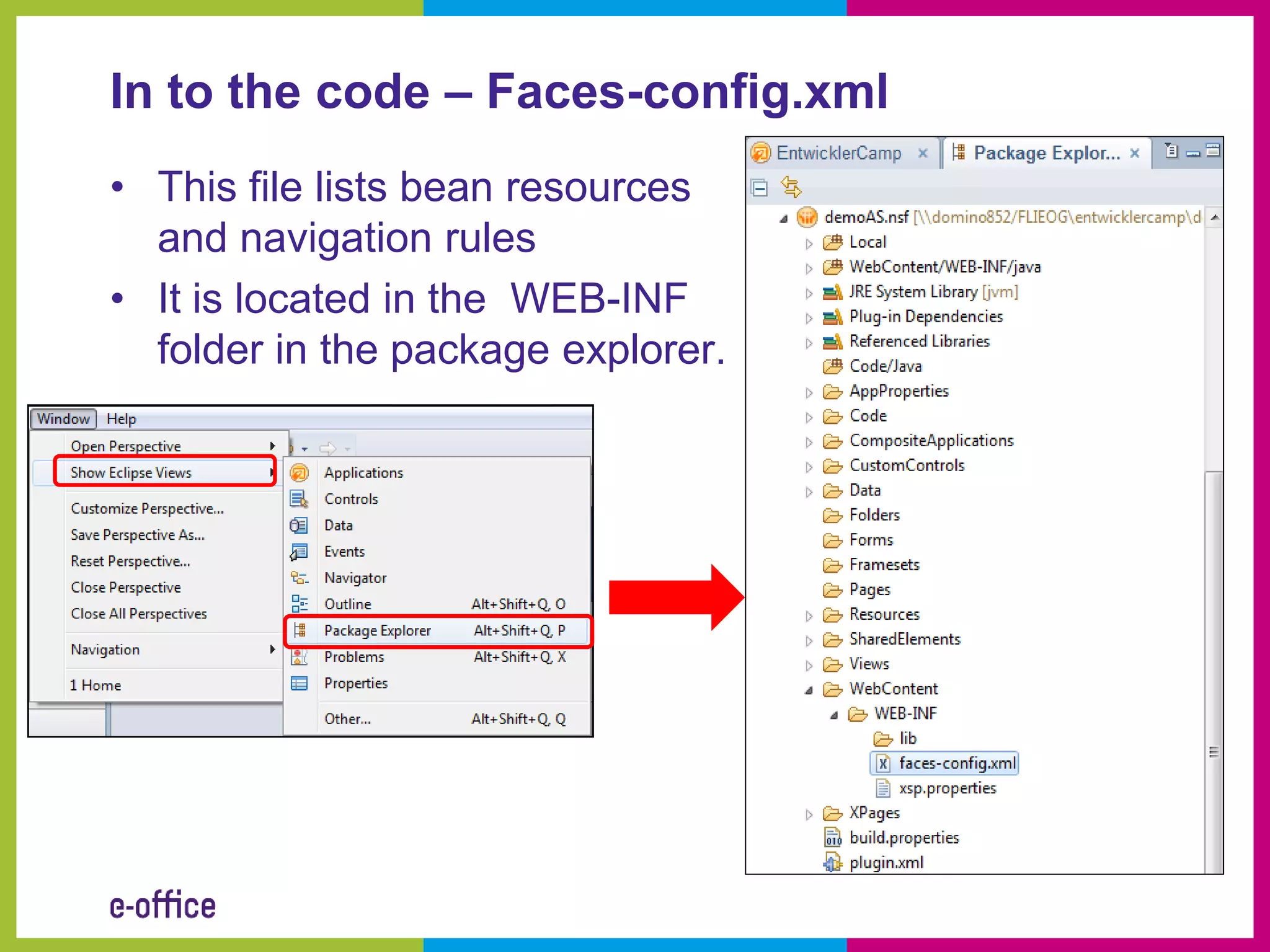
In to the code – Faces-config.xml
• This file lists bean resources
  and navigation rules
• It is located in the WEB-INF
  folder in the package explorer.
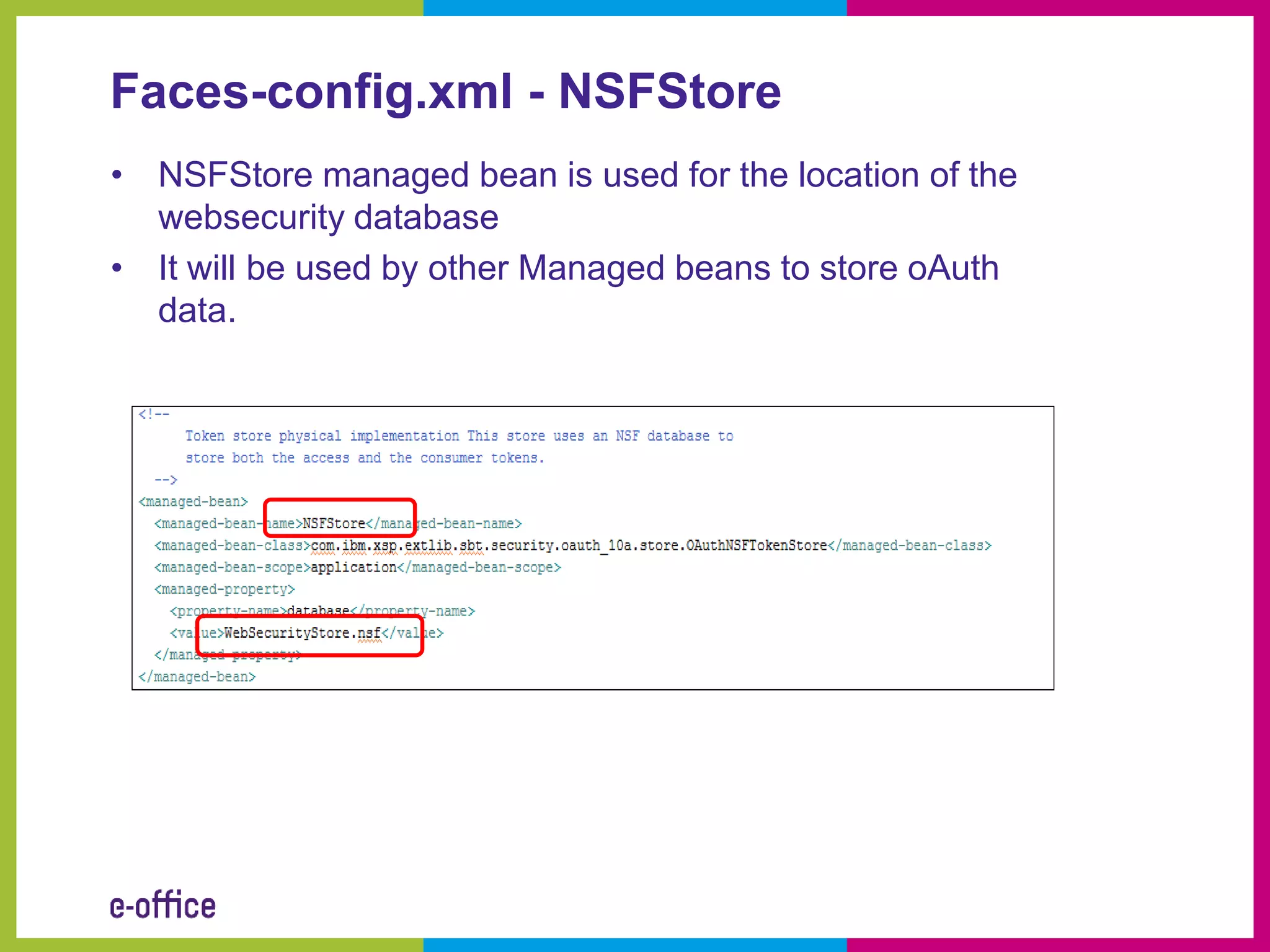
Faces-config.xml - NSFStore
• NSFStore managed bean is used for the location of the
  websecurity database
• It will be used by other Managed beans to store oAuth
  data.
Faces-config.xml – greenHouse managed
bean
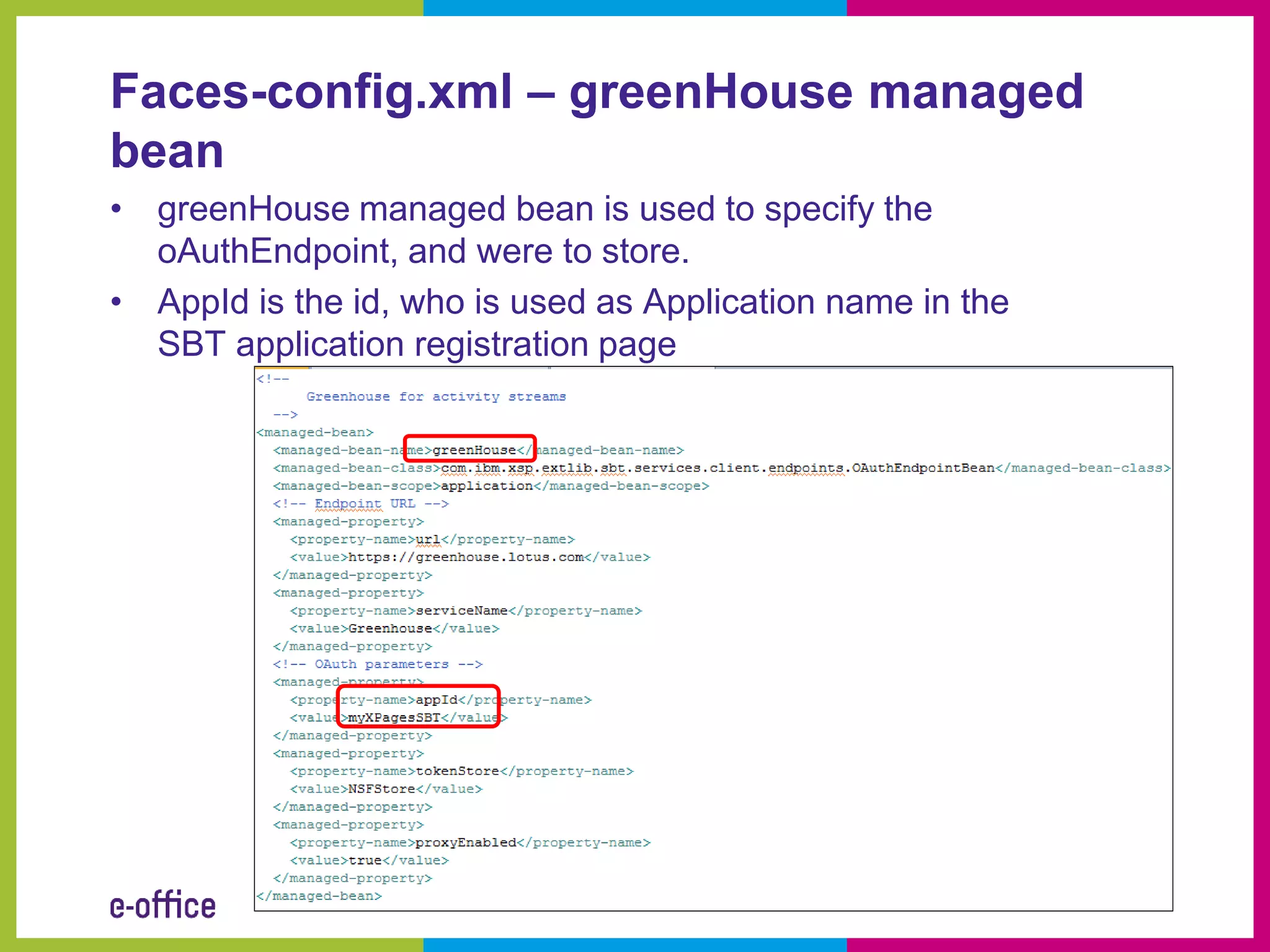
• greenHouse managed bean is used to specify the
  oAuthEndpoint, and were to store.
• AppId is the id, who is used as Application name in the
  SBT application registration page
How to get the entries of the Activity Stream

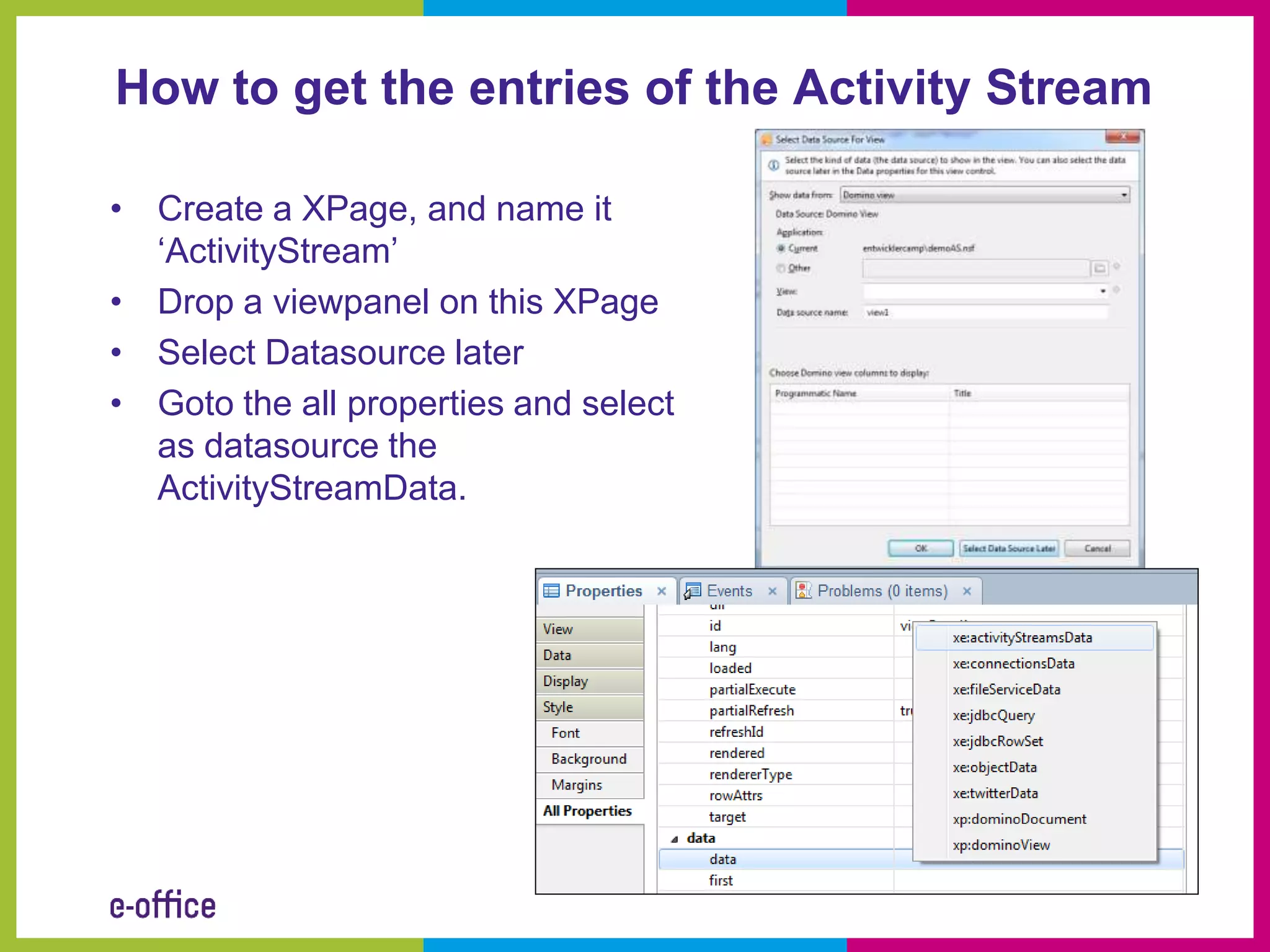
• Create a XPage, and name it
  ‘ActivityStream’
• Drop a viewpanel on this XPage
• Select Datasource later
• Goto the all properties and select
  as datasource the
  ActivityStreamData.
How to get the entries of the Activity Stream

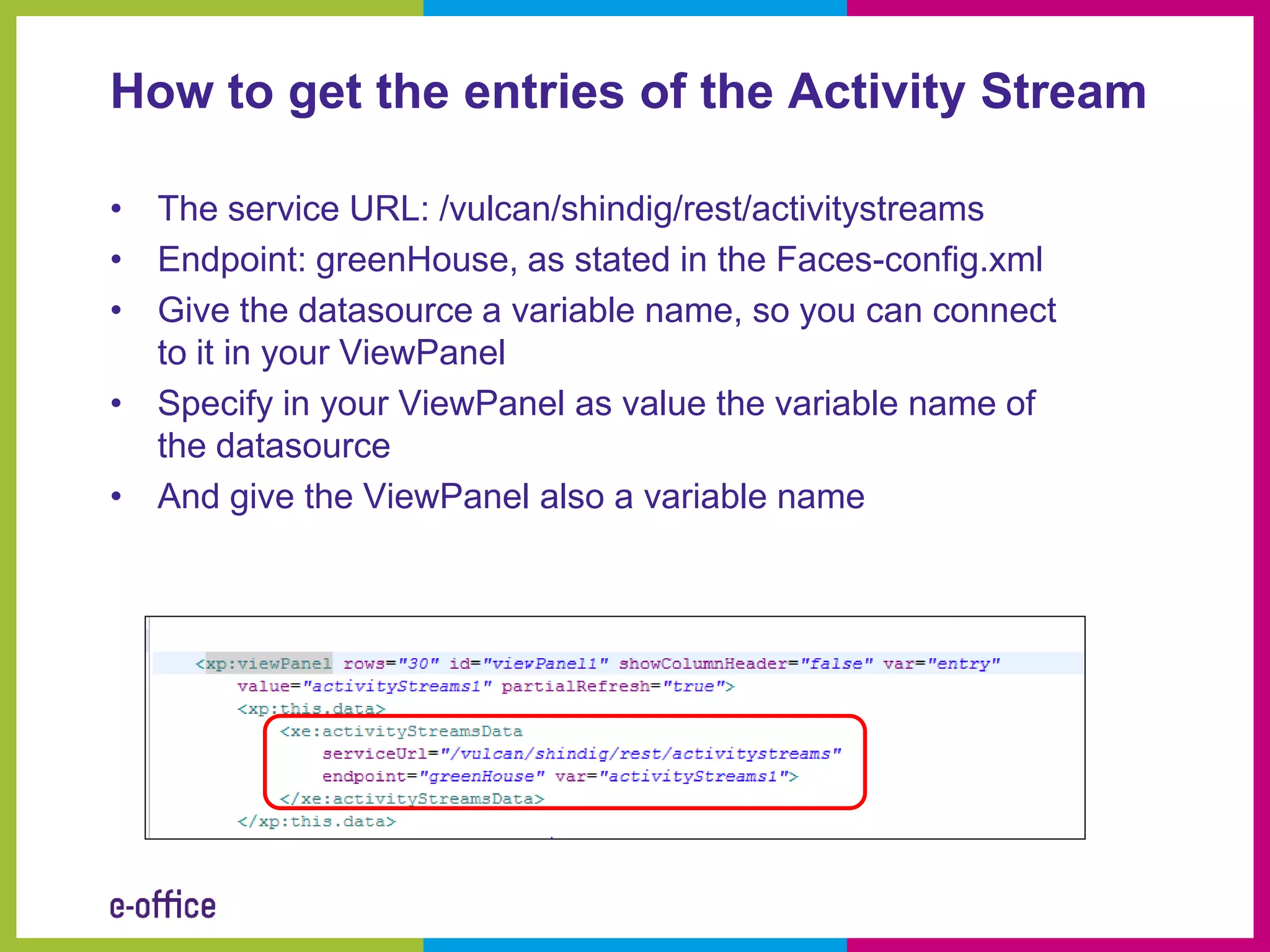
• The service URL: /vulcan/shindig/rest/activitystreams
• Endpoint: greenHouse, as stated in the Faces-config.xml
• Give the datasource a variable name, so you can connect
  to it in your ViewPanel
• Specify in your ViewPanel as value the variable name of
  the datasource
• And give the ViewPanel also a variable name
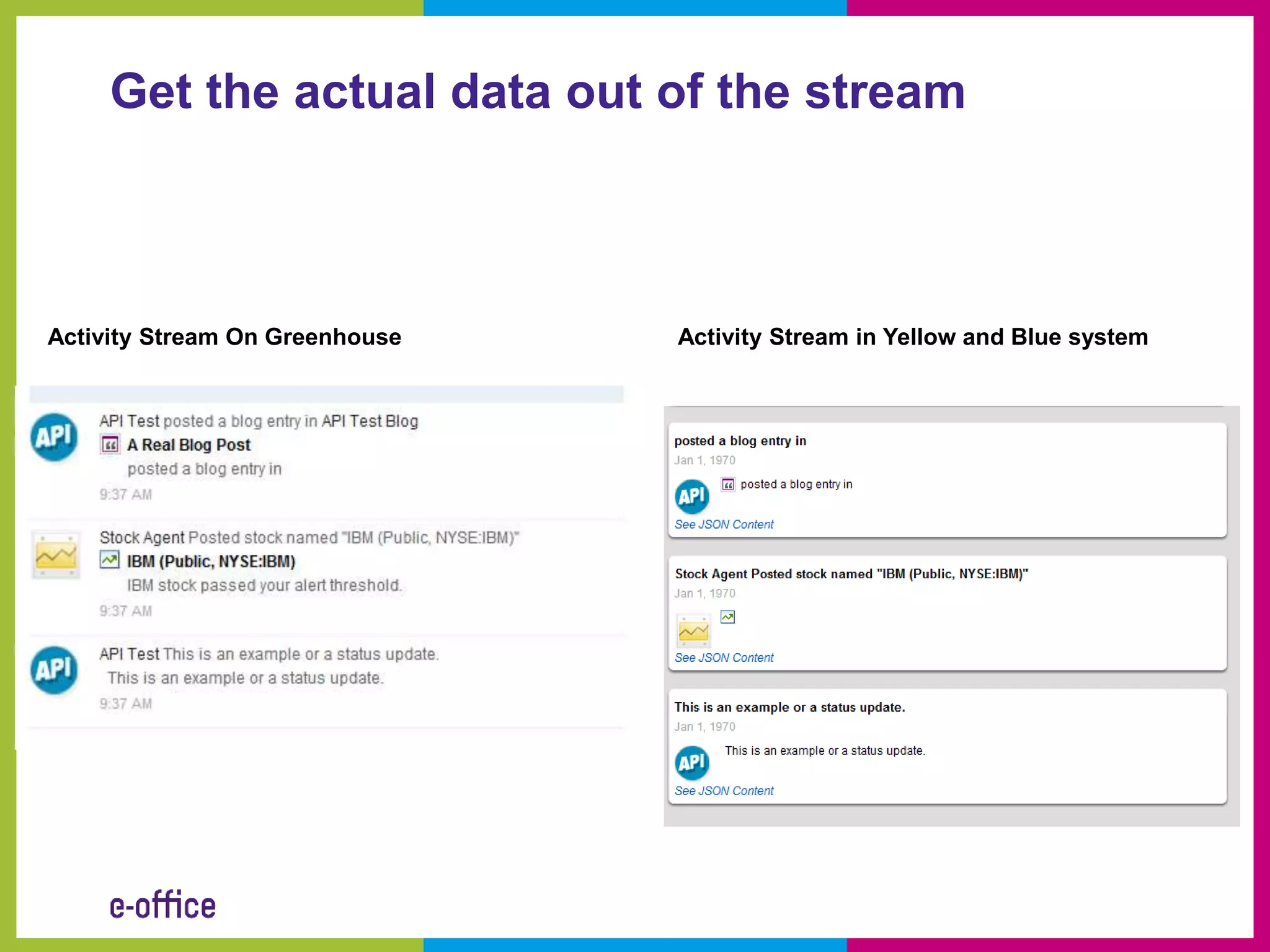
Get the actual data out of the stream


Activity Stream On Greenhouse   Activity Stream in Yellow and Blue system
Get access to some usefull properties

• Title: entry.title
• Posted date: new
  java.util.Date(parseInt(entry.postedTime)
• ID: entry.id
• Image: entry.actor.image.url
• Body: entry.body
• JSON of the links to the source:
  entry.standardLinks.alternate[0].inline
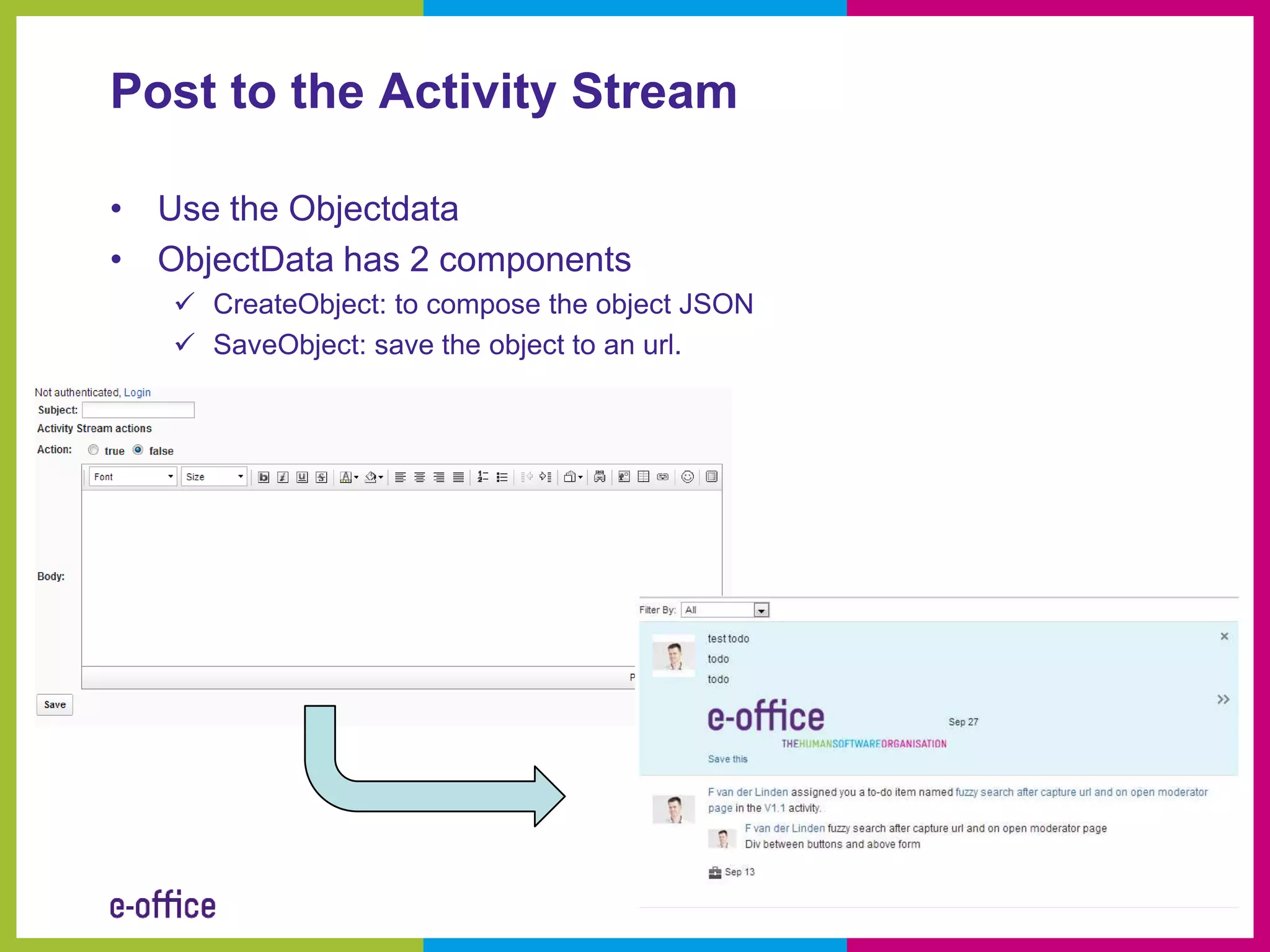
Post to the Activity Stream

• Use the Objectdata
• ObjectData has 2 components
    CreateObject: to compose the object JSON
    SaveObject: save the object to an url.
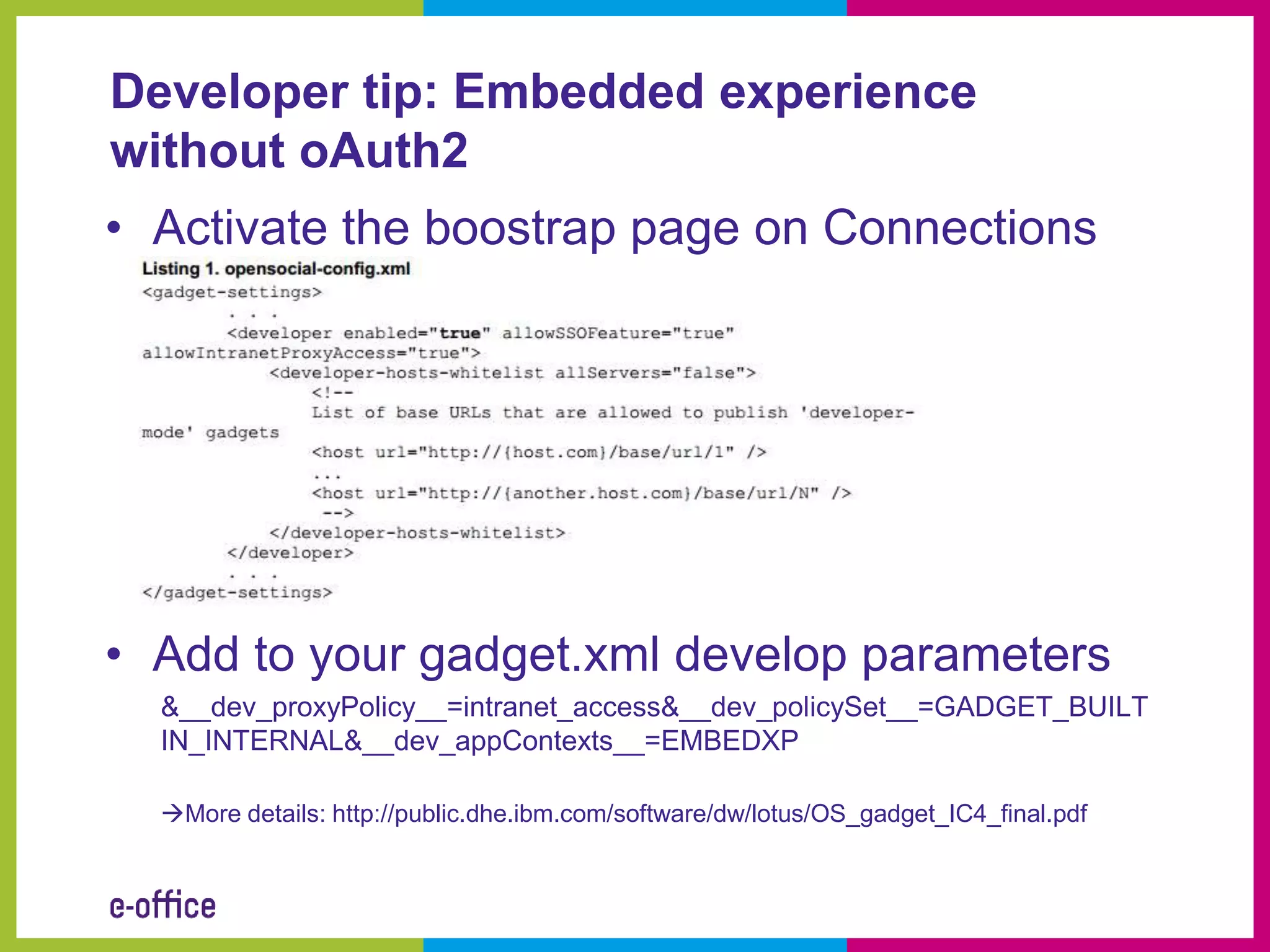
Developer tip: Embedded experience
without oAuth2
• Activate the boostrap page on Connections


• Add to your gadget.xml develop parameters
  &__dev_proxyPolicy__=intranet_access&__dev_policySet__=GADGET_BUILT
  IN_INTERNAL&__dev_appContexts__=EMBEDXP

  More details: http://public.dhe.ibm.com/software/dw/lotus/OS_gadget_IC4_final.pdf
Sample JSON to post entry
{
"generator": {
"image": { "url": "http://www.e-office.com/eog/nl/website2011.nsf/img_logo.png"},
"id": "Demo app",
"displayName": "XPages Post - Demo app",
"url": "http://ld09.e-office.com/"
},
"actor": {"id": "@me"},
"verb": "post",
"title": "Post from a XPages",
"content": " You have created a post from XPage.",
"updated": "2012-08-23T12:00:00.000Z",
"object": {
"summary": "Post from a XPages",
"objectType": "note",
"id": "xpages12",
"displayName": "Post from a XPages",
"url": "http://ld09.e-office.com/demo/demoAS.nsf/"
},
"connections":{
"actionable":"false",
"broadcast": "true",
"canUnFollow": "true",
"saved":"false"
},
"openSocial":{
"embed": {
"gadget": "http://ld09.e-
office.com/demo/demoAS.nsf/gadget.xml?openfileresource&__dev_proxyPolicy__=intranet_access&__dev_policySet__=GADGET_BUILTIN_INTER
NAL&__dev_appContexts__=EMBEDXP",
"context": ""
},
"deliverTo":[
{"objectType":"person",
"id":"@me"
}
]
}
}
Questions
Usefull resources
• Extension Library
   – http://extlib.openntf.org/
• Social Enabler
   – http://socialenabler.openntf.org/
• Activity Stream Community (GreenHouse)
   – https://greenhouse.lotus.com/communities/service/html/com
     munityview?communityUuid=cab9d6f0-d6f0-4b71-ae49-
     8cad85a454fd
• Social Business Toolkit Community
  (DeveloperWorks)
   – https://www.ibm.com/developerworks/mydeveloperworks/gro
     ups/service/html/communityview?communityUuid=0f357879
     -ccee-4927-98c1-7bb88d5dc81f
Contact details


    @flinden68

     http://www.domino-weblog.nl


     nl.linkedin.com/in/flinden68


       fli@e-office.com

how to connect your app to the activity stream with x-pages

  • 1.
    Bring your Dominoapplications into the Activity Stream Frank van der Linden
  • 2.
    Roadmap • Introduction • IBM Connections 4 • Open standards • Setup the environment • Connect to the Activity Stream • Q and A Joost van Dongen 11/28/20 12
  • 3.
    Frank van derLinden • I live in Utrecht in the Netherlands. • My role is XPages/Domino/Web developer at e- office since 2000. So I started with Lotus Notes 4.5.x. • I develop XPages application since the introduction of XPages in Lotus Notes 8.5.0. • In my sparetime I do a lot of running and then I mean a lot. • And I am married and have 2 daughters @flinden68 http://www.domino-weblog.nl nl.linkedin.com/in/flinden68 fli@e-office.com
  • 4.
    And he worksat e-office • Celebrated in 2011 it’s 20ste anniversary • First Lotus Business Partner in the Netherlands • E-office is IBM Premier Business Partner, Microsoft Gold Partner and RIM Alliance Elite partner
  • 5.
  • 6.
  • 7.
    What is oAuth •OAuth (Open Authorization) is an open standard for authorization • It allows users to share their resources stored on one site with another site without having to hand out their credentials • OAuth allows users to hand out tokens instead of credentials to their data hosted by a given service provider. Source: http://en.wikipedia.org/wiki/OAuth
  • 8.
    oAuth1.0, the 3leg dance
  • 9.
    oAuth in thereal world
  • 10.
    OpenSocial • Public specificationthat defines a component hosting environment (container) • Based on HTML and Javascript, as well as the Google gadgets framework • OpenSocial adopted support for Activity Streams format • OpenSocial API and oAuth support Source:http://en.wikipedia.org/wiki/OpenSocial
  • 11.
    Activity Stream • Streamof information • Support of oAuth and OpenSocial gadget specification • API’s are available to connect external systems • Part of Connections 4 and IBM Notes 9.0 Social Edition
  • 12.
    Get started –step 1: get access • If you don’t have an account for Greenhouse, go get it (https://greenhouse.lotus.com)
  • 13.
    Get started –step 2: register your app • oAuth is used, so you need to register your app.(https://greenhouse.lotus.com/vulcan/sec urity/provider/appList?serviceProvider=vulcan Toolkit)
  • 14.
    Get started –Register your app • oAuth is used, so you need to register your app.(https://greenhouse.lotus.com/vulcan/security/pr ovider/appList?serviceProvider=vulcanToolkit)
  • 15.
    Get started –Get the databases • Get the Extension Library of OpenNTF, the 8.5.3 code stream • Install the Extension Library on Designer and Domino server • Deploy the Social Enabler database to your Domino server • Deploy the WebsecurityStore database to the root of your Domino server • And sign both databases with the correct ID.
  • 16.
    Get started –Go to the Websecurity store • The startpoint is KeysApplications.xsp
  • 17.
    Get started –Fill in the oAuth keys • https://greenhouse.lotus.com:443/vulcan/security/provider/requestToken https://greenhouse.lotus.com:443/vulcan/security/provider/authorize https://greenhouse.lotus.com:443/vulcan/security/provider/accessToken
  • 18.
    In to thecode – Faces-config.xml • This file lists bean resources and navigation rules • It is located in the WEB-INF folder in the package explorer.
  • 19.
    Faces-config.xml - NSFStore •NSFStore managed bean is used for the location of the websecurity database • It will be used by other Managed beans to store oAuth data.
  • 20.
    Faces-config.xml – greenHousemanaged bean • greenHouse managed bean is used to specify the oAuthEndpoint, and were to store. • AppId is the id, who is used as Application name in the SBT application registration page
  • 21.
    How to getthe entries of the Activity Stream • Create a XPage, and name it ‘ActivityStream’ • Drop a viewpanel on this XPage • Select Datasource later • Goto the all properties and select as datasource the ActivityStreamData.
  • 22.
    How to getthe entries of the Activity Stream • The service URL: /vulcan/shindig/rest/activitystreams • Endpoint: greenHouse, as stated in the Faces-config.xml • Give the datasource a variable name, so you can connect to it in your ViewPanel • Specify in your ViewPanel as value the variable name of the datasource • And give the ViewPanel also a variable name
  • 23.
    Get the actualdata out of the stream Activity Stream On Greenhouse Activity Stream in Yellow and Blue system
  • 24.
    Get access tosome usefull properties • Title: entry.title • Posted date: new java.util.Date(parseInt(entry.postedTime) • ID: entry.id • Image: entry.actor.image.url • Body: entry.body • JSON of the links to the source: entry.standardLinks.alternate[0].inline
  • 25.
    Post to theActivity Stream • Use the Objectdata • ObjectData has 2 components  CreateObject: to compose the object JSON  SaveObject: save the object to an url.
  • 26.
    Developer tip: Embeddedexperience without oAuth2 • Activate the boostrap page on Connections • Add to your gadget.xml develop parameters &__dev_proxyPolicy__=intranet_access&__dev_policySet__=GADGET_BUILT IN_INTERNAL&__dev_appContexts__=EMBEDXP More details: http://public.dhe.ibm.com/software/dw/lotus/OS_gadget_IC4_final.pdf
  • 27.
    Sample JSON topost entry { "generator": { "image": { "url": "http://www.e-office.com/eog/nl/website2011.nsf/img_logo.png"}, "id": "Demo app", "displayName": "XPages Post - Demo app", "url": "http://ld09.e-office.com/" }, "actor": {"id": "@me"}, "verb": "post", "title": "Post from a XPages", "content": " You have created a post from XPage.", "updated": "2012-08-23T12:00:00.000Z", "object": { "summary": "Post from a XPages", "objectType": "note", "id": "xpages12", "displayName": "Post from a XPages", "url": "http://ld09.e-office.com/demo/demoAS.nsf/" }, "connections":{ "actionable":"false", "broadcast": "true", "canUnFollow": "true", "saved":"false" }, "openSocial":{ "embed": { "gadget": "http://ld09.e- office.com/demo/demoAS.nsf/gadget.xml?openfileresource&__dev_proxyPolicy__=intranet_access&__dev_policySet__=GADGET_BUILTIN_INTER NAL&__dev_appContexts__=EMBEDXP", "context": "" }, "deliverTo":[ {"objectType":"person", "id":"@me" } ] } }
  • 28.
  • 29.
    Usefull resources • ExtensionLibrary – http://extlib.openntf.org/ • Social Enabler – http://socialenabler.openntf.org/ • Activity Stream Community (GreenHouse) – https://greenhouse.lotus.com/communities/service/html/com munityview?communityUuid=cab9d6f0-d6f0-4b71-ae49- 8cad85a454fd • Social Business Toolkit Community (DeveloperWorks) – https://www.ibm.com/developerworks/mydeveloperworks/gro ups/service/html/communityview?communityUuid=0f357879 -ccee-4927-98c1-7bb88d5dc81f
  • 30.
    Contact details @flinden68 http://www.domino-weblog.nl nl.linkedin.com/in/flinden68 fli@e-office.com