MSIT Office 365 Migration
Phase I - Extranet
1
















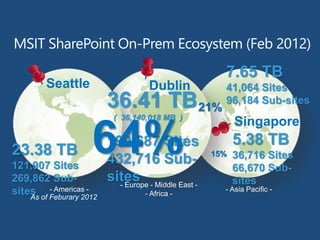
Seattle Dublin
Singapore
23.38 TB
121,907 Sites
269,862 Sub-
sites
5.38 TB
36,716 Sites
66,670 Sub-
sites
7.65 TB
41,064 Sites
96,184 Sub-sites36.41 TB
( 36,140,018 MB )
199,687 Sites
432,716 Sub-
sites
64%
21%
15%
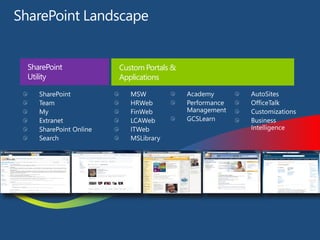
SharePoint
Utility
Custom Portals &
Applications
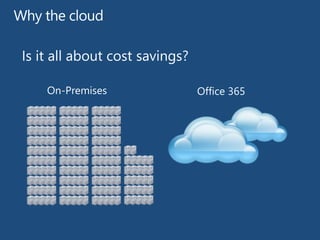
Cost Savings
• Less infrastructure to maintain
• No more SharePoint upgrades
• HA and DR built into the service
• Lower cost per user
User Benefits
• Social collaboration
• SkyDrive Pro
• Access to corporate SharePoint resources
regardless of location or device
• Enabler of MSIT’s Consumerization of IT strategy
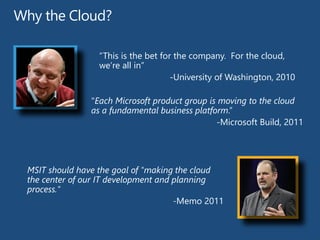
Why the Cloud?
"Each Microsoft product group is moving to the cloud
as a fundamental business platform.”
-Microsoft Build, 2011
“This is the bet for the company. For the cloud,
we’re all in”
-University of Washington, 2010
MSIT should have the goal of "making the cloud
the center of our IT development and planning
process."
-Memo 2011
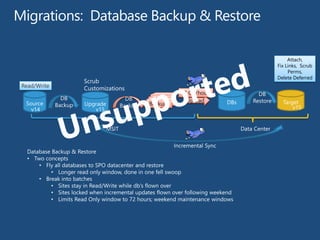
BackupsBackupsSource
DB
BackupUpgrade
DB
Backup Backups
Upload Target
MSIT Data Center
40 GB/hour
v14 v15 v15
DBs
Incremental Sync
Read/Write
Database Backup & Restore
• Two concepts
• Fly all databases to SPO datacenter and restore
• Longer read only window, done in one fell swoop
• Break into batches
• Sites stay in Read/Write while db’s flown over
• Sites locked when incremental updates flown over following weekend
• Limits Read Only window to 72 hours; weekend maintenance windows
Attach,
Fix Links, Scrub
Perms,
Delete Deferred
DB
Restore
Scrub
Customizations
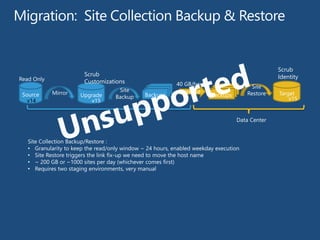
BackupsBackupsSource
Site
BackupUpgradeMirror Backups
Upload BackupsBackupsBackups Target
Site
Restore
MSIT Data Center
Site Collection Backup/Restore :
• Granularity to keep the read/only window ~ 24 hours, enabled weekday execution
• Site Restore triggers the link fix-up we need to move the host name
• ~ 200 GB or ~1000 sites per day (whichever comes first)
• Requires two staging environments, very manual
40 GB/hour
v14 v15 v15
Read Only
Scrub
IdentityScrub
Customizations
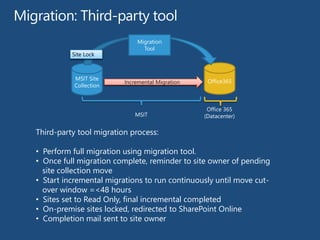
MSIT Site
Collection
Full Migration Office365
MSIT
Office 365
(Datacenter)
Migration
Tool
Read/Write
Third-party tool migration process:
• Perform full migration using migration tool.
• Once full migration complete, reminder to site owner of pending
site collection move
• Start incremental migrations to run continuously until move cut-
over window =<48 hours
• Sites set to Read Only, final incremental completed
• On-premise sites locked, redirected to SharePoint Online
• Completion mail sent to site owner
Read Only
Incremental Migration
Site Lock
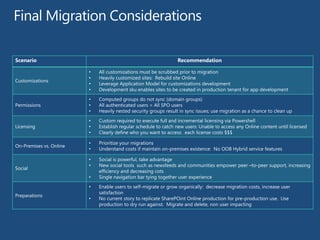
Scenario Recommendation
http://technet.microsoft.com/en-
us/library/jj838715.aspx
www.bpcs.com
Contact Us
Thank you for
attending
29
Sam Crewdson
Email: sam@bpcs.com
Phone: 425-891-1801
Twitter: SharePoint_Sam

How Microsoft IT migrated SharePoint to Office 365

  • 1.
    MSIT Office 365Migration Phase I - Extranet 1
  • 4.
  • 5.
    Seattle Dublin Singapore 23.38 TB 121,907Sites 269,862 Sub- sites 5.38 TB 36,716 Sites 66,670 Sub- sites 7.65 TB 41,064 Sites 96,184 Sub-sites36.41 TB ( 36,140,018 MB ) 199,687 Sites 432,716 Sub- sites 64% 21% 15%
  • 6.
  • 9.
    Cost Savings • Lessinfrastructure to maintain • No more SharePoint upgrades • HA and DR built into the service • Lower cost per user User Benefits • Social collaboration • SkyDrive Pro • Access to corporate SharePoint resources regardless of location or device • Enabler of MSIT’s Consumerization of IT strategy
  • 10.
    Why the Cloud? "EachMicrosoft product group is moving to the cloud as a fundamental business platform.” -Microsoft Build, 2011 “This is the bet for the company. For the cloud, we’re all in” -University of Washington, 2010 MSIT should have the goal of "making the cloud the center of our IT development and planning process." -Memo 2011
  • 13.
    BackupsBackupsSource DB BackupUpgrade DB Backup Backups Upload Target MSITData Center 40 GB/hour v14 v15 v15 DBs Incremental Sync Read/Write Database Backup & Restore • Two concepts • Fly all databases to SPO datacenter and restore • Longer read only window, done in one fell swoop • Break into batches • Sites stay in Read/Write while db’s flown over • Sites locked when incremental updates flown over following weekend • Limits Read Only window to 72 hours; weekend maintenance windows Attach, Fix Links, Scrub Perms, Delete Deferred DB Restore Scrub Customizations
  • 14.
    BackupsBackupsSource Site BackupUpgradeMirror Backups Upload BackupsBackupsBackupsTarget Site Restore MSIT Data Center Site Collection Backup/Restore : • Granularity to keep the read/only window ~ 24 hours, enabled weekday execution • Site Restore triggers the link fix-up we need to move the host name • ~ 200 GB or ~1000 sites per day (whichever comes first) • Requires two staging environments, very manual 40 GB/hour v14 v15 v15 Read Only Scrub IdentityScrub Customizations
  • 15.
    MSIT Site Collection Full MigrationOffice365 MSIT Office 365 (Datacenter) Migration Tool Read/Write Third-party tool migration process: • Perform full migration using migration tool. • Once full migration complete, reminder to site owner of pending site collection move • Start incremental migrations to run continuously until move cut- over window =<48 hours • Sites set to Read Only, final incremental completed • On-premise sites locked, redirected to SharePoint Online • Completion mail sent to site owner Read Only Incremental Migration Site Lock
  • 25.
  • 27.
  • 28.
    www.bpcs.com Contact Us Thank youfor attending 29 Sam Crewdson Email: sam@bpcs.com Phone: 425-891-1801 Twitter: SharePoint_Sam