How Docker
simplifies
CI/CD
Gabriel N. Schenker
Distinguished Software Architect
PhD in Astrophysics
@gnschenker
www.lostechies.com/gabrielschenker
www.linkedin.com/in/gabrielschenker
https://github.com/gnschenker
Professional Scrum Foundations
Training, Monday May 16 – Tuesday May 17
Held at Clear Measure Office
More Info/Register: http://www.scrum.org
•CI/CD – What and Why
•Classical CI/CD pipeline
•Containers – Quick Intro
•CI using Docker
•Defining a Service Stack
•Blue-Green Deployment
By Dreamstime
CI/CD – What and Why
• CI = Continuous Integration
• Why do we need CI?
• CD = Continuous Delivery or
Continuous Deployment
• Why do we need CD?
Classical CI/CD pipeline
You need:
• Source repository
• CI Server
• Multiple Environments (INT, UAT, Staging, PROD, etc.)
• Infrastructure as Code
• Service Discovery
• Health Monitoring, Auto-Healing
• Routing, Load Balancing
• Blue-Green Deployment
• Canary Releases
• Centralized Logging & Monitoring
• SLAs; Numbers and Metrics indicating Health
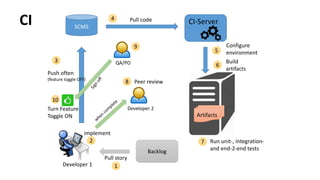
implement
SCMS
Push often
(feature toggle OFF)
Peer review
Developer 1
Developer 2Turn Feature
Toggle ON Artifacts
Build
artifacts
Backlog
Pull story
1
3
2
8
Pull code4
5
7 Run unit-, integration-
and end-2-end tests
6
Configure
environment
CI-Server
QA/PO
9
10
CI
Code
Repo
Developer
Push
feature
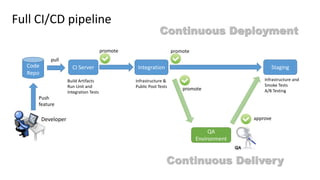
CI Server Integration Staging
promote
Build Artifacts
Run Unit and
Integration Tests
Infrastructure &
Public Pool Tests
promote
Infrastructure and
Smoke Tests
A/B Testing
QA
Environment
Full CI/CD pipeline
approve
promote
Continuous Delivery
Continuous Deployment
pull
Containers
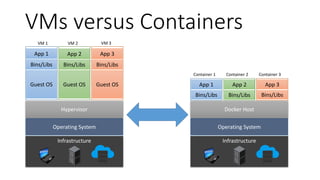
VMs versus Containers
Operating System
Hypervisor
Guest OS
Bins/Libs
App 1
VM 1
Guest OS
Bins/Libs
App 2
VM 2
Guest OS
Bins/Libs
App 3
VM 3
Infrastructure
Operating System
Docker Host
Infrastructure
Bins/Libs
App 1
Container 1
Bins/Libs
App 2
Container 2
Bins/Libs
App 3
Container 3
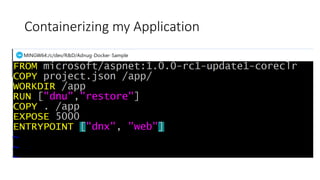
A Sample Application
• APS.NET Core 1.0 RC1
• Sample Template
• Running on CLR-CORE
Containerizing my Application
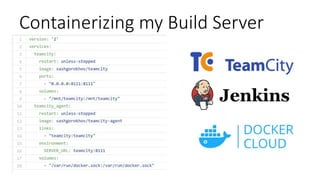
Containerizing my Build Server
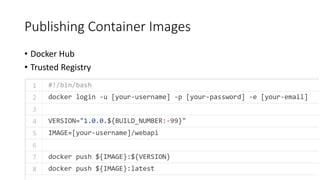
Publishing Container Images
• Docker Hub
• Trusted Registry
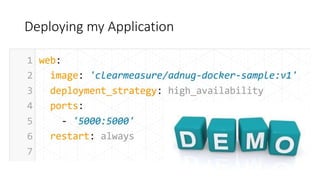
Deploying my Application
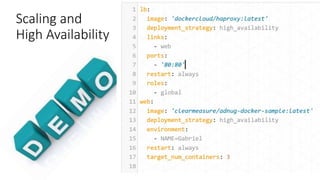
Scaling and
High Availability
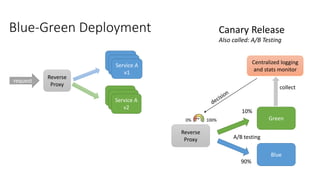
Blue-Green Deployment
Reverse
Proxy
Service A
v1
Service A
v2
request
Reverse
Proxy
Green
Blue
A/B testing
10%
90%
Centralized logging
and stats monitor
collect
0% 100%
Canary Release
Also called: A/B Testing
How Docker simplifies CI/CD

How Docker simplifies CI/CD

Editor's Notes

  • #6 CI assures us that after each merge of new code into the master branch we have a running, tested and deployable solution. It gives us confidence that we are not falling into the trap of “runs on my machine” CD: primary goal is to get new ideas from business into production asap, ideally in a matter of hours. Business stakeholders can then immediately measure and analyze the impact and take correcting action if necessary. Secondly, since we are now deploying often and in small batches we are reducing risk massively. Each deployment becomes a non-event.
  • #7 Although having a fully automated CI/CD is highly desirable and the ROI is guaranteed it is a non-trivial undertaken. Many elements need to be present. I’ll go through the list of the most important ones one by one.
  • #8 This slide shows how typically a CI setup could look like. It assumes that developers are merging their changes frequently to the master branch to reduce risk. To make this realistic they have to apply a technique called feature toggles which allows them to turn off an incomplete feature.
  • #9 This is how a medium complex CI/CD pipeline could look like. A developer pushes her code or feature to the code repo. The CI server pulls the latest code and builds and tests the artifacts If everything is OK the CI server promotes the artifacts to the next environment On this environment we can run other types of tests, specifically infrastructure and public pool tests Once again if everything is OK we can promote to the next environment Here it is a QA or UAT environment. A QA engineer manually tests and approves the changes Upon approval by the QA engineer the artifacts are promoted to staging On staging we can run some smoke tests and then do some A/B-testing and slowly funnel the traffic from the previous production through this version which becomes the new production We call this “Continuous Delivery” since a human needs to approve the changes. Everything is automated except this one step. To go a step further we can eliminate the QA altogether. If we go directly to staging without human intervention we call this “Continuous Deployment”
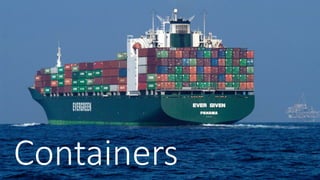
  • #10 Container in IT are revolutionizing DevOps the same way shipping containers revolutionized logistics! Shippers or carriers don’t have to care about the goods anymore but only about the container(s). Containers are self contained (e.g. cooling, packaging, etc.)
  • #11 A lot of people compare containers to VMs and think of a container as slimmed down VM. But that’s not quite true. Let’s look at it in detail Guest OS are huge and wasteful. Difference in size matters for storage, download, packaging on host and startup times
  • #12 Change .net version: dnvm use 1.0.0-rc1-update1 -r coreclr -arch x64