HOMONYMS
Monica Lopez
Definition of Homonyms
• Homonyms are words that are
spelled the same and also sound the
same, but they have different
meanings.
• The word “homonym” comes from
the prefix “homo,” which means the
same, and the suffix “-nym,” which
means name.
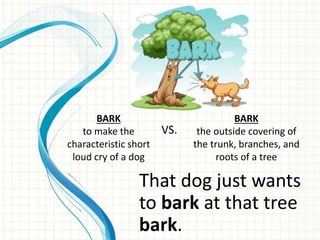
That dog just wants
to bark at that tree
bark.
BARK
to make the
characteristic short
loud cry of a dog
BARK
the outside covering of
the trunk, branches, and
roots of a tree
VS.
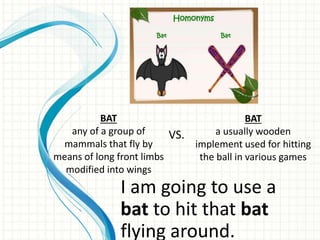
I am going to use a
bat to hit that bat
flying around.
BAT
any of a group of
mammals that fly by
means of long front limbs
modified into wings
BAT
a usually wooden
implement used for hitting
the ball in various games
VS.
How can you bear being
so close to that bear?
BEAR
being able to
withstand something
BEAR
an animalVS.
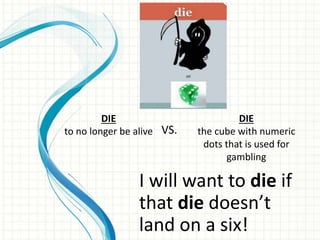
I will want to die if
that die doesn’t
land on a six!
DIE
to no longer be alive
DIE
the cube with numeric
dots that is used for
gambling
VS.
He rose from his seat to give
her a rose.
ROSE
A flower
ROSE
To get up
VS.
You will tire out that tire if you
don’t stop driving so much.
TIRE
to exhaust or greatly
decrease the
physical strength of
TIRE
a rubber cushion that fits
around a wheel (as of an
automobile) and usually
contains compressed air
VS.
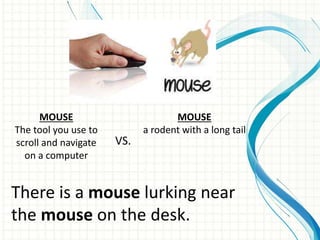
There is a mouse lurking near
the mouse on the desk.
MOUSE
The tool you use to
scroll and navigate
on a computer
MOUSE
a rodent with a long tail
VS.
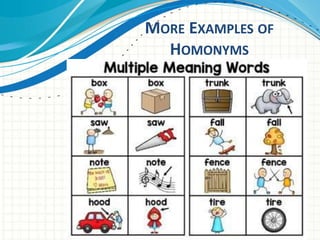
MORE EXAMPLES OF
HOMONYMS
MORE EXAMPLES OF
HOMONYMS
MORE EXAMPLES OF
HOMONYMS
MORE EXAMPLES OF
HOMONYMS
Conclusion of Homonyms
• Context clues clear up any confusion for most
readers within moments, and comprehension is
not an issue.
• Homonyms can be more confusing for young
readers or people learning English as a second
language, usually because they aren’t yet
familiar with alternate definitions of the word.
• If you ever come across a word that just doesn’t
seem to make sense in its context, check for
alternate definitions.
How Dr. Richter Feels

Homonyms presentation

  • 1.
  • 2.
    Definition of Homonyms •Homonyms are words that are spelled the same and also sound the same, but they have different meanings. • The word “homonym” comes from the prefix “homo,” which means the same, and the suffix “-nym,” which means name.
  • 3.
    That dog justwants to bark at that tree bark. BARK to make the characteristic short loud cry of a dog BARK the outside covering of the trunk, branches, and roots of a tree VS.
  • 4.
    I am goingto use a bat to hit that bat flying around. BAT any of a group of mammals that fly by means of long front limbs modified into wings BAT a usually wooden implement used for hitting the ball in various games VS.
  • 5.
    How can youbear being so close to that bear? BEAR being able to withstand something BEAR an animalVS.
  • 6.
    I will wantto die if that die doesn’t land on a six! DIE to no longer be alive DIE the cube with numeric dots that is used for gambling VS.
  • 7.
    He rose fromhis seat to give her a rose. ROSE A flower ROSE To get up VS.
  • 8.
    You will tireout that tire if you don’t stop driving so much. TIRE to exhaust or greatly decrease the physical strength of TIRE a rubber cushion that fits around a wheel (as of an automobile) and usually contains compressed air VS.
  • 9.
    There is amouse lurking near the mouse on the desk. MOUSE The tool you use to scroll and navigate on a computer MOUSE a rodent with a long tail VS.
  • 10.
  • 11.
  • 12.
  • 13.
  • 14.
    Conclusion of Homonyms •Context clues clear up any confusion for most readers within moments, and comprehension is not an issue. • Homonyms can be more confusing for young readers or people learning English as a second language, usually because they aren’t yet familiar with alternate definitions of the word. • If you ever come across a word that just doesn’t seem to make sense in its context, check for alternate definitions.
  • 15.

Editor's Notes

  • #2 This template can be used as a starter file for presenting training materials in a group setting. Sections Right-click on a slide to add sections. Sections can help to organize your slides or facilitate collaboration between multiple authors. Notes Use the Notes section for delivery notes or to provide additional details for the audience. View these notes in Presentation View during your presentation. Keep in mind the font size (important for accessibility, visibility, videotaping, and online production) Coordinated colors Pay particular attention to the graphs, charts, and text boxes. Consider that attendees will print in black and white or grayscale. Run a test print to make sure your colors work when printed in pure black and white and grayscale. Graphics, tables, and graphs Keep it simple: If possible, use consistent, non-distracting styles and colors. Label all graphs and tables.
  • #3 Give a brief overview of the presentation. Describe the major focus of the presentation and why it is important. Introduce each of the major topics. To provide a road map for the audience, you can repeat this Overview slide throughout the presentation, highlighting the particular topic you will discuss next.
  • #6 This is another option for an Overview slides using transitions.
  • #8 This is another option for an Overview slides using transitions.
  • #9 This is another option for an Overview slides using transitions.
  • #10 This is another option for an Overview slides using transitions.
  • #11 Microsoft Confidential
  • #12 Microsoft Confidential
  • #13 Microsoft Confidential
  • #14 Microsoft Confidential
  • #15 Give a brief overview of the presentation. Describe the major focus of the presentation and why it is important. Introduce each of the major topics. To provide a road map for the audience, you can repeat this Overview slide throughout the presentation, highlighting the particular topic you will discuss next.
  • #16 This template can be used as a starter file for presenting training materials in a group setting. Sections Right-click on a slide to add sections. Sections can help to organize your slides or facilitate collaboration between multiple authors. Notes Use the Notes section for delivery notes or to provide additional details for the audience. View these notes in Presentation View during your presentation. Keep in mind the font size (important for accessibility, visibility, videotaping, and online production) Coordinated colors Pay particular attention to the graphs, charts, and text boxes. Consider that attendees will print in black and white or grayscale. Run a test print to make sure your colors work when printed in pure black and white and grayscale. Graphics, tables, and graphs Keep it simple: If possible, use consistent, non-distracting styles and colors. Label all graphs and tables.