The case of the missing file extensions
44 café edition
Who?
Pete Beck
♦ PrincipalConsultant, NCC Group
♦ Breaking code since 1998
 GCHQ/CESG
 Microsoft
 BlackBerry
4/30/2014 © NCC Group 2
tl;dr
♦ SomeWindows file extensions are always hidden regardless of settings
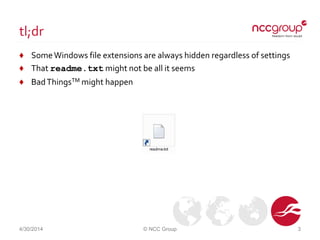
♦ That readme.txt might not be all it seems
♦ BadThingsTM might happen
4/30/2014 © NCC Group 3
Why?
♦ Accidental (re)discovery
 Chatting about retro games in the office
 Specifically text adventures
♦ Phill was a big fan of Infocom
 Zork, Hitchhikers Guide, …
♦ I was a big fan of Magnetic Scrolls
 The Pawn, Guild ofThieves, Jinxter, …
4/30/2014 © NCC Group 4
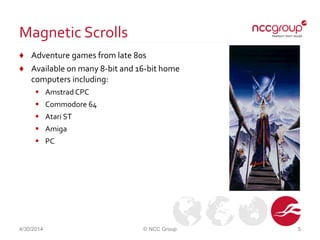
Magnetic Scrolls
♦ Adventure games from late 80s
♦ Available on many 8-bit and 16-bit home
computers including:
 Amstrad CPC
 Commodore 64
 Atari ST
 Amiga
 PC
4/30/2014 © NCC Group 5
Emulation
♦ Playable today with Magnetic emulator
♦ Games come as 4 files
 Game data
 Graphics
 Title Picture
 Title Music
4/30/2014 © NCC Group 6
Something missing
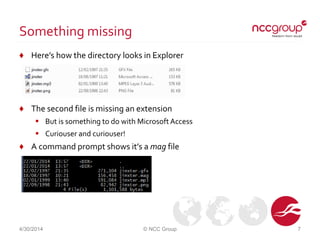
♦ Here’s how the directory looks in Explorer
♦ The second file is missing an extension
 But is something to do with MicrosoftAccess
 Curiouser and curiouser!
♦ A command prompt shows it’s a mag file
4/30/2014 © NCC Group 7
Questions
♦ Why are files with this extension are hidden?
♦ What else is hidden?
♦ How could someone abuse this?
4/30/2014 © NCC Group 8
Disclaimer
♦ All results from my machine
 Windows 7 64-bit
 Office 2010
♦ Yours might (probably will) vary
4/30/2014 © NCC Group 9
Registry mining
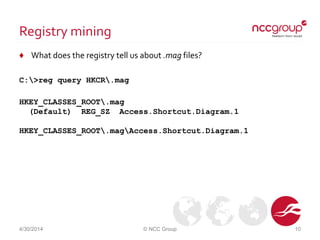
♦ What does the registry tell us about .mag files?
C:>reg query HKCR.mag
HKEY_CLASSES_ROOT.mag
(Default) REG_SZ Access.Shortcut.Diagram.1
HKEY_CLASSES_ROOT.magAccess.Shortcut.Diagram.1
4/30/2014 © NCC Group 10
More digging
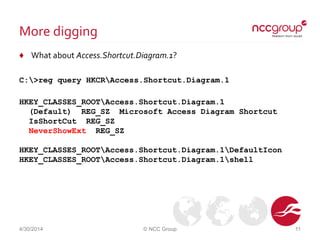
♦ What about Access.Shortcut.Diagram.1?
C:>reg query HKCRAccess.Shortcut.Diagram.1
HKEY_CLASSES_ROOTAccess.Shortcut.Diagram.1
(Default) REG_SZ Microsoft Access Diagram Shortcut
IsShortCut REG_SZ
NeverShowExt REG_SZ
HKEY_CLASSES_ROOTAccess.Shortcut.Diagram.1DefaultIcon
HKEY_CLASSES_ROOTAccess.Shortcut.Diagram.1shell
4/30/2014 © NCC Group 11
Prime suspect
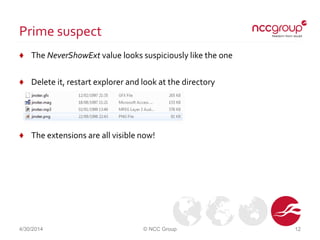
♦ The NeverShowExt value looks suspiciously like the one
♦ Delete it, restart explorer and look at the directory
♦ The extensions are all visible now!
4/30/2014 © NCC Group 12
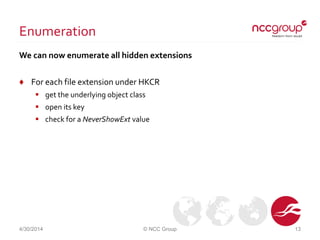
Enumeration
We can now enumerate all hidden extensions
♦ For each file extension under HKCR
 get the underlying object class
 open its key
 check for a NeverShowExt value
4/30/2014 © NCC Group 13
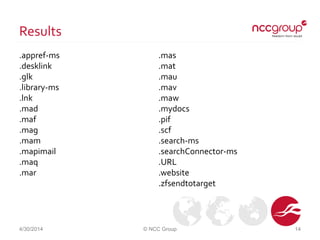
Results
.appref-ms
.desklink
.glk
.library-ms
.lnk
.mad
.maf
.mag
.mam
.mapimail
.maq
.mar
4/30/2014 © NCC Group 14
.mas
.mat
.mau
.mav
.maw
.mydocs
.pif
.scf
.search-ms
.searchConnector-ms
.URL
.website
.zfsendtotarget
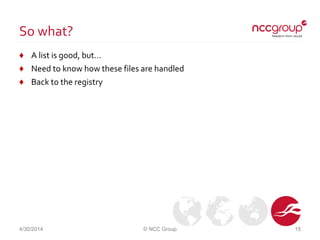
So what?
♦ A list is good, but…
♦ Need to know how these files are handled
♦ Back to the registry
4/30/2014 © NCC Group 15
Digging deeper
♦ Look at subkeys too
C:>reg query HKCRAccess.Shortcut.Diagram.1 /s
HKEY_CLASSES_ROOTAccess.Shortcut.Diagram.1
(Default) REG_SZ Microsoft Access Diagram Shortcut
IsShortCut REG_SZ
NeverShowExt REG_SZ
…
HKEY_CLASSES_ROOTAccess.Shortcut.Diagram.1shellOpencommand
(Default) REG_SZ "C:Program FilesMicrosoft
OfficeOffice14MSACCESS.EXE" /NOSTARTUP /SHELLSYSTEM
[OpenDiagram "%1"]
…
4/30/2014 © NCC Group 16
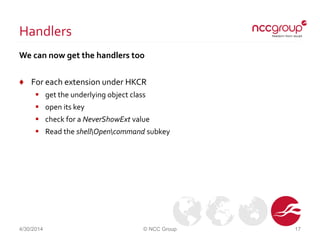
Handlers
We can now get the handlers too
♦ For each extension under HKCR
 get the underlying object class
 open its key
 check for a NeverShowExt value
 Read the shellOpencommand subkey
4/30/2014 © NCC Group 17
Enumeration II
.appref-ms rundll32.exe dfshim.dll,ShOpenVerbShortcut %1|%2
.desklink
.glk C:PROGRA~1MIF5BA~1Office14GROOVE.EXE /grv: "%1"
.library-ms
.lnk
.mad "C:Program FilesMicrosoft OfficeOffice14MSACCESS.EXE" /NOSTARTUP /SHELLSYSTEM [OpenModule "%1"]
.maf "C:Program FilesMicrosoft OfficeOffice14MSACCESS.EXE" /NOSTARTUP /SHELLSYSTEM [OpenForm "%1"]
.mag "C:Program FilesMicrosoft OfficeOffice14MSACCESS.EXE" /NOSTARTUP /SHELLSYSTEM [OpenDiagram "%1"]
.mam "C:Program FilesMicrosoft OfficeOffice14MSACCESS.EXE" /NOSTARTUP /SHELLSYSTEM [ShellOpenMacro "%1"]
.mapimail
.maq C:PROGRA~1MIF5BA~1Office14MSACCESS.EXE /NOSTARTUP /SHELLSYSTEM [OpenQuery "%1"]
.mar "C:Program FilesMicrosoft OfficeOffice14MSACCESS.EXE" /NOSTARTUP /SHELLSYSTEM [OpenReport "%1", 2]
.mas "C:Program FilesMicrosoft OfficeOffice14MSACCESS.EXE" /NOSTARTUP /SHELLSYSTEM [OpenStoredProcedure "%1"]
.mat C:PROGRA~1MIF5BA~1Office14MSACCESS.EXE /NOSTARTUP /SHELLSYSTEM [OpenTable "%1"]
.mau "C:Program FilesMicrosoft OfficeOffice14MSACCESS.EXE" /SHELLSYSTEM [OpenFunction "%1"]
.mav "C:Program FilesMicrosoft OfficeOffice14MSACCESS.EXE" /NOSTARTUP /SHELLSYSTEM [OpenView "%1"]
.maw "C:Program FilesMicrosoft OfficeOffice14MSACCESS.EXE" /NOSTARTUP /SHELLSYSTEM [OpenDataAccessPage "%1"]
.mydocs
.pif "%1" %*
.scf C:Windowsexplorer.exe
.search-ms
.searchConnector-ms
.URL "C:WindowsSystem32rundll32.exe" "C:WindowsSystem32ieframe.dll",OpenURL %l
.website "C:Program FilesInternet Exploreriexplore.exe" -w "%l" %*
.zfsendtotarget
4/30/2014 © NCC Group 18
Abuse
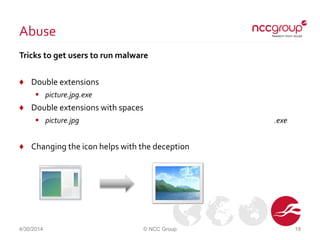
Tricks to get users to run malware
♦ Double extensions
 picture.jpg.exe
♦ Double extensions with spaces
 picture.jpg .exe
♦ Changing the icon helps with the deception
4/30/2014 © NCC Group 19
More abuse
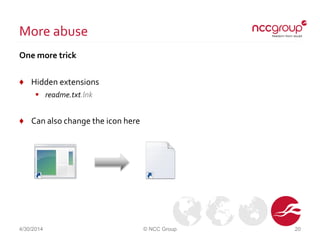
One more trick
♦ Hidden extensions
 readme.txt.lnk
♦ Can also change the icon here
4/30/2014 © NCC Group 20
Classes
The extensions fall into a few distinct groups
♦ MicrosoftAccess
♦ Shortcuts
♦ Internet shortcuts
♦ SendTo items
♦ Searches
♦ Others
4/30/2014 © NCC Group 21
Microsoft Access files
♦ No obvious reason for hiding them
♦ Lots!
 mad maf mag mam maq mar mas mat mau mav maw
♦ No obvious attack vectors
 Macros potentially interesting
 Caveat: I am not an Access expert
4/30/2014 © NCC Group 22
Shortcuts
♦ Extensions hidden to improve UI appearance
♦ Two extensions are shortcuts to executables
 lnk is a standard shortcut
 pif is a shortcut to a DOS program
♦ Icon is also controllable
♦ Attacks using lnk
 Run any executable on the local machine
 Run any signed executable from remote machines directly (SMB/WebDAV)
 Unsigned executables will run but pop a warning
 Run any unsigned executable from remote machines indirectly
 E.g. via cmd.exe or rundll32.exe
4/30/2014 © NCC Group 23
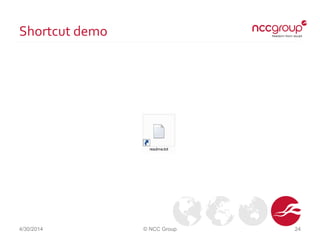
Shortcut demo
4/30/2014 © NCC Group 24
Internet shortcuts
♦ Two extensions send user to a web page
 url is an Internet Shortcut
 website is a Pinned Internet Shortcut
♦ Icon is also controllable
♦ Attacks
 Web bugs
 Phishing
 Malware
 Undesirable content
4/30/2014 © NCC Group 25
Internet shortcut example
♦ The following is an example readme.txt.url
 Sends a user to NCC Group’s home page
 Sets its icon to be the same as a text file
[{000214A0-0000-0000-C000-000000000046}]
Prop3=19,2
[InternetShortcut]
URL=http://www.nccgroup.com/
IDList=
HotKey=0
IconFile=C:WindowsSystem32shell32.dll
IconIndex=70
4/30/2014 © NCC Group 26
SendTo items
♦ Extensions hidden to improve UI appearance
♦ In %USERPROFILE%AppDataRoamingMicrosoftWindowsSendTo
 desklink creates a shortcut
 mapimail sends content to a mail recipient
 mydocs sends a file to a user's My Documents folder
 zfsendtotarget sends a file to a compressed (zip) file
♦ None have any controllable content
♦ No obvious ways they can be used maliciously
4/30/2014 © NCC Group 27
Searches
♦ Extensions hidden to improve UI appearance
♦ In %USERPROFILE%Searches
 searchConnector-ms is a search connector
 search-ms is a search folder
♦ No obvious ways they can be used maliciously
4/30/2014 © NCC Group 28
Others
♦ A few don’t fit into any groups
 appref-ms used with ClickOnce
 library-ms used by Explorer to merge several directories into a single view
 glk files are used by Groove
 scf files are used to tell Explorer to perform specific actions
♦ The first looks potentially interesting as it can install applications
 Though extensive user interaction is required
♦ The others have no obvious attack vectors
4/30/2014 © NCC Group 29
Mitigations
♦ Files with certain extensions blocked by
 Email clients
 Enterprise mail scanners
 Anti-virus software
♦ Sledgehammer approach
 Delete all NeverShowExt values in registry
4/30/2014 © NCC Group 30
Conclusions
♦ Some file extensions are always hidden
♦ A few of these increase the chance of malicious code being run
♦ Be very careful what you click on!
4/30/2014 © NCC Group 31
Thank you! Questions?
Contact us
pete.beck@nccgroup.com
UK Offices
Manchester - Head Office
Cheltenham
Edinburgh
Leatherhead
London
Thame
North American Offices
San Francisco
Atlanta
New York
Seattle
Australian Offices
Sydney
European Offices
Amsterdam - Netherlands
Munich – Germany
Zurich - Switzerland

The case of the missing file extensions

  • 1.
    The case ofthe missing file extensions 44 café edition
  • 2.
    Who? Pete Beck ♦ PrincipalConsultant,NCC Group ♦ Breaking code since 1998  GCHQ/CESG  Microsoft  BlackBerry 4/30/2014 © NCC Group 2
  • 3.
    tl;dr ♦ SomeWindows fileextensions are always hidden regardless of settings ♦ That readme.txt might not be all it seems ♦ BadThingsTM might happen 4/30/2014 © NCC Group 3
  • 4.
    Why? ♦ Accidental (re)discovery Chatting about retro games in the office  Specifically text adventures ♦ Phill was a big fan of Infocom  Zork, Hitchhikers Guide, … ♦ I was a big fan of Magnetic Scrolls  The Pawn, Guild ofThieves, Jinxter, … 4/30/2014 © NCC Group 4
  • 5.
    Magnetic Scrolls ♦ Adventuregames from late 80s ♦ Available on many 8-bit and 16-bit home computers including:  Amstrad CPC  Commodore 64  Atari ST  Amiga  PC 4/30/2014 © NCC Group 5
  • 6.
    Emulation ♦ Playable todaywith Magnetic emulator ♦ Games come as 4 files  Game data  Graphics  Title Picture  Title Music 4/30/2014 © NCC Group 6
  • 7.
    Something missing ♦ Here’show the directory looks in Explorer ♦ The second file is missing an extension  But is something to do with MicrosoftAccess  Curiouser and curiouser! ♦ A command prompt shows it’s a mag file 4/30/2014 © NCC Group 7
  • 8.
    Questions ♦ Why arefiles with this extension are hidden? ♦ What else is hidden? ♦ How could someone abuse this? 4/30/2014 © NCC Group 8
  • 9.
    Disclaimer ♦ All resultsfrom my machine  Windows 7 64-bit  Office 2010 ♦ Yours might (probably will) vary 4/30/2014 © NCC Group 9
  • 10.
    Registry mining ♦ Whatdoes the registry tell us about .mag files? C:>reg query HKCR.mag HKEY_CLASSES_ROOT.mag (Default) REG_SZ Access.Shortcut.Diagram.1 HKEY_CLASSES_ROOT.magAccess.Shortcut.Diagram.1 4/30/2014 © NCC Group 10
  • 11.
    More digging ♦ Whatabout Access.Shortcut.Diagram.1? C:>reg query HKCRAccess.Shortcut.Diagram.1 HKEY_CLASSES_ROOTAccess.Shortcut.Diagram.1 (Default) REG_SZ Microsoft Access Diagram Shortcut IsShortCut REG_SZ NeverShowExt REG_SZ HKEY_CLASSES_ROOTAccess.Shortcut.Diagram.1DefaultIcon HKEY_CLASSES_ROOTAccess.Shortcut.Diagram.1shell 4/30/2014 © NCC Group 11
  • 12.
    Prime suspect ♦ TheNeverShowExt value looks suspiciously like the one ♦ Delete it, restart explorer and look at the directory ♦ The extensions are all visible now! 4/30/2014 © NCC Group 12
  • 13.
    Enumeration We can nowenumerate all hidden extensions ♦ For each file extension under HKCR  get the underlying object class  open its key  check for a NeverShowExt value 4/30/2014 © NCC Group 13
  • 14.
    Results .appref-ms .desklink .glk .library-ms .lnk .mad .maf .mag .mam .mapimail .maq .mar 4/30/2014 © NCCGroup 14 .mas .mat .mau .mav .maw .mydocs .pif .scf .search-ms .searchConnector-ms .URL .website .zfsendtotarget
  • 15.
    So what? ♦ Alist is good, but… ♦ Need to know how these files are handled ♦ Back to the registry 4/30/2014 © NCC Group 15
  • 16.
    Digging deeper ♦ Lookat subkeys too C:>reg query HKCRAccess.Shortcut.Diagram.1 /s HKEY_CLASSES_ROOTAccess.Shortcut.Diagram.1 (Default) REG_SZ Microsoft Access Diagram Shortcut IsShortCut REG_SZ NeverShowExt REG_SZ … HKEY_CLASSES_ROOTAccess.Shortcut.Diagram.1shellOpencommand (Default) REG_SZ "C:Program FilesMicrosoft OfficeOffice14MSACCESS.EXE" /NOSTARTUP /SHELLSYSTEM [OpenDiagram "%1"] … 4/30/2014 © NCC Group 16
  • 17.
    Handlers We can nowget the handlers too ♦ For each extension under HKCR  get the underlying object class  open its key  check for a NeverShowExt value  Read the shellOpencommand subkey 4/30/2014 © NCC Group 17
  • 18.
    Enumeration II .appref-ms rundll32.exedfshim.dll,ShOpenVerbShortcut %1|%2 .desklink .glk C:PROGRA~1MIF5BA~1Office14GROOVE.EXE /grv: "%1" .library-ms .lnk .mad "C:Program FilesMicrosoft OfficeOffice14MSACCESS.EXE" /NOSTARTUP /SHELLSYSTEM [OpenModule "%1"] .maf "C:Program FilesMicrosoft OfficeOffice14MSACCESS.EXE" /NOSTARTUP /SHELLSYSTEM [OpenForm "%1"] .mag "C:Program FilesMicrosoft OfficeOffice14MSACCESS.EXE" /NOSTARTUP /SHELLSYSTEM [OpenDiagram "%1"] .mam "C:Program FilesMicrosoft OfficeOffice14MSACCESS.EXE" /NOSTARTUP /SHELLSYSTEM [ShellOpenMacro "%1"] .mapimail .maq C:PROGRA~1MIF5BA~1Office14MSACCESS.EXE /NOSTARTUP /SHELLSYSTEM [OpenQuery "%1"] .mar "C:Program FilesMicrosoft OfficeOffice14MSACCESS.EXE" /NOSTARTUP /SHELLSYSTEM [OpenReport "%1", 2] .mas "C:Program FilesMicrosoft OfficeOffice14MSACCESS.EXE" /NOSTARTUP /SHELLSYSTEM [OpenStoredProcedure "%1"] .mat C:PROGRA~1MIF5BA~1Office14MSACCESS.EXE /NOSTARTUP /SHELLSYSTEM [OpenTable "%1"] .mau "C:Program FilesMicrosoft OfficeOffice14MSACCESS.EXE" /SHELLSYSTEM [OpenFunction "%1"] .mav "C:Program FilesMicrosoft OfficeOffice14MSACCESS.EXE" /NOSTARTUP /SHELLSYSTEM [OpenView "%1"] .maw "C:Program FilesMicrosoft OfficeOffice14MSACCESS.EXE" /NOSTARTUP /SHELLSYSTEM [OpenDataAccessPage "%1"] .mydocs .pif "%1" %* .scf C:Windowsexplorer.exe .search-ms .searchConnector-ms .URL "C:WindowsSystem32rundll32.exe" "C:WindowsSystem32ieframe.dll",OpenURL %l .website "C:Program FilesInternet Exploreriexplore.exe" -w "%l" %* .zfsendtotarget 4/30/2014 © NCC Group 18
  • 19.
    Abuse Tricks to getusers to run malware ♦ Double extensions  picture.jpg.exe ♦ Double extensions with spaces  picture.jpg .exe ♦ Changing the icon helps with the deception 4/30/2014 © NCC Group 19
  • 20.
    More abuse One moretrick ♦ Hidden extensions  readme.txt.lnk ♦ Can also change the icon here 4/30/2014 © NCC Group 20
  • 21.
    Classes The extensions fallinto a few distinct groups ♦ MicrosoftAccess ♦ Shortcuts ♦ Internet shortcuts ♦ SendTo items ♦ Searches ♦ Others 4/30/2014 © NCC Group 21
  • 22.
    Microsoft Access files ♦No obvious reason for hiding them ♦ Lots!  mad maf mag mam maq mar mas mat mau mav maw ♦ No obvious attack vectors  Macros potentially interesting  Caveat: I am not an Access expert 4/30/2014 © NCC Group 22
  • 23.
    Shortcuts ♦ Extensions hiddento improve UI appearance ♦ Two extensions are shortcuts to executables  lnk is a standard shortcut  pif is a shortcut to a DOS program ♦ Icon is also controllable ♦ Attacks using lnk  Run any executable on the local machine  Run any signed executable from remote machines directly (SMB/WebDAV)  Unsigned executables will run but pop a warning  Run any unsigned executable from remote machines indirectly  E.g. via cmd.exe or rundll32.exe 4/30/2014 © NCC Group 23
  • 24.
  • 25.
    Internet shortcuts ♦ Twoextensions send user to a web page  url is an Internet Shortcut  website is a Pinned Internet Shortcut ♦ Icon is also controllable ♦ Attacks  Web bugs  Phishing  Malware  Undesirable content 4/30/2014 © NCC Group 25
  • 26.
    Internet shortcut example ♦The following is an example readme.txt.url  Sends a user to NCC Group’s home page  Sets its icon to be the same as a text file [{000214A0-0000-0000-C000-000000000046}] Prop3=19,2 [InternetShortcut] URL=http://www.nccgroup.com/ IDList= HotKey=0 IconFile=C:WindowsSystem32shell32.dll IconIndex=70 4/30/2014 © NCC Group 26
  • 27.
    SendTo items ♦ Extensionshidden to improve UI appearance ♦ In %USERPROFILE%AppDataRoamingMicrosoftWindowsSendTo  desklink creates a shortcut  mapimail sends content to a mail recipient  mydocs sends a file to a user's My Documents folder  zfsendtotarget sends a file to a compressed (zip) file ♦ None have any controllable content ♦ No obvious ways they can be used maliciously 4/30/2014 © NCC Group 27
  • 28.
    Searches ♦ Extensions hiddento improve UI appearance ♦ In %USERPROFILE%Searches  searchConnector-ms is a search connector  search-ms is a search folder ♦ No obvious ways they can be used maliciously 4/30/2014 © NCC Group 28
  • 29.
    Others ♦ A fewdon’t fit into any groups  appref-ms used with ClickOnce  library-ms used by Explorer to merge several directories into a single view  glk files are used by Groove  scf files are used to tell Explorer to perform specific actions ♦ The first looks potentially interesting as it can install applications  Though extensive user interaction is required ♦ The others have no obvious attack vectors 4/30/2014 © NCC Group 29
  • 30.
    Mitigations ♦ Files withcertain extensions blocked by  Email clients  Enterprise mail scanners  Anti-virus software ♦ Sledgehammer approach  Delete all NeverShowExt values in registry 4/30/2014 © NCC Group 30
  • 31.
    Conclusions ♦ Some fileextensions are always hidden ♦ A few of these increase the chance of malicious code being run ♦ Be very careful what you click on! 4/30/2014 © NCC Group 31
  • 32.
    Thank you! Questions? Contactus pete.beck@nccgroup.com UK Offices Manchester - Head Office Cheltenham Edinburgh Leatherhead London Thame North American Offices San Francisco Atlanta New York Seattle Australian Offices Sydney European Offices Amsterdam - Netherlands Munich – Germany Zurich - Switzerland