Effortless K8s 
resource 
management 
Various Options to deploy resources in k8s cluster 
 
March 2019 


Author 
Ganesh Pol 


K8s deployment Complexity 
K8s now become the de facto standard for container orchestration as it is open source. It 
needs various k8s resources in the form of YAML files to be deployed in k8s cluster. 
If the application is small then deploying these YAML files will be very easy with the help 
of kubectl. 
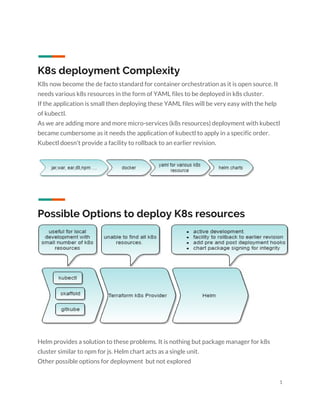
As we are adding more and more micro-services (k8s resources) deployment with kubectl 
became cumbersome as it needs the application of kubectl to apply in a specific order. 
Kubectl doesn't provide a facility to rollback to an earlier revision. 


Possible Options to deploy K8s resources 
 
 
Helm provides a solution to these problems. It is nothing but package manager for k8s 
cluster similar to npm for js. Helm chart acts as a single unit. 
Other possible options for deployment but not explored 
1 
 
● Draft 
● Metaparticle 
● ksonnet 
 
Important Components of Helm 
 
 
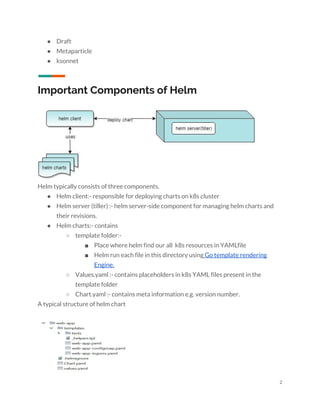
Helm typically consists of three components. 
● Helm client:- responsible for deploying charts on k8s cluster 
● Helm server (tiller) :- helm server-side component for managing helm charts and 
their revisions. 
● Helm charts:- contains  
○ template folder:-  
■ Place where helm find our all k8s resources in YAMLfile 
■ Helm run each file in this directory using​ Go template rendering 
Engine. 
○ Values.yaml :- contains placeholders in k8s YAML files present in the 
template folder 
○ Chart.yaml :- contains meta information e.g. version number. 
A typical structure of helm chart 
 
 
2 
 
Helm chart provides charts for various tools such as jenkins, sonarqube,nginx etc. more 
information can be found ​at  
 
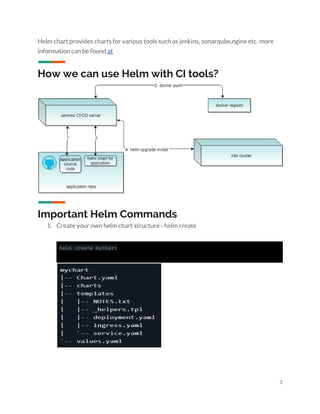
How we can use Helm with CI tools? 
 
 
Important Helm Commands 
1. Create your own helm chart structure - helm create  
 
helm create mychart


3 
 
2. Install helm chart :- helm install <chart-folder-location> 
 
Other commands 
Helm ls 
Helm search 
 
Possible Options to add more features to basic 
helm charts 
● Requirement.yaml:- manage complex charts to manage dependencies. 
Common use cases such as adding mongodb replicaset. 
● Pre and post deployment hooks 
● Chart package signing to verify integrity:- useful for a production 
environment 
● Add a description to chart 
● Add testing for chart after deployment 


4 

Helm chart-introduction

  • 1.
          Effortless K8s  resource  management  Various Optionsto deploy resources in k8s cluster    March 2019                        Author  Ganesh Pol           
  • 2.
          K8s deployment Complexity  K8snow become the de facto standard for container orchestration as it is open source. It  needs various k8s resources in the form of YAML files to be deployed in k8s cluster.  If the application is small then deploying these YAML files will be very easy with the help  of kubectl.  As we are adding more and more micro-services (k8s resources) deployment with kubectl  became cumbersome as it needs the application of kubectl to apply in a specific order.  Kubectl doesn't provide a facility to rollback to an earlier revision.          Possible Options to deploy K8s resources      Helm provides a solution to these problems. It is nothing but package manager for k8s  cluster similar to npm for js. Helm chart acts as a single unit.  Other possible options for deployment but not explored  1 
  • 3.
      ● Draft  ● Metaparticle  ●ksonnet    Important Components of Helm      Helm typically consists of three components.  ● Helm client:- responsible for deploying charts on k8s cluster  ● Helm server (tiller) :- helm server-side component for managing helm charts and  their revisions.  ● Helm charts:- contains   ○ template folder:-   ■ Place where helm find our all k8s resources in YAMLfile  ■ Helm run each file in this directory using​ Go template rendering  Engine.  ○ Values.yaml :- contains placeholders in k8s YAML files present in the  template folder  ○ Chart.yaml :- contains meta information e.g. version number.  A typical structure of helm chart      2 
  • 4.
      Helm chart providescharts for various tools such as jenkins, sonarqube,nginx etc. more  information can be found ​at     How we can use Helm with CI tools?      Important Helm Commands  1. Create your own helm chart structure - helm create     helm create mychart       3 
  • 5.
      2. Install helmchart :- helm install <chart-folder-location>    Other commands  Helm ls  Helm search    Possible Options to add more features to basic  helm charts  ● Requirement.yaml:- manage complex charts to manage dependencies.  Common use cases such as adding mongodb replicaset.  ● Pre and post deployment hooks  ● Chart package signing to verify integrity:- useful for a production  environment  ● Add a description to chart  ● Add testing for chart after deployment              4