Case Study
2/12/2016 1Chapter-3
1. Strive for consistency
2. Enable frequent users to use shortcuts
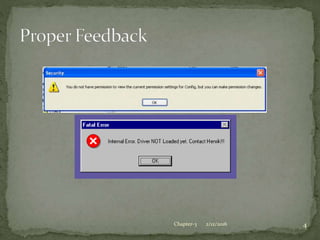
3. Offer informative feedback
4. Design dialogs to yield closure
5. Offer error prevention and simple error handling
6. Permit easy reversal of actions
7. Support internal locus of control
8. Reduce short-term memory load
2/12/2016 2Chapter-3
 Consistent sequence of
actions for similar situations
 Identical Terminology
(prompts, menus, help)
 Consistent visual layout
(fonts, color, etc.)
 Exceptions:
 Confirmation of deletion
 No password echoing
 Limited
2/12/2016 4Chapter-3
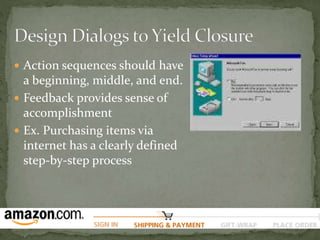
 Action sequences should have
a beginning, middle, and end.
 Feedback provides sense of
accomplishment
 Ex. Purchasing items via
internet has a clearly defined
step-by-step process
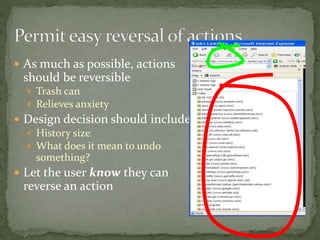
 As much as possible, actions
should be reversible
 Trash can
 Relieves anxiety
 Design decision should include
 History size
 What does it mean to undo
something?
 Let the user know they can
reverse an action
 Experiences operators want to feel in control
 User is in charge of the interface
 Interface rapidly responds to the user
 Builds anxiety and dissatisfaction
 Surprising interface actions
 Tedious actions
 Difficulty in obtaining necessary ability
 Difficulty in producing action
 Ex. Lag
 Good rules: Avoid a causality, make users initiators rather
than responders
 Ex. Sound when clicking on a link
 Rule of thumb: Humans can remember 7 +/- 2 chunks
of information
 Displays kept simple
 Multiple page displays should be consolidated
 Training if using codes, mnemonics, long sequence of
actions
 Online access to command-syntax, abbreviations,
codes, etc.
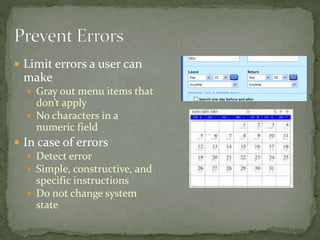
 Limit errors a user can
make
 Gray out menu items that
don’t apply
 No characters in a
numeric field
 In case of errors
 Detect error
 Simple, constructive, and
specific instructions
 Do not change system
state
 Error rate is typically higher than expected
 What are common errors for us?
 Coding, typing, dialing, grammar
 How can we design software to reduce them?
 Better error messages
 Specific, positive, and constructive
 “Printer is off, please turn on” instead of “Illegal Operation” Helps fix current
error
 Helps reduce similar errors
 Increases satisfaction
 Reduce chance for error
 Organizing info, screens, menus
 Commands and menu choices should be distinctive
 Consistency of actions (Yes/No order of buttons)
 Apply any five HCI principles to design the user interface
for Academic Calendar and Event Planner for college. It
should allow student to see any event organized by the
department in the college. Students should register , view
the venue and select the event. The report should be
generated at the end of the event and will be passed to all
faculties with attendance and event details. Assume
suitable data and draw the interface.
2/12/2016 11Chapter-3

Hci principles

  • 1.
  • 2.
    1. Strive forconsistency 2. Enable frequent users to use shortcuts 3. Offer informative feedback 4. Design dialogs to yield closure 5. Offer error prevention and simple error handling 6. Permit easy reversal of actions 7. Support internal locus of control 8. Reduce short-term memory load 2/12/2016 2Chapter-3
  • 3.
     Consistent sequenceof actions for similar situations  Identical Terminology (prompts, menus, help)  Consistent visual layout (fonts, color, etc.)  Exceptions:  Confirmation of deletion  No password echoing  Limited
  • 4.
  • 5.
     Action sequencesshould have a beginning, middle, and end.  Feedback provides sense of accomplishment  Ex. Purchasing items via internet has a clearly defined step-by-step process
  • 6.
     As muchas possible, actions should be reversible  Trash can  Relieves anxiety  Design decision should include  History size  What does it mean to undo something?  Let the user know they can reverse an action
  • 7.
     Experiences operatorswant to feel in control  User is in charge of the interface  Interface rapidly responds to the user  Builds anxiety and dissatisfaction  Surprising interface actions  Tedious actions  Difficulty in obtaining necessary ability  Difficulty in producing action  Ex. Lag  Good rules: Avoid a causality, make users initiators rather than responders  Ex. Sound when clicking on a link
  • 8.
     Rule ofthumb: Humans can remember 7 +/- 2 chunks of information  Displays kept simple  Multiple page displays should be consolidated  Training if using codes, mnemonics, long sequence of actions  Online access to command-syntax, abbreviations, codes, etc.
  • 9.
     Limit errorsa user can make  Gray out menu items that don’t apply  No characters in a numeric field  In case of errors  Detect error  Simple, constructive, and specific instructions  Do not change system state
  • 10.
     Error rateis typically higher than expected  What are common errors for us?  Coding, typing, dialing, grammar  How can we design software to reduce them?  Better error messages  Specific, positive, and constructive  “Printer is off, please turn on” instead of “Illegal Operation” Helps fix current error  Helps reduce similar errors  Increases satisfaction  Reduce chance for error  Organizing info, screens, menus  Commands and menu choices should be distinctive  Consistency of actions (Yes/No order of buttons)
  • 11.
     Apply anyfive HCI principles to design the user interface for Academic Calendar and Event Planner for college. It should allow student to see any event organized by the department in the college. Students should register , view the venue and select the event. The report should be generated at the end of the event and will be passed to all faculties with attendance and event details. Assume suitable data and draw the interface. 2/12/2016 11Chapter-3