Fall 2002 CS/PSY 6750 1
Information Visualization 2
Case Study: Portraying Hierarchies
• Visualizing hierarchies
− Variety of techniques
Traditional tree views, alternatives, space-filling
views
Hierarchies
• Definition
− Ordering of items in which particular items are
parents or ancestors of others
• Example: File System
− Folders/Directories with folders/subdirectories and
files inside
Fall 2002 CS/PSY 6750 2
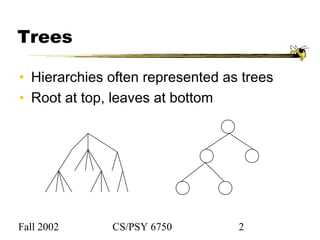
Trees
• Hierarchies often represented as trees
• Root at top, leaves at bottom
Fall 2002 CS/PSY 6750 3
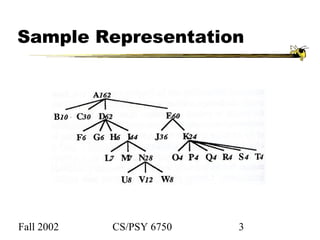
Sample Representation
Fall 2002 CS/PSY 6750 4
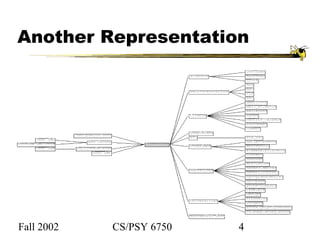
Another Representation
Fall 2002 CS/PSY 6750 5
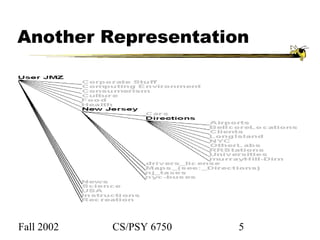
Another Representation
Fall 2002 CS/PSY 6750 6
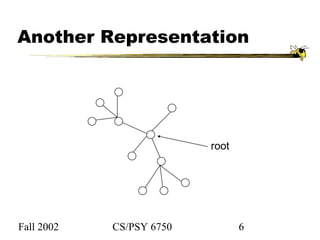
Another Representation
root
Fall 2002 CS/PSY 6750 7
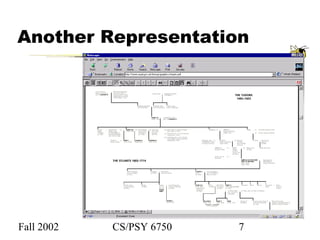
Another Representation
Fall 2002 CS/PSY 6750 8
Potential Problems
• Width of fan-out uses real estate
− Run out of room quickly
Fall 2002 CS/PSY 6750 9
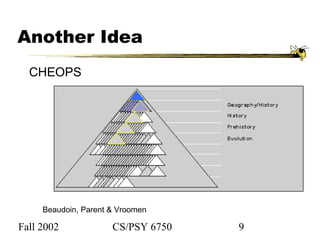
Another Idea
CHEOPS
Beaudoin, Parent & Vroomen
Fall 2002 CS/PSY 6750 10
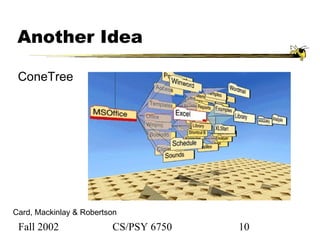
Another Idea
Card, Mackinlay & Robertson
ConeTree
Fall 2002 CS/PSY 6750 11
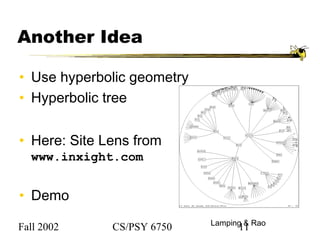
Another Idea
• Use hyperbolic geometry
• Hyperbolic tree
• Here: Site Lens from
www.inxight.com
• Demo
Lamping & Rao
Fall 2002 CS/PSY 6750 12
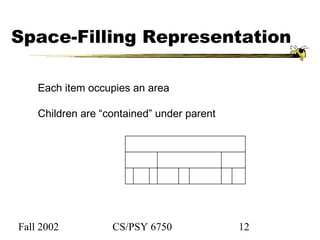
Space-Filling Representation
Each item occupies an area
Children are “contained” under parent
Fall 2002 CS/PSY 6750 13
Treemap
• Space-filling representation developed by
Shneiderman and Johnson
• Children are drawn inside their parent
• Alternate horizontal and vertical slicing at
each successive level
Fall 2002 CS/PSY 6750 14
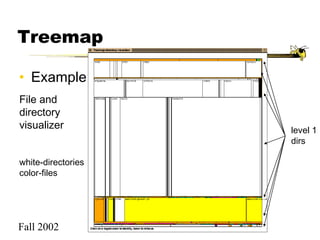
Treemap
• Example
File and
directory
visualizer
white-directories
color-files
level 1
dirs
Fall 2002 CS/PSY 6750 15
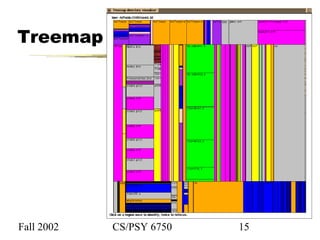
Treemap
Fall 2002 CS/PSY 6750 16
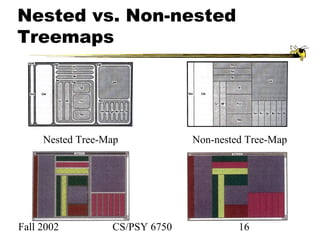
Nested vs. Non-nested
Treemaps
Nested Tree-Map Non-nested Tree-Map
Fall 2002 CS/PSY 6750 17
Treemap Affordances
• Good representation of two attributes:
color and area
• Not as good at representing structure
− What happens if it’s a perfectly balanced tree
of items all the same size?
− Also can get long-thin aspect ratios
Fall 2002 CS/PSY 6750 18
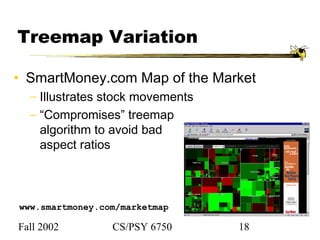
Treemap Variation
• SmartMoney.com Map of the Market
− Illustrates stock movements
− “Compromises” treemap
algorithm to avoid bad
aspect ratios
www.smartmoney.com/marketmap
Fall 2002 CS/PSY 6750 19
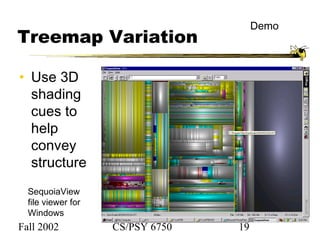
Treemap Variation
• Use 3D
shading
cues to
help
convey
structure
SequoiaView
file viewer for
Windows
Demo
Fall 2002 CS/PSY 6750 20
Another Technique
• What if we used a radial rather than a
rectangular space-filling technique?
Sunburst
• Demonstration of system
/usr/local/bin/sunburst
Fall 2002 CS/PSY 6750 21
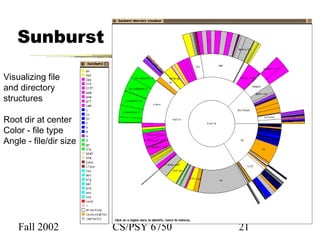
Sunburst
Visualizing file
and directory
structures
Root dir at center
Color - file type
Angle - file/dir size
Fall 2002 CS/PSY 6750 22
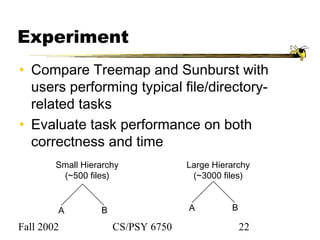
Experiment
• Compare Treemap and Sunburst with
users performing typical file/directory-
related tasks
• Evaluate task performance on both
correctness and time
Small Hierarchy
(~500 files)
Large Hierarchy
(~3000 files)
A B A B
Fall 2002 CS/PSY 6750 23
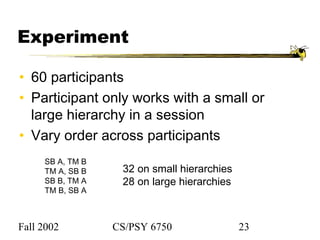
Experiment
• 60 participants
• Participant only works with a small or
large hierarchy in a session
• Vary order across participants
SB A, TM B
TM A, SB B
SB B, TM A
TM B, SB A
32 on small hierarchies
28 on large hierarchies
Fall 2002 CS/PSY 6750 24
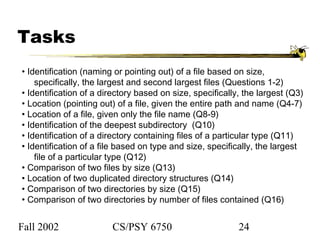
Tasks
• Identification (naming or pointing out) of a file based on size,
specifically, the largest and second largest files (Questions 1-2)
• Identification of a directory based on size, specifically, the largest (Q3)
• Location (pointing out) of a file, given the entire path and name (Q4-7)
• Location of a file, given only the file name (Q8-9)
• Identification of the deepest subdirectory (Q10)
• Identification of a directory containing files of a particular type (Q11)
• Identification of a file based on type and size, specifically, the largest
file of a particular type (Q12)
• Comparison of two files by size (Q13)
• Location of two duplicated directory structures (Q14)
• Comparison of two directories by size (Q15)
• Comparison of two directories by number of files contained (Q16)
Fall 2002 CS/PSY 6750 25
Results
• Ordering effect for Treemap on large
hierarchies
• Performance trends favored Sunburst, but
not clear-cut
• Subjective preference:
SB (51), TM (9), unsure (1)
Fall 2002 CS/PSY 6750 26
Observations
• SB appeared to convey structure better
• Participants felt TM conveyed size better,
but not bore out
• Strategies mattered
Fall 2002 CS/PSY 6750 27
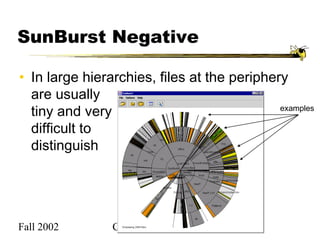
SunBurst Negative
• In large hierarchies, files at the periphery
are usually
tiny and very
difficult to
distinguish
examples
Fall 2002 CS/PSY 6750 28
Fix: Objectives
• Make small slices bigger
• Maintain full circular
space-filling idea
• Allow detailed
examination of small files
within context of entire
hierarchy
• Don’t alter ratios of sizes
• Avoid use of multiple
windows or lots of
scrollbars
• Provide an
aesthetically pleasing
interface in which it is
easy to track changes
in focus
Fall 2002 CS/PSY 6750 29
With Eugene Zhang
Proceedings of Information Visualization 2000,
Oct. 2000, pp. 57-65.
3 Solutions
• Three visualization+navigation techniques
developed to help remedy the
shortcoming
− Angular detail
− Detail outside
− Detail inside
Fall 2002 CS/PSY 6750 30
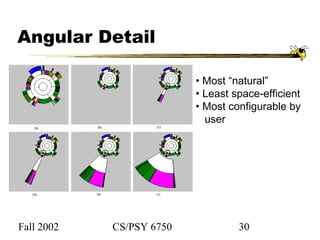
Angular Detail
• Most “natural”
• Least space-efficient
• Most configurable by
user
Fall 2002 CS/PSY 6750 31
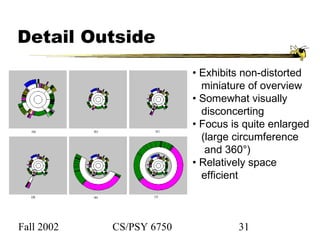
Detail Outside
• Exhibits non-distorted
miniature of overview
• Somewhat visually
disconcerting
• Focus is quite enlarged
(large circumference
and 360°)
• Relatively space
efficient
Fall 2002 CS/PSY 6750 32
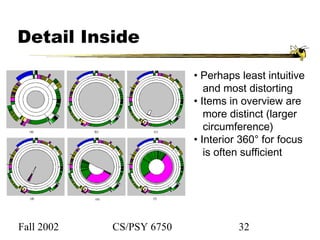
Detail Inside
• Perhaps least intuitive
and most distorting
• Items in overview are
more distinct (larger
circumference)
• Interior 360° for focus
is often sufficient
Fall 2002 CS/PSY 6750 33
Video
4 minutes
Fall 2002 CS/PSY 6750 34
Key Components
• Two ways to increase area for focus
region: larger sweep angle and longer
circumference
• Smooth transitions between overview and
focus allow viewer to track changes
• Always display overview
• Allow focus selections from anywhere:
normal display, focus or overview regions

Hci gattech34 info-vis-trees

  • 1.
    Fall 2002 CS/PSY6750 1 Information Visualization 2 Case Study: Portraying Hierarchies • Visualizing hierarchies − Variety of techniques Traditional tree views, alternatives, space-filling views Hierarchies • Definition − Ordering of items in which particular items are parents or ancestors of others • Example: File System − Folders/Directories with folders/subdirectories and files inside
  • 2.
    Fall 2002 CS/PSY6750 2 Trees • Hierarchies often represented as trees • Root at top, leaves at bottom
  • 3.
    Fall 2002 CS/PSY6750 3 Sample Representation
  • 4.
    Fall 2002 CS/PSY6750 4 Another Representation
  • 5.
    Fall 2002 CS/PSY6750 5 Another Representation
  • 6.
    Fall 2002 CS/PSY6750 6 Another Representation root
  • 7.
    Fall 2002 CS/PSY6750 7 Another Representation
  • 8.
    Fall 2002 CS/PSY6750 8 Potential Problems • Width of fan-out uses real estate − Run out of room quickly
  • 9.
    Fall 2002 CS/PSY6750 9 Another Idea CHEOPS Beaudoin, Parent & Vroomen
  • 10.
    Fall 2002 CS/PSY6750 10 Another Idea Card, Mackinlay & Robertson ConeTree
  • 11.
    Fall 2002 CS/PSY6750 11 Another Idea • Use hyperbolic geometry • Hyperbolic tree • Here: Site Lens from www.inxight.com • Demo Lamping & Rao
  • 12.
    Fall 2002 CS/PSY6750 12 Space-Filling Representation Each item occupies an area Children are “contained” under parent
  • 13.
    Fall 2002 CS/PSY6750 13 Treemap • Space-filling representation developed by Shneiderman and Johnson • Children are drawn inside their parent • Alternate horizontal and vertical slicing at each successive level
  • 14.
    Fall 2002 CS/PSY6750 14 Treemap • Example File and directory visualizer white-directories color-files level 1 dirs
  • 15.
    Fall 2002 CS/PSY6750 15 Treemap
  • 16.
    Fall 2002 CS/PSY6750 16 Nested vs. Non-nested Treemaps Nested Tree-Map Non-nested Tree-Map
  • 17.
    Fall 2002 CS/PSY6750 17 Treemap Affordances • Good representation of two attributes: color and area • Not as good at representing structure − What happens if it’s a perfectly balanced tree of items all the same size? − Also can get long-thin aspect ratios
  • 18.
    Fall 2002 CS/PSY6750 18 Treemap Variation • SmartMoney.com Map of the Market − Illustrates stock movements − “Compromises” treemap algorithm to avoid bad aspect ratios www.smartmoney.com/marketmap
  • 19.
    Fall 2002 CS/PSY6750 19 Treemap Variation • Use 3D shading cues to help convey structure SequoiaView file viewer for Windows Demo
  • 20.
    Fall 2002 CS/PSY6750 20 Another Technique • What if we used a radial rather than a rectangular space-filling technique? Sunburst • Demonstration of system /usr/local/bin/sunburst
  • 21.
    Fall 2002 CS/PSY6750 21 Sunburst Visualizing file and directory structures Root dir at center Color - file type Angle - file/dir size
  • 22.
    Fall 2002 CS/PSY6750 22 Experiment • Compare Treemap and Sunburst with users performing typical file/directory- related tasks • Evaluate task performance on both correctness and time Small Hierarchy (~500 files) Large Hierarchy (~3000 files) A B A B
  • 23.
    Fall 2002 CS/PSY6750 23 Experiment • 60 participants • Participant only works with a small or large hierarchy in a session • Vary order across participants SB A, TM B TM A, SB B SB B, TM A TM B, SB A 32 on small hierarchies 28 on large hierarchies
  • 24.
    Fall 2002 CS/PSY6750 24 Tasks • Identification (naming or pointing out) of a file based on size, specifically, the largest and second largest files (Questions 1-2) • Identification of a directory based on size, specifically, the largest (Q3) • Location (pointing out) of a file, given the entire path and name (Q4-7) • Location of a file, given only the file name (Q8-9) • Identification of the deepest subdirectory (Q10) • Identification of a directory containing files of a particular type (Q11) • Identification of a file based on type and size, specifically, the largest file of a particular type (Q12) • Comparison of two files by size (Q13) • Location of two duplicated directory structures (Q14) • Comparison of two directories by size (Q15) • Comparison of two directories by number of files contained (Q16)
  • 25.
    Fall 2002 CS/PSY6750 25 Results • Ordering effect for Treemap on large hierarchies • Performance trends favored Sunburst, but not clear-cut • Subjective preference: SB (51), TM (9), unsure (1)
  • 26.
    Fall 2002 CS/PSY6750 26 Observations • SB appeared to convey structure better • Participants felt TM conveyed size better, but not bore out • Strategies mattered
  • 27.
    Fall 2002 CS/PSY6750 27 SunBurst Negative • In large hierarchies, files at the periphery are usually tiny and very difficult to distinguish examples
  • 28.
    Fall 2002 CS/PSY6750 28 Fix: Objectives • Make small slices bigger • Maintain full circular space-filling idea • Allow detailed examination of small files within context of entire hierarchy • Don’t alter ratios of sizes • Avoid use of multiple windows or lots of scrollbars • Provide an aesthetically pleasing interface in which it is easy to track changes in focus
  • 29.
    Fall 2002 CS/PSY6750 29 With Eugene Zhang Proceedings of Information Visualization 2000, Oct. 2000, pp. 57-65. 3 Solutions • Three visualization+navigation techniques developed to help remedy the shortcoming − Angular detail − Detail outside − Detail inside
  • 30.
    Fall 2002 CS/PSY6750 30 Angular Detail • Most “natural” • Least space-efficient • Most configurable by user
  • 31.
    Fall 2002 CS/PSY6750 31 Detail Outside • Exhibits non-distorted miniature of overview • Somewhat visually disconcerting • Focus is quite enlarged (large circumference and 360°) • Relatively space efficient
  • 32.
    Fall 2002 CS/PSY6750 32 Detail Inside • Perhaps least intuitive and most distorting • Items in overview are more distinct (larger circumference) • Interior 360° for focus is often sufficient
  • 33.
    Fall 2002 CS/PSY6750 33 Video 4 minutes
  • 34.
    Fall 2002 CS/PSY6750 34 Key Components • Two ways to increase area for focus region: larger sweep angle and longer circumference • Smooth transitions between overview and focus allow viewer to track changes • Always display overview • Allow focus selections from anywhere: normal display, focus or overview regions