2
HCI isa design, implementation and evaluation
of interactive systems in the context of user’s
task and work
Computer – pc to main frame computer
embedded system
User – single user, a group of user or a
sequence of user
Interaction- direct or indirect communication
b/n user and computer
RECAP
3.
3
Human
◦ Inputand out put channels include visual, auditor , haptic
and movement
◦ Memory – sensory, short term and long term
◦ Processed – reasoning, problem solving and skill
acquisition ex. deductive and inductive reasoning
Human Processor model – perceptual system,
motor system, cognitive system
Computer
◦ Input- output devices
◦ Memory – SHORT TERM, LONG TERM MEMORY
◦ Processing
RECAP
5
Interaction iscommunication between user and
system
There are a number of ways in which the user can
communicate with the system.
◦ From batch input to highly interactive input devices and
paradigms
There are models of interaction that enable us to
identify and evaluate components of the interaction
◦ At the physical, social and organizational issues that provide
the context for it.
Survey to the different styles of interaction that are
used and consider how well they support the user
INTRODUCTION
6.
6
Interaction involvesat least two participants:
the user and the system.
◦ Both are complex, and are very different from each
other
The interface must therefore effectively
translate between them to allow the interaction
to be successful
This translation can fail at a number of points
and for a number of reasons
INTERACTION
7.
7
Develop Improveuse
Safety- protecting users and data
Utility- high and low utility
Effectiveness – desired goal
Efficiency – less time
Usability – easy to learn and use
Appeal to the system – impression and long term
satisfaction
Basic Goal of HCI
Usability – easy to learn and use, safe to use,
effective, efficient, enjoyable to use
HCI Goals
8.
8
Goals Achieved Example
SafetyWarning for exit
Utility A lot of functions is provided
Effectiveness A science student can edit
equations
Efficiency Default template
Usability Icon facilitate ease of learning
Appeal Interface is attractive
MS- vs HCI Goals
9.
9
The useof models of interaction can help us to
understand exactly what is going on in the
interaction and identify the likely root of
difficulties
1. Norman’s execution–evaluation cycle is the
most influential model of interaction
MODELS OF INTERACTION
10.
10
The terms ofinteraction
Traditionally, the purpose of an interactive
system is to aid a user in accomplishing goals
from some application domain
◦ Domain defines an area of expertise and knowledge
in some real-world activity
◦ Tasks are operations to manipulate the concepts of a
domain
◦ A goal is the desired output from a performed task.
◦ An intention is a specific action required to meet the
goal
MODELS OF INTERACTION
11.
11
Task analysisinvolves the identification of the
problem space for the user of an interactive
system in terms of the domain, goals,
intentions and tasks
The System and User are each described by
means of a language that can express concepts
relevant in the domain of the application.
MODELS OF INTERACTION
12.
12
The System’slanguage refer to as the core
language
◦ The core language describes computational
attributes of the domain relevant to the System state
The User’s language refer to as the task
language
◦ The task language describes psychological attributes
of the domain relevant to the User state
MODELS OF INTERACTION
13.
13
The execution–evaluation cycle
The user formulates a plan of action, which is
then executed at the computer interface
When the plan, or part of the plan, has been
executed, the user observes the computer
interface to evaluate the result of the executed
plan, and to determine further actions
MODELS OF INTERACTION
14.
14
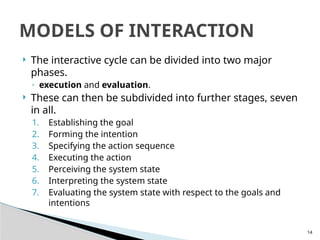
The interactivecycle can be divided into two major
phases.
◦ execution and evaluation.
These can then be subdivided into further stages, seven
in all.
1. Establishing the goal
2. Forming the intention
3. Specifying the action sequence
4. Executing the action
5. Perceiving the system state
6. Interpreting the system state
7. Evaluating the system state with respect to the goals and
intentions
MODELS OF INTERACTION
15.
15
Norman usesa simple example of switching on
a light to illustrate this cycle
Imagine you are sitting reading as evening falls
◦ You need more light- goal
◦ Form an intention to switch on the desk lamp, and
you specify the actions required, to reach over and
press the lamp switch
or– you may ask a person closer to switch on the light for
you
Your goal is the same(more light) but the
intention and actions are different
MODELS OF INTERACTION
16.
16
• When youhave executed the action you perceive the
result
either the light is on or it isn’t and you interpret this, based
on your knowledge of the world.
For example, if the light does not come on you may
interpret this as indicating the bulb has blown or the lamp
is not plugged into the mains, and you will formulate new
goals to deal with this.
◦ If the light does come on, you will evaluate the new
state according to the original goals
is there now enough light? If so, the cycle is complete.
If not, you may formulate a new intention to switch on the
main ceiling light as well
MODELS OF INTERACTION
17.
17
Norman usesthis model of interaction to
demonstrate why some interfaces cause
problems to their users
◦ gulfs of execution and the gulfs of evaluation
Gulf of execution: difference between the user’s
formulation of the actions to reach the goal
and the actions allowed by the system
◦ If the actions allowed by the system correspond to
those intended by the user, the interaction will be
effective
◦ The interface should therefore aim to reduce this gulf
MODELS OF INTERACTION
18.
18
Gulf ofevaluation is the distance between the
physical presentation of the system state and
the expectation of the user
If the user can readily evaluate the
presentation in terms of his goal, the gulf of
evaluation is small
The more effort that is required on the part of
the user to interpret the presentation, the less
effective the interaction
MODELS OF INTERACTION
19.
19
Norman’s modelonly considers the system as
far as the interface
It concentrates wholly on the user’s view of the
interaction
It does not attempt to deal with the system’s
communication through the interface
MODELS OF INTERACTION
20.
20
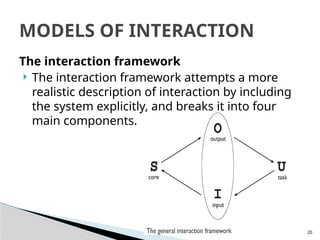
The interaction framework
The interaction framework attempts a more
realistic description of interaction by including
the system explicitly, and breaks it into four
main components.
MODELS OF INTERACTION
21.
21
The nodesrepresent the four major
components in an interactive system
◦ the System, the User, the Input and the Output
Each component has its own language
◦ User’s task language
◦ System’s core language,
◦ languages for both the Input and Output components
Input and Output together form the Interface
MODELS OF INTERACTION
22.
22
As theinterface sits between the User and the
System, there are four steps in the interactive
cycle, each corresponding to a translation from
one component to another.
MODELS OF INTERACTION
23.
23
The Userbegins the interactive cycle with the
formulation of a goal and a task to achieve that
goal.
The only way the user can manipulate the
machine is through the Input, and so the task
must be articulated within the input language.
The input language is translated into the core
language as operations to be performed by the
System.
MODELS OF INTERACTION
24.
24
The Systemthen transforms itself as described
by the operations; the execution phase of the
cycle is complete and the evaluation phase now
begins.
The System is in a new state, which must now
be communicated to the User.
The current values of system attributes are
rendered as concepts or features of the Output.
MODELS OF INTERACTION
25.
25
There arefour main translations involved in the
interaction:
◦ articulation, performance, presentation and
observation.
MODELS OF INTERACTION
26.
26
Ergonomics (orhuman factors) is traditionally
the study of the physical characteristics of the
interaction:
◦ how the controls are designed
◦ the physical environment in which the interaction takes
place
◦ the layout and physical qualities of the screen
A primary focus is on user performance and how
the interface enhances or detracts from this.
It is a large and established field, which is closely
related to but distinct from HCI
ERGONOMICS
27.
27
Arrangement of controlsand displays
Sets of controls and parts of the display should be
grouped logically to allow rapid access by the user
This issue becomes vital when we turn to safety-
critical applications such as plant control, aviation
and air traffic control.
◦ In each of these contexts, users are under pressure and
are faced with a huge range of displays and controls.
◦ Here it is crucial that the physical layout of these be
appropriate
ERGONOMICS
28.
28
For example,on one particular electronic
newsreader, used by one of the authors, the
command key to read articles from a
newsgroup (y) is directly beside the command
key to unsubscribe from a newsgroup (u) on
the keyboard.
This poor design frequently leads to
inadvertent removal of newsgroups.
ERGONOMICS
29.
29
It isimportant to group controls together logically
Possible organizations include the following:
◦ functional controls and displays are organized so that
those that are functionally related are placed together
◦ sequential controls and displays are organized to reflect
the order of their use in a typical interaction (this may be
especially appropriate in domains where a particular task
sequence is enforced, such as aviation);
◦ frequency controls and displays are organized according
to how frequently they are used, with the most commonly
used controls being the most easily accessible.
ERGONOMICS
30.
30
In additionto the organization of the controls
and displays in relation to each other, the entire
system interface must be arranged
appropriately in relation to the user’s position.
◦ for example, the user should be able to reach all
controls necessary and view all displays without
excessive body movement.
ERGONOMICS
31.
31
The physical environmentof the interaction
Ergonomics is concerned with the design of the
work environment itself
◦ Where will the system be used?
◦ By whom will it be used?
◦ Will users be sitting, standing or moving about?
ERGONOMICS
32.
32
Health issues
Followingare factors in the physical
environment that directly affect the quality of
the interaction and the user’s performance
◦ Physical position:
users should be able to reach all controls comfortably
and see all displays
◦ Temperature:
Experimental studies show that performance
deteriorates at high or low temperatures, with users
being unable to concentrate efficiently
ERGONOMICS
33.
33
◦ Lighting
adequatelighting should be provided to allow users to
see the computer screen without discomfort or eyestrain
◦ Noise
Noise levels should be maintained at a comfortable level
in the work environment
◦ Time
The time users spend using the system should also be
controlled
It has been suggested that excessive use of CRT displays can
be harmful to users,
ERGONOMICS
34.
34
Ergonomics and HCI
Ergonomics is distinct from HCI but sits
alongside it
Ergonomic factors are in general well
established and understood and are therefore
used as the basis for standardizing hardware
designs
ERGONOMICS
35.
35
Interaction canbe seen as a dialog between the
computer and the user
The choice of interface style can have a profound effect
on the nature of this dialog
The most common interface styles are
◦ command line interface
◦ menus
◦ natural language
◦ question/answer and query dialog
◦ form-fills and spreadsheets
◦ WIMP(Windows, Icons, Menus and Pointer)
◦ point and click
◦ three-dimensional interfaces
INTERACTION STYLES
36.
36
Command line interface
The first interactive dialog style to be commonly used
provides a means of expressing instructions to the
computer directly, using function keys, single
characters, abbreviations or whole-word commands.
In some systems the command line is the only way of
communicating with the system, especially for
remote access using telnet
More commonly today it is supplementary to menu-
based interfaces, providing accelerated access to the
system’s functionality for experienced user.
INTERACTION STYLES
37.
37
Command lineinterfaces are powerful
they offer direct access to system functionality
as opposed to the hierarchical nature of menus
can be combined to apply a number of tools to the same data
Commands must be remembered
◦ They are therefore better for expert users than for novices.
This problem can be alleviated a little by using consistent
and meaningful commands and abbreviations
The commands used should be terms within the
vocabulary of the user rather than the technician
Unfortunately, commands are often obscure and vary
across systems, causing confusion to the user and
increasing the overhead of learning
INTERACTION STYLES
38.
38
Menus
In amenu-driven interface, the set of options
available to the user is displayed on the screen,
and selected using the mouse, or numeric or
alphabetic keys
Since the options are visible they are less
demanding of the user, relying on recognition
rather than recall
However, menu options still need to be meaningful
and logically grouped to aid recognition
INTERACTION STYLES
40
Natural language
Perhapsthe most attractive means of
communicating with computers, at least at first
glance, is by natural language
Natural language understanding, both of
speech and written input, is the subject of
much interest and research
Unfortunately, however, the ambiguity of
natural language makes it very difficult for a
machine to understand
INTERACTION STYLES
41.
41
It seemsunlikely that a general natural
language interface will be available for some
time
Language is by nature vague and imprecise:
this gives it its flexibility and allows creativity in
expression.
◦ Computers, on the other hand, require precise
instructions
INTERACTION STYLES
42.
42
Question/answer and querydialog
Question and answer dialog is a simple
mechanism for providing input to an
application in a specific domain
The user is asked a series of questions (mainly
with yes/no responses, multiple choice, or
codes) and so is led through the interaction
step by step
◦ Example: web questionnaires.
INTERACTION STYLES
43.
43
These interfacesare easy to learn and use, but
are limited in functionality and power.
◦ As such, they are appropriate for restricted domains
(particularly information systems) and for novice or
casual users
Query languages, on the other hand, are used to
construct queries to retrieve information from a
database
They use natural-language-style phrases, but in
fact require specific syntax, as well as knowledge
of the database structure.
INTERACTION STYLES
44.
44
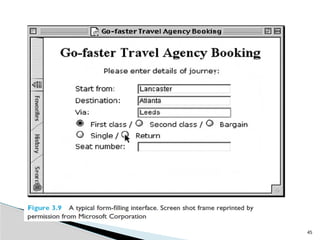
Form-fills and spreadsheets
Form-filling interfaces are used primarily for
data entry but can also be useful in data
retrieval applications
The user is presented with a display resembling
a paper form, with slots to fill in
Often the form display is based upon an actual
form with which the user is familiar, which
makes the interface easier to use.
INTERACTION STYLES
46
Spreadsheets area sophisticated variation of
form filling.
The spreadsheet comprises a grid of cells, each
of which can contain a value or a formula.
◦ The formula can involve the values of other cells (for
example, the total of all cells in this column)
INTERACTION STYLES
47.
47
The WIMP interface
windows, icons, menus and pointers
often simply called windowing systems
the default interface style for the majority of
interactive computer systems in use today
◦ especially in the PC and desktop workstation arena
Examples of WIMP interfaces include Microsoft
Windows for IBM PC compatibles, MacOS for
Apple Macintosh compatibles and various X
Windows-based systems for UNIX…
INTERACTION STYLES
48.
48
Point-and-click interfaces
Inmost multimedia systems and in web
browsers, virtually all actions take only a single
click of the mouse button
closely related to the WIMP style
◦ however, the philosophy is simpler and more closely
tied to ideas of hypertext.
popularized by world wide web pages
INTERACTION STYLES
49.
49
Three-dimensional interfaces
Thereis an increasing use of three-dimensional effects
in user interfaces
The most obvious example is virtual reality
The simplest technique is where ordinary WIMP
elements, buttons, scroll bars, etc., are given a 3D
appearance using shading, giving the appearance of
being sculpted out of stone
A more complex technique uses interfaces with 3D
workspaces.
◦ there are virtual reality and information visualization systems
where the user can move about within a simulated 3D world
INTERACTION STYLES



















![[PPT] _ UNIT 2 _ Interaction-1.pptx](https://cdn.slidesharecdn.com/ss_thumbnails/pptunit2interaction-1-230328055901-ed9e51ef-thumbnail.jpg?width=640&height=640&fit=bounds)


![Hci [4]interaction](https://cdn.slidesharecdn.com/ss_thumbnails/hci-4interaction-140116110608-phpapp01-thumbnail.jpg?width=640&height=640&fit=bounds)


![[English Version]Maker-Ray Product Brochure V3 .pdf](https://cdn.slidesharecdn.com/ss_thumbnails/englishversionmaker-rayproductbrochurev3-260113094444-0156dbdc-thumbnail.jpg?width=640&height=640&fit=bounds)


