

HANA – Overview & RoadmapHenrique PintoConsultor de Soluções, SAP BrasilOutubro de 2011
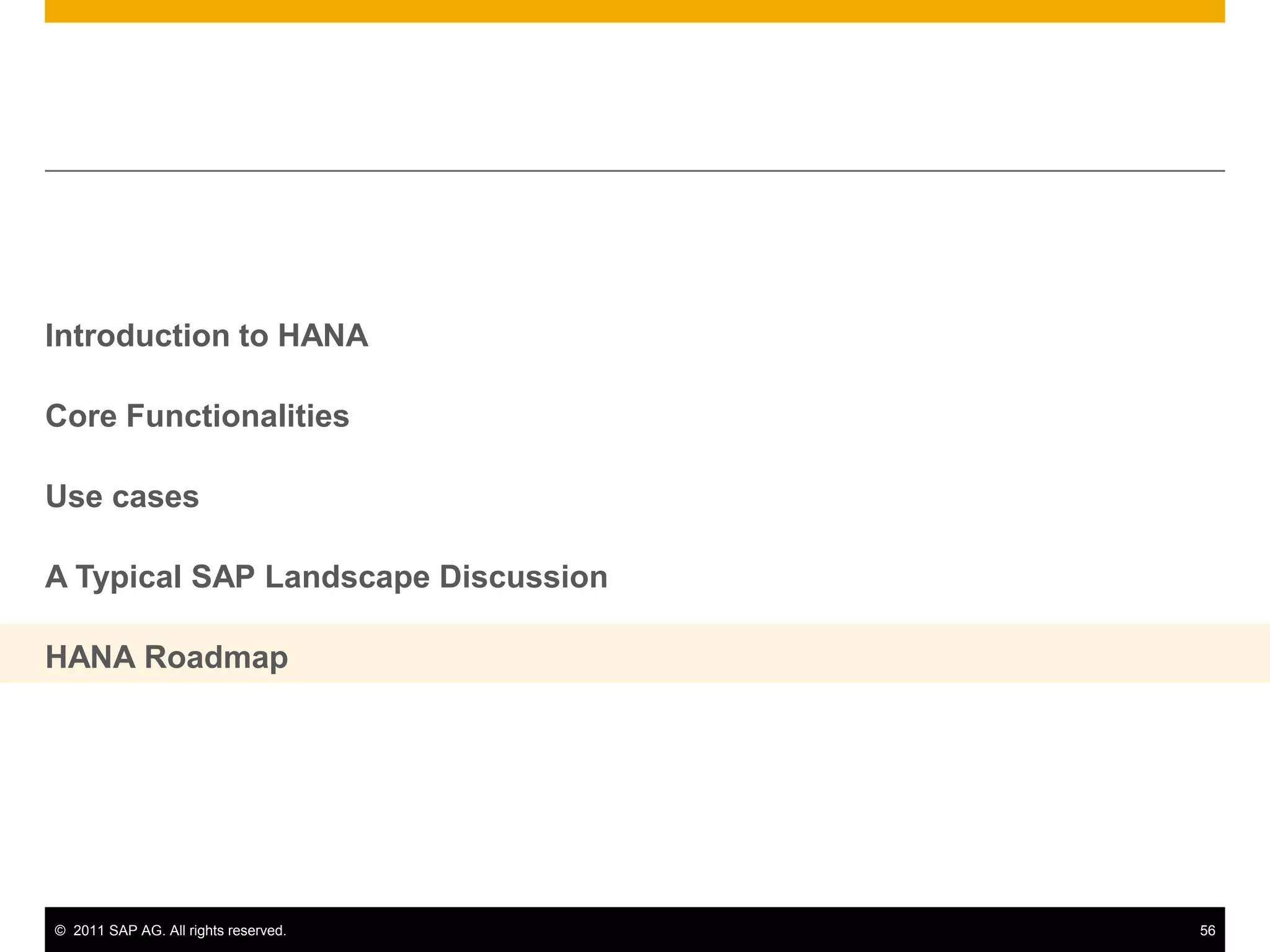
Introduction to HANACore FunctionalitiesUse casesA Typical SAP Landscape DiscussionHANA Roadmap
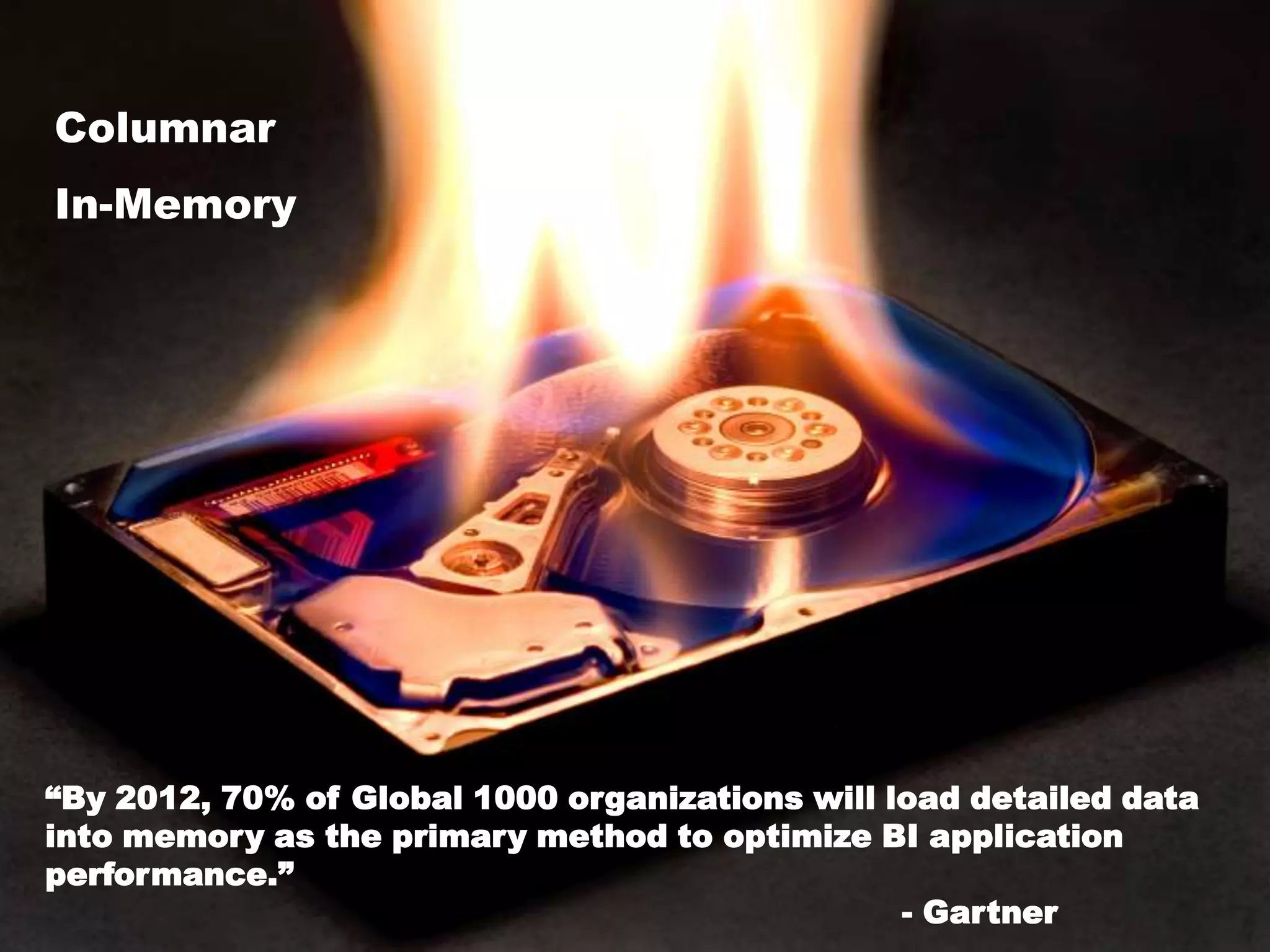
ColumnarIn-Memory	“By 2012, 70% of Global 1000 organizations will load detailed data into memory as the primary method to optimize BI application performance.” 								- Gartner
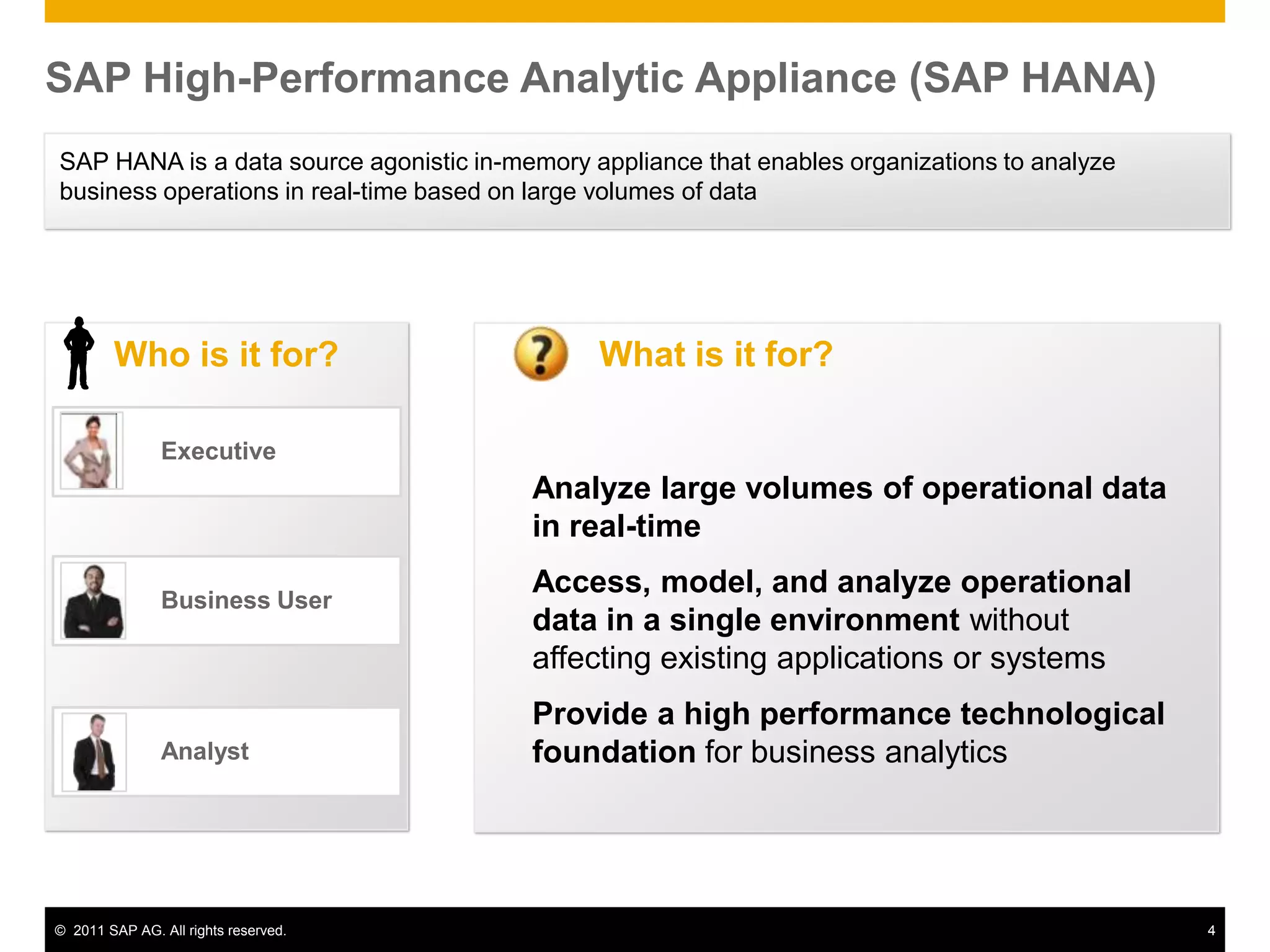
SAP High-Performance Analytic Appliance (SAP HANA)SAP HANA is a data source agonistic in-memory appliance that enables organizations to analyze business operations in real-time based on large volumes of data Who is it for?	Analyst	Business User	ExecutiveAnalyze large volumes of operational data in real-timeAccess, model, and analyze operational data in a single environment without affecting existing applications or systemsProvide a high performance technological foundation for business analyticsWhat is it for?
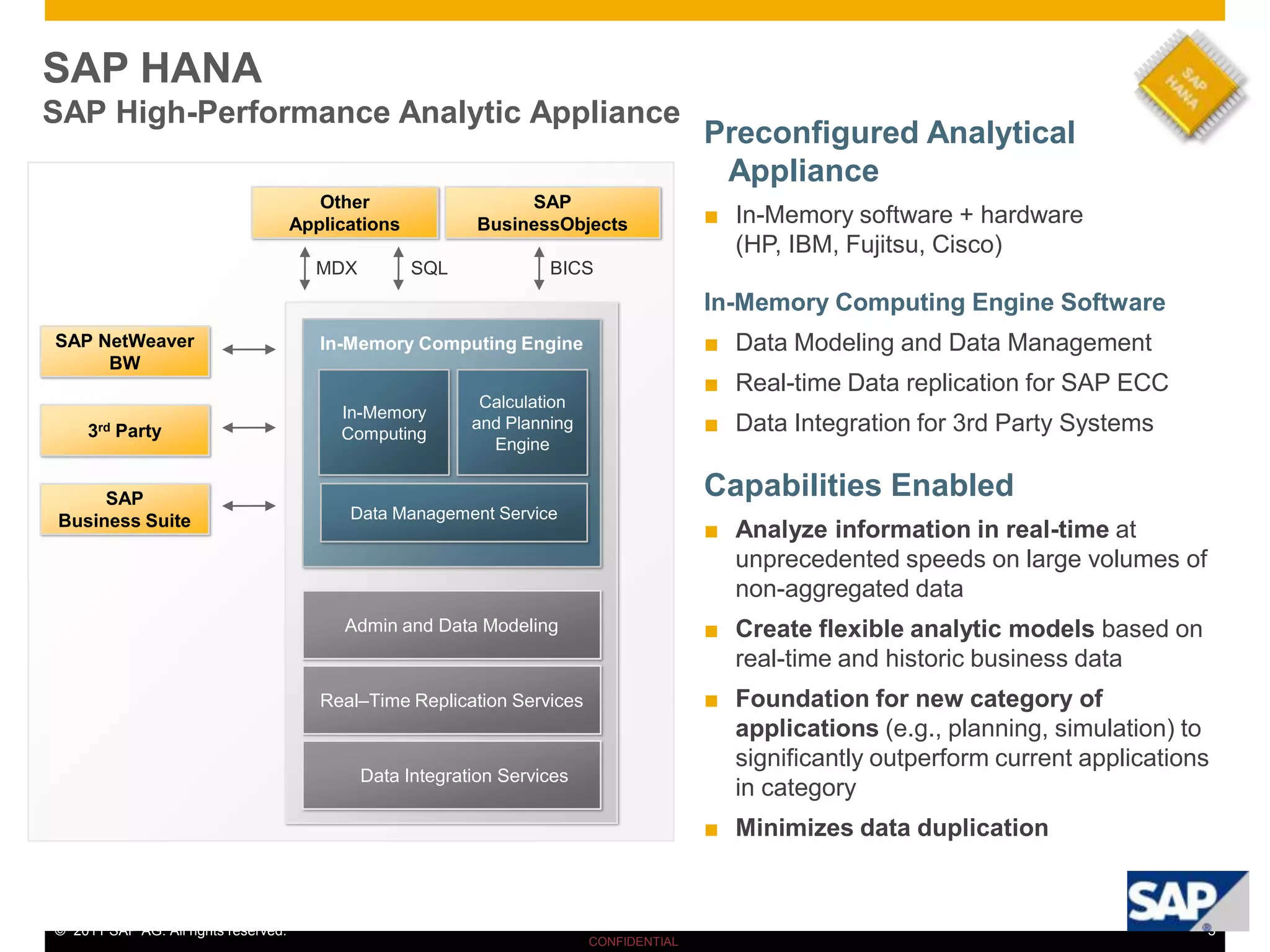
SAP HANASAP High-Performance Analytic AppliancePreconfigured Analytical ApplianceIn-Memory software + hardware(HP, IBM, Fujitsu, Cisco)In-Memory Computing Engine SoftwareData Modeling and Data Management
Real-time Data replication for SAP ECC
Data Integration for 3rd Party SystemsCapabilities EnabledAnalyze information in real-time at unprecedented speeds on large volumes of non-aggregated data
Create flexible analytic models based on real-time and historic business data
Foundation for new category of applications (e.g., planning, simulation) to significantly outperform current applications in category
Minimizes data duplicationOther ApplicationsSAP BusinessObjectsSAP HANAMDXSQLBICSIn-Memory Computing EngineSAP NetWeaverBWIn-MemoryComputingCalculation and Planning Engine3rd PartyData Management ServiceSAP Business SuiteAdmin and Data ModelingReal–Time Replication ServicesData Integration Services
ROW-BASED StorageTuple 1Tuple 2Tuple 3Tuple 4Column 1Column 4Column 3Column 2 OPTIMIZED for current HW EasilyCOMPRESSABLECOLUMN-BASED StorageAVOID Bottlenecks – Data Storage
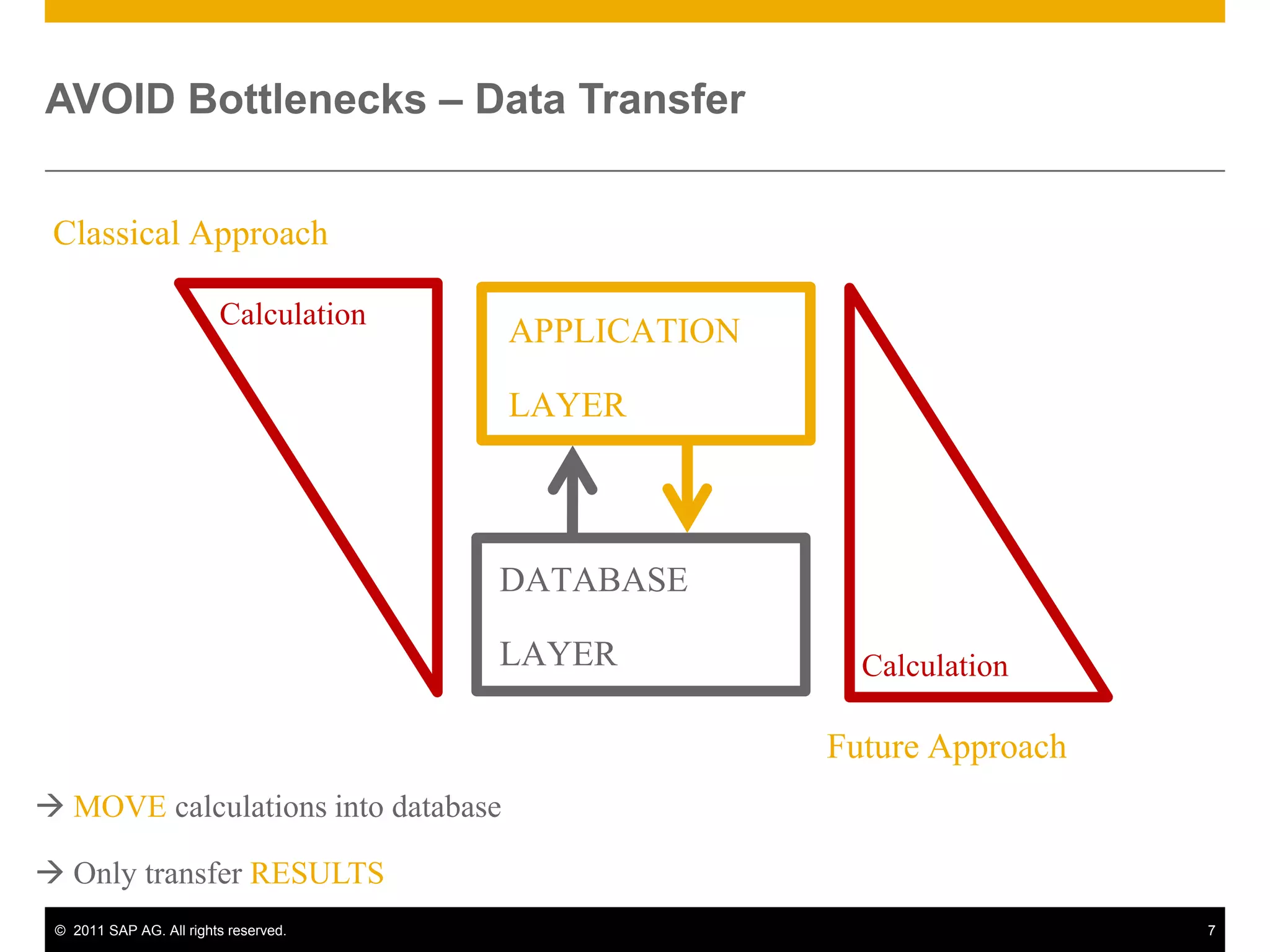
Classical ApproachCalculationAPPLICATIONLAYERDATABASELAYERMOVEcalculations into database Only transferRESULTSCalculationFuture ApproachAVOID Bottlenecks – Data Transfer
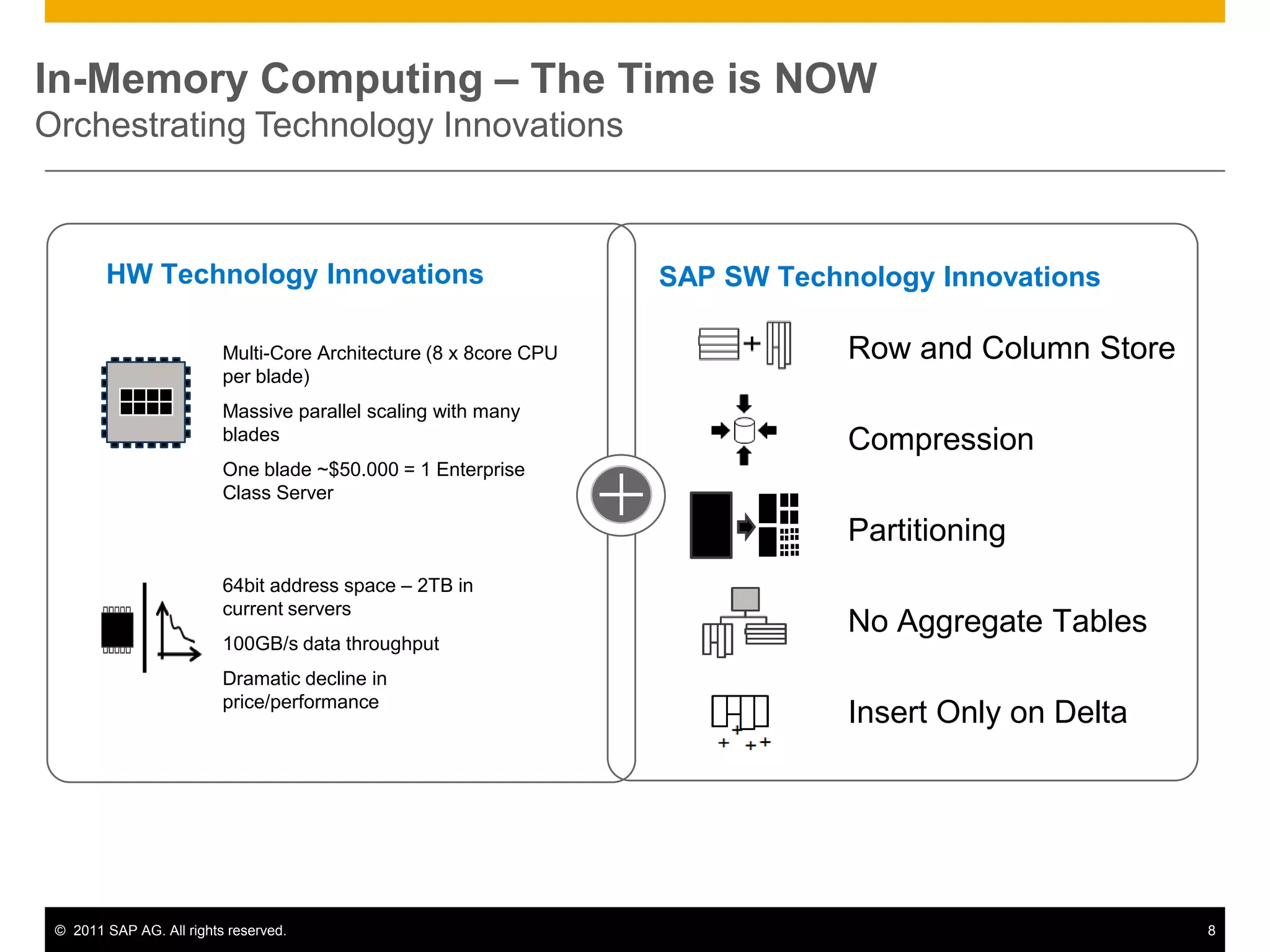
In-Memory Computing – The Time is NOWOrchestrating Technology InnovationsHW Technology InnovationsSAP SW Technology InnovationsRow and Column StoreMulti-Core Architecture (8 x 8core CPU per blade)Massive parallel scaling with many bladesOne blade ~$50.000 = 1 Enterprise Class ServerCompressionPartitioning64bit address space – 2TB in current servers100GB/s data throughputDramatic decline in price/performanceNo Aggregate TablesInsert Only on Delta
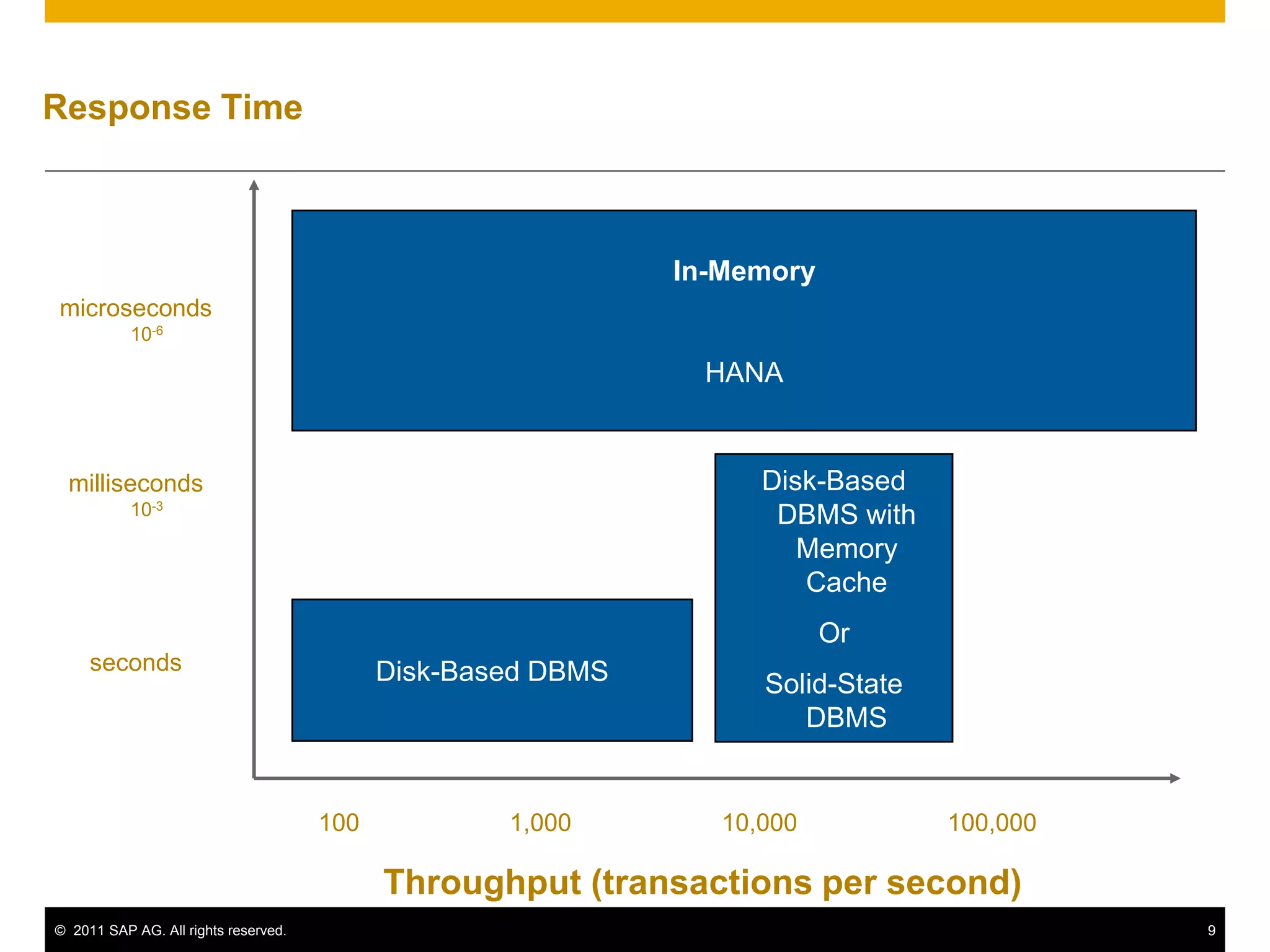
Response TimeIn-MemoryHANAmicroseconds10-6Disk-Based DBMS with Memory CacheOrSolid-State DBMSmilliseconds10-3Disk-Based DBMSseconds1001,00010,000100,000Throughput (transactions per second)
Introduction to HANACore FunctionalitiesUse casesA Typical SAP Landscape DiscussionHANA Roadmap
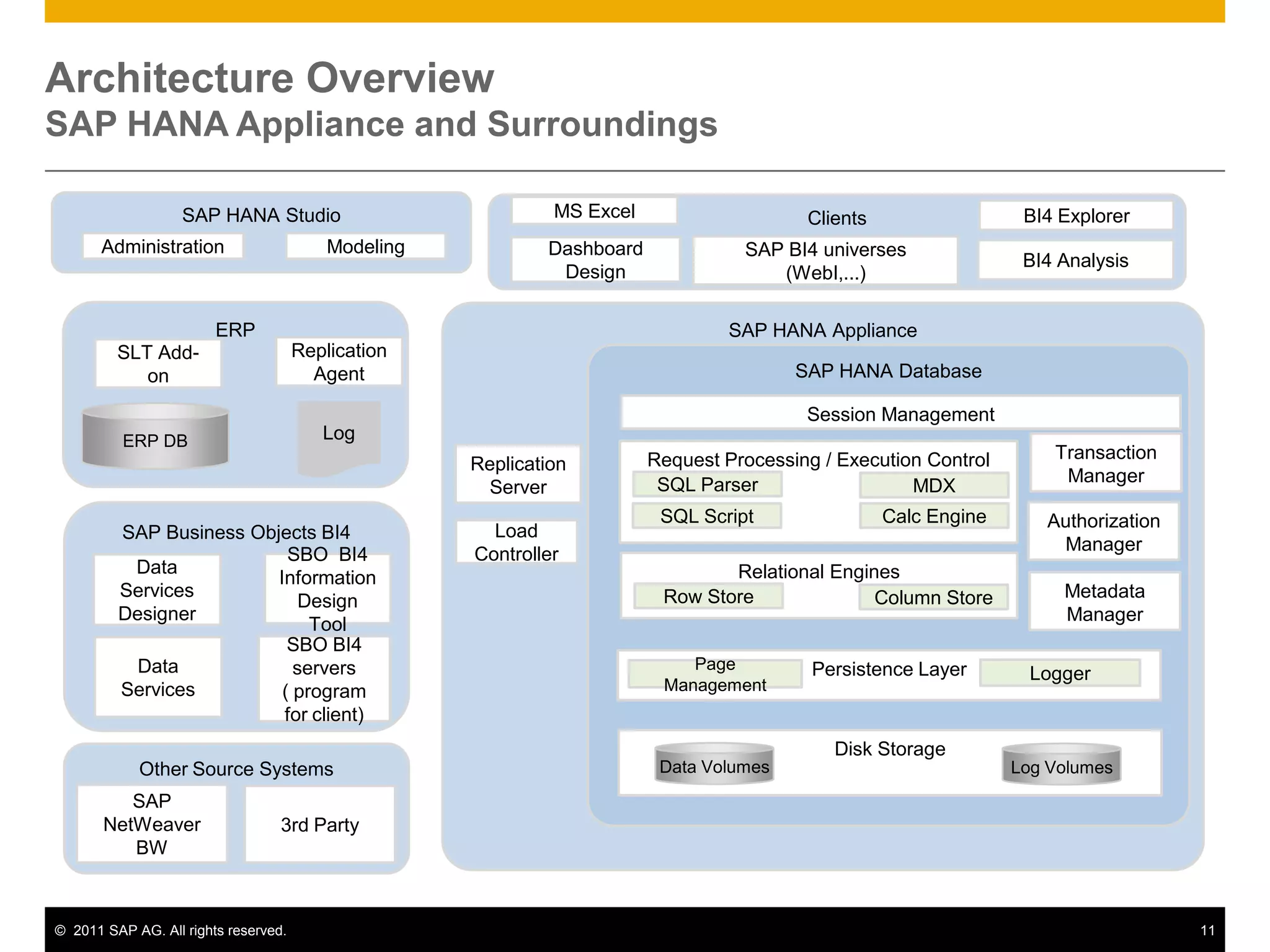
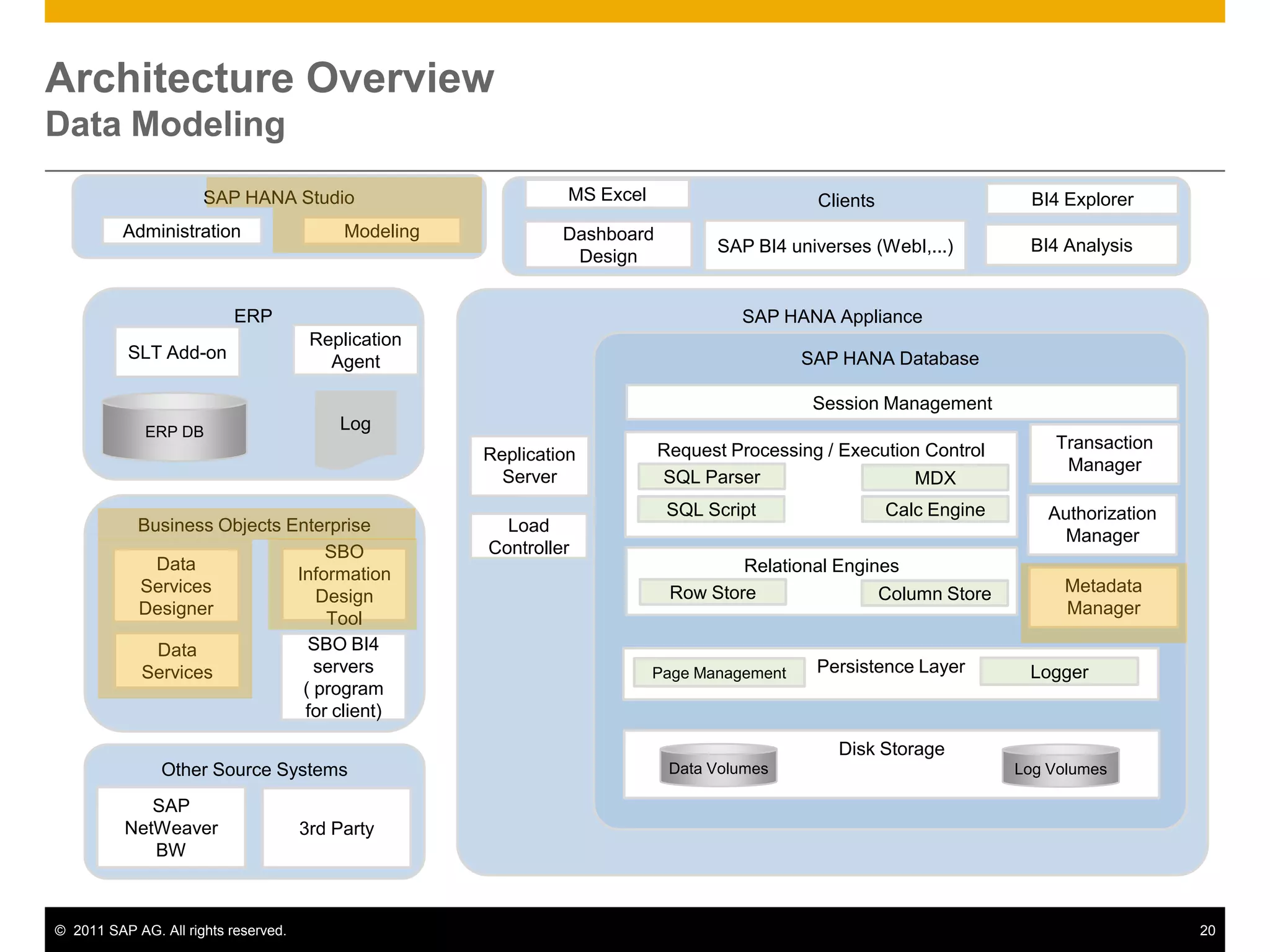
Architecture OverviewSAP HANA Appliance and SurroundingsSAP HANA StudioClientsMS ExcelBI4 ExplorerModelingAdministrationSAP BI4 universes (WebI,...)Dashboard DesignBI4 AnalysisERPSAP HANA ApplianceReplication AgentSLT Add-onSAP HANA DatabaseSession ManagementLogERP DBTransaction ManagerRequest Processing / Execution ControlReplication ServerSQL ParserMDXAuthorization ManagerSAP Business Objects BI4SQL ScriptCalc EngineLoad ControllerRelational EnginesSBO  BI4 Information Design ToolData Services DesignerMetadata ManagerRow StoreColumn StorePersistence LayerLoggerPage ManagementSBO BI4 servers       ( program for client)Data ServicesDisk StorageData VolumesLog VolumesOther Source SystemsSAP NetWeaver BW3rd Party
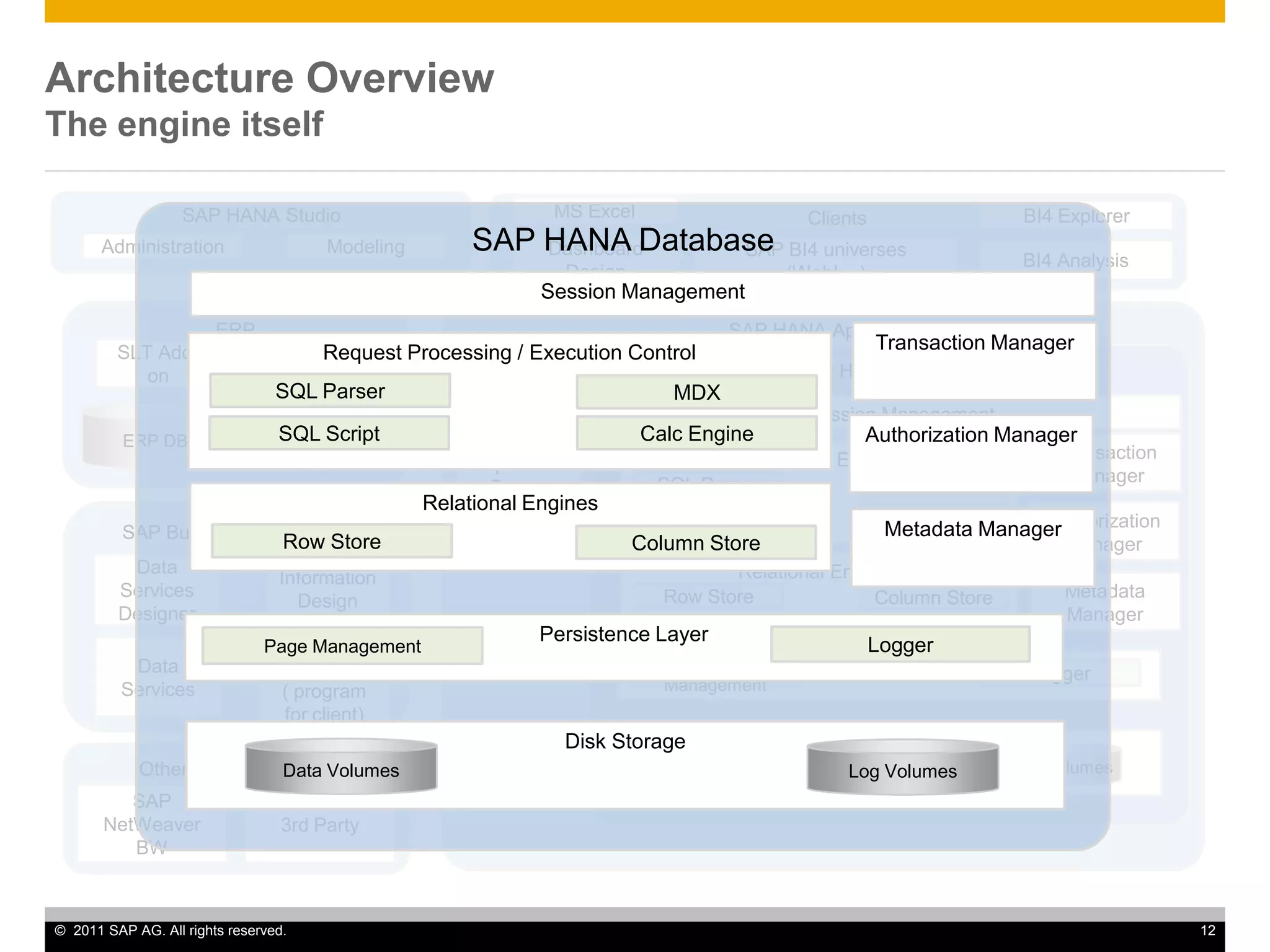
SAP HANA StudioClientsMS ExcelBI4 ExplorerModelingAdministrationSAP BI4 universes (WebI,...)Dashboard DesignBI4 AnalysisERPSAP HANA ApplianceReplication AgentSLT Add-onSAP HANA DatabaseSAP HANA DatabaseSession ManagementSession ManagementLogERP DBTransaction ManagerTransaction ManagerRequest Processing / Execution ControlRequest Processing / Execution ControlReplication ServerSQL ParserSQL ParserMDXMDXAuthorization ManagerAuthorization ManagerSAP Business Objects BI4SQL ScriptSQL ScriptCalc EngineCalc EngineLoad ControllerRelational EnginesRelational EnginesSBO  BI4 Information Design ToolData Services DesignerMetadata ManagerMetadata ManagerRow StoreRow StoreColumn StoreColumn StorePersistence LayerPersistence LayerLoggerLoggerPage ManagementPage ManagementSBO BI4 servers       ( program for client)Data ServicesDisk StorageDisk StorageData VolumesData VolumesLog VolumesLog VolumesOther Source SystemsSAP NetWeaver BW3rd PartyArchitecture OverviewThe engine itself
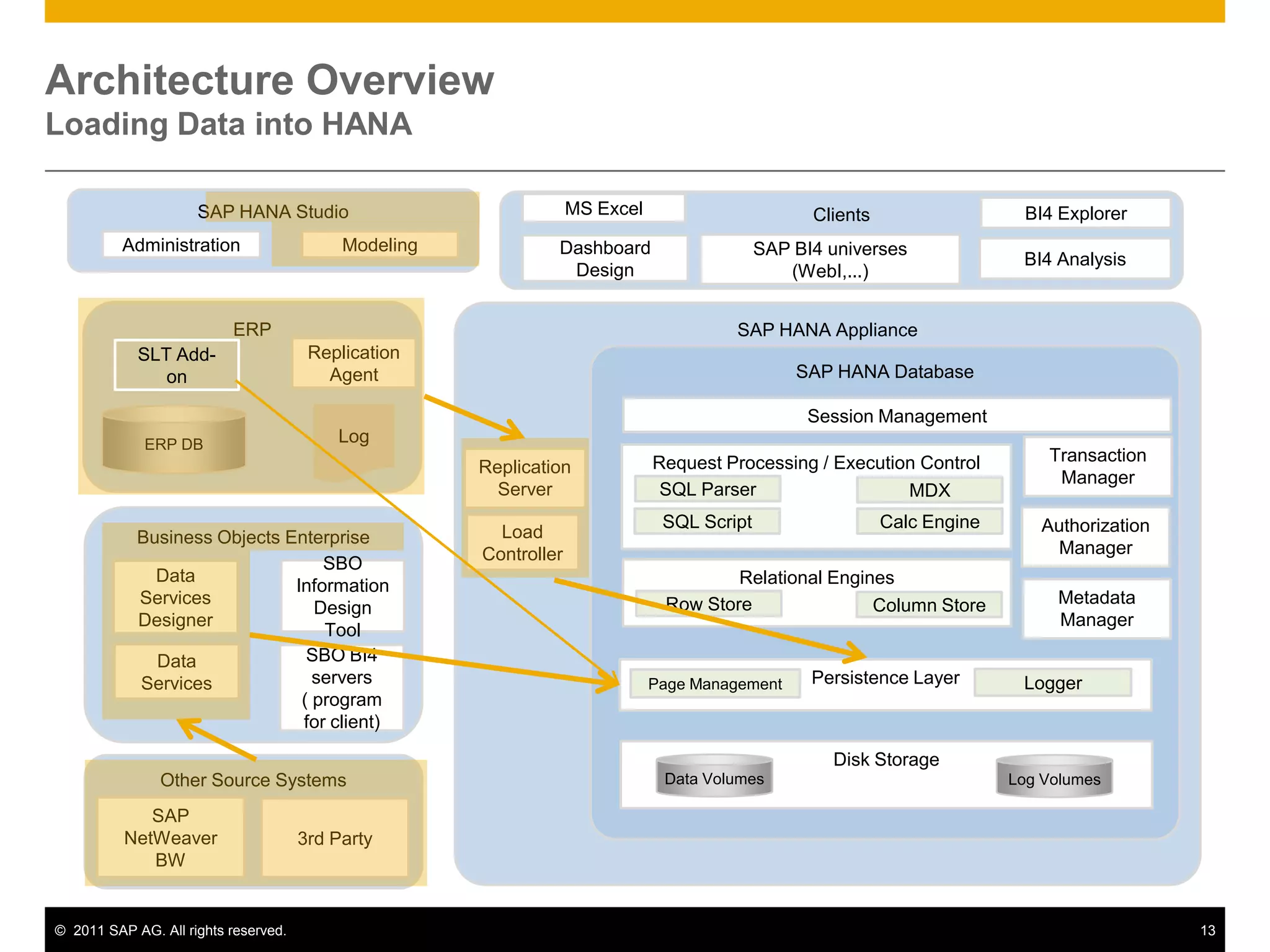
Architecture OverviewLoading Data into HANASAP HANA StudioClientsMS ExcelBI4 ExplorerModelingAdministrationSAP BI4 universes (WebI,...)Dashboard DesignBI4 AnalysisERPSAP HANA ApplianceReplication AgentSLT Add-onSAP HANA DatabaseSession ManagementLogERP DBTransaction ManagerRequest Processing / Execution ControlReplication ServerSQL ParserMDXAuthorization ManagerBusiness Objects EnterpriseSQL ScriptCalc EngineLoad ControllerRelational EnginesSBO Information Design ToolData Services DesignerMetadata ManagerRow StoreColumn StorePersistence LayerLoggerPage ManagementData ServicesSBO BI4 servers       ( program for client)Disk StorageData VolumesLog VolumesOther Source SystemsSAP NetWeaver BW3rd Party
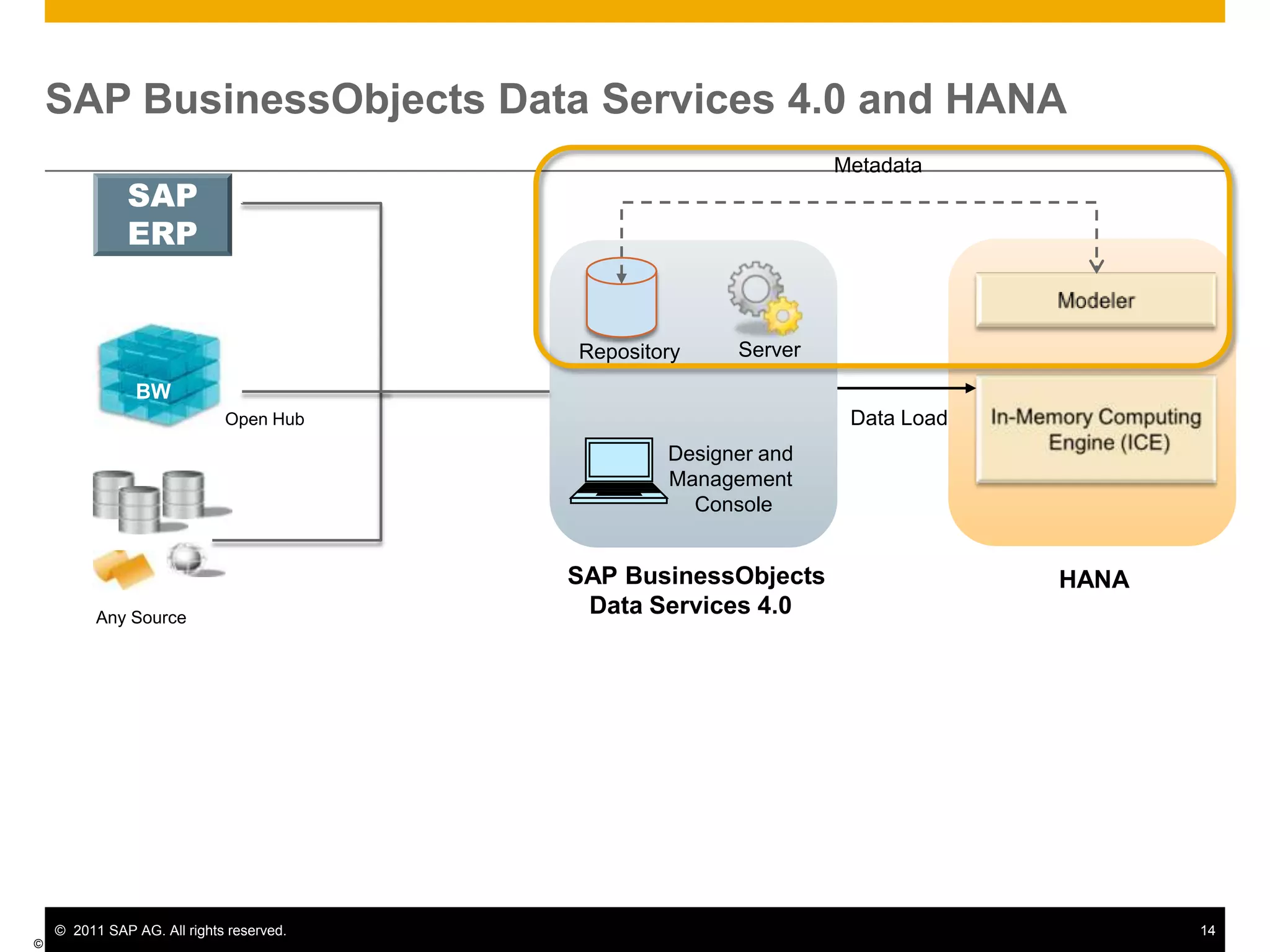
SAP BusinessObjects Data Services 4.0 and HANAMetadataSAPERPModelerServerRepositoryBWIn-Memory Computing Engine(ICE)Data LoadOpen HubDesigner and Management  ConsoleSAP BusinessObjectsData Services 4.0HANAAny Source© SAP AG 2011
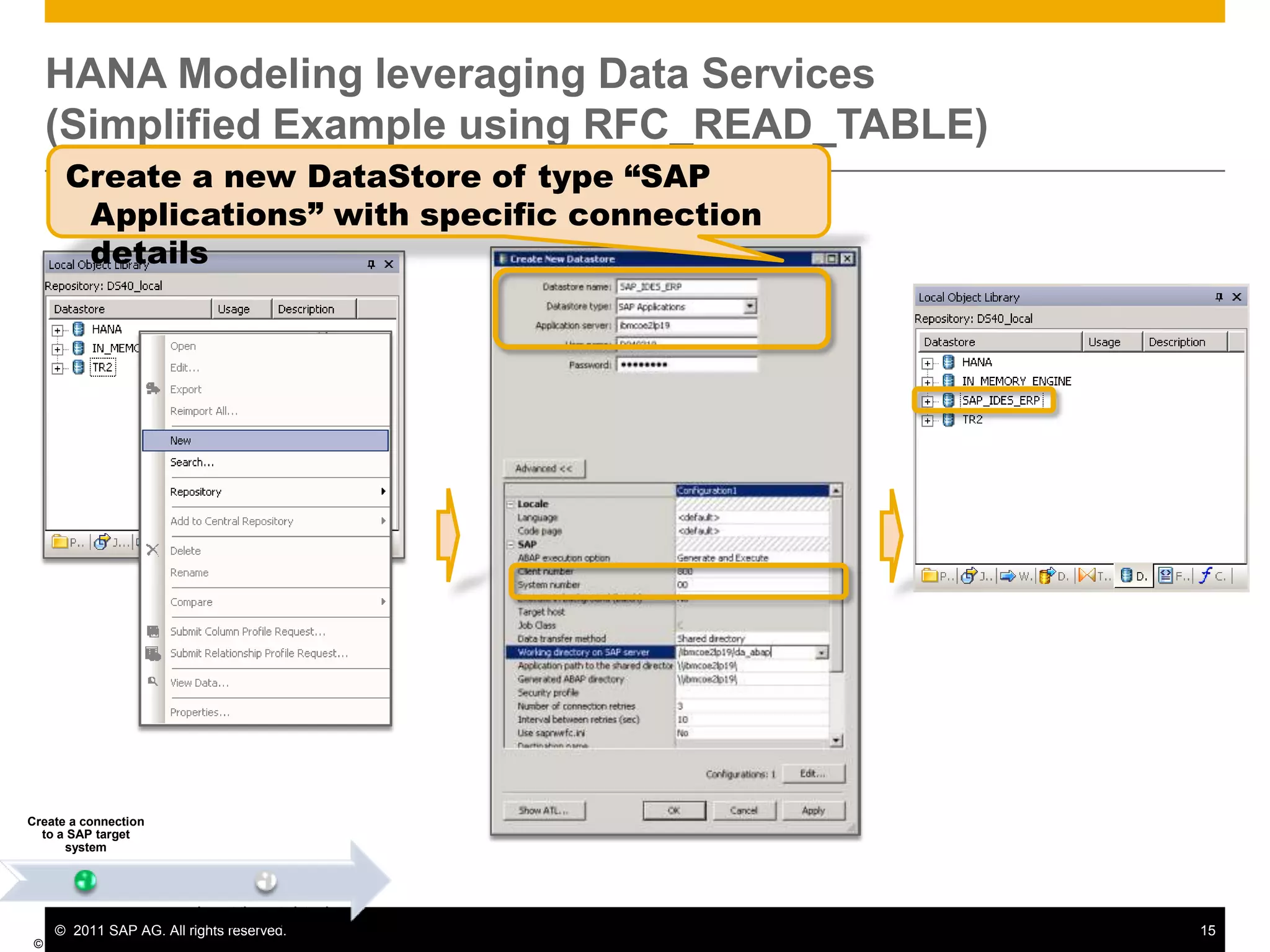
HANA Modeling leveraging Data Services(Simplified Example using RFC_READ_TABLE)© SAP AG 2011 Create a new DataStore of type “SAP Applications” with specific connection details
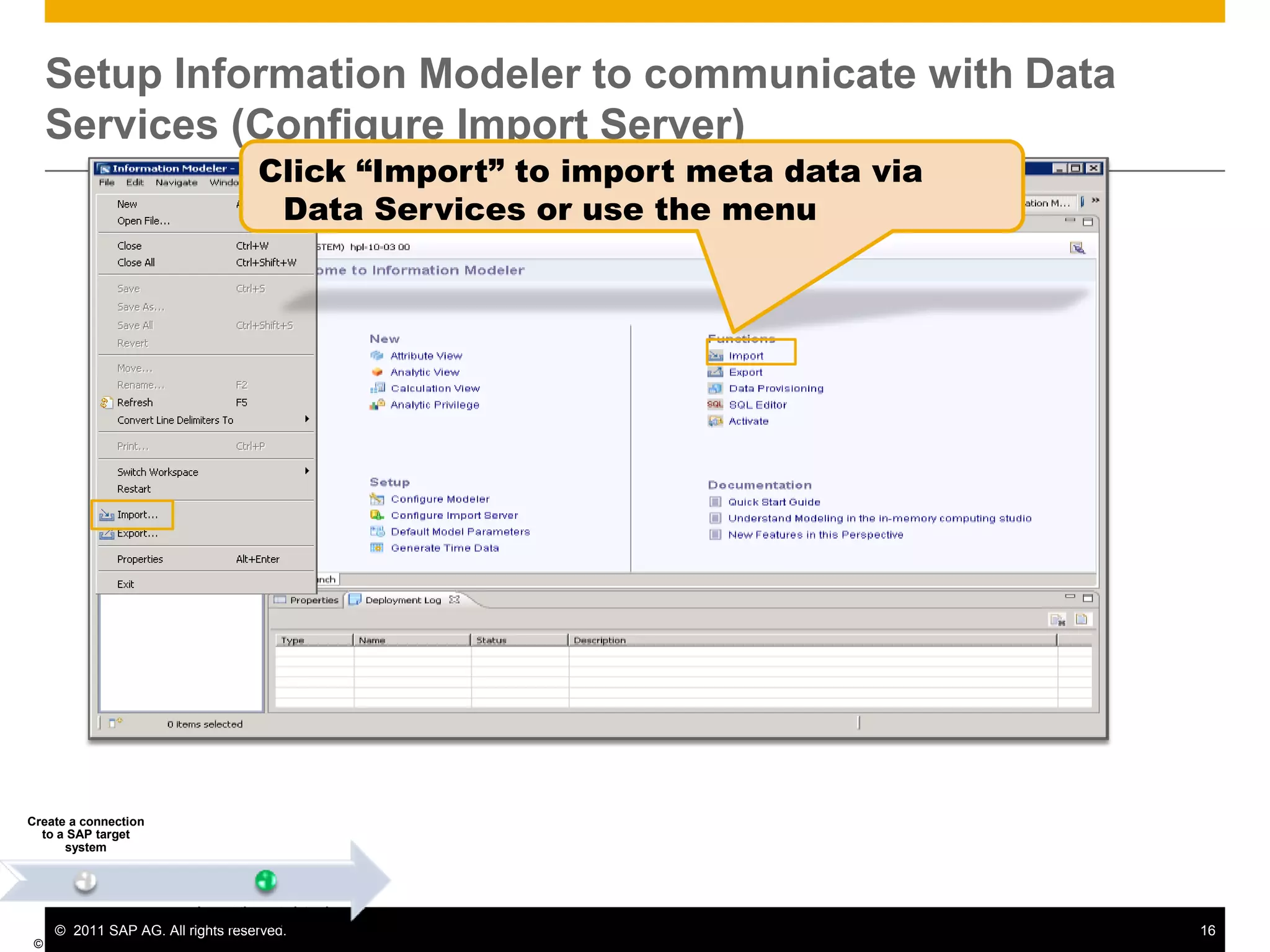
Setup Information Modeler to communicate with Data Services (Configure Import Server)© SAP AG 2011 Click “Import” to import meta data via Data Services or use the menu
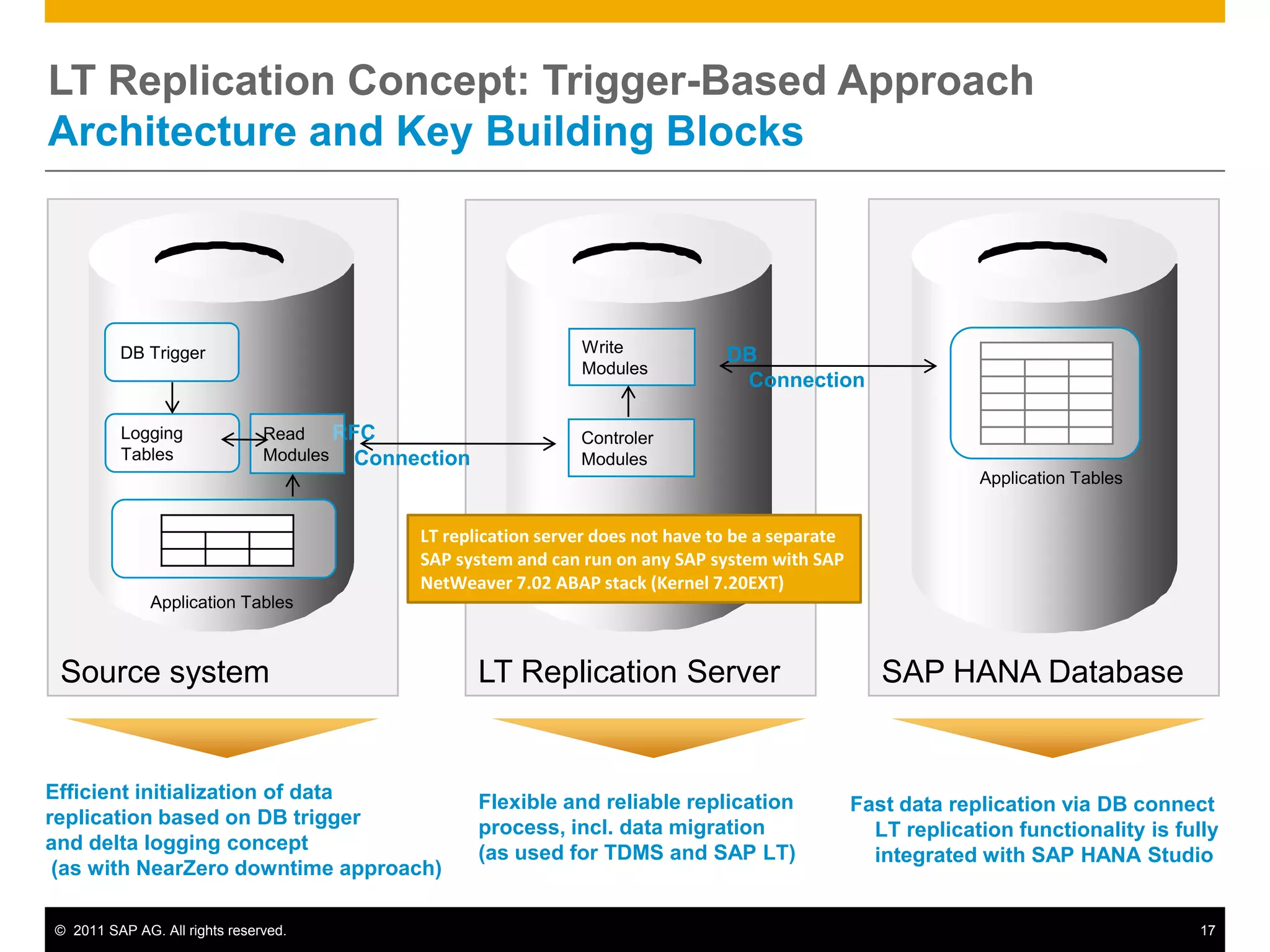
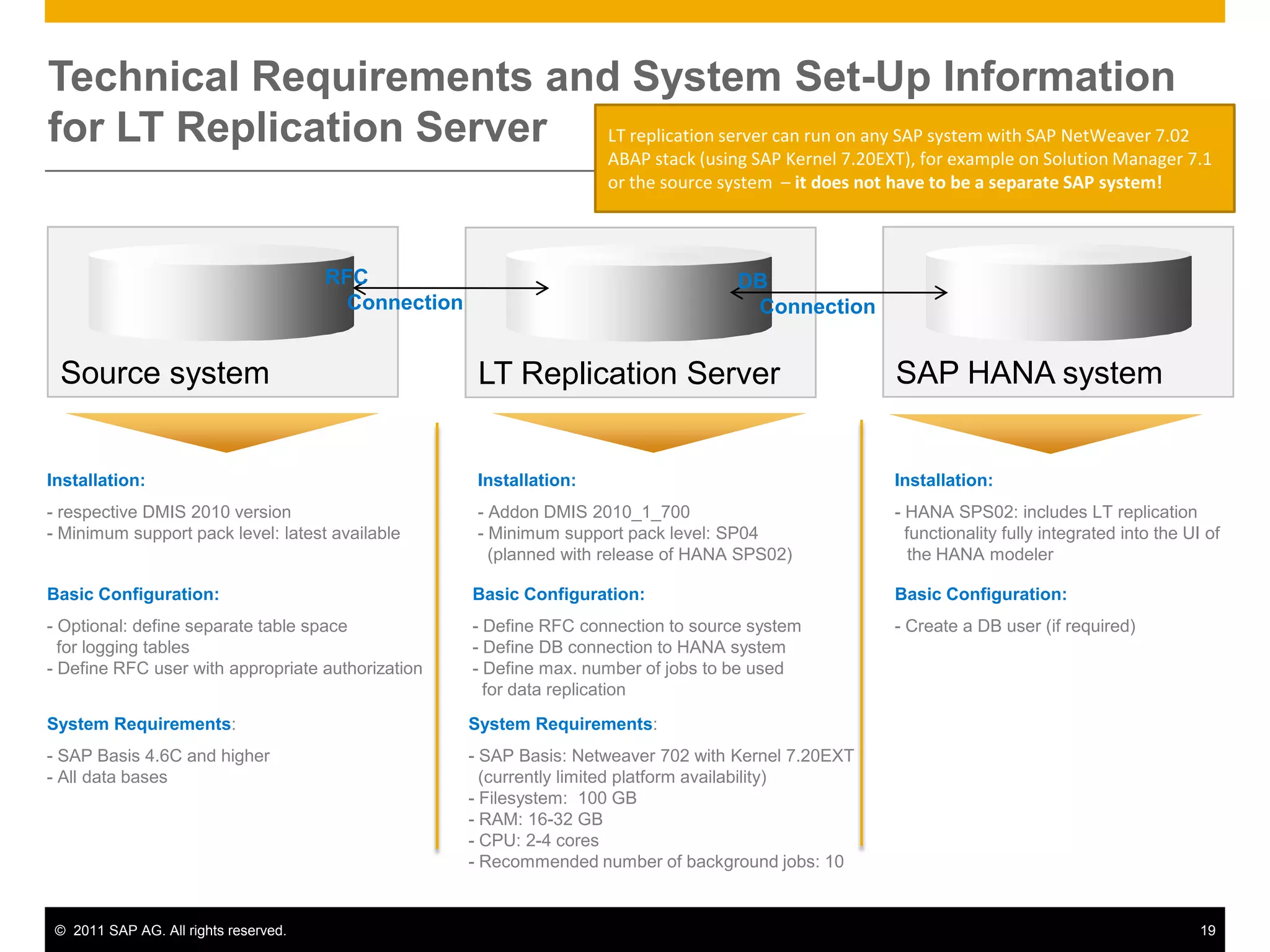
LT Replication Concept: Trigger-Based ApproachArchitecture and Key Building Blocks SAP HANA DatabaseSource systemLT Replication ServerDB TriggerWrite ModulesDBConnectionRFCConnectionLoggingTablesRead ModulesControler ModulesApplication TablesLT replication server does not have to be a separate SAP system and can run on any SAP system with SAP NetWeaver 7.02 ABAP stack (Kernel 7.20EXT)  Application TablesEfficient initialization of data replication based on DB trigger and delta logging concept (as with NearZero downtime approach)Flexible and reliable replication process, incl. data migration (as used for TDMS and SAP LT)Fast data replication via DB connectLT replication functionality is fully integrated with SAP HANA Studio
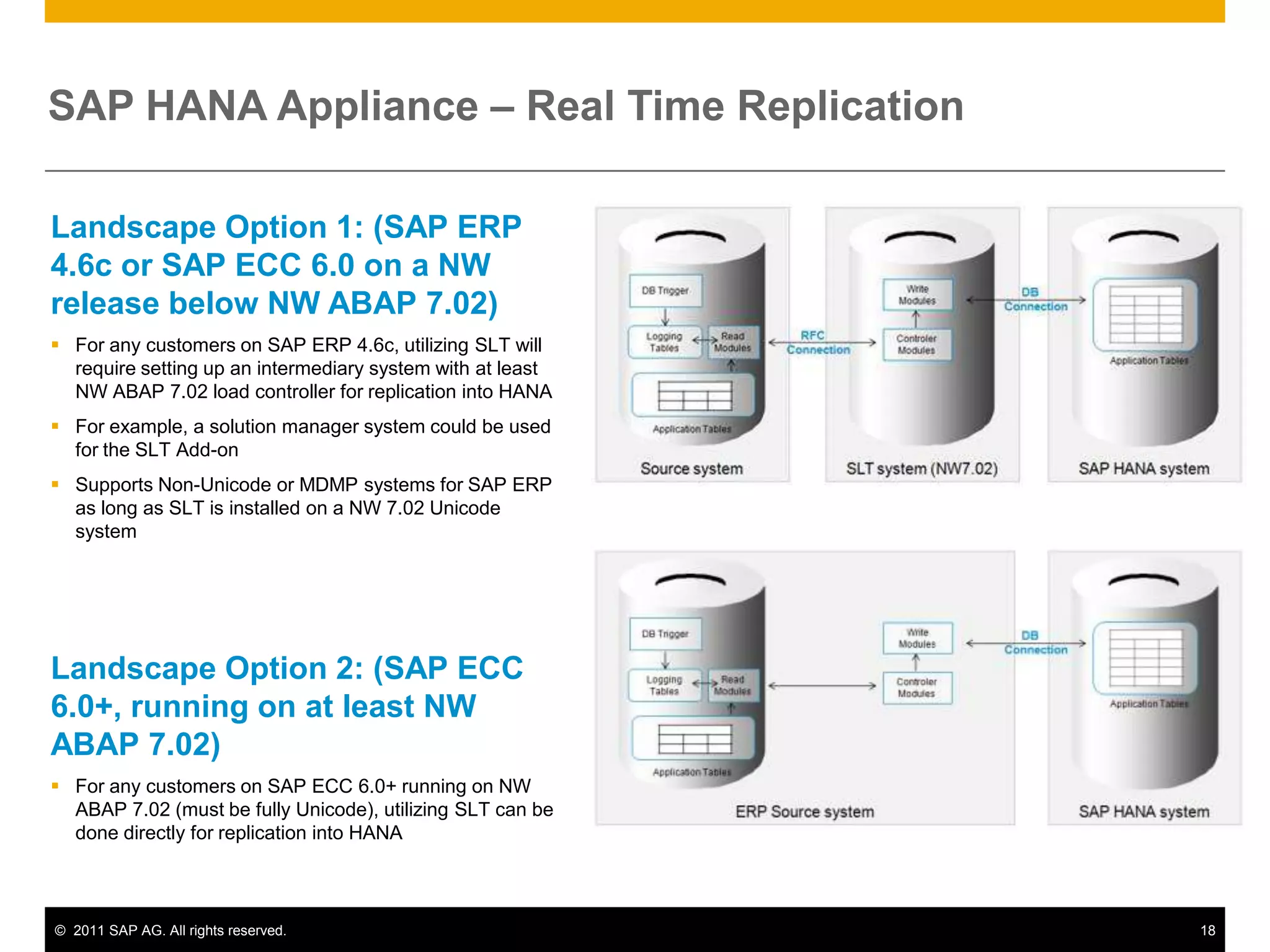
SAP HANA Appliance – Real Time ReplicationLandscape Option 1: (SAP ERP 4.6c or SAP ECC 6.0 on a NW release below NW ABAP 7.02)For any customers on SAP ERP 4.6c, utilizing SLT will require setting up an intermediary system with at least NW ABAP 7.02 load controller for replication into HANA
For example, a solution manager system could be used for the SLT Add-on
Supports Non-Unicode or MDMP systems for SAP ERP as long as SLT is installed on a NW 7.02 Unicode systemLandscape Option 2: (SAP ECC 6.0+, running on at least NW ABAP 7.02)For any customers on SAP ECC 6.0+ running on NW ABAP 7.02 (must be fully Unicode), utilizing SLT can be done directly for replication into HANATechnical Requirements and System Set-Up Information for LT Replication ServerLT replication server can run on any SAP system with SAP NetWeaver 7.02 ABAP stack (using SAP Kernel 7.20EXT), for example on Solution Manager 7.1 or the source system  – it does not have to be a separate SAP system!  SAP HANA systemSource systemLT Replication ServerRFCConnectionDBConnectionInstallation: respective DMIS 2010 version
 Minimum support pack level: latest available  Installation: HANA SPS02: includes LT replication   functionality fully integrated into the UI of	the HANA modelerInstallation: Addon DMIS 2010_1_700
 Minimum support pack level: SP04    (planned with release of HANA SPS02) Basic Configuration: Define RFC connection to source system- Define DB connection to HANA system- Define max. number of jobs to be used   for data replicationBasic Configuration: Optional: define separate table space  for logging tables
 Define RFC user with appropriate authorizationBasic Configuration:- Create a DB user (if required)System Requirements:- SAP Basis: Netweaver 702 with Kernel 7.20EXT   (currently limited platform availability) - Filesystem:  100 GB- RAM: 16-32 GB CPU: 2-4 cores
 Recommended number of background jobs: 10 System Requirements: SAP Basis 4.6C and higher
 All data bases Architecture OverviewData ModelingSAP HANA StudioClientsMS ExcelBI4 ExplorerModelingAdministrationSAP BI4 universes (WebI,...)Dashboard DesignBI4 AnalysisERPSAP HANA ApplianceReplication AgentSLT Add-onSAP HANA DatabaseSession ManagementLogERP DBTransaction ManagerRequest Processing / Execution ControlReplication ServerSQL ParserMDXAuthorization ManagerBusiness Objects EnterpriseSQL ScriptCalc EngineLoad ControllerRelational EnginesSBO Information Design ToolData Services DesignerMetadata ManagerRow StoreColumn StorePersistence LayerLoggerPage ManagementData ServicesSBO BI4 servers       ( program for client)Disk StorageData VolumesLog VolumesOther Source SystemsSAP NetWeaver BW3rd Party
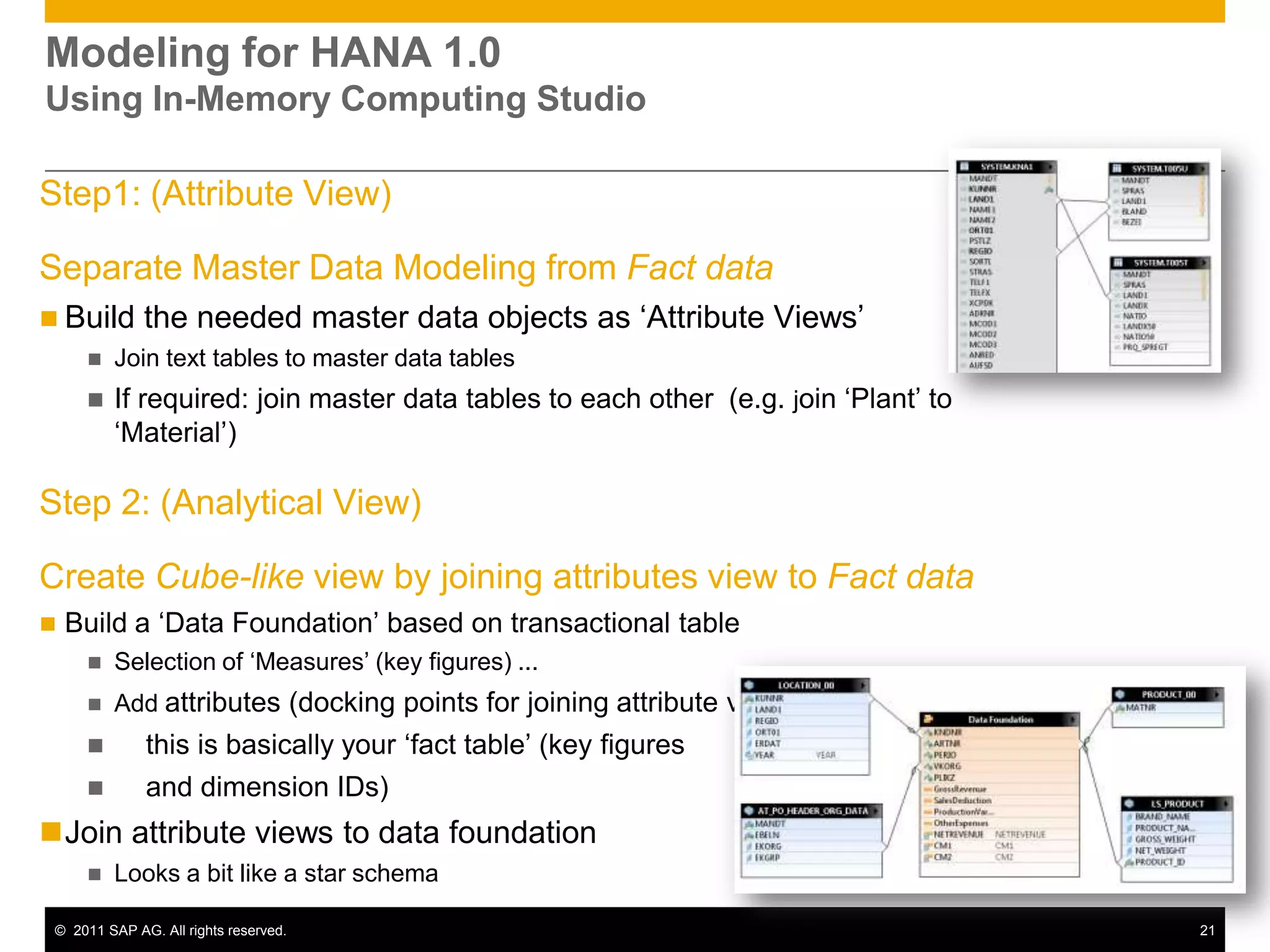
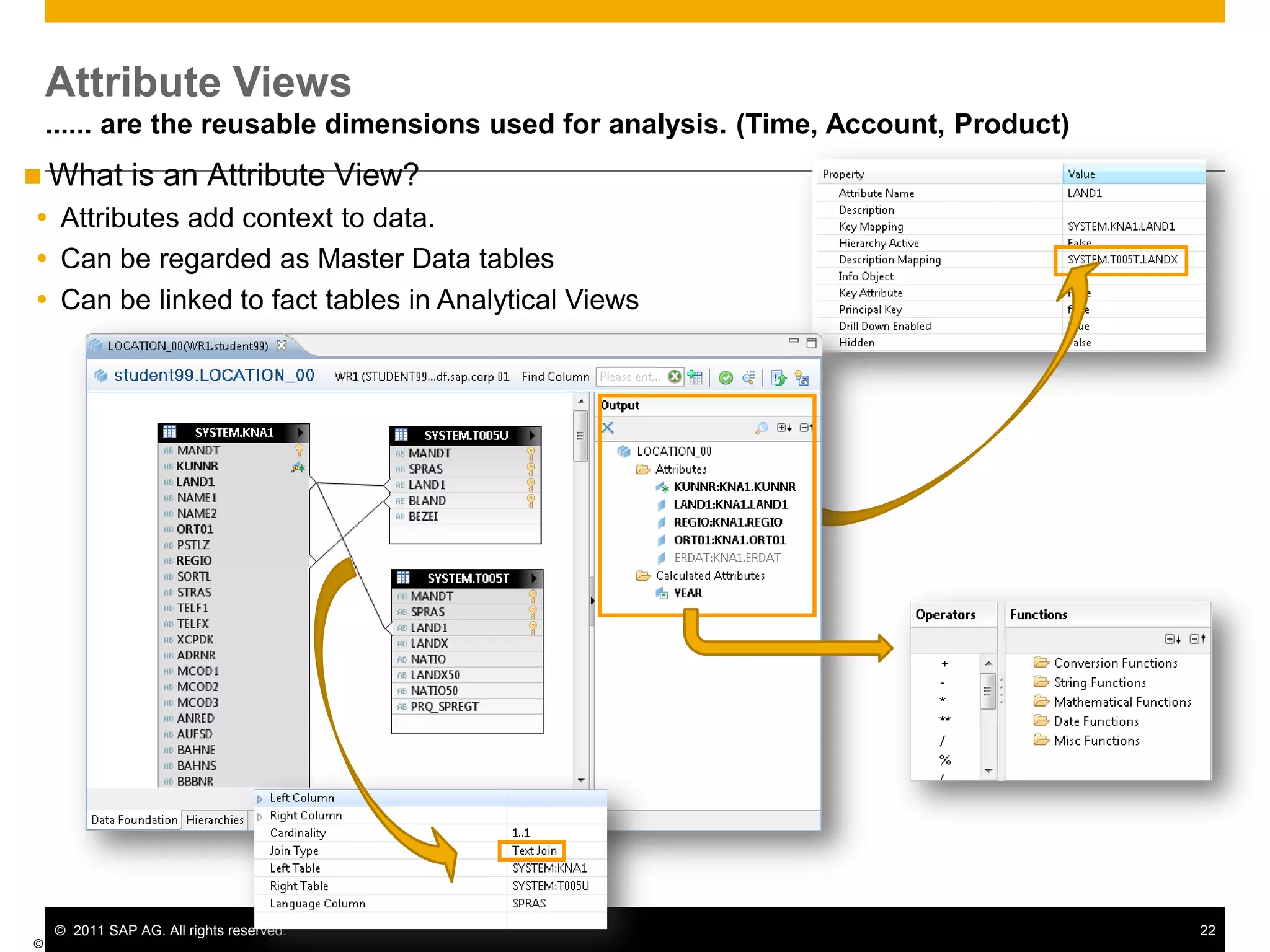
Modeling for HANA 1.0Using In-Memory Computing StudioStep1: (Attribute View)Separate Master Data Modeling from Fact dataBuild the needed master data objects as ‘Attribute Views’
Join text tables to master data tables
If required: join master data tables to each other (e.g. join ‘Plant’ to ‘Material’)Step 2: (Analytical View)Create Cube-like view by joining attributes view to Fact dataBuild a ‘Data Foundation’ based on transactional table
Selection of ‘Measures’ (key figures) ...
Add attributes (docking points for joining attribute views)    this is basically your ‘fact table’ (key figures     and dimension IDs)Join attribute views to data foundation
Looks a bit like a star schema Attribute Views...... are the reusable dimensions used for analysis. (Time, Account, Product)© SAP AG 2011What is an Attribute View?Attributes add context to data.Can be regarded as Master Data tablesCan be linked to fact tables in Analytical Views
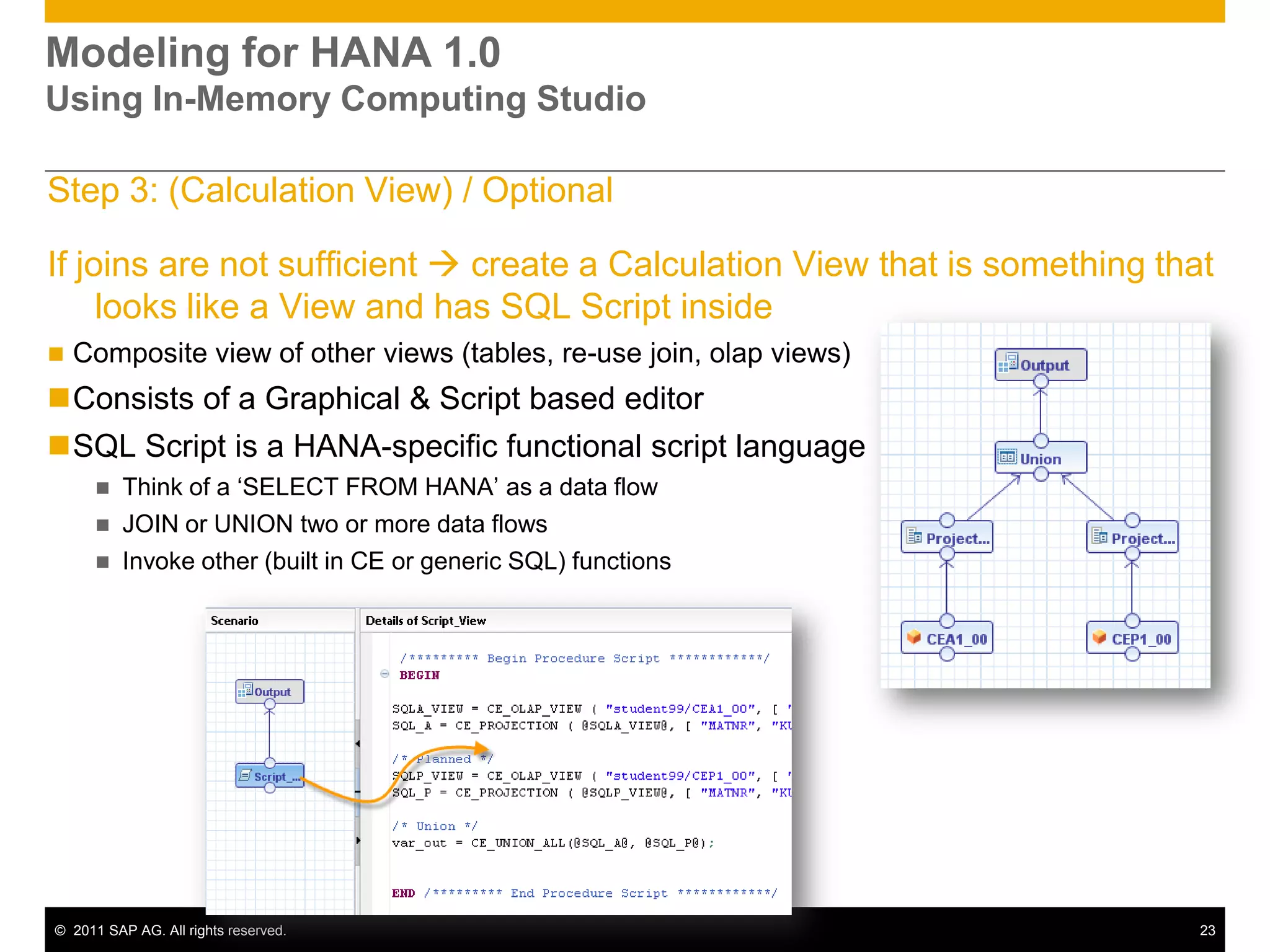
Modeling for HANA 1.0Using In-Memory Computing StudioStep 3: (Calculation View) / OptionalIf joins are not sufficient create a Calculation View that is something that looks like a View and has SQL Script insideComposite view of other views (tables, re-use join, olap views)
Consists of a Graphical & Script based editor
SQL Script is a HANA-specific functional script language
Think of a ‘SELECT FROM HANA’ as a data flow
JOIN or UNION two or more data flows
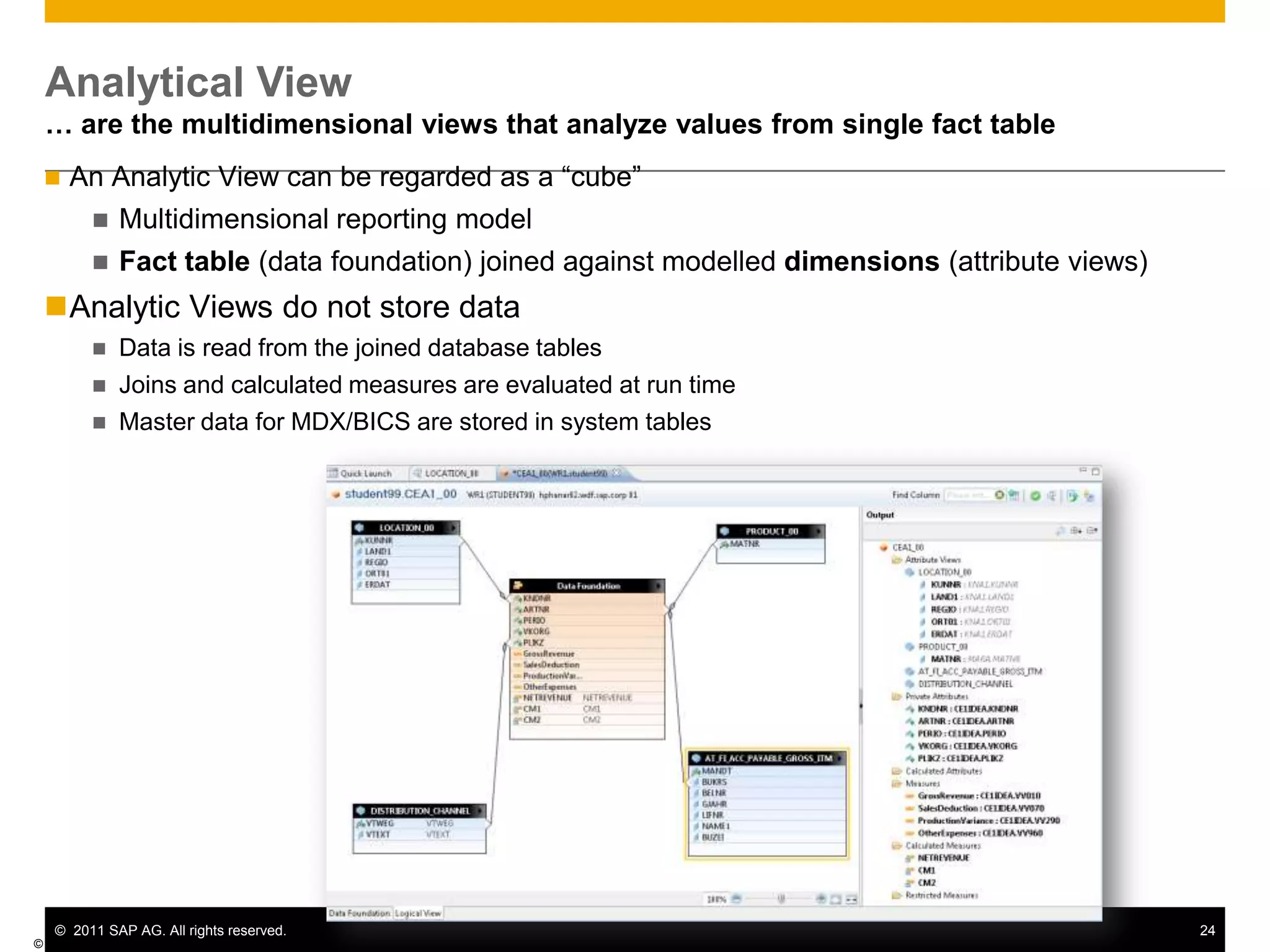
Invoke other (built in CE or generic SQL) functionsAnalytical View… are the multidimensional views that analyze values from single fact table© SAP AG 2011An Analytic View can be regarded as a “cube”
Multidimensional reporting model
Fact table (data foundation) joined against modelled dimensions (attribute views)
Analytic Views do not store data
Data is read from the joined database tables
Joins and calculated measures are evaluated at run time
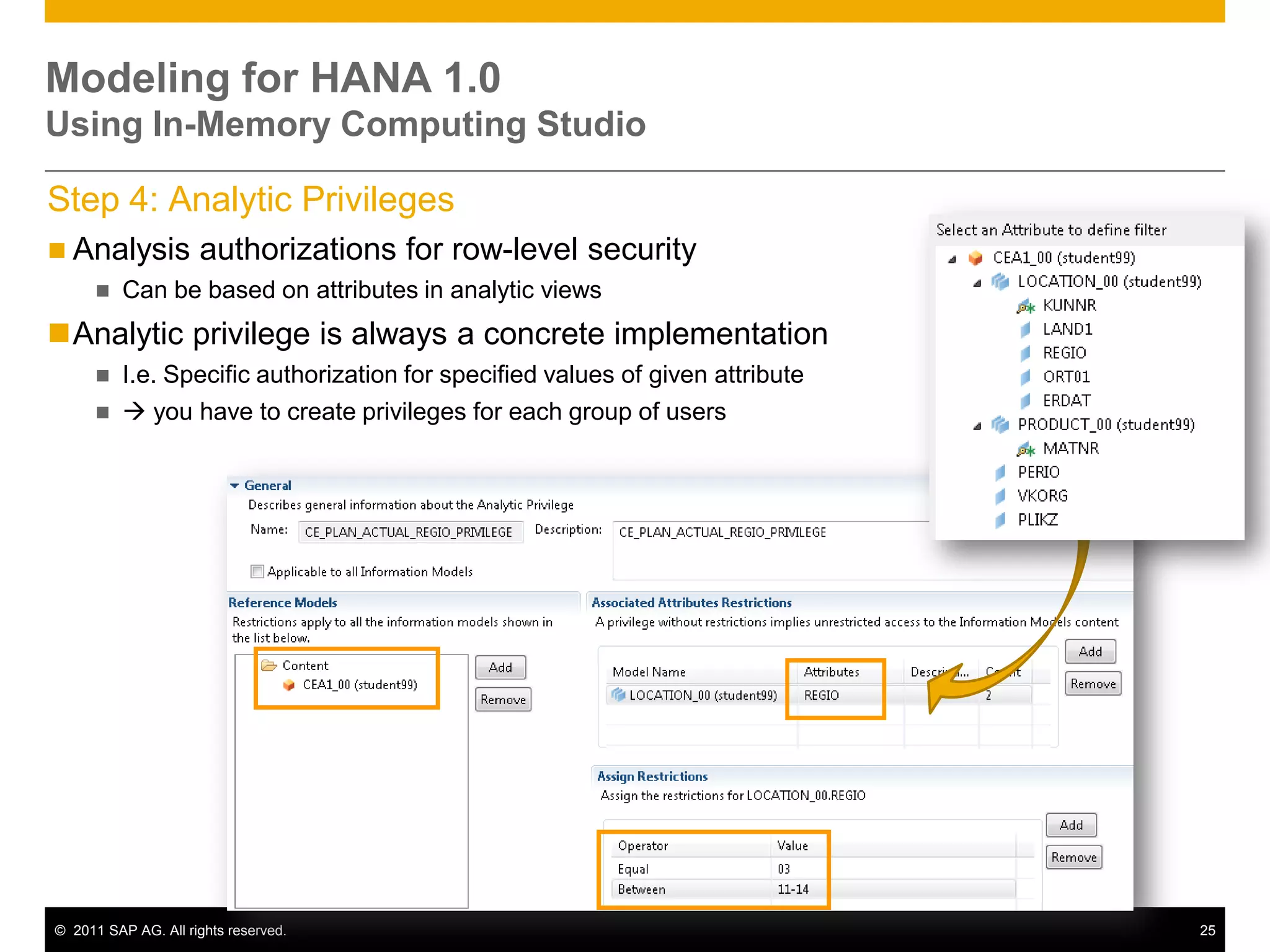
Master data for MDX/BICS are stored in system tablesModeling for HANA 1.0Using In-Memory Computing Studio Step 4: Analytic PrivilegesAnalysis authorizations for row-level security
Can be based on attributes in analytic views
Analytic privilege is always a concrete implementation
I.e. Specific authorization for specified values of given attribute
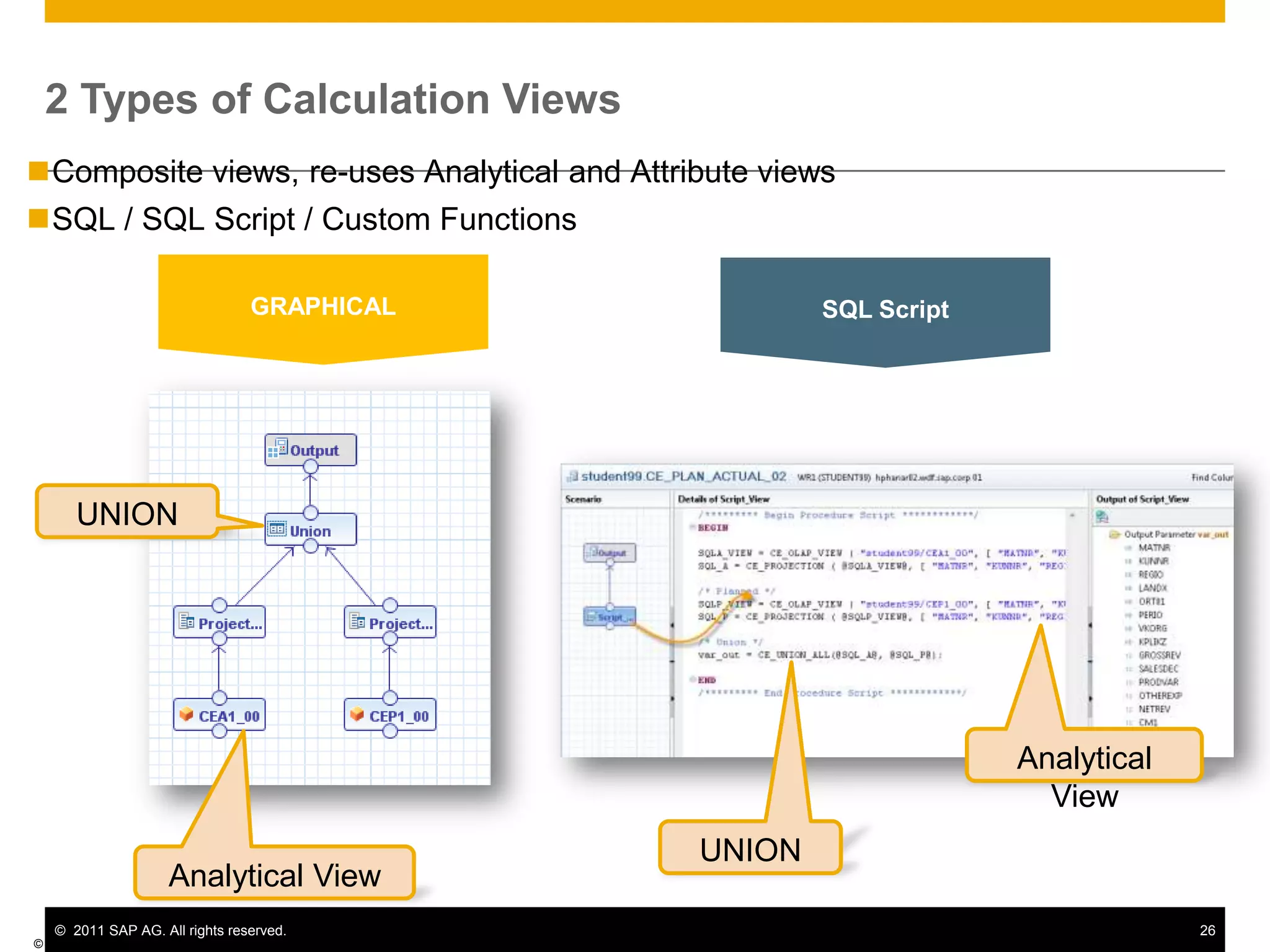
 you have to create privileges for each group of users2 Types of Calculation Views© SAP AG 2011GRAPHICALSQL ScriptComposite views, re-uses Analytical and Attribute views
SQL / SQL Script / Custom FunctionsUNIONAnalytical ViewUNIONAnalytical View
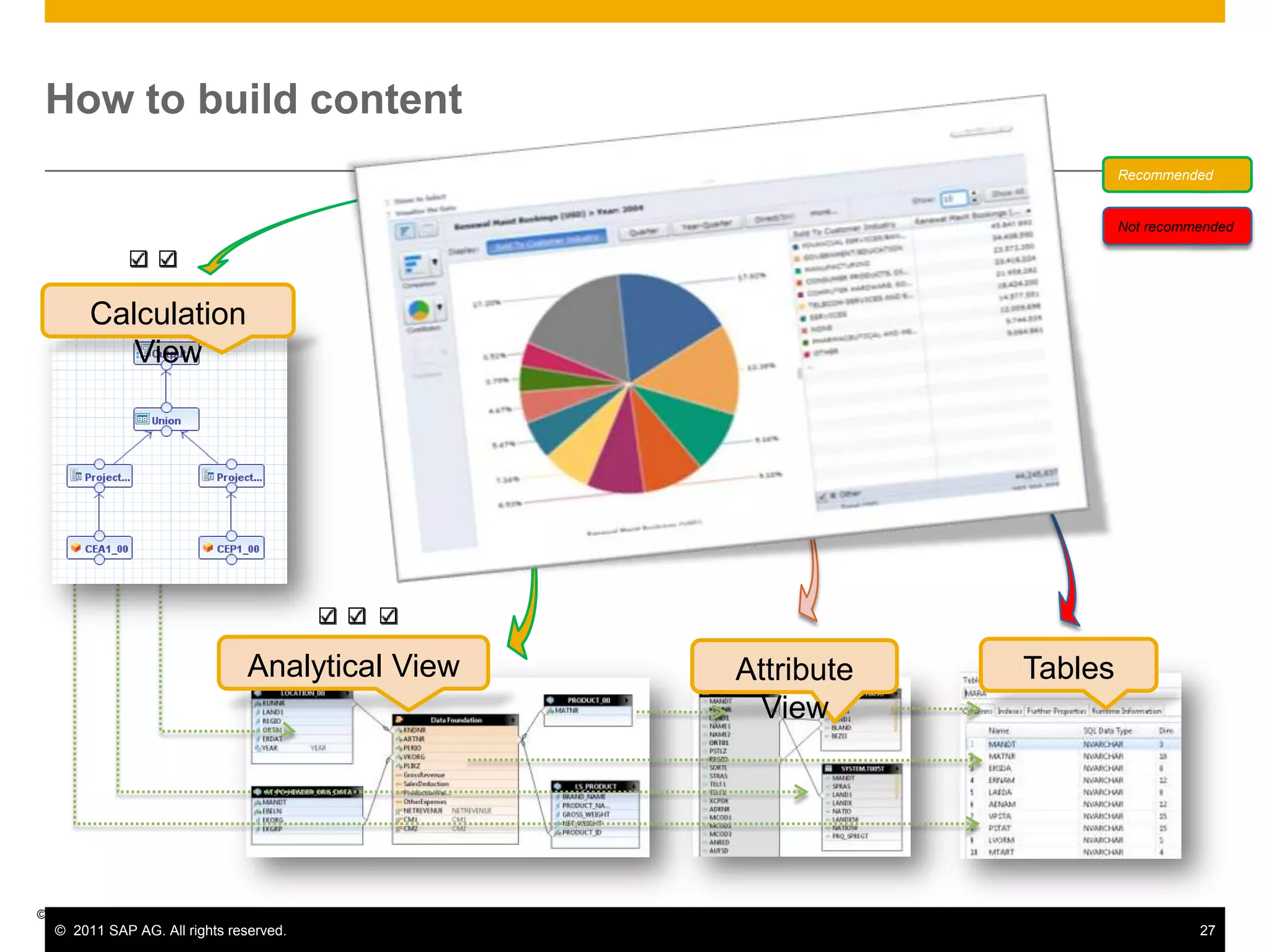
How to build content RecommendedNot recommendedCalculation ViewAnalytical ViewTablesAttribute View© SAP AG 2011
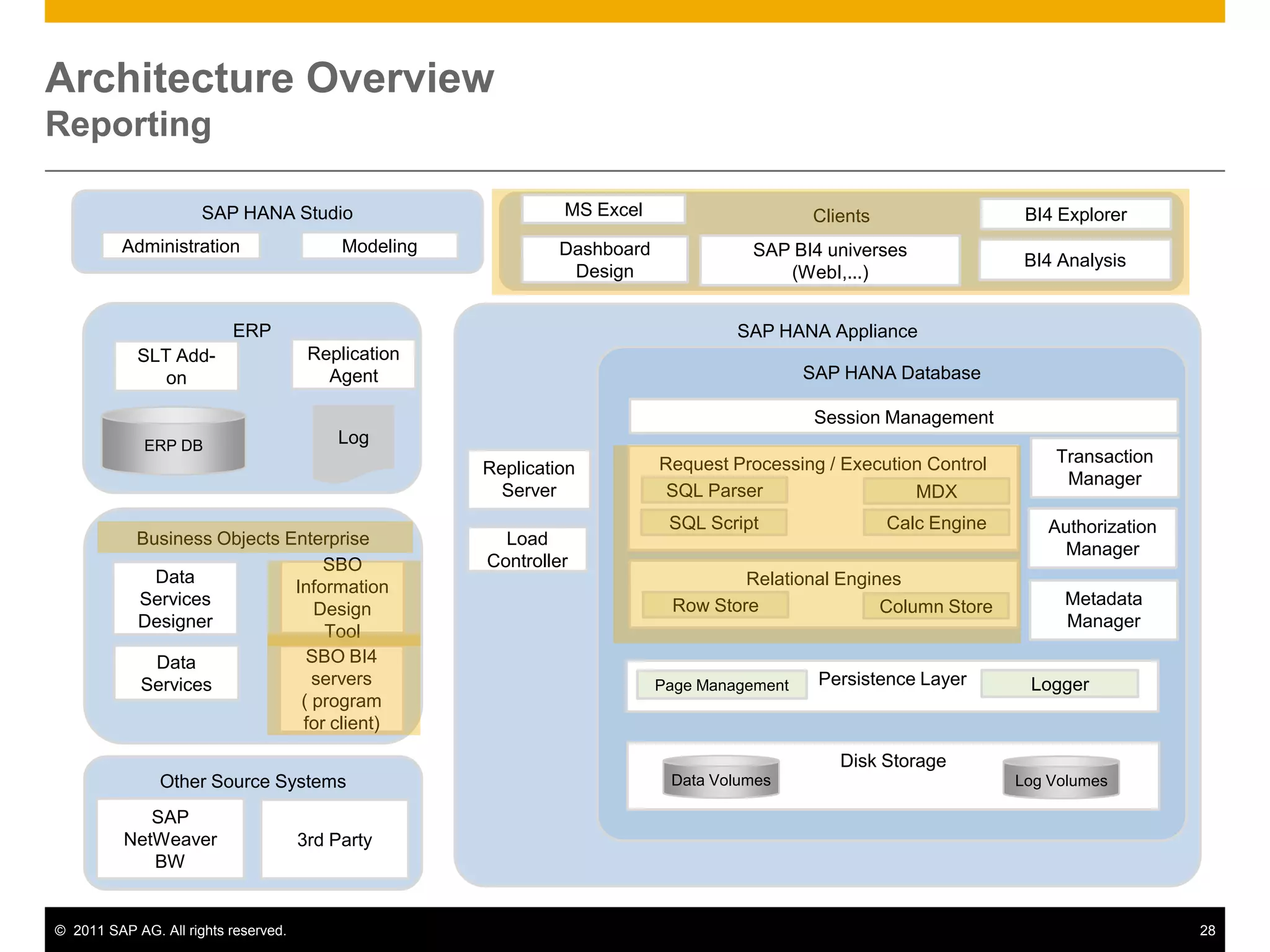
Architecture OverviewReportingSAP HANA StudioClientsMS ExcelBI4 ExplorerModelingAdministrationSAP BI4 universes (WebI,...)Dashboard DesignBI4 AnalysisERPSAP HANA ApplianceReplication AgentSLT Add-onSAP HANA DatabaseSession ManagementLogERP DBTransaction ManagerRequest Processing / Execution ControlReplication ServerSQL ParserMDXAuthorization ManagerBusiness Objects EnterpriseSQL ScriptCalc EngineLoad ControllerRelational EnginesSBO Information Design ToolData Services DesignerMetadata ManagerRow StoreColumn StorePersistence LayerLoggerPage ManagementData ServicesSBO BI4 servers       ( program for client)Disk StorageData VolumesLog VolumesOther Source SystemsSAP NetWeaver BW3rd Party
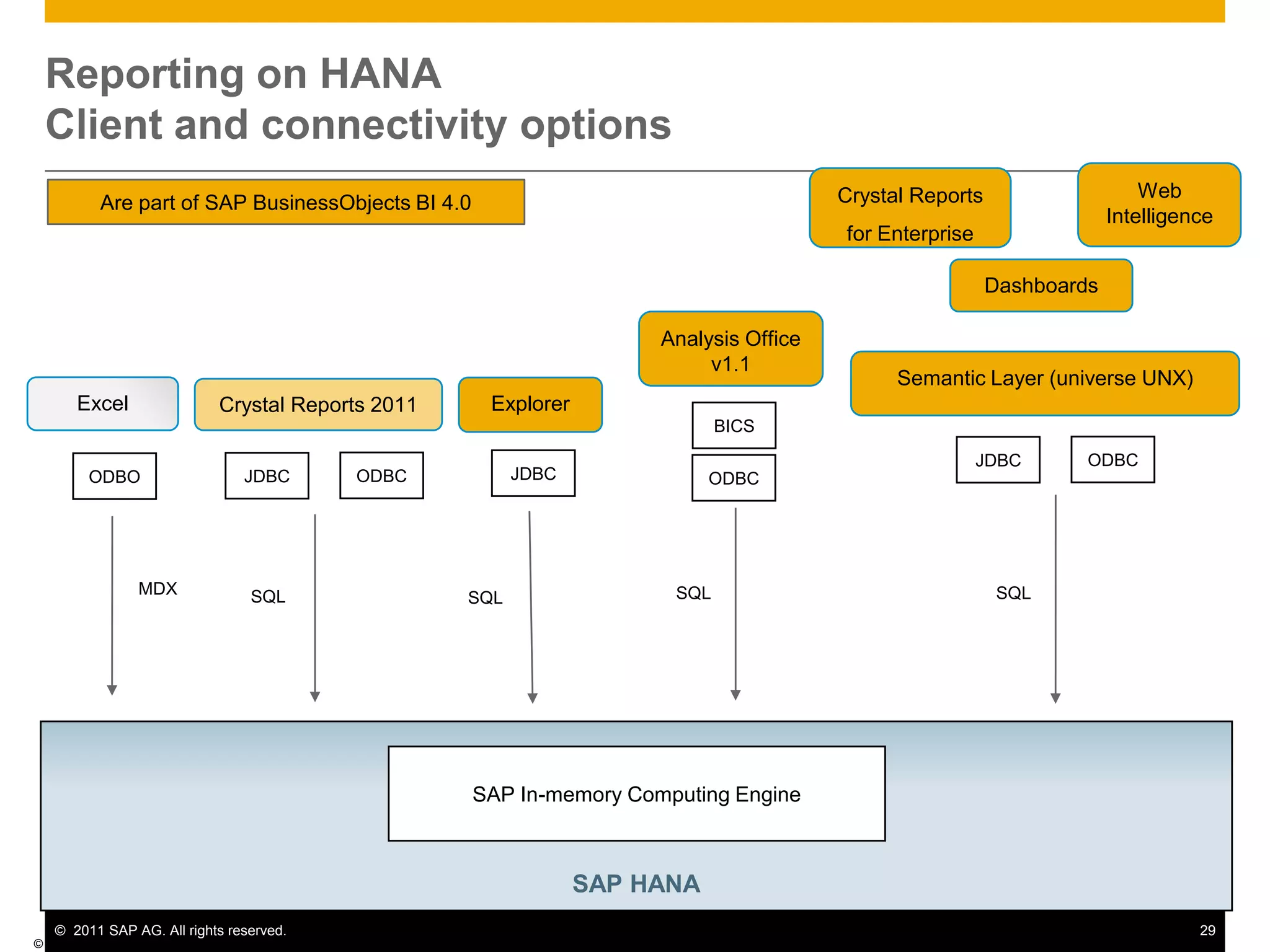
Reporting on HANA Client and connectivity options© SAP AG 2009Web IntelligenceCrystal Reportsfor EnterpriseAre part of SAP BusinessObjects BI 4.0DashboardsAnalysis Office v1.1Semantic Layer (universe UNX)ExcelExplorerCrystal Reports 2011BICSODBCJDBCJDBCODBCJDBCODBOODBCMDXSQLSQLSQLSQLSAP HANA SAP In-memory Computing Engine
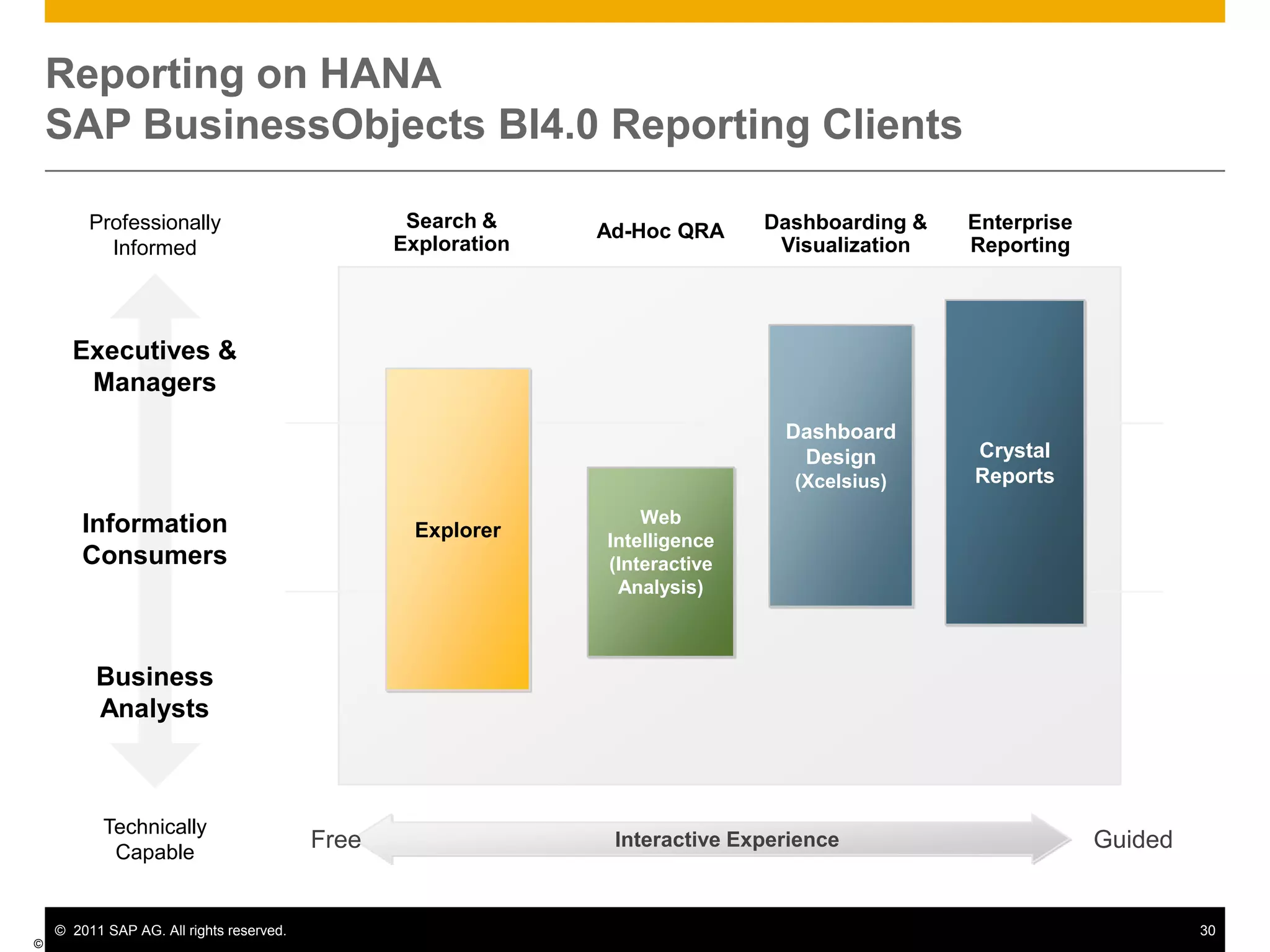
Reporting on HANA SAP BusinessObjects BI4.0 Reporting Clients© SAP AG 2009Professionally InformedSearch &ExplorationDashboarding &VisualizationEnterpriseReportingAd-Hoc QRACrystal ReportsDashboard Design (Xcelsius)Executives &ManagersExplorerWeb Intelligence (Interactive Analysis)InformationConsumersBusiness AnalystsTechnically CapableGuidedFreeInteractive Experience
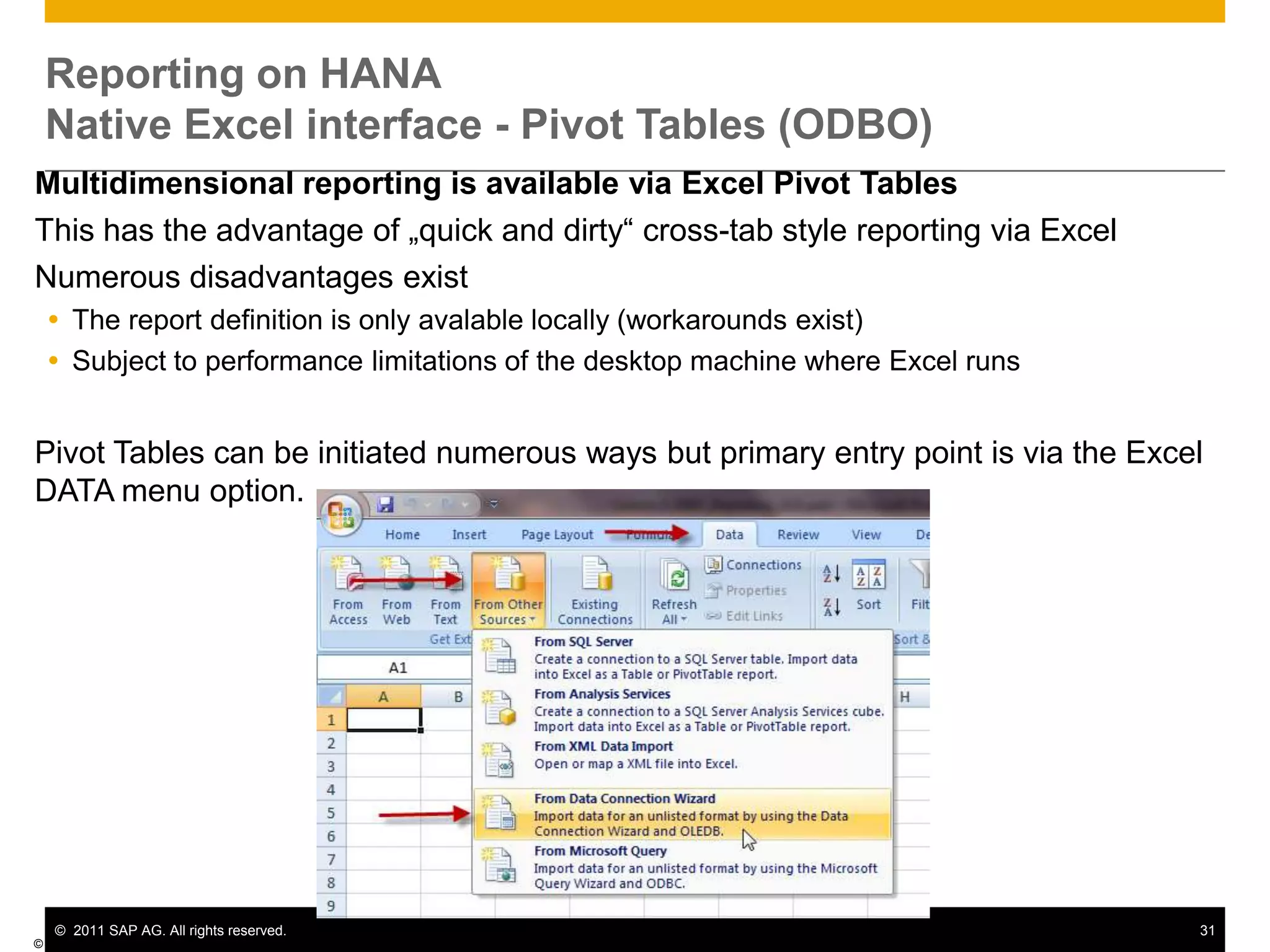
Reporting on HANANative Excel interface - Pivot Tables (ODBO)Multidimensional reporting is available via Excel Pivot TablesThis has the advantage of „quick and dirty“ cross-tab style reporting via ExcelNumerous disadvantages existThe report definition is only avalable locally (workarounds exist)Subject to performance limitations of the desktop machine where Excel runsPivot Tables can be initiated numerous ways but primary entry point is via the Excel DATA menu option.© SAP AG 2009
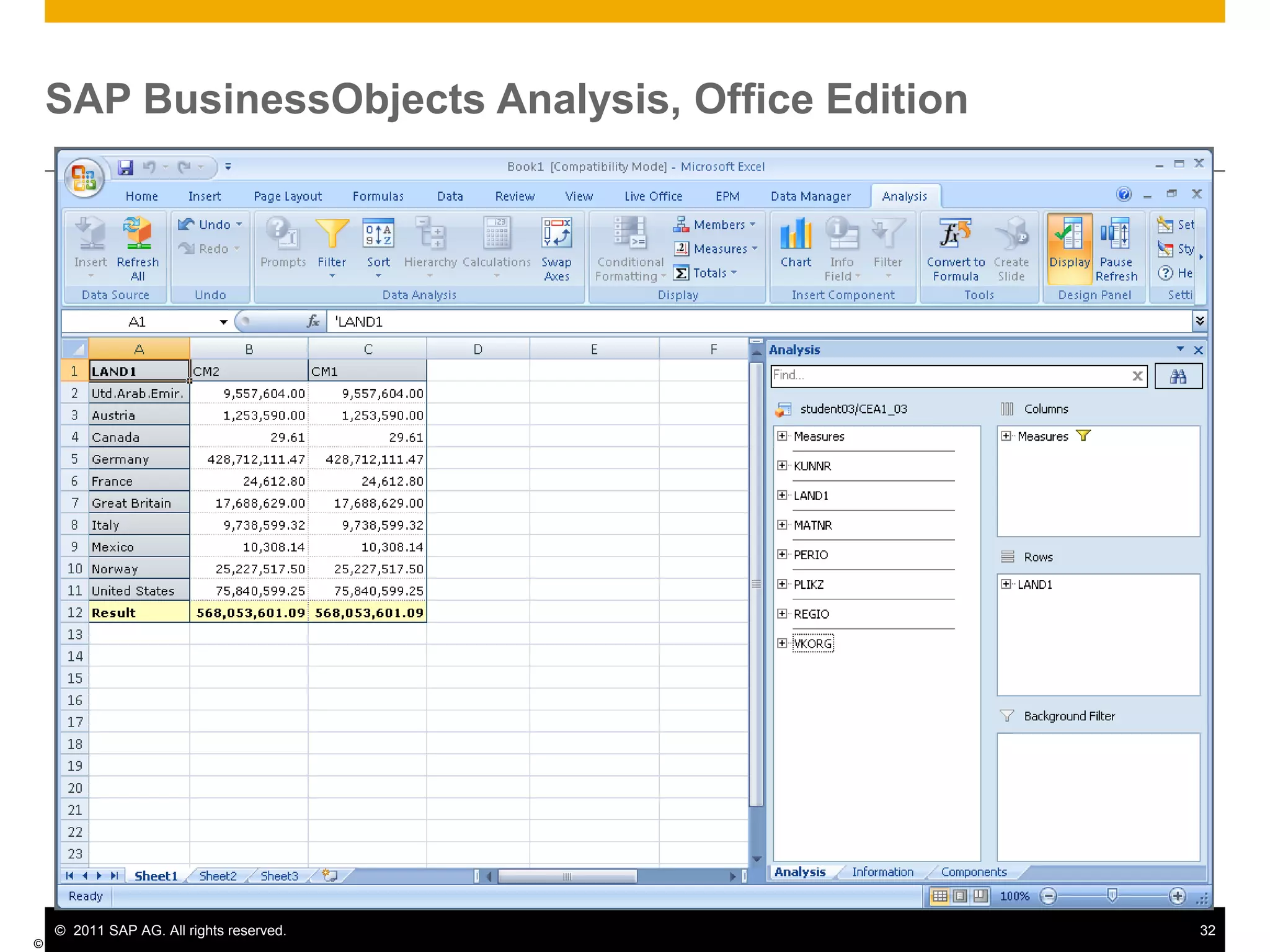
SAP BusinessObjects Analysis, Office Edition© SAP AG 2009
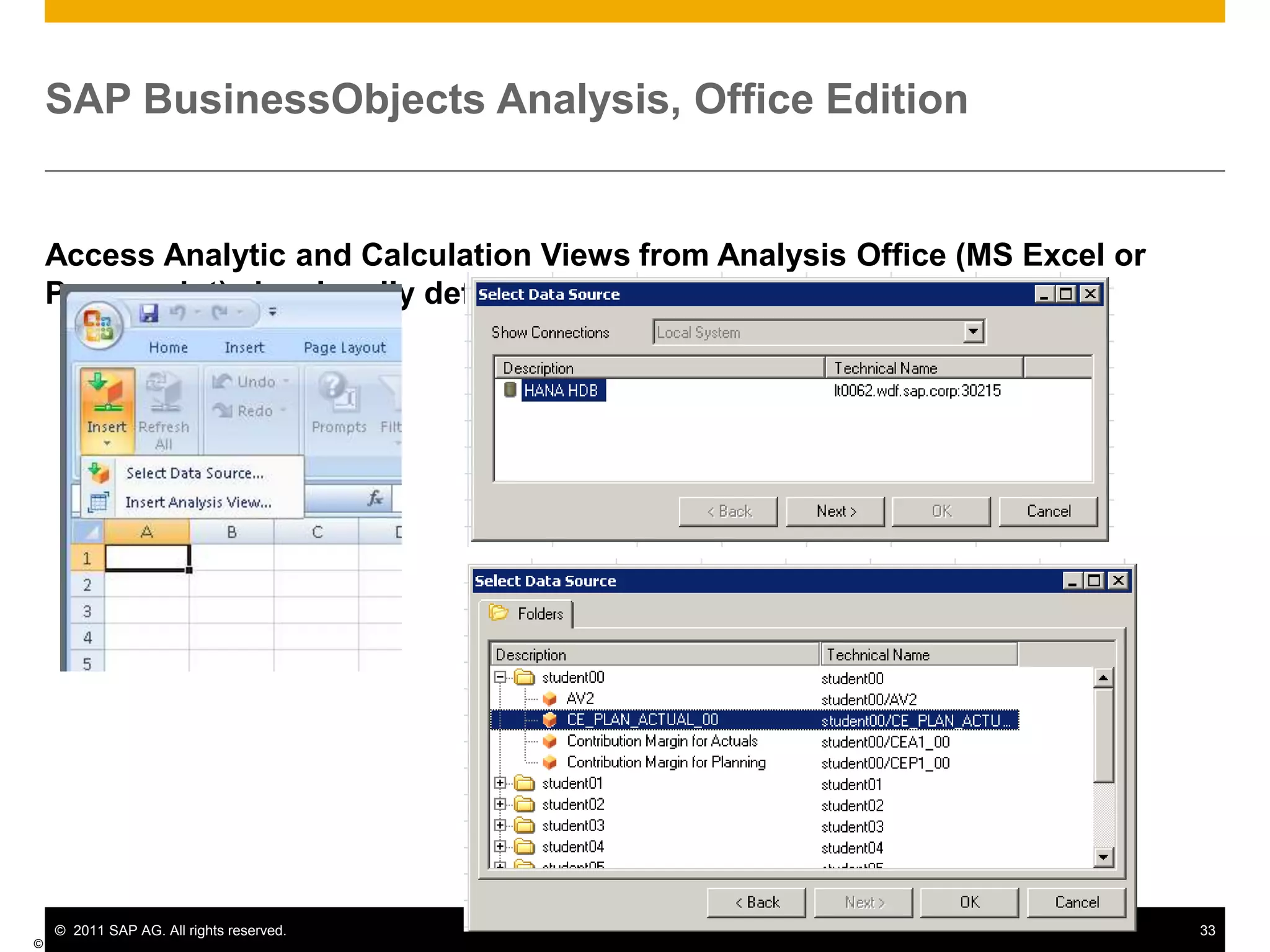
SAP BusinessObjects Analysis, Office EditionAccess Analytic and Calculation Views from Analysis Office (MS Excel or Powerpoint) via a locally defined ODBC connection© SAP AG 2009
What is BusinessObjects Explorer?It’s search against BI…Use familiar key-word search to find business informationAnswers “on-the-fly”  and investigative questionsSearches directly on pre-indexed dataNo previous reports or metrics need exist

HANA SITSP 2011

  • 1.
    HANA – Overview& RoadmapHenrique PintoConsultor de Soluções, SAP BrasilOutubro de 2011
  • 2.
    Introduction to HANACoreFunctionalitiesUse casesA Typical SAP Landscape DiscussionHANA Roadmap
  • 3.
    ColumnarIn-Memory “By 2012, 70%of Global 1000 organizations will load detailed data into memory as the primary method to optimize BI application performance.” - Gartner
  • 4.
    SAP High-Performance AnalyticAppliance (SAP HANA)SAP HANA is a data source agonistic in-memory appliance that enables organizations to analyze business operations in real-time based on large volumes of data Who is it for? Analyst Business User ExecutiveAnalyze large volumes of operational data in real-timeAccess, model, and analyze operational data in a single environment without affecting existing applications or systemsProvide a high performance technological foundation for business analyticsWhat is it for?
  • 5.
    SAP HANASAP High-PerformanceAnalytic AppliancePreconfigured Analytical ApplianceIn-Memory software + hardware(HP, IBM, Fujitsu, Cisco)In-Memory Computing Engine SoftwareData Modeling and Data Management
  • 6.
  • 7.
    Data Integration for3rd Party SystemsCapabilities EnabledAnalyze information in real-time at unprecedented speeds on large volumes of non-aggregated data
  • 8.
    Create flexible analyticmodels based on real-time and historic business data
  • 9.
    Foundation for newcategory of applications (e.g., planning, simulation) to significantly outperform current applications in category
  • 10.
    Minimizes data duplicationOtherApplicationsSAP BusinessObjectsSAP HANAMDXSQLBICSIn-Memory Computing EngineSAP NetWeaverBWIn-MemoryComputingCalculation and Planning Engine3rd PartyData Management ServiceSAP Business SuiteAdmin and Data ModelingReal–Time Replication ServicesData Integration Services
  • 11.
    ROW-BASED StorageTuple 1Tuple2Tuple 3Tuple 4Column 1Column 4Column 3Column 2 OPTIMIZED for current HW EasilyCOMPRESSABLECOLUMN-BASED StorageAVOID Bottlenecks – Data Storage
  • 12.
    Classical ApproachCalculationAPPLICATIONLAYERDATABASELAYERMOVEcalculations intodatabase Only transferRESULTSCalculationFuture ApproachAVOID Bottlenecks – Data Transfer
  • 13.
    In-Memory Computing –The Time is NOWOrchestrating Technology InnovationsHW Technology InnovationsSAP SW Technology InnovationsRow and Column StoreMulti-Core Architecture (8 x 8core CPU per blade)Massive parallel scaling with many bladesOne blade ~$50.000 = 1 Enterprise Class ServerCompressionPartitioning64bit address space – 2TB in current servers100GB/s data throughputDramatic decline in price/performanceNo Aggregate TablesInsert Only on Delta
  • 14.
    Response TimeIn-MemoryHANAmicroseconds10-6Disk-Based DBMSwith Memory CacheOrSolid-State DBMSmilliseconds10-3Disk-Based DBMSseconds1001,00010,000100,000Throughput (transactions per second)
  • 15.
    Introduction to HANACoreFunctionalitiesUse casesA Typical SAP Landscape DiscussionHANA Roadmap
  • 16.
    Architecture OverviewSAP HANAAppliance and SurroundingsSAP HANA StudioClientsMS ExcelBI4 ExplorerModelingAdministrationSAP BI4 universes (WebI,...)Dashboard DesignBI4 AnalysisERPSAP HANA ApplianceReplication AgentSLT Add-onSAP HANA DatabaseSession ManagementLogERP DBTransaction ManagerRequest Processing / Execution ControlReplication ServerSQL ParserMDXAuthorization ManagerSAP Business Objects BI4SQL ScriptCalc EngineLoad ControllerRelational EnginesSBO BI4 Information Design ToolData Services DesignerMetadata ManagerRow StoreColumn StorePersistence LayerLoggerPage ManagementSBO BI4 servers ( program for client)Data ServicesDisk StorageData VolumesLog VolumesOther Source SystemsSAP NetWeaver BW3rd Party
  • 17.
    SAP HANA StudioClientsMSExcelBI4 ExplorerModelingAdministrationSAP BI4 universes (WebI,...)Dashboard DesignBI4 AnalysisERPSAP HANA ApplianceReplication AgentSLT Add-onSAP HANA DatabaseSAP HANA DatabaseSession ManagementSession ManagementLogERP DBTransaction ManagerTransaction ManagerRequest Processing / Execution ControlRequest Processing / Execution ControlReplication ServerSQL ParserSQL ParserMDXMDXAuthorization ManagerAuthorization ManagerSAP Business Objects BI4SQL ScriptSQL ScriptCalc EngineCalc EngineLoad ControllerRelational EnginesRelational EnginesSBO BI4 Information Design ToolData Services DesignerMetadata ManagerMetadata ManagerRow StoreRow StoreColumn StoreColumn StorePersistence LayerPersistence LayerLoggerLoggerPage ManagementPage ManagementSBO BI4 servers ( program for client)Data ServicesDisk StorageDisk StorageData VolumesData VolumesLog VolumesLog VolumesOther Source SystemsSAP NetWeaver BW3rd PartyArchitecture OverviewThe engine itself
  • 18.
    Architecture OverviewLoading Datainto HANASAP HANA StudioClientsMS ExcelBI4 ExplorerModelingAdministrationSAP BI4 universes (WebI,...)Dashboard DesignBI4 AnalysisERPSAP HANA ApplianceReplication AgentSLT Add-onSAP HANA DatabaseSession ManagementLogERP DBTransaction ManagerRequest Processing / Execution ControlReplication ServerSQL ParserMDXAuthorization ManagerBusiness Objects EnterpriseSQL ScriptCalc EngineLoad ControllerRelational EnginesSBO Information Design ToolData Services DesignerMetadata ManagerRow StoreColumn StorePersistence LayerLoggerPage ManagementData ServicesSBO BI4 servers ( program for client)Disk StorageData VolumesLog VolumesOther Source SystemsSAP NetWeaver BW3rd Party
  • 19.
    SAP BusinessObjects DataServices 4.0 and HANAMetadataSAPERPModelerServerRepositoryBWIn-Memory Computing Engine(ICE)Data LoadOpen HubDesigner and Management ConsoleSAP BusinessObjectsData Services 4.0HANAAny Source© SAP AG 2011
  • 20.
    HANA Modeling leveragingData Services(Simplified Example using RFC_READ_TABLE)© SAP AG 2011 Create a new DataStore of type “SAP Applications” with specific connection details
  • 21.
    Setup Information Modelerto communicate with Data Services (Configure Import Server)© SAP AG 2011 Click “Import” to import meta data via Data Services or use the menu
  • 22.
    LT Replication Concept:Trigger-Based ApproachArchitecture and Key Building Blocks SAP HANA DatabaseSource systemLT Replication ServerDB TriggerWrite ModulesDBConnectionRFCConnectionLoggingTablesRead ModulesControler ModulesApplication TablesLT replication server does not have to be a separate SAP system and can run on any SAP system with SAP NetWeaver 7.02 ABAP stack (Kernel 7.20EXT) Application TablesEfficient initialization of data replication based on DB trigger and delta logging concept (as with NearZero downtime approach)Flexible and reliable replication process, incl. data migration (as used for TDMS and SAP LT)Fast data replication via DB connectLT replication functionality is fully integrated with SAP HANA Studio
  • 23.
    SAP HANA Appliance– Real Time ReplicationLandscape Option 1: (SAP ERP 4.6c or SAP ECC 6.0 on a NW release below NW ABAP 7.02)For any customers on SAP ERP 4.6c, utilizing SLT will require setting up an intermediary system with at least NW ABAP 7.02 load controller for replication into HANA
  • 24.
    For example, asolution manager system could be used for the SLT Add-on
  • 25.
    Supports Non-Unicode orMDMP systems for SAP ERP as long as SLT is installed on a NW 7.02 Unicode systemLandscape Option 2: (SAP ECC 6.0+, running on at least NW ABAP 7.02)For any customers on SAP ECC 6.0+ running on NW ABAP 7.02 (must be fully Unicode), utilizing SLT can be done directly for replication into HANATechnical Requirements and System Set-Up Information for LT Replication ServerLT replication server can run on any SAP system with SAP NetWeaver 7.02 ABAP stack (using SAP Kernel 7.20EXT), for example on Solution Manager 7.1 or the source system – it does not have to be a separate SAP system! SAP HANA systemSource systemLT Replication ServerRFCConnectionDBConnectionInstallation: respective DMIS 2010 version
  • 26.
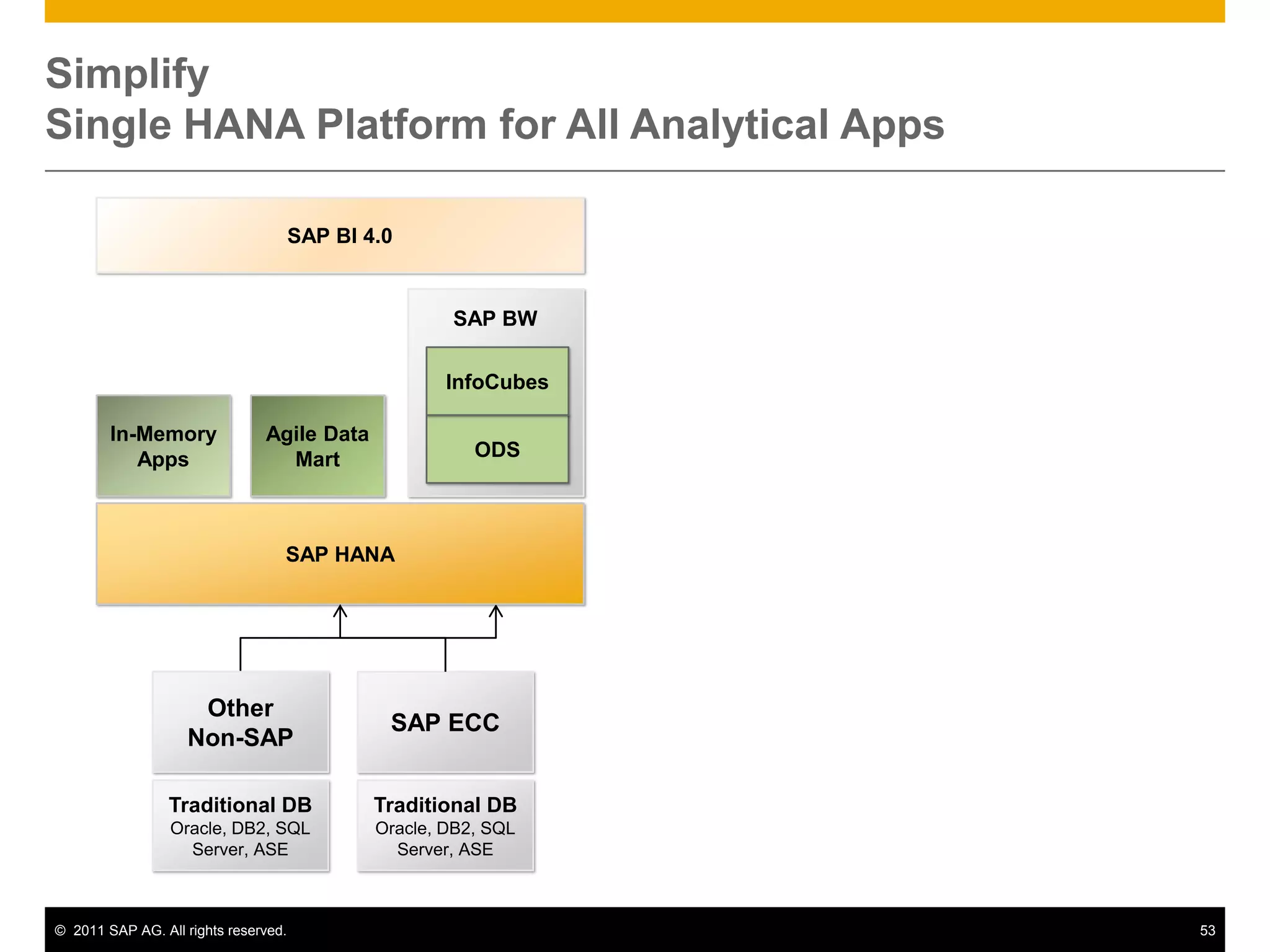
    Minimum supportpack level: latest available Installation: HANA SPS02: includes LT replication functionality fully integrated into the UI of the HANA modelerInstallation: Addon DMIS 2010_1_700
  • 27.
    Minimum supportpack level: SP04 (planned with release of HANA SPS02) Basic Configuration: Define RFC connection to source system- Define DB connection to HANA system- Define max. number of jobs to be used for data replicationBasic Configuration: Optional: define separate table space for logging tables
  • 28.
    Define RFCuser with appropriate authorizationBasic Configuration:- Create a DB user (if required)System Requirements:- SAP Basis: Netweaver 702 with Kernel 7.20EXT (currently limited platform availability) - Filesystem: 100 GB- RAM: 16-32 GB CPU: 2-4 cores
  • 29.
    Recommended numberof background jobs: 10 System Requirements: SAP Basis 4.6C and higher
  • 30.
    All databases Architecture OverviewData ModelingSAP HANA StudioClientsMS ExcelBI4 ExplorerModelingAdministrationSAP BI4 universes (WebI,...)Dashboard DesignBI4 AnalysisERPSAP HANA ApplianceReplication AgentSLT Add-onSAP HANA DatabaseSession ManagementLogERP DBTransaction ManagerRequest Processing / Execution ControlReplication ServerSQL ParserMDXAuthorization ManagerBusiness Objects EnterpriseSQL ScriptCalc EngineLoad ControllerRelational EnginesSBO Information Design ToolData Services DesignerMetadata ManagerRow StoreColumn StorePersistence LayerLoggerPage ManagementData ServicesSBO BI4 servers ( program for client)Disk StorageData VolumesLog VolumesOther Source SystemsSAP NetWeaver BW3rd Party
  • 31.
    Modeling for HANA1.0Using In-Memory Computing StudioStep1: (Attribute View)Separate Master Data Modeling from Fact dataBuild the needed master data objects as ‘Attribute Views’
  • 32.
    Join text tablesto master data tables
  • 33.
    If required: joinmaster data tables to each other (e.g. join ‘Plant’ to ‘Material’)Step 2: (Analytical View)Create Cube-like view by joining attributes view to Fact dataBuild a ‘Data Foundation’ based on transactional table
  • 34.
  • 35.
    Add attributes (dockingpoints for joining attribute views) this is basically your ‘fact table’ (key figures and dimension IDs)Join attribute views to data foundation
  • 36.
    Looks a bitlike a star schema Attribute Views...... are the reusable dimensions used for analysis. (Time, Account, Product)© SAP AG 2011What is an Attribute View?Attributes add context to data.Can be regarded as Master Data tablesCan be linked to fact tables in Analytical Views
  • 37.
    Modeling for HANA1.0Using In-Memory Computing StudioStep 3: (Calculation View) / OptionalIf joins are not sufficient create a Calculation View that is something that looks like a View and has SQL Script insideComposite view of other views (tables, re-use join, olap views)
  • 38.
    Consists of aGraphical & Script based editor
  • 39.
    SQL Script isa HANA-specific functional script language
  • 40.
    Think of a‘SELECT FROM HANA’ as a data flow
  • 41.
    JOIN or UNIONtwo or more data flows
  • 42.
    Invoke other (builtin CE or generic SQL) functionsAnalytical View… are the multidimensional views that analyze values from single fact table© SAP AG 2011An Analytic View can be regarded as a “cube”
  • 43.
  • 44.
    Fact table (datafoundation) joined against modelled dimensions (attribute views)
  • 45.
    Analytic Views donot store data
  • 46.
    Data is readfrom the joined database tables
  • 47.
    Joins and calculatedmeasures are evaluated at run time
  • 48.
    Master data forMDX/BICS are stored in system tablesModeling for HANA 1.0Using In-Memory Computing Studio Step 4: Analytic PrivilegesAnalysis authorizations for row-level security
  • 49.
    Can be basedon attributes in analytic views
  • 50.
    Analytic privilege isalways a concrete implementation
  • 51.
    I.e. Specific authorizationfor specified values of given attribute
  • 52.
     you haveto create privileges for each group of users2 Types of Calculation Views© SAP AG 2011GRAPHICALSQL ScriptComposite views, re-uses Analytical and Attribute views
  • 53.
    SQL / SQLScript / Custom FunctionsUNIONAnalytical ViewUNIONAnalytical View
  • 54.
    How to buildcontent RecommendedNot recommendedCalculation ViewAnalytical ViewTablesAttribute View© SAP AG 2011
  • 55.
    Architecture OverviewReportingSAP HANAStudioClientsMS ExcelBI4 ExplorerModelingAdministrationSAP BI4 universes (WebI,...)Dashboard DesignBI4 AnalysisERPSAP HANA ApplianceReplication AgentSLT Add-onSAP HANA DatabaseSession ManagementLogERP DBTransaction ManagerRequest Processing / Execution ControlReplication ServerSQL ParserMDXAuthorization ManagerBusiness Objects EnterpriseSQL ScriptCalc EngineLoad ControllerRelational EnginesSBO Information Design ToolData Services DesignerMetadata ManagerRow StoreColumn StorePersistence LayerLoggerPage ManagementData ServicesSBO BI4 servers ( program for client)Disk StorageData VolumesLog VolumesOther Source SystemsSAP NetWeaver BW3rd Party
  • 56.
    Reporting on HANAClient and connectivity options© SAP AG 2009Web IntelligenceCrystal Reportsfor EnterpriseAre part of SAP BusinessObjects BI 4.0DashboardsAnalysis Office v1.1Semantic Layer (universe UNX)ExcelExplorerCrystal Reports 2011BICSODBCJDBCJDBCODBCJDBCODBOODBCMDXSQLSQLSQLSQLSAP HANA SAP In-memory Computing Engine
  • 57.
    Reporting on HANASAP BusinessObjects BI4.0 Reporting Clients© SAP AG 2009Professionally InformedSearch &ExplorationDashboarding &VisualizationEnterpriseReportingAd-Hoc QRACrystal ReportsDashboard Design (Xcelsius)Executives &ManagersExplorerWeb Intelligence (Interactive Analysis)InformationConsumersBusiness AnalystsTechnically CapableGuidedFreeInteractive Experience
  • 58.
    Reporting on HANANativeExcel interface - Pivot Tables (ODBO)Multidimensional reporting is available via Excel Pivot TablesThis has the advantage of „quick and dirty“ cross-tab style reporting via ExcelNumerous disadvantages existThe report definition is only avalable locally (workarounds exist)Subject to performance limitations of the desktop machine where Excel runsPivot Tables can be initiated numerous ways but primary entry point is via the Excel DATA menu option.© SAP AG 2009
  • 59.
    SAP BusinessObjects Analysis,Office Edition© SAP AG 2009
  • 60.
    SAP BusinessObjects Analysis,Office EditionAccess Analytic and Calculation Views from Analysis Office (MS Excel or Powerpoint) via a locally defined ODBC connection© SAP AG 2009
  • 61.
    What is BusinessObjectsExplorer?It’s search against BI…Use familiar key-word search to find business informationAnswers “on-the-fly” and investigative questionsSearches directly on pre-indexed dataNo previous reports or metrics need exist
  • 62.
    Provides fast searchand explorationSearches across all data sourcesAny universe accessible source
  • 63.
    Any SAP NetWeaverBW Accelerator accessible source
  • 64.
    And of courseany accessible HANA system…and Then It’s Exploration Of the ResultsIntuitively explore on dataNo data model or data knowledge requiredAutomated relevancy of resultsMost relevant information is displayed first
  • 65.
    Best chart typeauto generatedShare insights with othersExport to CSV or image
  • 66.
    Save it locallyas a browser bookmark
  • 67.
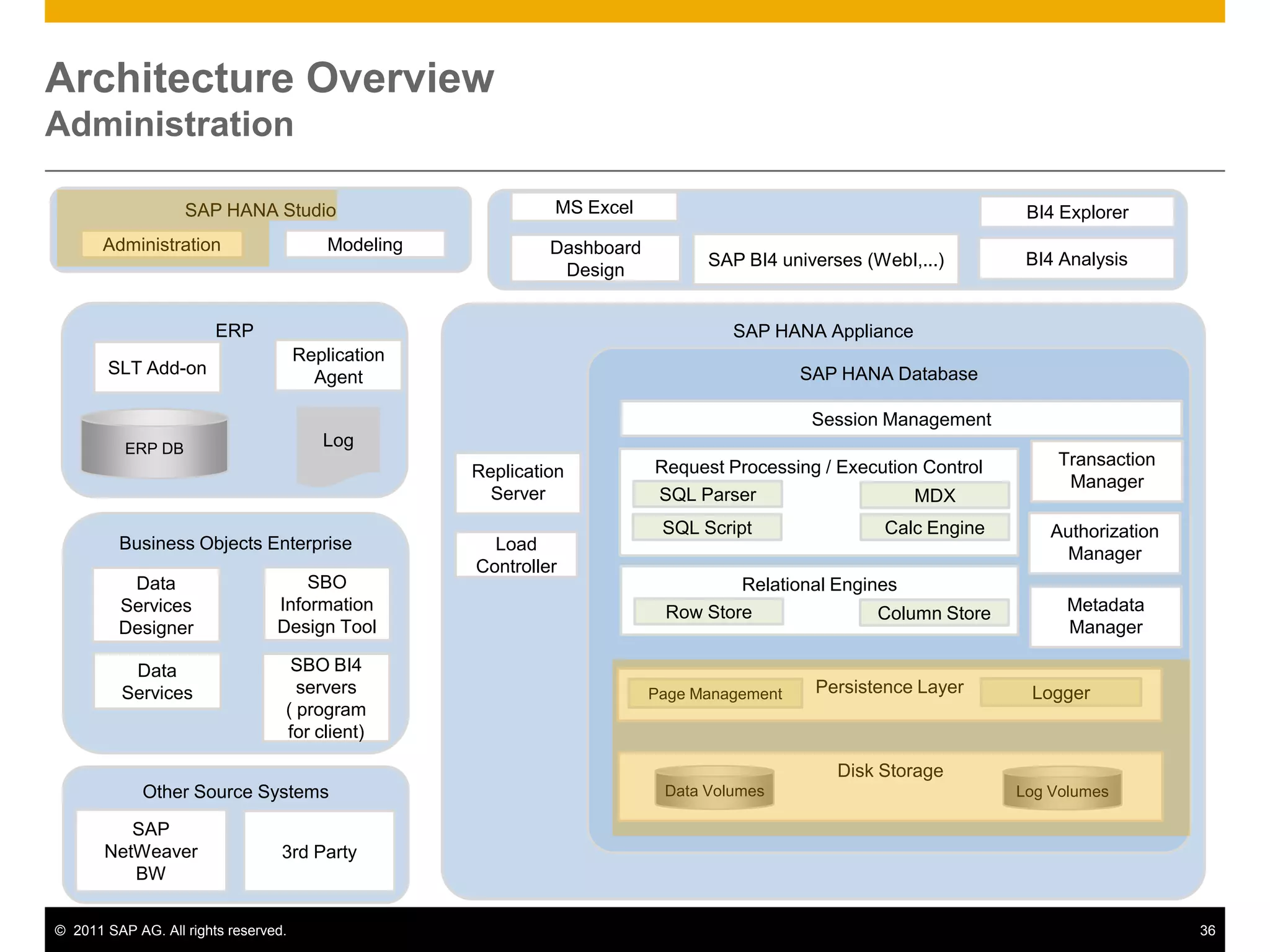
    One-click to senda link to the results by email Architecture OverviewAdministrationSAP HANA StudioMS ExcelBI4 ExplorerModelingAdministrationSAP BI4 universes (WebI,...)Dashboard DesignBI4 AnalysisERPSAP HANA ApplianceReplication AgentSLT Add-onSAP HANA DatabaseSession ManagementLogERP DBTransaction ManagerRequest Processing / Execution ControlReplication ServerSQL ParserMDXAuthorization ManagerBusiness Objects EnterpriseSQL ScriptCalc EngineLoad ControllerRelational EnginesSBO Information Design ToolData Services DesignerMetadata ManagerRow StoreColumn StorePersistence LayerLoggerPage ManagementData ServicesSBO BI4 servers ( program for client)Disk StorageData VolumesLog VolumesOther Source SystemsSAP NetWeaver BW3rd Party
  • 68.
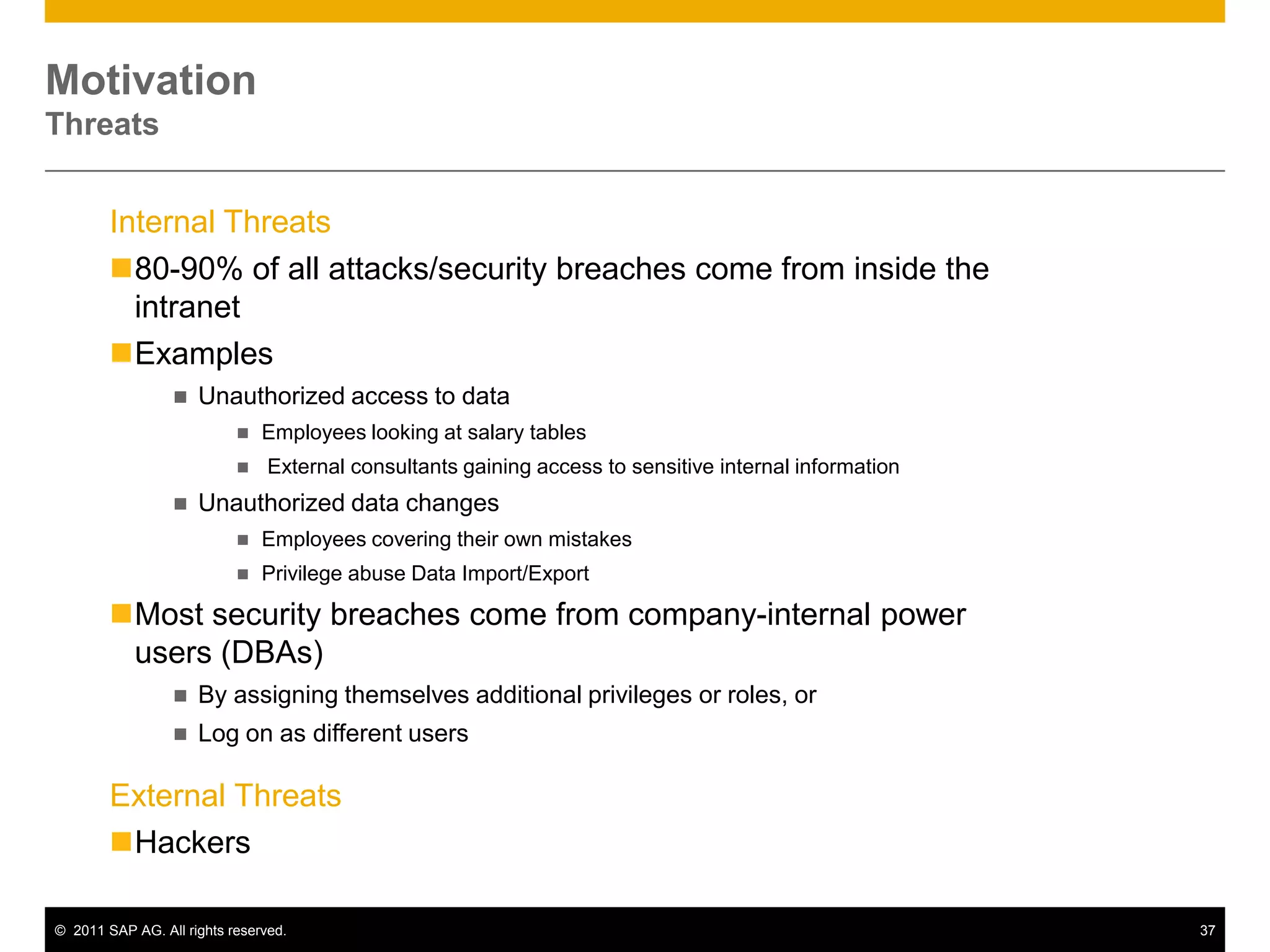
    MotivationThreatsInternal Threats 80-90%of all attacks/security breaches come from inside the intranet
  • 69.
  • 70.
  • 71.
  • 72.
    External consultantsgaining access to sensitive internal information
  • 73.
  • 74.
  • 75.
    Privilege abuse DataImport/Export
  • 76.
    Most security breachescome from company-internal power users (DBAs)
  • 77.
    By assigning themselvesadditional privileges or roles, or
  • 78.
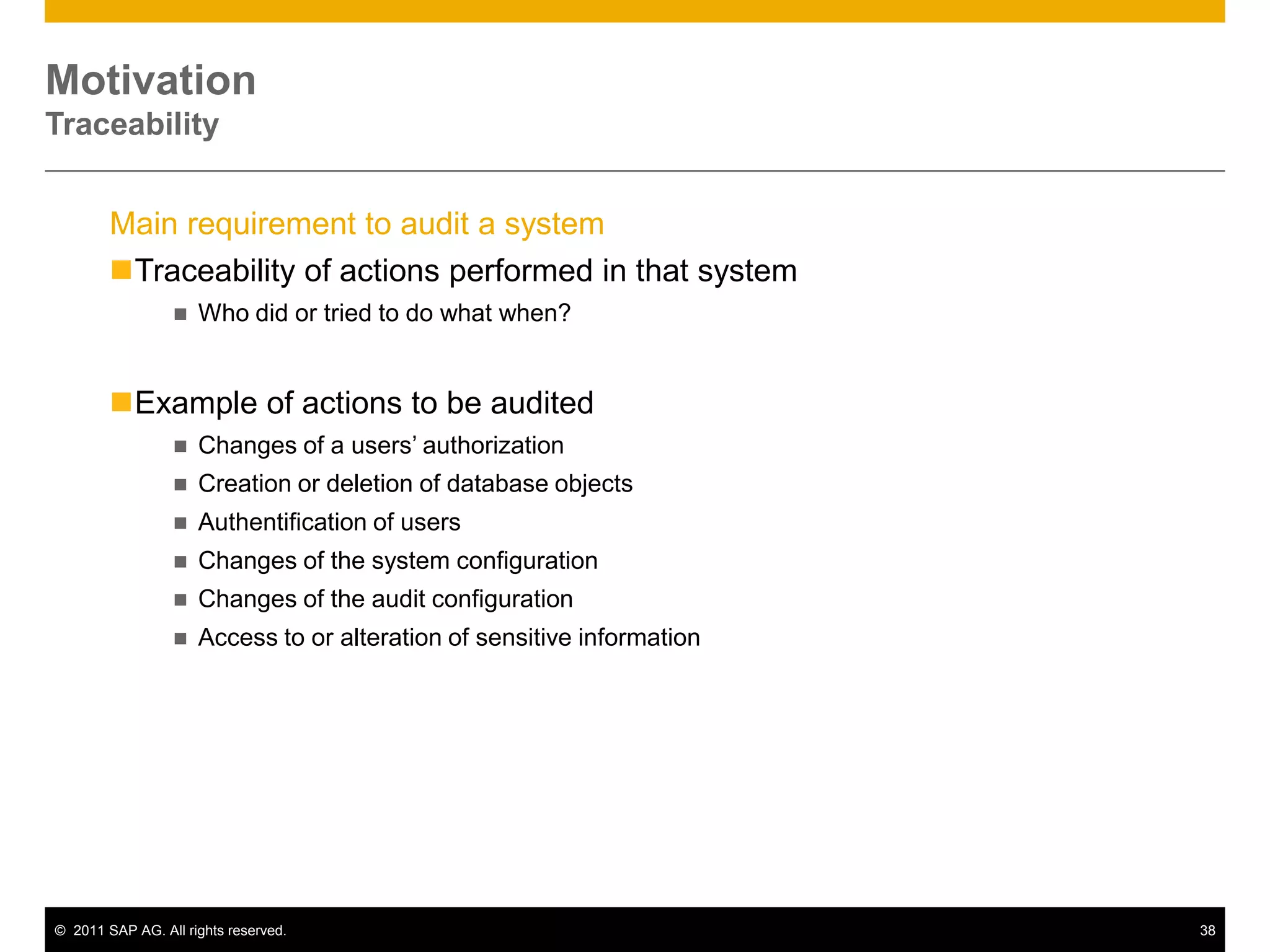
    Log on asdifferent usersExternal Threats HackersMotivationTraceabilityMain requirement to audit a system Traceability of actions performed in that system
  • 79.
    Who did ortried to do what when?
  • 80.
    Example of actionsto be audited
  • 81.
    Changes of ausers’ authorization
  • 82.
    Creation or deletionof database objects
  • 83.
  • 84.
    Changes of thesystem configuration
  • 85.
    Changes of theaudit configuration
  • 86.
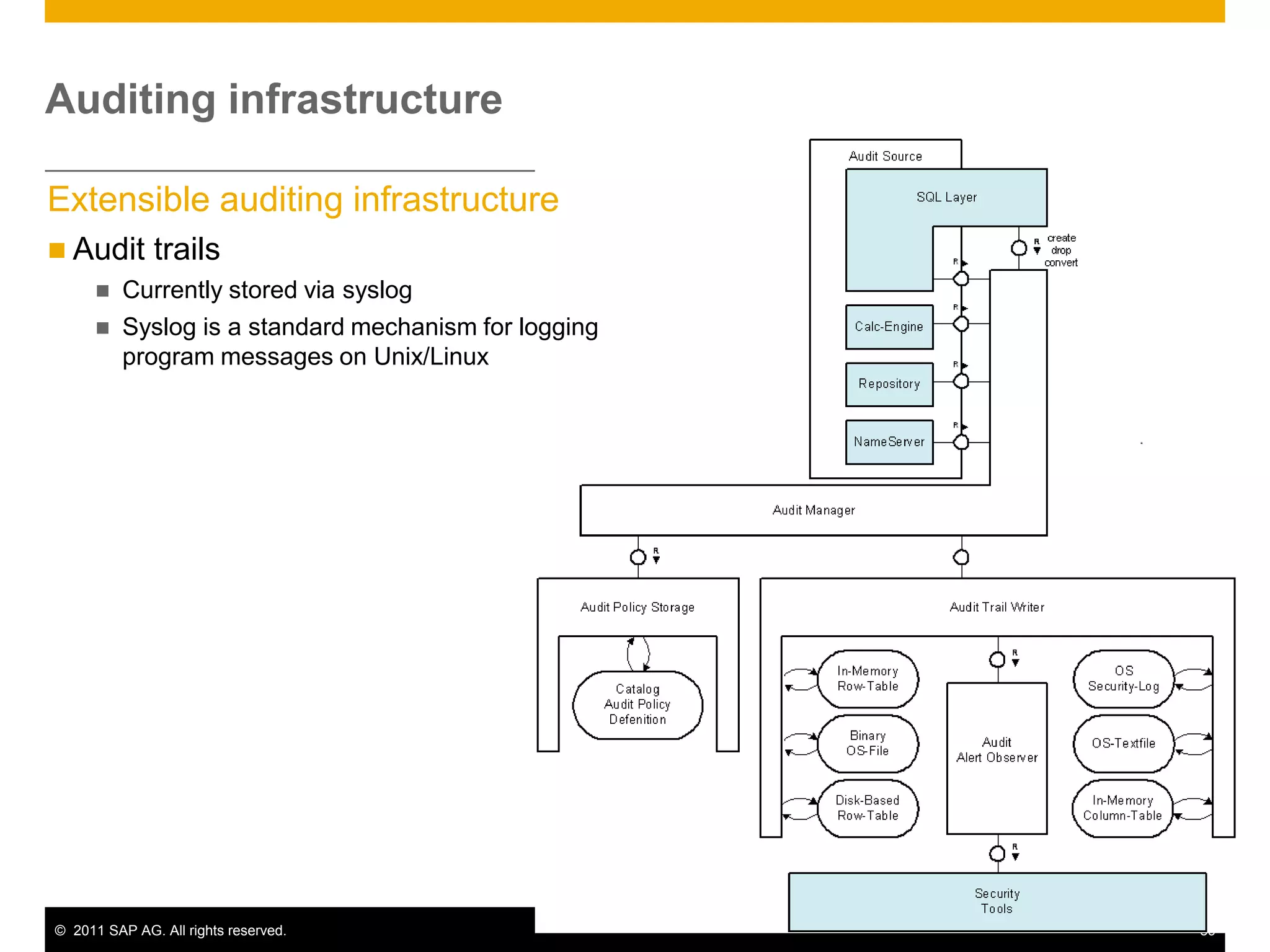
    Access to oralteration of sensitive informationAuditing infrastructureExtensible auditing infrastructureAudit trails
  • 87.
  • 88.
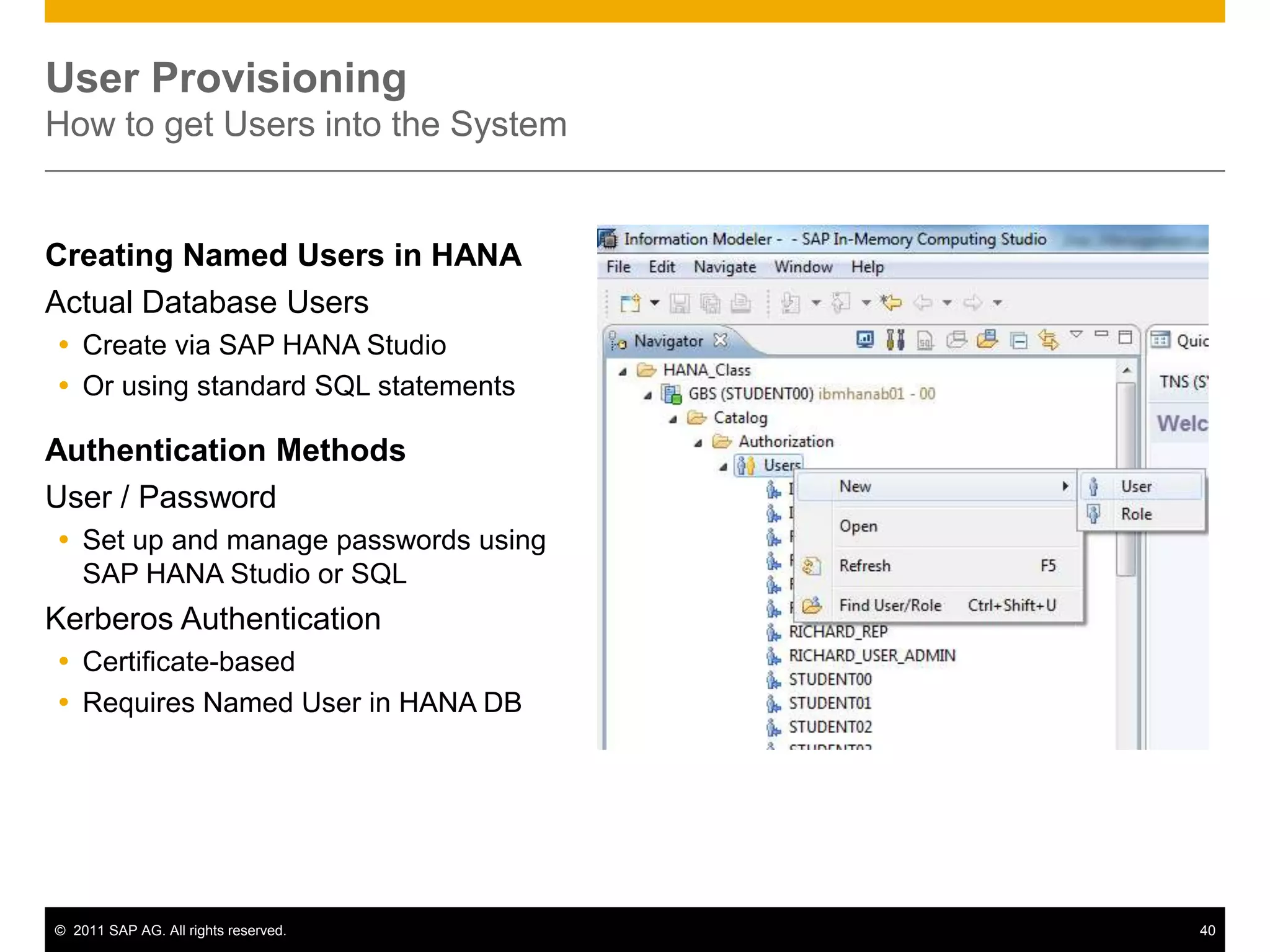
    Syslog is astandard mechanism for logging program messages on Unix/LinuxUser ProvisioningHow to get Users into the SystemCreating Named Users in HANAActual Database UsersCreate via SAP HANA StudioOr using standard SQL statementsAuthentication MethodsUser / PasswordSet up and manage passwords using SAP HANA Studio or SQLKerberos AuthenticationCertificate-basedRequires Named User in HANA DB
  • 89.
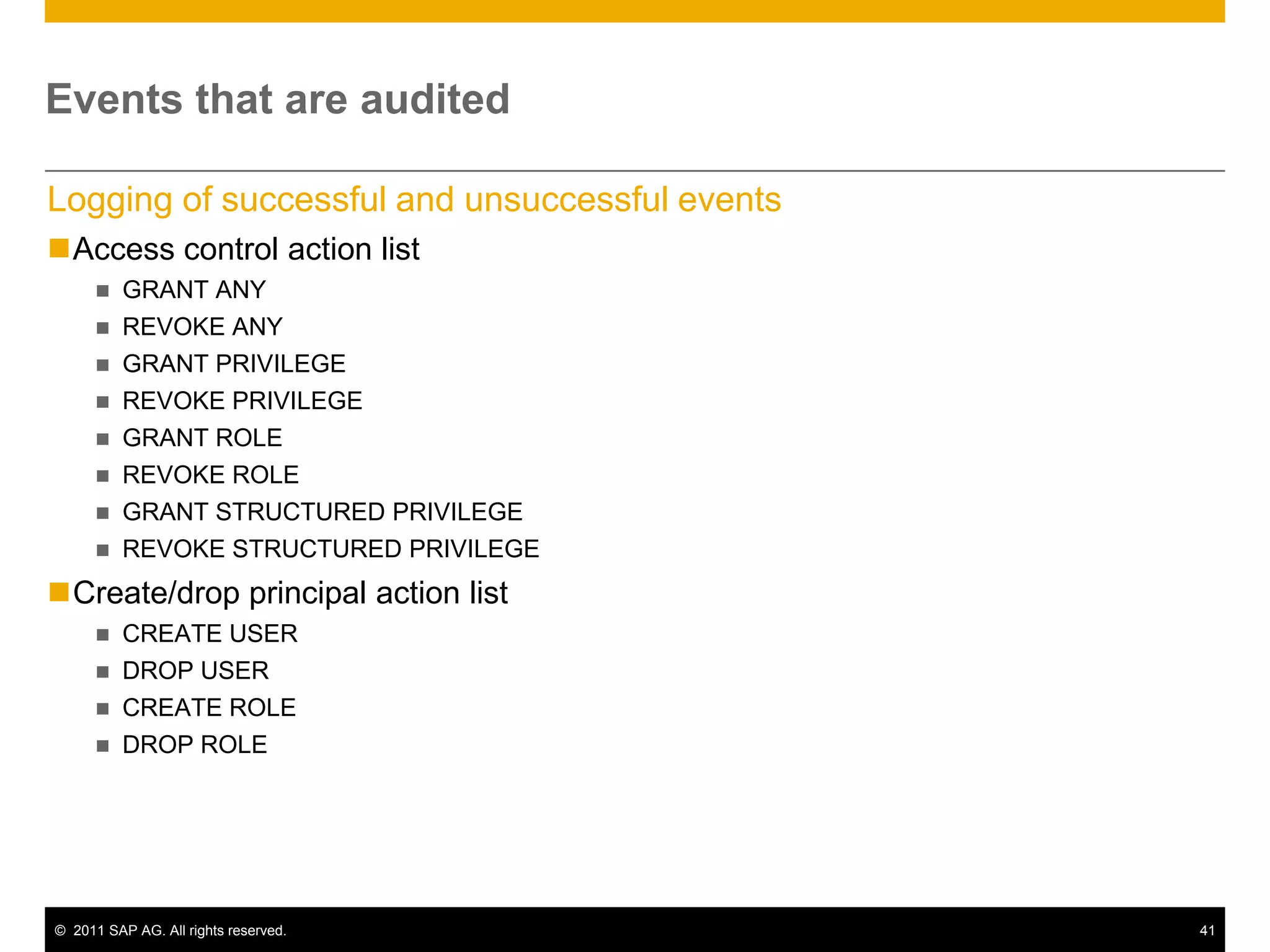
    Events that areauditedLogging of successful and unsuccessful eventsAccess control action list
  • 90.
  • 91.
  • 92.
  • 93.
  • 94.
  • 95.
  • 96.
  • 97.
  • 98.
  • 99.
  • 100.
  • 101.
  • 102.
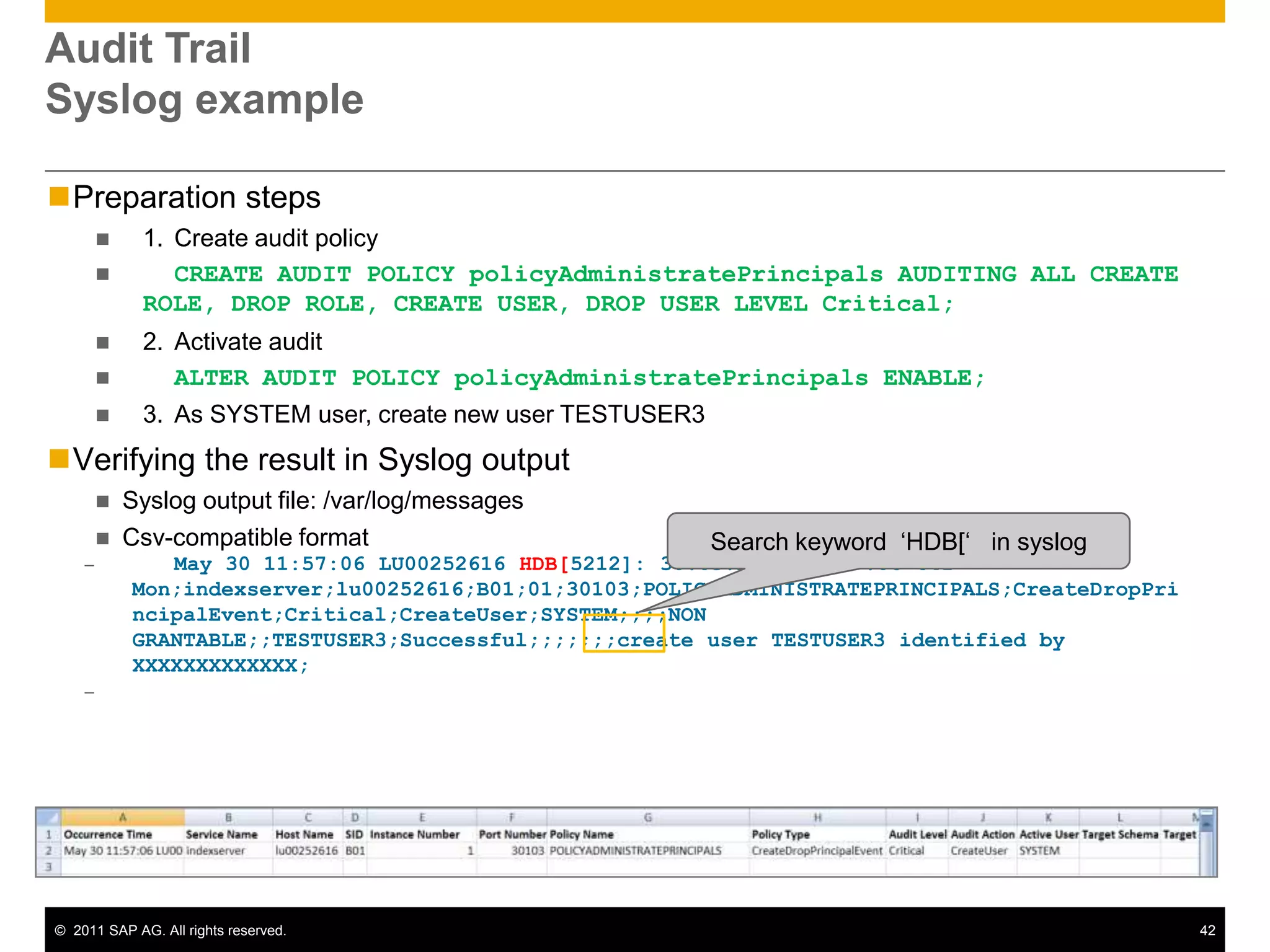
    DROP ROLEAudit TrailSyslogexamplePreparation steps1. Create audit policy CREATE AUDIT POLICY policyAdministratePrincipals AUDITING ALL CREATE ROLE, DROP ROLE, CREATE USER, DROP USER LEVEL Critical;2. Activate auditALTER AUDIT POLICY policyAdministratePrincipals ENABLE;3. As SYSTEM user, create new user TESTUSER3Verifying the result in Syslog output
  • 103.
    Syslog output file:/var/log/messages
  • 104.
    Csv-compatible formatMay 3011:57:06 LU00252616 HDB[5212]: 30.05.2011 09:57:06 641 Mon;indexserver;lu00252616;B01;01;30103;POLICYADMINISTRATEPRINCIPALS;CreateDropPrincipalEvent;Critical;CreateUser;SYSTEM;;;;NON GRANTABLE;;TESTUSER3;Successful;;;;;;;create user TESTUSER3 identified by XXXXXXXXXXXXX;Search keyword ‘HDB[‘ in syslog
  • 105.
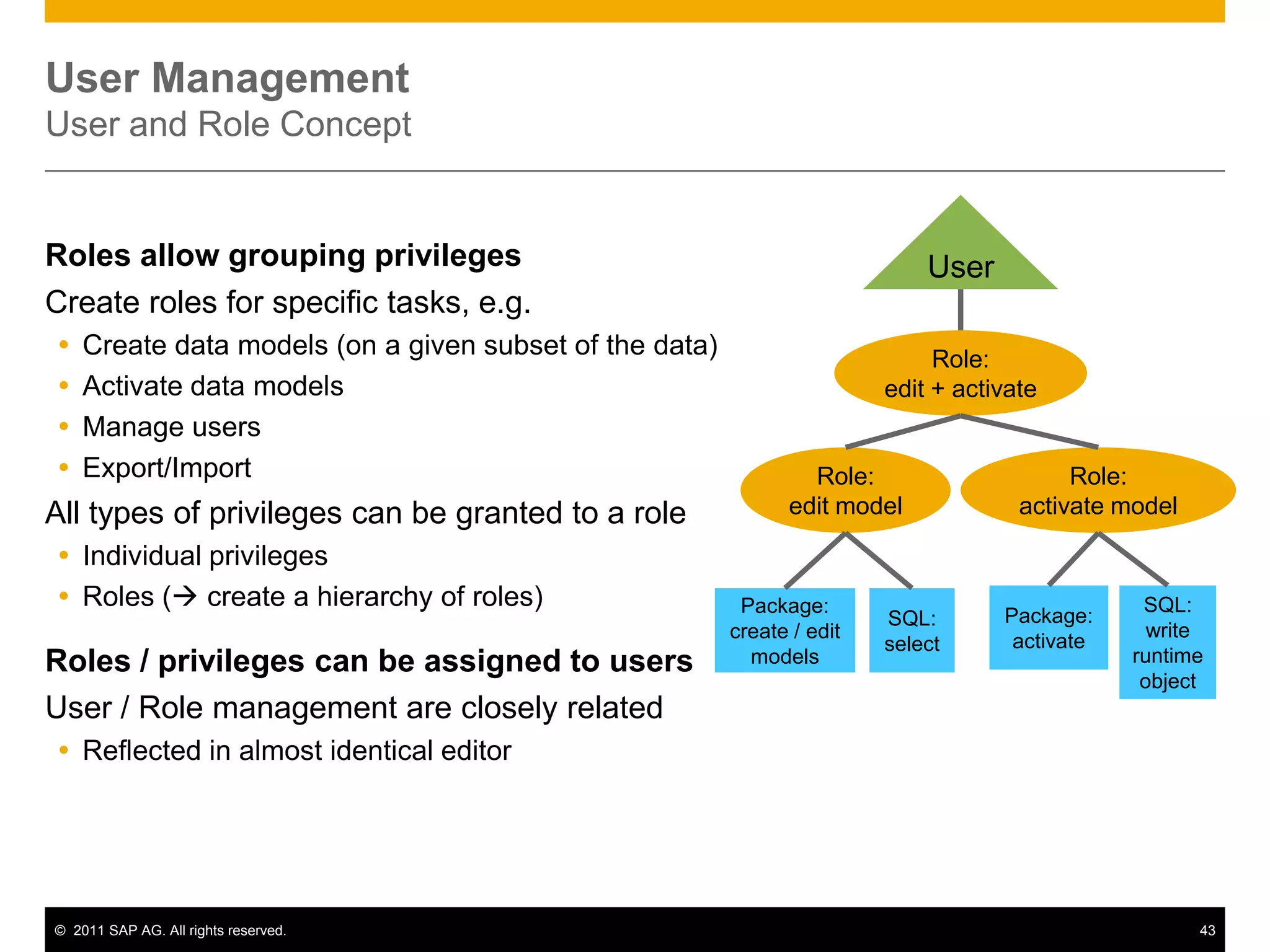
    User ManagementUser andRole ConceptUserRoles allow grouping privilegesCreate roles for specific tasks, e.g. Create data models (on a given subset of the data)Activate data modelsManage usersExport/ImportAll types of privileges can be granted to a roleIndividual privilegesRoles ( create a hierarchy of roles)Roles / privileges can be assigned to usersUser / Role management are closely relatedReflected in almost identical editorRole: edit + activateRole: editmodelRole: activatemodelPackage:activateSQL:writeruntimeobjectPackage:create/ editmodelsSQL:select
  • 106.
    Introduction to HANACoreFunctionalitiesUse casesA Typical SAP Landscape DiscussionHANA Roadmap
  • 107.
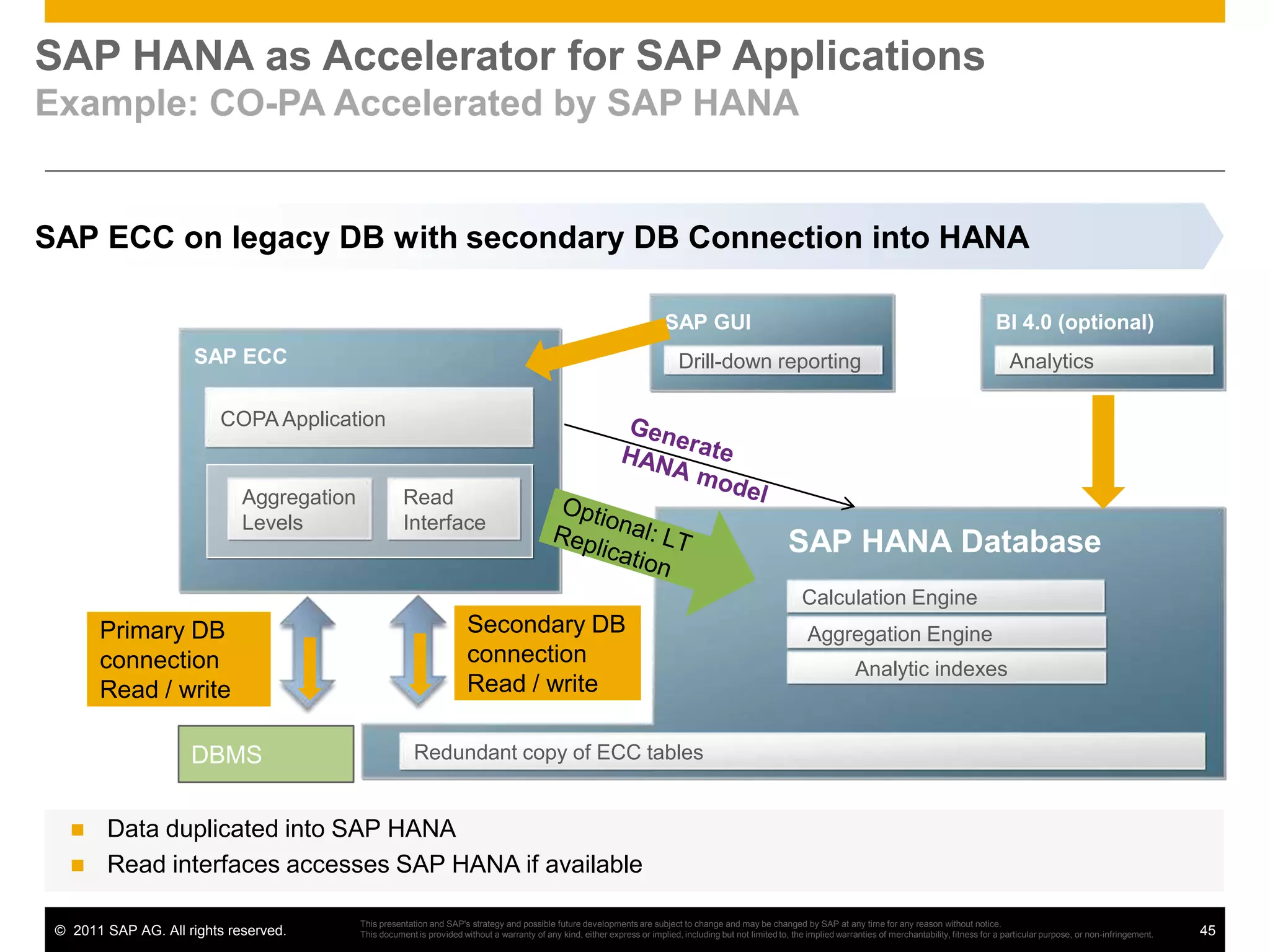
    SAP HANA asAcceleratorforSAP ApplicationsExample: CO-PA Accelerated by SAP HANASAP ECC on legacy DB with secondary DB Connection into HANABI 4.0 (optional)SAP GUISAP ECCAnalyticsDrill-down reportingCOPA ApplicationGenerate HANA modelAggregation LevelsRead InterfaceOptional: LT ReplicationSAP HANA DatabaseCalculation EngineSecondary DB connectionRead / writePrimary DB connectionRead / write Aggregation EngineAnalytic indexesDBMSRedundant copy of ECC tablesData duplicatedinto SAP HANA
  • 108.
    Read interfacesaccesses SAPHANA ifavailableThis presentation and SAP's strategy and possible future developments are subject to change and may be changed by SAP at any time for any reason without notice. This document is provided without a warranty of any kind, either express or implied, including but not limited to, the implied warranties of merchantability, fitness for a particular purpose, or non-infringement.
  • 109.
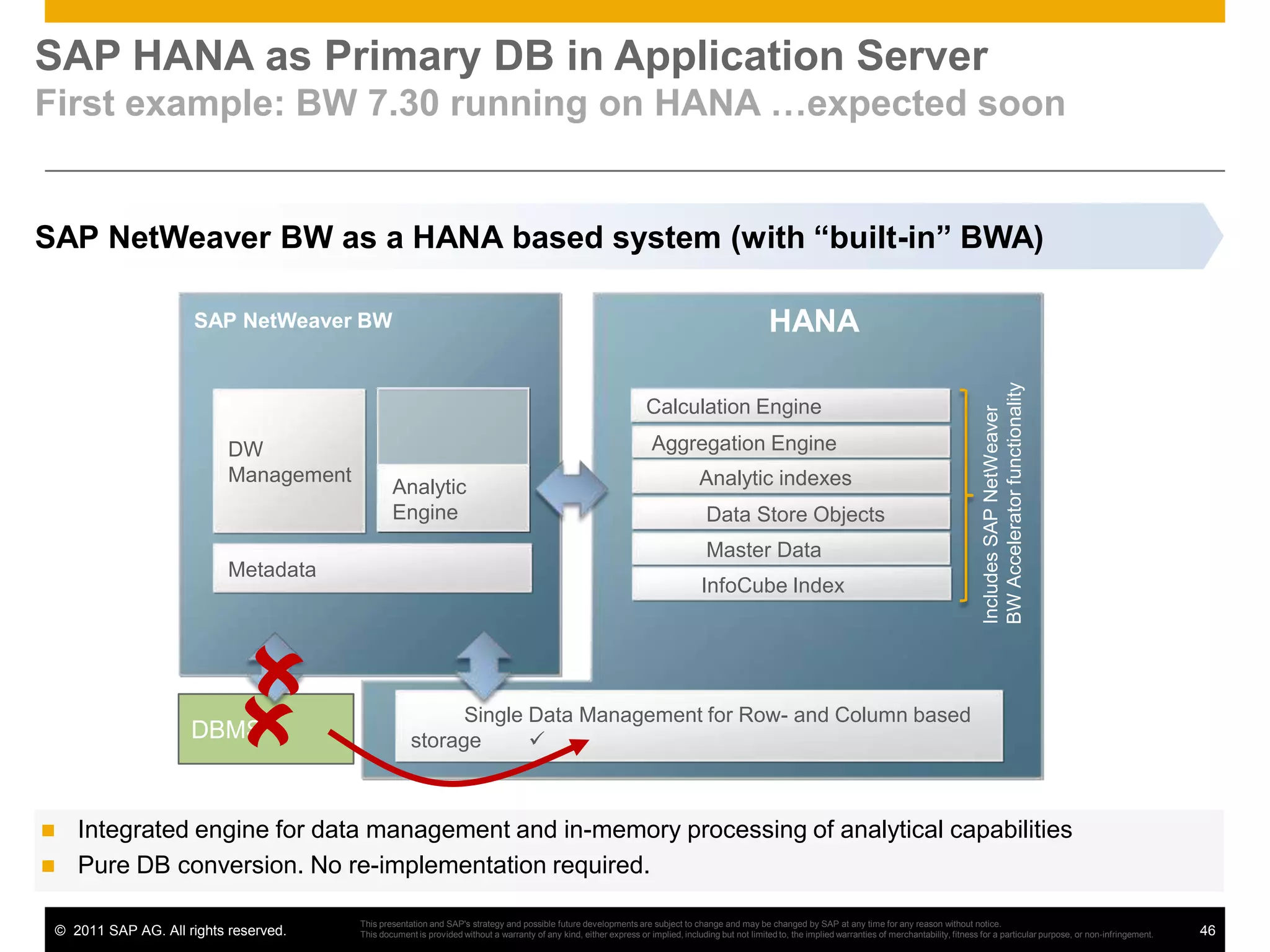
    DBMSSAP HANA asPrimary DB in Application ServerFirst example: BW 7.30 running on HANA …expected soonSAP NetWeaver BW as a HANA based system (with “built-in” BWA)SAP NetWeaver BWHANADW ManagementCalculation Engine Aggregation EngineAnalytic indexesAnalyticEngineIncludes SAP NetWeaver BW Accelerator functionality Data Store Objects Master DataMetadata InfoCube Index Single Data Management for Row- and Column based storage DBMSIntegrated engine for data management and in-memory processing of analytical capabilities
  • 110.
    Pure DB conversion.No re-implementation required.This presentation and SAP's strategy and possible future developments are subject to change and may be changed by SAP at any time for any reason without notice. This document is provided without a warranty of any kind, either express or implied, including but not limited to, the implied warranties of merchantability, fitness for a particular purpose, or non-infringement.
  • 111.
    Introduction to HANACoreFunctionalitiesUse casesA Typical SAP Landscape DiscussionHANA Roadmap
  • 112.
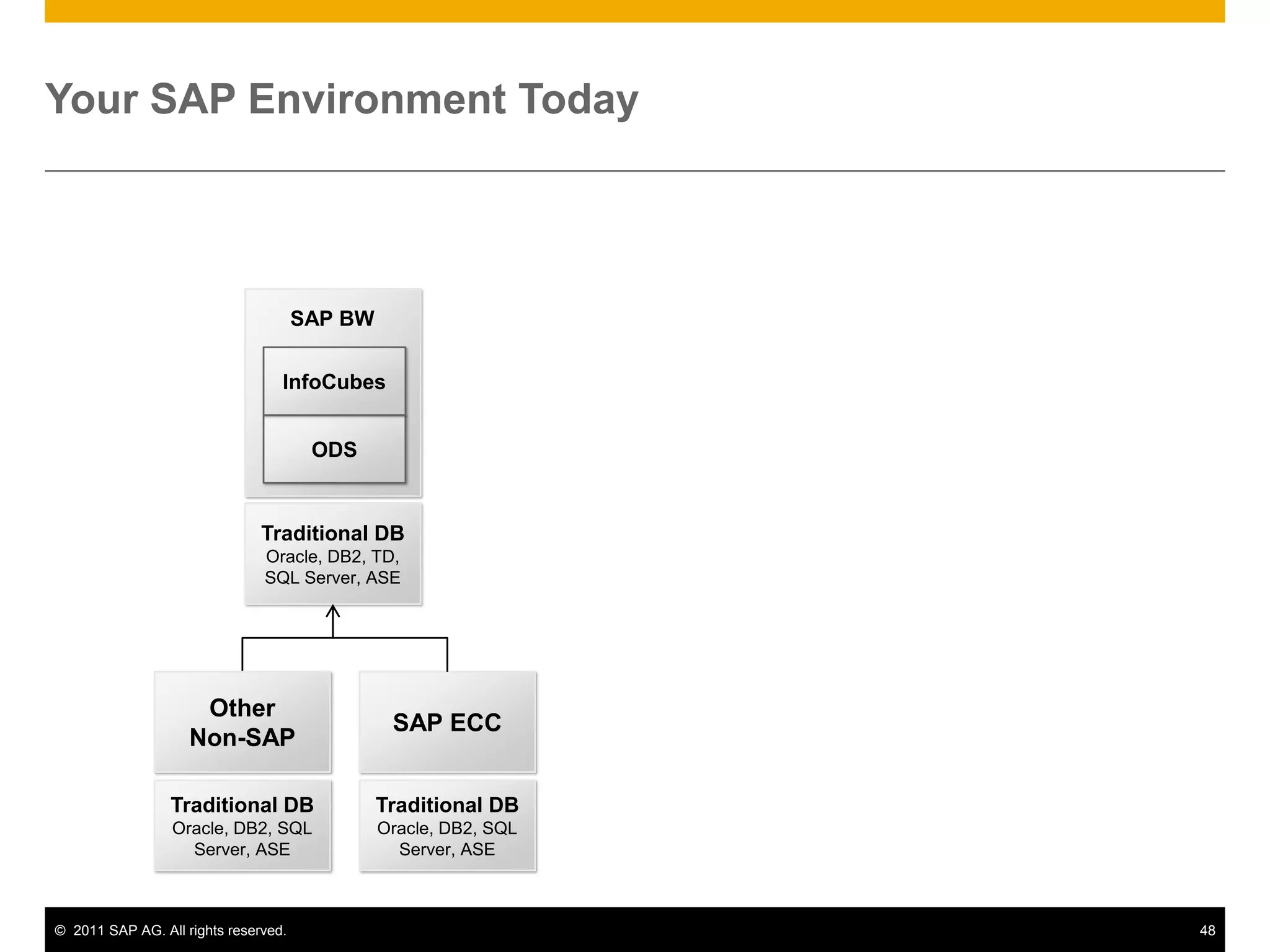
    Your SAP EnvironmentTodaySAP BWInfoCubesODSTraditional DBOracle, DB2, TD, SQL Server, ASESAP ECCOtherNon-SAPTraditional DBOracle, DB2, SQL Server, ASETraditional DBOracle, DB2, SQL Server, ASE
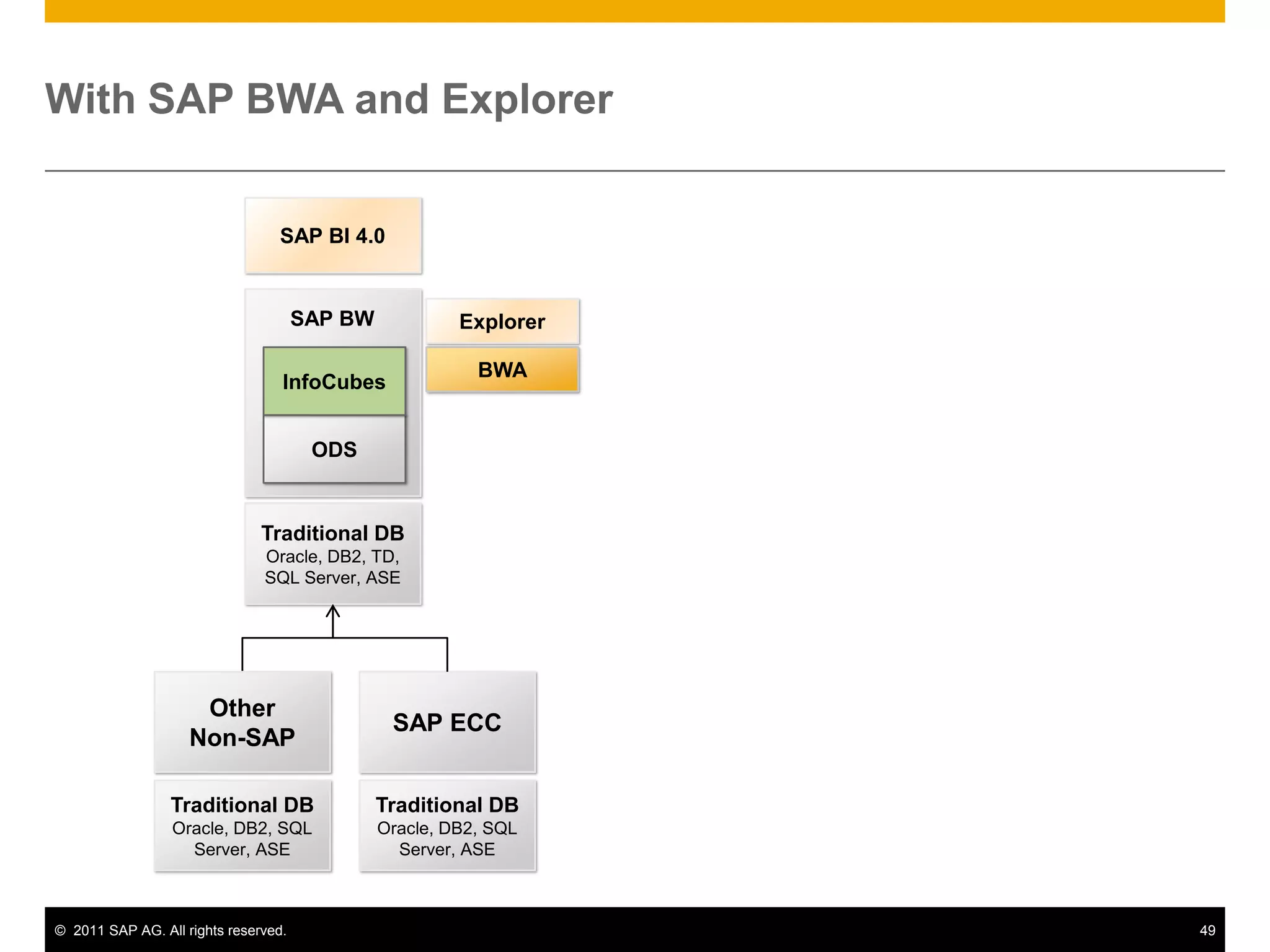
  • 113.
    With SAP BWAand ExplorerSAP BI 4.0SAP BWExplorerInfoCubesBWAODSTraditional DBOracle, DB2, TD, SQL Server, ASESAP ECCOtherNon-SAPTraditional DBOracle, DB2, SQL Server, ASETraditional DBOracle, DB2, SQL Server, ASE
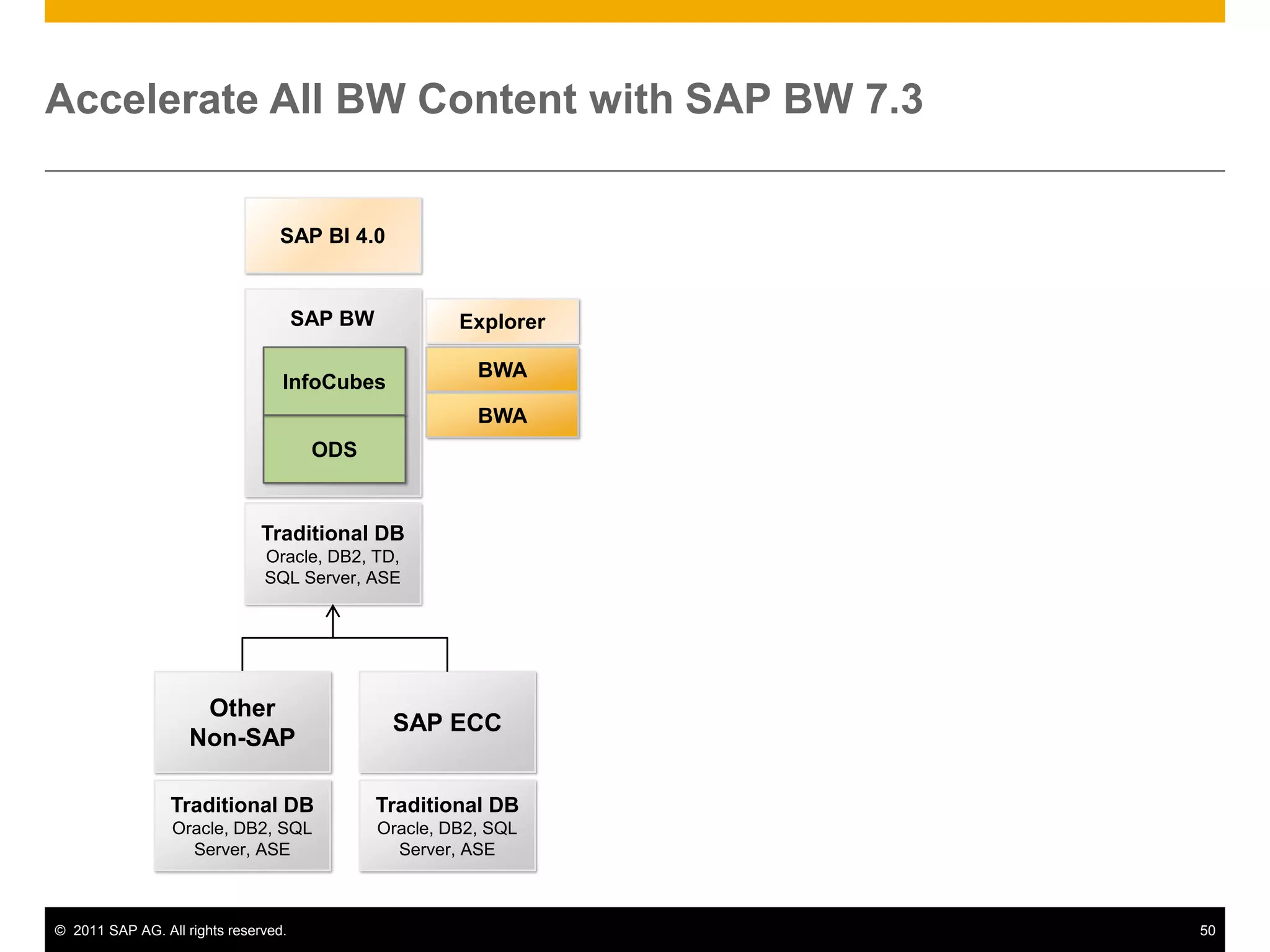
  • 114.
    Accelerate All BWContent with SAP BW 7.3SAP BI 4.0SAP BWExplorerInfoCubesBWABWAODSTraditional DBOracle, DB2, TD, SQL Server, ASESAP ECCOtherNon-SAPTraditional DBOracle, DB2, SQL Server, ASETraditional DBOracle, DB2, SQL Server, ASE
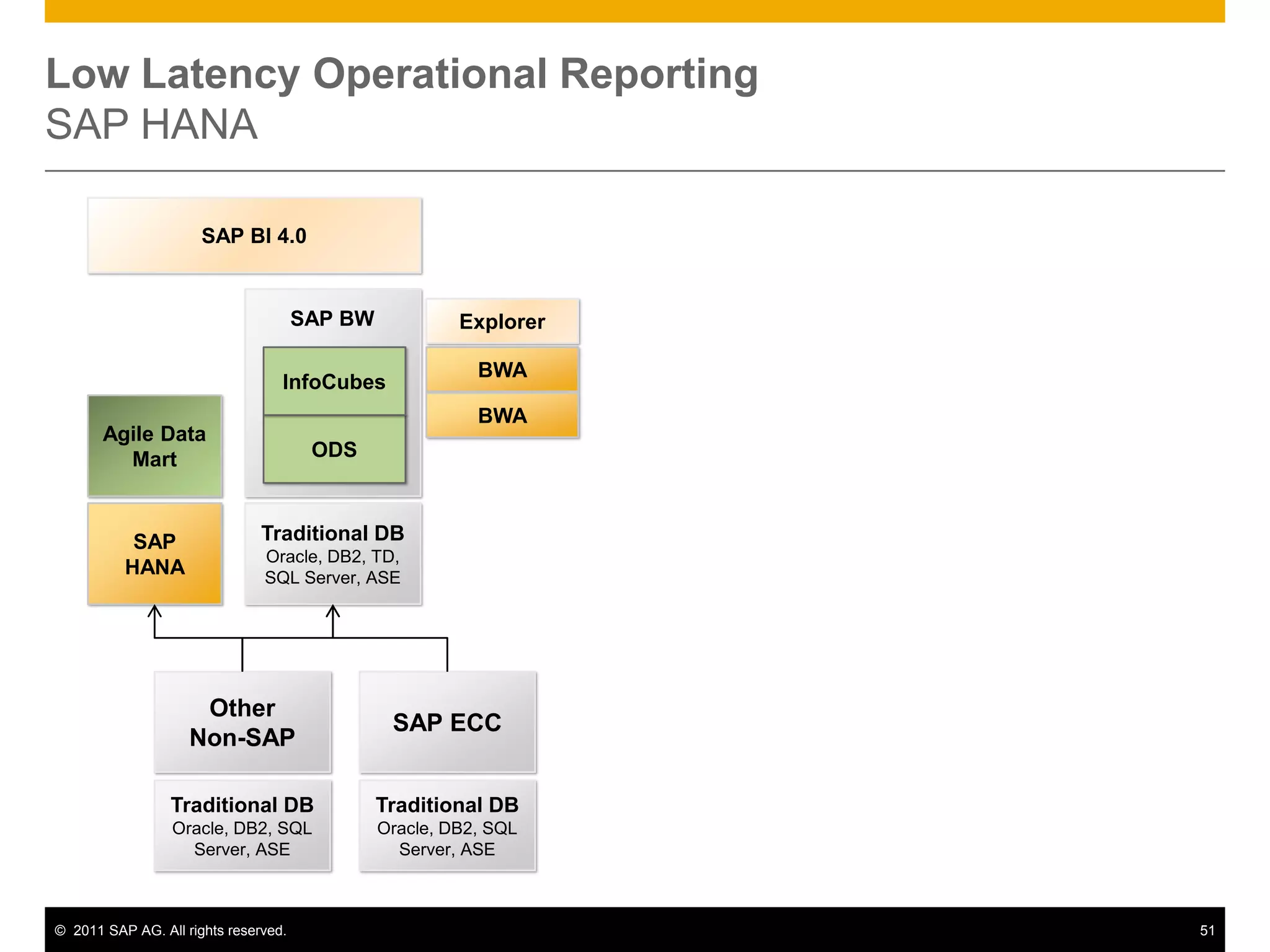
  • 115.
    Low Latency OperationalReportingSAP HANASAP BI 4.0SAP BWExplorerInfoCubesBWABWAAgile Data MartODSSAP HANATraditional DBOracle, DB2, TD, SQL Server, ASESAP ECCOtherNon-SAPTraditional DBOracle, DB2, SQL Server, ASETraditional DBOracle, DB2, SQL Server, ASE
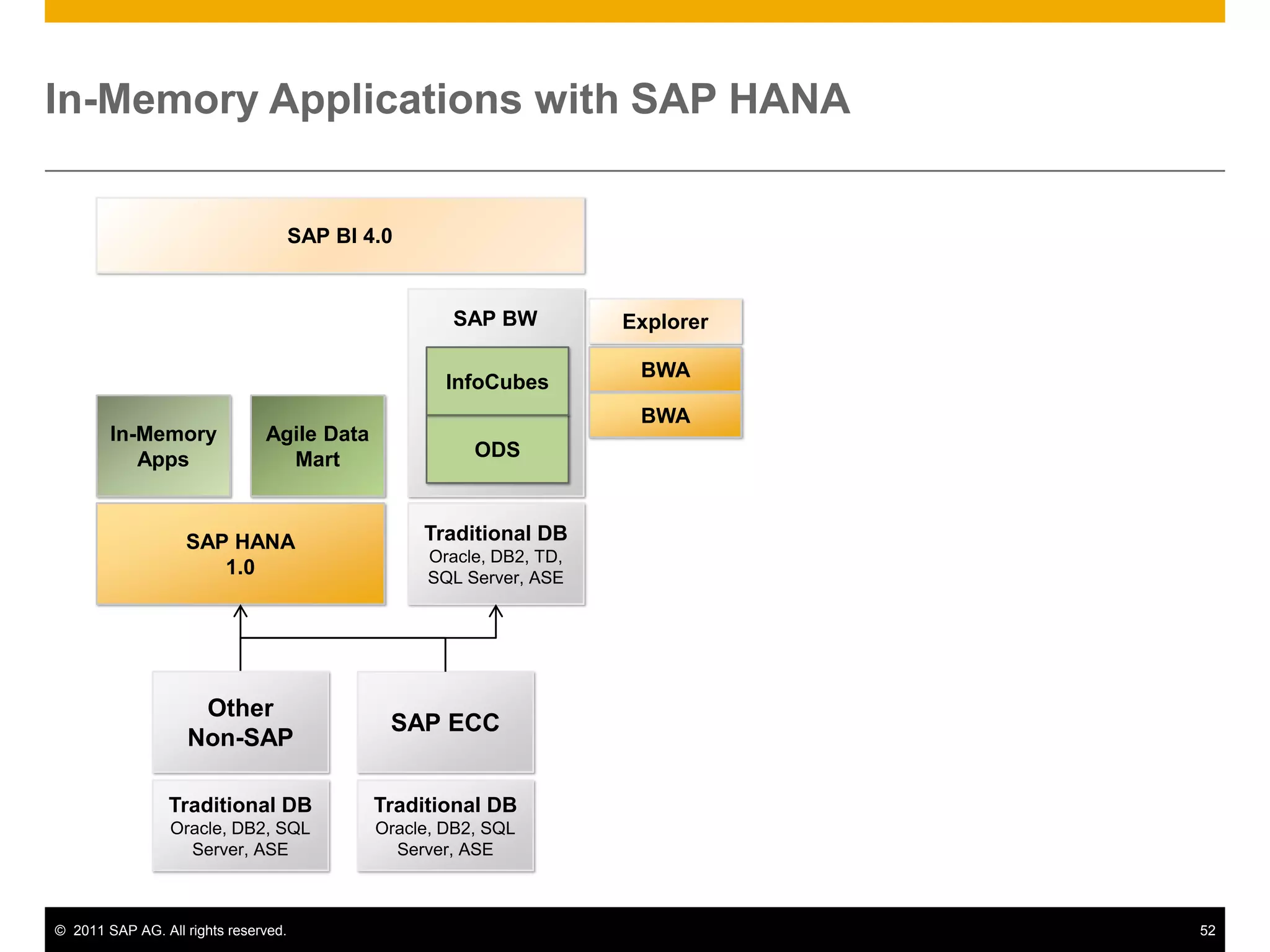
  • 116.
    In-Memory Applications withSAP HANASAP BI 4.0SAP BWExplorerInfoCubesBWABWAAgile Data MartIn-MemoryAppsODSSAP HANA1.0Traditional DBOracle, DB2, TD, SQL Server, ASESAP ECCOtherNon-SAPTraditional DBOracle, DB2, SQL Server, ASETraditional DBOracle, DB2, SQL Server, ASE
  • 117.
    SimplifySingle HANA Platformfor All Analytical AppsSAP BI 4.0SAP BWInfoCubesAgile Data MartIn-MemoryAppsODSSAP HANASAP ECCOtherNon-SAPTraditional DBOracle, DB2, SQL Server, ASETraditional DBOracle, DB2, SQL Server, ASE
  • 118.
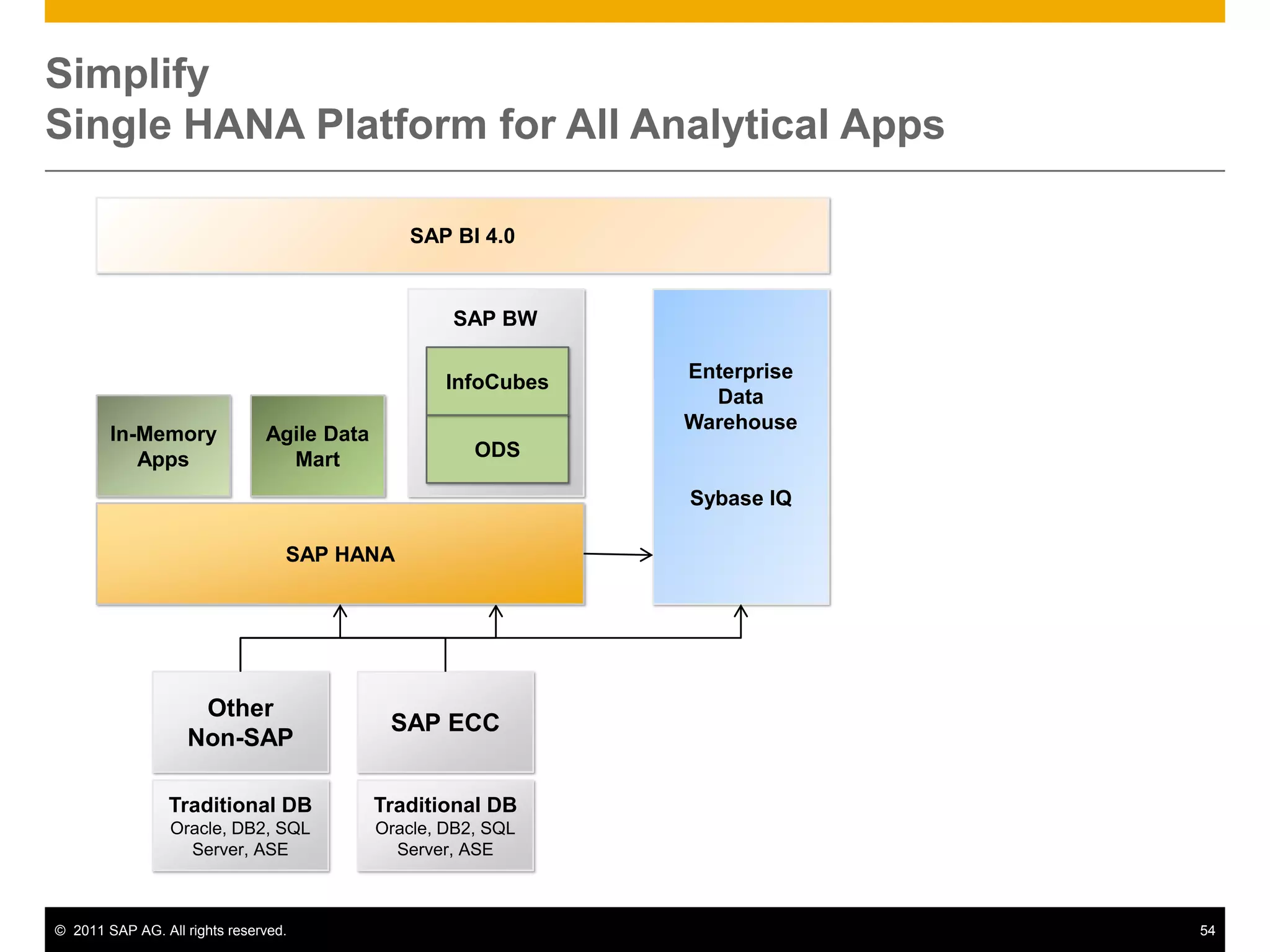
    SimplifySingle HANA Platformfor All Analytical AppsSAP BI 4.0Enterprise Data WarehouseSybase IQSAP BWInfoCubesAgile Data MartIn-MemoryAppsODSSAP HANASAP ECCOtherNon-SAPTraditional DBOracle, DB2, SQL Server, ASETraditional DBOracle, DB2, SQL Server, ASE
  • 119.
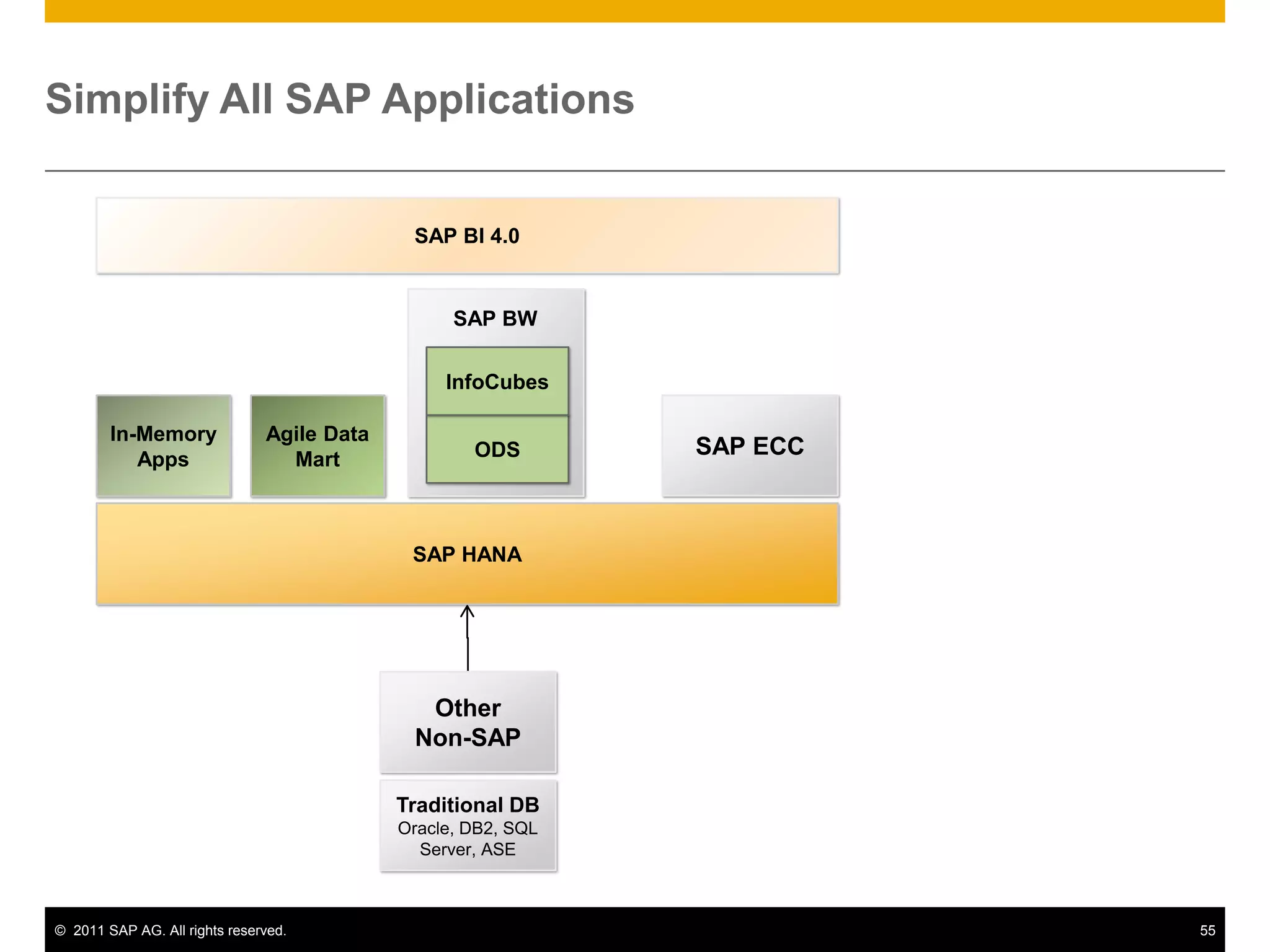
    Simplify All SAPApplicationsSAP BI 4.0SAP BWInfoCubesAgile Data MartIn-MemoryAppsSAP ECCODSSAP HANAOtherNon-SAPTraditional DBOracle, DB2, SQL Server, ASE
  • 120.
    Introduction to HANACoreFunctionalitiesUse casesA Typical SAP Landscape DiscussionHANA Roadmap
  • 121.
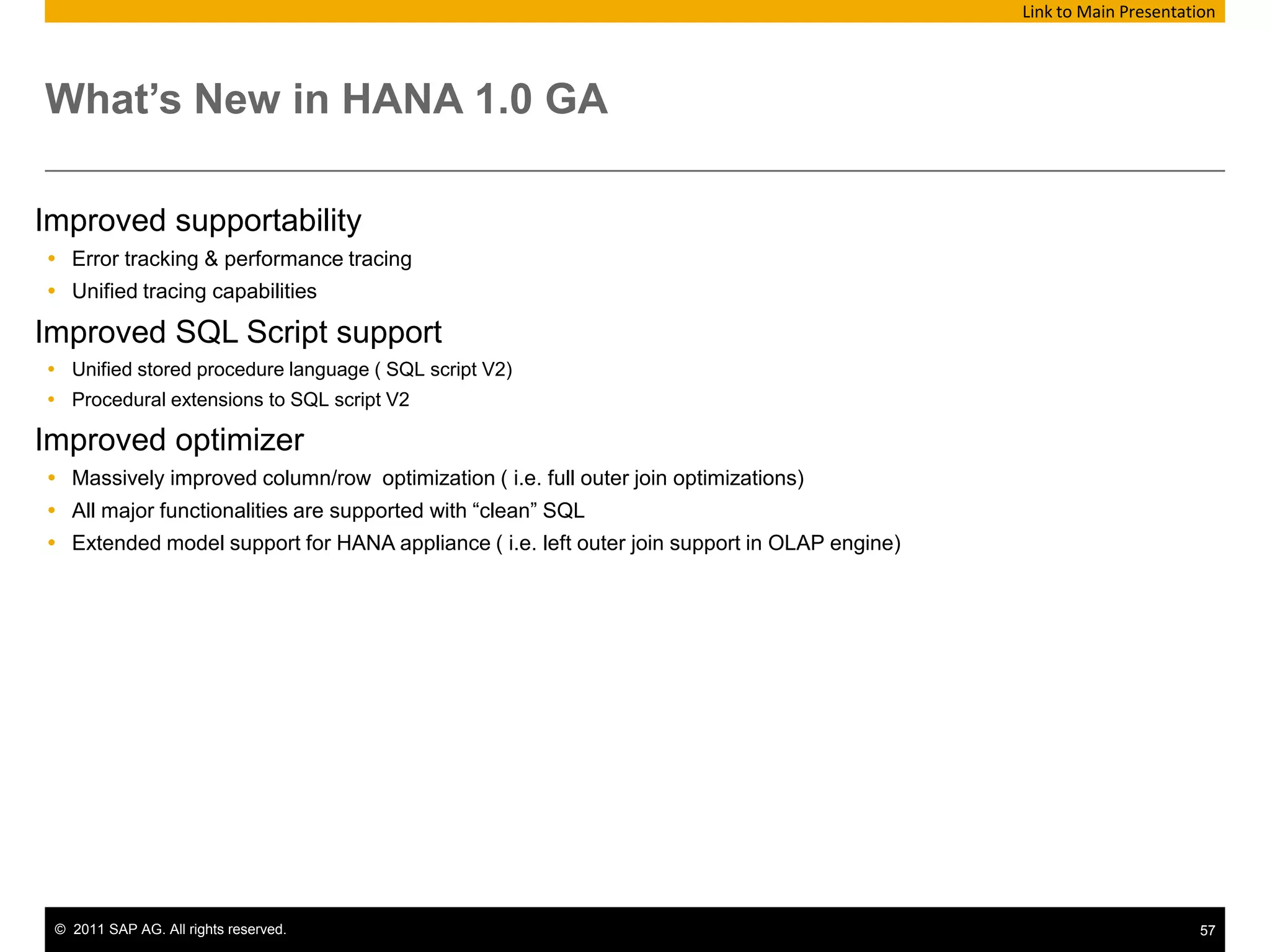
    What’s New inHANA 1.0 GA Link to Main PresentationImproved supportabilityError tracking & performance tracingUnified tracing capabilitiesImproved SQL Script supportUnified stored procedure language ( SQL script V2)Procedural extensions to SQL script V2 Improved optimizerMassively improved column/row optimization ( i.e. full outer join optimizations)All major functionalities are supported with “clean” SQLExtended model support for HANA appliance ( i.e. left outer join support in OLAP engine)
  • 122.
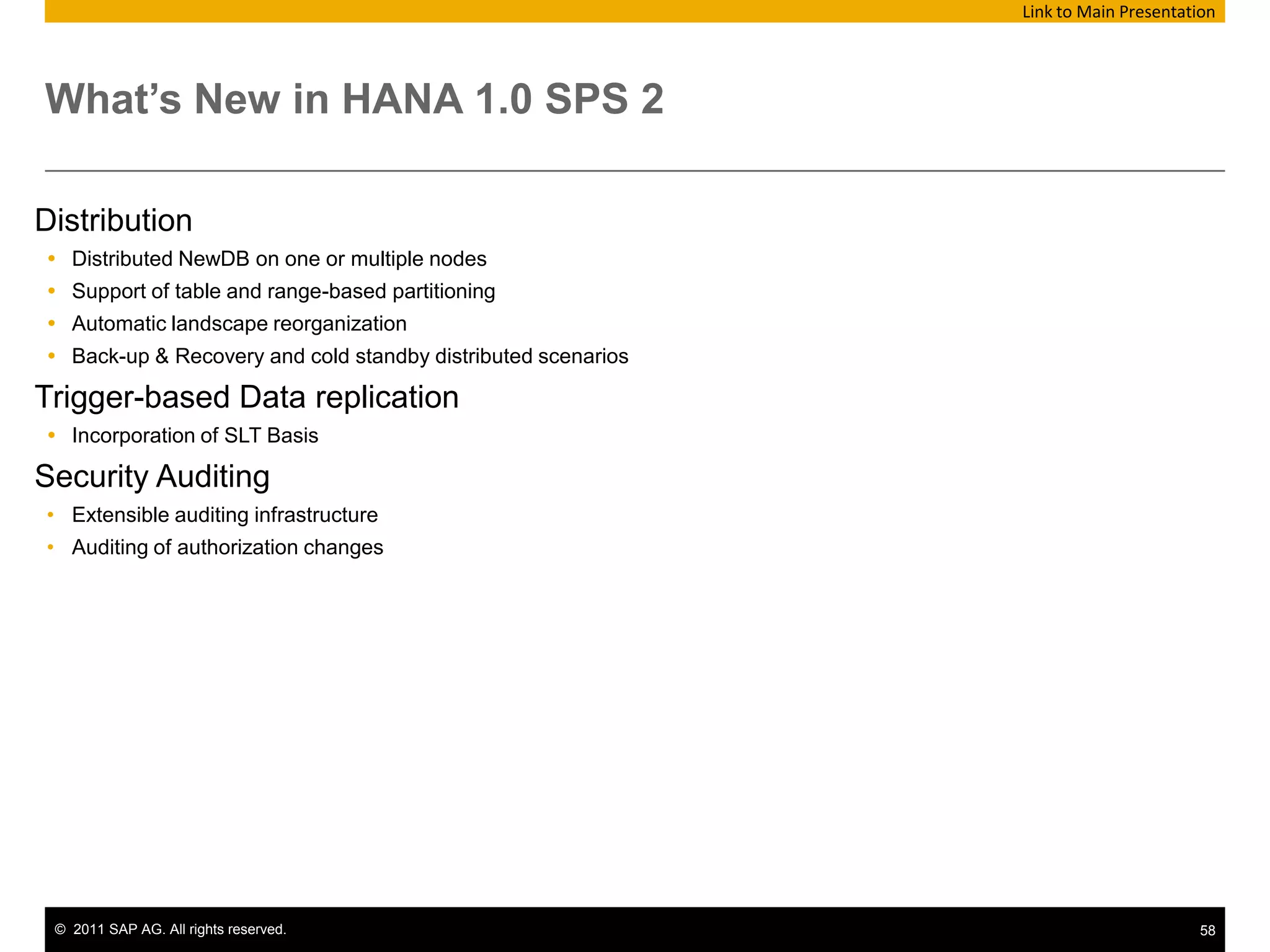
    What’s New inHANA 1.0 SPS 2 Link to Main PresentationDistributionDistributed NewDB on one or multiple nodesSupport of table and range-based partitioning Automatic landscape reorganizationBack-up & Recovery and cold standby distributed scenariosTrigger-based Data replicationIncorporation of SLT BasisSecurity AuditingExtensible auditing infrastructure
  • 123.
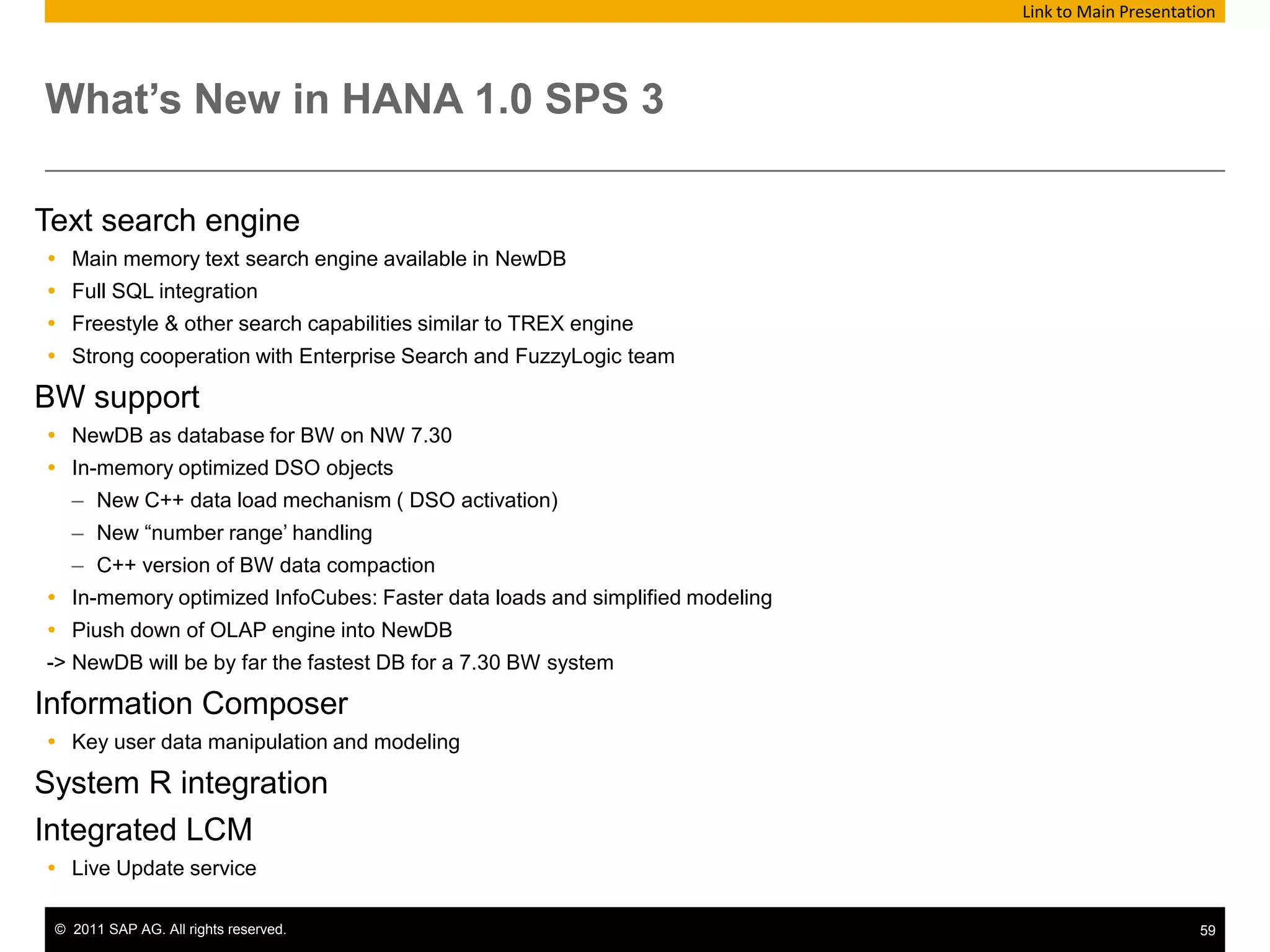
    Auditing of authorizationchangesWhat’s New in HANA 1.0 SPS 3 Link to Main PresentationText search engineMain memory text search engine available in NewDBFull SQL integrationFreestyle & other search capabilities similar to TREX engineStrong cooperation with Enterprise Search and FuzzyLogic teamBW support NewDB as database for BW on NW 7.30In-memory optimized DSO objectsNew C++ data load mechanism ( DSO activation)New “number range’ handlingC++ version of BW data compactionIn-memory optimized InfoCubes: Faster data loads and simplified modelingPiush down of OLAP engine into NewDB-> NewDB will be by far the fastest DB for a 7.30 BW systemInformation ComposerKey user data manipulation and modelingSystem R integrationIntegrated LCMLive Update service
  • 124.
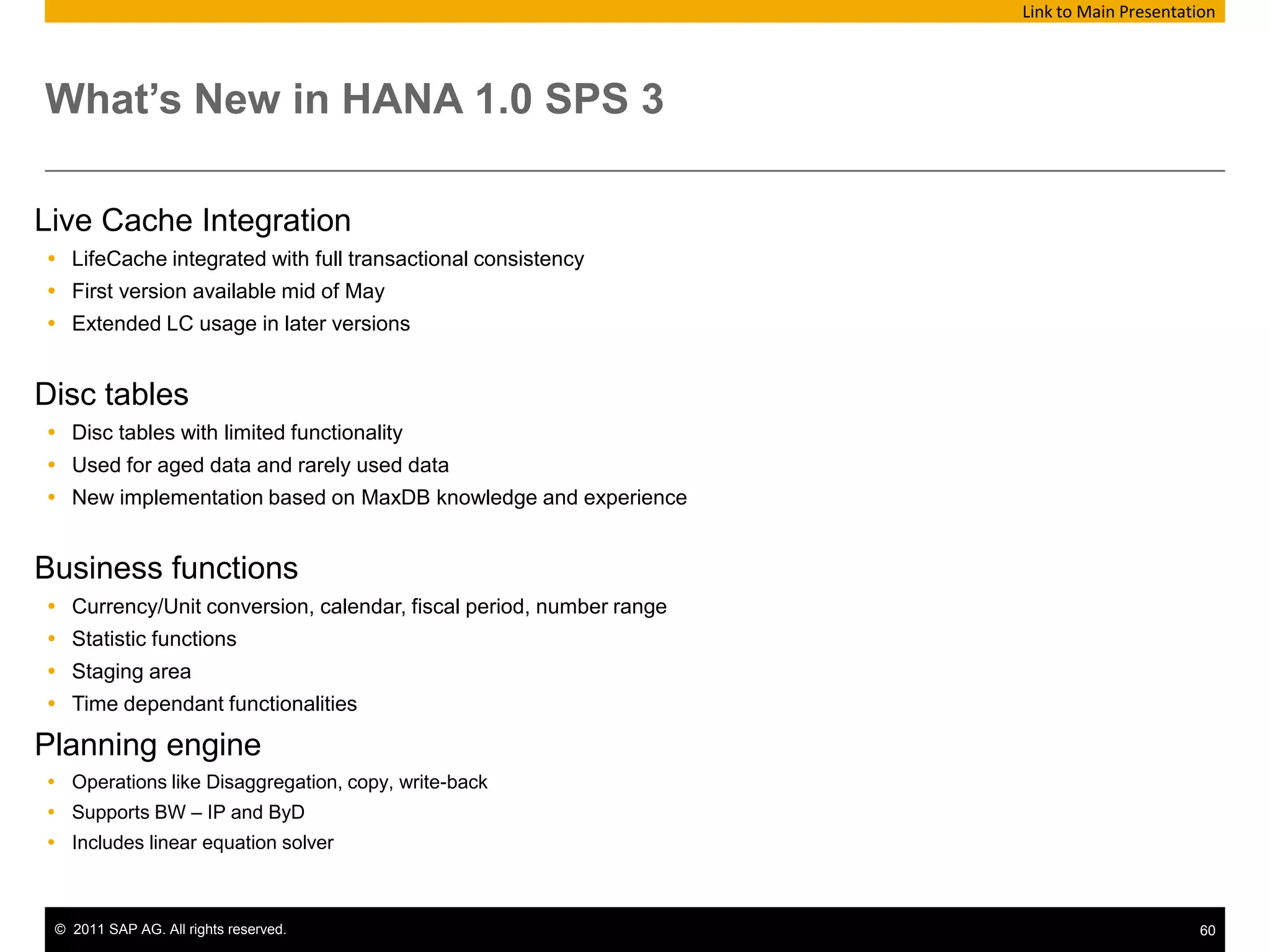
    What’s New inHANA 1.0 SPS 3 Link to Main PresentationLive Cache IntegrationLifeCache integrated with full transactional consistencyFirst version available mid of MayExtended LC usage in later versionsDisc tablesDisc tables with limited functionality Used for aged data and rarely used dataNew implementation based on MaxDB knowledge and experienceBusiness functionsCurrency/Unit conversion, calendar, fiscal period, number rangeStatistic functionsStaging areaTime dependant functionalitiesPlanning engineOperations like Disaggregation, copy, write-backSupports BW – IP and ByDIncludes linear equation solver
  • 125.
    What’s New inHANA 1.0 SPS 3 Link to Main PresentationNGAP support Fast data exchange between appserver and database SQL script support in appserverBetter data type compatibility ( text, GUID, decfloat, dates) Back-up & Recovery and SecurityPoint-in-time recoveryLog backups Additional auditing functionsSSL connection encryption with certificates for client connectionsHANA-SAP IDM integration for user provisioning into IMDB
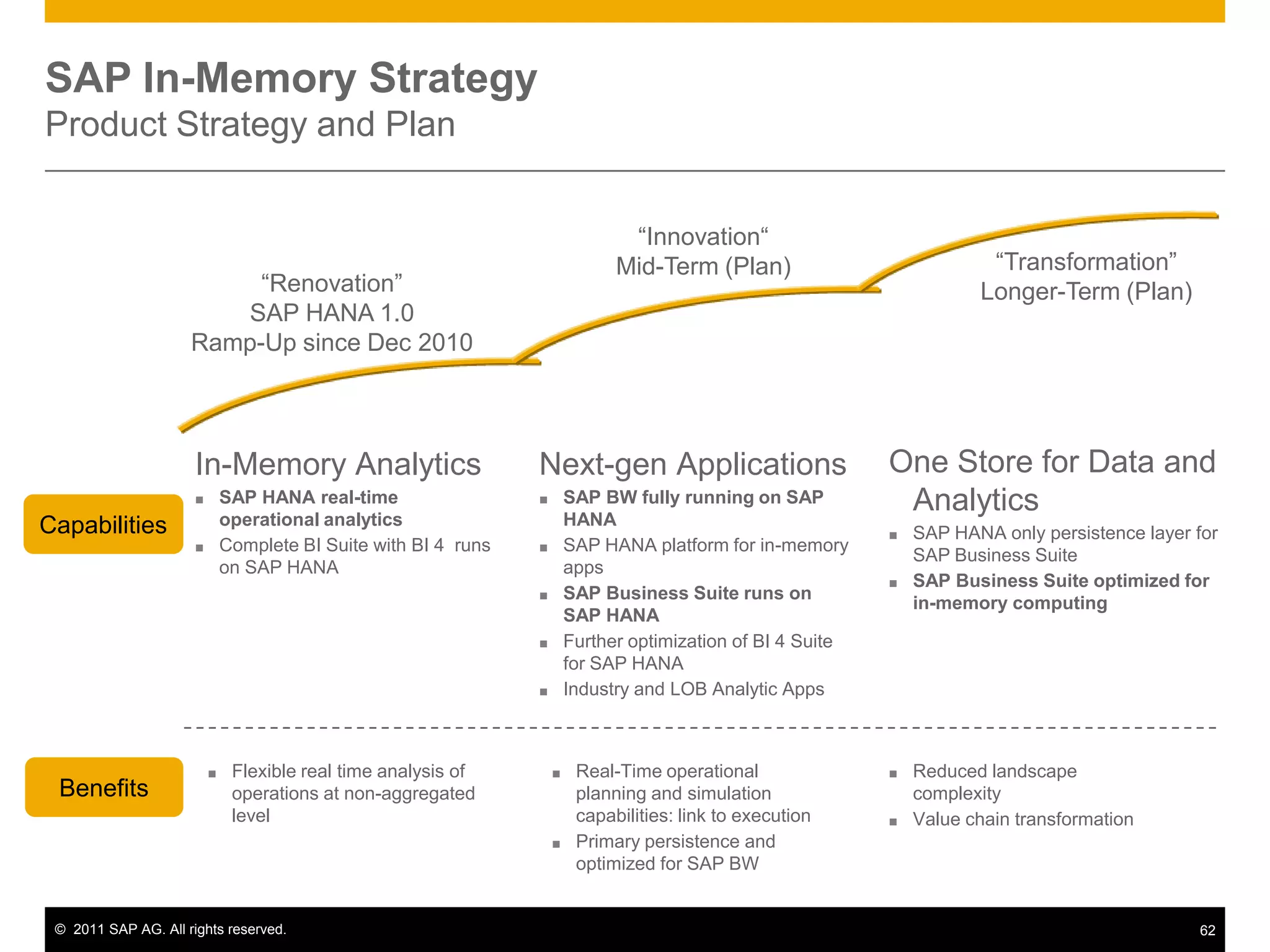
  • 126.
    “Innovation“Mid-Term (Plan)“Transformation”Longer-Term (Plan)“Renovation”SAPHANA 1.0Ramp-Up since Dec 2010One Store for Data and AnalyticsSAP HANA only persistence layer for SAP Business Suite
  • 127.
    SAP Business Suiteoptimized for in-memory computingIn-Memory AnalyticsSAP HANA real-time operational analytics
  • 128.
    Complete BI Suitewith BI 4 runs on SAP HANANext-gen ApplicationsSAP BW fully running on SAP HANA
  • 129.
    SAP HANA platformfor in-memory apps
  • 130.
    SAP Business Suiteruns on SAP HANA
  • 131.
    Further optimization ofBI 4 Suite for SAP HANA
  • 132.
    Industry and LOBAnalytic Apps CapabilitiesFlexible real time analysis of operations at non-aggregated level
  • 133.
    Real-Time operational planningand simulation capabilities: link to execution
  • 134.
    Primary persistence andoptimized for SAP BW
  • 135.
  • 136.
    Value chain transformationBenefitsSAPIn-Memory StrategyProduct Strategy and Plan
  • 137.

Editor's Notes

  • #9 Columnar data store benefitsOptimizes load of data to CPUHigh data compressionVery fast data aggregationMakes use of real-life fill of tables (few fields filled, few updates)
  • #10 4 minutesResponse time and throughput – HANA aka IMCE is sitting on top of the heap here. We have orders of magnitude increase in speed while maintaining high levels of throughput. Because what it does is implement all of the features of the legacy data storage mechanisms IN MEMORY. The only reason we use disk is for recovery and restart. We are the fastest.Before we get into those features, lets position and differentiate HANA with what is out there.Disk based:By the time you position the disk head to read the first block, we have already returned.Traditional DBMS – db2, 11g, mssql, aseNextGen Traditional DBMS –exadata, madison, teradata, nz, really start to blur the line with caching/disk/network optimizationMemory CacheTraditional – memcache, persistence, tangasol, CICS buffer poolsBI Based – MSTR, qlicktech, don’t let those vendors come out equal (yeah we have in memory) NO THEY DON”TWhile the NextGen Traditional DBMS does introduce further memory usage through appliance structures (Exadata for example), this will require deciding which data to store in memory and get good performance on. HANA includes all data in-memory and takes a different approach to ensure good performance on the full dataset.
  • #11 Of the components displayed on this slide, not all are part of HANA. Business Objects Enterprise, the ERP system, the clients etc. are optional components whose presence in the system landscape depends on the customer scenario.The components listed here are: The in-memory computing engine itself, which hosts the actual data stores, a persistence layer, a calculation/execution engine, interfaces and other components The in-memory computing studio which is a front-end delivered with HANA which enables administration of the in-memory computing engine and modeling for the engine. An ERP system in which a replication agentis installed to enable data transfer from ERP to HANADatabase clients (JDBC, ODBC, ODBO) which allow client tools to connect to HANA.Optional components - a NetWeaver BW system or third party systems which can be connected to HANA via SAP BusinessObjects Data Services- a BusinessObjects Enterprise system with Data Services installed.Client tools for reporting off HANA, e.g. MS Excel, SAP BusinessObjectsAnalysis Office, SAP BusinessObjects BI reporting tools. These tools might need components in a BusinessObjects Enterprise system (such as Information Design Tool).In the following slides we take a look at several usage aspects of HANA such as data loading, modelling and reporting and discuss which parts of this setup are important for these aspects.
  • #12 At the top is the connection and session management which creates and manages sessions and connections for the database clients. For each session a set of parameters is maintained such as e.g. auto commit settings or the curernt transaction isolation level.The client requests are analyzed and executed by the set of components summarized as „Request Processing and Execution Control“. Once a session is established, database clients typically use SQL statements to communicate with the in-memory computing engine. For analytical applications the multidimensional query language MDX is supported in addition.Features such as SQL Script, MDX and planning operations are implemented using a common infrastructure called calc engine.At the heart of the in-memory computing engine are two relational engines. The row and the column store. These relational engines act as databases. Both are in-memory databases, that is, their primary data persistence is based in RAM.The row store stores data in row based way. In this respect it behaves like traditional relational databases: data is stored and retrieved in records. A major diffenrence to traditional databases is that all data is always kept in RAM.The column store is a relational column based in-memory data engine. That means data is stored and retrieved in columns. This is an optimal concept for analytical queries. The concept is known e.g. From SAP netweaver BW Accelerator (BWA) where this technology has already demonstrated its potential.Even though the relational engines are memory based, a persistence on less volatile media is required for reasons of data safety. Otherwise a power cut or OS reboot would permanently erase all data in the database. The persistency layer handles page management and logging (redo and Undo logs) and permanently stores data in a disk storage. This storage has seperate volumes for data and log.The engine also has a component called transaction management. Transaction management is required in order to provide consistent views of the data at any given point in time (an ongoing transaction must only see that part of the data that was committed before that transaction was started).Replication Server and Load Controller arethe engine-side part of the Sybase replication manager.
  • #13 One of the promises of HANA is to deliver real-time analytic insight on vast data volumes.For the real-time aspect, data provisioning in real time is required. This is the task of Sybase Replication Server. Tables from the ERP system are initially loaded into HANA. All subsequent changes to these ERP tables are immediately replicated into the HANA server. To this end, replication server makes use of the database logs in the ERP system.There is a tool that helps selecting the tables to be loaded and replicated. This tool is integrated into the In-Memory Computing Studio.Replication Server only allows connecting one SAP ERP system to HANA. Some additional requirements apply regarding the ERP system such as server OS, DBMS system, ERP version, SAP kernel and unicode state (only unicode is supported). Note: 1513496 gives information about Hana restrictions.Systems not fullfilling these requirements can be accessed via data services. This requires a BusinessObjects installation, with a data services server and data services designer on the client. Note 1522554 NetWeaver Support Package requirement for Data Services SAP Extractor support .Note: for practical purposes it will probably not be reasonable to connect to several ERP systems with one HANA box (one via replication, the other(s) via data services) for obvious reasons (same tables existing in all the ERP systems etc).Note: Loading from NetWeaver BW into HANA via data services technically is an application of OpenHub.
  • #15 The High‐performance ANalytic Appliance (HANA) is a hardware and software combination that integrates a number of SAP components (for example, NewDB, Modeler, Data Services) delivered as an optimized hardware appliance in conjunction with leading hardware partners.HANA provides a flexible, data source agnostic, multi‐purpose appliance that has many deployment options. For example, customers can directly analyze large volumes of SAP ERP, SAP BW, or non‐SAP data in “real real‐time” without having to create any form of materialized views. This is possible because the software intelligently leverages the native multi‐core support and massively parallel processing capability of the appliance to provide a data source agnostic high performance analytical engine.
  • #17 Notes: This is a example......
  • #21 Once tables are created in HANA and loaded from the source system, the semantic relationships between the tables need to be modeled.In an ERP system, these relationships are modeled via database views and ABAP code. In HANA, these relations initially do not exist at all.Modeling can be done in several places (bottom-up description): If data services is used to create and fill the table, first modeling decisions can be made here. Data models can be created within the In-Memory Computing Engine. Models are stored in form of views and associated metadata in the engine. The front-end tool to create these models in the In-Memory computing Studio (Information Modeler within that tool). Depending on the front-end tool used to retrieve data from the In-Memory Computing Engine, further modeling decisions can be made in universes (SAP BusinessObjects Information Design Tool) or other semantic layers.
  • #29 In reporting, client tools create queries against the database. Where the actual query is generated depends on the tool used. This slide list some of the possible reporting tools.BusinessObjects Explorer will directly create a call against a HANA interface. Excel will also directly request data via MDX. Front-end tools which report against Universes will have the SQL request against HANA created in the universe layer. BI4 Analysis reports against BICS.Please note that at the time of creating these transparencies, it is not yet decided which front-end tools will be supported in combination with HANA. The front-end tools listed in these slides are candidates.The following client side drivers are delivered with HANA: JDBC ( SQL) ODBC ( SQL) ODBO (short for OLEDB for OLAP  MDX)Which of the drivers will be used depends on the front-end tool used (and sometimes even the way in which the front-end tool is used).
  • #30 Various connectivities exist : (O|J)DBC / ODBC (MDX) / SQL DBC (native lib for NewDB = newDB SDK (data, but also users rights, system management Here we can see BOBJ BI 4.0 client for Reporting, Crystal Report, 2 versions: * CR Enterprise include in BI 4.0 with connectivity though BI 4.0 (aka make usage of the CSL (or DSL as you like)) (C for Common, D for Dynamic) * CR 20xx standalone reporting tool, connectivity through ODBC (ODBO and MDX)BI4.0 Enterprise system will not be discussed here but separate training is available. Please contact SAP Education for further details.
  • #31 Veryclassic BOBJ productpositionningslide, once again, positioning BI products, no good slide show withoutthisslide:ExplorerExplorer is a new BI paradigm: youcan explore your business and findanswerswhenyoudon’tknownwhich question to ask. Indeed, youdon’tneed to understand how the data isstructured, how yourqueries are built. Explorer searchesdirectly on the pre-indexed data in a very intuitive way.This tool is for “Casual User”, “Information workers who are seeking easier self-service environment” or “Users who are involved in day-to-day decisions”Web IntelligenceWeb intelligence is one of the mostadvanced ad-hoc reporting solution on the market. It lets end-users design and analyzetheirown reports and queries. This tool is the one to use for Reporting & Analysis goals, especially for the casual business users. During this webinar, we will only focus on Web Intelligence, connecting to a SAP BW data source.XcelsiusXcelsius bridges the gap between data analysis and visual presentation in a very sexy way. The Target audience is mostly for business users.Crystal ReportsCrystal Reports allowsyou to createOperational or pixel-perfect reportsThe Target audience is IT department for report authoring. It is the tool as well for most business usersfor report consumption.(** not here **)Voyager / Bex Web (=Pioneer)This is a powerful web-based OLAP analysis tool, for analyst users. It can help you to gain insight into business data and make intelligent decisions that impact corporate performance.
  • #35 For Administration of the HANA, the In-Memory Computing Studio has an administration component. Tasks offered by the studio include (but are not limited to): Starting/stopping the In-Memory Computing Engine (upon start, the in-memory stores are reconstructed from the persistence layer) User administration including creating/deleting users and authorizations Table administration, including creating indexes or some part of the configuration for data replication Creating or replaying a backup
  • #36 According to a current survey, 28 percent of IT managers in North America have snooped, and 44 percent of those in Europe, the Middle East, and Africa have done so, too. Around 20 percent of respondents in North America and 31 percent in EMEA say one or more of their co-workers have used administrative privileges to reach confidential or sensitive information.See http://www.darkreading.com/insider-threat/167801100/security/client-security/229401640/it-temptation-to-snoop-too-great.html
  • #37 Auditing does not directly increase the security of the system. But wisely designed, it can help: Uncover security holes Show security breaches and privilege misuses Protect the system owner against accusations of security violation and data misuse The system owner meet their security standards In the current version of the SAP In-Memory Database, security logging and tracing is supported using the standard database log files. The features described in the following sections are supported in SAP HANA 1.0 SPS2, only.
  • #38 Auditing in SPS02: Extensible auditing infrastructureAudit trail is stored using syslog Audit logging of authorization changes
  • #43 The actual message that is written to the syslog is in CSV (comma-separated values) format so that it can be easily parsed and imported into other systems. The CSV format is as follows:<Event Timestamp>;<Service Name>;<Hostname>;<SID>;<Instance Number>;<Port Number>;<Policy Name>;<Policy Type Name>;<Audit Level>;<Audit Action>;<Active User>;<Target Schema>;<Target Object>;<Privilege Name>;<Grantable>;<Role Name>;<Target Principal>;<Success Status>;<Component>;<Section>;<Parameter>;<Old Value>;<New Value>;<Comment>;<Executed Statement>;It is possible to alter the audit configuration so that the audit trail is written to a text file. This must not be used on production systems. The text file writer has severe limitations. For example, it is not written in a thread-safe manner so that multiple entries, being written at the same time, can yield unexpected results. However, this can be very useful during testing the audit policies, as it is much easier to see the results of a policy in action.