White Paper


USING VPLEX™ METRO WITH VMWARE
HIGH AVAILABILITY AND FAULT
TOLERANCE FOR ULTIMATE AVAILABILITY


              Abstract
              This white paper discusses using best of breed technologies from
              VMware® and EMC® to create federated continuous availability
              solutions. The following topics are reviewed

                  Choosing between federated Fault Tolerance or
                   federated High Availability
                  Design considerations and constraints
                  Operational Best Practice
September 2012


         Copyright © 2012 EMC Corporation. All Rights Reserved.

         EMC believes the information in this publication is
         accurate as of its publication date. The information is
         subject to change without notice.

         The information in this publication is provided “as is.”
         EMC Corporation makes no representations or
         warranties of any kind with respect to the information in
         this publication, and specifically disclaims implied
         warranties of merchantability or fitness for a particular
         purpose.

         Use, copying, and distribution of any EMC software
         described in this publication requires an applicable
         software license.

         For the most up-to-date listing of EMC product names,
         see EMC Corporation Trademarks on EMC.com.


USING VMWARE FAULT TOLERANCE AND HIGH AVAILABILITY WITH                    2
VPLEX™ METRO HA FOR ULTIMATE AVAILABILITY
Table of Contents
Executive summary ............................................................................................. 5
   Audience ......................................................................................................................... 6
   Document scope and limitations................................................................................. 6
Introduction .......................................................................................................... 8
EMC VPLEX technology ..................................................................................... 10
   VPLEX terms and Glossary ........................................................................................... 11
   EMC VPLEX architecture.............................................................................................. 13
   EMC VPLEX Metro overview ........................................................................................ 14
   Understanding VPLEX Metro active/active distributed volumes ........................... 15
   VPLEX Witness – An introduction................................................................................. 18
   Protecting VPLEX Witness using VMware FT .............................................................. 22
   VPLEX Metro HA ............................................................................................................ 24
   VPLEX Metro cross cluster connect ............................................................................ 24
Unique VPLEX benefits for availability and I/O response time ...................... 26
   Uniform and non-uniform I/O access ........................................................................ 26
   Uniform access (non-VPLEX) ....................................................................................... 26
   Non-Uniform Access (VPLEX IO access pattern)...................................................... 31
   VPLEX with cross-connect and non-uniform mode ................................................. 35
   VPLEX with cross-connect and forced uniform mode ............................................ 36
Combining VPLEX HA with VMware HA and/or FT .......................................... 39
   vSphere HA and VPLEX Metro HA (federated HA) .................................................. 39
   Use Cases for federated HA ....................................................................................... 40
   Datacenter pooling using DRS with federated HA.................................................. 40
   Avoiding downtime and disasters using federated HA and vMotion .................. 41
   Failure scenarios and recovery using federated HA ............................................... 42
   vSphere FT and VPLEX Metro (federated FT) ............................................................ 45
   Use cases for a federated FT solution ........................................................................ 45
   Failure scenarios and recovery using federated FT ................................................. 46
   Choosing between federated availability or disaster recovery (or both) ........... 49
   Augmenting DR with federated HA and/or FT ......................................................... 51
   Environments where federated HA and/or FT should not replace DR ................. 52
Best Practices and considerations when combining VPLEX HA with VMware
HA and/or FT....................................................................................................... 54
   VMware HA and FT best practice requirements ...................................................... 55
   Networking principles and pre-requisites .................................................................. 55
   vCenter placement options ....................................................................................... 56


             USING VMWARE FAULT TOLERANCE AND HIGH AVAILABILITY WITH                                                                      3
             VPLEX™ METRO HA FOR ULTIMATE AVAILABILITY
Path loss handling semantics (PDL and APD)........................................................... 57
   Cross-connect Topologies and Failure Scenarios. ................................................... 58
   Cross-connect and multipathing ............................................................................... 60
   VPLEX site preference rules ......................................................................................... 60
   DRS and site affinity rules ............................................................................................. 61
   Additional best practices and considerations for VMware FT ............................... 61
   Secondary VM placement considerations............................................................... 62
   DRS affinity and cluster node count. ......................................................................... 63
   VPLEX preference rule considerations for FT............................................................. 64
   Other generic recommendations for FT .................................................................... 64
Conclusion ......................................................................................................... 66
References ......................................................................................................... 67
Appendix A - vMotioning over longer distances (10ms) .............................. 69


             USING VMWARE FAULT TOLERANCE AND HIGH AVAILABILITY WITH                                                              4
             VPLEX™ METRO HA FOR ULTIMATE AVAILABILITY
Executive summary
The EMC® VPLEX™ family removes physical barriers within, across, and
between datacenters. VPLEX Local provides simplified management and
non-disruptive data mobility for heterogeneous arrays. VPLEX Metro and
Geo provide data access and mobility between two VPLEX clusters within
synchronous and asynchronous distances respectively. With a unique
scale-out architecture, VPLEX’s advanced data caching and distributed
cache coherency provide workload resiliency, automatic sharing,
balancing and failover of storage domains, and enable both local and
remote data access with predictable service levels.
VMware vSphere makes it simpler and less expensive to provide higher
levels of availability for important applications. With vSphere, organizations
can easily increase the baseline level of availability provided for all
applications, as well as provide higher levels of availability more easily and
cost-effectively. vSphere makes it possible to reduce both planned and
unplanned downtime. The revolutionary VMware vMotion™ (vMotion)
capabilities in vSphere make it possible to perform planned maintenance
with zero application downtime.
VMware High Availability (HA), a feature of vSphere, reduces unplanned
downtime by leveraging multiple VMware ESX® and VMware ESXi™ hosts
configured as a cluster, to provide automatic recovery from outages as
well as cost-effective high availability for applications running in virtual
machines.
VMware Fault Tolerance (FT) leverages the well-known encapsulation
properties of virtualization by building fault tolerance directly into the ESXi
hypervisor in order to deliver hardware style fault tolerance to virtual
machines. Guest operating systems and applications do not require
modifications or reconfiguration. In fact, they remain unaware of the
protection transparently delivered by ESXi and the underlying architecture.
By leveraging distance, VPLEX Metro builds on the strengths of VMware FT
and HA to provide solutions that go beyond traditional “Disaster
Recovery”. These solutions provide a new type of deployment which
achieves the absolute highest levels of continuous availability over
distance for today’s enterprise storage and cloud environments. When
using such technologies, it is now possible to provide a solution that has
both zero Recovery Point Objective (RPO) with zero "storage" Recovery
Time Objective (RTO) (and zero "application" RTO when using VMware FT).
This white paper is designed to give technology decision-makers a deeper
understanding of VPLEX Metro in conjunction with VMware Fault Tolerance


        USING VMWARE FAULT TOLERANCE AND HIGH AVAILABILITY WITH                   5
        VPLEX™ METRO HA FOR ULTIMATE AVAILABILITY
and/or High Availability discussing design, features, functionality and
benefits. This paper also highlights the key technical considerations for
implementing VMware Fault Tolerance and/or High Availability with VPLEX
Metro technology to achieve "Federated Availability" over distance.

Audience
This white paper is intended for technology architects, storage
administrators and EMC professional services partners who are responsible
for architecting, creating, managing and using IT environments that utilize
EMC VPLEX and VMware Fault Tolerance and/or High Availability
technologies (FT and HA respectively). The white paper assumes that the
reader is familiar with EMC VPLEX and VMware technologies and
concepts.

Document scope and limitations
This document applies to EMC VPLEX Metro configured with VPLEX Witness.
The details provided in this white paper are based on the following
configurations:


   •   VPLEX Geosynchrony 5.1 (patch 2) or higher
   •   VPLEX Metro HA only (Local and Geo are not supported with FT or
       HA in a stretched configuration)
   •   VPLEX Clusters are within 5 milliseconds (ms) of each other for
       VMware HA
   •   Cross-connected configurations can be optionally deployed for
       VMware HA solutions (not mandatory).
   •   For VMware FT configurations VPLEX cross cluster connect is in place
       (mandatory requirement).
   •   VPLEX Clusters are within 5 millisecond (ms) round trip time (RTT) of
       each other for VMware HA
   •   VPLEX Clusters are within 1 millisecond (ms) round trip time (RTT) of
       each other for VMware FT
   •   VPLEX Witness is deployed to a third failure domain (Mandatory). The
       Witness functionality is required for “VPLEX Metro” to become a true
       active/active continuously available storage cluster.
   •   ESXi and vSphere 5.0 Update 1 or later are used
   •   Any qualified pair of arrays (both EMC and non-EMC) listed on the
       EMC Simple Support Matrix (ESSM) found here:
       https://elabnavigator.emc.com/vault/pdf/EMC_VPLEX.pdf


        USING VMWARE FAULT TOLERANCE AND HIGH AVAILABILITY WITH                6
        VPLEX™ METRO HA FOR ULTIMATE AVAILABILITY
•   The configuration is in full compliance with VPLEX best practice
       found here:
       http://powerlink.emc.com/km/live1/en_US/Offering_Technical/Tech
       nical_Documentation/h7139-implementation-planning-vplex-tn.pdf


Please consult with your local EMC Support representative if you are
uncertain as to the applicability of these requirements.


Note: While out of scope for this document, it should be noted that in
addition to all best practices within this paper, that all federated FT and HA
solutions will carry the same best practices and limitations imposed by the
VMware HA and FT technologies too. For instance at the time of writing
VMware FT technology is only capable of supporting a single vCPU per VM
(VMware HA does not carry the same vCPU limitation) and this limitation
will prevail when federating a VMware FT cluster. Please ensure to review
the VMware best practice documentation as well as the limitations and
considerations documentation (please see the References section) for
further information.


        USING VMWARE FAULT TOLERANCE AND HIGH AVAILABILITY WITH                  7
        VPLEX™ METRO HA FOR ULTIMATE AVAILABILITY
Introduction
Increasingly, more and more customers wish to protect their business
services from any event imaginable that would lead to downtime.
Previously (i.e. prior to VPLEX) solutions to prevent downtime fell into two
camps:
   1. Highly available and fault tolerant systems within a datacenter
   2. Disaster recovery solutions outside of a datacenter.
The benefit of FT and HA solutions are that they provide automatic
recovery in the event of a failure. However, the geographical protection
range is limited to a single datacenter therefore not protecting business
services from a datacenter failure.
On the other hand, disaster recovery solutions typically protect business
services using geographic dispersion so that if a datacenter fails, recovery
would be achieved using another datacenter in a separate fault domain
from the primary. Some of the drawbacks with a disaster recovery
solutions, however, are that they are human decision based (i.e. not
automatic) and typically require a 2nd disruptive failback once the primary
site is repaired. In other words, should a primary datacenter fail the
business would need to make a non-trivial decision to invoke disaster
recovery.
Since disaster recovery is decision-based (i.e. manually invoked), it can
lead to extended outages since the very decision itself takes time, and this
is generally made at the business level involving key stakeholders. As most
site outages are caused by recoverable events (e.g. an elongated power
outage), faced with the “Invoke DR” decision some businesses choose not
to invoke DR and to ride through the outage instead. This means that
critical business IT services remain offline for the duration of the event.
These types of scenarios are not uncommon in these "disaster" situations
and non-invocation can be for various reasons. The two biggest ones are:
   1. The primary site that failed can be recovered within 24-48 hours
      therefore not warranting the complexity and risk of invoking DR.
   2. Invoking DR will require a “failback” at some point in the future
      which in turn will bring more disruption.
Other potential concerns to invoking disaster recovery include complexity,
lack of testing, lack of resources, lack of skill sets and lengthy recovery
time.
To avoid such pitfalls, VPLEX and VMware offer a more comprehensive
answer to safeguarding your environments. By combining the benefits of
HA and FT, a new category of availability is created. This new type of


        USING VMWARE FAULT TOLERANCE AND HIGH AVAILABILITY WITH                8
        VPLEX™ METRO HA FOR ULTIMATE AVAILABILITY
category provides the automatic (non-decision based) benefits of FT and
HA, but allows them to be leveraged over distance by using VPLEX Metro.
This brings the geographical distance benefits normally associated with
disaster recovery to the table enhancing the HA and FT propositions
significantly.
The new category is known as “Federated Availability” and enables bullet
proof availability which in turn significantly lessens the chance of downtime
for both planned and unplanned events.


        USING VMWARE FAULT TOLERANCE AND HIGH AVAILABILITY WITH                 9
        VPLEX™ METRO HA FOR ULTIMATE AVAILABILITY
EMC VPLEX technology

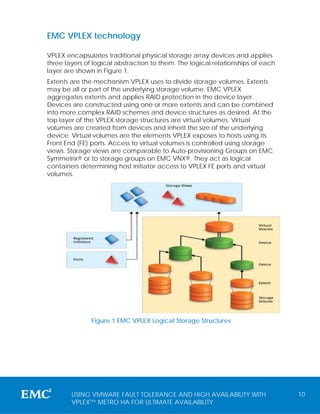
VPLEX encapsulates traditional physical storage array devices and applies
three layers of logical abstraction to them. The logical relationships of each
layer are shown in Figure 1.
Extents are the mechanism VPLEX uses to divide storage volumes. Extents
may be all or part of the underlying storage volume. EMC VPLEX
aggregates extents and applies RAID protection in the device layer.
Devices are constructed using one or more extents and can be combined
into more complex RAID schemes and device structures as desired. At the
top layer of the VPLEX storage structures are virtual volumes. Virtual
volumes are created from devices and inherit the size of the underlying
device. Virtual volumes are the elements VPLEX exposes to hosts using its
Front End (FE) ports. Access to virtual volumes is controlled using storage
views. Storage views are comparable to Auto-provisioning Groups on EMC
Symmetrix® or to storage groups on EMC VNX®. They act as logical
containers determining host initiator access to VPLEX FE ports and virtual
volumes.


               Figure 1 EMC VPLEX Logical Storage Structures


        USING VMWARE FAULT TOLERANCE AND HIGH AVAILABILITY WITH                  10
        VPLEX™ METRO HA FOR ULTIMATE AVAILABILITY
VPLEX terms and Glossary


Term                       Definition

VPLEX Virtual              Unit of storage presented by the
Volume                     VPLEX front-end ports to hosts

VPLEX Distributed          A single unit of storage presented by
Volume                     the VPLEX front-end ports of both
                           VPLEX clusters in a VPLEX Metro
                           configuration separated by
                           distance

VPLEX Director             The central processing and
                           intelligence of the VPLEX solution.
                           There are redundant (A and B)
                           directors in each VPLEX Engine

VPLEX Engine               Consists of two directors and is the
                           unit of scale for the VPLEX solution

VPLEX cluster              A collection of VPLEX engines in one
                           rack.

VPLEX Metro                The cooperation of two VPLEX
                           clusters, each serving their own
                           storage domain over synchronous
                           distance forming active/active
                           distributed volume(s)

VPLEX Metro HA             As per VPLEX Metro, but configured
                           with VPLEX Witness to provide fully
                           automatic recovery from the loss of
                           any failure domain. This can also be
                           thought of as an active/active
                           continuously available storage
                           cluster over distance.

Access Anywhere            The term used to describe a
                           distributed volume using VPLEX
                           Metro which has active/active
                           characteristics

Federation                 The cooperation of storage


        USING VMWARE FAULT TOLERANCE AND HIGH AVAILABILITY WITH    11
        VPLEX™ METRO HA FOR ULTIMATE AVAILABILITY
elements at a peer level over
                        distance enabling mobility,
                        availability and collaboration

Automatic               No human intervention whatsoever
                        (e.g. HA and FT)

Automated               No human intervention required
                        once a decision has been made
                        (e.g. disaster recovery with
                        VMware's SRM technology)


      USING VMWARE FAULT TOLERANCE AND HIGH AVAILABILITY WITH   12
      VPLEX™ METRO HA FOR ULTIMATE AVAILABILITY
EMC VPLEX architecture
EMC VPLEX represents the next-generation architecture for data mobility
and information access. The new architecture is based on EMC’s more
than 20 years of expertise in designing, implementing, and perfecting
enterprise-class intelligent cache and distributed data protection solutions.
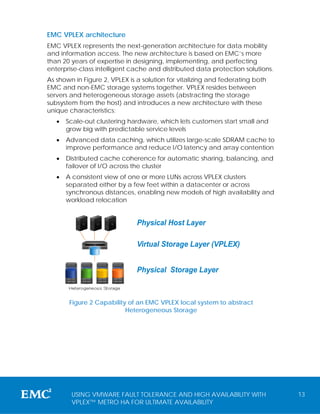
As shown in Figure 2, VPLEX is a solution for vitalizing and federating both
EMC and non-EMC storage systems together. VPLEX resides between
servers and heterogeneous storage assets (abstracting the storage
subsystem from the host) and introduces a new architecture with these
unique characteristics:
   •   Scale-out clustering hardware, which lets customers start small and
       grow big with predictable service levels
   •   Advanced data caching, which utilizes large-scale SDRAM cache to
       improve performance and reduce I/O latency and array contention
   •   Distributed cache coherence for automatic sharing, balancing, and
       failover of I/O across the cluster
   •   A consistent view of one or more LUNs across VPLEX clusters
       separated either by a few feet within a datacenter or across
       synchronous distances, enabling new models of high availability and
       workload relocation


                               Physical Host Layer
               A
                   A   A                                                    A
                                                                                A   A


                               Virtual Storage Layer (VPLEX)
           A

                                                                        A


                               Physical Storage Layer


        Figure 2 Capability of an EMC VPLEX local system to abstract
                           Heterogeneous Storage


        USING VMWARE FAULT TOLERANCE AND HIGH AVAILABILITY WITH                         13
        VPLEX™ METRO HA FOR ULTIMATE AVAILABILITY
EMC VPLEX Metro overview
VPLEX Metro brings mobility and access across two locations separated by
an inter-site round trip time of up to 5 milliseconds (host application
permitting). VPLEX Metro uses two VPLEX clusters (one at each location)
and includes the unique capability to support synchronous distributed
volumes that mirror data between the two clusters using write-through
caching.
Since a VPLEX Metro Distributed volume is under the control of the VPLEX
Metro advanced cache coherency algorithms, active data I/O access to
the distributed volume is possible at either VPLEX cluster. VPLEX Metro
therefore is a truly active/active solution which goes far beyond traditional
active/passive legacy replication solutions.
VPLEX Metro distributes the same block volume to more than one location
and ensures standard HA cluster environments (e.g. VMware HA and FT)
can simply leverage this capability and therefore can be easily and
transparently deployed and over distance too.
The key to this is to make the host cluster believe there is no distance
between the nodes so they behave identically as they would in a single
data center. This is known as “dissolving distance” and is a key deliverable
of VPLEX Metro.
The other piece to delivering truly active/active FT or HA environments is an
active/active network topology whereby the Layer 2 of the same network
resides in each location giving truly seamless datacenter pooling. Whilst
layer 2 network stretching is a pre-requisite for any FT or HA solution based
on VPLEX Metro, it is outside of the scope of this document. Going forward
throughout this document it is assumed that there is a stretched layer 2
network between datacenters where a VPLEX Metro resides.


Note: Please see further information on Cisco Overlay Transport
Virtualization (OTV) found here
http://www.cisco.com/en/US/docs/solutions/Enterprise/Data_Center/DCI/
whitepaper/DCI_1.html and Brocade Virtual Private LAN Service(VPLS)
found here
http://www.brocade.com/downloads/documents/white_papers/Offering_
Scalable_Layer2_Services_with_VPLS_and_VLL.pdf technology for
stretching a layer 2 network over distance.


        USING VMWARE FAULT TOLERANCE AND HIGH AVAILABILITY WITH                 14
        VPLEX™ METRO HA FOR ULTIMATE AVAILABILITY
Understanding VPLEX Metro active/active distributed volumes
Unlike traditional legacy replication where access to a replicated volume
is either in one location or another (i.e. an active/passive only paradigm)
VPLEX distributes a virtual device over distance which ultimately means
host access is now possible in more than one location to the same
(distributed) volume.
In engineering terms the distributed volumes that is presented from VPLEX
Metro is said to have “single disk semantics” meaning that in every way
(including failure) the disk will behave as one object as any traditional
block device would. This therefore means that all the rules associated with
a single disk are fully applicable to a VPLEX Metro distributed volume.
For instance, the following figure shows a single host accessing a single
JBOD type volume:


                                        Datacenter
                 Figure 3 Single host access to a single disk

Clearly the host in the diagram is the only host initiator accessing the single
volume.
The next figure shows a local two node cluster.
                              Cluster of hosts coordinate for access


                                         Datacenter
                Figure 4 Multiple host access to a single disk

As shown in the diagram there are now two hosts contending for the single
volume. The dashed orange rectangle shows that each of the nodes is


        USING VMWARE FAULT TOLERANCE AND HIGH AVAILABILITY WITH                   15
        VPLEX™ METRO HA FOR ULTIMATE AVAILABILITY
required to be in a cluster or utilize a cluster file system so they can
effectively coordinate locking to ensure the volume remains consistent.
The next figure shows the same two node cluster but now connected to a
VPLEX distributed volume using VPLEX cache coherency technology.


                                       Cluster of hosts coordinate
                                                for access


                                VPLEX AccessAnywhere™

                          Datacenter                                 Datacenter
        Figure 5 Multiple host access to a VPLEX distributed volume

In this example there is no difference to the fundamental dynamics of the
two node cluster access pattern to the single volume. Additionally as far as
the hosts are concerned they cannot see any different between this and
the previous example since VPLEX is distributing the device between
datacenters via AccessAnywhere™ (which is a type of federation).
This means that the hosts are still required to coordinate locking to ensure
the volume remains consistent.
For ESXi this mechanism is controlled by the cluster file system Virtual
Machine File System (VMFS) within each datastore. In this case each
distributed volume will be imported into VPLEX and formatted with the
VMFS file system.
The figure below shows a high-level physical topology of a VPLEX Metro
distributed device.

                  A
                      A     A                                                         A
                                                                                          A   A


   SITE A                                                                                         SITE B
                                       AccessAnywhere™
              A


                                                  LINK                            A


        Figure 6 Multiple host access to a VPLEX distributed volume

This figure is a physical representation of the logical configuration shown in
Figure 5. Effectively, with this topology deployed, the distributed volume


        USING VMWARE FAULT TOLERANCE AND HIGH AVAILABILITY WITH                                            16
        VPLEX™ METRO HA FOR ULTIMATE AVAILABILITY
can be treated just like any other volume, the only difference being it is
now distributed and available in two locations at the same time.
Another benefit of this type of architecture is “extreme simplicity” since it is
no more difficult to configure a cluster across distance that it is in a single
data center.


Note: VPLEX Metro can use either 8GB FC or native 10GB Ethernet WAN
connectivity (Where the word link is written). When using FC connectivity
this can be configured with either a dedicated channel (i.e. separate non
merged fabrics) or ISL based (i.e. where fabrics have been merged across
sites). It is assumed that any WAN link will have a second physically
redundant circuit.


Note: It is vital that VPLEX Metro has enough bandwidth between clusters
to meet requirements. EMC can assist in the qualification of this through
the Business Continuity Solution Designer (BCSD) tool. Please engage your
EMC account team to perform a sizing exercise.


For further details on VPLEX Metro architecture, please see the VPLEX HA Techbook
found here: http://www.emc.com/collateral/hardware/technical-
documentation/h7113-vplex-architecture-deployment.pdf


        USING VMWARE FAULT TOLERANCE AND HIGH AVAILABILITY WITH                     17
        VPLEX™ METRO HA FOR ULTIMATE AVAILABILITY
VPLEX Witness – An introduction
As mentioned previously, VPLEX Metro goes beyond the realms of legacy
active/passive replication technologies since it can deliver true
active/active storage over distance as well as federated availability.
There are three main items that are required to deliver true "Federated
Availability".
   1. True active/active fibre channel block storage over distance.
   2. Synchronous mirroring to ensure both locations are in lock step with
      each other from a data perspective.
   3. External arbitration to ensure that under all failure conditions
      automatic recovery is possible.
In the previous sections we have discussed 1 and 2, but now we will look at
external arbitration which is enabled by VPLEX Witness.
VPLEX Witness is delivered as a zero cost VMware Virtual Appliance (vApp)
which runs on a customer supplied ESXi server. The ESXi server resides in a
physically separate failure domain to either VPLEX cluster and uses
different storage to the VPLEX cluster.
Using VPLEX Witness ensures that true Federated Availability can be
delivered. This means that regardless of site or link/WAN failure a copy of
the data will automatically remain online in at least one of the locations.
When setting up a single or a group of distributed volumes the user will
choose a “preference rule” which is a special property that each
individual or group of distributed volumes has. It is the preference rule that
determines the outcome after failure conditions such as site failure or link
partition. The preference rule can either be set to cluster A preferred,
cluster B preferred or no automatic winner.
At a high level this has the following effect to a single or group of
distributed volumes under different failure conditions as listed below:


        USING VMWARE FAULT TOLERANCE AND HIGH AVAILABILITY WITH                  18
        VPLEX™ METRO HA FOR ULTIMATE AVAILABILITY
Preference     VPLEX CLUSTER PARTITION         SITE A FAILS               SITE B FAILS
   Rule /
 scenario        Site A          Site B    Site A          Site B     Site A          Site B

Cluster A       ONLINE       SUSPENDED     FAILED     SUSPENDED      ONLINE           FAILED
Preferred                 GOOD               BAD (by design)                   GOOD

Cluster B      SUSPENDED         ONLINE    FAILED       ONLINE      SUSPENDED         FAILED
preferred                 GOOD                      GOOD               BAD (by design)
   No
automatic       SUSPENDED (by design)     SUSPENDED (by design)     SUSPENDED (by design)
 winner

                  Table 1 Failure scenarios without VPLEX Witness


 As we can see in Table 1(above) if we only used the preference rules
 without VPLEX Witness then under some scenarios manual intervention
 would be required to bring the volume online at a given VPLEX cluster(e.g.
 if site A is the preferred site, and site A fails, site B would also suspend).
 This is where VPLEX Witness assists since it can better diagnose failures due
 to the network triangulation, and ensures that at any time at least one of
 the VPLEX clusters has an active path to the data as shown in the table
 below:
Preference     VPLEX CLUSTER PARTITION         SITE A FAILS               SITE B FAILS
   Rule          Site A          Site B    Site A          Site B     Site A          Site B

Cluster A        ONLINE      SUSPENDED     FAILED       ONLINE       ONLINE        FAILED
Preferred                 GOOD                      GOOD                       GOOD

Cluster B      SUSPENDED         ONLINE    FAILED       ONLINE       ONLINE        FAILED
preferred                 GOOD                      GOOD                       GOOD
   No
automatic       SUSPENDED (by design)     SUSPENDED (by design)     SUSPENDED (by design)
 winner

                    Table 2 Failure scenarios with VPLEX Witness


 As one can see from Table 2 VPLEX Witness converts a VPLEX Metro from an
 active/active mobility and collaboration solution into an active/active continuously
 available storage cluster. Furthermore once VPLEX Witness is deployed, failure
 scenarios become self-managing (i.e. fully automatic) which makes it extremely
 simple since there is nothing to do regardless of failure condition!


             USING VMWARE FAULT TOLERANCE AND HIGH AVAILABILITY WITH                           19
             VPLEX™ METRO HA FOR ULTIMATE AVAILABILITY
Figure 7 below shows the high level topology of VPLEX Witness


               Figure 7 VPLEX configured for VPLEX Witness

As depicted in Figure 7 we can see that the Witness VM is deployed in a
separate fault domain (as defined by the customer) and connected into
both VPLEX management stations via an IP network.


Note: Fault domain is decided by the customer and can range from
different racks in the same datacenter all the way up to VPLEX clusters 5ms
of distance away from each other (5ms measured round trip time latency
or typical synchronous distance). The distance that VPLEX witness can be
placed from the two VPLEX clusters can be even further. The current
supported maximum round trip latency for this is 1 second.


        USING VMWARE FAULT TOLERANCE AND HIGH AVAILABILITY WITH               20
        VPLEX™ METRO HA FOR ULTIMATE AVAILABILITY
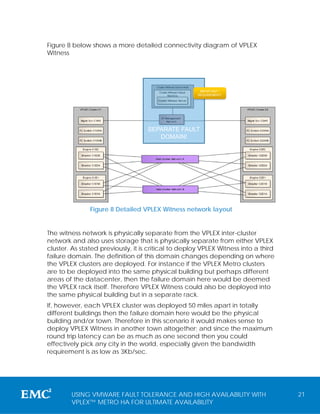
Figure 8 below shows a more detailed connectivity diagram of VPLEX
Witness


                                                       IMPORTANT /
                                                      REQUIREMENT!


                                    SEPARATE FAULT
                                       DOMAIN!


               Figure 8 Detailed VPLEX Witness network layout


The witness network is physically separate from the VPLEX inter-cluster
network and also uses storage that is physically separate from either VPLEX
cluster. As stated previously, it is critical to deploy VPLEX Witness into a third
failure domain. The definition of this domain changes depending on where
the VPLEX clusters are deployed. For instance if the VPLEX Metro clusters
are to be deployed into the same physical building but perhaps different
areas of the datacenter, then the failure domain here would be deemed
the VPLEX rack itself. Therefore VPLEX Witness could also be deployed into
the same physical building but in a separate rack.
If, however, each VPLEX cluster was deployed 50 miles apart in totally
different buildings then the failure domain here would be the physical
building and/or town. Therefore in this scenario it would makes sense to
deploy VPLEX Witness in another town altogether; and since the maximum
round trip latency can be as much as one second then you could
effectively pick any city in the world, especially given the bandwidth
requirement is as low as 3Kb/sec.


        USING VMWARE FAULT TOLERANCE AND HIGH AVAILABILITY WITH                      21
        VPLEX™ METRO HA FOR ULTIMATE AVAILABILITY
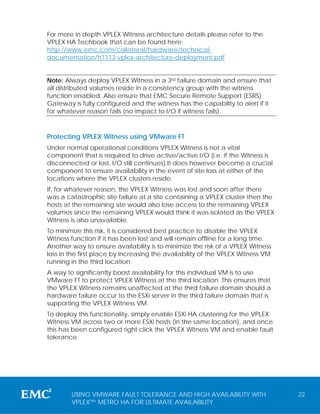
For more in depth VPLEX Witness architecture details please refer to the
VPLEX HA Techbook that can be found here:
http://www.emc.com/collateral/hardware/technical-
documentation/h7113-vplex-architecture-deployment.pdf


Note: Always deploy VPLEX Witness in a 3rd failure domain and ensure that
all distributed volumes reside in a consistency group with the witness
function enabled. Also ensure that EMC Secure Remote Support (ESRS)
Gateway is fully configured and the witness has the capability to alert if it
for whatever reason fails (no impact to I/O if witness fails).


Protecting VPLEX Witness using VMware FT
Under normal operational conditions VPLEX Witness is not a vital
component that is required to drive active/active I/O (i.e. if the Witness is
disconnected or lost, I/O still continues).It does however become a crucial
component to ensure availability in the event of site loss at either of the
locations where the VPLEX clusters reside.
If, for whatever reason, the VPLEX Witness was lost and soon after there
was a catastrophic site failure at a site containing a VPLEX cluster then the
hosts at the remaining site would also lose access to the remaining VPLEX
volumes since the remaining VPLEX would think it was isolated as the VPLEX
Witness is also unavailable.
To minimize this risk, it is considered best practice to disable the VPLEX
Witness function if it has been lost and will remain offline for a long time.
Another way to ensure availability is to minimize the risk of a VPLEX Witness
loss in the first place by increasing the availability of the VPLEX Witness VM
running in the third location.
A way to significantly boost availability for this individual VM is to use
VMware FT to protect VPLEX Witness at the third location. This ensures that
the VPLEX Witness remains unaffected at the third failure domain should a
hardware failure occur to the ESXi server in the third failure domain that is
supporting the VPLEX Witness VM.
To deploy this functionality, simply enable ESXi HA clustering for the VPLEX
Witness VM across two or more ESXi hosts (in the same location), and once
this has been configured right click the VPLEX Witness VM and enable fault
tolerance.


        USING VMWARE FAULT TOLERANCE AND HIGH AVAILABILITY WITH                  22
        VPLEX™ METRO HA FOR ULTIMATE AVAILABILITY
Note: At the time of writing, the FT configuration on VPLEX Witness is only
within one location and not a stretched / federated FT configuration. The
storage that the VPLEX Witness uses should be physically contained within
the boundaries of the third failure domain on local (i.e. not VPLEX Metro
distributed) volumes. Additionally it should be noted that currently HA
alone is not supported, only FT or unprotected.


        USING VMWARE FAULT TOLERANCE AND HIGH AVAILABILITY WITH               23
        VPLEX™ METRO HA FOR ULTIMATE AVAILABILITY
VPLEX Metro HA
As discussed in the two previous sections, VPLEX Metro is able to provide
active/active distributed storage, however we have seen that in some
cases depending on failure, loss of access to the storage volume could
occur if the preferred site fails for some reason causing the non-preferred
site to suspend too. Using VPLEX Witness overcomes this scenario and
ensures that access to a VPLEX cluster is always maintained regardless of
which site fails.
VPLEX Metro HA describes a VPLEX Metro solution that has also been
deployed with VPLEX Witness. As the name suggests VPLEX Metro HA
effectively delivers truly available distributed Storage volumes over
distance and forms a solid foundation for additional layers of VMware
technology such as HA and FT.


Note: It is assumed that all topologies discussed within this white paper use
VPLEX Metro HA (i.e. use VPLEX Metro and VPLEX Witness). This is
mandatory to ensure fully automatic (i.e. decision less) recovery under all
the failure conditions outlined within this document.


VPLEX Metro cross cluster connect
Another important feature of VPLEX Metro that can be optionally
deployed within a campus topology (i.e. up to 1ms) is cross cluster
connect.


Note: At the time of writing cross-connect is a mandatory requirement for
VMware FT implementations.


This feature pushes VPLEX HA into an even greater level of availability than
before since now an entire VPLEX cluster failure at a single location would
not cause an interruption to host I/O at either location (using either
VMware FT or HA)
Figure 9 below shows the topology of a cross-connected configuration:


        USING VMWARE FAULT TOLERANCE AND HIGH AVAILABILITY WITH                 24
        VPLEX™ METRO HA FOR ULTIMATE AVAILABILITY
A
                           A   A
                                        OPTIONAL                      A
                                                                               A   A


                                       X – CONNECT
  SITE A                                                                               SITE B
                                   AccessAnywhere™
              A


                                          LINK                    A


                                         VPLEX
                                         WITNESS


                      IP                                                  IP


           Figure 9 VPLEX Metro deployment with cross-connect


As we can see in the diagram the cross-connect offers an alternate path or paths
from each ESXi server to the remote VPLEX.
This ensures that if for any reason an entire VPLEX cluster were to fail (which
is unlikely since there is no single-point-of-failure) there would be no
interruption to I/O since the remaining VPLEX cluster will continue to service
I/O across the remote cross link (alternate path)
It is recommended when deploying cross-connect that rather than
merging fabrics and using an Inter Switch Link (ISL), additional host bus
adapters (HBAs) should be used to connect directly to the remote data
centers switch fabric. This ensures that fabrics do not merge and span
failure domains.
Another important note to remember for cross-connect is that it is only
supported for campus environments up to 1ms round trip time.


Note: When setting up cross-connect, each ESXi server will see double the
paths to the datastore (50% local and 50% remote). It is best practice to
ensure that the pathing policy is set to fixed and mark the remote paths
across to the other cluster as passive. This ensures that the workload
remains balanced and only committing to a single cluster at any one time.


        USING VMWARE FAULT TOLERANCE AND HIGH AVAILABILITY WITH                                 25
        VPLEX™ METRO HA FOR ULTIMATE AVAILABILITY
Unique VPLEX benefits for availability and I/O response
time
VPLEX is built from the ground up to perform block storage distribution over
long distances at enterprise scale and performance. One of the unique
core principles of VPLEX that enables this, is its underlying and extremely
efficient cache coherency algorithms which enable an active/active
topology without compromise.
Since VPLEX is architecturally unique from other virtual storage products,
two simple categories are used to easily distinguish between the
architectures.

Uniform and non-uniform I/O access
Essentially these two categories are a way to describe the I/O access
pattern from the host to the storage system when using a stretched or
distributed cluster configuration. VPLEX Metro (under normal conditions)
follows what is known technically as a non-uniform access pattern,
whereas other products that function differently from VPLEX follow what is
known as a uniform I/O access pattern. On the surface, both types of
topology seem to deliver active/active storage over distance, however at
the simplest level it is only the non-uniform category that delivers true
active/active within the non-uniform category which carries some
significant benefits over uniform type solutions.
The terms are defined as follows:
   1. Uniform access
      All I/O is serviced by the same single storage controller therefore all
      I/O is sent to or received from the same location, hence the term
      "uniform". Typically this involves "stretching" dual controller
      active/passive architectures.
   2. Non Uniform access
      I/O can be serviced by any available storage controller at any given
      location; therefore I/O can be sent to or received from any storage
      target location, hence the term "non-uniform". This is derived from
      "distributing" multiple active controllers/directors in each location.
To understand this in greater detail and to quantify the benefits of non-uniform
access we must first understand uniform access.

Uniform access (non-VPLEX)
Uniform Access works in a very similar way to a dual controller array that
uses an active/passive storage controller. With such an array a host would


        USING VMWARE FAULT TOLERANCE AND HIGH AVAILABILITY WITH                    26
        VPLEX™ METRO HA FOR ULTIMATE AVAILABILITY
generally be connected to both directors in a HA configuration so if one
failed the other one would continue to process I/O. However since the
secondary storage controller is passive, no write or read I/O can be
propagated to it or from it under normal operations since it remains
passive. The other thing to understand here is that these types of
architectures typically use cache mirroring whereby any write I/O to the
primary controller/director is synchronously mirrored to the secondary
controller for redundancy.
Next imagine taking a dual controller active/passive array and physically
splitting the nodes/controllers apart therefore stretching it over distance so
that the active controller/node resides in site A and the secondary
controller/node resides in site B.
The first thing to note here is that we now only have a single controller at
either location so we have already compromised the local HA ability of
the solution since each location now has a single point of failure.
The next challenge here is to maintain host access to both controllers from
either location.
Let's suppose we have an ESXi server in site A and a second one in site B. If
the only active storage controller resides at A, then we need to ensure that
hosts in both site A and site B have access to the storage controller in site A
(uniform access). This is important since if we want to run a host workload
at site B we will need an active path to connect it back to the active
director in site A since the controller at site B is passive. This may be
handled by a standard FC ISL which stretches the fabric across sites.
Additionally we will also require a physical path from the ESXi hosts in site A
to the passive controller at site B. The reason for this is just in case there is a
controller failure at site A, the controller at site B should be able to service
I/O.
As discussed in the previous section this type of configuration is known as
"Uniform Access" since all I/O will be serviced uniformly by the exact same
controller for any given storage volume, passing all I/O to and from the
same location. The diagram in Figure 10 below shows a typical example of
a uniform architecture.


         USING VMWARE FAULT TOLERANCE AND HIGH AVAILABILITY WITH                      27
         VPLEX™ METRO HA FOR ULTIMATE AVAILABILITY
Fabric A – Stretched via ISL


                                                                                                                           Fabric B Stretched via ISL A


                                         A

                                             Front End                       A


                                                                                                                                SPLIT CONTROLLERS                                           Front End


                 Single Controller


                                                                                                                                                                                                                    Single Controller
                                                                                       A                                                                                                                                                                        A
                                                                                                                                                                                                                                                                            A       A


                                                                                           Communication


                                                                                                                                                                        Communication
                                              (Active)                                                                                                                                      (Passive)
                                                                                                                                           Proprietary
                                               Cache                                                                                                                                          Cache
   SITE A                                    (Mirrored)
                                                                                                                                               or
                                                                                                                                           Dedicated                                        (Mirrored)
                                                                                                                                                                                                                                        SITE B
                 A
                                              Backend                                                                                         ISL                                            Backend                             A


             A
                                     A


                                             (Mirrored)                                                                                                                                     (Passive)                                                       A


                                                                                 Figure 10 A typical non-uniform layout

As we can see in the above diagram, hosts at each site connect to both
controllers by way of the stretched fabric; however the active controller
(for any given LUN) is only at one of the sites (in this case site A).
While not as efficient (bandwidth and latency) as VPLEX, under normal
operating conditions (i.e. where the active host is at the same location as
the active controller) this type of configuration functions satisfactorily,
however this type of access pattern starts to become sub-optimal if the
active host is propagating I/O at the same location where the passive
controller resides.
Figure 11 shows the numbered sequence of I/O flow for a host connected
to a uniform configuration at the local (i.e. active) site.
      5

                                                                                                                                      Fabric A – Stretched via ISL


                                                                                                                                    Fabric B Stretched via ISL A


                                                                     1 Front End
                                                                         A
                                                                                   A
                                                                                                                                                                                                            Front End
                                                 Single Controller


                                                                                                                                                                                                                                        Single Controller


                                                                                                           A                                                                                                                                                            A
                                                                                                                                                                                                                                                                                A       A


                                                                                                                                      SPLIT CONTROLLERS
                                                                                                               Communication


                                                                                                                                                                                            Communication


                                                                        (Active)                                                                                                                            (Passive)
                                                                         Cache                                                                                                                                Cache
      SITE A                                                           (Mirrored)
                                                                                                                                     All cache mirrored synchronously
                                                                                                                                                                                                            (Mirrored)
                                                                                                                                                                                                                                                            SITE B
                                                 A
                                                                        Backend                                                                                                         2                    Backend                                 A


                                             A
                                                                     A


                                                                       (Mirrored)                                                                                                                           (Passive)                                               A


                                                                                                                                                              3


                                                                                       4                                                                                                                    4

            Figure 11 Uniform write I/O Flow example at local site


          USING VMWARE FAULT TOLERANCE AND HIGH AVAILABILITY WITH                                                                                                                                                                                                                           28
          VPLEX™ METRO HA FOR ULTIMATE AVAILABILITY
The steps below correspond to the numbers in the diagram.
   1. I/O is generated by the host at site A and sent to the active controller in site
      A.

   2. The I/O is committed to local cache, and synchronously mirrored to remote
      cache over the WAN.

   3. The local/active controller’s backend now mirrors the I/O to the back end
      disks. It does this by committing a copy to the local array as well as sending
      another copy of the I/O across the WAN to the remote array.

   4. The acknowledgment from back end disk returns to the owning storage
      controller.

   5. Acknowledgement is received by the host and the I/O is complete.

Now, let's look at a write I/O initiated from the ESXi host at location B where
the controller for the LUN receiving I/O resides at site A.
The concern here is that each write at the passive site B will have to
traverse the link and be acknowledged back to site A. Before the
acknowledgement can be given back to the host at site B from the
controller at site A, the storage system has to synchronously mirror the I/O
back to the controller in site B (both cache and disk), thereby incurring
more round trips of the WAN. This ultimately increases the response time
(i.e. negatively impacts performance) and bandwidth utilization.
The numbered sequence in Figure 12 shows a typical I/O flow of a host
connected to a uniform configuration at the remote (i.e. passive) site.


        USING VMWARE FAULT TOLERANCE AND HIGH AVAILABILITY WITH                          29
        VPLEX™ METRO HA FOR ULTIMATE AVAILABILITY
1       6
                                                                           Fabric A – Stretched via ISL


                                                                          Fabric B Stretched via ISL A


                                      2 Front End
                                          A
                                              A
                                                                                                                                      Front End


                  Single Controller


                                                                                                                                                   Single Controller
                                                      A                                                                                                                       A
                                                                                                                                                                                  A   A


                                                                            SPLIT CONTROLLERS


                                                          Communication


                                                                                                                      Communication
                                         (Active)                                                                                     (Passive)
                                          Cache                                                                                         Cache
    SITE A                              (Mirrored)
                                                                          All cache mirrored synchronously
                                                                                                                                      (Mirrored)
                                                                                                                                                                       SITE B
                  A
                                         Backend                                                              3                        Backend                  A


              A
                                      A


                                        (Mirrored)                                                                                    (Passive)                           A


                                                                                                 4


                                                  5                                                                                   5

          Figure 12 Uniform write I/O flow example at remote site


The following steps correspond to the numbers in the diagram.
   1. I/O is generated by the host at site B and sent across the ISL to the
      active controller at site A.
   2. The I/O is received at the controller at site A from the ISL
   3. The I/O is committed to local cache, and mirrored to remote cache
      over the WAN and acknowledged back to the active controller in
      site A.
   4. The active controllers’ back end now mirrors the I/O to the back end
      disks at both locations. It does this by committing a copy to the local
      array as well as sending another copy of the I/O across the WAN to
      the remote array (this step may sometimes be asynchronous).
   5. Both write acknowledgments are sent back to the active controller
      (back across the ISL)
   6. Acknowledgement back to the host and the I/O is complete.


Clearly if using a uniform access device from a VMware datastore
perspective with ESXi hosts at either location, I/O could be propagated to
both locations perhaps simultaneously (e.g. if a VM were to be vMotioned
to the remote location leaving at least one VM online at the previous
location in the same datastore). Therefore in a uniform deployment, I/O
response time at the passive location will always be worse (perhaps
significantly) than I/O response time at the active location. Additionally,
I/O at the passive site could use up to three times the bandwidth of an I/O


        USING VMWARE FAULT TOLERANCE AND HIGH AVAILABILITY WITH                                                                                                                           30
        VPLEX™ METRO HA FOR ULTIMATE AVAILABILITY
at the active controller site due to the need to mirror the disk and cache
as well as send the I/O in the first place across the ISL.

Non-Uniform Access (VPLEX IO access pattern)
While VPLEX can be configured to provide uniform access, the typical
VPLEX Metro deployment uses non-uniform access. VPLEX was built from
the ground up for extremely efficient non-uniform access. This means it
has a different hardware and cache architecture relative to uniform
access solutions and, contrary to what you might have already read about
non-uniform access clusters, provides significant advantages over uniform
access for several reasons:
   1. All controllers in a VPLEX distributed cluster are fully active. Therefore
      if an I/O is initiated at site A, the write will happen to the director in
      site A directly and be mirrored to B before the acknowledgement is
      given. This ensures minimal (up to 3x better compared to uniform
      access) response time and bandwidth regardless of where the
      workload is running.
   2. A cross-connection where hosts at site A connect to the storage
      controllers at site B is not a mandatory requirement (unless using
      VMware FT). Additionally, with VPLEX if a cross-connect is deployed,
      it is only used as a last resort in the unlikely event that a full VPLEX
      cluster has been lost (this would be deemed a double failure since a
      single VPLEX cluster has no SPOFs) or the WAN has failed/been
      partitioned.
   3. Non-uniform access uses less bandwidth and gives better response
      times when compared to uniform access since under normal
      conditions all I/O is handled by the local active controller (all
      controllers are active) and sent across to the remote site only once.
      It is important to note that read and write I/O is serviced locally
      within VPLEX Metro.
   4. Interestingly, due to the active/active nature of VPLEX, should a full
      site outage occur VPLEX does not need to perform a failover since
      the remaining copy of the data was already active. This is another
      key difference when compared to uniform access since if the
      primary active node is lost a failover to the passive node is required.
The diagram below shows a high-level architecture of VPLEX when
distributed over a Metro distance:


        USING VMWARE FAULT TOLERANCE AND HIGH AVAILABILITY WITH                    31
        VPLEX™ METRO HA FOR ULTIMATE AVAILABILITY
Front End           Front End                                                Front End           Front End


                                                                                                                                             VPLEX Cluster B
                                                                                       Communication
                                     A
                                                 A                                                                                      A


        VPLEX Cluster A
                                                         A
                                                                                                                                                               A   A


                                                              Communication
                           (Active)            (Active)                                                 (Active)            (Active)
                             Cache               Cache                                                    Cache               Cache
                                                                              I P or
                          (Distributed)       (Distributed)                                            (Distributed)       (Distributed)
                                                                                FC

                          Backend
                                     A


                                              Backend                                                  Backend         A   Backend
                                          A
                                 A


                                                                                                                                    A


  SITE A                                                                                                                                    SITE B


                                     Figure 13 VPLEX non-uniform access layout


As we can see in Figure 13, each host is only connected to the local VPLEX
cluster ensuring that I/O flow from whatever location is always serviced by
the local storage controllers. VPLEX can achieve this because all of the
controllers (at both sites) are in an active state and able to service I/O.
Some other key differences to observe from the diagram are:
   1. Storage devices behind VPLEX are only connected to each
      respective local VPLEX cluster and are not connected across the
      WAN, dramatically simplifying fabric design.
   2. VPLEX has dedicated redundant WAN ports that can be connected
      natively to either 10GB Ethernet or 8GB FC.
   3. VPLEX has multiple active controllers in each location ensuring there
      are no local single points of failure. With up to eight controllers in
      each location, VPLEX provides N+1 redundancy.
   4. VPLEX uses and maintains single disk semantics across clusters at two
      different locations.
I/O flow is also very different and more efficient when compared to
uniform access too as the diagram below highlights.


        USING VMWARE FAULT TOLERANCE AND HIGH AVAILABILITY WITH                                                                                                        32
        VPLEX™ METRO HA FOR ULTIMATE AVAILABILITY
4


                                                                                                                     1
                          Front End           Front End                                                           Front End           Front End


                                                                                                                                                        VPLEX Cluster B
                                                                                                  Communication
                                     A
                                                 A                                                                                                 A


        VPLEX Cluster A
                                                         A
                                                                                                                                                                          A   A


                                                              Communication
                           (Active)            (Active)                                                            (Active)            (Active)
                                                                                     2                               Cache               Cache
                             Cache               Cache
                          (Distributed)       (Distributed)                   Inter Cluster Com                   (Distributed)       (Distributed)

                          Backend
                                     A


                                              Backend                                                             Backend         A   Backend
                                          A
                                 A


                                                                                                                                               A


                                                     3                                                                    3
   SITE A                                                                                                                                              SITE B


                           Figure 14 High level VPLEX non-uniform write I/O flow


The steps below correspond to the numbers in the Figure 14:
   1. Write I/O is generated by the host at either site and sent to one of
      the local VPLEX controllers (depending on path policy).
   2. The write I/O is duplicated and sent to the remote VPLEX cluster.
   3. Each VPLEX cluster now has a copy of the write I/O which is written
      through to the backend array at each location. Site A VPLEX does
      this for the array in site A, while site B VPLEX does this for the array in
      site B.
   4. Once the remote VPLEX cluster has acknowledged back to the local
      cluster the acknowledgement is sent to the host and the I/O is
      complete.


Note: Under some conditions depending on the access pattern, VPLEX
may encounter what is known as a local write miss condition. This does not
necessarily cause another step as the remote cache page owner is
invalidated as part of the write through caching activity. In effect, VPLEX is
able to accomplish several distinct tasks through a single cache update
messaging step.


The table below shows a broad comparison of the expected increase in
response time (in milliseconds) for I/O flow for both uniform and non-
uniform layouts if using an FC link with a 3 ms response time (and without
any form of external WAN acceleration / fast write technology). These


        USING VMWARE FAULT TOLERANCE AND HIGH AVAILABILITY WITH                                                                                                                   33
        VPLEX™ METRO HA FOR ULTIMATE AVAILABILITY
numbers are additional overhead when compared to a local storage
system of the same hardware, since I/O now has to be sent across the link.

     (Based on 3ms RTT and 2 round trips per IO)             SITE A                   Site B
     Additional RT overhead (ms)                        read        write      read            write
     Full Uniform (sync mirror)                           0          12          6              18
     Full Uniform (async Mirror)                          0           6          6              12
     Non-Uniform (owner hit)                              0          6*          0              6*
     * This is comparable to standard synchronous Active/Passive replication

                                                 Key
                                              Optimal
                                     Acceptable, but not efficient
                                            Sub-optimal

           Table 3 Uniform vs. non-uniform response time increase


Note: Table 3 Only shows the expected additional latency of the IO on the
WAN and does not include any other overheads such as data
propagation delay or additional machine time at either location for
remote copy processing. Your mileage will vary.


As we can see in Table 3, topologies that use a uniform access pattern
and a synchronous disk mirror can add significantly more time to each I/O,
increasing the response time by as much at 3x compared to non-uniform.


Note: VPLEX Metro environments can also be configured using native IP
connectivity between sites. Using this type of topology caries further
response time efficiencies since each and every IO across the WAN only
typically incurs a single round trip.


Another factor to consider when comparing the two topologies is also the
amount of WAN bandwidth used. The table below shows a comparison
between a full uniform topology and a VPLEX non-uniform topology for
bandwidth utilization. The IO size example is 128KB and the results are also
shown in KB.


        USING VMWARE FAULT TOLERANCE AND HIGH AVAILABILITY WITH                                        34
        VPLEX™ METRO HA FOR ULTIMATE AVAILABILITY
SITE A                   Site B
     WAN bandwidth used for a 128KB IO                  read        write      read            write
     Full Uniform (sync or async mirror)                  0         256        128             384
     Non-Uniform                                          0         128*         0             128*
     * This is comparable to standard synchronous Active/Passive replication

                                                 Key
                                              Optimal
                                     Acceptable, but not efficient
                                            Sub-optimal

              Table 4 Uniform vs. non-uniform bandwidth usage

As one can see from Table 4, non-uniform always performs local reads and
also only has to send the data payload once across the WAN for a write
I/O regardless of where the data was written. This is in stark contrast to a
uniform topology, especially if the write occurs at the site with the passive
controller, since now the data has to be sent once to across the WAN (ISL)
to the controller where it will both mirror the cache page (synchronously
over the WAN again)as well as mirror the underlying storage again back
over the WAN giving an overall 3x increase in WAN traffic when compared
to non-uniform.


VPLEX with cross-connect and non-uniform mode
When using VPLEX Metro with a cross cluster connect configuration (up to
1ms round-trip time) is sometimes referred to as "VPLEX in uniform mode"
since each ESXi host is now connected to both the local and remote
VPLEX clusters.
While on the surface this does look similar to uniform mode it still typically
functions in a non-uniform mode. This is because under the covers all
VPLEX directors remain active and able to serve data locally, maintaining
the efficiencies of the VPLEX cache coherent architecture. Additionally
when using cross-connected clusters, it is recommended to configure the
ESXi servers so that the cross-connected paths are only standby paths.
Therefore even with a VPLEX cross-connected configuration, I/O flow is still
locally serviced from each local VPLEX cluster and does not traverse the
link.
The diagram below shows an example of this:


        USING VMWARE FAULT TOLERANCE AND HIGH AVAILABILITY WITH                                        35
        VPLEX™ METRO HA FOR ULTIMATE AVAILABILITY
Paths in standby


                          Front End           Front End                                                          Front End           Front End


                                                                                                                                                       VPLEX Cluster B
                                                                                                 Communication
                                     A
                                                 A                                                                                                A


        VPLEX Cluster A
                                                         A
                                                                                                                                                                         A   A


                                                              Communication
                           (Active)            (Active)                                                           (Active)            (Active)
                             Cache               Cache                                                              Cache               Cache
                                                                                   I P or
                          (Distributed)       (Distributed)                                                      (Distributed)       (Distributed)
                                                                                     FC

                          Backend
                                     A


                                              Backend                                                            Backend         A   Backend
                                          A
                                 A


                                                                                                                                              A


   SITE A                                                                                                                                             SITE B


  Figure 15 High-level VPLEX cross-connect with non-uniform I/O access


In Figure 15, each ESXi host now has an alternate path to the remote VPLEX
cluster. Compared to the typical uniform diagram in the previous section,
however, we can still see that the underlying VPLEX architecture differs
significantly since it remains identical to the non-uniform layout, servicing
I/O locally at either location.

VPLEX with cross-connect and forced uniform mode

Although VPLEX functions primarily in a non-uniform model, there are
certain conditions where VPLEX can sustain a type of uniform access
mode. One such condition is if cross-connect is used and certain failures
occur causing the uniform mode to be forced.
One of the scenarios where this may occur is when VPLEX and the cross-
connect network are using physically separate channels and the VPLEX
clusters are partitioned while the cross-connect network remains in place.
The diagram below shows an example of this:


        USING VMWARE FAULT TOLERANCE AND HIGH AVAILABILITY WITH                                                                                                                  36
        VPLEX™ METRO HA FOR ULTIMATE AVAILABILITY
Front End           Front End                                                       Front End           Front End


                                                                                                                                                    VPLEX Cluster B
                                                                                              Communication
                                     A
                                                 A                                                                                             A


        VPLEX Cluster A
                                                         A
                                                                                                                                                                      A   A


                                                                                  Partition
                                                              Communication
                           (Active)            (Active)                                                       (Passive)           (Passive)
                             Cache               Cache                                                           Cache               Cache
                          (Distributed)       (Distributed)                                                   (Distributed)       (Distributed)

                          Backend
                                     A


                                              Backend                                                         Backend         A   Backend
                                          A
                                 A


                                                                                                                                           A


   SITE A                                                                                                                                          SITE B


                           Figure 16 forced uniform mode due to WAN partition

As illustrated in Figure 16 , VPLEX will invoke the "site preference rule"
suspending access to a given distributed virtual volume at one of the
locations (in the case site B). This ultimately means that I/O at site B has to
traverse the link to site A since the VPLEX controller path in site B is now
suspended due to the preference rule.
Another scenario where this might occur is if one of the VPLEX clusters at
either location becomes isolated or destroyed. The diagram below shows
an example of a localized rack failure at site B which has taken the VPLEX
cluster offline at site B.


                          Front End           Front End                                                       Front End Front End
                                                                                                                                                    VPLEX Cluster B
                                                                                              Communication


                                     A
                                                 A                                                                                             A
        VPLEX Cluster A


                                                         A
                                                                                                                                                                      A   A
                                                              Communication


                           (Active)            (Active)                                                        (offline)   (offline)
                                                                                                                      Localized
                             Cache               Cache                                                           Cache               Cache
                          (Distributed)       (Distributed)
                                                                              I P or
                                                                                FC
                                                                                                                     rack failure
                                                                                                              (Distributed)(Distributed)

                          Backend
                                     A


                                              Backend                                                         Backend         A   Backend
                                          A
                                 A


                                                                                                                                           A


   SITE A                                                                                                                                          SITE B


           Figure 17 VPLEX forced uniform mode due to cluster failure

In this scenario the VPLEX cluster remains online at site A (through VPLEX
Witness) and any I/O at site B will automatically access the VPLEX cluster at


        USING VMWARE FAULT TOLERANCE AND HIGH AVAILABILITY WITH                                                                                                               37
        VPLEX™ METRO HA FOR ULTIMATE AVAILABILITY
site A over the cross-connect, thereby turning the standby path into an
active path.
In summary, VPLEX can use ‘forced uniform’ mode as a failsafe to ensure
that the highest possible level of availability is maintained at all times.


Note: Cross-connected VPLEX clusters are only supported with distances
up to 1 ms round trip time.


        USING VMWARE FAULT TOLERANCE AND HIGH AVAILABILITY WITH               38
        VPLEX™ METRO HA FOR ULTIMATE AVAILABILITY
Combining VPLEX HA with VMware HA and/or FT
Due to its core design, EMC VPLEX Metro provides the perfect foundation
for VMware Fault Tolerance and High Availability clustering over distance
ensuring simple and transparent deployment of stretched clusters without
any added complexity.

vSphere HA and VPLEX Metro HA (federated HA)
VPLEX Metro takes a single block storage device in one location and
“distributes” to provide single disk semantics across two locations. This
enables a “distributed” VMFS datastore to be created on that virtual
volume.
On top of this, if the layer 2 network has also been “stretched” then a
single instance vSphere (including a single logical datacenter) can now
also be “distributed” into more than one location and HA enabled for any
given vSphere cluster! This is possible since the storage federation layer of
the VPLEX is completely transparent to ESXi. It therefore enables the user to
add ESXi hosts at two different locations to the same HA cluster.
Stretching a HA failover cluster (such as VMware HA) with VPLEX creates a
“Federated HA” cluster over distance. This blurs the boundaries between
local HA and disaster recovery since the configuration has the automatic
restart capabilities of HA combined with the geographical distance
typically associated with synchronous DR.


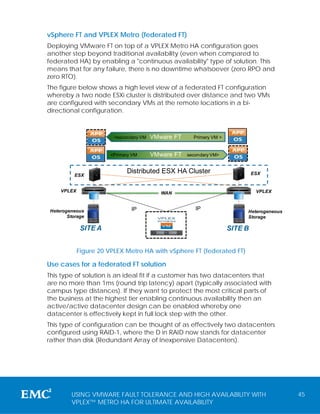
                                                                                 ESX
                                    Distributed ESX HA Cluster
        A
              A         A                                                A


             ESX
                                                                             A      A


        VPLEX                                 WAN                                  VPLEX
    A


                                                                 A
                  A


                                                                     A


  Heterogeneous                      IP                  IP                      Heterogeneous
         Storage                             VPLEX                               Storage
                                             WITNESS


                      SITE A                                         SITE B


                            Figure 18 VPLEX Metro HA with vSphere HA

For detailed technical setup instruction please see the VPLEX Procedure
generator - Configuring a distributed volume as well as the " VMware
vSphere® Metro Storage Cluster Case Study " white paper found here:


            USING VMWARE FAULT TOLERANCE AND HIGH AVAILABILITY WITH                              39
            VPLEX™ METRO HA FOR ULTIMATE AVAILABILITY
http://www.vmware.com/files/pdf/techpaper/vSPHR-CS-MTRO-STOR-
CLSTR-USLET-102-HI-RES.pdf for additional information around:
   •   Setting up Persistent Device Loss (PDL) handling
   •   vCenter placement options and considerations
   •   DRS enablement and affinity rules
   •   Controlling restart priorities (High/Medium/Low)


Use Cases for federated HA
A federated HA solution is an ideal fit if a customer has two datacenters
that are no more than 5ms (round trip latency) apart and wants to enable
an active/active datacenter design whilst also significantly enhancing
availability.
Using this type of solution brings several key business continuity items into
the solution including downtime and disaster avoidance as well as fully-
automatic service restart in the event of a total site outage. This type of
configuration would need to also be deployed with a stretched layer 2
network to ensure seamless capability regardless of which location the VM
runs in.

Datacenter pooling using DRS with federated HA
A nice feature of the federated HA solution is the ability for VMware DRS
(Dynamic Resource Scheduler) to be enabled and function relatively
transparently within the stretched cluster.
Using DRS effectively means that the vCenter/ESXi server load can be
distributed over two separate locations driving up utilization and using all
available, formerly passive, assets. Effectively with DRS enabled, the
configuration can be considered as two physical datacenters acting as a
single logical datacenter. This has some significant benefits since it brings
the ability to utilize what were once passive assets at a remote location
into a fully-active state.
To enable this functionality DRS can simply be switched on within the
stretched cluster and configured by the user to the desired automation
level. Depending on the setting, VMs will then automatically start to
distribute between the datacenters (Please read
http://www.vmware.com/files/pdf/techpaper/vSPHR-CS-MTRO-STOR-
CLSTR-USLET-102-HI-RES.pdf for more details).


        USING VMWARE FAULT TOLERANCE AND HIGH AVAILABILITY WITH                 40
        VPLEX™ METRO HA FOR ULTIMATE AVAILABILITY
Note: A design consideration to take into account if DRS is desired within a
solution is to ensure that there are enough compute and network
resources at each location to take the full load of the business services
should either site fail.


Avoiding downtime and disasters using federated HA and vMotion
Another nice feature of a federated HA solution with vSphere is the ability
to avoid planned downtime as well as unplanned downtime. This is
achievable using the vMotion ability of vCenter to move a running VM (or
group of VMs) to any ESXi server in another (physical) datacenter. Since
the vMotion ability is now federated over distance, planned downtime
can be avoided for events that affect an entire datacenter location.
For instance, let's say that we needed to perform a power upgrade at
datacenter A which will result in the power being offline for 2 hours.
Downtime can be avoided since all running VMs at site A can be moved
to site B before the outage. Once the outage has ended, the VMs can be
moved back to site A using vMotion while keeping everything completely
online.
This use case can also be employed for anticipated, yet unplanned
events.
For instance, a hurricane may be in close proximity to your datacenter, this
solution brings the ability to move the VMs elsewhere avoiding any
potential disaster.


Note: During a planned event where power will be taken offline it is best to
engage EMC support to bring the VPLEX down gracefully. However, in the
event of a scenario where time does not permit (perhaps a hurricane) it
may not be possible to involve EMC support. In this case if site A was
destroyed there would still be no interruption assuming the VMs were
vMotioned ahead of time since VPLEX Witness would ensure that the site
that remains online keeps full access to the storage volume once site A has
been powered off. Please see the Failure scenarios and recovery using
federated HA below for more details.


        USING VMWARE FAULT TOLERANCE AND HIGH AVAILABILITY WITH                41
        VPLEX™ METRO HA FOR ULTIMATE AVAILABILITY
Failure scenarios and recovery using federated HA
This section addresses all of the different types of failures and shows how in
each case VMware HA is able to continue or restart operations ensuring
maximum uptime.
The configuration below is a representation of a typical federated HA
solution:


                                         STRETCHED VSPHERE CLUSTER (DRS + HA)


          ESX                                                                                           ESX
                                                      optional cross
                                                         connect
                     A
                              A      A                                               A
                                                                                              A     A


  SITE A                                                                                                  SITE B

            VPLEX                                                                                 VPLEX
                 A


                                                                                 A


                                                           WAN


                         IP                                                              IP

                                                          VPLEX
                                                          WITNESS


      Figure 19 Typical VPLEX federated HA layout (multi-node cluster)

The table below shows the different failure scenarios and the outcome:

Failure                           VMs at A                VMs at B          Notes
Storage failure at                Remain online /         Remain online /   Cache read miss at
site A                            uninterrupted           uninterrupted     sire A now incurs
                                                                            additional link
                                                                            latency, cache
                                                                            read hits remain the
                                                                            same as do write
                                                                            I/O response times
Storage failure at                Remain online /         Remain online /   Cache read miss at
site B                            uninterrupted           uninterrupted     site B now incurs
                                                                            additional link
                                                                            latency, cache
                                                                            read hits remain the
                                                                            same as do write
                                                                            I/O response times
VPLEX Witness failure             Remain online /         Remain online /   Both VPLEX clusters
                                  uninterrupted           uninterrupted     dial home
All ESXi hosts fail at A          All VMs are restarted   Remain online /   Once the ESXi hosts
                                  automatically on                          are recovered, DRS


          USING VMWARE FAULT TOLERANCE AND HIGH AVAILABILITY WITH                                                  42
          VPLEX™ METRO HA FOR ULTIMATE AVAILABILITY
the ESXi host at site B   uninterrupted           (if configured) will
                                                                             move them back
                                                                             automatically
All ESXi hosts fail at B   Remain online /           All VMs are restarted   Once the ESXi hosts
                           uninterrupted             automatically on        are recovered, DRS
                                                     the ESXi host at site   (if configured) will
                                                     A                       move them back
                                                                             automatically
Total cross-connect        Remain online /           Remain online /         Cross-connect is
failure                    uninterrupted             uninterrupted           not normally in use
                                                                             and access remains
                                                                             non-uniform.
WAN failure with           Remain online /           Remain online /         Cross-connect now
cross-connect intact       uninterrupted             uninterrupted           in use for the hosts
                                                                             at the "non-
                                                                             preferred" site. (this
                                                                             is called forced
                                                                             uniform mode)
WAN failure with           Remain online /           Distributed volume      This is the same for
cross-connect              uninterrupted             suspended at B and      configurations
partitioned and                                      Persistent Device       without cross-
VPLEX preference at                                  Loss (PDL) sent to      connect where a
site A                                               ESX servers at B        WAN partition
                                                     causing VMs to die.     occurs.
                                                     This invokes a HA
                                                     restart and VMs start
                                                     coming online at A.
WAN failure with           Distributed volume        Remain online /         This is the same for
cross-connect              suspended at A and        uninterrupted           configurations
partitioned and            Persistent Device                                 without cross-
VPLEX preference at        Loss (PDL) sent to                                connect where a
site B                     ESXi servers at A                                 WAN partition
                           causing VMs to die.                               occurs.
                           This invokes a HA
                           restart and VMs start
                           coming online at B.
VPLEX cluster              Remain online /           Remain online /         Highly unlikely since
outage at A (with          uninterrupted             uninterrupted           VPLEX has no
cross-connect)                                                               SPOFS. Full site
                                                                             failure more likely.
VPLEX cluster              Remain online /           Remain online /         Highly unlikely since
outage at B (with          uninterrupted             uninterrupted           VPLEX has no
cross-connect)                                                               SPOFS. Full site
                                                                             failure more likely.
VPLEX cluster              ESXi detects an all       Remain online /         Highly unlikely since
outage at A                path down                 uninterrupted           VPLEX has no
(without cross-            condition (APD) and                               SPOFS. Full site
connect)                   VMs cannot                                        failure more likely.


          USING VMWARE FAULT TOLERANCE AND HIGH AVAILABILITY WITH                                     43
          VPLEX™ METRO HA FOR ULTIMATE AVAILABILITY
continue and are
                          not restarted.
VPLEX cluster             Remain online /        ESXi detects an all      Highly unlikely since
outage at B (without      uninterrupted          path down                VPLEX has no
cross-connect)                                   condition (APD) and      SPOFS. Full site
                                                 VMs cannot               failure more likely.
                                                 continue and are
                                                 not restarted.
Full site failure at A    Since the VPLEX        Remain online /          A disaster recovery
                          Witness ensures that   uninterrupted            solution would
                          the datastore                                   need a manual
                          remains online at B,                            decision at this
                          all VMs die (at A)                              point whereas the
                          but are restarted                               VPLEX HA layer
                          automatically at B.                             ensures fully
                                                                          automatic
                                                                          operation with
                                                                          minimal downtime.
Full site failure at B    Remain online /        Since the VPLEX          A disaster recovery
                          uninterrupted          Witness ensures that     solution would
                                                 the datastore            need a manual
                                                 remains online at A,     decision at this
                                                 all VMs die (at B) but   point whereas the
                                                 are restarted            VPLEX HA layer
                                                 automatically at A.      ensures fully
                                                                          automatic
                                                                          operation with
                                                                          minimal downtime.


                         Table 5 Federated HA failure scenarios


          USING VMWARE FAULT TOLERANCE AND HIGH AVAILABILITY WITH                                 44
          VPLEX™ METRO HA FOR ULTIMATE AVAILABILITY
vSphere FT and VPLEX Metro (federated FT)
Deploying VMware FT on top of a VPLEX Metro HA configuration goes
another step beyond traditional availability (even when compared to
federated HA) by enabling a "continuous availability" type of solution. This
means that for any failure, there is no downtime whatsoever (zero RPO and
zero RTO).
The figure below shows a high level view of a federated FT configuration
whereby a two node ESXi cluster is distributed over distance and two VMs
are configured with secondary VMs at the remote locations in a bi-
directional configuration.


                          <secondary VM   VMware FT     Primary VM >


                         <Primary VM      VMware FT   secondary VM>


                               Distributed ESX HA Cluster                       ESX
          ESX


    VPLEX                                    WAN                                 VPLEX
            A


                                                                       A


Heterogeneous                    IP                      IP                 Heterogeneous
       Storage                              VPLEX                           Storage
                                            WITNESS


                SITE A                                                 SITE B


            Figure 20 VPLEX Metro HA with vSphere FT (federated FT)

Use cases for a federated FT solution
This type of solution is an ideal fit if a customer has two datacenters that
are no more than 1ms (round trip latency) apart (typically associated with
campus type distances). If they want to protect the most critical parts of
the business at the highest tier enabling continuous availability then an
active/active datacenter design can be enabled whereby one
datacenter is effectively kept in full lock step with the other.
This type of configuration can be thought of as effectively two datacenters
configured using RAID-1, where the D in RAID now stands for datacenter
rather than disk (Redundant Array of Inexpensive Datacenters).


        USING VMWARE FAULT TOLERANCE AND HIGH AVAILABILITY WITH                             45
        VPLEX™ METRO HA FOR ULTIMATE AVAILABILITY
Similar to federated HA this type of configuration requires a stretched layer
2 network to ensure seamless capability regardless of which location the
VM runs in.


Note: A further design consideration to take into account here is any
limitation that exists with VMware FT compared to HA will also pertain in the
federated FT solution. For instance at the time of writing VMware FT can
only support a single vCPU per VM. See the paper here for more details
http://www.vmware.com/files/pdf/fault_tolerance_recommendations_con
siderations_on_vmw_vsphere4.pdf.


Failure scenarios and recovery using federated FT
This section addresses all of the different type of failures and shows how in
each case VMware FT is able to keep the service online without any
downtime.
The configuration below shows a typical federated FT solution using a two
node cluster with cross-connect using a physically separate network from
the VPLEX WAN.
               Primary VMs                                     Secondary VMs


                                 STRETCHED VSPHERE CLUSTER


         ESX                                                                      ESX
                                         cross connect
  SITE A
                A
                         A   A                                       A
                                                                              A     A


                                                                                          SITE B

                                                                                  VPLEX
           A


                                                                 A


                                             WAN


                    IP                                                   IP

                                           VPLEX
                                           WITNESS


        Figure 21 Typical VPLEX federated FT layout (2 node cluster)


        USING VMWARE FAULT TOLERANCE AND HIGH AVAILABILITY WITH                                    46
        VPLEX™ METRO HA FOR ULTIMATE AVAILABILITY
The table below shows the different failure scenarios and the outcome:

Failure                    VM State (Assuming   VM using Primary or   Notes
                           primary at A)        Secondary
Storage failure at A       Remain online /      Primary               Cache read hits
                           uninterrupted                              remain the same as
                                                                      do write I/O
                                                                      response time.
                                                                      Cache read miss at
                                                                      A now incurs
                                                                      additional link
                                                                      latency (<1ms),
                                                                      Can manually
                                                                      switch to secondary
                                                                      if required to avoid
                                                                      this.
Storage failure at B       Remain online /      Primary               No impact to
                           uninterrupted                              storage operations
                                                                      as all I/O is at A
VPLEX Witness failure      Remain online /      Primary               Both VPLEX clusters
                           uninterrupted                              dial home.
All ESXi hosts fail at A   Remain online /      Secondary             FT automatically
                           uninterrupted                              starts using the
                                                                      secondary VM
All ESXi hosts fail at B   Remain online /      Primary               The primary VM is
                           uninterrupted                              automatically
                                                                      protected
                                                                      elsewhere. If using
                                                                      more than 2 nodes
                                                                      in the cluster best
                                                                      practice is to
                                                                      ensure this re-
                                                                      protected at the
                                                                      remote site via
                                                                      vMotion.
Total cross-connect        Remain online /      Primary               Cross-connect is
failure                    uninterrupted                              not normally in use
                                                                      and access remains
                                                                      non-uniform.
WAN failure with           Remain online /      Primary               VPLEX suspends
cross-connect intact       uninterrupted                              volume access at
and primary running                                                   non-preferred site.
at preferred site.                                                    Cross-connect still
                                                                      not in use since in
                                                                      this case since the
                                                                      primary VM is
                                                                      running at the
                                                                      preferred site.


          USING VMWARE FAULT TOLERANCE AND HIGH AVAILABILITY WITH                            47
          VPLEX™ METRO HA FOR ULTIMATE AVAILABILITY
WAN failure with          Remain online /    Primary              Cross-connect now
cross-connect intact      uninterrupted                           in use (forced
and primary running                                               uniform mode) and
at non-preferred                                                  all I/O is going to
site.                                                             the controllers at
                                                                  the preferred site.
VPLEX cluster             Remain online /    Primary              Host I/O access will
outage at A (with         uninterrupted                           switch into forced
cross-connect)                                                    uniform access
                                                                  mode via ESXi Path
                                                                  policy
VPLEX cluster             Remain online /    Primary              No impact since no
outage at B (with         uninterrupted                           host I/O at
cross-connect)                                                    secondary VM and
                                                                  even if there was
                                                                  the cross-connect
                                                                  ensures an
                                                                  alternate path to
                                                                  the other VPLEX
                                                                  cluster.
Full site failure at A    Remain online /    Secondary            A disaster recovery
                          uninterrupted                           solution would
                                                                  need a manual
                                                                  decision at this
                                                                  point whereas the
                                                                  VPLEX FT layer
                                                                  ensures fully
                                                                  automatic
                                                                  operation with no
                                                                  downtime.
Full site failure at B    Remain online /    Primary              Primary has no
                          uninterrupted                           need to switch
                                                                  since it is active at
                                                                  the site that is still
                                                                  operational.

                         Table 6 federated FT failure scenarios


          USING VMWARE FAULT TOLERANCE AND HIGH AVAILABILITY WITH                          48
          VPLEX™ METRO HA FOR ULTIMATE AVAILABILITY
Choosing between federated availability or disaster recovery (or
both)
Due to its core fundamental design, EMC VPLEX Metro provides the perfect
foundation for VMware Fault Tolerance and High Availability clustering
over distance ensuring simple and transparent deployment of stretched
clusters without any added complexity; however careful consideration
should be given if seeking to replace traditional DR solutions with a
federated availability solution as they have different characteristics.
The following few paragraphs explain the major distinctions between these
different types of solution allowing the business to choose the correct
solution. From a high-level perspective the table below frames the key
differences between federated availability solutions and disaster recovery
solutions.
                                        or  Continuous
                                        Restart Based


                                                                                       Storage RTO


                                                                                                                                    Stretched L2
                                                             DR Testing
            Automatic /


                                                                                                                      Granularity
            Automated


                                           Operation
             (Decision


                                                                                                                                      Required
                                                                                                       Full RTO
                            Distance


                                                                                                                                      Network
                                                              possible


                                                                                                                       Restart
              based)


                                                                            RPO
Federated
    FT    Automatic       <1ms         Continuous              no           0           0               0        N/A                  Yes
Federated                                                                                                     High/Med/
   HA     Automatic       <5ms          Restart                no            0          0            minutes     Low                  Yes
 Disaster                                                                   0-                                   Full
Recovery Automated         Any          Restart               yes         minutes   seconds*         minutes*  Control                 No

Downtime Automated*
Avoidance    *            Any ***      Continuous            hybrid         0           0               0              N/A            Yes
Notes:
* Does not include decision time
** Must be invoked before downtime occurs
               yq                                        y                  y                                     y
check ESSM for further details
                            Table 7 BC attributes comparison

As one can see from Table 7 DR has a different set of parameters when
compared to federated availability technologies.
The diagram below shows a simplified pictorial view of the bigger business
continuity framework laying out all of the various components in relation to
distance and automation level.


         USING VMWARE FAULT TOLERANCE AND HIGH AVAILABILITY WITH                                                                             49
         VPLEX™ METRO HA FOR ULTIMATE AVAILABILITY
VPLEX
                                                              AccessAnywhere
  BC Comparison


                                            Automatic
            High            Fault                       Federated
          Availability    Tolerance                       HA/FT


                                      Total Continuity
                Within DC                                    Across DCs
                                        in the cloud


                                            Automated
                         Operational                    Disaster    Downtime
                          Recovery                      Recovery    Avoidance


    RecoverPoint
 ProtectEverywhere


                   Figure 22 Automation level vs. Distance

Figure 22 shows a comparison of the Automation level vs. Distance. Due to
the distances VPLEX Metro can span, VPLEX does lend itself to a type of
disaster recovery however this ability is a byproduct of its ability to achieve
federated availability across long distances. The reason for this is that
VPLEX is now not only performing the federation layer, but also by default
synchronous replication is also handled by the VPLEX.
We can also see, however, that there is an overlap in the disaster recovery
space with EMC RecoverPoint technology. EMC RecoverPoint Continuous
Remote Replication (CRR) has been designed from the ground up to
provide a long-distance disaster recovery capability (best of breed) as well
as operational recovery. It does not, however, provide a federated
availability solution like VPLEX.
Similar to using VPLEX Metro HA with VMware HA and FT, RecoverPoint CRR
can also be combined with VMware’s vCenter Site Recovery Manager
software (SRM) to enhance its DR capability significantly.
VMware vCenter Site Recovery Manager is the preferred and
recommended solution for VM disaster recovery and is compatible with


        USING VMWARE FAULT TOLERANCE AND HIGH AVAILABILITY WITH                   50
        VPLEX™ METRO HA FOR ULTIMATE AVAILABILITY
VPLEX (Local or Metro). When combined with EMC RecoverPoint CRR
technology using the RecoverPoint SRA (Storage Replication Adapter),SRM
dramatically enhances and simplifies disaster recovery.
Since a VM can now be protected using different geographical protection
options, a choice can now be made as to how each VM can be
configured to ensure that the protection schema matches that of the
business criticality. This can effectively be thought of as protection tiering.
The figure below shows the various protections tiers and how they each
relate to business criticality.


                       Federated FT*                            FT +
                                                                  .
 (+) Criticality (-)


                                                               VPLEX


                                                                                    AUTOMATIC
                       Federated HA*                          HA +
                                                              VPLEX
                                                                .


                       Disaster Recovery        SRM+VPLEX+RecoverPoint
                                                          .


                            Figure 23 Protection tiering vs. business criticality


*Note: Although not mentioned in the figure and while out of the scope for
this paper, both federated FT and HA solutions can be easily used in
conjunction with RecoverPoint Continuous Data Protection (CDP) for the
most critical workload giving automatic and highly granular operational
recovery benefits protecting the entire environment from potential
corruption or data loss events perhaps caused by a rogue employee or
virus.


Augmenting DR with federated HA and/or FT
Since VPLEX Metro and RecoverPoint CRR can work in combination for the
same virtual machine, not only can the end user select between a HA/FT
or DR solution, but can also choose to augment a solution from all
technologies. If a solution is augmented then it has the joint capability of a
VPLEX federated availability solution giving automatic restart or continuous
availability over Metro distances as well as fully a automated DR solution
over very long distance using RecoverPoint CRR and SRM. Furthermore due


                       USING VMWARE FAULT TOLERANCE AND HIGH AVAILABILITY WITH                  51
                       VPLEX™ METRO HA FOR ULTIMATE AVAILABILITY
to the inherent IO journaling capabilities of RecoverPoint, the best of breed
operational recovery benefits are automatically added to the solution too.
While RecoverPoint and Site Recovery Manager are out of scope for this
document the figure below shows some additional topology information
that is important to understand if you are currently weighing the different
options of choosing between DR, federated availability or both.

       VPLEX Metro Within or across          RecoverPoint CRR (Operational and Disaster
      buildings (Federated HA and DA)                       Recovery)


                                             0 – 5ms FC =synchronous or
  <5ms IP or FC Synchronous
                                            >5ms FC or IP = asynchronous
        Active /Active                             Active/Passive
  A                                     B                                                 C

             vSphere HA                           Site Recovery Manager


                            Figure 24 Augmenting HA with DR

A good example of where augmenting these technologies makes sense
would be where a company had a campus type setup or perhaps
different failure domains within the same building. In this campus
environment it would make good sense to deploy VMware HA or FT in a
VPLEX federated deployment providing an enhanced level of availability.
However a solution like this would also more than likely require an out-of-
region disaster recovery solution due to the close proximity of the two
campus sites.

Environments where federated HA and/or FT should not replace DR
Below are some points to consider that negate the feasibility of a
federated availability solution:
VPLEX federated availability solutions must never replace a DR solution if:
   1. The VPLEX clusters are located too close together (i.e. campus
      deployment)
       Therefore federated FT would never normally replace DR due to the
       distance restriction (1ms), but the same may not be true for
       federated HA.
   2. The site locations where the VPLEX Clusters reside are located too far
      apart (i.e. beyond 5ms where VPLEX Metro HA is not possible).


         USING VMWARE FAULT TOLERANCE AND HIGH AVAILABILITY WITH                              52
         VPLEX™ METRO HA FOR ULTIMATE AVAILABILITY
VPLEX Metro HA is only compatible with synchronous disk topologies.
   Automatic restart is not possible with async type deployments. This is
   largely due to the fact that the remaining copy after a failure may
   be out of date.
3. VPLEX Witness is unable to be deployed.
   To ensure recovery is fully automatic in all instances, VPLEX Witness is
   mandatory.
4. The business requires controlled and isolated DR testing for
   conformity reasons.
   Unless using custom scripting and point in time technology, Isolated
   DR testing is not possible when stretching a cluster, since an
   additional version of the system cannot be brought online elsewhere
   (only the main production instance will be online at any given time).
   The only form of testing possible with a stretched cluster is to perform
   a graceful failover, or simulate a site failure (See VPLEX Fault injection
   document for more details).
5. VM Restart granularity (beyond 3 priorities) is required.
   In some environments it is vital that some services start before other
   services. HA cannot always guarantee this since it will try and restart
   all VMs that have failed together (or recently prioritizes them
   high/medium/low). DR on the other hand can have a much tighter
   control over restart granularity to always ensure that services come
   back on line in the correct order.
6. Stretching a Layer 2 network is not possible.
   The major premise of any federated availability solution is that the
   network must be stretched to accommodate the relocation of VMs
   without requiring any network configuration changes. Therefore if it is
   not possible to stretch a layer 2 network between two locations
   where VPLEX resides then a DR solution is a better fit.
7. If automatic network switchover is not possible.
   This is an important factor to consider. For instance, if a primary site
   has failed, it is not much good if all of the VMs are running at a
   location where the network has been isolated and all of the routing
   is pointing to the original location.


     USING VMWARE FAULT TOLERANCE AND HIGH AVAILABILITY WITH                    53
     VPLEX™ METRO HA FOR ULTIMATE AVAILABILITY
Best Practices and considerations when combining
VPLEX HA with VMware HA and/or FT
The following section is a technical reference containing all off of the
considerations and best practices when using VMware availability
products with VPLEX Metro HA.


Note: As mentioned earlier and while out of scope for this document, it
should be noted that in addition to all best practices within this paper, that
all federated FT and HA solutions will carry the same best practices and
limitations imposed by the VMware HA and FT technologies too. For
instance at the time of writing VMware FT technology is only capable of
supporting a single vCPU per VM (VMware HA does not carry the same
vCPU limitation) and this limitation will prevail when federating a VMware
FT cluster. Please ensure to review the VMware best practice
documentation as well as the limitations and considerations
documentation (please see the References section) for further information.


        USING VMWARE FAULT TOLERANCE AND HIGH AVAILABILITY WITH                  54
        VPLEX™ METRO HA FOR ULTIMATE AVAILABILITY
VMware HA and FT best practice requirements

The majority of the best practice for this type of configuration is covered in the
VMware MSC (Metro Storage Cluster) white paper that can be found here:
http://www.vmware.com/files/pdf/techpaper/vSPHR-CS-MTRO-STOR-CLSTR-USLET-
102-HI-RES.pdf
In addition to this paper the following items should also be considered.

Networking principles and pre-requisites
As with any solution which synchronously replicates data, it is important
that there is enough bandwidth available to accommodate the server
write workload.
Additionally when stretching a HA or FT cluster it is also important that the
IP network between ESXi servers meet the supportability requirement laid
out by VMware (i.e. must be stretched layer 2, with enough bandwidth
and not exceed the latency requirement).
EMC professional services can be engaged to conduct a VPLEX WAN link
sizing exercise that will determine if there is enough bandwidth between
sites. The sizing exercise uses a tool called Business Continuity Solutions
Designer.
Another key factor in network topology is latency. VPLEX can support up to
5ms of round trip time latency where VMware HA solutions can be
deployed, however only 1ms between clusters is supported for both VPLEX
cross cluster connect topologies as well as VMware FT topologies.
The VPLEX hardware can be ordered with either an 8GB/sec FC WAN
connection option, or a native 10GB Ethernet connectivity option.
When using VPLEX with the FC option over long distances, it is important
there are enough FC buffer to buffer credits (BB_credits) available. More
information on BB_credits is available in the EMC (SRDF) Networked
Storage Topology Guide (page 91 onwards), available through Powerlink
at:
http://powerlink.emc.com/km/live1/en_US/Offering_Technical/Technical_
Documentation/300-003-885.pdf


        USING VMWARE FAULT TOLERANCE AND HIGH AVAILABILITY WITH                      55
        VPLEX™ METRO HA FOR ULTIMATE AVAILABILITY
vCenter placement options
Although vCenter is technically not required to be up and running to
automatically start virtual machines in the event of failure, it is an important
part of the environment and care should be taken when deciding on the
deployment topology within a federated HA cluster.
Ultimately when stretching a HA cluster over distance, the same instance
of vCenter will need to exist in either location regardless of a site failure.
This can be achieved through a number of methods, but the three main
deployment options for vCenter when using a federated HA configuration
are:


1. Use vCenter Heartbeat to replication vCenter across site (outside of
VPLEX Metro).
    Pros:
    No concerns about vCenter restart and service (such as external SQL
    database) dependencies as it is handled automatically within the
    Heartbeat product.
    Cons:
    Adds another layer of complexity into the solution that is outside of the
    federated HA solution.
2. Configure the vCenter server into the federated HA cluster to
automatically restart.
    Pros:
    vCenter restart is automatically handled if the site is lost where vCenter
    is running as part of the larger federated HA solution.
    Cons:
    If using the SQL backend, it is important that this starts before the
    vCenter hosts; therefore this needs additional configuration through
    the high/medium/low policy in VMware HA.
3. Configure the vCenter server into the federated FT cluster for
continuous availability.
    Pros:
    vCenter will now remain online and restart is not required.
    Cons:
    Not supported outside of campus distances and limitations around
    VMware FT typically do not make a vCenter server a good candidate.


        USING VMWARE FAULT TOLERANCE AND HIGH AVAILABILITY WITH                    56
        VPLEX™ METRO HA FOR ULTIMATE AVAILABILITY
Please read http://www.vmware.com/files/pdf/techpaper/vSPHR-CS-MTRO-STOR-
CLSTR-USLET-102-HI-RES.pdf for more details.


Path loss handling semantics (PDL and APD)
vSphere can recognize two different types of total path failure to an ESXi
server. These are known as "All Paths Down" (APD) and "Persistent Device
Loss" (PDL). Either one of these conditions can be declared by the ESXi
server depending on the failure condition.
   •   Persistent device loss (PDL)
   This is a state that is declared by an ESXi server when a PDL SCSI code
   (2/4/3+5) is sent from the underlying storage array (in this case a VPLEX)
   to the ESXi host effectively informing the ESXi server that the paths can
   no longer be used. This condition can be caused if the VPLEX suffers a
   WAN partition causing the storage volumes at the non-preferred
   location to suspend. If this does happen then the VPLEX will also send
   the PDL SCSI code (2/4/3+5) to the ESXi server from the site that is
   suspending.
   •   All paths down (APD)
   This is a state where all the paths to a given volume has gone away for
   whatever reason but no PDL has been received by the ESXi server. An
   example of this would be a dual fabric failure at a given location
   causing all of the paths to be down. In this case no PDL signal will be
   generated or sent by the underlying storage array. Another example of
   APD condition is if a full VPLEX cluster fails (unlikely since, once again,
   there are no SPOFs). In this case a PDL signal cannot be generated
   since the storage hardware is unavailable causing the ESXi server to
   detect the problem resulting in an APD condition.


ESXi versions prior to vSphere 5.0 Update 1 could not distinguish between
an APD or PDL condition, causing VM's to hang rather than to
automatically invoke a HA failover (i.e. if the VPLEX suffered a WAN
partition and the VMs were running on the non-preferred site). Clearly, this
behavior is not desirable when using vSphere HA with VPLEX in a stretched
cluster configuration.
This changed in vSphere 5.0 Update 1 since the ESXi server is now able to
receive and act on a PDL sense code if is received, however additional
settings are required to ensure the ESXi host acts on this condition.
At the time of this writing the settings that need to be applied to vSphere
5.0 update 1 deployments (and beyond, including vSphere 5.1) are:


        USING VMWARE FAULT TOLERANCE AND HIGH AVAILABILITY WITH                  57
        VPLEX™ METRO HA FOR ULTIMATE AVAILABILITY
1. Use vSphere Client and select the cluster, right-click and select Edit
Settings. From the pop-up menu, click to select vSphere HA, then click
Advanced Options. Define and save the following option:
das.maskCleanShutdownEnabled=true
2. On every ESXi server, create and edit (with vi) the /etc/vmware/settings
with the content below, then reboot the ESXi server.
The following output shows the correct setting applied in the file:
    ~ # cat /etc/vmware/settings
    disk.terminateVMOnPDLDefault=TRUE
Refer to the ESXi documentation for further details and the whitepaper
found here http://www.vmware.com/files/pdf/techpaper/vSPHR-CS-
MTRO-STOR-CLSTR-USLET-102-HI-RES.pdf.


Note: vSphere and ESXi 5.1 introduces a new feature called APD timeout.
This feature is automatically enabled in ESXi 5.1 deployments and while not
to be confused with PDL states does carry an advantage whereby if both
fabrics to the ESXi host or an entire VPLEX cluster fails, the host (which
would normally hang (referred to as zombie state)) would now be able to
respond to non-storage requests since hostd will effectively disconnect the
unreachable storage. At the time of writing however this feature does not
cause the affected VM to die. Please see this article for further details:
http://www.vmware.com/files/pdf/techpaper/Whats-New-VMware-
vSphere-51-Storage-Technical-Whitepaper.pdf. It is expected that since
VPLEX used a non-uniform architecture that this situation should never be
encountered on a VPLEX METRO cluster.


Cross-connect Topologies and Failure Scenarios.
As discussed previously, VPLEX Metro when using VPLEX Witness when used
with and without a cross-cluster connect configuration will provide
federated HA giving automatic resolution to all scenarios described in this
paper, however if not using a cross-connected configuration (and
depending on topology) the resolutions where a VM encounters a PDL
condition (e.g. WAN partition) would result incur a small interruption to the
service as the VM restarts elsewhere. A cross-connected topology can
avoid this by using forced uniform mode therefore continuing to access an
active copy of the datastore. It can also be used to avoid further highly
unlikely scenarios too.


        USING VMWARE FAULT TOLERANCE AND HIGH AVAILABILITY WITH                 58
        VPLEX™ METRO HA FOR ULTIMATE AVAILABILITY
The failure scenarios that a cross-connect configuration can protect from
vary depending of the deployment topology. Effectively there are several
different types of topology that can be adopted with VPLEX cross-
connect.
1. Merged or separate fabrics
    •     Merge fabrics between locations and each ESXi HBA is zoned into
          the local and remote VPLEX front end ports.
    •     Use dedicated HBA for the local site, and another set of dedicated
          HBAs for the remote site.
2. Shared or dedicated channels
   • A cross-connect configuration is deemed as a "shared channel" model when
      it is routed along the same physical WAN as the VPLEX WAN traffic

    •     A cross-connect configuration is deemed "dedicated channel" when the
          VPLEX WAN uses a physically separate channel to the cross-connect
          network.

The table below shows all of the failure scenarios that a cross-connect
protects against and tabulates the effect to I/O at the preferred and non-
preferred locations.
                           Cross connect configuration topology failure comparisons
Option #                    OPTION 1 (best)       OPTION 2 (joint 2nd)      OPTION 3 (joint 2nd)            OPTION 4            Option 5 (worst)
Shared or dedicated           Dedicated                   Shared                 Dedicated                    Shared           No cross connect
Merged or separate          Different HBAs           Different HBAs              Merged ISL                Merged ISL          No cross connect
                                        non-                     non-                       non-                     non-                  non-
Scenario                preferred preferred preferred preferred preferred preferred preferred preferred                      preferred preferred
VPLEX WAN                              forced                                              forced
                            OK                       OK          PDL*          OK                        OK          PDL*      OK        PDL*
partition                             uniform                                             uniform
Preffered VPLEX           forced                   forced                    forced                    forced
                                         OK                       OK                         OK                       OK      APD**       OK
failed                   uniform                  uniform                   uniform                   uniform
Non-preffered                          forced                   forced                     forced                   forced
                            OK                       OK                        OK                        OK                    OK        APD**
VPLEX failed                          uniform                  uniform                    uniform                  uniform
both fabrics fail at      forced                   forced
                                         OK                       OK               APD **                     APD **          APD**       OK
preferred                uniform                  uniform
both fabrics fail at                   forced                   forced
                            OK                       OK                            APD **                     APD **           OK        APD**
non-preferred                         uniform                  uniform
Notes:                 * PDL Will cause a VM to restart elsewhere (Hence orange coulour)
                       * APD will require manual intervention. (Pre-ESX 5.1, VM will also be in zombie state)

                              Table 8 Cross-connect topology options


As we can see from Table 8, if possible it is always best to deploy the cross-
connect with additional HBAs (therefore not merging fabrics between
sites) and also use a separate dedicated channel that is not shared with
the VPLEX WAN.


              USING VMWARE FAULT TOLERANCE AND HIGH AVAILABILITY WITH                                                                     59
              VPLEX™ METRO HA FOR ULTIMATE AVAILABILITY
Note: Only the first scenario (VPLEX WAN partition) would be deemed as a
likely event, whereas all other events shown in the table (including the first
one if there were dual diversely routed WAN links) would be considered
unlikely since they would warrant a double component failure.


Cross-connect and multipathing
When using a cross-connect configuration of any topology each ESXi
server will see twice as many paths to the storage (assuming the number of
paths to the local and remote sites are equal) when compared to a
configuration that does not leverage cross-connect.
Since the local and the remote paths will almost certainly have different
circuit lengths it is always best practice to ensure that the ESXi host uses the
local paths only, and is only forced to use the cross-connect path under
any of the conditions listed in the table above.
To achieve this, it is a requirement to manually set the path selection policy
(PSP) to ensure that the cross-connected paths are for failover only.
For PowerPath/VE deployments this is simply achieved by setting the cross
path to "standby"
Other supported multi-pathing products can achieve a similar
configuration by using a fixed pathing policy where the preferred path is
set as a local path to the local (nearest) VPLEX.


VPLEX site preference rules
Preference rules are a way to give deterministic failure handling in the
event of a VPLEX WAN partition since if this event happens (regardless of
VPLEX Witness being deployed) the non-preferred cluster (for a given
individual or consistency group of distributed volumes) suspends access to
the distributed volume while at the same time sending a PDL code to the
ESXi server.
Unless you are using a cross-connected configuration (option 1, or option 3
from Table 8 above) it is important to consider the preference rule
configuration. Otherwise, there is a risk that a VM running at the non-
preferred location will be restarted elsewhere causing an interruption of
service should a WAN partition occur.
To avoid this disruption completely it is a best practice (unless using option
1 or 3 above) to set the preferred location for an individual or consistency


        USING VMWARE FAULT TOLERANCE AND HIGH AVAILABILITY WITH                    60
        VPLEX™ METRO HA FOR ULTIMATE AVAILABILITY
group of distributed volumes to the VPLEX cluster where the VMs are
located. This ensures that during a WAN partition the volumes where the
VMs are located continue to service I/O and the VMs continue without
disruption.

DRS and site affinity rules
Under certain conditions when using DRS with VPLEX Metro HA a VM may
be moved to the VPLEX non-preferred cluster putting it at risk of a PDL state
should the VPLEX WAN partition fail.
If this were to happen then the VM would terminate and HA would restart
the VM on another node in the cluster. Although the outage would be
minimal and handled automatically, this may be deemed as undesirable
behavior.
One of the ways to avoid this behavior is to use a VPLEX cross-connected
topology (options 1 and 3 above would not exhibit this behavior due to
forced uniform mode).
Another way to avoid this behavior is to use DRS affinity "should" rules,
whereby each VM can have a rule set up which will ensure under normal
conditions it "should" run on hosts within the preferred location. With this
rule set a WAN partition would not cause a temporary service outage.
Please read http://www.vmware.com/files/pdf/techpaper/vSPHR-CS-MTRO-STOR-
CLSTR-USLET-102-HI-RES.pdf for more details.


Additional best practices and considerations for VMware FT
While the majority of best practices remain identical for both a HA or FT
solution, it is important to note that the two technologies are architected in
totally different ways.
VMware HA is a restart-based topology that will restart machines in the
event of a failure. FT, on the other hand, will run two instances of a VM and
keep the secondary in lock step whereby if the primary fails the secondary
automatically takes over without restart.
Although technologies such as vMotion can be used with FT, the downtime
avoidance use case is eradicated since there is typically no need to move
the VM ahead of an event as the VM is already running in multiple
locations.
Another key consideration to take into account with FT is around
datacenter pooling. Again this use case is less relevant with FT since the
VMs will execute at both locations. Therefore it is important to equally size
the physical environment in each location to be able to take the full load.


        USING VMWARE FAULT TOLERANCE AND HIGH AVAILABILITY WITH                  61
        VPLEX™ METRO HA FOR ULTIMATE AVAILABILITY
The best way to think about federated FT is simply like a RAID-1 for
datacenters (Redundant Array of Inexpensive Datacenters). With this in
mind it becomes much easier to think about the considerations for FT
compared to HA.
The following section examines some of these considerations and best
practice recommendations for federated FT.


Note: VMware Fault tolerance capability currently has more limitations and
restrictions than VMware HA, therefore please read the following white
paper found here
http://www.vmware.com/files/pdf/fault_tolerance_recommendations_con
siderations_on_vmw_vsphere4.pdf for further Fault Tolerance
considerations and limitations.


Secondary VM placement considerations
It is important to note that at the time of writing vCenter is not site aware
when a cluster is stretched. In fact all vCenter knows is that there is a
cluster with some nodes in, but there is no distinction as to where those
nodes reside.
Clearly a key requirement for FT to be able to automatically survive a site
loss with zero downtime is for the secondary VM to be located on the
remote site to the primary VM.
When FT is first enabled for a VM, a secondary VM is created on another
physical ESXi server and this server is chosen based on the workload
characteristics at the time, therefore if we have a 3 or more node cluster it
could be the case that the secondary VM is initially placed on an ESXi
server in the same physical location as the primary.
It is therefore important in all cases where there are three or more nodes in
the cluster that the secondary VM placement is manually checked once
FT has been enabled for any particular VM.
If it is found that secondary VM is not running in the remote location
(compared to the primary) additional actions will be required.
Compliance can easily achieved using vMotion on the secondary VM
moving it to the correct location. To perform this, right click the secondary
VM, select migrate and choose an ESXi server at the remote location.


        USING VMWARE FAULT TOLERANCE AND HIGH AVAILABILITY WITH                 62
        VPLEX™ METRO HA FOR ULTIMATE AVAILABILITY
DRS affinity and cluster node count.
Currently DRS Affinity does not honor the secondary VM placement within
FT. This means that if FT is switched on and DRS enabled the primary VM
may move around periodically, however the secondary VM will never
move automatically.
Again, if using a cluster that has more than 2 nodes, it is important to
disable DRS if a cluster has been enabled for FT since DRS may
inadvertently move a primary VM into the same physical location as a
secondary VM.
Another factor to consider when using three or more nodes is to
periodically check the secondary VM placement in relation to the primary
since even with DRS disabled the VM does have the potential to move
around, particularly if a node has failed within the cluster.
Recommendations:
   1. Try to keep VMs in a given cluster either all enabled for FT or all
      disabled for FT (i.e. try not to mix within clusters). This will ensure two
      types of cluster in your datacenter (FT or simple HA clusters) This way
      DRS can be enabled on the simple HA clusters bringing the benefits
      to those hosts, whereas the FT cluster should be equally balanced
      between sites providing total resiliency for a smaller subset of the
      most critical systems.
   2. Although an FT cluster can have more than two nodes, for a
      maintenance free topology consider using no more than two nodes
      in the FT cluster. This ensures that the secondary VM placement
      always resides on the remote location without any intervention. If
      more nodes are required consider using additional clusters, each
      with two nodes.
   3. If more than two nodes are to be used ensure there is an even
      symmetrical balance (i.e. if using a 4 node cluster, keep 2 nodes at
      each site). Odd numbers clusters are not sensible and could lead to
      an imbalance or not having enough resources to fully enable FT on
      all of the VMs.
   4. When creating and naming physical ESXi servers always try to give a
      site designation in the name. The reason for this is vSphere treats all
      the hosts in the cluster as a single entity. Naming the host correctly
      makes it easy to see which site each VM is located on.
   5. When enabling FT with more than two nodes in a cluster, it is
      important to ensure that the secondary VM is manually vMotioned
      to an ESXi host that resides in the remote VPLEX fault domain (FT will


        USING VMWARE FAULT TOLERANCE AND HIGH AVAILABILITY WITH                     63
        VPLEX™ METRO HA FOR ULTIMATE AVAILABILITY
randomly place the secondary VM initially onto any node in the
      cluster which could be in the same failure domain as the primary)
   6. If any host fails or is placed into maintenance mode and when using
      more than two nodes in an FT cluster, it is recommended to re-check
      the FT secondary placements as they may end up in the same
      failure domain as the primaries.


VPLEX preference rule considerations for FT
As with VMware HA, and unless using cross-connect configuration options
1 and 3 (as described in the cross-connect section), it is important to set
the preference rule so that the primary VMs are running at the preferred
location. If options 1 or 3 (from Table 8) are being used, then these
recommendations are largely irrelevant.
It is considered best practice to use a VPLEX consistency group per FT
cluster and set all of the volumes within the group to be preferred at the
same site where all of the primary VMs are located.
This ensures that for any given cluster all of the primary VMs reside in the
same physical location as each other.
Larger consistency groups can be used that span multiple FT clusters, but
care should be taken to ensure that all of the primary VMs reside at the
preferred location (this is extremely easy to enforce with 2 node clusters).


Note: At the time of writing, cross cluster connect is a mandatory
requirement for VMware FT with VPLEX. Please submit an RPQ to EMC if
considering using FT without cross-connect beyond distances of 1ms.


Other generic recommendations for FT
    1. If using VMware NMP then set the PATH policy to default (Fixed)
       and select one of the local paths as primary on each ESXi cluster.
    2. If using PowerPath/VE, set the cross-connected paths to standby.
    3. It is mandatory to use VPLEX Witness with FT. Ensure that all of the
       protected distributed volumes are placed in a VPLEX consistency
       group and that the Witness function is enabled.
    4. On the VPLEX Consistency Group, ensure the flag "auto-resume" is
       set to true


        USING VMWARE FAULT TOLERANCE AND HIGH AVAILABILITY WITH                64
        VPLEX™ METRO HA FOR ULTIMATE AVAILABILITY
5. Although VPLEX Witness can also use VMware FT (i.e. to protect
   itself), it should not use any assets from the locations that are being
   protected. The VPLEX Witness storage volume must be physically
   separate from the locations it is protecting.


    USING VMWARE FAULT TOLERANCE AND HIGH AVAILABILITY WITH                  65
    VPLEX™ METRO HA FOR ULTIMATE AVAILABILITY
Conclusion
Using best of breed VMware availability technologies brings increased
availability benefits to any x86 based VM within a local datacenter.
VPLEX Metro HA is unique and dissolves distance by federating
heterogeneous block storage devices over distance leveraging distance
to enhance availability.
Using VPLEX HA in conjunction with VMware availability technologies
provides new levels of availability suitable for the most mission critical
environments without compromise that go beyond any other solution on
the market today.


        USING VMWARE FAULT TOLERANCE AND HIGH AVAILABILITY WITH              66
        VPLEX™ METRO HA FOR ULTIMATE AVAILABILITY
References

EMC VPLEX page on EMC.com
http://www.emc.com/campaign/global/vplex/index.htm


EMC VPLEX simple support matrix
https://elabnavigator.emc.com/vault/pdf/EMC_VPLEX.pdf


VMware storage HCL (Hardware compatibility list)
http://www.vmware.com/resources/compatibility/search.php?action=bas
e&deviceCategory=san


EMC VPLEX HA Techbook
http:/www.emc.com/collateral/hardware/technical-documentation/h7113-vplex-
architecture-deployment.pdf

VMware Metro Storage Cluster White paper
http://www.vmware.com/files/pdf/techpaper/vSPHR-CS-MTRO-STOR-CLSTR-USLET-
102-HI-RES.pdf

EMC Networked Storage Topology Guide (page 91 onwards)
http://powerlink.emc.com/km/live1/en_US/Offering_Technical/Technical_Docume
ntation/300-003-885.pdf

VPLEX implementation best practices
http://powerlink.emc.com/km/live1/en_US/Offering_Technical/Technical_Docume
ntation/h7139-implementation-planning-vplex-tn.pdf

What's new in vSphere 5.1 storage
http://www.vmware.com/files/pdf/techpaper/Whats-New-VMware-
vSphere-51-Storage-Technical-Whitepaper.pdf


VMware Fault Tolerance recommendations and considerations
http://www.vmware.com/files/pdf/fault_tolerance_recommendations_con
siderations_on_vmw_vsphere4.pdf


       USING VMWARE FAULT TOLERANCE AND HIGH AVAILABILITY WITH               67
       VPLEX™ METRO HA FOR ULTIMATE AVAILABILITY
VMware HA best practices
http://www.vmware.com/files/pdf/techpaper/vmw-vsphere-high-
availability.pdf


VPLEX Administrator guide on Powerlink
http://powerlink.emc.com/km/appmanager/km/secureDesktop?_nfpb=trueand_p
ageLabel=defaultandinternalId=0b014066805c2149and_irrt=true


VPLEX Procedure Generator
http://powerlink.emc.com/km/appmanager/km/secureDesktop?_nfpb=trueand_p
ageLabel=query2andinternalId=0b014066804e9dbcand_irrt=true

EMC RecoverPoint page on EMC.com
http://www.emc.com/replication/recoverpoint/recoverpoint.htm

Cisco OTV White paper
http://www.cisco.com/en/US/docs/solutions/Enterprise/Data_Center/DCI/whitepa
per/DCI_1.html

Brocade Virtual Private LAN Service(VPLS) white paper
http://www.brocade.com/downloads/documents/white_papers/Offering_Scalabl
e_Layer2_Services_with_VPLS_and_VLL.pdf


       USING VMWARE FAULT TOLERANCE AND HIGH AVAILABILITY WITH             68
       VPLEX™ METRO HA FOR ULTIMATE AVAILABILITY
Appendix A - vMotioning over longer distances (10ms)
vCenter and ESXi (ESXi version 5.1 and above only) can also be configured
to span more than one location but without ESXi HA or FT enabled.
This is where two locations share the same vCenter environment and VPLEX
distributed volumes are provisioned with VMFS datastores between, but
rather than each HA cluster having nodes from both physical locations,
each HA cluster only contains the VMs respective to the local site.
While this type of configuration is not a stretched cluster and therefore
does not deliver the federated availability benefits discussed throughout
this paper, it does give the ability to use vMotion between different ESXi
clusters in different locations as each site can share a common VPLEX
distributed volume.
Enabling this type of topology means it is now possible to vMotion across
up to 10ms (Round trip time) latency (workload and application tolerance
permitting)
The configuration for such a topology is no different from the federated HA
topologies including all best practices and caveats found within this paper
up to the point where HA is enabled over distance (HA is only ever
enabled within a single DC in this topology). This ensures that the solution is
able to perform long distance vMotion across even longer distances
(downtime avoidance) without automatic restart capabilities within the
datacenter, but not across datacenters.


Note: Please submit an RPQ to both EMC and VMware if federated HA is
required between 5ms and 10ms.


        USING VMWARE FAULT TOLERANCE AND HIGH AVAILABILITY WITH                   69
        VPLEX™ METRO HA FOR ULTIMATE AVAILABILITY

White Paper: Using VPLEX Metro with VMware High Availability and Fault Tolerance for Ultimate Availability

  • 1.
    White Paper USING VPLEX™METRO WITH VMWARE HIGH AVAILABILITY AND FAULT TOLERANCE FOR ULTIMATE AVAILABILITY Abstract This white paper discusses using best of breed technologies from VMware® and EMC® to create federated continuous availability solutions. The following topics are reviewed  Choosing between federated Fault Tolerance or federated High Availability  Design considerations and constraints  Operational Best Practice
  • 2.
    September 2012 Copyright © 2012 EMC Corporation. All Rights Reserved. EMC believes the information in this publication is accurate as of its publication date. The information is subject to change without notice. The information in this publication is provided “as is.” EMC Corporation makes no representations or warranties of any kind with respect to the information in this publication, and specifically disclaims implied warranties of merchantability or fitness for a particular purpose. Use, copying, and distribution of any EMC software described in this publication requires an applicable software license. For the most up-to-date listing of EMC product names, see EMC Corporation Trademarks on EMC.com. USING VMWARE FAULT TOLERANCE AND HIGH AVAILABILITY WITH 2 VPLEX™ METRO HA FOR ULTIMATE AVAILABILITY
  • 3.
    Table of Contents Executivesummary ............................................................................................. 5 Audience ......................................................................................................................... 6 Document scope and limitations................................................................................. 6 Introduction .......................................................................................................... 8 EMC VPLEX technology ..................................................................................... 10 VPLEX terms and Glossary ........................................................................................... 11 EMC VPLEX architecture.............................................................................................. 13 EMC VPLEX Metro overview ........................................................................................ 14 Understanding VPLEX Metro active/active distributed volumes ........................... 15 VPLEX Witness – An introduction................................................................................. 18 Protecting VPLEX Witness using VMware FT .............................................................. 22 VPLEX Metro HA ............................................................................................................ 24 VPLEX Metro cross cluster connect ............................................................................ 24 Unique VPLEX benefits for availability and I/O response time ...................... 26 Uniform and non-uniform I/O access ........................................................................ 26 Uniform access (non-VPLEX) ....................................................................................... 26 Non-Uniform Access (VPLEX IO access pattern)...................................................... 31 VPLEX with cross-connect and non-uniform mode ................................................. 35 VPLEX with cross-connect and forced uniform mode ............................................ 36 Combining VPLEX HA with VMware HA and/or FT .......................................... 39 vSphere HA and VPLEX Metro HA (federated HA) .................................................. 39 Use Cases for federated HA ....................................................................................... 40 Datacenter pooling using DRS with federated HA.................................................. 40 Avoiding downtime and disasters using federated HA and vMotion .................. 41 Failure scenarios and recovery using federated HA ............................................... 42 vSphere FT and VPLEX Metro (federated FT) ............................................................ 45 Use cases for a federated FT solution ........................................................................ 45 Failure scenarios and recovery using federated FT ................................................. 46 Choosing between federated availability or disaster recovery (or both) ........... 49 Augmenting DR with federated HA and/or FT ......................................................... 51 Environments where federated HA and/or FT should not replace DR ................. 52 Best Practices and considerations when combining VPLEX HA with VMware HA and/or FT....................................................................................................... 54 VMware HA and FT best practice requirements ...................................................... 55 Networking principles and pre-requisites .................................................................. 55 vCenter placement options ....................................................................................... 56 USING VMWARE FAULT TOLERANCE AND HIGH AVAILABILITY WITH 3 VPLEX™ METRO HA FOR ULTIMATE AVAILABILITY
  • 4.
    Path loss handlingsemantics (PDL and APD)........................................................... 57 Cross-connect Topologies and Failure Scenarios. ................................................... 58 Cross-connect and multipathing ............................................................................... 60 VPLEX site preference rules ......................................................................................... 60 DRS and site affinity rules ............................................................................................. 61 Additional best practices and considerations for VMware FT ............................... 61 Secondary VM placement considerations............................................................... 62 DRS affinity and cluster node count. ......................................................................... 63 VPLEX preference rule considerations for FT............................................................. 64 Other generic recommendations for FT .................................................................... 64 Conclusion ......................................................................................................... 66 References ......................................................................................................... 67 Appendix A - vMotioning over longer distances (10ms) .............................. 69 USING VMWARE FAULT TOLERANCE AND HIGH AVAILABILITY WITH 4 VPLEX™ METRO HA FOR ULTIMATE AVAILABILITY
  • 5.
    Executive summary The EMC®VPLEX™ family removes physical barriers within, across, and between datacenters. VPLEX Local provides simplified management and non-disruptive data mobility for heterogeneous arrays. VPLEX Metro and Geo provide data access and mobility between two VPLEX clusters within synchronous and asynchronous distances respectively. With a unique scale-out architecture, VPLEX’s advanced data caching and distributed cache coherency provide workload resiliency, automatic sharing, balancing and failover of storage domains, and enable both local and remote data access with predictable service levels. VMware vSphere makes it simpler and less expensive to provide higher levels of availability for important applications. With vSphere, organizations can easily increase the baseline level of availability provided for all applications, as well as provide higher levels of availability more easily and cost-effectively. vSphere makes it possible to reduce both planned and unplanned downtime. The revolutionary VMware vMotion™ (vMotion) capabilities in vSphere make it possible to perform planned maintenance with zero application downtime. VMware High Availability (HA), a feature of vSphere, reduces unplanned downtime by leveraging multiple VMware ESX® and VMware ESXi™ hosts configured as a cluster, to provide automatic recovery from outages as well as cost-effective high availability for applications running in virtual machines. VMware Fault Tolerance (FT) leverages the well-known encapsulation properties of virtualization by building fault tolerance directly into the ESXi hypervisor in order to deliver hardware style fault tolerance to virtual machines. Guest operating systems and applications do not require modifications or reconfiguration. In fact, they remain unaware of the protection transparently delivered by ESXi and the underlying architecture. By leveraging distance, VPLEX Metro builds on the strengths of VMware FT and HA to provide solutions that go beyond traditional “Disaster Recovery”. These solutions provide a new type of deployment which achieves the absolute highest levels of continuous availability over distance for today’s enterprise storage and cloud environments. When using such technologies, it is now possible to provide a solution that has both zero Recovery Point Objective (RPO) with zero "storage" Recovery Time Objective (RTO) (and zero "application" RTO when using VMware FT). This white paper is designed to give technology decision-makers a deeper understanding of VPLEX Metro in conjunction with VMware Fault Tolerance USING VMWARE FAULT TOLERANCE AND HIGH AVAILABILITY WITH 5 VPLEX™ METRO HA FOR ULTIMATE AVAILABILITY
  • 6.
    and/or High Availabilitydiscussing design, features, functionality and benefits. This paper also highlights the key technical considerations for implementing VMware Fault Tolerance and/or High Availability with VPLEX Metro technology to achieve "Federated Availability" over distance. Audience This white paper is intended for technology architects, storage administrators and EMC professional services partners who are responsible for architecting, creating, managing and using IT environments that utilize EMC VPLEX and VMware Fault Tolerance and/or High Availability technologies (FT and HA respectively). The white paper assumes that the reader is familiar with EMC VPLEX and VMware technologies and concepts. Document scope and limitations This document applies to EMC VPLEX Metro configured with VPLEX Witness. The details provided in this white paper are based on the following configurations: • VPLEX Geosynchrony 5.1 (patch 2) or higher • VPLEX Metro HA only (Local and Geo are not supported with FT or HA in a stretched configuration) • VPLEX Clusters are within 5 milliseconds (ms) of each other for VMware HA • Cross-connected configurations can be optionally deployed for VMware HA solutions (not mandatory). • For VMware FT configurations VPLEX cross cluster connect is in place (mandatory requirement). • VPLEX Clusters are within 5 millisecond (ms) round trip time (RTT) of each other for VMware HA • VPLEX Clusters are within 1 millisecond (ms) round trip time (RTT) of each other for VMware FT • VPLEX Witness is deployed to a third failure domain (Mandatory). The Witness functionality is required for “VPLEX Metro” to become a true active/active continuously available storage cluster. • ESXi and vSphere 5.0 Update 1 or later are used • Any qualified pair of arrays (both EMC and non-EMC) listed on the EMC Simple Support Matrix (ESSM) found here: https://elabnavigator.emc.com/vault/pdf/EMC_VPLEX.pdf USING VMWARE FAULT TOLERANCE AND HIGH AVAILABILITY WITH 6 VPLEX™ METRO HA FOR ULTIMATE AVAILABILITY
  • 7.
    The configuration is in full compliance with VPLEX best practice found here: http://powerlink.emc.com/km/live1/en_US/Offering_Technical/Tech nical_Documentation/h7139-implementation-planning-vplex-tn.pdf Please consult with your local EMC Support representative if you are uncertain as to the applicability of these requirements. Note: While out of scope for this document, it should be noted that in addition to all best practices within this paper, that all federated FT and HA solutions will carry the same best practices and limitations imposed by the VMware HA and FT technologies too. For instance at the time of writing VMware FT technology is only capable of supporting a single vCPU per VM (VMware HA does not carry the same vCPU limitation) and this limitation will prevail when federating a VMware FT cluster. Please ensure to review the VMware best practice documentation as well as the limitations and considerations documentation (please see the References section) for further information. USING VMWARE FAULT TOLERANCE AND HIGH AVAILABILITY WITH 7 VPLEX™ METRO HA FOR ULTIMATE AVAILABILITY
  • 8.
    Introduction Increasingly, more andmore customers wish to protect their business services from any event imaginable that would lead to downtime. Previously (i.e. prior to VPLEX) solutions to prevent downtime fell into two camps: 1. Highly available and fault tolerant systems within a datacenter 2. Disaster recovery solutions outside of a datacenter. The benefit of FT and HA solutions are that they provide automatic recovery in the event of a failure. However, the geographical protection range is limited to a single datacenter therefore not protecting business services from a datacenter failure. On the other hand, disaster recovery solutions typically protect business services using geographic dispersion so that if a datacenter fails, recovery would be achieved using another datacenter in a separate fault domain from the primary. Some of the drawbacks with a disaster recovery solutions, however, are that they are human decision based (i.e. not automatic) and typically require a 2nd disruptive failback once the primary site is repaired. In other words, should a primary datacenter fail the business would need to make a non-trivial decision to invoke disaster recovery. Since disaster recovery is decision-based (i.e. manually invoked), it can lead to extended outages since the very decision itself takes time, and this is generally made at the business level involving key stakeholders. As most site outages are caused by recoverable events (e.g. an elongated power outage), faced with the “Invoke DR” decision some businesses choose not to invoke DR and to ride through the outage instead. This means that critical business IT services remain offline for the duration of the event. These types of scenarios are not uncommon in these "disaster" situations and non-invocation can be for various reasons. The two biggest ones are: 1. The primary site that failed can be recovered within 24-48 hours therefore not warranting the complexity and risk of invoking DR. 2. Invoking DR will require a “failback” at some point in the future which in turn will bring more disruption. Other potential concerns to invoking disaster recovery include complexity, lack of testing, lack of resources, lack of skill sets and lengthy recovery time. To avoid such pitfalls, VPLEX and VMware offer a more comprehensive answer to safeguarding your environments. By combining the benefits of HA and FT, a new category of availability is created. This new type of USING VMWARE FAULT TOLERANCE AND HIGH AVAILABILITY WITH 8 VPLEX™ METRO HA FOR ULTIMATE AVAILABILITY
  • 9.
    category provides theautomatic (non-decision based) benefits of FT and HA, but allows them to be leveraged over distance by using VPLEX Metro. This brings the geographical distance benefits normally associated with disaster recovery to the table enhancing the HA and FT propositions significantly. The new category is known as “Federated Availability” and enables bullet proof availability which in turn significantly lessens the chance of downtime for both planned and unplanned events. USING VMWARE FAULT TOLERANCE AND HIGH AVAILABILITY WITH 9 VPLEX™ METRO HA FOR ULTIMATE AVAILABILITY
  • 10.
    EMC VPLEX technology VPLEXencapsulates traditional physical storage array devices and applies three layers of logical abstraction to them. The logical relationships of each layer are shown in Figure 1. Extents are the mechanism VPLEX uses to divide storage volumes. Extents may be all or part of the underlying storage volume. EMC VPLEX aggregates extents and applies RAID protection in the device layer. Devices are constructed using one or more extents and can be combined into more complex RAID schemes and device structures as desired. At the top layer of the VPLEX storage structures are virtual volumes. Virtual volumes are created from devices and inherit the size of the underlying device. Virtual volumes are the elements VPLEX exposes to hosts using its Front End (FE) ports. Access to virtual volumes is controlled using storage views. Storage views are comparable to Auto-provisioning Groups on EMC Symmetrix® or to storage groups on EMC VNX®. They act as logical containers determining host initiator access to VPLEX FE ports and virtual volumes. Figure 1 EMC VPLEX Logical Storage Structures USING VMWARE FAULT TOLERANCE AND HIGH AVAILABILITY WITH 10 VPLEX™ METRO HA FOR ULTIMATE AVAILABILITY
  • 11.
    VPLEX terms andGlossary Term Definition VPLEX Virtual Unit of storage presented by the Volume VPLEX front-end ports to hosts VPLEX Distributed A single unit of storage presented by Volume the VPLEX front-end ports of both VPLEX clusters in a VPLEX Metro configuration separated by distance VPLEX Director The central processing and intelligence of the VPLEX solution. There are redundant (A and B) directors in each VPLEX Engine VPLEX Engine Consists of two directors and is the unit of scale for the VPLEX solution VPLEX cluster A collection of VPLEX engines in one rack. VPLEX Metro The cooperation of two VPLEX clusters, each serving their own storage domain over synchronous distance forming active/active distributed volume(s) VPLEX Metro HA As per VPLEX Metro, but configured with VPLEX Witness to provide fully automatic recovery from the loss of any failure domain. This can also be thought of as an active/active continuously available storage cluster over distance. Access Anywhere The term used to describe a distributed volume using VPLEX Metro which has active/active characteristics Federation The cooperation of storage USING VMWARE FAULT TOLERANCE AND HIGH AVAILABILITY WITH 11 VPLEX™ METRO HA FOR ULTIMATE AVAILABILITY
  • 12.
    elements at apeer level over distance enabling mobility, availability and collaboration Automatic No human intervention whatsoever (e.g. HA and FT) Automated No human intervention required once a decision has been made (e.g. disaster recovery with VMware's SRM technology) USING VMWARE FAULT TOLERANCE AND HIGH AVAILABILITY WITH 12 VPLEX™ METRO HA FOR ULTIMATE AVAILABILITY
  • 13.
    EMC VPLEX architecture EMCVPLEX represents the next-generation architecture for data mobility and information access. The new architecture is based on EMC’s more than 20 years of expertise in designing, implementing, and perfecting enterprise-class intelligent cache and distributed data protection solutions. As shown in Figure 2, VPLEX is a solution for vitalizing and federating both EMC and non-EMC storage systems together. VPLEX resides between servers and heterogeneous storage assets (abstracting the storage subsystem from the host) and introduces a new architecture with these unique characteristics: • Scale-out clustering hardware, which lets customers start small and grow big with predictable service levels • Advanced data caching, which utilizes large-scale SDRAM cache to improve performance and reduce I/O latency and array contention • Distributed cache coherence for automatic sharing, balancing, and failover of I/O across the cluster • A consistent view of one or more LUNs across VPLEX clusters separated either by a few feet within a datacenter or across synchronous distances, enabling new models of high availability and workload relocation Physical Host Layer A A A A A A Virtual Storage Layer (VPLEX) A A Physical Storage Layer Figure 2 Capability of an EMC VPLEX local system to abstract Heterogeneous Storage USING VMWARE FAULT TOLERANCE AND HIGH AVAILABILITY WITH 13 VPLEX™ METRO HA FOR ULTIMATE AVAILABILITY
  • 14.
    EMC VPLEX Metrooverview VPLEX Metro brings mobility and access across two locations separated by an inter-site round trip time of up to 5 milliseconds (host application permitting). VPLEX Metro uses two VPLEX clusters (one at each location) and includes the unique capability to support synchronous distributed volumes that mirror data between the two clusters using write-through caching. Since a VPLEX Metro Distributed volume is under the control of the VPLEX Metro advanced cache coherency algorithms, active data I/O access to the distributed volume is possible at either VPLEX cluster. VPLEX Metro therefore is a truly active/active solution which goes far beyond traditional active/passive legacy replication solutions. VPLEX Metro distributes the same block volume to more than one location and ensures standard HA cluster environments (e.g. VMware HA and FT) can simply leverage this capability and therefore can be easily and transparently deployed and over distance too. The key to this is to make the host cluster believe there is no distance between the nodes so they behave identically as they would in a single data center. This is known as “dissolving distance” and is a key deliverable of VPLEX Metro. The other piece to delivering truly active/active FT or HA environments is an active/active network topology whereby the Layer 2 of the same network resides in each location giving truly seamless datacenter pooling. Whilst layer 2 network stretching is a pre-requisite for any FT or HA solution based on VPLEX Metro, it is outside of the scope of this document. Going forward throughout this document it is assumed that there is a stretched layer 2 network between datacenters where a VPLEX Metro resides. Note: Please see further information on Cisco Overlay Transport Virtualization (OTV) found here http://www.cisco.com/en/US/docs/solutions/Enterprise/Data_Center/DCI/ whitepaper/DCI_1.html and Brocade Virtual Private LAN Service(VPLS) found here http://www.brocade.com/downloads/documents/white_papers/Offering_ Scalable_Layer2_Services_with_VPLS_and_VLL.pdf technology for stretching a layer 2 network over distance. USING VMWARE FAULT TOLERANCE AND HIGH AVAILABILITY WITH 14 VPLEX™ METRO HA FOR ULTIMATE AVAILABILITY
  • 15.
    Understanding VPLEX Metroactive/active distributed volumes Unlike traditional legacy replication where access to a replicated volume is either in one location or another (i.e. an active/passive only paradigm) VPLEX distributes a virtual device over distance which ultimately means host access is now possible in more than one location to the same (distributed) volume. In engineering terms the distributed volumes that is presented from VPLEX Metro is said to have “single disk semantics” meaning that in every way (including failure) the disk will behave as one object as any traditional block device would. This therefore means that all the rules associated with a single disk are fully applicable to a VPLEX Metro distributed volume. For instance, the following figure shows a single host accessing a single JBOD type volume: Datacenter Figure 3 Single host access to a single disk Clearly the host in the diagram is the only host initiator accessing the single volume. The next figure shows a local two node cluster. Cluster of hosts coordinate for access Datacenter Figure 4 Multiple host access to a single disk As shown in the diagram there are now two hosts contending for the single volume. The dashed orange rectangle shows that each of the nodes is USING VMWARE FAULT TOLERANCE AND HIGH AVAILABILITY WITH 15 VPLEX™ METRO HA FOR ULTIMATE AVAILABILITY
  • 16.
    required to bein a cluster or utilize a cluster file system so they can effectively coordinate locking to ensure the volume remains consistent. The next figure shows the same two node cluster but now connected to a VPLEX distributed volume using VPLEX cache coherency technology. Cluster of hosts coordinate for access VPLEX AccessAnywhere™ Datacenter Datacenter Figure 5 Multiple host access to a VPLEX distributed volume In this example there is no difference to the fundamental dynamics of the two node cluster access pattern to the single volume. Additionally as far as the hosts are concerned they cannot see any different between this and the previous example since VPLEX is distributing the device between datacenters via AccessAnywhere™ (which is a type of federation). This means that the hosts are still required to coordinate locking to ensure the volume remains consistent. For ESXi this mechanism is controlled by the cluster file system Virtual Machine File System (VMFS) within each datastore. In this case each distributed volume will be imported into VPLEX and formatted with the VMFS file system. The figure below shows a high-level physical topology of a VPLEX Metro distributed device. A A A A A A SITE A SITE B AccessAnywhere™ A LINK A Figure 6 Multiple host access to a VPLEX distributed volume This figure is a physical representation of the logical configuration shown in Figure 5. Effectively, with this topology deployed, the distributed volume USING VMWARE FAULT TOLERANCE AND HIGH AVAILABILITY WITH 16 VPLEX™ METRO HA FOR ULTIMATE AVAILABILITY
  • 17.
    can be treatedjust like any other volume, the only difference being it is now distributed and available in two locations at the same time. Another benefit of this type of architecture is “extreme simplicity” since it is no more difficult to configure a cluster across distance that it is in a single data center. Note: VPLEX Metro can use either 8GB FC or native 10GB Ethernet WAN connectivity (Where the word link is written). When using FC connectivity this can be configured with either a dedicated channel (i.e. separate non merged fabrics) or ISL based (i.e. where fabrics have been merged across sites). It is assumed that any WAN link will have a second physically redundant circuit. Note: It is vital that VPLEX Metro has enough bandwidth between clusters to meet requirements. EMC can assist in the qualification of this through the Business Continuity Solution Designer (BCSD) tool. Please engage your EMC account team to perform a sizing exercise. For further details on VPLEX Metro architecture, please see the VPLEX HA Techbook found here: http://www.emc.com/collateral/hardware/technical- documentation/h7113-vplex-architecture-deployment.pdf USING VMWARE FAULT TOLERANCE AND HIGH AVAILABILITY WITH 17 VPLEX™ METRO HA FOR ULTIMATE AVAILABILITY
  • 18.
    VPLEX Witness –An introduction As mentioned previously, VPLEX Metro goes beyond the realms of legacy active/passive replication technologies since it can deliver true active/active storage over distance as well as federated availability. There are three main items that are required to deliver true "Federated Availability". 1. True active/active fibre channel block storage over distance. 2. Synchronous mirroring to ensure both locations are in lock step with each other from a data perspective. 3. External arbitration to ensure that under all failure conditions automatic recovery is possible. In the previous sections we have discussed 1 and 2, but now we will look at external arbitration which is enabled by VPLEX Witness. VPLEX Witness is delivered as a zero cost VMware Virtual Appliance (vApp) which runs on a customer supplied ESXi server. The ESXi server resides in a physically separate failure domain to either VPLEX cluster and uses different storage to the VPLEX cluster. Using VPLEX Witness ensures that true Federated Availability can be delivered. This means that regardless of site or link/WAN failure a copy of the data will automatically remain online in at least one of the locations. When setting up a single or a group of distributed volumes the user will choose a “preference rule” which is a special property that each individual or group of distributed volumes has. It is the preference rule that determines the outcome after failure conditions such as site failure or link partition. The preference rule can either be set to cluster A preferred, cluster B preferred or no automatic winner. At a high level this has the following effect to a single or group of distributed volumes under different failure conditions as listed below: USING VMWARE FAULT TOLERANCE AND HIGH AVAILABILITY WITH 18 VPLEX™ METRO HA FOR ULTIMATE AVAILABILITY
  • 19.
    Preference VPLEX CLUSTER PARTITION SITE A FAILS SITE B FAILS Rule / scenario Site A Site B Site A Site B Site A Site B Cluster A ONLINE SUSPENDED FAILED SUSPENDED ONLINE FAILED Preferred GOOD BAD (by design) GOOD Cluster B SUSPENDED ONLINE FAILED ONLINE SUSPENDED FAILED preferred GOOD GOOD BAD (by design) No automatic SUSPENDED (by design) SUSPENDED (by design) SUSPENDED (by design) winner Table 1 Failure scenarios without VPLEX Witness As we can see in Table 1(above) if we only used the preference rules without VPLEX Witness then under some scenarios manual intervention would be required to bring the volume online at a given VPLEX cluster(e.g. if site A is the preferred site, and site A fails, site B would also suspend). This is where VPLEX Witness assists since it can better diagnose failures due to the network triangulation, and ensures that at any time at least one of the VPLEX clusters has an active path to the data as shown in the table below: Preference VPLEX CLUSTER PARTITION SITE A FAILS SITE B FAILS Rule Site A Site B Site A Site B Site A Site B Cluster A ONLINE SUSPENDED FAILED ONLINE ONLINE FAILED Preferred GOOD GOOD GOOD Cluster B SUSPENDED ONLINE FAILED ONLINE ONLINE FAILED preferred GOOD GOOD GOOD No automatic SUSPENDED (by design) SUSPENDED (by design) SUSPENDED (by design) winner Table 2 Failure scenarios with VPLEX Witness As one can see from Table 2 VPLEX Witness converts a VPLEX Metro from an active/active mobility and collaboration solution into an active/active continuously available storage cluster. Furthermore once VPLEX Witness is deployed, failure scenarios become self-managing (i.e. fully automatic) which makes it extremely simple since there is nothing to do regardless of failure condition! USING VMWARE FAULT TOLERANCE AND HIGH AVAILABILITY WITH 19 VPLEX™ METRO HA FOR ULTIMATE AVAILABILITY
  • 20.
    Figure 7 belowshows the high level topology of VPLEX Witness Figure 7 VPLEX configured for VPLEX Witness As depicted in Figure 7 we can see that the Witness VM is deployed in a separate fault domain (as defined by the customer) and connected into both VPLEX management stations via an IP network. Note: Fault domain is decided by the customer and can range from different racks in the same datacenter all the way up to VPLEX clusters 5ms of distance away from each other (5ms measured round trip time latency or typical synchronous distance). The distance that VPLEX witness can be placed from the two VPLEX clusters can be even further. The current supported maximum round trip latency for this is 1 second. USING VMWARE FAULT TOLERANCE AND HIGH AVAILABILITY WITH 20 VPLEX™ METRO HA FOR ULTIMATE AVAILABILITY
  • 21.
    Figure 8 belowshows a more detailed connectivity diagram of VPLEX Witness IMPORTANT / REQUIREMENT! SEPARATE FAULT DOMAIN! Figure 8 Detailed VPLEX Witness network layout The witness network is physically separate from the VPLEX inter-cluster network and also uses storage that is physically separate from either VPLEX cluster. As stated previously, it is critical to deploy VPLEX Witness into a third failure domain. The definition of this domain changes depending on where the VPLEX clusters are deployed. For instance if the VPLEX Metro clusters are to be deployed into the same physical building but perhaps different areas of the datacenter, then the failure domain here would be deemed the VPLEX rack itself. Therefore VPLEX Witness could also be deployed into the same physical building but in a separate rack. If, however, each VPLEX cluster was deployed 50 miles apart in totally different buildings then the failure domain here would be the physical building and/or town. Therefore in this scenario it would makes sense to deploy VPLEX Witness in another town altogether; and since the maximum round trip latency can be as much as one second then you could effectively pick any city in the world, especially given the bandwidth requirement is as low as 3Kb/sec. USING VMWARE FAULT TOLERANCE AND HIGH AVAILABILITY WITH 21 VPLEX™ METRO HA FOR ULTIMATE AVAILABILITY
  • 22.
    For more indepth VPLEX Witness architecture details please refer to the VPLEX HA Techbook that can be found here: http://www.emc.com/collateral/hardware/technical- documentation/h7113-vplex-architecture-deployment.pdf Note: Always deploy VPLEX Witness in a 3rd failure domain and ensure that all distributed volumes reside in a consistency group with the witness function enabled. Also ensure that EMC Secure Remote Support (ESRS) Gateway is fully configured and the witness has the capability to alert if it for whatever reason fails (no impact to I/O if witness fails). Protecting VPLEX Witness using VMware FT Under normal operational conditions VPLEX Witness is not a vital component that is required to drive active/active I/O (i.e. if the Witness is disconnected or lost, I/O still continues).It does however become a crucial component to ensure availability in the event of site loss at either of the locations where the VPLEX clusters reside. If, for whatever reason, the VPLEX Witness was lost and soon after there was a catastrophic site failure at a site containing a VPLEX cluster then the hosts at the remaining site would also lose access to the remaining VPLEX volumes since the remaining VPLEX would think it was isolated as the VPLEX Witness is also unavailable. To minimize this risk, it is considered best practice to disable the VPLEX Witness function if it has been lost and will remain offline for a long time. Another way to ensure availability is to minimize the risk of a VPLEX Witness loss in the first place by increasing the availability of the VPLEX Witness VM running in the third location. A way to significantly boost availability for this individual VM is to use VMware FT to protect VPLEX Witness at the third location. This ensures that the VPLEX Witness remains unaffected at the third failure domain should a hardware failure occur to the ESXi server in the third failure domain that is supporting the VPLEX Witness VM. To deploy this functionality, simply enable ESXi HA clustering for the VPLEX Witness VM across two or more ESXi hosts (in the same location), and once this has been configured right click the VPLEX Witness VM and enable fault tolerance. USING VMWARE FAULT TOLERANCE AND HIGH AVAILABILITY WITH 22 VPLEX™ METRO HA FOR ULTIMATE AVAILABILITY
  • 23.
    Note: At thetime of writing, the FT configuration on VPLEX Witness is only within one location and not a stretched / federated FT configuration. The storage that the VPLEX Witness uses should be physically contained within the boundaries of the third failure domain on local (i.e. not VPLEX Metro distributed) volumes. Additionally it should be noted that currently HA alone is not supported, only FT or unprotected. USING VMWARE FAULT TOLERANCE AND HIGH AVAILABILITY WITH 23 VPLEX™ METRO HA FOR ULTIMATE AVAILABILITY
  • 24.
    VPLEX Metro HA Asdiscussed in the two previous sections, VPLEX Metro is able to provide active/active distributed storage, however we have seen that in some cases depending on failure, loss of access to the storage volume could occur if the preferred site fails for some reason causing the non-preferred site to suspend too. Using VPLEX Witness overcomes this scenario and ensures that access to a VPLEX cluster is always maintained regardless of which site fails. VPLEX Metro HA describes a VPLEX Metro solution that has also been deployed with VPLEX Witness. As the name suggests VPLEX Metro HA effectively delivers truly available distributed Storage volumes over distance and forms a solid foundation for additional layers of VMware technology such as HA and FT. Note: It is assumed that all topologies discussed within this white paper use VPLEX Metro HA (i.e. use VPLEX Metro and VPLEX Witness). This is mandatory to ensure fully automatic (i.e. decision less) recovery under all the failure conditions outlined within this document. VPLEX Metro cross cluster connect Another important feature of VPLEX Metro that can be optionally deployed within a campus topology (i.e. up to 1ms) is cross cluster connect. Note: At the time of writing cross-connect is a mandatory requirement for VMware FT implementations. This feature pushes VPLEX HA into an even greater level of availability than before since now an entire VPLEX cluster failure at a single location would not cause an interruption to host I/O at either location (using either VMware FT or HA) Figure 9 below shows the topology of a cross-connected configuration: USING VMWARE FAULT TOLERANCE AND HIGH AVAILABILITY WITH 24 VPLEX™ METRO HA FOR ULTIMATE AVAILABILITY
  • 25.
    A A A OPTIONAL A A A X – CONNECT SITE A SITE B AccessAnywhere™ A LINK A VPLEX WITNESS IP IP Figure 9 VPLEX Metro deployment with cross-connect As we can see in the diagram the cross-connect offers an alternate path or paths from each ESXi server to the remote VPLEX. This ensures that if for any reason an entire VPLEX cluster were to fail (which is unlikely since there is no single-point-of-failure) there would be no interruption to I/O since the remaining VPLEX cluster will continue to service I/O across the remote cross link (alternate path) It is recommended when deploying cross-connect that rather than merging fabrics and using an Inter Switch Link (ISL), additional host bus adapters (HBAs) should be used to connect directly to the remote data centers switch fabric. This ensures that fabrics do not merge and span failure domains. Another important note to remember for cross-connect is that it is only supported for campus environments up to 1ms round trip time. Note: When setting up cross-connect, each ESXi server will see double the paths to the datastore (50% local and 50% remote). It is best practice to ensure that the pathing policy is set to fixed and mark the remote paths across to the other cluster as passive. This ensures that the workload remains balanced and only committing to a single cluster at any one time. USING VMWARE FAULT TOLERANCE AND HIGH AVAILABILITY WITH 25 VPLEX™ METRO HA FOR ULTIMATE AVAILABILITY
  • 26.
    Unique VPLEX benefitsfor availability and I/O response time VPLEX is built from the ground up to perform block storage distribution over long distances at enterprise scale and performance. One of the unique core principles of VPLEX that enables this, is its underlying and extremely efficient cache coherency algorithms which enable an active/active topology without compromise. Since VPLEX is architecturally unique from other virtual storage products, two simple categories are used to easily distinguish between the architectures. Uniform and non-uniform I/O access Essentially these two categories are a way to describe the I/O access pattern from the host to the storage system when using a stretched or distributed cluster configuration. VPLEX Metro (under normal conditions) follows what is known technically as a non-uniform access pattern, whereas other products that function differently from VPLEX follow what is known as a uniform I/O access pattern. On the surface, both types of topology seem to deliver active/active storage over distance, however at the simplest level it is only the non-uniform category that delivers true active/active within the non-uniform category which carries some significant benefits over uniform type solutions. The terms are defined as follows: 1. Uniform access All I/O is serviced by the same single storage controller therefore all I/O is sent to or received from the same location, hence the term "uniform". Typically this involves "stretching" dual controller active/passive architectures. 2. Non Uniform access I/O can be serviced by any available storage controller at any given location; therefore I/O can be sent to or received from any storage target location, hence the term "non-uniform". This is derived from "distributing" multiple active controllers/directors in each location. To understand this in greater detail and to quantify the benefits of non-uniform access we must first understand uniform access. Uniform access (non-VPLEX) Uniform Access works in a very similar way to a dual controller array that uses an active/passive storage controller. With such an array a host would USING VMWARE FAULT TOLERANCE AND HIGH AVAILABILITY WITH 26 VPLEX™ METRO HA FOR ULTIMATE AVAILABILITY
  • 27.
    generally be connectedto both directors in a HA configuration so if one failed the other one would continue to process I/O. However since the secondary storage controller is passive, no write or read I/O can be propagated to it or from it under normal operations since it remains passive. The other thing to understand here is that these types of architectures typically use cache mirroring whereby any write I/O to the primary controller/director is synchronously mirrored to the secondary controller for redundancy. Next imagine taking a dual controller active/passive array and physically splitting the nodes/controllers apart therefore stretching it over distance so that the active controller/node resides in site A and the secondary controller/node resides in site B. The first thing to note here is that we now only have a single controller at either location so we have already compromised the local HA ability of the solution since each location now has a single point of failure. The next challenge here is to maintain host access to both controllers from either location. Let's suppose we have an ESXi server in site A and a second one in site B. If the only active storage controller resides at A, then we need to ensure that hosts in both site A and site B have access to the storage controller in site A (uniform access). This is important since if we want to run a host workload at site B we will need an active path to connect it back to the active director in site A since the controller at site B is passive. This may be handled by a standard FC ISL which stretches the fabric across sites. Additionally we will also require a physical path from the ESXi hosts in site A to the passive controller at site B. The reason for this is just in case there is a controller failure at site A, the controller at site B should be able to service I/O. As discussed in the previous section this type of configuration is known as "Uniform Access" since all I/O will be serviced uniformly by the exact same controller for any given storage volume, passing all I/O to and from the same location. The diagram in Figure 10 below shows a typical example of a uniform architecture. USING VMWARE FAULT TOLERANCE AND HIGH AVAILABILITY WITH 27 VPLEX™ METRO HA FOR ULTIMATE AVAILABILITY
  • 28.
    Fabric A –Stretched via ISL Fabric B Stretched via ISL A A Front End A SPLIT CONTROLLERS Front End Single Controller Single Controller A A A A Communication Communication (Active) (Passive) Proprietary Cache Cache SITE A (Mirrored) or Dedicated (Mirrored) SITE B A Backend ISL Backend A A A (Mirrored) (Passive) A Figure 10 A typical non-uniform layout As we can see in the above diagram, hosts at each site connect to both controllers by way of the stretched fabric; however the active controller (for any given LUN) is only at one of the sites (in this case site A). While not as efficient (bandwidth and latency) as VPLEX, under normal operating conditions (i.e. where the active host is at the same location as the active controller) this type of configuration functions satisfactorily, however this type of access pattern starts to become sub-optimal if the active host is propagating I/O at the same location where the passive controller resides. Figure 11 shows the numbered sequence of I/O flow for a host connected to a uniform configuration at the local (i.e. active) site. 5 Fabric A – Stretched via ISL Fabric B Stretched via ISL A 1 Front End A A Front End Single Controller Single Controller A A A A SPLIT CONTROLLERS Communication Communication (Active) (Passive) Cache Cache SITE A (Mirrored) All cache mirrored synchronously (Mirrored) SITE B A Backend 2 Backend A A A (Mirrored) (Passive) A 3 4 4 Figure 11 Uniform write I/O Flow example at local site USING VMWARE FAULT TOLERANCE AND HIGH AVAILABILITY WITH 28 VPLEX™ METRO HA FOR ULTIMATE AVAILABILITY
  • 29.
    The steps belowcorrespond to the numbers in the diagram. 1. I/O is generated by the host at site A and sent to the active controller in site A. 2. The I/O is committed to local cache, and synchronously mirrored to remote cache over the WAN. 3. The local/active controller’s backend now mirrors the I/O to the back end disks. It does this by committing a copy to the local array as well as sending another copy of the I/O across the WAN to the remote array. 4. The acknowledgment from back end disk returns to the owning storage controller. 5. Acknowledgement is received by the host and the I/O is complete. Now, let's look at a write I/O initiated from the ESXi host at location B where the controller for the LUN receiving I/O resides at site A. The concern here is that each write at the passive site B will have to traverse the link and be acknowledged back to site A. Before the acknowledgement can be given back to the host at site B from the controller at site A, the storage system has to synchronously mirror the I/O back to the controller in site B (both cache and disk), thereby incurring more round trips of the WAN. This ultimately increases the response time (i.e. negatively impacts performance) and bandwidth utilization. The numbered sequence in Figure 12 shows a typical I/O flow of a host connected to a uniform configuration at the remote (i.e. passive) site. USING VMWARE FAULT TOLERANCE AND HIGH AVAILABILITY WITH 29 VPLEX™ METRO HA FOR ULTIMATE AVAILABILITY
  • 30.
    1 6 Fabric A – Stretched via ISL Fabric B Stretched via ISL A 2 Front End A A Front End Single Controller Single Controller A A A A SPLIT CONTROLLERS Communication Communication (Active) (Passive) Cache Cache SITE A (Mirrored) All cache mirrored synchronously (Mirrored) SITE B A Backend 3 Backend A A A (Mirrored) (Passive) A 4 5 5 Figure 12 Uniform write I/O flow example at remote site The following steps correspond to the numbers in the diagram. 1. I/O is generated by the host at site B and sent across the ISL to the active controller at site A. 2. The I/O is received at the controller at site A from the ISL 3. The I/O is committed to local cache, and mirrored to remote cache over the WAN and acknowledged back to the active controller in site A. 4. The active controllers’ back end now mirrors the I/O to the back end disks at both locations. It does this by committing a copy to the local array as well as sending another copy of the I/O across the WAN to the remote array (this step may sometimes be asynchronous). 5. Both write acknowledgments are sent back to the active controller (back across the ISL) 6. Acknowledgement back to the host and the I/O is complete. Clearly if using a uniform access device from a VMware datastore perspective with ESXi hosts at either location, I/O could be propagated to both locations perhaps simultaneously (e.g. if a VM were to be vMotioned to the remote location leaving at least one VM online at the previous location in the same datastore). Therefore in a uniform deployment, I/O response time at the passive location will always be worse (perhaps significantly) than I/O response time at the active location. Additionally, I/O at the passive site could use up to three times the bandwidth of an I/O USING VMWARE FAULT TOLERANCE AND HIGH AVAILABILITY WITH 30 VPLEX™ METRO HA FOR ULTIMATE AVAILABILITY
  • 31.
    at the activecontroller site due to the need to mirror the disk and cache as well as send the I/O in the first place across the ISL. Non-Uniform Access (VPLEX IO access pattern) While VPLEX can be configured to provide uniform access, the typical VPLEX Metro deployment uses non-uniform access. VPLEX was built from the ground up for extremely efficient non-uniform access. This means it has a different hardware and cache architecture relative to uniform access solutions and, contrary to what you might have already read about non-uniform access clusters, provides significant advantages over uniform access for several reasons: 1. All controllers in a VPLEX distributed cluster are fully active. Therefore if an I/O is initiated at site A, the write will happen to the director in site A directly and be mirrored to B before the acknowledgement is given. This ensures minimal (up to 3x better compared to uniform access) response time and bandwidth regardless of where the workload is running. 2. A cross-connection where hosts at site A connect to the storage controllers at site B is not a mandatory requirement (unless using VMware FT). Additionally, with VPLEX if a cross-connect is deployed, it is only used as a last resort in the unlikely event that a full VPLEX cluster has been lost (this would be deemed a double failure since a single VPLEX cluster has no SPOFs) or the WAN has failed/been partitioned. 3. Non-uniform access uses less bandwidth and gives better response times when compared to uniform access since under normal conditions all I/O is handled by the local active controller (all controllers are active) and sent across to the remote site only once. It is important to note that read and write I/O is serviced locally within VPLEX Metro. 4. Interestingly, due to the active/active nature of VPLEX, should a full site outage occur VPLEX does not need to perform a failover since the remaining copy of the data was already active. This is another key difference when compared to uniform access since if the primary active node is lost a failover to the passive node is required. The diagram below shows a high-level architecture of VPLEX when distributed over a Metro distance: USING VMWARE FAULT TOLERANCE AND HIGH AVAILABILITY WITH 31 VPLEX™ METRO HA FOR ULTIMATE AVAILABILITY
  • 32.
    Front End Front End Front End Front End VPLEX Cluster B Communication A A A VPLEX Cluster A A A A Communication (Active) (Active) (Active) (Active) Cache Cache Cache Cache I P or (Distributed) (Distributed) (Distributed) (Distributed) FC Backend A Backend Backend A Backend A A A SITE A SITE B Figure 13 VPLEX non-uniform access layout As we can see in Figure 13, each host is only connected to the local VPLEX cluster ensuring that I/O flow from whatever location is always serviced by the local storage controllers. VPLEX can achieve this because all of the controllers (at both sites) are in an active state and able to service I/O. Some other key differences to observe from the diagram are: 1. Storage devices behind VPLEX are only connected to each respective local VPLEX cluster and are not connected across the WAN, dramatically simplifying fabric design. 2. VPLEX has dedicated redundant WAN ports that can be connected natively to either 10GB Ethernet or 8GB FC. 3. VPLEX has multiple active controllers in each location ensuring there are no local single points of failure. With up to eight controllers in each location, VPLEX provides N+1 redundancy. 4. VPLEX uses and maintains single disk semantics across clusters at two different locations. I/O flow is also very different and more efficient when compared to uniform access too as the diagram below highlights. USING VMWARE FAULT TOLERANCE AND HIGH AVAILABILITY WITH 32 VPLEX™ METRO HA FOR ULTIMATE AVAILABILITY
  • 33.
    4 1 Front End Front End Front End Front End VPLEX Cluster B Communication A A A VPLEX Cluster A A A A Communication (Active) (Active) (Active) (Active) 2 Cache Cache Cache Cache (Distributed) (Distributed) Inter Cluster Com (Distributed) (Distributed) Backend A Backend Backend A Backend A A A 3 3 SITE A SITE B Figure 14 High level VPLEX non-uniform write I/O flow The steps below correspond to the numbers in the Figure 14: 1. Write I/O is generated by the host at either site and sent to one of the local VPLEX controllers (depending on path policy). 2. The write I/O is duplicated and sent to the remote VPLEX cluster. 3. Each VPLEX cluster now has a copy of the write I/O which is written through to the backend array at each location. Site A VPLEX does this for the array in site A, while site B VPLEX does this for the array in site B. 4. Once the remote VPLEX cluster has acknowledged back to the local cluster the acknowledgement is sent to the host and the I/O is complete. Note: Under some conditions depending on the access pattern, VPLEX may encounter what is known as a local write miss condition. This does not necessarily cause another step as the remote cache page owner is invalidated as part of the write through caching activity. In effect, VPLEX is able to accomplish several distinct tasks through a single cache update messaging step. The table below shows a broad comparison of the expected increase in response time (in milliseconds) for I/O flow for both uniform and non- uniform layouts if using an FC link with a 3 ms response time (and without any form of external WAN acceleration / fast write technology). These USING VMWARE FAULT TOLERANCE AND HIGH AVAILABILITY WITH 33 VPLEX™ METRO HA FOR ULTIMATE AVAILABILITY
  • 34.
    numbers are additionaloverhead when compared to a local storage system of the same hardware, since I/O now has to be sent across the link. (Based on 3ms RTT and 2 round trips per IO) SITE A Site B Additional RT overhead (ms) read write read write Full Uniform (sync mirror) 0 12 6 18 Full Uniform (async Mirror) 0 6 6 12 Non-Uniform (owner hit) 0 6* 0 6* * This is comparable to standard synchronous Active/Passive replication Key Optimal Acceptable, but not efficient Sub-optimal Table 3 Uniform vs. non-uniform response time increase Note: Table 3 Only shows the expected additional latency of the IO on the WAN and does not include any other overheads such as data propagation delay or additional machine time at either location for remote copy processing. Your mileage will vary. As we can see in Table 3, topologies that use a uniform access pattern and a synchronous disk mirror can add significantly more time to each I/O, increasing the response time by as much at 3x compared to non-uniform. Note: VPLEX Metro environments can also be configured using native IP connectivity between sites. Using this type of topology caries further response time efficiencies since each and every IO across the WAN only typically incurs a single round trip. Another factor to consider when comparing the two topologies is also the amount of WAN bandwidth used. The table below shows a comparison between a full uniform topology and a VPLEX non-uniform topology for bandwidth utilization. The IO size example is 128KB and the results are also shown in KB. USING VMWARE FAULT TOLERANCE AND HIGH AVAILABILITY WITH 34 VPLEX™ METRO HA FOR ULTIMATE AVAILABILITY
  • 35.
    SITE A Site B WAN bandwidth used for a 128KB IO read write read write Full Uniform (sync or async mirror) 0 256 128 384 Non-Uniform 0 128* 0 128* * This is comparable to standard synchronous Active/Passive replication Key Optimal Acceptable, but not efficient Sub-optimal Table 4 Uniform vs. non-uniform bandwidth usage As one can see from Table 4, non-uniform always performs local reads and also only has to send the data payload once across the WAN for a write I/O regardless of where the data was written. This is in stark contrast to a uniform topology, especially if the write occurs at the site with the passive controller, since now the data has to be sent once to across the WAN (ISL) to the controller where it will both mirror the cache page (synchronously over the WAN again)as well as mirror the underlying storage again back over the WAN giving an overall 3x increase in WAN traffic when compared to non-uniform. VPLEX with cross-connect and non-uniform mode When using VPLEX Metro with a cross cluster connect configuration (up to 1ms round-trip time) is sometimes referred to as "VPLEX in uniform mode" since each ESXi host is now connected to both the local and remote VPLEX clusters. While on the surface this does look similar to uniform mode it still typically functions in a non-uniform mode. This is because under the covers all VPLEX directors remain active and able to serve data locally, maintaining the efficiencies of the VPLEX cache coherent architecture. Additionally when using cross-connected clusters, it is recommended to configure the ESXi servers so that the cross-connected paths are only standby paths. Therefore even with a VPLEX cross-connected configuration, I/O flow is still locally serviced from each local VPLEX cluster and does not traverse the link. The diagram below shows an example of this: USING VMWARE FAULT TOLERANCE AND HIGH AVAILABILITY WITH 35 VPLEX™ METRO HA FOR ULTIMATE AVAILABILITY
  • 36.
    Paths in standby Front End Front End Front End Front End VPLEX Cluster B Communication A A A VPLEX Cluster A A A A Communication (Active) (Active) (Active) (Active) Cache Cache Cache Cache I P or (Distributed) (Distributed) (Distributed) (Distributed) FC Backend A Backend Backend A Backend A A A SITE A SITE B Figure 15 High-level VPLEX cross-connect with non-uniform I/O access In Figure 15, each ESXi host now has an alternate path to the remote VPLEX cluster. Compared to the typical uniform diagram in the previous section, however, we can still see that the underlying VPLEX architecture differs significantly since it remains identical to the non-uniform layout, servicing I/O locally at either location. VPLEX with cross-connect and forced uniform mode Although VPLEX functions primarily in a non-uniform model, there are certain conditions where VPLEX can sustain a type of uniform access mode. One such condition is if cross-connect is used and certain failures occur causing the uniform mode to be forced. One of the scenarios where this may occur is when VPLEX and the cross- connect network are using physically separate channels and the VPLEX clusters are partitioned while the cross-connect network remains in place. The diagram below shows an example of this: USING VMWARE FAULT TOLERANCE AND HIGH AVAILABILITY WITH 36 VPLEX™ METRO HA FOR ULTIMATE AVAILABILITY
  • 37.
    Front End Front End Front End Front End VPLEX Cluster B Communication A A A VPLEX Cluster A A A A Partition Communication (Active) (Active) (Passive) (Passive) Cache Cache Cache Cache (Distributed) (Distributed) (Distributed) (Distributed) Backend A Backend Backend A Backend A A A SITE A SITE B Figure 16 forced uniform mode due to WAN partition As illustrated in Figure 16 , VPLEX will invoke the "site preference rule" suspending access to a given distributed virtual volume at one of the locations (in the case site B). This ultimately means that I/O at site B has to traverse the link to site A since the VPLEX controller path in site B is now suspended due to the preference rule. Another scenario where this might occur is if one of the VPLEX clusters at either location becomes isolated or destroyed. The diagram below shows an example of a localized rack failure at site B which has taken the VPLEX cluster offline at site B. Front End Front End Front End Front End VPLEX Cluster B Communication A A A VPLEX Cluster A A A A Communication (Active) (Active) (offline) (offline) Localized Cache Cache Cache Cache (Distributed) (Distributed) I P or FC rack failure (Distributed)(Distributed) Backend A Backend Backend A Backend A A A SITE A SITE B Figure 17 VPLEX forced uniform mode due to cluster failure In this scenario the VPLEX cluster remains online at site A (through VPLEX Witness) and any I/O at site B will automatically access the VPLEX cluster at USING VMWARE FAULT TOLERANCE AND HIGH AVAILABILITY WITH 37 VPLEX™ METRO HA FOR ULTIMATE AVAILABILITY
  • 38.
    site A overthe cross-connect, thereby turning the standby path into an active path. In summary, VPLEX can use ‘forced uniform’ mode as a failsafe to ensure that the highest possible level of availability is maintained at all times. Note: Cross-connected VPLEX clusters are only supported with distances up to 1 ms round trip time. USING VMWARE FAULT TOLERANCE AND HIGH AVAILABILITY WITH 38 VPLEX™ METRO HA FOR ULTIMATE AVAILABILITY
  • 39.
    Combining VPLEX HAwith VMware HA and/or FT Due to its core design, EMC VPLEX Metro provides the perfect foundation for VMware Fault Tolerance and High Availability clustering over distance ensuring simple and transparent deployment of stretched clusters without any added complexity. vSphere HA and VPLEX Metro HA (federated HA) VPLEX Metro takes a single block storage device in one location and “distributes” to provide single disk semantics across two locations. This enables a “distributed” VMFS datastore to be created on that virtual volume. On top of this, if the layer 2 network has also been “stretched” then a single instance vSphere (including a single logical datacenter) can now also be “distributed” into more than one location and HA enabled for any given vSphere cluster! This is possible since the storage federation layer of the VPLEX is completely transparent to ESXi. It therefore enables the user to add ESXi hosts at two different locations to the same HA cluster. Stretching a HA failover cluster (such as VMware HA) with VPLEX creates a “Federated HA” cluster over distance. This blurs the boundaries between local HA and disaster recovery since the configuration has the automatic restart capabilities of HA combined with the geographical distance typically associated with synchronous DR. ESX Distributed ESX HA Cluster A A A A ESX A A VPLEX WAN VPLEX A A A A Heterogeneous IP IP Heterogeneous Storage VPLEX Storage WITNESS SITE A SITE B Figure 18 VPLEX Metro HA with vSphere HA For detailed technical setup instruction please see the VPLEX Procedure generator - Configuring a distributed volume as well as the " VMware vSphere® Metro Storage Cluster Case Study " white paper found here: USING VMWARE FAULT TOLERANCE AND HIGH AVAILABILITY WITH 39 VPLEX™ METRO HA FOR ULTIMATE AVAILABILITY
  • 40.
    http://www.vmware.com/files/pdf/techpaper/vSPHR-CS-MTRO-STOR- CLSTR-USLET-102-HI-RES.pdf for additionalinformation around: • Setting up Persistent Device Loss (PDL) handling • vCenter placement options and considerations • DRS enablement and affinity rules • Controlling restart priorities (High/Medium/Low) Use Cases for federated HA A federated HA solution is an ideal fit if a customer has two datacenters that are no more than 5ms (round trip latency) apart and wants to enable an active/active datacenter design whilst also significantly enhancing availability. Using this type of solution brings several key business continuity items into the solution including downtime and disaster avoidance as well as fully- automatic service restart in the event of a total site outage. This type of configuration would need to also be deployed with a stretched layer 2 network to ensure seamless capability regardless of which location the VM runs in. Datacenter pooling using DRS with federated HA A nice feature of the federated HA solution is the ability for VMware DRS (Dynamic Resource Scheduler) to be enabled and function relatively transparently within the stretched cluster. Using DRS effectively means that the vCenter/ESXi server load can be distributed over two separate locations driving up utilization and using all available, formerly passive, assets. Effectively with DRS enabled, the configuration can be considered as two physical datacenters acting as a single logical datacenter. This has some significant benefits since it brings the ability to utilize what were once passive assets at a remote location into a fully-active state. To enable this functionality DRS can simply be switched on within the stretched cluster and configured by the user to the desired automation level. Depending on the setting, VMs will then automatically start to distribute between the datacenters (Please read http://www.vmware.com/files/pdf/techpaper/vSPHR-CS-MTRO-STOR- CLSTR-USLET-102-HI-RES.pdf for more details). USING VMWARE FAULT TOLERANCE AND HIGH AVAILABILITY WITH 40 VPLEX™ METRO HA FOR ULTIMATE AVAILABILITY
  • 41.
    Note: A designconsideration to take into account if DRS is desired within a solution is to ensure that there are enough compute and network resources at each location to take the full load of the business services should either site fail. Avoiding downtime and disasters using federated HA and vMotion Another nice feature of a federated HA solution with vSphere is the ability to avoid planned downtime as well as unplanned downtime. This is achievable using the vMotion ability of vCenter to move a running VM (or group of VMs) to any ESXi server in another (physical) datacenter. Since the vMotion ability is now federated over distance, planned downtime can be avoided for events that affect an entire datacenter location. For instance, let's say that we needed to perform a power upgrade at datacenter A which will result in the power being offline for 2 hours. Downtime can be avoided since all running VMs at site A can be moved to site B before the outage. Once the outage has ended, the VMs can be moved back to site A using vMotion while keeping everything completely online. This use case can also be employed for anticipated, yet unplanned events. For instance, a hurricane may be in close proximity to your datacenter, this solution brings the ability to move the VMs elsewhere avoiding any potential disaster. Note: During a planned event where power will be taken offline it is best to engage EMC support to bring the VPLEX down gracefully. However, in the event of a scenario where time does not permit (perhaps a hurricane) it may not be possible to involve EMC support. In this case if site A was destroyed there would still be no interruption assuming the VMs were vMotioned ahead of time since VPLEX Witness would ensure that the site that remains online keeps full access to the storage volume once site A has been powered off. Please see the Failure scenarios and recovery using federated HA below for more details. USING VMWARE FAULT TOLERANCE AND HIGH AVAILABILITY WITH 41 VPLEX™ METRO HA FOR ULTIMATE AVAILABILITY
  • 42.
    Failure scenarios andrecovery using federated HA This section addresses all of the different types of failures and shows how in each case VMware HA is able to continue or restart operations ensuring maximum uptime. The configuration below is a representation of a typical federated HA solution: STRETCHED VSPHERE CLUSTER (DRS + HA) ESX ESX optional cross connect A A A A A A SITE A SITE B VPLEX VPLEX A A WAN IP IP VPLEX WITNESS Figure 19 Typical VPLEX federated HA layout (multi-node cluster) The table below shows the different failure scenarios and the outcome: Failure VMs at A VMs at B Notes Storage failure at Remain online / Remain online / Cache read miss at site A uninterrupted uninterrupted sire A now incurs additional link latency, cache read hits remain the same as do write I/O response times Storage failure at Remain online / Remain online / Cache read miss at site B uninterrupted uninterrupted site B now incurs additional link latency, cache read hits remain the same as do write I/O response times VPLEX Witness failure Remain online / Remain online / Both VPLEX clusters uninterrupted uninterrupted dial home All ESXi hosts fail at A All VMs are restarted Remain online / Once the ESXi hosts automatically on are recovered, DRS USING VMWARE FAULT TOLERANCE AND HIGH AVAILABILITY WITH 42 VPLEX™ METRO HA FOR ULTIMATE AVAILABILITY
  • 43.
    the ESXi hostat site B uninterrupted (if configured) will move them back automatically All ESXi hosts fail at B Remain online / All VMs are restarted Once the ESXi hosts uninterrupted automatically on are recovered, DRS the ESXi host at site (if configured) will A move them back automatically Total cross-connect Remain online / Remain online / Cross-connect is failure uninterrupted uninterrupted not normally in use and access remains non-uniform. WAN failure with Remain online / Remain online / Cross-connect now cross-connect intact uninterrupted uninterrupted in use for the hosts at the "non- preferred" site. (this is called forced uniform mode) WAN failure with Remain online / Distributed volume This is the same for cross-connect uninterrupted suspended at B and configurations partitioned and Persistent Device without cross- VPLEX preference at Loss (PDL) sent to connect where a site A ESX servers at B WAN partition causing VMs to die. occurs. This invokes a HA restart and VMs start coming online at A. WAN failure with Distributed volume Remain online / This is the same for cross-connect suspended at A and uninterrupted configurations partitioned and Persistent Device without cross- VPLEX preference at Loss (PDL) sent to connect where a site B ESXi servers at A WAN partition causing VMs to die. occurs. This invokes a HA restart and VMs start coming online at B. VPLEX cluster Remain online / Remain online / Highly unlikely since outage at A (with uninterrupted uninterrupted VPLEX has no cross-connect) SPOFS. Full site failure more likely. VPLEX cluster Remain online / Remain online / Highly unlikely since outage at B (with uninterrupted uninterrupted VPLEX has no cross-connect) SPOFS. Full site failure more likely. VPLEX cluster ESXi detects an all Remain online / Highly unlikely since outage at A path down uninterrupted VPLEX has no (without cross- condition (APD) and SPOFS. Full site connect) VMs cannot failure more likely. USING VMWARE FAULT TOLERANCE AND HIGH AVAILABILITY WITH 43 VPLEX™ METRO HA FOR ULTIMATE AVAILABILITY
  • 44.
    continue and are not restarted. VPLEX cluster Remain online / ESXi detects an all Highly unlikely since outage at B (without uninterrupted path down VPLEX has no cross-connect) condition (APD) and SPOFS. Full site VMs cannot failure more likely. continue and are not restarted. Full site failure at A Since the VPLEX Remain online / A disaster recovery Witness ensures that uninterrupted solution would the datastore need a manual remains online at B, decision at this all VMs die (at A) point whereas the but are restarted VPLEX HA layer automatically at B. ensures fully automatic operation with minimal downtime. Full site failure at B Remain online / Since the VPLEX A disaster recovery uninterrupted Witness ensures that solution would the datastore need a manual remains online at A, decision at this all VMs die (at B) but point whereas the are restarted VPLEX HA layer automatically at A. ensures fully automatic operation with minimal downtime. Table 5 Federated HA failure scenarios USING VMWARE FAULT TOLERANCE AND HIGH AVAILABILITY WITH 44 VPLEX™ METRO HA FOR ULTIMATE AVAILABILITY
  • 45.
    vSphere FT andVPLEX Metro (federated FT) Deploying VMware FT on top of a VPLEX Metro HA configuration goes another step beyond traditional availability (even when compared to federated HA) by enabling a "continuous availability" type of solution. This means that for any failure, there is no downtime whatsoever (zero RPO and zero RTO). The figure below shows a high level view of a federated FT configuration whereby a two node ESXi cluster is distributed over distance and two VMs are configured with secondary VMs at the remote locations in a bi- directional configuration. <secondary VM VMware FT Primary VM > <Primary VM VMware FT secondary VM> Distributed ESX HA Cluster ESX ESX VPLEX WAN VPLEX A A Heterogeneous IP IP Heterogeneous Storage VPLEX Storage WITNESS SITE A SITE B Figure 20 VPLEX Metro HA with vSphere FT (federated FT) Use cases for a federated FT solution This type of solution is an ideal fit if a customer has two datacenters that are no more than 1ms (round trip latency) apart (typically associated with campus type distances). If they want to protect the most critical parts of the business at the highest tier enabling continuous availability then an active/active datacenter design can be enabled whereby one datacenter is effectively kept in full lock step with the other. This type of configuration can be thought of as effectively two datacenters configured using RAID-1, where the D in RAID now stands for datacenter rather than disk (Redundant Array of Inexpensive Datacenters). USING VMWARE FAULT TOLERANCE AND HIGH AVAILABILITY WITH 45 VPLEX™ METRO HA FOR ULTIMATE AVAILABILITY
  • 46.
    Similar to federatedHA this type of configuration requires a stretched layer 2 network to ensure seamless capability regardless of which location the VM runs in. Note: A further design consideration to take into account here is any limitation that exists with VMware FT compared to HA will also pertain in the federated FT solution. For instance at the time of writing VMware FT can only support a single vCPU per VM. See the paper here for more details http://www.vmware.com/files/pdf/fault_tolerance_recommendations_con siderations_on_vmw_vsphere4.pdf. Failure scenarios and recovery using federated FT This section addresses all of the different type of failures and shows how in each case VMware FT is able to keep the service online without any downtime. The configuration below shows a typical federated FT solution using a two node cluster with cross-connect using a physically separate network from the VPLEX WAN. Primary VMs Secondary VMs STRETCHED VSPHERE CLUSTER ESX ESX cross connect SITE A A A A A A A SITE B VPLEX A A WAN IP IP VPLEX WITNESS Figure 21 Typical VPLEX federated FT layout (2 node cluster) USING VMWARE FAULT TOLERANCE AND HIGH AVAILABILITY WITH 46 VPLEX™ METRO HA FOR ULTIMATE AVAILABILITY
  • 47.
    The table belowshows the different failure scenarios and the outcome: Failure VM State (Assuming VM using Primary or Notes primary at A) Secondary Storage failure at A Remain online / Primary Cache read hits uninterrupted remain the same as do write I/O response time. Cache read miss at A now incurs additional link latency (<1ms), Can manually switch to secondary if required to avoid this. Storage failure at B Remain online / Primary No impact to uninterrupted storage operations as all I/O is at A VPLEX Witness failure Remain online / Primary Both VPLEX clusters uninterrupted dial home. All ESXi hosts fail at A Remain online / Secondary FT automatically uninterrupted starts using the secondary VM All ESXi hosts fail at B Remain online / Primary The primary VM is uninterrupted automatically protected elsewhere. If using more than 2 nodes in the cluster best practice is to ensure this re- protected at the remote site via vMotion. Total cross-connect Remain online / Primary Cross-connect is failure uninterrupted not normally in use and access remains non-uniform. WAN failure with Remain online / Primary VPLEX suspends cross-connect intact uninterrupted volume access at and primary running non-preferred site. at preferred site. Cross-connect still not in use since in this case since the primary VM is running at the preferred site. USING VMWARE FAULT TOLERANCE AND HIGH AVAILABILITY WITH 47 VPLEX™ METRO HA FOR ULTIMATE AVAILABILITY
  • 48.
    WAN failure with Remain online / Primary Cross-connect now cross-connect intact uninterrupted in use (forced and primary running uniform mode) and at non-preferred all I/O is going to site. the controllers at the preferred site. VPLEX cluster Remain online / Primary Host I/O access will outage at A (with uninterrupted switch into forced cross-connect) uniform access mode via ESXi Path policy VPLEX cluster Remain online / Primary No impact since no outage at B (with uninterrupted host I/O at cross-connect) secondary VM and even if there was the cross-connect ensures an alternate path to the other VPLEX cluster. Full site failure at A Remain online / Secondary A disaster recovery uninterrupted solution would need a manual decision at this point whereas the VPLEX FT layer ensures fully automatic operation with no downtime. Full site failure at B Remain online / Primary Primary has no uninterrupted need to switch since it is active at the site that is still operational. Table 6 federated FT failure scenarios USING VMWARE FAULT TOLERANCE AND HIGH AVAILABILITY WITH 48 VPLEX™ METRO HA FOR ULTIMATE AVAILABILITY
  • 49.
    Choosing between federatedavailability or disaster recovery (or both) Due to its core fundamental design, EMC VPLEX Metro provides the perfect foundation for VMware Fault Tolerance and High Availability clustering over distance ensuring simple and transparent deployment of stretched clusters without any added complexity; however careful consideration should be given if seeking to replace traditional DR solutions with a federated availability solution as they have different characteristics. The following few paragraphs explain the major distinctions between these different types of solution allowing the business to choose the correct solution. From a high-level perspective the table below frames the key differences between federated availability solutions and disaster recovery solutions. or  Continuous Restart Based Storage RTO Stretched L2 DR Testing Automatic / Granularity Automated Operation (Decision Required Full RTO Distance Network possible Restart based) RPO Federated FT Automatic <1ms Continuous no 0 0 0 N/A Yes Federated High/Med/ HA Automatic <5ms Restart no 0 0 minutes Low Yes Disaster 0- Full Recovery Automated Any Restart yes minutes seconds* minutes* Control No Downtime Automated* Avoidance * Any *** Continuous hybrid 0 0 0 N/A Yes Notes: * Does not include decision time ** Must be invoked before downtime occurs yq y y y check ESSM for further details Table 7 BC attributes comparison As one can see from Table 7 DR has a different set of parameters when compared to federated availability technologies. The diagram below shows a simplified pictorial view of the bigger business continuity framework laying out all of the various components in relation to distance and automation level. USING VMWARE FAULT TOLERANCE AND HIGH AVAILABILITY WITH 49 VPLEX™ METRO HA FOR ULTIMATE AVAILABILITY
  • 50.
    VPLEX AccessAnywhere BC Comparison Automatic High Fault Federated Availability Tolerance HA/FT Total Continuity Within DC Across DCs in the cloud Automated Operational Disaster Downtime Recovery Recovery Avoidance RecoverPoint ProtectEverywhere Figure 22 Automation level vs. Distance Figure 22 shows a comparison of the Automation level vs. Distance. Due to the distances VPLEX Metro can span, VPLEX does lend itself to a type of disaster recovery however this ability is a byproduct of its ability to achieve federated availability across long distances. The reason for this is that VPLEX is now not only performing the federation layer, but also by default synchronous replication is also handled by the VPLEX. We can also see, however, that there is an overlap in the disaster recovery space with EMC RecoverPoint technology. EMC RecoverPoint Continuous Remote Replication (CRR) has been designed from the ground up to provide a long-distance disaster recovery capability (best of breed) as well as operational recovery. It does not, however, provide a federated availability solution like VPLEX. Similar to using VPLEX Metro HA with VMware HA and FT, RecoverPoint CRR can also be combined with VMware’s vCenter Site Recovery Manager software (SRM) to enhance its DR capability significantly. VMware vCenter Site Recovery Manager is the preferred and recommended solution for VM disaster recovery and is compatible with USING VMWARE FAULT TOLERANCE AND HIGH AVAILABILITY WITH 50 VPLEX™ METRO HA FOR ULTIMATE AVAILABILITY
  • 51.
    VPLEX (Local orMetro). When combined with EMC RecoverPoint CRR technology using the RecoverPoint SRA (Storage Replication Adapter),SRM dramatically enhances and simplifies disaster recovery. Since a VM can now be protected using different geographical protection options, a choice can now be made as to how each VM can be configured to ensure that the protection schema matches that of the business criticality. This can effectively be thought of as protection tiering. The figure below shows the various protections tiers and how they each relate to business criticality. Federated FT* FT + . (+) Criticality (-) VPLEX AUTOMATIC Federated HA* HA + VPLEX . Disaster Recovery SRM+VPLEX+RecoverPoint . Figure 23 Protection tiering vs. business criticality *Note: Although not mentioned in the figure and while out of the scope for this paper, both federated FT and HA solutions can be easily used in conjunction with RecoverPoint Continuous Data Protection (CDP) for the most critical workload giving automatic and highly granular operational recovery benefits protecting the entire environment from potential corruption or data loss events perhaps caused by a rogue employee or virus. Augmenting DR with federated HA and/or FT Since VPLEX Metro and RecoverPoint CRR can work in combination for the same virtual machine, not only can the end user select between a HA/FT or DR solution, but can also choose to augment a solution from all technologies. If a solution is augmented then it has the joint capability of a VPLEX federated availability solution giving automatic restart or continuous availability over Metro distances as well as fully a automated DR solution over very long distance using RecoverPoint CRR and SRM. Furthermore due USING VMWARE FAULT TOLERANCE AND HIGH AVAILABILITY WITH 51 VPLEX™ METRO HA FOR ULTIMATE AVAILABILITY
  • 52.
    to the inherentIO journaling capabilities of RecoverPoint, the best of breed operational recovery benefits are automatically added to the solution too. While RecoverPoint and Site Recovery Manager are out of scope for this document the figure below shows some additional topology information that is important to understand if you are currently weighing the different options of choosing between DR, federated availability or both. VPLEX Metro Within or across RecoverPoint CRR (Operational and Disaster buildings (Federated HA and DA) Recovery) 0 – 5ms FC =synchronous or <5ms IP or FC Synchronous >5ms FC or IP = asynchronous Active /Active Active/Passive A B C vSphere HA Site Recovery Manager Figure 24 Augmenting HA with DR A good example of where augmenting these technologies makes sense would be where a company had a campus type setup or perhaps different failure domains within the same building. In this campus environment it would make good sense to deploy VMware HA or FT in a VPLEX federated deployment providing an enhanced level of availability. However a solution like this would also more than likely require an out-of- region disaster recovery solution due to the close proximity of the two campus sites. Environments where federated HA and/or FT should not replace DR Below are some points to consider that negate the feasibility of a federated availability solution: VPLEX federated availability solutions must never replace a DR solution if: 1. The VPLEX clusters are located too close together (i.e. campus deployment) Therefore federated FT would never normally replace DR due to the distance restriction (1ms), but the same may not be true for federated HA. 2. The site locations where the VPLEX Clusters reside are located too far apart (i.e. beyond 5ms where VPLEX Metro HA is not possible). USING VMWARE FAULT TOLERANCE AND HIGH AVAILABILITY WITH 52 VPLEX™ METRO HA FOR ULTIMATE AVAILABILITY
  • 53.
    VPLEX Metro HAis only compatible with synchronous disk topologies. Automatic restart is not possible with async type deployments. This is largely due to the fact that the remaining copy after a failure may be out of date. 3. VPLEX Witness is unable to be deployed. To ensure recovery is fully automatic in all instances, VPLEX Witness is mandatory. 4. The business requires controlled and isolated DR testing for conformity reasons. Unless using custom scripting and point in time technology, Isolated DR testing is not possible when stretching a cluster, since an additional version of the system cannot be brought online elsewhere (only the main production instance will be online at any given time). The only form of testing possible with a stretched cluster is to perform a graceful failover, or simulate a site failure (See VPLEX Fault injection document for more details). 5. VM Restart granularity (beyond 3 priorities) is required. In some environments it is vital that some services start before other services. HA cannot always guarantee this since it will try and restart all VMs that have failed together (or recently prioritizes them high/medium/low). DR on the other hand can have a much tighter control over restart granularity to always ensure that services come back on line in the correct order. 6. Stretching a Layer 2 network is not possible. The major premise of any federated availability solution is that the network must be stretched to accommodate the relocation of VMs without requiring any network configuration changes. Therefore if it is not possible to stretch a layer 2 network between two locations where VPLEX resides then a DR solution is a better fit. 7. If automatic network switchover is not possible. This is an important factor to consider. For instance, if a primary site has failed, it is not much good if all of the VMs are running at a location where the network has been isolated and all of the routing is pointing to the original location. USING VMWARE FAULT TOLERANCE AND HIGH AVAILABILITY WITH 53 VPLEX™ METRO HA FOR ULTIMATE AVAILABILITY
  • 54.
    Best Practices andconsiderations when combining VPLEX HA with VMware HA and/or FT The following section is a technical reference containing all off of the considerations and best practices when using VMware availability products with VPLEX Metro HA. Note: As mentioned earlier and while out of scope for this document, it should be noted that in addition to all best practices within this paper, that all federated FT and HA solutions will carry the same best practices and limitations imposed by the VMware HA and FT technologies too. For instance at the time of writing VMware FT technology is only capable of supporting a single vCPU per VM (VMware HA does not carry the same vCPU limitation) and this limitation will prevail when federating a VMware FT cluster. Please ensure to review the VMware best practice documentation as well as the limitations and considerations documentation (please see the References section) for further information. USING VMWARE FAULT TOLERANCE AND HIGH AVAILABILITY WITH 54 VPLEX™ METRO HA FOR ULTIMATE AVAILABILITY
  • 55.
    VMware HA andFT best practice requirements The majority of the best practice for this type of configuration is covered in the VMware MSC (Metro Storage Cluster) white paper that can be found here: http://www.vmware.com/files/pdf/techpaper/vSPHR-CS-MTRO-STOR-CLSTR-USLET- 102-HI-RES.pdf In addition to this paper the following items should also be considered. Networking principles and pre-requisites As with any solution which synchronously replicates data, it is important that there is enough bandwidth available to accommodate the server write workload. Additionally when stretching a HA or FT cluster it is also important that the IP network between ESXi servers meet the supportability requirement laid out by VMware (i.e. must be stretched layer 2, with enough bandwidth and not exceed the latency requirement). EMC professional services can be engaged to conduct a VPLEX WAN link sizing exercise that will determine if there is enough bandwidth between sites. The sizing exercise uses a tool called Business Continuity Solutions Designer. Another key factor in network topology is latency. VPLEX can support up to 5ms of round trip time latency where VMware HA solutions can be deployed, however only 1ms between clusters is supported for both VPLEX cross cluster connect topologies as well as VMware FT topologies. The VPLEX hardware can be ordered with either an 8GB/sec FC WAN connection option, or a native 10GB Ethernet connectivity option. When using VPLEX with the FC option over long distances, it is important there are enough FC buffer to buffer credits (BB_credits) available. More information on BB_credits is available in the EMC (SRDF) Networked Storage Topology Guide (page 91 onwards), available through Powerlink at: http://powerlink.emc.com/km/live1/en_US/Offering_Technical/Technical_ Documentation/300-003-885.pdf USING VMWARE FAULT TOLERANCE AND HIGH AVAILABILITY WITH 55 VPLEX™ METRO HA FOR ULTIMATE AVAILABILITY
  • 56.
    vCenter placement options AlthoughvCenter is technically not required to be up and running to automatically start virtual machines in the event of failure, it is an important part of the environment and care should be taken when deciding on the deployment topology within a federated HA cluster. Ultimately when stretching a HA cluster over distance, the same instance of vCenter will need to exist in either location regardless of a site failure. This can be achieved through a number of methods, but the three main deployment options for vCenter when using a federated HA configuration are: 1. Use vCenter Heartbeat to replication vCenter across site (outside of VPLEX Metro). Pros: No concerns about vCenter restart and service (such as external SQL database) dependencies as it is handled automatically within the Heartbeat product. Cons: Adds another layer of complexity into the solution that is outside of the federated HA solution. 2. Configure the vCenter server into the federated HA cluster to automatically restart. Pros: vCenter restart is automatically handled if the site is lost where vCenter is running as part of the larger federated HA solution. Cons: If using the SQL backend, it is important that this starts before the vCenter hosts; therefore this needs additional configuration through the high/medium/low policy in VMware HA. 3. Configure the vCenter server into the federated FT cluster for continuous availability. Pros: vCenter will now remain online and restart is not required. Cons: Not supported outside of campus distances and limitations around VMware FT typically do not make a vCenter server a good candidate. USING VMWARE FAULT TOLERANCE AND HIGH AVAILABILITY WITH 56 VPLEX™ METRO HA FOR ULTIMATE AVAILABILITY
  • 57.
    Please read http://www.vmware.com/files/pdf/techpaper/vSPHR-CS-MTRO-STOR- CLSTR-USLET-102-HI-RES.pdffor more details. Path loss handling semantics (PDL and APD) vSphere can recognize two different types of total path failure to an ESXi server. These are known as "All Paths Down" (APD) and "Persistent Device Loss" (PDL). Either one of these conditions can be declared by the ESXi server depending on the failure condition. • Persistent device loss (PDL) This is a state that is declared by an ESXi server when a PDL SCSI code (2/4/3+5) is sent from the underlying storage array (in this case a VPLEX) to the ESXi host effectively informing the ESXi server that the paths can no longer be used. This condition can be caused if the VPLEX suffers a WAN partition causing the storage volumes at the non-preferred location to suspend. If this does happen then the VPLEX will also send the PDL SCSI code (2/4/3+5) to the ESXi server from the site that is suspending. • All paths down (APD) This is a state where all the paths to a given volume has gone away for whatever reason but no PDL has been received by the ESXi server. An example of this would be a dual fabric failure at a given location causing all of the paths to be down. In this case no PDL signal will be generated or sent by the underlying storage array. Another example of APD condition is if a full VPLEX cluster fails (unlikely since, once again, there are no SPOFs). In this case a PDL signal cannot be generated since the storage hardware is unavailable causing the ESXi server to detect the problem resulting in an APD condition. ESXi versions prior to vSphere 5.0 Update 1 could not distinguish between an APD or PDL condition, causing VM's to hang rather than to automatically invoke a HA failover (i.e. if the VPLEX suffered a WAN partition and the VMs were running on the non-preferred site). Clearly, this behavior is not desirable when using vSphere HA with VPLEX in a stretched cluster configuration. This changed in vSphere 5.0 Update 1 since the ESXi server is now able to receive and act on a PDL sense code if is received, however additional settings are required to ensure the ESXi host acts on this condition. At the time of this writing the settings that need to be applied to vSphere 5.0 update 1 deployments (and beyond, including vSphere 5.1) are: USING VMWARE FAULT TOLERANCE AND HIGH AVAILABILITY WITH 57 VPLEX™ METRO HA FOR ULTIMATE AVAILABILITY
  • 58.
    1. Use vSphereClient and select the cluster, right-click and select Edit Settings. From the pop-up menu, click to select vSphere HA, then click Advanced Options. Define and save the following option: das.maskCleanShutdownEnabled=true 2. On every ESXi server, create and edit (with vi) the /etc/vmware/settings with the content below, then reboot the ESXi server. The following output shows the correct setting applied in the file: ~ # cat /etc/vmware/settings disk.terminateVMOnPDLDefault=TRUE Refer to the ESXi documentation for further details and the whitepaper found here http://www.vmware.com/files/pdf/techpaper/vSPHR-CS- MTRO-STOR-CLSTR-USLET-102-HI-RES.pdf. Note: vSphere and ESXi 5.1 introduces a new feature called APD timeout. This feature is automatically enabled in ESXi 5.1 deployments and while not to be confused with PDL states does carry an advantage whereby if both fabrics to the ESXi host or an entire VPLEX cluster fails, the host (which would normally hang (referred to as zombie state)) would now be able to respond to non-storage requests since hostd will effectively disconnect the unreachable storage. At the time of writing however this feature does not cause the affected VM to die. Please see this article for further details: http://www.vmware.com/files/pdf/techpaper/Whats-New-VMware- vSphere-51-Storage-Technical-Whitepaper.pdf. It is expected that since VPLEX used a non-uniform architecture that this situation should never be encountered on a VPLEX METRO cluster. Cross-connect Topologies and Failure Scenarios. As discussed previously, VPLEX Metro when using VPLEX Witness when used with and without a cross-cluster connect configuration will provide federated HA giving automatic resolution to all scenarios described in this paper, however if not using a cross-connected configuration (and depending on topology) the resolutions where a VM encounters a PDL condition (e.g. WAN partition) would result incur a small interruption to the service as the VM restarts elsewhere. A cross-connected topology can avoid this by using forced uniform mode therefore continuing to access an active copy of the datastore. It can also be used to avoid further highly unlikely scenarios too. USING VMWARE FAULT TOLERANCE AND HIGH AVAILABILITY WITH 58 VPLEX™ METRO HA FOR ULTIMATE AVAILABILITY
  • 59.
    The failure scenariosthat a cross-connect configuration can protect from vary depending of the deployment topology. Effectively there are several different types of topology that can be adopted with VPLEX cross- connect. 1. Merged or separate fabrics • Merge fabrics between locations and each ESXi HBA is zoned into the local and remote VPLEX front end ports. • Use dedicated HBA for the local site, and another set of dedicated HBAs for the remote site. 2. Shared or dedicated channels • A cross-connect configuration is deemed as a "shared channel" model when it is routed along the same physical WAN as the VPLEX WAN traffic • A cross-connect configuration is deemed "dedicated channel" when the VPLEX WAN uses a physically separate channel to the cross-connect network. The table below shows all of the failure scenarios that a cross-connect protects against and tabulates the effect to I/O at the preferred and non- preferred locations. Cross connect configuration topology failure comparisons Option # OPTION 1 (best) OPTION 2 (joint 2nd) OPTION 3 (joint 2nd) OPTION 4 Option 5 (worst) Shared or dedicated Dedicated Shared Dedicated Shared No cross connect Merged or separate Different HBAs Different HBAs Merged ISL Merged ISL No cross connect non- non- non- non- non- Scenario preferred preferred preferred preferred preferred preferred preferred preferred preferred preferred VPLEX WAN forced forced OK OK PDL* OK OK PDL* OK PDL* partition uniform uniform Preffered VPLEX forced forced forced forced OK OK OK OK APD** OK failed uniform uniform uniform uniform Non-preffered forced forced forced forced OK OK OK OK OK APD** VPLEX failed uniform uniform uniform uniform both fabrics fail at forced forced OK OK APD ** APD ** APD** OK preferred uniform uniform both fabrics fail at forced forced OK OK APD ** APD ** OK APD** non-preferred uniform uniform Notes: * PDL Will cause a VM to restart elsewhere (Hence orange coulour) * APD will require manual intervention. (Pre-ESX 5.1, VM will also be in zombie state) Table 8 Cross-connect topology options As we can see from Table 8, if possible it is always best to deploy the cross- connect with additional HBAs (therefore not merging fabrics between sites) and also use a separate dedicated channel that is not shared with the VPLEX WAN. USING VMWARE FAULT TOLERANCE AND HIGH AVAILABILITY WITH 59 VPLEX™ METRO HA FOR ULTIMATE AVAILABILITY
  • 60.
    Note: Only thefirst scenario (VPLEX WAN partition) would be deemed as a likely event, whereas all other events shown in the table (including the first one if there were dual diversely routed WAN links) would be considered unlikely since they would warrant a double component failure. Cross-connect and multipathing When using a cross-connect configuration of any topology each ESXi server will see twice as many paths to the storage (assuming the number of paths to the local and remote sites are equal) when compared to a configuration that does not leverage cross-connect. Since the local and the remote paths will almost certainly have different circuit lengths it is always best practice to ensure that the ESXi host uses the local paths only, and is only forced to use the cross-connect path under any of the conditions listed in the table above. To achieve this, it is a requirement to manually set the path selection policy (PSP) to ensure that the cross-connected paths are for failover only. For PowerPath/VE deployments this is simply achieved by setting the cross path to "standby" Other supported multi-pathing products can achieve a similar configuration by using a fixed pathing policy where the preferred path is set as a local path to the local (nearest) VPLEX. VPLEX site preference rules Preference rules are a way to give deterministic failure handling in the event of a VPLEX WAN partition since if this event happens (regardless of VPLEX Witness being deployed) the non-preferred cluster (for a given individual or consistency group of distributed volumes) suspends access to the distributed volume while at the same time sending a PDL code to the ESXi server. Unless you are using a cross-connected configuration (option 1, or option 3 from Table 8 above) it is important to consider the preference rule configuration. Otherwise, there is a risk that a VM running at the non- preferred location will be restarted elsewhere causing an interruption of service should a WAN partition occur. To avoid this disruption completely it is a best practice (unless using option 1 or 3 above) to set the preferred location for an individual or consistency USING VMWARE FAULT TOLERANCE AND HIGH AVAILABILITY WITH 60 VPLEX™ METRO HA FOR ULTIMATE AVAILABILITY
  • 61.
    group of distributedvolumes to the VPLEX cluster where the VMs are located. This ensures that during a WAN partition the volumes where the VMs are located continue to service I/O and the VMs continue without disruption. DRS and site affinity rules Under certain conditions when using DRS with VPLEX Metro HA a VM may be moved to the VPLEX non-preferred cluster putting it at risk of a PDL state should the VPLEX WAN partition fail. If this were to happen then the VM would terminate and HA would restart the VM on another node in the cluster. Although the outage would be minimal and handled automatically, this may be deemed as undesirable behavior. One of the ways to avoid this behavior is to use a VPLEX cross-connected topology (options 1 and 3 above would not exhibit this behavior due to forced uniform mode). Another way to avoid this behavior is to use DRS affinity "should" rules, whereby each VM can have a rule set up which will ensure under normal conditions it "should" run on hosts within the preferred location. With this rule set a WAN partition would not cause a temporary service outage. Please read http://www.vmware.com/files/pdf/techpaper/vSPHR-CS-MTRO-STOR- CLSTR-USLET-102-HI-RES.pdf for more details. Additional best practices and considerations for VMware FT While the majority of best practices remain identical for both a HA or FT solution, it is important to note that the two technologies are architected in totally different ways. VMware HA is a restart-based topology that will restart machines in the event of a failure. FT, on the other hand, will run two instances of a VM and keep the secondary in lock step whereby if the primary fails the secondary automatically takes over without restart. Although technologies such as vMotion can be used with FT, the downtime avoidance use case is eradicated since there is typically no need to move the VM ahead of an event as the VM is already running in multiple locations. Another key consideration to take into account with FT is around datacenter pooling. Again this use case is less relevant with FT since the VMs will execute at both locations. Therefore it is important to equally size the physical environment in each location to be able to take the full load. USING VMWARE FAULT TOLERANCE AND HIGH AVAILABILITY WITH 61 VPLEX™ METRO HA FOR ULTIMATE AVAILABILITY
  • 62.
    The best wayto think about federated FT is simply like a RAID-1 for datacenters (Redundant Array of Inexpensive Datacenters). With this in mind it becomes much easier to think about the considerations for FT compared to HA. The following section examines some of these considerations and best practice recommendations for federated FT. Note: VMware Fault tolerance capability currently has more limitations and restrictions than VMware HA, therefore please read the following white paper found here http://www.vmware.com/files/pdf/fault_tolerance_recommendations_con siderations_on_vmw_vsphere4.pdf for further Fault Tolerance considerations and limitations. Secondary VM placement considerations It is important to note that at the time of writing vCenter is not site aware when a cluster is stretched. In fact all vCenter knows is that there is a cluster with some nodes in, but there is no distinction as to where those nodes reside. Clearly a key requirement for FT to be able to automatically survive a site loss with zero downtime is for the secondary VM to be located on the remote site to the primary VM. When FT is first enabled for a VM, a secondary VM is created on another physical ESXi server and this server is chosen based on the workload characteristics at the time, therefore if we have a 3 or more node cluster it could be the case that the secondary VM is initially placed on an ESXi server in the same physical location as the primary. It is therefore important in all cases where there are three or more nodes in the cluster that the secondary VM placement is manually checked once FT has been enabled for any particular VM. If it is found that secondary VM is not running in the remote location (compared to the primary) additional actions will be required. Compliance can easily achieved using vMotion on the secondary VM moving it to the correct location. To perform this, right click the secondary VM, select migrate and choose an ESXi server at the remote location. USING VMWARE FAULT TOLERANCE AND HIGH AVAILABILITY WITH 62 VPLEX™ METRO HA FOR ULTIMATE AVAILABILITY
  • 63.
    DRS affinity andcluster node count. Currently DRS Affinity does not honor the secondary VM placement within FT. This means that if FT is switched on and DRS enabled the primary VM may move around periodically, however the secondary VM will never move automatically. Again, if using a cluster that has more than 2 nodes, it is important to disable DRS if a cluster has been enabled for FT since DRS may inadvertently move a primary VM into the same physical location as a secondary VM. Another factor to consider when using three or more nodes is to periodically check the secondary VM placement in relation to the primary since even with DRS disabled the VM does have the potential to move around, particularly if a node has failed within the cluster. Recommendations: 1. Try to keep VMs in a given cluster either all enabled for FT or all disabled for FT (i.e. try not to mix within clusters). This will ensure two types of cluster in your datacenter (FT or simple HA clusters) This way DRS can be enabled on the simple HA clusters bringing the benefits to those hosts, whereas the FT cluster should be equally balanced between sites providing total resiliency for a smaller subset of the most critical systems. 2. Although an FT cluster can have more than two nodes, for a maintenance free topology consider using no more than two nodes in the FT cluster. This ensures that the secondary VM placement always resides on the remote location without any intervention. If more nodes are required consider using additional clusters, each with two nodes. 3. If more than two nodes are to be used ensure there is an even symmetrical balance (i.e. if using a 4 node cluster, keep 2 nodes at each site). Odd numbers clusters are not sensible and could lead to an imbalance or not having enough resources to fully enable FT on all of the VMs. 4. When creating and naming physical ESXi servers always try to give a site designation in the name. The reason for this is vSphere treats all the hosts in the cluster as a single entity. Naming the host correctly makes it easy to see which site each VM is located on. 5. When enabling FT with more than two nodes in a cluster, it is important to ensure that the secondary VM is manually vMotioned to an ESXi host that resides in the remote VPLEX fault domain (FT will USING VMWARE FAULT TOLERANCE AND HIGH AVAILABILITY WITH 63 VPLEX™ METRO HA FOR ULTIMATE AVAILABILITY
  • 64.
    randomly place thesecondary VM initially onto any node in the cluster which could be in the same failure domain as the primary) 6. If any host fails or is placed into maintenance mode and when using more than two nodes in an FT cluster, it is recommended to re-check the FT secondary placements as they may end up in the same failure domain as the primaries. VPLEX preference rule considerations for FT As with VMware HA, and unless using cross-connect configuration options 1 and 3 (as described in the cross-connect section), it is important to set the preference rule so that the primary VMs are running at the preferred location. If options 1 or 3 (from Table 8) are being used, then these recommendations are largely irrelevant. It is considered best practice to use a VPLEX consistency group per FT cluster and set all of the volumes within the group to be preferred at the same site where all of the primary VMs are located. This ensures that for any given cluster all of the primary VMs reside in the same physical location as each other. Larger consistency groups can be used that span multiple FT clusters, but care should be taken to ensure that all of the primary VMs reside at the preferred location (this is extremely easy to enforce with 2 node clusters). Note: At the time of writing, cross cluster connect is a mandatory requirement for VMware FT with VPLEX. Please submit an RPQ to EMC if considering using FT without cross-connect beyond distances of 1ms. Other generic recommendations for FT 1. If using VMware NMP then set the PATH policy to default (Fixed) and select one of the local paths as primary on each ESXi cluster. 2. If using PowerPath/VE, set the cross-connected paths to standby. 3. It is mandatory to use VPLEX Witness with FT. Ensure that all of the protected distributed volumes are placed in a VPLEX consistency group and that the Witness function is enabled. 4. On the VPLEX Consistency Group, ensure the flag "auto-resume" is set to true USING VMWARE FAULT TOLERANCE AND HIGH AVAILABILITY WITH 64 VPLEX™ METRO HA FOR ULTIMATE AVAILABILITY
  • 65.
    5. Although VPLEXWitness can also use VMware FT (i.e. to protect itself), it should not use any assets from the locations that are being protected. The VPLEX Witness storage volume must be physically separate from the locations it is protecting. USING VMWARE FAULT TOLERANCE AND HIGH AVAILABILITY WITH 65 VPLEX™ METRO HA FOR ULTIMATE AVAILABILITY
  • 66.
    Conclusion Using best ofbreed VMware availability technologies brings increased availability benefits to any x86 based VM within a local datacenter. VPLEX Metro HA is unique and dissolves distance by federating heterogeneous block storage devices over distance leveraging distance to enhance availability. Using VPLEX HA in conjunction with VMware availability technologies provides new levels of availability suitable for the most mission critical environments without compromise that go beyond any other solution on the market today. USING VMWARE FAULT TOLERANCE AND HIGH AVAILABILITY WITH 66 VPLEX™ METRO HA FOR ULTIMATE AVAILABILITY
  • 67.
    References EMC VPLEX pageon EMC.com http://www.emc.com/campaign/global/vplex/index.htm EMC VPLEX simple support matrix https://elabnavigator.emc.com/vault/pdf/EMC_VPLEX.pdf VMware storage HCL (Hardware compatibility list) http://www.vmware.com/resources/compatibility/search.php?action=bas e&deviceCategory=san EMC VPLEX HA Techbook http:/www.emc.com/collateral/hardware/technical-documentation/h7113-vplex- architecture-deployment.pdf VMware Metro Storage Cluster White paper http://www.vmware.com/files/pdf/techpaper/vSPHR-CS-MTRO-STOR-CLSTR-USLET- 102-HI-RES.pdf EMC Networked Storage Topology Guide (page 91 onwards) http://powerlink.emc.com/km/live1/en_US/Offering_Technical/Technical_Docume ntation/300-003-885.pdf VPLEX implementation best practices http://powerlink.emc.com/km/live1/en_US/Offering_Technical/Technical_Docume ntation/h7139-implementation-planning-vplex-tn.pdf What's new in vSphere 5.1 storage http://www.vmware.com/files/pdf/techpaper/Whats-New-VMware- vSphere-51-Storage-Technical-Whitepaper.pdf VMware Fault Tolerance recommendations and considerations http://www.vmware.com/files/pdf/fault_tolerance_recommendations_con siderations_on_vmw_vsphere4.pdf USING VMWARE FAULT TOLERANCE AND HIGH AVAILABILITY WITH 67 VPLEX™ METRO HA FOR ULTIMATE AVAILABILITY
  • 68.
    VMware HA bestpractices http://www.vmware.com/files/pdf/techpaper/vmw-vsphere-high- availability.pdf VPLEX Administrator guide on Powerlink http://powerlink.emc.com/km/appmanager/km/secureDesktop?_nfpb=trueand_p ageLabel=defaultandinternalId=0b014066805c2149and_irrt=true VPLEX Procedure Generator http://powerlink.emc.com/km/appmanager/km/secureDesktop?_nfpb=trueand_p ageLabel=query2andinternalId=0b014066804e9dbcand_irrt=true EMC RecoverPoint page on EMC.com http://www.emc.com/replication/recoverpoint/recoverpoint.htm Cisco OTV White paper http://www.cisco.com/en/US/docs/solutions/Enterprise/Data_Center/DCI/whitepa per/DCI_1.html Brocade Virtual Private LAN Service(VPLS) white paper http://www.brocade.com/downloads/documents/white_papers/Offering_Scalabl e_Layer2_Services_with_VPLS_and_VLL.pdf USING VMWARE FAULT TOLERANCE AND HIGH AVAILABILITY WITH 68 VPLEX™ METRO HA FOR ULTIMATE AVAILABILITY
  • 69.
    Appendix A -vMotioning over longer distances (10ms) vCenter and ESXi (ESXi version 5.1 and above only) can also be configured to span more than one location but without ESXi HA or FT enabled. This is where two locations share the same vCenter environment and VPLEX distributed volumes are provisioned with VMFS datastores between, but rather than each HA cluster having nodes from both physical locations, each HA cluster only contains the VMs respective to the local site. While this type of configuration is not a stretched cluster and therefore does not deliver the federated availability benefits discussed throughout this paper, it does give the ability to use vMotion between different ESXi clusters in different locations as each site can share a common VPLEX distributed volume. Enabling this type of topology means it is now possible to vMotion across up to 10ms (Round trip time) latency (workload and application tolerance permitting) The configuration for such a topology is no different from the federated HA topologies including all best practices and caveats found within this paper up to the point where HA is enabled over distance (HA is only ever enabled within a single DC in this topology). This ensures that the solution is able to perform long distance vMotion across even longer distances (downtime avoidance) without automatic restart capabilities within the datacenter, but not across datacenters. Note: Please submit an RPQ to both EMC and VMware if federated HA is required between 5ms and 10ms. USING VMWARE FAULT TOLERANCE AND HIGH AVAILABILITY WITH 69 VPLEX™ METRO HA FOR ULTIMATE AVAILABILITY