Troubleshooting Best Practices
for GVP 8.x
Presented by Ron Barton and Darrell Travis
©2012, Genesys Telecommunications Laboratories – All Rights Reserved 2
Objectives
 This Tech Tutorial will cover the following:
 How GVP applications communicate with each other
 SIP Error Codes
 Tracking calls in Genesys logs using unique identifiers
 What data to collect for different types of problems
 How to enable custom logging
 How to save temp files
 How to manually produce .dmp and core files
 Some of the basic functionality of Wireshark
 Review some common questions/problems
©2012, Genesys Telecommunications Laboratories – All Rights Reserved 3
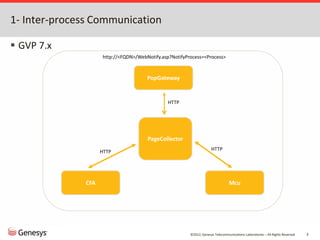
1- Inter-process Communication
 GVP 7.x
PageCollector
PopGateway
Mcu
CFA
HTTP
HTTP
HTTP
http://<FQDN>/WebNotify.asp?NotifyProcess=<Process>
©2012, Genesys Telecommunications Laboratories – All Rights Reserved 4
Inter-process Communication, cont.
 GVP 8.x
RM
MCP
CTIc
SIP Server
SIP
SIP
CCP
* Exceptions:
• RC - RS: TCP:61616
• SSG - SIP Server: T-Lib
• CTIc - IVR T-Server: IVR XML
•MCP – Speech Server: RTSP
©2012, Genesys Telecommunications Laboratories – All Rights Reserved 5
2- SIP error codes.
 GVP will send negative responses (400, 500, 600 range) when it
cannot process an incoming request.
 The response code sent can be a head start in determining the
underlying issue.
 Each component has options, which allow you to modify the
default code.
 Your MGW may require a specific code to handle a certain scenario.
 The most common Error Codes are:
 503, 500, 480, 408, 405, 404, 403, 400
©2012, Genesys Telecommunications Laboratories – All Rights Reserved 6
SIP Error codes cont.
503 Service Unavailable
 When the RM has suspended accepting new RM sessions before
gracefully shutting down, requests that would create new RM
sessions will be rejected with this code.
©2012, Genesys Telecommunications Laboratories – All Rights Reserved 7
SIP Error codes cont.
500 Server Internal Error
 This is normally seen when the application RM is trying to forward
the message to doesn't have the TCP port open. RM will try to use
the TCP transport if the request being forwarded exceeds the MTU
size (estimation) or the route set dictates it to go through TCP
transport (through the transport=TCP) in the Route header or in
the request-uri.
©2012, Genesys Telecommunications Laboratories – All Rights Reserved 8
SIP Error codes cont.
485 Ambiguous
 If the request specifies the RM session ID and that session ID is
not recognized by the RM, then RM will try to create the RM
session. If the RM session creation fails, then this response code
will be returned.
©2012, Genesys Telecommunications Laboratories – All Rights Reserved 9
SIP Error codes cont.
480 Temporarily Unavailable
 All resources are down or unavailable.
 Port count/usage-limit/other limit has been reached.
408 Request Timeout
 If the UAS did not respond at all within timer B/F, RM will reject
the request with this code.
405 Method Not Allowed
 If out-of-dialog methods other than INVITE or OPTIONS is sent to
the RM, RM will reject with this response code. Also rejected with
this code if the OPTIONS contains user-info and doesn't have Max-
Forwards header set to value 0.
©2012, Genesys Telecommunications Laboratories – All Rights Reserved 10
SIP Error codes cont.
404 Not Found
 Logical Resource Group servicing the requested service type
cannot be found.
 No matching IVR Profile based on DNIS and no default IVR Profile
was specified.
 Request needs to be forwarded to the Specific Gateway or CTI
connector, but the resource could not be allocated.
403 Forbidden
 This is the default SIP response code returned when one of the
"allow/disallow" policies for the tenant/ivr-profile is enforced.

©2012, Genesys Telecommunications Laboratories – All Rights Reserved 11
SIP Error codes cont.
400 Bad Request
 This response code indicates that the request contained values
that were not acceptable by the RM.
Examples:
 sip:conf=@<host>:<port> - conference ID is missing in the request
 Min-SE header had refresher value other than "uac" or "uas"
©2012, Genesys Telecommunications Laboratories – All Rights Reserved 12
3-Tracking calls in Genesys logs
Where to start:
 ->What is the correct callflow?
 ->How can you track the call?
©2012, Genesys Telecommunications Laboratories – All Rights Reserved 13
Tracking Calls in Genesys Logs, cont.
Key Type Created by
ConnID T-LIB SIP Server
Call-ID SIP SIP Server/MCP/CTIc/CCP/PSTNc
X-Genesys-GVP-Session-ID SIP (Custom header) RM/PSTNc
CallId IVR XML CTIc
sessionID MCP
CCXMLSessionId CCP
X-Genesys-GVP-IVRPort SIP (Custom header) PSTNc
X-Genesys-geo-location SIP (Custom header) SIP Server
X-Genesys-GVP-Site-ID* SIP (Custom header) RM
©2012, Genesys Telecommunications Laboratories – All Rights Reserved 14
Tracking Calls in Genesys logs, cont.
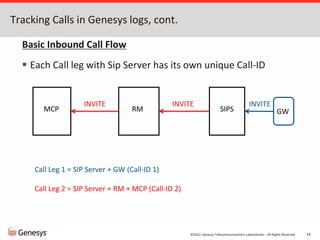
Basic Inbound Call Flow
 Each Call leg with Sip Server has its own unique Call-ID
MCP RM SIPS
INVITE
INVITE
GW
INVITE
Call Leg 1 = SIP Server + GW (Call-ID 1)
Call Leg 2 = SIP Server + RM + MCP (Call-ID 2)
©2012, Genesys Telecommunications Laboratories – All Rights Reserved 15
Tracking calls in Genesys logs, cont.
 SIP Server invites RM with a new Call-ID:
11:50:18.755: SIPTR: Received [0,UDP] 975 bytes from 192.168.62.85:5060 <<<<<
INVITE sip:5001@au-jk-test.us.int.genesyslab.com SIP/2.0
...
To: sip:5001@au-jk-test.us.int.genesyslab.com
From: <sip:111@au-3y912q1.us.int.genesyslab.com>;tag=1e085bcb
Call-ID: MTZhMzZkNTlmNGVlNzI3ZWU5YWQwNWIwZmQzYjRlODU.
...
11:50:18.755: Create regular call
@11:50:18.7550 {tscp.call {constructed} {uuid RFSV544OPL2NL7S23I723AQ71C00000L}
{connection-id 008f02028c866006} {call-id 6}}
...
11:50:18.755: Sending [0,UDP] 1110 bytes to 192.168.62.81:5060 >>>>>
INVITE sip:5001@au-jk-gvp80.us.int.genesyslab.com:5060 SIP/2.0
From: sip:111@au-3y912q1.us.int.genesyslab.com;tag=76C16151-C32B-48A1-815F-5B87DFAD220A-
79
To: sip:5001@192.168.62.91:5060
Call-ID: 657DAE5C-423A-4C32-81C4-24B5695CDF52-72@192.168.62.91
...
©2012, Genesys Telecommunications Laboratories – All Rights Reserved 16
Tracking calls in Genesys logs, cont.
 RM invites MCP (CCP or CTIc, depending on call flow) with the
same Call-ID and attach its session ID to the X-Genesys-GVP-
Session-ID header in the request:
2012-02-06 11:50:18.666 DBUG 00000000-00000000 3032 09400901
CCPSIPMessageInterceptor.h:588 RM - SIP Message received from [192.168.62.91:5060]
(1110): INVITE sip:5001@au-jk-gvp80.us.int.genesyslab.com:5060 SIP/2.0
...
Call-ID: 657DAE5C-423A-4C32-81C4-24B5695CDF52-72@192.168.62.91
...
2012-02-06T11:50:18.666 Trc 20119 INFO 00000000-00000000 3032 09400506 New call :
sip:5001@au-jk-gvp80.us.int.genesyslab.com:5060
...
2012-02-06 11:50:18.791 DBUG 00000000-00000000 2712 09400901
CCPSIPMessageInterceptor.h:588 RM - SIP Message sent to [192.168.62.81:5070] (1762):
INVITE sip:dialog@192.168.62.81:5070;gvp-tenant-id=[Resources].1st;gvp.appmodule=VXML-
NG;gvp.defaultsvxml=file://C:%5CProgram%20Files%5CGCTI%5Cgvp%5CVP%20Media%20Control%20Pla
tform%208.0%5CMCP%5Cconfig%5Cdefaults-
ng.vxml;trunkport=5001;voicexml=file:///C:/temp/samples/alaw/helloworld.vxml SIP/2.0
...
Call-ID: 657DAE5C-423A-4C32-81C4-24B5695CDF52-72@192.168.62.91
...
X-Genesys-GVP-Session-ID: 895A2882-3990-4E33-32AB-
652601364136;gvp.rm.datanodes=1;gvp.rm.tenant-id=101_1st
©2012, Genesys Telecommunications Laboratories – All Rights Reserved 17
Tracking calls in Genesys logs, cont.
 MCP creates a sessionID. Use this to track down metrics:
11:50:18.791 Trc 33009 INFO 00000000-00000000 4588 02800FA1 Request received: INVITE
sip:dialog@192.168.62.81:5070;gvp-tenant-id=[Resources].1st;gvp.appmodule=VXML-
NG;gvp.defaultsvxml=file://C:%5CProgram%20Files%5CGCTI%5Cgvp%5CVP%20Media%20Control%20Platform%208
.0%5CMCP%5Cconfig%5Cdefaults-
ng.vxml;trunkport=5001;voicexml=file:///C:/temp/samples/alaw/helloworld.vxml SIP/2.0
...
Call-ID: 657DAE5C-423A-4C32-81C4-24B5695CDF52-72@192.168.62.91
...
2012-02-06 11:50:18.791 DBUG 00000000-00000000 4248 0A000000 LogManager.cpp:833
Instantiating new Call for sessionID: 00B200F2-10002A32
...
11:50:18.838 Int 50052 00B200F2-10002A32 4452 incall_initiated 0:0
...
11:50:18.869 Int 50130 00B200F2-10002A32 316 appl_begin
INIT_URL=file:///C:/temp/samples/alaw/helloworld.vxml|DEFAULTS=file://C:Program FilesGCTIgvpVP
Media Control Platform 8.0MCPconfigdefaults-ng.vxml|ANI=sip:111@au-
3y912q1.us.int.genesyslab.com|DNIS=sip:5001@192.168.62.91:5060|PROTOCOLNAME=sip|PROTOCOLVERSION=2.
0|CALLIDREF=657DAE5C-423A-4C32-81C4-24B5695CDF52-72@192.168.62.91|VXMLI_TYPE=NGI
...
11:50:19.572 Int 50000 00B200F2-10002A32 4452 incall_begin
sip:5001@192.168.62.91:5060|sip:111@au-3y912q1.us.int.genesyslab.com|20120206493019000|N/A|N/A|N/A
...
11:50:19.635 Int 50134 00B200F2-10002A32 4580 prompt_play
audio|file:///C:/temp/samples/alaw/prompts/brand.vox
©2012, Genesys Telecommunications Laboratories – All Rights Reserved 18
Tracking calls in Genesys logs, cont.
 Genesys Voice Platform 8.1 Metrics Reference provides
information about all the GVP metrics (VXML and CCXML event
logs), including descriptions, format, logging level, source
component, and metric ID.
appl_begin 130 Application Begin
Logged when the VoiceXML application begins.
The format is:
appl_begin [<name>=<value>[|<name>=<value>...]]
<name> The name of the parameter. This name is either the name of a Call Manager variable
that is sent to the Interpreter when a session is created, INIT_URL (The initial URL),
or DEFAULTS (the default page that is used).
<value> The value of the parameter.
Example:
appl_begin INIT_URL=http://www.genesyslab.com/test.vxml|DEFAULTS=defaults.vxml|ANI=1234
|DNIS=1234
©2012, Genesys Telecommunications Laboratories – All Rights Reserved 19
Tracking calls in Genesys logs, cont.
 CTIc maps the X-Genesys-GVP-Session-ID header to CallId:
2010-12-28 13:13:11.406 DBUG 00000000-00000000 3244 09900500 SessionFactory.cxx:291 SIP Message
received (1205): INVITE sip:2031@192.168.62.81:5080 SIP/2.0
...
X-Genesys-GVP-Session-ID: 7E193A48-6E98-44CF-6D91-
BC308CEAD749;gvp.rm.datanodes=1;gvp.rm.cti-call=1
...
13:13:11.422 Trc 20123 INFO 00000000-00000000 4580 0AC005AC ISvrClientGlobalData.cpp:1561 Data
sent to I-Server [192.168.62.91]... <?xml version="1.0" encoding="utf-8"?><!DOCTYPE GctiMsg SYSTEM
"IServer.dtd">
<GctiMsg>
<CallId>
7E193A48-6E98-44CF-6D91-BC308CEAD749
</CallId>
<NewCall CallControlMode="Network" Version="4.0" >
<CalledNum>
2031
</CalledNum>
</NewCall>
</GctiMsg>
©2012, Genesys Telecommunications Laboratories – All Rights Reserved 20
Tracking calls in Genesys logs, cont.
 With PSTNc integration, CTIc maps the X-Genesys-GVP-IVRPort
header to CalledNum:
- PSTNc:
2010-08-13 17:28:25.404 DBUG 00000000-00000000 3468 08D00000 GVPsipGsMsg.cpp:488 addHeader(X-Genesys-GVP-IVRPort=01)
- CTIc:
2010-08-13 17:29:01.666 DBUG 00000000-00000000 4952 09900500 SessionFactory.cxx:291 SIP Message received (1018): INVITE
sip:VTP_SSG@192.168.62.81:5080;gvp-tenant-id=Environment SIP/2.0
...
X-Genesys-GVP-IVRPort: 01
X-Genesys-GVP-PSTNC-DBID: 201
..
X-Genesys-GVP-Session-ID: CB63C47A-3B46-4FE8-11B4-BFFAD3C24C11;gvp.rm.datanodes=1;gvp.rm.cti-call=1
...
17:29:01.759 Trc 20123 INFO 1640 00000000-00000000 5696 0AC005AC ISvrClientGlobalData.cpp:1561 Data sent to I-Server [192.168.62.91]...
<?xml version="1.0" encoding="utf-8"?><!DOCTYPE GctiMsg SYSTEM "IServer.dtd">
<GctiMsg>
<CallId>
CB63C47A-3B46-4FE8-11B4-BFFAD3C24C11
</CallId>
<NewCall CallControlMode="Network" Version="4.0" >
<CalledNum>
01
</CalledNum>
</NewCall>
</GctiMsg>
©2012, Genesys Telecommunications Laboratories – All Rights Reserved 21
4- What to Collect
 Generally, matching SIP Server and GVP debug logs are required to
start investigation.*
 Keep the last start-up log for each component as it would be useful for
configuration review.
 The local .ini file that GVP creates in ..config also contains all the
configuration information read from MF during start-up.
 Additional data required:
 In case a component terminates abruptly:
- *.snapshot.log, exception.log , and *…logsdmp (Windows) or ..bincore.* (Linux).
- Usually “<Code>.cxx:XXXX Assert!” is logged before crash.
- Event Viewer export for application and system logs in the EVT format (Windows)
 For fetch failures:
- Web server logs (and Squid logs, if available)
 When investigation is required from network perspective:
- Packet traces – Wireshark or tcpdump (Linux)
©2012, Genesys Telecommunications Laboratories – All Rights Reserved 22
What to Collect, cont.
 Depending on symptoms, Customer Care may request:
 Temp files, grammars, application related files (Composer export for
example)
 Local storage files (*.db) of each RC and RS database export
 PerfMon (Windows) or top (Linux) data:
- Make sure that data for following counters is written as a .csv file with 15s
collection interval :
- Process counters (pwcallmgr.exe, ccpccxml.exe, ssg.exe, java.exe, resourcemgr.exe, CTIConnector.exe):
- % Processor Time
- Working Set
- Private Bytes
- Handle Count
- Thread Count
- Virtual Bytes
- Memory counters:
- Available Kilobytes
- Committed Bytes
- Processor counters: % Processor Time (choose _Total from Select Instances From List)
- LogicalDisk Counters (choose _Total from Select Instances From list)
- Avg Disk Bytes/Read
- Avg Disk Bytes/Write
- Avg Disk Queue Length
©2012, Genesys Telecommunications Laboratories – All Rights Reserved 23
5- Custom Logging
 For debugging some issues, it might not require having full logs
but specific logs that can be enabled.
 Logs include three important elements - Severity, Module ID, and
Specifier:
 Severity:
- 0 = Critical
- 1 = Error
- 2 = Warning
- 3 = Note
- 4 = Info
- 5 = Debug
 Module ID: Each GVP component is composed of one or more application
modules, each of which is assigned a Module ID. The component logically
organizes the logs that it emits by Module ID.
 Specifier: A number that uniquely identifies a given event that is logged by a
given module.
©2012, Genesys Telecommunications Laboratories – All Rights Reserved 24
Custom Logging, cont.
 2013-07-25T14:24:26.756 Std 20029 EROR
00000000-00000000 1616 09400217 718DEB0B-
E36E-4103-98A5-FD144B7D967A Cannot allocate a
resource type matching service type [Service
Type: voicexml]
 Severity = 1 (EROR)
 Module ID = 094 Hex = 148 Decimal
 Specifier ID = 00217 Hex = 535 Decimal
©2012, Genesys Telecommunications Laboratories – All Rights Reserved 25
Custom Logging, cont.
 ‘[ems]logconfig.MFSINK’ controls log messages.
 The format is 'levels|moduleIDs|specifierIDs' (repeated if necessary).
 The values between the pipes can be in the format: 'm-n,o,p' (ie "0-4,5,6").
 The wildcard character '*' can also be used to indicate all valid numbers.
Example: '*|*|*' indicates that all log messages should be sent to the sink.
Alternatively, '0,1|0-10|*|4|*|*' indicates that CRITICAL(0) and ERROR(1)
level messages with module IDs in the range 0-10 will be sent to the sink;
and all INFO(4) level messages will be sent as well.
 The default value is *|*|* and any change takes effect immediately.
 Appendix A in the GVP user guide lists module/specifiers IDs.
©2012, Genesys Telecommunications Laboratories – All Rights Reserved 26
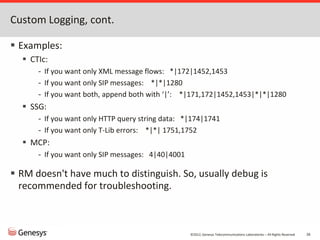
Custom Logging, cont.
 Examples:
 CTIc:
- If you want only XML message flows: *|172|1452,1453
- If you want only SIP messages: *|*|1280
- If you want both, append both with ‘|’: *|171,172|1452,1453|*|*|1280
 SSG:
- If you want only HTTP query string data: *|174|1741
- If you want only T-Lib errors: *|*| 1751,1752
 MCP:
- If you want only SIP messages: 4|40|4001
 RM doesn't have much to distinguish. So, usually debug is
recommended for troubleshooting.
©2012, Genesys Telecommunications Laboratories – All Rights Reserved 27
6- Saving Temp Files
 This feature enables NGI to save various information to disk for
troubleshooting. The information saved can be items such as
prompts and VXML pages.
 Three properties control this feature. Refer to GVP 8.1 VoiceXML
Help for details:
 com.genesyslab.savetmpfiles
 com.genesyslab.savetmpfilesmode
 com.genesyslab.onexit.keeptmpfiles
 The properties can be modified in defaults-ng.vxml in ..config
where MCP is installed. Alternatively, they can be set at
application level.
©2012, Genesys Telecommunications Laboratories – All Rights Reserved 28
Saving Temp Files, cont.
 To immediately save all files:
<property name="com.genesyslab.savetmpfiles" value="all"/>
<property name="com.genesyslab.savetmpfilesmode" value="immediate"/>
<property name="com.genesyslab.onexit.keeptmpfiles" value="true"/>
 Tmp files are saved ..tmp after a call is completed.
 Look up the session ID in the MCP log to identify the relevant directory.
©2012, Genesys Telecommunications Laboratories – All Rights Reserved 29
Saving Temp Files, cont.
 This feature doesn’t work for GVPi. But, MCP logs each JSP/ASP
fetched:
2011-10-04 21:35:57.712 DBUG 00000000-00000000 8276 0C1001F4 CPageCollector.cpp:1443 POST: Url
[http://10.125.1.58/ivr1888_LoadTest_NoWS/cod%5FDefineValue%2Easp], flags [0x28000000], event
[ConversationController1252827682607046], session [4C401A43-20AC-4F05-9F84-60FD82540B1F], timeout [25000 msec], flow ctrl [0 KBps],
ctx [0], retry [0], ByFile [false]
...
21:35:57.712 Trc 60022 INFO 00000000-00000000 4780 0C100005 CnHttpRequest.cpp:5421 Sending Header
[POST /ivr1888_LoadTest_NoWS/cod%5FDefineValue%2Easp HTTP/1.1
User-Agent: Mozilla/4.0 (compatible; Telera _ND_C 8.1.410.08)
Accept: */*
Host: 10.125.1.58
Cookie: $Version=0; ASPSESSIONIDQSARRCTR=NPMGBGMAJHNDKNGLIOEJKFMJ; $Path=/
X-Genesys-GVP-Session-ID: 4C401A43-20AC-4F05-9F84-60FD82540B1F
Content-Type: application/x-www-form-urlencoded
Content-Length: 337
]
...
2011-10-04 21:35:57.712 DBUG 00000000-00000000 8276 0C100132 XMLPage.cpp:990 XMLPage::getPageFromXPC - PageURL
[http://10.125.1.58/ivr1888_LoadTest_NoWS/cod%5FDefineValue%2Easp] PageContent[<?xml version='1.0' encoding='utf-8'?><vxml
version='2.1' xmlns='http://www.w3.org/2001/vxml' xmlns:genesys='http://www.genesyslab.com/vxml/2.0/ext/20020430'
application='http://10.125.1.58/ivr1888_LoadTest_NoWS/stt_1888.asp' xml:lang='en-US'><form>
<block>
<submit next='ply_welcome.asp' />
</block>
</form>
</vxml>
]
©2012, Genesys Telecommunications Laboratories – All Rights Reserved 30
7- Forcing Dump
 This can give Engineering insight as to what is happening in the
non-responsive (hang) process.
 The steps for MCP:
1. Run "ntsd -pn pwcallmgr.exe". The process will be paused until the dump
is completed and the debugger is closed with either the .kill or qd
commands.
2. When the debugger console window appears, type the following into the
debugger console window:
.dump /ma c:pwcallmgr.mdmp
.kill
3. pwcallmgr.mdmp is saved on c:.
4. Close the debugger window and re-start the process.
©2012, Genesys Telecommunications Laboratories – All Rights Reserved 31
8-Manually creating a core file
To manually create a core file on a process that is having problem but not automatically
coring, you can run the following:
 kill -11 <PID_of_problem_process>
To find the PID, you can do the following (this is just an example)
 root@mypc > ps -wwef | grep pwcallmgr
 root 30339 4365 0 Jan18 ? 01:42:18 pwcallmgr
Verify the date and time
 root@mypc > date
 Fri Jan 24 18:09:35 EDT 2014
 Generate core
 pw@sif > kill -11 30339
©2012, Genesys Telecommunications Laboratories – All Rights Reserved 32
9- Wireshark Basics
 What is it?
 Freeware software that can collect or read a packet capture
 It can read either a wireshark .pcap file or tcpdump output.
 What is it most commonly used for by support?
 Troubleshooting network problems
 Troubleshooting DTMF or Voice Recognition problems
©2012, Genesys Telecommunications Laboratories – All Rights Reserved 33
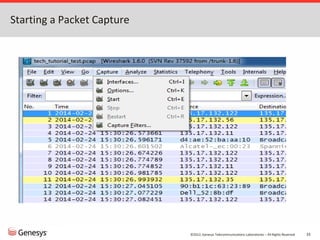
Starting a Packet Capture
©2012, Genesys Telecommunications Laboratories – All Rights Reserved 34
Starting a Packet Capture, cont.
©2012, Genesys Telecommunications Laboratories – All Rights Reserved 35
Stopping a Packet Capture
©2012, Genesys Telecommunications Laboratories – All Rights Reserved 36
Filtering VOIP calls
©2012, Genesys Telecommunications Laboratories – All Rights Reserved 37
Filtering VOIP calls, cont.
©2012, Genesys Telecommunications Laboratories – All Rights Reserved 38
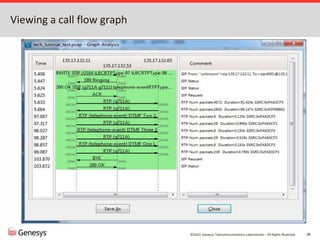
Viewing a call flow graph
©2012, Genesys Telecommunications Laboratories – All Rights Reserved 39
Listening to a call using the RTP Player
©2012, Genesys Telecommunications Laboratories – All Rights Reserved 40
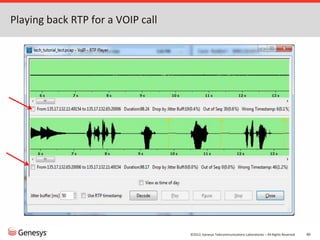
Playing back RTP for a VOIP call
©2012, Genesys Telecommunications Laboratories – All Rights Reserved 41
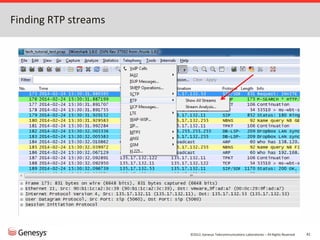
Finding RTP streams
©2012, Genesys Telecommunications Laboratories – All Rights Reserved 42
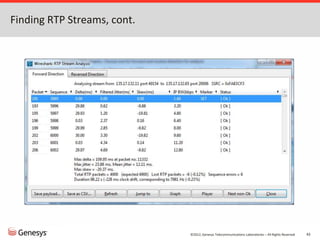
Finding RTP Streams, cont.
©2012, Genesys Telecommunications Laboratories – All Rights Reserved 43
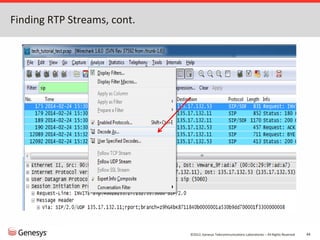
Finding RTP Streams, cont.
©2012, Genesys Telecommunications Laboratories – All Rights Reserved 44
Finding RTP Streams, cont.
©2012, Genesys Telecommunications Laboratories – All Rights Reserved 45
Finding RTP Streams, cont.
©2012, Genesys Telecommunications Laboratories – All Rights Reserved 46
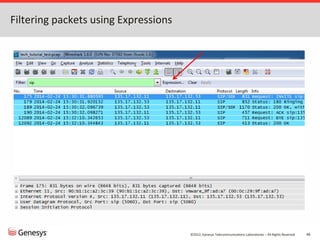
Filtering packets using Expressions
©2012, Genesys Telecommunications Laboratories – All Rights Reserved 47
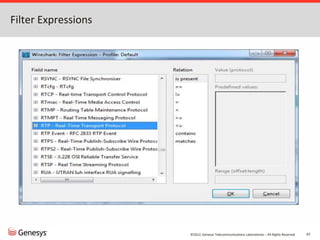
Filter Expressions
Common Questions & Issues
©2012, Genesys Telecommunications Laboratories – All Rights Reserved 49
TCP vs UDP
 TCP – Transmission Control Protocol
 Connection orientated protocol
 Highly reliable
 Slower than UDP
 More overhead (header size is 20 bytes)
 Requires 3 packets set up a socket connection before user data sent
 Examples: HTTP, HTTPs, FTP, Telnet
©2012, Genesys Telecommunications Laboratories – All Rights Reserved 50
TCP vs UDP, cont.
 UDP – User Datagram Protocol
 Connectionless protocol
 Used in transmissions that need to be fast and efficient (i.e audio streaming)
 Less overhead than TCP (Header size is 8 bytes)
 Lightweight with no ordering of messages or tracking connections
 Examples: DNS, VOIP, RIP, SNMP, DHCP
©2012, Genesys Telecommunications Laboratories – All Rights Reserved 51
Controlling the switching from UDP to TCP by GVP
 The mtusize options on the GVP applications control the size of
the Maximum Transmission Unit (MTU) using UDP.
 Increase these option values to avoid switching transport layer
messages from UDP to TCP.
 The default threshold is 1500 (bytes).
 If a SIP request size is within 200 bytes of this value, the request will be sent
on a congestion controlled transport protocol, such as TCP.
- User data and codec list in SDP can increase packet size.
- RM logs the size of each SIP message.
 Relevant mtusize options are in a number of sections of RM/MCP/CTIc/CCP.
 UDP is actually easier on the network, as is does not constantly check/verify
each packet
©2012, Genesys Telecommunications Laboratories – All Rights Reserved 52
Switching from UDP to TCP, cont.
2012-03-08 14:08:16.347 DBUG 00000000-00000000 3336 09400901
CCPSIPMessageInterceptor.h:588 RM - SIP Message sent to
[192.168.62.81:5070] (780): INVITE
sip:Genesys@192.168.62.81:5070 SIP/2.0
Via: SIP/2.0/UDP
192.168.62.81:5060;branch=z9hG4bK0cbc4a685830b0abcdef09
Via: SIP/2.0/UDP 192.168.62.91:5060;branch=z9hG4bK5CE3A9BF-
029E-4F34-B4E6-CC55C08D4FAC-2072
From: sip:111@au-3y912q1.us.int.genesyslab.com;tag=2324E934-
1C0E-444D-BA72-E6B954C9A0CE-365
To:
<sip:msml=4f5454240000000a@192.168.62.81:5060;dn=111;record>;ta
g=6DAD27CB-7B39-43DD-67B6-1301299B2F6D
Max-Forwards: 68
CSeq: 3 INVITE
Call-ID: 016A829A-1919-4D62-905D-3D83E3B16310-87@192.168.62.91
Contact: <sip:111@192.168.62.91:5060>
Content-Length: 0
Allow: INVITE, ACK, PRACK, CANCEL, BYE, REFER, INFO, UPDATE,
MESSAGE, NOTIFY, OPTIONS
X-Genesys-CallUUID: BVF22PQ50H26L3VD0HER5FSOS800000I
Session-Expires: 1800;refresher=uac
Min-SE: 90
Supported: timer
2012-03-08 14:08:08.066 DBUG 00000000-00000000 2948 09400901
CCPSIPMessageInterceptor.h:588 RM - SIP Message sent to
[192.168.62.81:5070] (1561): INVITE
sip:msml=4f5454240000000a@192.168.62.81:5070;dn=111;gvp-tenant-
id=[Resources].1st;record SIP/2.0
Via: SIP/2.0/TCP
192.168.62.81:5060;branch=z9hG4bK200df1d05830a7abcdef09
Via: SIP/2.0/UDP 192.168.62.91:5060;branch=z9hG4bK5CE3A9BF-029E-4F34-
B4E6-CC55C08D4FAC-2067
From: sip:111@au-3y912q1.us.int.genesyslab.com;tag=2324E934-1C0E-444D-
BA72-E6B954C9A0CE-365
To: <sip:msml=4f5454240000000a@192.168.62.81:5060;dn=111;record>
Max-Forwards: 68
CSeq: 1 INVITE
Call-ID: 016A829A-1919-4D62-905D-3D83E3B16310-87@192.168.62.91
Contact: <sip:111@192.168.62.91:5060>
Content-Length: 360
Content-Type: application/sdp
Record-Route:
<sip:1a506c00@192.168.62.81:5060;transport=TCP;lr;gvp.rm.datanodes=1;c
onfinstid=4f5454240000000a;idtag=00000013>
Allow: ACK, BYE, CANCEL, INFO, INVITE, MESSAGE, NOTIFY, OPTIONS,
PRACK, REFER, UPDATE
X-Genesys-CallUUID: BVF22PQ50H26L3VD0HER5FSOS800000I
Session-Expires: 1800;refresher=uac
Min-SE: 90
Supported: timer
X-Genesys-GVP-Session-ID: 83FD43F4-2DC0-42F2-21AA-
1F51BE365724;gvp.rm.datanodes=1;gvp.rm.tenant-id=101_1st
X-Genesys-RM-Application-dbid: 101
X-Genesys-GVP-Session-Data: callsession=83FD43F4-2DC0-42F2-21AA-
1F51BE365724;1;0;;;;Resources;1st
v=0
o=- 1330906283 2 IN IP4 0.0.0.0
s=CounterPath X-Lite 4.1
c=IN IP4 0.0.0.0
t=0 0
a=ice-ufrag:9fe7b7
a=ice-pwd:e7174ddd9b3f771288981f1826bce9dc
m=audio 50112 RTP/AVP 8 101
a=sendrecv
a=candidate:1 1 UDP 659136 192.168.62.85 50112 typ host
a=candidate:1 2 UDP 659134 192.168.62.85 50113 typ host
a=rtpmap:101 telephone-event/8000
a=fmtp:101 0-15
©2012, Genesys Telecommunications Laboratories – All Rights Reserved 53
 To investigate abnormal network issues, enhancement has been
made in Common 8.1.602.16 to add more debugging logs.
 Warnings will be logged when TCP/UDP/TLS sockets encounter any
problems and more detailed tracing will be logged when the transport layer
in SIP stack encounters errors.
Switching from UDP to TCP, cont.
 Bad socket type
 caWot create new socket
 socket failed errno ?%d
 socket not bound
 ioctlsocket failed errno ?%d“
 fcntl(F_SETFL) failed errno ?%d
 fcntl(F_SETFD) failed errno ?%d
 nSocketAffinity ?%p is invalid“
 cannot find socket ?%p
 invalid socket
 connect failed errno ?%d
 TCP accept failed with error code
(%d).
 listen failed errno ?%d
 invalid TCP socket
 invalid UDP socket
©2012, Genesys Telecommunications Laboratories – All Rights Reserved 54
Switching from UDP to TCP, cont.
2013-07-04T10:04:03.534 Std 20003 WARN 00000000-00000000 7508 08500000
VGSocket::NotifySocketError nErrorCode 10061
2013-07-04 10:04:03.534 DBUG 00000000-00000000 7508 08500000 VGSIPTransportTCP.cxx:266
VGSIPTransportTCP::TCPConnection::VGSocketError NotifyError
2013-07-04 10:04:03.534 DBUG 00000000-00000000 7508 08500000 VGSIPTransport.cxx:576
VGSIPTransport::NotifyError nErrorResult 503, nErrorReturn -1
2013-07-04 10:04:03.534 DBUG 00000000-00000000 7508 08500000 VGSIPProxyTransaction.cxx:350
VGSIPProxyTransaction::TerminateTransaction nError 503
2013-07-04 10:04:03.534 DBUG 00000000-00000000 7508 08500000 VGSIPTransaction.cxx:733
VGSIPTransaction::NotifyTransactionError, nError 503
2013-07-04 10:04:03.534 DBUG 00000000-00000000 7508 08500000 VGSIPProxyCore.cxx:1022
VGSIPProxyCore::NotifyTransactionError nError 503
...
2013-07-04 10:04:03.534 DBUG 00000000-00000000 7508 09400901 CCPSIPMessageInterceptor.h:588 RM - SIP Message sent to [X.X.X.X:5060] (598):
SIP/2.0 500 Server Internal Error
Via: SIP/2.0/UDP X.X.X.X:5060;branch=z9hG4bK2DDF29EB-72E2-4FC9-99B4-0B042981E1A0-26f5;F5Tag=F5-Inserted-Header
Via: SIP/2.0/UDP Y.Y.Y.Y:5060;branch=z9hG4bK2DDF29EB-72E2-4FC9-99B4-0B042981E1A0-26
From: "1234" <sip:60919@XXXX.com>;tag=42ABB350-7ACD-4AFE-8336-779394748F40-20
To: <sip:5678@Y.Y.Y.Y:5060>;tag=4FF53CB2-C116-4699-6AB6-B2BDB092984A
CSeq: 1 INVITE
Call-ID: B1AD2C7D-9D5A-4D5B-A91A-EA74DBFA3C46-10@Y.Y.Y.Y
Content-Length: 0
Warning: 399 localhost "ICMP errors in UDP or connection failures in TCP encountered"
©2012, Genesys Telecommunications Laboratories – All Rights Reserved 55
GVPi and PSTNc Support
 GVPi and PSTNc support is officially dropped in MCP 8.1.5.
 But, GVP 8.1.5 deployments will continue to support GVPi and
PSTNc in the following way:
 From the deployment guide:
The PSTN Connector and Legacy GVP VoiceXML interpreter (GVPi) are not
included in the 8.1.5 release, but they are still supported and can be deployed
in 8.1.5 environments. However, at least one instance of the 8.1.4 Media
Control Platform is required to provide capability-based routing for PSTN
Connector and GVPi requests for media services. In other words, the 8.1.4
Media Control Platform can interoperate with all GVP 8.1.5 components, but
the 8.1.4 PSTN Connector and GVPi can not.
 Starting with MCP 8.1.6, PSTNc 8.1.4 is supported.
 No special configuration changes are required.
©2012, Genesys Telecommunications Laboratories – All Rights Reserved 56
GVPi and PSTNc Support, cont.
 Capability-based routing can be used to force RM to select a LRG
for MCP 8.1.4 for any GVPi or PSTNc call:
 1) Set the capability in the LRG(s) for MCP 8.1.4: Set
"capability="capName=capVal"" under Annexgvp.lrg.
 2a) Set the requirement in the IVR Profile(s): Set "voicexml-capability-
requirement="capName=capVal"" under Annexgvp.policy.
- or
 2b) Set the requirement in the SIP Server DN(s) for RM. For example, set the
contact option like "sip:<ip>:<port>;gvp.rm.resource-req.capName=capVal".
 *Note: capName and capVal are arbitrary. You could use
interpreterreq=GVPi for example.
©2012, Genesys Telecommunications Laboratories – All Rights Reserved 57
Logic to determine recording destination
 The logic to determine recording destination resides in T-Lib
client or with GVP.
 T-Lib client can set the destination using ‘dest’ in AttrExtension and this
gets mapped to MSML as “<gvp:param
name=”dest”>sip:<address>:<port></gvp:param>”.
 If neither dest nor dest2 are defined, GVP will determine where to record
based on the IVR Profile service parameters:
- [gvp.service-parameters]recordingclient.recdest
- [gvp.service-parameters]recordingclient.recdest2
- The format: “fixed,sip:<address>:<port>”.
 Starting from 8.1.603.56, MCP supports file-based MSML call
recording.
 The format: “fixed,file://<path>”.
©2012, Genesys Telecommunications Laboratories – All Rights Reserved 58
What’s New in 8.5?
 Additional features in MCP for support of the Genesys Interaction
Recording (GIR) Solution:
 Call Recording Encryption Support.
 Stereo MP3 encoding for call recording.
 Submission to Amazon S3 storage and webDAV support.
 Interactions with GIR.
 Changes in RM to add support for:
 Passing parameters from an MSML tenant IVR profile for recording.
 Scaling for premise architecture (multiple MCPs in the resource pool).
 Policy-based call recording.
 Call recording status monitoring.
©2012, Genesys Telecommunications Laboratories – All Rights Reserved 59
MRCPp supports only MRCPv1.
 MCP supports using MRCPp for connection to MRCPv1 resources.
 Only Nuance MRCPv1 ASR and TTS resources – no MRCPv2 support
- Round-robin load-balancing supported - amongst the resources with the same
engine name.
- MRCPp sends RTSP DESCRIBE to the speech resources to check online/offline
status.
 Speech resources are provisioned on the MRCPp instead of on each MCP.
- When MCP is using MRCPp, it can’t be provisioned with other MRCPv1
resources. Using MRCPp + MRCPv2 resources is fine.
- MRCPp connection cannot be added/removed on the fly – it is read once during
MCP startup.
©2012, Genesys Telecommunications Laboratories – All Rights Reserved 60
CPA Control Parameters
SSG (CreateRequest) OCS SIP Server
CPA recording record cpd-recording
When to start CPA preconnect cpd-on-connect
RNA timer rnatimeout
call_wait_connected
_timeout
Post-connect timer postconnecttimeout
call_timeguard_time
out
cpd-info-timeout
Action to take detect
call_answer_type_re
cognition
am-detected, fax-
detected, or silence-
detected
©2012, Genesys Telecommunications Laboratories – All Rights Reserved 61
What happens when connection to RS is lost?
 Starting from Release 8.1.5, RC immediately writes data locally
when it detects unusual delays while sending data to RS.
 Local database files are defined in the following options under [ems]:
- rc.cdr.local_queue_path, rc.ors.local_queue_path, rc.sqa.local_queue_path, and
rc.local_queue_path (the last two are only valid for MCP).
 The message limits (number of log messages, CDR updates, OR updates, or
SQA updates) are:
- [ems]rc.local_queue_max=5000000
- [ems]rc.cdr.local_queue_max=1000000
- [ems]rc.ors.local_queue_max=1000000
- [ems]rc.sqa.local_queue_max=3000
©2012, Genesys Telecommunications Laboratories – All Rights Reserved 62
Throttling for RS recovery
 If RS has been down for a while, data is persisted on RC waiting to
be sent.
 When RS comes back up, RC could blast all data non-stop to RS. To
avoid overload problems, two options are introduced in Release
8.1.5:
 [ems] rc.cdr.max_throughput (in bytes per second): control the rate at
which CDR data is sent.
 [ems] rc.max_throughput (in bytes per second): control the rate at which
event (Metrics) data is sent
 No controls for OR or SQA data.
©2012, Genesys Telecommunications Laboratories – All Rights Reserved 63
Limit to storage usage on RS
 The ‘[messaging]activemq.diskStoreUsageLimit’ option limits the
amount of space ActiveMQ will take up when the DB is down.
 When the limit is reached, RS will no longer accept incoming
messages from RC. These records will be buffered on the client
side, until the client side limit is reached, and then client will
discard messages beyond its limit.
©2012, Genesys Telecommunications Laboratories – All Rights Reserved 64
IP Takeover vs NLB on Windows
 Virtual IP (VIP) Address Takeover for Windows is less reliable
than a Windows NLB cluster configuration.
 Adding or removing an IP address using VIP Address Takeover is more
complicated than enabling or disabling a port in the Windows NLB
configuration. VIP Address Takeover fails when either command fails on the
backup or the primary. By comparison, in the Windows NLB configuration there
is no dependency on the backup command to succeed for most of the failover
scenarios.
 It takes longer for Netsh (the Microsoft utility that is used for IP Address
Takeover) to modify the network configuration than it takes to enable or
disable a port in the NLB configuration. In addition, the time may depend on a
particular NIC and its configuration. Normally, modification takes less than 15
seconds to execute, but in this situation it can take as long as 30-45 seconds.
 Note: The Netsh command can fail if the NIC configuration is already being
accessed through the Network Properties User Interface.

GVP8- Troubleshooting.pptx

  • 1.
    Troubleshooting Best Practices forGVP 8.x Presented by Ron Barton and Darrell Travis
  • 2.
    ©2012, Genesys TelecommunicationsLaboratories – All Rights Reserved 2 Objectives  This Tech Tutorial will cover the following:  How GVP applications communicate with each other  SIP Error Codes  Tracking calls in Genesys logs using unique identifiers  What data to collect for different types of problems  How to enable custom logging  How to save temp files  How to manually produce .dmp and core files  Some of the basic functionality of Wireshark  Review some common questions/problems
  • 3.
    ©2012, Genesys TelecommunicationsLaboratories – All Rights Reserved 3 1- Inter-process Communication  GVP 7.x PageCollector PopGateway Mcu CFA HTTP HTTP HTTP http://<FQDN>/WebNotify.asp?NotifyProcess=<Process>
  • 4.
    ©2012, Genesys TelecommunicationsLaboratories – All Rights Reserved 4 Inter-process Communication, cont.  GVP 8.x RM MCP CTIc SIP Server SIP SIP CCP * Exceptions: • RC - RS: TCP:61616 • SSG - SIP Server: T-Lib • CTIc - IVR T-Server: IVR XML •MCP – Speech Server: RTSP
  • 5.
    ©2012, Genesys TelecommunicationsLaboratories – All Rights Reserved 5 2- SIP error codes.  GVP will send negative responses (400, 500, 600 range) when it cannot process an incoming request.  The response code sent can be a head start in determining the underlying issue.  Each component has options, which allow you to modify the default code.  Your MGW may require a specific code to handle a certain scenario.  The most common Error Codes are:  503, 500, 480, 408, 405, 404, 403, 400
  • 6.
    ©2012, Genesys TelecommunicationsLaboratories – All Rights Reserved 6 SIP Error codes cont. 503 Service Unavailable  When the RM has suspended accepting new RM sessions before gracefully shutting down, requests that would create new RM sessions will be rejected with this code.
  • 7.
    ©2012, Genesys TelecommunicationsLaboratories – All Rights Reserved 7 SIP Error codes cont. 500 Server Internal Error  This is normally seen when the application RM is trying to forward the message to doesn't have the TCP port open. RM will try to use the TCP transport if the request being forwarded exceeds the MTU size (estimation) or the route set dictates it to go through TCP transport (through the transport=TCP) in the Route header or in the request-uri.
  • 8.
    ©2012, Genesys TelecommunicationsLaboratories – All Rights Reserved 8 SIP Error codes cont. 485 Ambiguous  If the request specifies the RM session ID and that session ID is not recognized by the RM, then RM will try to create the RM session. If the RM session creation fails, then this response code will be returned.
  • 9.
    ©2012, Genesys TelecommunicationsLaboratories – All Rights Reserved 9 SIP Error codes cont. 480 Temporarily Unavailable  All resources are down or unavailable.  Port count/usage-limit/other limit has been reached. 408 Request Timeout  If the UAS did not respond at all within timer B/F, RM will reject the request with this code. 405 Method Not Allowed  If out-of-dialog methods other than INVITE or OPTIONS is sent to the RM, RM will reject with this response code. Also rejected with this code if the OPTIONS contains user-info and doesn't have Max- Forwards header set to value 0.
  • 10.
    ©2012, Genesys TelecommunicationsLaboratories – All Rights Reserved 10 SIP Error codes cont. 404 Not Found  Logical Resource Group servicing the requested service type cannot be found.  No matching IVR Profile based on DNIS and no default IVR Profile was specified.  Request needs to be forwarded to the Specific Gateway or CTI connector, but the resource could not be allocated. 403 Forbidden  This is the default SIP response code returned when one of the "allow/disallow" policies for the tenant/ivr-profile is enforced. 
  • 11.
    ©2012, Genesys TelecommunicationsLaboratories – All Rights Reserved 11 SIP Error codes cont. 400 Bad Request  This response code indicates that the request contained values that were not acceptable by the RM. Examples:  sip:conf=@<host>:<port> - conference ID is missing in the request  Min-SE header had refresher value other than "uac" or "uas"
  • 12.
    ©2012, Genesys TelecommunicationsLaboratories – All Rights Reserved 12 3-Tracking calls in Genesys logs Where to start:  ->What is the correct callflow?  ->How can you track the call?
  • 13.
    ©2012, Genesys TelecommunicationsLaboratories – All Rights Reserved 13 Tracking Calls in Genesys Logs, cont. Key Type Created by ConnID T-LIB SIP Server Call-ID SIP SIP Server/MCP/CTIc/CCP/PSTNc X-Genesys-GVP-Session-ID SIP (Custom header) RM/PSTNc CallId IVR XML CTIc sessionID MCP CCXMLSessionId CCP X-Genesys-GVP-IVRPort SIP (Custom header) PSTNc X-Genesys-geo-location SIP (Custom header) SIP Server X-Genesys-GVP-Site-ID* SIP (Custom header) RM
  • 14.
    ©2012, Genesys TelecommunicationsLaboratories – All Rights Reserved 14 Tracking Calls in Genesys logs, cont. Basic Inbound Call Flow  Each Call leg with Sip Server has its own unique Call-ID MCP RM SIPS INVITE INVITE GW INVITE Call Leg 1 = SIP Server + GW (Call-ID 1) Call Leg 2 = SIP Server + RM + MCP (Call-ID 2)
  • 15.
    ©2012, Genesys TelecommunicationsLaboratories – All Rights Reserved 15 Tracking calls in Genesys logs, cont.  SIP Server invites RM with a new Call-ID: 11:50:18.755: SIPTR: Received [0,UDP] 975 bytes from 192.168.62.85:5060 <<<<< INVITE sip:5001@au-jk-test.us.int.genesyslab.com SIP/2.0 ... To: sip:5001@au-jk-test.us.int.genesyslab.com From: <sip:111@au-3y912q1.us.int.genesyslab.com>;tag=1e085bcb Call-ID: MTZhMzZkNTlmNGVlNzI3ZWU5YWQwNWIwZmQzYjRlODU. ... 11:50:18.755: Create regular call @11:50:18.7550 {tscp.call {constructed} {uuid RFSV544OPL2NL7S23I723AQ71C00000L} {connection-id 008f02028c866006} {call-id 6}} ... 11:50:18.755: Sending [0,UDP] 1110 bytes to 192.168.62.81:5060 >>>>> INVITE sip:5001@au-jk-gvp80.us.int.genesyslab.com:5060 SIP/2.0 From: sip:111@au-3y912q1.us.int.genesyslab.com;tag=76C16151-C32B-48A1-815F-5B87DFAD220A- 79 To: sip:5001@192.168.62.91:5060 Call-ID: 657DAE5C-423A-4C32-81C4-24B5695CDF52-72@192.168.62.91 ...
  • 16.
    ©2012, Genesys TelecommunicationsLaboratories – All Rights Reserved 16 Tracking calls in Genesys logs, cont.  RM invites MCP (CCP or CTIc, depending on call flow) with the same Call-ID and attach its session ID to the X-Genesys-GVP- Session-ID header in the request: 2012-02-06 11:50:18.666 DBUG 00000000-00000000 3032 09400901 CCPSIPMessageInterceptor.h:588 RM - SIP Message received from [192.168.62.91:5060] (1110): INVITE sip:5001@au-jk-gvp80.us.int.genesyslab.com:5060 SIP/2.0 ... Call-ID: 657DAE5C-423A-4C32-81C4-24B5695CDF52-72@192.168.62.91 ... 2012-02-06T11:50:18.666 Trc 20119 INFO 00000000-00000000 3032 09400506 New call : sip:5001@au-jk-gvp80.us.int.genesyslab.com:5060 ... 2012-02-06 11:50:18.791 DBUG 00000000-00000000 2712 09400901 CCPSIPMessageInterceptor.h:588 RM - SIP Message sent to [192.168.62.81:5070] (1762): INVITE sip:dialog@192.168.62.81:5070;gvp-tenant-id=[Resources].1st;gvp.appmodule=VXML- NG;gvp.defaultsvxml=file://C:%5CProgram%20Files%5CGCTI%5Cgvp%5CVP%20Media%20Control%20Pla tform%208.0%5CMCP%5Cconfig%5Cdefaults- ng.vxml;trunkport=5001;voicexml=file:///C:/temp/samples/alaw/helloworld.vxml SIP/2.0 ... Call-ID: 657DAE5C-423A-4C32-81C4-24B5695CDF52-72@192.168.62.91 ... X-Genesys-GVP-Session-ID: 895A2882-3990-4E33-32AB- 652601364136;gvp.rm.datanodes=1;gvp.rm.tenant-id=101_1st
  • 17.
    ©2012, Genesys TelecommunicationsLaboratories – All Rights Reserved 17 Tracking calls in Genesys logs, cont.  MCP creates a sessionID. Use this to track down metrics: 11:50:18.791 Trc 33009 INFO 00000000-00000000 4588 02800FA1 Request received: INVITE sip:dialog@192.168.62.81:5070;gvp-tenant-id=[Resources].1st;gvp.appmodule=VXML- NG;gvp.defaultsvxml=file://C:%5CProgram%20Files%5CGCTI%5Cgvp%5CVP%20Media%20Control%20Platform%208 .0%5CMCP%5Cconfig%5Cdefaults- ng.vxml;trunkport=5001;voicexml=file:///C:/temp/samples/alaw/helloworld.vxml SIP/2.0 ... Call-ID: 657DAE5C-423A-4C32-81C4-24B5695CDF52-72@192.168.62.91 ... 2012-02-06 11:50:18.791 DBUG 00000000-00000000 4248 0A000000 LogManager.cpp:833 Instantiating new Call for sessionID: 00B200F2-10002A32 ... 11:50:18.838 Int 50052 00B200F2-10002A32 4452 incall_initiated 0:0 ... 11:50:18.869 Int 50130 00B200F2-10002A32 316 appl_begin INIT_URL=file:///C:/temp/samples/alaw/helloworld.vxml|DEFAULTS=file://C:Program FilesGCTIgvpVP Media Control Platform 8.0MCPconfigdefaults-ng.vxml|ANI=sip:111@au- 3y912q1.us.int.genesyslab.com|DNIS=sip:5001@192.168.62.91:5060|PROTOCOLNAME=sip|PROTOCOLVERSION=2. 0|CALLIDREF=657DAE5C-423A-4C32-81C4-24B5695CDF52-72@192.168.62.91|VXMLI_TYPE=NGI ... 11:50:19.572 Int 50000 00B200F2-10002A32 4452 incall_begin sip:5001@192.168.62.91:5060|sip:111@au-3y912q1.us.int.genesyslab.com|20120206493019000|N/A|N/A|N/A ... 11:50:19.635 Int 50134 00B200F2-10002A32 4580 prompt_play audio|file:///C:/temp/samples/alaw/prompts/brand.vox
  • 18.
    ©2012, Genesys TelecommunicationsLaboratories – All Rights Reserved 18 Tracking calls in Genesys logs, cont.  Genesys Voice Platform 8.1 Metrics Reference provides information about all the GVP metrics (VXML and CCXML event logs), including descriptions, format, logging level, source component, and metric ID. appl_begin 130 Application Begin Logged when the VoiceXML application begins. The format is: appl_begin [<name>=<value>[|<name>=<value>...]] <name> The name of the parameter. This name is either the name of a Call Manager variable that is sent to the Interpreter when a session is created, INIT_URL (The initial URL), or DEFAULTS (the default page that is used). <value> The value of the parameter. Example: appl_begin INIT_URL=http://www.genesyslab.com/test.vxml|DEFAULTS=defaults.vxml|ANI=1234 |DNIS=1234
  • 19.
    ©2012, Genesys TelecommunicationsLaboratories – All Rights Reserved 19 Tracking calls in Genesys logs, cont.  CTIc maps the X-Genesys-GVP-Session-ID header to CallId: 2010-12-28 13:13:11.406 DBUG 00000000-00000000 3244 09900500 SessionFactory.cxx:291 SIP Message received (1205): INVITE sip:2031@192.168.62.81:5080 SIP/2.0 ... X-Genesys-GVP-Session-ID: 7E193A48-6E98-44CF-6D91- BC308CEAD749;gvp.rm.datanodes=1;gvp.rm.cti-call=1 ... 13:13:11.422 Trc 20123 INFO 00000000-00000000 4580 0AC005AC ISvrClientGlobalData.cpp:1561 Data sent to I-Server [192.168.62.91]... <?xml version="1.0" encoding="utf-8"?><!DOCTYPE GctiMsg SYSTEM "IServer.dtd"> <GctiMsg> <CallId> 7E193A48-6E98-44CF-6D91-BC308CEAD749 </CallId> <NewCall CallControlMode="Network" Version="4.0" > <CalledNum> 2031 </CalledNum> </NewCall> </GctiMsg>
  • 20.
    ©2012, Genesys TelecommunicationsLaboratories – All Rights Reserved 20 Tracking calls in Genesys logs, cont.  With PSTNc integration, CTIc maps the X-Genesys-GVP-IVRPort header to CalledNum: - PSTNc: 2010-08-13 17:28:25.404 DBUG 00000000-00000000 3468 08D00000 GVPsipGsMsg.cpp:488 addHeader(X-Genesys-GVP-IVRPort=01) - CTIc: 2010-08-13 17:29:01.666 DBUG 00000000-00000000 4952 09900500 SessionFactory.cxx:291 SIP Message received (1018): INVITE sip:VTP_SSG@192.168.62.81:5080;gvp-tenant-id=Environment SIP/2.0 ... X-Genesys-GVP-IVRPort: 01 X-Genesys-GVP-PSTNC-DBID: 201 .. X-Genesys-GVP-Session-ID: CB63C47A-3B46-4FE8-11B4-BFFAD3C24C11;gvp.rm.datanodes=1;gvp.rm.cti-call=1 ... 17:29:01.759 Trc 20123 INFO 1640 00000000-00000000 5696 0AC005AC ISvrClientGlobalData.cpp:1561 Data sent to I-Server [192.168.62.91]... <?xml version="1.0" encoding="utf-8"?><!DOCTYPE GctiMsg SYSTEM "IServer.dtd"> <GctiMsg> <CallId> CB63C47A-3B46-4FE8-11B4-BFFAD3C24C11 </CallId> <NewCall CallControlMode="Network" Version="4.0" > <CalledNum> 01 </CalledNum> </NewCall> </GctiMsg>
  • 21.
    ©2012, Genesys TelecommunicationsLaboratories – All Rights Reserved 21 4- What to Collect  Generally, matching SIP Server and GVP debug logs are required to start investigation.*  Keep the last start-up log for each component as it would be useful for configuration review.  The local .ini file that GVP creates in ..config also contains all the configuration information read from MF during start-up.  Additional data required:  In case a component terminates abruptly: - *.snapshot.log, exception.log , and *…logsdmp (Windows) or ..bincore.* (Linux). - Usually “<Code>.cxx:XXXX Assert!” is logged before crash. - Event Viewer export for application and system logs in the EVT format (Windows)  For fetch failures: - Web server logs (and Squid logs, if available)  When investigation is required from network perspective: - Packet traces – Wireshark or tcpdump (Linux)
  • 22.
    ©2012, Genesys TelecommunicationsLaboratories – All Rights Reserved 22 What to Collect, cont.  Depending on symptoms, Customer Care may request:  Temp files, grammars, application related files (Composer export for example)  Local storage files (*.db) of each RC and RS database export  PerfMon (Windows) or top (Linux) data: - Make sure that data for following counters is written as a .csv file with 15s collection interval : - Process counters (pwcallmgr.exe, ccpccxml.exe, ssg.exe, java.exe, resourcemgr.exe, CTIConnector.exe): - % Processor Time - Working Set - Private Bytes - Handle Count - Thread Count - Virtual Bytes - Memory counters: - Available Kilobytes - Committed Bytes - Processor counters: % Processor Time (choose _Total from Select Instances From List) - LogicalDisk Counters (choose _Total from Select Instances From list) - Avg Disk Bytes/Read - Avg Disk Bytes/Write - Avg Disk Queue Length
  • 23.
    ©2012, Genesys TelecommunicationsLaboratories – All Rights Reserved 23 5- Custom Logging  For debugging some issues, it might not require having full logs but specific logs that can be enabled.  Logs include three important elements - Severity, Module ID, and Specifier:  Severity: - 0 = Critical - 1 = Error - 2 = Warning - 3 = Note - 4 = Info - 5 = Debug  Module ID: Each GVP component is composed of one or more application modules, each of which is assigned a Module ID. The component logically organizes the logs that it emits by Module ID.  Specifier: A number that uniquely identifies a given event that is logged by a given module.
  • 24.
    ©2012, Genesys TelecommunicationsLaboratories – All Rights Reserved 24 Custom Logging, cont.  2013-07-25T14:24:26.756 Std 20029 EROR 00000000-00000000 1616 09400217 718DEB0B- E36E-4103-98A5-FD144B7D967A Cannot allocate a resource type matching service type [Service Type: voicexml]  Severity = 1 (EROR)  Module ID = 094 Hex = 148 Decimal  Specifier ID = 00217 Hex = 535 Decimal
  • 25.
    ©2012, Genesys TelecommunicationsLaboratories – All Rights Reserved 25 Custom Logging, cont.  ‘[ems]logconfig.MFSINK’ controls log messages.  The format is 'levels|moduleIDs|specifierIDs' (repeated if necessary).  The values between the pipes can be in the format: 'm-n,o,p' (ie "0-4,5,6").  The wildcard character '*' can also be used to indicate all valid numbers. Example: '*|*|*' indicates that all log messages should be sent to the sink. Alternatively, '0,1|0-10|*|4|*|*' indicates that CRITICAL(0) and ERROR(1) level messages with module IDs in the range 0-10 will be sent to the sink; and all INFO(4) level messages will be sent as well.  The default value is *|*|* and any change takes effect immediately.  Appendix A in the GVP user guide lists module/specifiers IDs.
  • 26.
    ©2012, Genesys TelecommunicationsLaboratories – All Rights Reserved 26 Custom Logging, cont.  Examples:  CTIc: - If you want only XML message flows: *|172|1452,1453 - If you want only SIP messages: *|*|1280 - If you want both, append both with ‘|’: *|171,172|1452,1453|*|*|1280  SSG: - If you want only HTTP query string data: *|174|1741 - If you want only T-Lib errors: *|*| 1751,1752  MCP: - If you want only SIP messages: 4|40|4001  RM doesn't have much to distinguish. So, usually debug is recommended for troubleshooting.
  • 27.
    ©2012, Genesys TelecommunicationsLaboratories – All Rights Reserved 27 6- Saving Temp Files  This feature enables NGI to save various information to disk for troubleshooting. The information saved can be items such as prompts and VXML pages.  Three properties control this feature. Refer to GVP 8.1 VoiceXML Help for details:  com.genesyslab.savetmpfiles  com.genesyslab.savetmpfilesmode  com.genesyslab.onexit.keeptmpfiles  The properties can be modified in defaults-ng.vxml in ..config where MCP is installed. Alternatively, they can be set at application level.
  • 28.
    ©2012, Genesys TelecommunicationsLaboratories – All Rights Reserved 28 Saving Temp Files, cont.  To immediately save all files: <property name="com.genesyslab.savetmpfiles" value="all"/> <property name="com.genesyslab.savetmpfilesmode" value="immediate"/> <property name="com.genesyslab.onexit.keeptmpfiles" value="true"/>  Tmp files are saved ..tmp after a call is completed.  Look up the session ID in the MCP log to identify the relevant directory.
  • 29.
    ©2012, Genesys TelecommunicationsLaboratories – All Rights Reserved 29 Saving Temp Files, cont.  This feature doesn’t work for GVPi. But, MCP logs each JSP/ASP fetched: 2011-10-04 21:35:57.712 DBUG 00000000-00000000 8276 0C1001F4 CPageCollector.cpp:1443 POST: Url [http://10.125.1.58/ivr1888_LoadTest_NoWS/cod%5FDefineValue%2Easp], flags [0x28000000], event [ConversationController1252827682607046], session [4C401A43-20AC-4F05-9F84-60FD82540B1F], timeout [25000 msec], flow ctrl [0 KBps], ctx [0], retry [0], ByFile [false] ... 21:35:57.712 Trc 60022 INFO 00000000-00000000 4780 0C100005 CnHttpRequest.cpp:5421 Sending Header [POST /ivr1888_LoadTest_NoWS/cod%5FDefineValue%2Easp HTTP/1.1 User-Agent: Mozilla/4.0 (compatible; Telera _ND_C 8.1.410.08) Accept: */* Host: 10.125.1.58 Cookie: $Version=0; ASPSESSIONIDQSARRCTR=NPMGBGMAJHNDKNGLIOEJKFMJ; $Path=/ X-Genesys-GVP-Session-ID: 4C401A43-20AC-4F05-9F84-60FD82540B1F Content-Type: application/x-www-form-urlencoded Content-Length: 337 ] ... 2011-10-04 21:35:57.712 DBUG 00000000-00000000 8276 0C100132 XMLPage.cpp:990 XMLPage::getPageFromXPC - PageURL [http://10.125.1.58/ivr1888_LoadTest_NoWS/cod%5FDefineValue%2Easp] PageContent[<?xml version='1.0' encoding='utf-8'?><vxml version='2.1' xmlns='http://www.w3.org/2001/vxml' xmlns:genesys='http://www.genesyslab.com/vxml/2.0/ext/20020430' application='http://10.125.1.58/ivr1888_LoadTest_NoWS/stt_1888.asp' xml:lang='en-US'><form> <block> <submit next='ply_welcome.asp' /> </block> </form> </vxml> ]
  • 30.
    ©2012, Genesys TelecommunicationsLaboratories – All Rights Reserved 30 7- Forcing Dump  This can give Engineering insight as to what is happening in the non-responsive (hang) process.  The steps for MCP: 1. Run "ntsd -pn pwcallmgr.exe". The process will be paused until the dump is completed and the debugger is closed with either the .kill or qd commands. 2. When the debugger console window appears, type the following into the debugger console window: .dump /ma c:pwcallmgr.mdmp .kill 3. pwcallmgr.mdmp is saved on c:. 4. Close the debugger window and re-start the process.
  • 31.
    ©2012, Genesys TelecommunicationsLaboratories – All Rights Reserved 31 8-Manually creating a core file To manually create a core file on a process that is having problem but not automatically coring, you can run the following:  kill -11 <PID_of_problem_process> To find the PID, you can do the following (this is just an example)  root@mypc > ps -wwef | grep pwcallmgr  root 30339 4365 0 Jan18 ? 01:42:18 pwcallmgr Verify the date and time  root@mypc > date  Fri Jan 24 18:09:35 EDT 2014  Generate core  pw@sif > kill -11 30339
  • 32.
    ©2012, Genesys TelecommunicationsLaboratories – All Rights Reserved 32 9- Wireshark Basics  What is it?  Freeware software that can collect or read a packet capture  It can read either a wireshark .pcap file or tcpdump output.  What is it most commonly used for by support?  Troubleshooting network problems  Troubleshooting DTMF or Voice Recognition problems
  • 33.
    ©2012, Genesys TelecommunicationsLaboratories – All Rights Reserved 33 Starting a Packet Capture
  • 34.
    ©2012, Genesys TelecommunicationsLaboratories – All Rights Reserved 34 Starting a Packet Capture, cont.
  • 35.
    ©2012, Genesys TelecommunicationsLaboratories – All Rights Reserved 35 Stopping a Packet Capture
  • 36.
    ©2012, Genesys TelecommunicationsLaboratories – All Rights Reserved 36 Filtering VOIP calls
  • 37.
    ©2012, Genesys TelecommunicationsLaboratories – All Rights Reserved 37 Filtering VOIP calls, cont.
  • 38.
    ©2012, Genesys TelecommunicationsLaboratories – All Rights Reserved 38 Viewing a call flow graph
  • 39.
    ©2012, Genesys TelecommunicationsLaboratories – All Rights Reserved 39 Listening to a call using the RTP Player
  • 40.
    ©2012, Genesys TelecommunicationsLaboratories – All Rights Reserved 40 Playing back RTP for a VOIP call
  • 41.
    ©2012, Genesys TelecommunicationsLaboratories – All Rights Reserved 41 Finding RTP streams
  • 42.
    ©2012, Genesys TelecommunicationsLaboratories – All Rights Reserved 42 Finding RTP Streams, cont.
  • 43.
    ©2012, Genesys TelecommunicationsLaboratories – All Rights Reserved 43 Finding RTP Streams, cont.
  • 44.
    ©2012, Genesys TelecommunicationsLaboratories – All Rights Reserved 44 Finding RTP Streams, cont.
  • 45.
    ©2012, Genesys TelecommunicationsLaboratories – All Rights Reserved 45 Finding RTP Streams, cont.
  • 46.
    ©2012, Genesys TelecommunicationsLaboratories – All Rights Reserved 46 Filtering packets using Expressions
  • 47.
    ©2012, Genesys TelecommunicationsLaboratories – All Rights Reserved 47 Filter Expressions
  • 48.
  • 49.
    ©2012, Genesys TelecommunicationsLaboratories – All Rights Reserved 49 TCP vs UDP  TCP – Transmission Control Protocol  Connection orientated protocol  Highly reliable  Slower than UDP  More overhead (header size is 20 bytes)  Requires 3 packets set up a socket connection before user data sent  Examples: HTTP, HTTPs, FTP, Telnet
  • 50.
    ©2012, Genesys TelecommunicationsLaboratories – All Rights Reserved 50 TCP vs UDP, cont.  UDP – User Datagram Protocol  Connectionless protocol  Used in transmissions that need to be fast and efficient (i.e audio streaming)  Less overhead than TCP (Header size is 8 bytes)  Lightweight with no ordering of messages or tracking connections  Examples: DNS, VOIP, RIP, SNMP, DHCP
  • 51.
    ©2012, Genesys TelecommunicationsLaboratories – All Rights Reserved 51 Controlling the switching from UDP to TCP by GVP  The mtusize options on the GVP applications control the size of the Maximum Transmission Unit (MTU) using UDP.  Increase these option values to avoid switching transport layer messages from UDP to TCP.  The default threshold is 1500 (bytes).  If a SIP request size is within 200 bytes of this value, the request will be sent on a congestion controlled transport protocol, such as TCP. - User data and codec list in SDP can increase packet size. - RM logs the size of each SIP message.  Relevant mtusize options are in a number of sections of RM/MCP/CTIc/CCP.  UDP is actually easier on the network, as is does not constantly check/verify each packet
  • 52.
    ©2012, Genesys TelecommunicationsLaboratories – All Rights Reserved 52 Switching from UDP to TCP, cont. 2012-03-08 14:08:16.347 DBUG 00000000-00000000 3336 09400901 CCPSIPMessageInterceptor.h:588 RM - SIP Message sent to [192.168.62.81:5070] (780): INVITE sip:Genesys@192.168.62.81:5070 SIP/2.0 Via: SIP/2.0/UDP 192.168.62.81:5060;branch=z9hG4bK0cbc4a685830b0abcdef09 Via: SIP/2.0/UDP 192.168.62.91:5060;branch=z9hG4bK5CE3A9BF- 029E-4F34-B4E6-CC55C08D4FAC-2072 From: sip:111@au-3y912q1.us.int.genesyslab.com;tag=2324E934- 1C0E-444D-BA72-E6B954C9A0CE-365 To: <sip:msml=4f5454240000000a@192.168.62.81:5060;dn=111;record>;ta g=6DAD27CB-7B39-43DD-67B6-1301299B2F6D Max-Forwards: 68 CSeq: 3 INVITE Call-ID: 016A829A-1919-4D62-905D-3D83E3B16310-87@192.168.62.91 Contact: <sip:111@192.168.62.91:5060> Content-Length: 0 Allow: INVITE, ACK, PRACK, CANCEL, BYE, REFER, INFO, UPDATE, MESSAGE, NOTIFY, OPTIONS X-Genesys-CallUUID: BVF22PQ50H26L3VD0HER5FSOS800000I Session-Expires: 1800;refresher=uac Min-SE: 90 Supported: timer 2012-03-08 14:08:08.066 DBUG 00000000-00000000 2948 09400901 CCPSIPMessageInterceptor.h:588 RM - SIP Message sent to [192.168.62.81:5070] (1561): INVITE sip:msml=4f5454240000000a@192.168.62.81:5070;dn=111;gvp-tenant- id=[Resources].1st;record SIP/2.0 Via: SIP/2.0/TCP 192.168.62.81:5060;branch=z9hG4bK200df1d05830a7abcdef09 Via: SIP/2.0/UDP 192.168.62.91:5060;branch=z9hG4bK5CE3A9BF-029E-4F34- B4E6-CC55C08D4FAC-2067 From: sip:111@au-3y912q1.us.int.genesyslab.com;tag=2324E934-1C0E-444D- BA72-E6B954C9A0CE-365 To: <sip:msml=4f5454240000000a@192.168.62.81:5060;dn=111;record> Max-Forwards: 68 CSeq: 1 INVITE Call-ID: 016A829A-1919-4D62-905D-3D83E3B16310-87@192.168.62.91 Contact: <sip:111@192.168.62.91:5060> Content-Length: 360 Content-Type: application/sdp Record-Route: <sip:1a506c00@192.168.62.81:5060;transport=TCP;lr;gvp.rm.datanodes=1;c onfinstid=4f5454240000000a;idtag=00000013> Allow: ACK, BYE, CANCEL, INFO, INVITE, MESSAGE, NOTIFY, OPTIONS, PRACK, REFER, UPDATE X-Genesys-CallUUID: BVF22PQ50H26L3VD0HER5FSOS800000I Session-Expires: 1800;refresher=uac Min-SE: 90 Supported: timer X-Genesys-GVP-Session-ID: 83FD43F4-2DC0-42F2-21AA- 1F51BE365724;gvp.rm.datanodes=1;gvp.rm.tenant-id=101_1st X-Genesys-RM-Application-dbid: 101 X-Genesys-GVP-Session-Data: callsession=83FD43F4-2DC0-42F2-21AA- 1F51BE365724;1;0;;;;Resources;1st v=0 o=- 1330906283 2 IN IP4 0.0.0.0 s=CounterPath X-Lite 4.1 c=IN IP4 0.0.0.0 t=0 0 a=ice-ufrag:9fe7b7 a=ice-pwd:e7174ddd9b3f771288981f1826bce9dc m=audio 50112 RTP/AVP 8 101 a=sendrecv a=candidate:1 1 UDP 659136 192.168.62.85 50112 typ host a=candidate:1 2 UDP 659134 192.168.62.85 50113 typ host a=rtpmap:101 telephone-event/8000 a=fmtp:101 0-15
  • 53.
    ©2012, Genesys TelecommunicationsLaboratories – All Rights Reserved 53  To investigate abnormal network issues, enhancement has been made in Common 8.1.602.16 to add more debugging logs.  Warnings will be logged when TCP/UDP/TLS sockets encounter any problems and more detailed tracing will be logged when the transport layer in SIP stack encounters errors. Switching from UDP to TCP, cont.  Bad socket type  caWot create new socket  socket failed errno ?%d  socket not bound  ioctlsocket failed errno ?%d“  fcntl(F_SETFL) failed errno ?%d  fcntl(F_SETFD) failed errno ?%d  nSocketAffinity ?%p is invalid“  cannot find socket ?%p  invalid socket  connect failed errno ?%d  TCP accept failed with error code (%d).  listen failed errno ?%d  invalid TCP socket  invalid UDP socket
  • 54.
    ©2012, Genesys TelecommunicationsLaboratories – All Rights Reserved 54 Switching from UDP to TCP, cont. 2013-07-04T10:04:03.534 Std 20003 WARN 00000000-00000000 7508 08500000 VGSocket::NotifySocketError nErrorCode 10061 2013-07-04 10:04:03.534 DBUG 00000000-00000000 7508 08500000 VGSIPTransportTCP.cxx:266 VGSIPTransportTCP::TCPConnection::VGSocketError NotifyError 2013-07-04 10:04:03.534 DBUG 00000000-00000000 7508 08500000 VGSIPTransport.cxx:576 VGSIPTransport::NotifyError nErrorResult 503, nErrorReturn -1 2013-07-04 10:04:03.534 DBUG 00000000-00000000 7508 08500000 VGSIPProxyTransaction.cxx:350 VGSIPProxyTransaction::TerminateTransaction nError 503 2013-07-04 10:04:03.534 DBUG 00000000-00000000 7508 08500000 VGSIPTransaction.cxx:733 VGSIPTransaction::NotifyTransactionError, nError 503 2013-07-04 10:04:03.534 DBUG 00000000-00000000 7508 08500000 VGSIPProxyCore.cxx:1022 VGSIPProxyCore::NotifyTransactionError nError 503 ... 2013-07-04 10:04:03.534 DBUG 00000000-00000000 7508 09400901 CCPSIPMessageInterceptor.h:588 RM - SIP Message sent to [X.X.X.X:5060] (598): SIP/2.0 500 Server Internal Error Via: SIP/2.0/UDP X.X.X.X:5060;branch=z9hG4bK2DDF29EB-72E2-4FC9-99B4-0B042981E1A0-26f5;F5Tag=F5-Inserted-Header Via: SIP/2.0/UDP Y.Y.Y.Y:5060;branch=z9hG4bK2DDF29EB-72E2-4FC9-99B4-0B042981E1A0-26 From: "1234" <sip:60919@XXXX.com>;tag=42ABB350-7ACD-4AFE-8336-779394748F40-20 To: <sip:5678@Y.Y.Y.Y:5060>;tag=4FF53CB2-C116-4699-6AB6-B2BDB092984A CSeq: 1 INVITE Call-ID: B1AD2C7D-9D5A-4D5B-A91A-EA74DBFA3C46-10@Y.Y.Y.Y Content-Length: 0 Warning: 399 localhost "ICMP errors in UDP or connection failures in TCP encountered"
  • 55.
    ©2012, Genesys TelecommunicationsLaboratories – All Rights Reserved 55 GVPi and PSTNc Support  GVPi and PSTNc support is officially dropped in MCP 8.1.5.  But, GVP 8.1.5 deployments will continue to support GVPi and PSTNc in the following way:  From the deployment guide: The PSTN Connector and Legacy GVP VoiceXML interpreter (GVPi) are not included in the 8.1.5 release, but they are still supported and can be deployed in 8.1.5 environments. However, at least one instance of the 8.1.4 Media Control Platform is required to provide capability-based routing for PSTN Connector and GVPi requests for media services. In other words, the 8.1.4 Media Control Platform can interoperate with all GVP 8.1.5 components, but the 8.1.4 PSTN Connector and GVPi can not.  Starting with MCP 8.1.6, PSTNc 8.1.4 is supported.  No special configuration changes are required.
  • 56.
    ©2012, Genesys TelecommunicationsLaboratories – All Rights Reserved 56 GVPi and PSTNc Support, cont.  Capability-based routing can be used to force RM to select a LRG for MCP 8.1.4 for any GVPi or PSTNc call:  1) Set the capability in the LRG(s) for MCP 8.1.4: Set "capability="capName=capVal"" under Annexgvp.lrg.  2a) Set the requirement in the IVR Profile(s): Set "voicexml-capability- requirement="capName=capVal"" under Annexgvp.policy. - or  2b) Set the requirement in the SIP Server DN(s) for RM. For example, set the contact option like "sip:<ip>:<port>;gvp.rm.resource-req.capName=capVal".  *Note: capName and capVal are arbitrary. You could use interpreterreq=GVPi for example.
  • 57.
    ©2012, Genesys TelecommunicationsLaboratories – All Rights Reserved 57 Logic to determine recording destination  The logic to determine recording destination resides in T-Lib client or with GVP.  T-Lib client can set the destination using ‘dest’ in AttrExtension and this gets mapped to MSML as “<gvp:param name=”dest”>sip:<address>:<port></gvp:param>”.  If neither dest nor dest2 are defined, GVP will determine where to record based on the IVR Profile service parameters: - [gvp.service-parameters]recordingclient.recdest - [gvp.service-parameters]recordingclient.recdest2 - The format: “fixed,sip:<address>:<port>”.  Starting from 8.1.603.56, MCP supports file-based MSML call recording.  The format: “fixed,file://<path>”.
  • 58.
    ©2012, Genesys TelecommunicationsLaboratories – All Rights Reserved 58 What’s New in 8.5?  Additional features in MCP for support of the Genesys Interaction Recording (GIR) Solution:  Call Recording Encryption Support.  Stereo MP3 encoding for call recording.  Submission to Amazon S3 storage and webDAV support.  Interactions with GIR.  Changes in RM to add support for:  Passing parameters from an MSML tenant IVR profile for recording.  Scaling for premise architecture (multiple MCPs in the resource pool).  Policy-based call recording.  Call recording status monitoring.
  • 59.
    ©2012, Genesys TelecommunicationsLaboratories – All Rights Reserved 59 MRCPp supports only MRCPv1.  MCP supports using MRCPp for connection to MRCPv1 resources.  Only Nuance MRCPv1 ASR and TTS resources – no MRCPv2 support - Round-robin load-balancing supported - amongst the resources with the same engine name. - MRCPp sends RTSP DESCRIBE to the speech resources to check online/offline status.  Speech resources are provisioned on the MRCPp instead of on each MCP. - When MCP is using MRCPp, it can’t be provisioned with other MRCPv1 resources. Using MRCPp + MRCPv2 resources is fine. - MRCPp connection cannot be added/removed on the fly – it is read once during MCP startup.
  • 60.
    ©2012, Genesys TelecommunicationsLaboratories – All Rights Reserved 60 CPA Control Parameters SSG (CreateRequest) OCS SIP Server CPA recording record cpd-recording When to start CPA preconnect cpd-on-connect RNA timer rnatimeout call_wait_connected _timeout Post-connect timer postconnecttimeout call_timeguard_time out cpd-info-timeout Action to take detect call_answer_type_re cognition am-detected, fax- detected, or silence- detected
  • 61.
    ©2012, Genesys TelecommunicationsLaboratories – All Rights Reserved 61 What happens when connection to RS is lost?  Starting from Release 8.1.5, RC immediately writes data locally when it detects unusual delays while sending data to RS.  Local database files are defined in the following options under [ems]: - rc.cdr.local_queue_path, rc.ors.local_queue_path, rc.sqa.local_queue_path, and rc.local_queue_path (the last two are only valid for MCP).  The message limits (number of log messages, CDR updates, OR updates, or SQA updates) are: - [ems]rc.local_queue_max=5000000 - [ems]rc.cdr.local_queue_max=1000000 - [ems]rc.ors.local_queue_max=1000000 - [ems]rc.sqa.local_queue_max=3000
  • 62.
    ©2012, Genesys TelecommunicationsLaboratories – All Rights Reserved 62 Throttling for RS recovery  If RS has been down for a while, data is persisted on RC waiting to be sent.  When RS comes back up, RC could blast all data non-stop to RS. To avoid overload problems, two options are introduced in Release 8.1.5:  [ems] rc.cdr.max_throughput (in bytes per second): control the rate at which CDR data is sent.  [ems] rc.max_throughput (in bytes per second): control the rate at which event (Metrics) data is sent  No controls for OR or SQA data.
  • 63.
    ©2012, Genesys TelecommunicationsLaboratories – All Rights Reserved 63 Limit to storage usage on RS  The ‘[messaging]activemq.diskStoreUsageLimit’ option limits the amount of space ActiveMQ will take up when the DB is down.  When the limit is reached, RS will no longer accept incoming messages from RC. These records will be buffered on the client side, until the client side limit is reached, and then client will discard messages beyond its limit.
  • 64.
    ©2012, Genesys TelecommunicationsLaboratories – All Rights Reserved 64 IP Takeover vs NLB on Windows  Virtual IP (VIP) Address Takeover for Windows is less reliable than a Windows NLB cluster configuration.  Adding or removing an IP address using VIP Address Takeover is more complicated than enabling or disabling a port in the Windows NLB configuration. VIP Address Takeover fails when either command fails on the backup or the primary. By comparison, in the Windows NLB configuration there is no dependency on the backup command to succeed for most of the failover scenarios.  It takes longer for Netsh (the Microsoft utility that is used for IP Address Takeover) to modify the network configuration than it takes to enable or disable a port in the NLB configuration. In addition, the time may depend on a particular NIC and its configuration. Normally, modification takes less than 15 seconds to execute, but in this situation it can take as long as 30-45 seconds.  Note: The Netsh command can fail if the NIC configuration is already being accessed through the Network Properties User Interface.