August 2, 2016
Dear Authors,
Due to the number of new authors on Codemio.com, we have decided to prepare this Author Manual
for you to consult while writing your posts. We hope that this document will be helpful to you. Thank
you for your contributions to Codemio!
Guest Author Manual
1 – Adding Code Snippets: If you want to add a Code Snippet into your post, switch to the HTML
view, scroll and find the line you want to add your code snippet, and add the following pre and code
tags along with your code. Please do not add any code without these tags.
<pre><code class=”language-javascript”>
Your Code Goes Here
</code></pre>
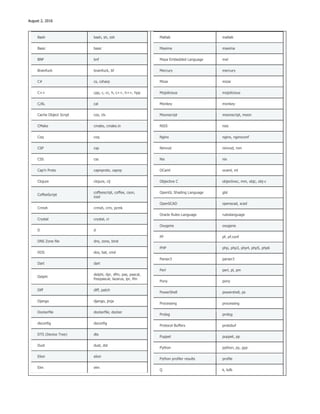
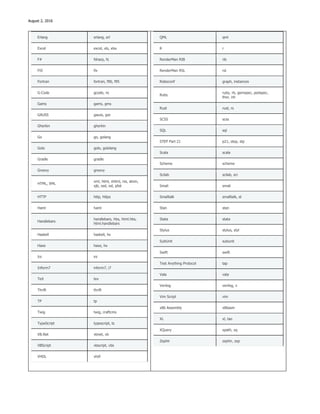
In the example above, we selected the programming language javascript for demonstration purpose
but you should change that to whichever language you are adding to your post. Here is the supported
languages list:
1C 1c
ABNF abnf
Access logs accesslog
Ada ada
ARM assembler armasm, arm
AVR assembler avrasm
ActionScript actionscript, as
Apache apache, apacheconf
AppleScript applescript, osascript
AsciiDoc asciidoc, adoc
AspectJ aspectj
AutoHotkey autohotkey
AutoIt autoit
Axapta axapta
IRPF90 irpf90
JSON json
Java java, jsp
JavaScript javascript, js, jsx
Lasso lasso, ls, lassoscript
Less less
LDIF ldif
Lisp lisp
LiveCode Server livecodeserver
LiveScript livescript, ls
Lua lua
Makefile makefile, mk, mak
Markdown markdown, md, mkdown, mkd
Mathematica mathematica, mma
August 2, 2016
Bash bash, sh, zsh
Basic basic
BNF bnf
Brainfuck brainfuck, bf
C# cs, csharp
C++ cpp, c, cc, h, c++, h++, hpp
C/AL cal
Cache Object Script cos, cls
CMake cmake, cmake.in
Coq coq
CSP csp
CSS css
Cap’n Proto capnproto, capnp
Clojure clojure, clj
CoffeeScript
coffeescript, coffee, cson,
iced
Crmsh crmsh, crm, pcmk
Crystal crystal, cr
D d
DNS Zone file dns, zone, bind
DOS dos, bat, cmd
Dart dart
Delphi
delphi, dpr, dfm, pas, pascal,
freepascal, lazarus, lpr, lfm
Diff diff, patch
Django django, jinja
Dockerfile dockerfile, docker
dsconfig dsconfig
DTS (Device Tree) dts
Dust dust, dst
Elixir elixir
Elm elm
Matlab matlab
Maxima maxima
Maya Embedded Language mel
Mercury mercury
Mizar mizar
Mojolicious mojolicious
Monkey monkey
Moonscript moonscript, moon
NSIS nsis
Nginx nginx, nginxconf
Nimrod nimrod, nim
Nix nix
OCaml ocaml, ml
Objective C objectivec, mm, objc, obj-c
OpenGL Shading Language glsl
OpenSCAD openscad, scad
Oracle Rules Language ruleslanguage
Oxygene oxygene
PF pf, pf.conf
PHP php, php3, php4, php5, php6
Parser3 parser3
Perl perl, pl, pm
Pony pony
PowerShell powershell, ps
Processing processing
Prolog prolog
Protocol Buffers protobuf
Puppet puppet, pp
Python python, py, gyp
Python profiler results profile
Q k, kdb
August 2, 2016
Erlang erlang, erl
Excel excel, xls, xlsx
F# fsharp, fs
FIX fix
Fortran fortran, f90, f95
G-Code gcode, nc
Gams gams, gms
GAUSS gauss, gss
Gherkin gherkin
Go go, golang
Golo golo, gololang
Gradle gradle
Groovy groovy
HTML, XML
xml, html, xhtml, rss, atom,
xjb, xsd, xsl, plist
HTTP http, https
Haml haml
Handlebars
handlebars, hbs, html.hbs,
html.handlebars
Haskell haskell, hs
Haxe haxe, hx
Ini ini
Inform7 inform7, i7
TeX tex
Thrift thrift
TP tp
Twig twig, craftcms
TypeScript typescript, ts
VB.Net vbnet, vb
VBScript vbscript, vbs
VHDL vhdl
QML qml
R r
RenderMan RIB rib
RenderMan RSL rsl
Roboconf graph, instances
Ruby
ruby, rb, gemspec, podspec,
thor, irb
Rust rust, rs
SCSS scss
SQL sql
STEP Part 21 p21, step, stp
Scala scala
Scheme scheme
Scilab scilab, sci
Smali smali
Smalltalk smalltalk, st
Stan stan
Stata stata
Stylus stylus, styl
SubUnit subunit
Swift swift
Test Anything Protocol tap
Vala vala
Verilog verilog, v
Vim Script vim
x86 Assembly x86asm
XL xl, tao
XQuery xpath, xq
Zephir zephir, zep
August 2, 2016
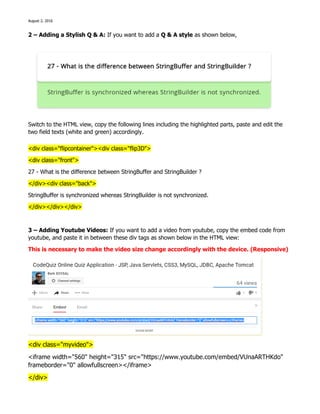
2 – Adding a Stylish Q & A: If you want to add a Q & A style as shown below,
Switch to the HTML view, copy the following lines including the highlighted parts, paste and edit the
two field texts (white and green) accordingly.
<div class="flipcontainer"><div class="flip3D">
<div class="front">
27 - What is the difference between StringBuffer and StringBuilder ?
</div><div class="back">
StringBuffer is synchronized whereas StringBuilder is not synchronized.
</div></div></div>
3 – Adding Youtube Videos: If you want to add a video from youtube, copy the embed code from
youtube, and paste it in between these div tags as shown below in the HTML view:
This is necessary to make the video size change accordingly with the device. (Responsive)
<div class="myvideo">
<iframe width="560" height="315" src="https://www.youtube.com/embed/VUnaARTHKdo"
frameborder="0" allowfullscreen></iframe>
</div>
August 2, 2016
4 - Fonts: Please do not edit the font-style of your post, since the whole website has a specific font
and changing the font of individual posts damages the integrity of the website. If you are copying
from a word document make sure to select this text/image and click on the following
button to clear the existing style. The safest is to copying from a .txt document.
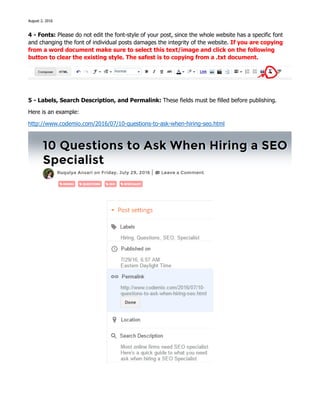
5 - Labels, Search Description, and Permalink: These fields must be filled before publishing.
Here is an example:
http://www.codemio.com/2016/07/10-questions-to-ask-when-hiring-seo.html
August 2, 2016
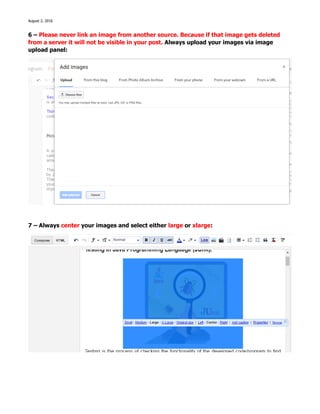
6 – Please never link an image from another source. Because if that image gets deleted
from a server it will not be visible in your post. Always upload your images via image
upload panel:
7 – Always center your images and select either large or xlarge:
August 2, 2016
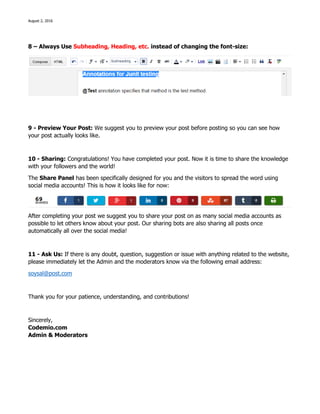
8 – Always Use Subheading, Heading, etc. instead of changing the font-size:
9 - Preview Your Post: We suggest you to preview your post before posting so you can see how
your post actually looks like.
10 - Sharing: Congratulations! You have completed your post. Now it is time to share the knowledge
with your followers and the world!
The Share Panel has been specifically designed for you and the visitors to spread the word using
social media accounts! This is how it looks like for now:
After completing your post we suggest you to share your post on as many social media accounts as
possible to let others know about your post. Our sharing bots are also sharing all posts once
automatically all over the social media!
11 - Ask Us: If there is any doubt, question, suggestion or issue with anything related to the website,
please immediately let the Admin and the moderators know via the following email address:
soysal@post.com
Thank you for your patience, understanding, and contributions!
Sincerely,
Codemio.com
Admin & Moderators

Guest author manual

  • 1.
    August 2, 2016 DearAuthors, Due to the number of new authors on Codemio.com, we have decided to prepare this Author Manual for you to consult while writing your posts. We hope that this document will be helpful to you. Thank you for your contributions to Codemio! Guest Author Manual 1 – Adding Code Snippets: If you want to add a Code Snippet into your post, switch to the HTML view, scroll and find the line you want to add your code snippet, and add the following pre and code tags along with your code. Please do not add any code without these tags. <pre><code class=”language-javascript”> Your Code Goes Here </code></pre> In the example above, we selected the programming language javascript for demonstration purpose but you should change that to whichever language you are adding to your post. Here is the supported languages list: 1C 1c ABNF abnf Access logs accesslog Ada ada ARM assembler armasm, arm AVR assembler avrasm ActionScript actionscript, as Apache apache, apacheconf AppleScript applescript, osascript AsciiDoc asciidoc, adoc AspectJ aspectj AutoHotkey autohotkey AutoIt autoit Axapta axapta IRPF90 irpf90 JSON json Java java, jsp JavaScript javascript, js, jsx Lasso lasso, ls, lassoscript Less less LDIF ldif Lisp lisp LiveCode Server livecodeserver LiveScript livescript, ls Lua lua Makefile makefile, mk, mak Markdown markdown, md, mkdown, mkd Mathematica mathematica, mma
  • 2.
    August 2, 2016 Bashbash, sh, zsh Basic basic BNF bnf Brainfuck brainfuck, bf C# cs, csharp C++ cpp, c, cc, h, c++, h++, hpp C/AL cal Cache Object Script cos, cls CMake cmake, cmake.in Coq coq CSP csp CSS css Cap’n Proto capnproto, capnp Clojure clojure, clj CoffeeScript coffeescript, coffee, cson, iced Crmsh crmsh, crm, pcmk Crystal crystal, cr D d DNS Zone file dns, zone, bind DOS dos, bat, cmd Dart dart Delphi delphi, dpr, dfm, pas, pascal, freepascal, lazarus, lpr, lfm Diff diff, patch Django django, jinja Dockerfile dockerfile, docker dsconfig dsconfig DTS (Device Tree) dts Dust dust, dst Elixir elixir Elm elm Matlab matlab Maxima maxima Maya Embedded Language mel Mercury mercury Mizar mizar Mojolicious mojolicious Monkey monkey Moonscript moonscript, moon NSIS nsis Nginx nginx, nginxconf Nimrod nimrod, nim Nix nix OCaml ocaml, ml Objective C objectivec, mm, objc, obj-c OpenGL Shading Language glsl OpenSCAD openscad, scad Oracle Rules Language ruleslanguage Oxygene oxygene PF pf, pf.conf PHP php, php3, php4, php5, php6 Parser3 parser3 Perl perl, pl, pm Pony pony PowerShell powershell, ps Processing processing Prolog prolog Protocol Buffers protobuf Puppet puppet, pp Python python, py, gyp Python profiler results profile Q k, kdb
  • 3.
    August 2, 2016 Erlangerlang, erl Excel excel, xls, xlsx F# fsharp, fs FIX fix Fortran fortran, f90, f95 G-Code gcode, nc Gams gams, gms GAUSS gauss, gss Gherkin gherkin Go go, golang Golo golo, gololang Gradle gradle Groovy groovy HTML, XML xml, html, xhtml, rss, atom, xjb, xsd, xsl, plist HTTP http, https Haml haml Handlebars handlebars, hbs, html.hbs, html.handlebars Haskell haskell, hs Haxe haxe, hx Ini ini Inform7 inform7, i7 TeX tex Thrift thrift TP tp Twig twig, craftcms TypeScript typescript, ts VB.Net vbnet, vb VBScript vbscript, vbs VHDL vhdl QML qml R r RenderMan RIB rib RenderMan RSL rsl Roboconf graph, instances Ruby ruby, rb, gemspec, podspec, thor, irb Rust rust, rs SCSS scss SQL sql STEP Part 21 p21, step, stp Scala scala Scheme scheme Scilab scilab, sci Smali smali Smalltalk smalltalk, st Stan stan Stata stata Stylus stylus, styl SubUnit subunit Swift swift Test Anything Protocol tap Vala vala Verilog verilog, v Vim Script vim x86 Assembly x86asm XL xl, tao XQuery xpath, xq Zephir zephir, zep
  • 4.
    August 2, 2016 2– Adding a Stylish Q & A: If you want to add a Q & A style as shown below, Switch to the HTML view, copy the following lines including the highlighted parts, paste and edit the two field texts (white and green) accordingly. <div class="flipcontainer"><div class="flip3D"> <div class="front"> 27 - What is the difference between StringBuffer and StringBuilder ? </div><div class="back"> StringBuffer is synchronized whereas StringBuilder is not synchronized. </div></div></div> 3 – Adding Youtube Videos: If you want to add a video from youtube, copy the embed code from youtube, and paste it in between these div tags as shown below in the HTML view: This is necessary to make the video size change accordingly with the device. (Responsive) <div class="myvideo"> <iframe width="560" height="315" src="https://www.youtube.com/embed/VUnaARTHKdo" frameborder="0" allowfullscreen></iframe> </div>
  • 5.
    August 2, 2016 4- Fonts: Please do not edit the font-style of your post, since the whole website has a specific font and changing the font of individual posts damages the integrity of the website. If you are copying from a word document make sure to select this text/image and click on the following button to clear the existing style. The safest is to copying from a .txt document. 5 - Labels, Search Description, and Permalink: These fields must be filled before publishing. Here is an example: http://www.codemio.com/2016/07/10-questions-to-ask-when-hiring-seo.html
  • 6.
    August 2, 2016 6– Please never link an image from another source. Because if that image gets deleted from a server it will not be visible in your post. Always upload your images via image upload panel: 7 – Always center your images and select either large or xlarge:
  • 7.
    August 2, 2016 8– Always Use Subheading, Heading, etc. instead of changing the font-size: 9 - Preview Your Post: We suggest you to preview your post before posting so you can see how your post actually looks like. 10 - Sharing: Congratulations! You have completed your post. Now it is time to share the knowledge with your followers and the world! The Share Panel has been specifically designed for you and the visitors to spread the word using social media accounts! This is how it looks like for now: After completing your post we suggest you to share your post on as many social media accounts as possible to let others know about your post. Our sharing bots are also sharing all posts once automatically all over the social media! 11 - Ask Us: If there is any doubt, question, suggestion or issue with anything related to the website, please immediately let the Admin and the moderators know via the following email address: soysal@post.com Thank you for your patience, understanding, and contributions! Sincerely, Codemio.com Admin & Moderators