Google Cloud Certified -
Professional Data
Engineer
PRACTICE QUESTIONS
SKILLCERTPRO
For your information:
 Each Question will be displayed for 40 Secs.
 Each Answer & Explanation will be displayed for 30 Secs.
 If you need more time, pause the video and resume when you’re ready.
 All the Documentation links given in explanation are also given in Description for
easy access.
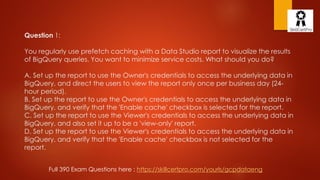
Question 1:
You regularly use prefetch caching with a Data Studio report to visualize the results
of BigQuery queries. You want to minimize service costs. What should you do?
A. Set up the report to use the Owner's credentials to access the underlying data in
BigQuery, and direct the users to view the report only once per business day (24-
hour period).
B. Set up the report to use the Owner's credentials to access the underlying data in
BigQuery, and verify that the 'Enable cache' checkbox is selected for the report.
C. Set up the report to use the Viewer's credentials to access the underlying data in
BigQuery, and also set it up to be a 'view-only' report.
D. Set up the report to use the Viewer's credentials to access the underlying data in
BigQuery, and verify that the 'Enable cache' checkbox is not selected for the
report.
Full 390 Exam Questions here : https://skillcertpro.com/yourls/gcpdataeng
Answer: B
 Correct option is B as you must set Owner credentials to use the 'enable cache'
option in BigQuery. It is also a Google best practice to use the ‘enable cache’
option when the business scenario calls for using prefetch caching;
 Refer GCP documentation - Datastudio data caching: -
https://support.google.com/datastudio/answer/7020039?hl=en;
 The prefetch cache is only active for data sources that use owner's
credentials to access the underlying data.
 Options A, C, & D are wrong as cache auto-expires every 12 hours; a prefetch
cache is only for data sources that use the Owner's credentials and not the
Viewer's credentials;
Full 390 Exam Questions here : https://skillcertpro.com/yourls/gcpdataeng
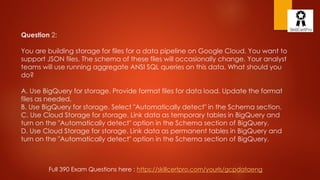
Question 2:
You are building storage for files for a data pipeline on Google Cloud. You want to
support JSON files. The schema of these files will occasionally change. Your analyst
teams will use running aggregate ANSI SQL queries on this data. What should you
do?
A. Use BigQuery for storage. Provide format files for data load. Update the format
files as needed.
B. Use BigQuery for storage. Select "Automatically detect" in the Schema section.
C. Use Cloud Storage for storage. Link data as temporary tables in BigQuery and
turn on the "Automatically detect" option in the Schema section of BigQuery.
D. Use Cloud Storage for storage. Link data as permanent tables in BigQuery and
turn on the "Automatically detect" option in the Schema section of BigQuery.
Full 390 Exam Questions here : https://skillcertpro.com/yourls/gcpdataeng
Answer: B
 Correct answer is B as the requirement is to support occasionally (schema) changing
JSON files and aggregate ANSI SQL queries: you need to use BigQuery, and it is quickest
to use 'Automatically detect' for schema changes.
 Refer GCP documentation - BigQuery Auto-Detection: -
https://cloud.google.com/bigquery/docs/schema-detect;
 Schema auto-detection is available when you load data into BigQuery, and when you
query an external data source.
 When auto-detection is enabled, BigQuery starts the inference process by selecting a
random file in the data source and scanning up to 100 rows of data to use as a
representative sample. BigQuery then examines each field and attempts to assign a data
type to that field based on the values in the sample.
 A is not correct because you should not provide format files: you can simply turn on the
'Automatically detect' schema changes flag.
 C and D are not correct as Cloud Storage is not ideal for this scenario; it is cumbersome,
adds latency and doesn't add value.
Question 3:
You are developing an application on Google Cloud that will label famous landmarks in
users’ photos. You are under competitive pressure to develop the predictive model quickly.
You need to keep service costs low. What should you do?
A. Build an application that calls the Cloud Vision API. Inspect the generated MID values to
supply the image labels.
B. Build an application that calls the Cloud Vision API. Pass landmark locations as base64-
encoded strings.
C. Build and train a classification model with TensorFlow. Deploy the model using Cloud
Machine Learning Engine. Pass landmark locations as base64-encoded strings.
D. Build and train a classification model with TensorFlow. Deploy the model using Cloud
Machine Learning Engine. Inspect the generated MID values to supply the image labels.
Full 390 Exam Questions here : https://skillcertpro.com/yourls/gcpdataeng
Answer: B
 Correct answer is B as the requirement is to quickly develop a model that generates landmark labels
from photos, it can be easily supported by Cloud Vision API.
 Refer GCP documentation - Cloud Vision: - https://cloud.google.com/vision/docs/;
 Cloud Vision offers both pretrained models via an API and the ability to build custom models using
AutoML Vision to provide flexibility depending on your use case.
 Cloud Vision API enables developers to understand the content of an image by encapsulating
powerful machine learning models in an easy-to-use REST API. It quickly classifies images into
thousands of categories (such as, “sailboat”), detects individual objects and faces within images,
and reads printed words contained within images. You can build metadata on your image catalog,
moderate offensive content, or enable new marketing scenarios through image sentiment analysis.
 Option A is wrong as you should not inspect the generated MID values; instead, you should simply
pass the image locations to the API and use the labels, which are output.
 Options C & D are wrong as you should not build a custom classification TF model for this scenario, as
it would require time.
Question 4:
Your company is in a highly regulated industry. One of your requirements is to
ensure external users have access only to the non PII fields information required to
do their jobs. You want to enforce this requirement with Google BigQuery. Which
access control method would you use?
A. Use Primitive role on the dataset
B. Use Predefined role on the dataset
C. Use Authorized view with the same dataset with proper permissions
D. Use Authorized view with the different dataset with proper permissions
Full 390 Exam Questions here : https://skillcertpro.com/yourls/gcpdataeng
Answer: D
 Correct answer is D as the controlled access can be granted using Authorized view. The Authorized
view needs to be in a different dataset than the source.
 Refer GCP documentation - BigQuery Authorized Views: -
https://cloud.google.com/bigquery/docs/share-access-views;
 Giving a view access to a dataset is also known as creating an authorized view in BigQuery. An
authorized view allows you to share query results with particular users and groups without giving them
access to the underlying tables. You can also use the view's SQL query to restrict the columns (fields)
the users are able to query.
 When you create the view, it must be created in a dataset separate from the source data queried by
the view. Because you can assign access controls only at the dataset level, if the view is created in
the same dataset as the source data, your users would have access to both the view and the data.
 Options A, B & C are wrong as they would provide access to the complete datasets with the source
included.
Question 5:
You are building a data pipeline on Google Cloud. You need to select services that
will host a deep neural network machine-learning model also hosted on Google
Cloud. You also need to monitor and run jobs that could occasionally fail. What
should you do?
A. Use Cloud Machine Learning to host your model. Monitor the status of the
Operation object for 'error' results.
B. Use Cloud Machine Learning to host your model. Monitor the status of the Jobs
object for 'failed' job states.
C. Use a Kubernetes Engine cluster to host your model. Monitor the status of the
Jobs object for 'failed' job states.
D. Use a Kubernetes Engine cluster to host your model. Monitor the status of
Operation object for 'error' results.
Full 390 Exam Questions here : https://skillcertpro.com/yourls/gcpdataeng
Answer: B
 Correct answer is B as the requirement is to host a Machine Learning Deep
Neural Network job it is ideal to use the Cloud Machine Learning service.
Monitoring works on Jobs object.
 Refer GCP documentation - ML Engine Managing Jobs: -
https://cloud.google.com/ml-engine/docs/tensorflow/managing-models-jobs;
 Option A is wrong as monitoring should not be on Operation object to monitor
failures.
 Options C & D are wrong as you should not use a Kubernetes Engine cluster for
Machine Learning jobs.
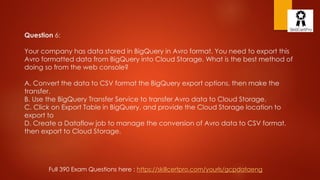
Question 6:
Your company has data stored in BigQuery in Avro format. You need to export this
Avro formatted data from BigQuery into Cloud Storage. What is the best method of
doing so from the web console?
A. Convert the data to CSV format the BigQuery export options, then make the
transfer.
B. Use the BigQuery Transfer Service to transfer Avro data to Cloud Storage.
C. Click on Export Table in BigQuery, and provide the Cloud Storage location to
export to
D. Create a Dataflow job to manage the conversion of Avro data to CSV format,
then export to Cloud Storage.
Full 390 Exam Questions here : https://skillcertpro.com/yourls/gcpdataeng
Answer: C
 Correct answer is C as BigQuery can export Avro data natively to Cloud Storage.
 Refer GCP documentation - BigQuery Exporting Data: -
https://cloud.google.com/bigquery/docs/exporting-data;
 After you've loaded your data into BigQuery, you can export the data in several formats. BigQuery
can export up to 1 GB of data to a single file. If you are exporting more than 1 GB of data, you must
export your data to multiple files. When you export your data to multiple files, the size of the files will
vary.
 You cannot export data to a local file or to Google Drive, but you can save query results to a local
file. The only supported export location is Google Cloud Storage.
 For Export format, choose the format for your exported data: CSV, JSON (Newline Delimited), or Avro.
 Option A is wrong as BigQuery can export Avro data natively to Cloud Storage and does not need to
be converted to CSV format.
 Option B is wrong as BigQuery Transfer Service is for moving BigQuery data to Google SaaS
applications (AdWords, DoubleClick, etc.). You will want to do a normal export of data, which works
with Avro formatted data.
 Option D is wrong as Google Cloud Dataflow can be used to read data from BigQuery instead of
manually exporting it, but doesn't work through console.
Question 7:
You need to take streaming data from thousands of Internet of Things (IoT) devices,
ingest it, run it through a processing pipeline, and store it for analysis. You want to
run SQL queries against your data for analysis. What services in which order should
you use for this task?
A. Cloud Dataflow, Cloud Pub/Sub, BigQuery
B. Cloud Pub/Sub, Cloud Dataflow, Cloud Dataproc
C. Cloud Pub/Sub, Cloud Dataflow, BigQuery
D. App Engine, Cloud Dataflow, BigQuery
Full 390 Exam Questions here : https://skillcertpro.com/yourls/gcpdataeng
Answer: C
 Correct answer is C as the need to ingest it, transform and store the Cloud Pub/Sub, Cloud Dataflow, BigQuery is ideal stack to handle
the IoT data.
 Refer GCP documentation - IoT: - https://cloud.google.com/solutions/iot-overview#ingestion;
 Google Cloud Pub/Sub provides a globally durable message ingestion service. By creating topics for streams or channels, you can
enable different components of your application to subscribe to specific streams of data without needing to construct subscriber-
specific channels on each device. Cloud Pub/Sub also natively connects to other Cloud Platform services, helping you to connect
ingestion, data pipelines, and storage systems.
 Google Cloud Dataflow provides the open Apache Beam programming model as a managed service for processing data in multiple
ways, including batch operations, extract-transform-load (ETL) patterns, and continuous, streaming computation. Cloud Dataflow can
be particularly useful for managing the high-volume data processing pipelines required for IoT scenarios. Cloud Dataflow is also
designed to integrate seamlessly with the other Cloud Platform services you choose for your pipeline.
 Google BigQuery provides a fully managed data warehouse with a familiar SQL interface, so you can store your IoT data alongside
any of your other enterprise analytics and logs. The performance and cost of BigQuery means you might keep your valuable data
longer, instead of deleting it just to save disk space.
 Sample Arch - Mobile Gaming Analysis Telemetry: - https://cloud.google.com/solutions/mobile/mobile-gaming-analysis-telemetry;
 Processing game client and game server events in real time;
 Option A is wrong as the stack is correct, however the order is not correct.
 Option B is wrong as Dataproc is not an ideal tool for analysis. Cloud Dataproc is a fast, easy-to-use, fully-managed cloud service for
running Apache Spark and Apache Hadoop clusters in a simpler, more cost-efficient way.
 Option D is wrong as App Engine is not an ideal ingestion tool to handle IoT data.
Question 8:
You have 250,000 devices which produce a JSON device status event every 10
seconds. You want to capture this event data for outlier time series analysis. What
should you do?
A. Ship the data into BigQuery. Develop a custom application that uses the
BigQuery API to query the dataset and displays device outlier data based on your
business requirements.
B. Ship the data into BigQuery. Use the BigQuery console to query the dataset and
display device outlier data based on your business requirements.
C. Ship the data into Cloud Bigtable. Use the Cloud Bigtable cbt tool to display
device outlier data based on your business requirements.
D. Ship the data into Cloud Bigtable. Install and use the HBase shell for Cloud
Bigtable to query the table for device outlier data based on your business
requirements.
Full 390 Exam Questions here : https://skillcertpro.com/yourls/gcpdataeng
Answer: C
 Correct answer is C as the time series data with its data type,
volume, and query pattern best fits BigTable capabilities.
 Refer GCP documentation - Bigtable Time Series data and CBT: -
https://cloud.google.com/bigtable/docs/schema-design-time-
series;
 Options A & B are wrong as BigQuery is not suitable for the query
pattern in this scenario.
 Option D is wrong as you can use the simpler method of 'cbt tool'
to support this scenario.
Question 9:
Your company is planning the infrastructure for a new large-scale
application that will need to store over 100 TB or a petabyte of data
in NoSQL format for Low-latency read/write and High-throughput
analytics. Which storage option should you use?
A. Cloud Bigtable
B. Cloud Spanner
C. Cloud SQL
D. Cloud Datastore
Answer: A
 Correct answer is A as Bigtable is an ideal solution to provide low
latency, high throughput data processing storage option with
analytics;
 Refer GCP documentation - Storage Options: -
https://cloud.google.com/storage/docs/;
 Options B & C are wrong as they are relational databases;
 Option D is wrong as Cloud Datastore is not ideal for analytics.
Question 10:
You are building new real-time data warehouse for your company and will use
Google BigQuery streaming inserts. There is no guarantee that data will only be sent
in once but you do have a unique ID for each row of data and an event
timestamp. You want to ensure that duplicates are not included while interactively
querying data. Which query type should you use?
A. Include ORDER BY DESK on timestamp column and LIMIT to 1.
B. Use GROUP BY on the unique ID column and timestamp column and SUM on the
values.
C. Use the LAG window function with PARTITION by unique ID along with WHERE
LAG IS NOT NULL.
D. Use the ROW_NUMBER window function with PARTITION by unique ID along with
WHERE row equals 1.
Answer: D
 Correct answer is D as the best approach is to ROW_NUMBER with PARTITION by
the UNIQUE_ID and filter it by row_number = 1.
 Refer GCP documentation - BigQuery Streaming Data - Removing Duplicates: -
https://cloud.google.com/bigquery/streaming-data-into-
bigquery#manually_removing_duplicates;
 To remove duplicates, perform the following query. You should specify a
destination table, allow large results, and disable result flattening.
 #standardSQL SELECT * EXCEPT(row_number) FROM ( SELECT *,
ROW_NUMBER() OVER (PARTITION BY ID_COLUMN) row_number FROM
`TABLE_NAME`) WHERE row_number = 1 ;
Hope you enjoyed the questions. Want to practice more questions?
We have 390+ Practice set questions for Google Cloud Certified -
Professional Data Engineer certification (Taken from previous exams)
Full Practice Set link Given in Description of this Video
100% Money back Guarantee, If you don't pass the exam in 1st
attempt, your money will be refunded back.
Full 390 Exam Questions here : https://skillcertpro.com/yourls/gcpdataeng
Hope you enjoyed the questions. Want to practice more questions?
We have 390+ Practice set questions for Google Cloud Certified -
Professional Data Engineer certification (Taken from previous exams)
Full Practice Set link below
https://skillcertpro.com/yourls/gcpdataeng
100% Money back Guarantee, If you don't pass the exam in 1st
attempt, your money will be refunded back.
Full 390 Exam Questions here : https://skillcertpro.com/yourls/gcpdataeng
Thank you.

Google cloud Professional Data Engineer practice exam test 2020

  • 1.
    Google Cloud Certified- Professional Data Engineer PRACTICE QUESTIONS SKILLCERTPRO
  • 2.
    For your information: Each Question will be displayed for 40 Secs.  Each Answer & Explanation will be displayed for 30 Secs.  If you need more time, pause the video and resume when you’re ready.  All the Documentation links given in explanation are also given in Description for easy access.
  • 3.
    Question 1: You regularlyuse prefetch caching with a Data Studio report to visualize the results of BigQuery queries. You want to minimize service costs. What should you do? A. Set up the report to use the Owner's credentials to access the underlying data in BigQuery, and direct the users to view the report only once per business day (24- hour period). B. Set up the report to use the Owner's credentials to access the underlying data in BigQuery, and verify that the 'Enable cache' checkbox is selected for the report. C. Set up the report to use the Viewer's credentials to access the underlying data in BigQuery, and also set it up to be a 'view-only' report. D. Set up the report to use the Viewer's credentials to access the underlying data in BigQuery, and verify that the 'Enable cache' checkbox is not selected for the report. Full 390 Exam Questions here : https://skillcertpro.com/yourls/gcpdataeng
  • 4.
    Answer: B  Correctoption is B as you must set Owner credentials to use the 'enable cache' option in BigQuery. It is also a Google best practice to use the ‘enable cache’ option when the business scenario calls for using prefetch caching;  Refer GCP documentation - Datastudio data caching: - https://support.google.com/datastudio/answer/7020039?hl=en;  The prefetch cache is only active for data sources that use owner's credentials to access the underlying data.  Options A, C, & D are wrong as cache auto-expires every 12 hours; a prefetch cache is only for data sources that use the Owner's credentials and not the Viewer's credentials; Full 390 Exam Questions here : https://skillcertpro.com/yourls/gcpdataeng
  • 5.
    Question 2: You arebuilding storage for files for a data pipeline on Google Cloud. You want to support JSON files. The schema of these files will occasionally change. Your analyst teams will use running aggregate ANSI SQL queries on this data. What should you do? A. Use BigQuery for storage. Provide format files for data load. Update the format files as needed. B. Use BigQuery for storage. Select "Automatically detect" in the Schema section. C. Use Cloud Storage for storage. Link data as temporary tables in BigQuery and turn on the "Automatically detect" option in the Schema section of BigQuery. D. Use Cloud Storage for storage. Link data as permanent tables in BigQuery and turn on the "Automatically detect" option in the Schema section of BigQuery. Full 390 Exam Questions here : https://skillcertpro.com/yourls/gcpdataeng
  • 6.
    Answer: B  Correctanswer is B as the requirement is to support occasionally (schema) changing JSON files and aggregate ANSI SQL queries: you need to use BigQuery, and it is quickest to use 'Automatically detect' for schema changes.  Refer GCP documentation - BigQuery Auto-Detection: - https://cloud.google.com/bigquery/docs/schema-detect;  Schema auto-detection is available when you load data into BigQuery, and when you query an external data source.  When auto-detection is enabled, BigQuery starts the inference process by selecting a random file in the data source and scanning up to 100 rows of data to use as a representative sample. BigQuery then examines each field and attempts to assign a data type to that field based on the values in the sample.  A is not correct because you should not provide format files: you can simply turn on the 'Automatically detect' schema changes flag.  C and D are not correct as Cloud Storage is not ideal for this scenario; it is cumbersome, adds latency and doesn't add value.
  • 7.
    Question 3: You aredeveloping an application on Google Cloud that will label famous landmarks in users’ photos. You are under competitive pressure to develop the predictive model quickly. You need to keep service costs low. What should you do? A. Build an application that calls the Cloud Vision API. Inspect the generated MID values to supply the image labels. B. Build an application that calls the Cloud Vision API. Pass landmark locations as base64- encoded strings. C. Build and train a classification model with TensorFlow. Deploy the model using Cloud Machine Learning Engine. Pass landmark locations as base64-encoded strings. D. Build and train a classification model with TensorFlow. Deploy the model using Cloud Machine Learning Engine. Inspect the generated MID values to supply the image labels. Full 390 Exam Questions here : https://skillcertpro.com/yourls/gcpdataeng
  • 8.
    Answer: B  Correctanswer is B as the requirement is to quickly develop a model that generates landmark labels from photos, it can be easily supported by Cloud Vision API.  Refer GCP documentation - Cloud Vision: - https://cloud.google.com/vision/docs/;  Cloud Vision offers both pretrained models via an API and the ability to build custom models using AutoML Vision to provide flexibility depending on your use case.  Cloud Vision API enables developers to understand the content of an image by encapsulating powerful machine learning models in an easy-to-use REST API. It quickly classifies images into thousands of categories (such as, “sailboat”), detects individual objects and faces within images, and reads printed words contained within images. You can build metadata on your image catalog, moderate offensive content, or enable new marketing scenarios through image sentiment analysis.  Option A is wrong as you should not inspect the generated MID values; instead, you should simply pass the image locations to the API and use the labels, which are output.  Options C & D are wrong as you should not build a custom classification TF model for this scenario, as it would require time.
  • 9.
    Question 4: Your companyis in a highly regulated industry. One of your requirements is to ensure external users have access only to the non PII fields information required to do their jobs. You want to enforce this requirement with Google BigQuery. Which access control method would you use? A. Use Primitive role on the dataset B. Use Predefined role on the dataset C. Use Authorized view with the same dataset with proper permissions D. Use Authorized view with the different dataset with proper permissions Full 390 Exam Questions here : https://skillcertpro.com/yourls/gcpdataeng
  • 10.
    Answer: D  Correctanswer is D as the controlled access can be granted using Authorized view. The Authorized view needs to be in a different dataset than the source.  Refer GCP documentation - BigQuery Authorized Views: - https://cloud.google.com/bigquery/docs/share-access-views;  Giving a view access to a dataset is also known as creating an authorized view in BigQuery. An authorized view allows you to share query results with particular users and groups without giving them access to the underlying tables. You can also use the view's SQL query to restrict the columns (fields) the users are able to query.  When you create the view, it must be created in a dataset separate from the source data queried by the view. Because you can assign access controls only at the dataset level, if the view is created in the same dataset as the source data, your users would have access to both the view and the data.  Options A, B & C are wrong as they would provide access to the complete datasets with the source included.
  • 11.
    Question 5: You arebuilding a data pipeline on Google Cloud. You need to select services that will host a deep neural network machine-learning model also hosted on Google Cloud. You also need to monitor and run jobs that could occasionally fail. What should you do? A. Use Cloud Machine Learning to host your model. Monitor the status of the Operation object for 'error' results. B. Use Cloud Machine Learning to host your model. Monitor the status of the Jobs object for 'failed' job states. C. Use a Kubernetes Engine cluster to host your model. Monitor the status of the Jobs object for 'failed' job states. D. Use a Kubernetes Engine cluster to host your model. Monitor the status of Operation object for 'error' results. Full 390 Exam Questions here : https://skillcertpro.com/yourls/gcpdataeng
  • 12.
    Answer: B  Correctanswer is B as the requirement is to host a Machine Learning Deep Neural Network job it is ideal to use the Cloud Machine Learning service. Monitoring works on Jobs object.  Refer GCP documentation - ML Engine Managing Jobs: - https://cloud.google.com/ml-engine/docs/tensorflow/managing-models-jobs;  Option A is wrong as monitoring should not be on Operation object to monitor failures.  Options C & D are wrong as you should not use a Kubernetes Engine cluster for Machine Learning jobs.
  • 13.
    Question 6: Your companyhas data stored in BigQuery in Avro format. You need to export this Avro formatted data from BigQuery into Cloud Storage. What is the best method of doing so from the web console? A. Convert the data to CSV format the BigQuery export options, then make the transfer. B. Use the BigQuery Transfer Service to transfer Avro data to Cloud Storage. C. Click on Export Table in BigQuery, and provide the Cloud Storage location to export to D. Create a Dataflow job to manage the conversion of Avro data to CSV format, then export to Cloud Storage. Full 390 Exam Questions here : https://skillcertpro.com/yourls/gcpdataeng
  • 14.
    Answer: C  Correctanswer is C as BigQuery can export Avro data natively to Cloud Storage.  Refer GCP documentation - BigQuery Exporting Data: - https://cloud.google.com/bigquery/docs/exporting-data;  After you've loaded your data into BigQuery, you can export the data in several formats. BigQuery can export up to 1 GB of data to a single file. If you are exporting more than 1 GB of data, you must export your data to multiple files. When you export your data to multiple files, the size of the files will vary.  You cannot export data to a local file or to Google Drive, but you can save query results to a local file. The only supported export location is Google Cloud Storage.  For Export format, choose the format for your exported data: CSV, JSON (Newline Delimited), or Avro.  Option A is wrong as BigQuery can export Avro data natively to Cloud Storage and does not need to be converted to CSV format.  Option B is wrong as BigQuery Transfer Service is for moving BigQuery data to Google SaaS applications (AdWords, DoubleClick, etc.). You will want to do a normal export of data, which works with Avro formatted data.  Option D is wrong as Google Cloud Dataflow can be used to read data from BigQuery instead of manually exporting it, but doesn't work through console.
  • 15.
    Question 7: You needto take streaming data from thousands of Internet of Things (IoT) devices, ingest it, run it through a processing pipeline, and store it for analysis. You want to run SQL queries against your data for analysis. What services in which order should you use for this task? A. Cloud Dataflow, Cloud Pub/Sub, BigQuery B. Cloud Pub/Sub, Cloud Dataflow, Cloud Dataproc C. Cloud Pub/Sub, Cloud Dataflow, BigQuery D. App Engine, Cloud Dataflow, BigQuery Full 390 Exam Questions here : https://skillcertpro.com/yourls/gcpdataeng
  • 16.
    Answer: C  Correctanswer is C as the need to ingest it, transform and store the Cloud Pub/Sub, Cloud Dataflow, BigQuery is ideal stack to handle the IoT data.  Refer GCP documentation - IoT: - https://cloud.google.com/solutions/iot-overview#ingestion;  Google Cloud Pub/Sub provides a globally durable message ingestion service. By creating topics for streams or channels, you can enable different components of your application to subscribe to specific streams of data without needing to construct subscriber- specific channels on each device. Cloud Pub/Sub also natively connects to other Cloud Platform services, helping you to connect ingestion, data pipelines, and storage systems.  Google Cloud Dataflow provides the open Apache Beam programming model as a managed service for processing data in multiple ways, including batch operations, extract-transform-load (ETL) patterns, and continuous, streaming computation. Cloud Dataflow can be particularly useful for managing the high-volume data processing pipelines required for IoT scenarios. Cloud Dataflow is also designed to integrate seamlessly with the other Cloud Platform services you choose for your pipeline.  Google BigQuery provides a fully managed data warehouse with a familiar SQL interface, so you can store your IoT data alongside any of your other enterprise analytics and logs. The performance and cost of BigQuery means you might keep your valuable data longer, instead of deleting it just to save disk space.  Sample Arch - Mobile Gaming Analysis Telemetry: - https://cloud.google.com/solutions/mobile/mobile-gaming-analysis-telemetry;  Processing game client and game server events in real time;  Option A is wrong as the stack is correct, however the order is not correct.  Option B is wrong as Dataproc is not an ideal tool for analysis. Cloud Dataproc is a fast, easy-to-use, fully-managed cloud service for running Apache Spark and Apache Hadoop clusters in a simpler, more cost-efficient way.  Option D is wrong as App Engine is not an ideal ingestion tool to handle IoT data.
  • 17.
    Question 8: You have250,000 devices which produce a JSON device status event every 10 seconds. You want to capture this event data for outlier time series analysis. What should you do? A. Ship the data into BigQuery. Develop a custom application that uses the BigQuery API to query the dataset and displays device outlier data based on your business requirements. B. Ship the data into BigQuery. Use the BigQuery console to query the dataset and display device outlier data based on your business requirements. C. Ship the data into Cloud Bigtable. Use the Cloud Bigtable cbt tool to display device outlier data based on your business requirements. D. Ship the data into Cloud Bigtable. Install and use the HBase shell for Cloud Bigtable to query the table for device outlier data based on your business requirements. Full 390 Exam Questions here : https://skillcertpro.com/yourls/gcpdataeng
  • 18.
    Answer: C  Correctanswer is C as the time series data with its data type, volume, and query pattern best fits BigTable capabilities.  Refer GCP documentation - Bigtable Time Series data and CBT: - https://cloud.google.com/bigtable/docs/schema-design-time- series;  Options A & B are wrong as BigQuery is not suitable for the query pattern in this scenario.  Option D is wrong as you can use the simpler method of 'cbt tool' to support this scenario.
  • 19.
    Question 9: Your companyis planning the infrastructure for a new large-scale application that will need to store over 100 TB or a petabyte of data in NoSQL format for Low-latency read/write and High-throughput analytics. Which storage option should you use? A. Cloud Bigtable B. Cloud Spanner C. Cloud SQL D. Cloud Datastore
  • 20.
    Answer: A  Correctanswer is A as Bigtable is an ideal solution to provide low latency, high throughput data processing storage option with analytics;  Refer GCP documentation - Storage Options: - https://cloud.google.com/storage/docs/;  Options B & C are wrong as they are relational databases;  Option D is wrong as Cloud Datastore is not ideal for analytics.
  • 21.
    Question 10: You arebuilding new real-time data warehouse for your company and will use Google BigQuery streaming inserts. There is no guarantee that data will only be sent in once but you do have a unique ID for each row of data and an event timestamp. You want to ensure that duplicates are not included while interactively querying data. Which query type should you use? A. Include ORDER BY DESK on timestamp column and LIMIT to 1. B. Use GROUP BY on the unique ID column and timestamp column and SUM on the values. C. Use the LAG window function with PARTITION by unique ID along with WHERE LAG IS NOT NULL. D. Use the ROW_NUMBER window function with PARTITION by unique ID along with WHERE row equals 1.
  • 22.
    Answer: D  Correctanswer is D as the best approach is to ROW_NUMBER with PARTITION by the UNIQUE_ID and filter it by row_number = 1.  Refer GCP documentation - BigQuery Streaming Data - Removing Duplicates: - https://cloud.google.com/bigquery/streaming-data-into- bigquery#manually_removing_duplicates;  To remove duplicates, perform the following query. You should specify a destination table, allow large results, and disable result flattening.  #standardSQL SELECT * EXCEPT(row_number) FROM ( SELECT *, ROW_NUMBER() OVER (PARTITION BY ID_COLUMN) row_number FROM `TABLE_NAME`) WHERE row_number = 1 ;
  • 23.
    Hope you enjoyedthe questions. Want to practice more questions? We have 390+ Practice set questions for Google Cloud Certified - Professional Data Engineer certification (Taken from previous exams) Full Practice Set link Given in Description of this Video 100% Money back Guarantee, If you don't pass the exam in 1st attempt, your money will be refunded back. Full 390 Exam Questions here : https://skillcertpro.com/yourls/gcpdataeng
  • 24.
    Hope you enjoyedthe questions. Want to practice more questions? We have 390+ Practice set questions for Google Cloud Certified - Professional Data Engineer certification (Taken from previous exams) Full Practice Set link below https://skillcertpro.com/yourls/gcpdataeng 100% Money back Guarantee, If you don't pass the exam in 1st attempt, your money will be refunded back. Full 390 Exam Questions here : https://skillcertpro.com/yourls/gcpdataeng
  • 25.