Understanding
Google APIs
Building application that uses Google APIs

Fethi DILMI
Active Member at Scientific Club of ESI – CSE
Technical Manager at GDG Algiers
Microsoft Student Partner
What's Google APIs?
What's Google APIs
●
    Google offers a variety of APIs, mostly web APIs for
    web developers and mobile developers.
●
    The APIs are based on popular Google consumer
    products, including Google Maps, Google Earth,
    AdSense, Adwords, Google Apps and YouTube.
What's Google APIs

    Example:
●
    YOU use Google+ from your web browser.
●
    Your Android application uses Google+ through
    Google+ API.
●
    i.e: Google APIs are the tools we need to build
    applications that can use Google Products.
How Google APIs work behind
the scenes?
How Google APIs work behind the scenes ?
●
    Most of Google APIs are web-based APIs.
●
    This kind of APIs are called RESTFUL APIs (because they
    are based on REST architecture).
●
    REST is a style of software architecture that is based on
    HTTP protocol to retrieve data.
How Google APIs work behind the scenes ?
●
    Most of Google APIs are web-based APIs.
●
    This kind of APIs are called RESTFUL APIs (because they
    are based on REST architecture).
●
    REST is a style of software architecture that is based on
    HTTP protocol to retrieve data.
      Simply, in order to use Google APIs , you
      only need to make HTTP requests to get
                        data ☺
How Google APIs work behind the scenes ?

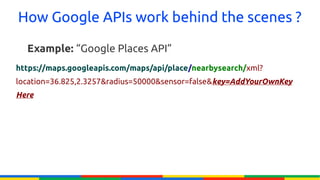
  Example: “Google Places API”
https://maps.googleapis.com/maps/api/place/nearbysearch/xml?
location=36.825,2.3257&radius=50000&sensor=false&key=AddYourOwnKey
Here
Global Structure of an API HTTP
request:
Global Structure of an API HTTP request
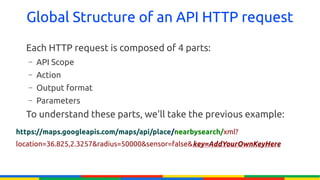
  Each HTTP request is composed of 4 parts:
   –   API Scope
   –   Action
   –   Output format
   –   Parameters
  To understand these parts, we'll take the previous example:
https://maps.googleapis.com/maps/api/place/nearbysearch/xml?
location=36.825,2.3257&radius=50000&sensor=false&key=AddYourOwnKeyHere
Global Structure of an API HTTP request

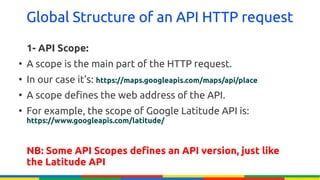
    1- API Scope:
●
    A scope is the main part of the HTTP request.
●
    In our case it's: https://maps.googleapis.com/maps/api/place
●
    A scope defines the web address of the API.
●
    For example, the scope of Google Latitude API is:
    https://www.googleapis.com/latitude/


    NB: Some API Scopes defines an API version, just like
    the Latitude API
Global Structure of an API HTTP request

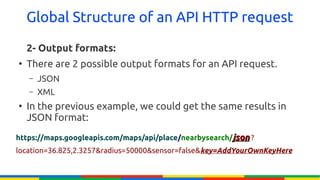
    2- Output formats:
●
    There are 2 possible output formats for an API request.
    –   JSON
    –   XML
●
    In the previous example, we could get the same results in
    JSON format:
https://maps.googleapis.com/maps/api/place/nearbysearch/json ?
location=36.825,2.3257&radius=50000&sensor=false&key=AddYourOwnKeyHere
Global Structure of an API HTTP request

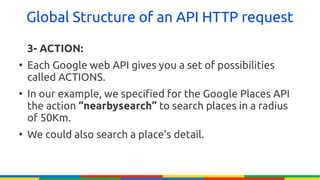
    3- ACTION:
●
    Each Google web API gives you a set of possibilities
    called ACTIONS.
●
    In our example, we specified for the Google Places API
    the action “nearbysearch” to search places in a radius
    of 50Km.
●
    We could also search a place's detail.
Global Structure of an API HTTP request

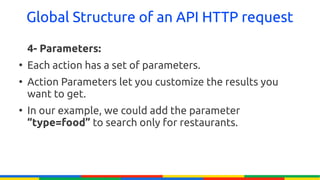
    4- Parameters:
●
    Each action has a set of parameters.
●
    Action Parameters let you customize the results you
    want to get.
●
    In our example, we could add the parameter
    “type=food” to search only for restaurants.
Types of Google web APIs
●
    There are 2 kinds of Google web APIs:
    –   Public APIs.
    –   Private APIs.
Types of Google web APIs

    1- Public APIs
●
    Interact with public content: Google Maps API, Google
    Places API ..
●
    Need an authentication key to be able to retrieve data.
Types of Google web APIs

    2- Private APIs
●
    Interact with user private date: Google+ API, Google
    Latitude API, Google Drive SDK ..
●
    Need an authorization process before accessing to user
    data.
Public APIs and Authentication:
What's THAT !!
Authentication
●
    Public APIs use authentication key to identify your application.
●
    This means, in our previous example we would not be able to
    make a search using Google Places API without specifying an
    authentication key.
●
    Each device type has a different kind of key:
    –   Android application authentication key.
    –   Web application authentication key.
    –   Web Service authentication key
    –   ..
Authentication


But Why ?
Authentication
●
    Identify from which device your application is making API request:
    i.e: You can't make an API request from a web browser using an
    Android application authentication key.
●
    Limit the quota of requests per day: Each API has a limited number
    of requests per day. Since your application makes request using an
    authentication key, Google Servers will be able to stop your
    application when it exceeds its daily quota.
●
    Limit the number of requests per second for a single user: Your
    application may be used by millions of people at the same time, and
    since we're talking about a daily quota, we have to limit the number of
    requests/second for a single user.
Authentication
●
    Identify from which device your application is making API request:
    i.e: You can't make an API request from a web browser using an
    Android application authentication key.
●
    Limit the quota of requests per day: Each API has a limited number
    of requests per day. Since your application makes request using an
    authentication key, Google Servers will be able to stop your
    application when it exceeds its daily quota.
●
    Limit the number of requests per second for a single user: Your
    application may be used by millions of people at the same time, and
    since we're talking about a daily quota, we have to limit the number of
    requests/second for a single user.
Authentication
●
    Identify from which device your application is making API request:
    i.e: You can't make an API request from a web browser using an
    Android application authentication key.
●
    Limit the quota of requests per day: Each API has a limited number
    of requests per day. Since your application makes request using an
    authentication key, Google Servers will be able to stop your
    application when it exceeds its daily quota.
●
    Limit the number of requests per second for a single user: Your
    application may be used by millions of people at the same time, and
    since we're talking about a daily quota, we have to limit the number of
    requests/second for a single user.
Private APIs and Authorization:
What's THAT !!
Authorization:
●
    Private APIs try to fetch user data.
●
    This cannot be done without the permission of the user.
●
    So we need a tool to demand permissions from the user
    in order to perform action on his/her private data.
Authorization:
●
    Private APIs try to fetch user data.
●
    This cannot be done without the permission of the user.
●
    So we need a tool to demand permissions from the user
    in order to perform action on his/her private data.


           THIS TOOL IS CALLED “OAuth2.0”
What is OAuth2.0 ?


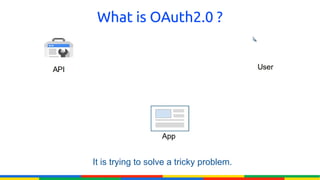
It is trying to solve a tricky problem.
What is OAuth2.0 ?


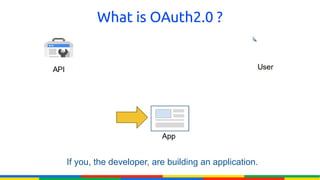
If you, the developer, are building an application.
What is OAuth2.0 ?


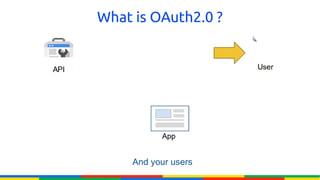
     And your users
What is OAuth2.0 ?


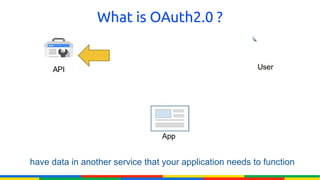
have data in another service that your application needs to function
What is OAuth2.0 ?


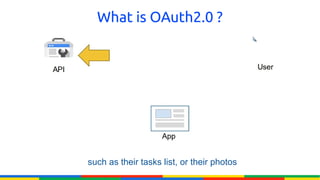
such as their tasks list, or their photos
What is OAuth2.0 ?


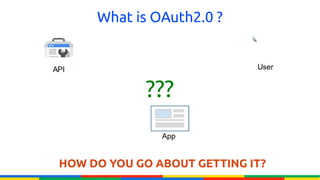
            ???


HOW DO YOU GO ABOUT GETTING IT?
NO !!


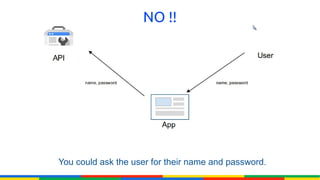
You could ask the user for their name and password.
NO !!


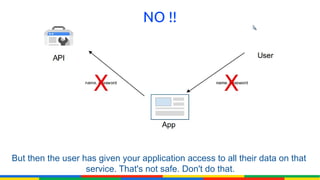
But then the user has given your application access to all their data on that
                   service. That's not safe. Don't do that.
NO !!


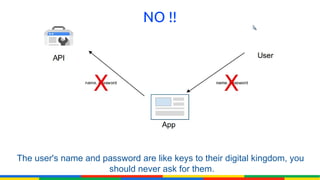
The user's name and password are like keys to their digital kingdom, you
                     should never ask for them.
Better ☺


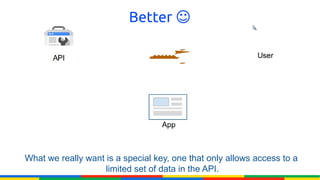
What we really want is a special key, one that only allows access to a
                    limited set of data in the API.
Better ☺


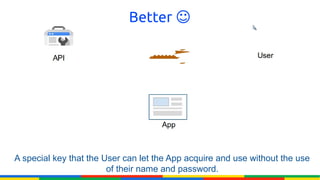
A special key that the User can let the App acquire and use without the use
                        of their name and password.
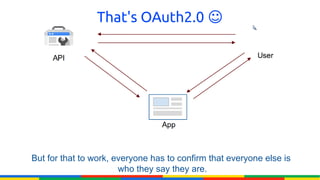
That's OAuth2.0 ☺


But for that to work, everyone has to confirm that everyone else is
                       who they say they are.
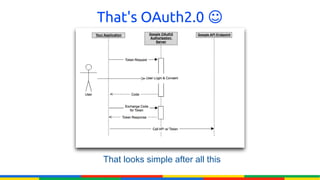
That's OAuth2.0 ☺


That looks simple after all this
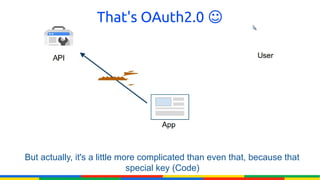
That's OAuth2.0 ☺


But actually, it's a little more complicated than even that, because that
                              special key (Code)
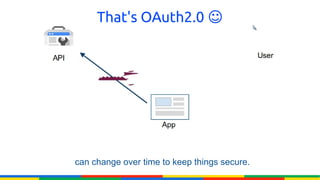
That's OAuth2.0 ☺


can change over time to keep things secure.
How to create Authentication and
Authorization keys ?
How to create Authentication and
             Authorization keys ?
●
    To get authentication/authorization keys, you have to
    register your application.
●
    Registering your application is signing its name, type,
    package, and extra info.
How to create Authentication and
             Authorization keys ?
●
    To get authentication/authorization keys, you have to
    register your application.
●
    Registering your application is signing its name, type,
    package, and extra info.


       Please focus on the following steps ☺
How to create Authentication and
             Authorization keys ?
●
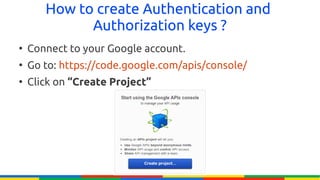
    Connect to your Google account.
●
    Go to: https://code.google.com/apis/console/
●
    Click on “Create Project”
How to create Authentication and
              Authorization keys ?
●
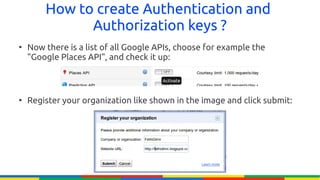
    Now there is a list of all Google APIs, choose for example the
    "Google Places API", and check it up:


●
    Register your organization like shown in the image and click submit:
How to create Authentication and
              Authorization keys ?
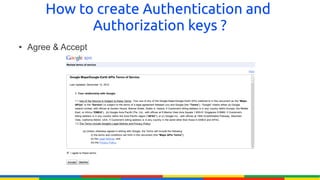
●   Agree & Accept
How to create Authentication and
              Authorization keys ?
●
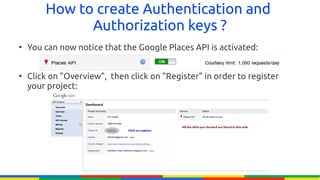
    You can now notice that the Google Places API is activated:


●
    Click on "Overview", then click on "Register" in order to register
    your project:
How to create Authentication and
              Authorization keys ?
●
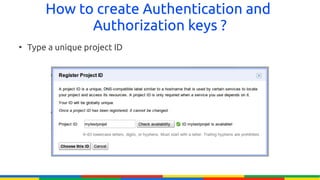
    Type a unique project ID
How to create Authentication and
              Authorization keys ?
●
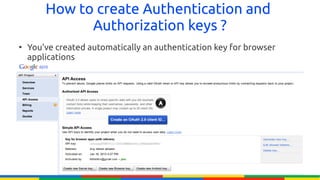
    You've created automatically an authentication key for browser
    applications
How to create Authentication and
               Authorization keys ?
●
    You can click on:
    –   Create New Server Key: To create an authentication key for
        a server application
    –   Create New Server Key: To create an authentication key for
        an Android application.
●
    You can create many authentication keys for the same
    application type (example: 3 authentication keys for
    Android Applications)
How to create Authentication and
             Authorization keys ?
●
    And Now ..


           How To Create
         Authorization Keys ?
How to create Authentication and
              Authorization keys ?
●
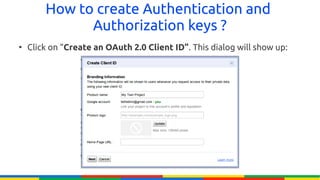
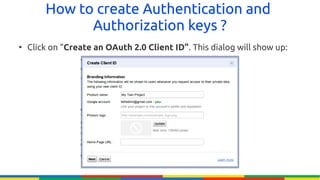
    Click on “Create an OAuth 2.0 Client ID”. This dialog will show up:
How to create Authentication and
              Authorization keys ?
●
    Click on “Create an OAuth 2.0 Client ID”. This dialog will show up:
How to create Authentication and
        Authorization keys ?


Now please focus with me, it's so important ! In the
 following dialog, you'll be asked to specify your
                application type !!
How to create Authentication and
             Authorization keys ?
    1- Web Applications:
●
    If you choose this type of application, you'll be asked to
    specify your application URL. Than Google will generate
    a redirect URI according to what you've entered.
How to create Authentication and
              Authorization keys ?
    2- Server Applications:
●
    Applications of this type run on server.
●
    They're a little bit different, so I invite you to read this
    article to understand more:
    https://developers.google.com/accounts/docs/OAuth2#
    serviceaccount
How to create Authentication and
                Authorization keys ?
    3- Installed Applications:
●
    This could be:
    –   Android application: You'll have to specify you're application
        package (it must be unique)
    –   iOS application.
    –   Chrome extension.
    –   A Desktop application .
    –   etc...
How to create Authentication and
              Authorization keys ?
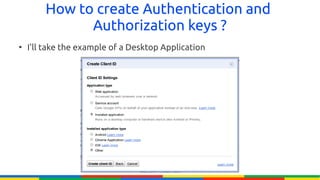
●
    I'll take the example of a Desktop Application
How to create Authentication and
              Authorization keys ?
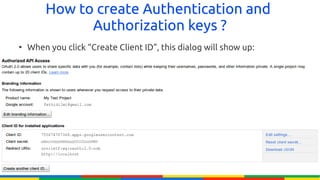
●
    When you click “Create Client ID”, this dialog will show up:
How to create Authentication and
             Authorization keys ?
●
    You can create many authorization keys for many
    projects.
●
    We'll see how to use the “Client ID” and the “Client
    Secret” to make authorized API calls.
Some demonstration:
Step By Step ☺
Google APIs Client Libraries
●
    It's not easy to construct manually authorized HTTP
    requests.
●
    It's much harder to parse the XML/JSON results in order
    to extract information.
Google APIs Client Libraries
●
    Google created some libraries to do those tasks for you:
    It's Google API Client Libraries.
●
    Google API Client Libraries are available in many
    languages (e.g: PHP, Python, C# and .NET, Java ..)
●
    In this Demo, we'll be using the Google API Client for
    Python.
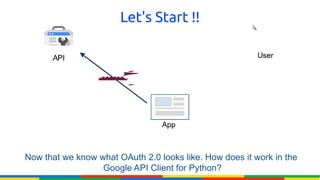
Let's Start !!


Now that we know what OAuth 2.0 looks like. How does it work in the
                  Google API Client for Python?
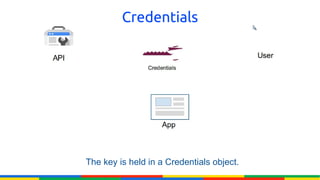
Credentials


The key is held in a Credentials object.
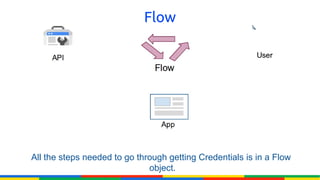
Flow


All the steps needed to go through getting Credentials is in a Flow
                              object.
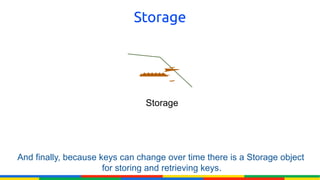
Storage


                                Storage


And finally, because keys can change over time there is a Storage object
                      for storing and retrieving keys.
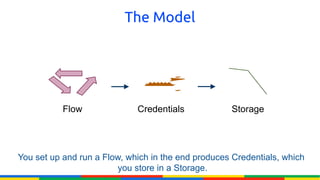
The Model


           Flow              Credentials            Storage


You set up and run a Flow, which in the end produces Credentials, which
                         you store in a Storage.
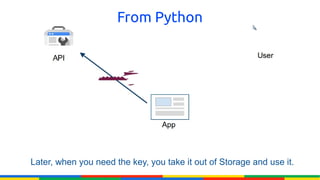
From Python


Later, when you need the key, you take it out of Storage and use it.
Step By Step


So let's look at actual code.
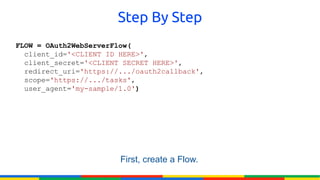
Step By Step
FLOW = OAuth2WebServerFlow(
  client_id='<CLIENT ID HERE>',
  client_secret='<CLIENT SECRET HERE>',
  redirect_uri='https://.../oauth2callback',
  scope='https://.../tasks',
  user_agent='my-sample/1.0')


                        First, create a Flow.
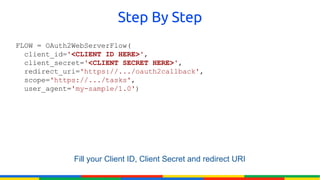
Step By Step
FLOW = OAuth2WebServerFlow(
  client_id='<CLIENT ID HERE>',
  client_secret='<CLIENT SECRET HERE>',
  redirect_uri='https://.../oauth2callback',
  scope='https://.../tasks',
  user_agent='my-sample/1.0')


             Fill your Client ID, Client Secret and redirect URI
Step By Step
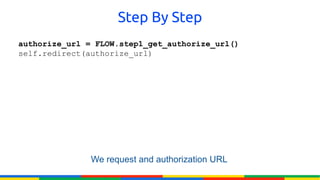
authorize_url = FLOW.step1_get_authorize_url()
self.redirect(authorize_url)


               We request and authorization URL
Step By Step
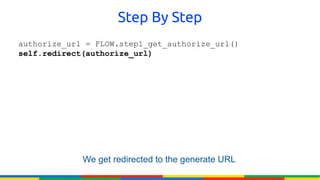
authorize_url = FLOW.step1_get_authorize_url()
self.redirect(authorize_url)


             We get redirected to the generate URL
Step By Step
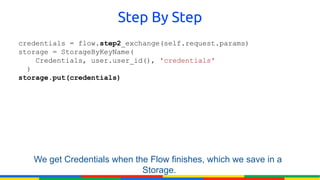
credentials = flow.step2_exchange(self.request.params)
storage = StorageByKeyName(
    Credentials, user.user_id(), 'credentials'
  )
storage.put(credentials)


   We get Credentials when the Flow finishes, which we save in a
                             Storage.
Step By Step
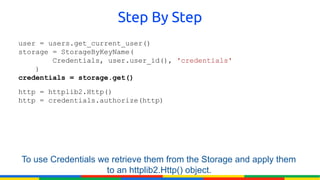
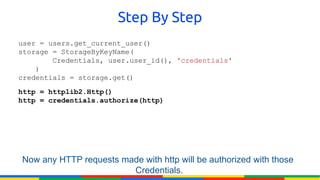
user = users.get_current_user()
storage = StorageByKeyName(
        Credentials, user.user_id(), 'credentials'
    )
credentials = storage.get()
http = httplib2.Http()
http = credentials.authorize(http)


To use Credentials we retrieve them from the Storage and apply them
                     to an httplib2.Http() object.
Step By Step
user = users.get_current_user()
storage = StorageByKeyName(
        Credentials, user.user_id(), 'credentials'
    )
credentials = storage.get()
http = httplib2.Http()
http = credentials.authorize(http)


Now any HTTP requests made with http will be authorized with those
                        Credentials.
Thanks everyone ☺
References
●
    “OAuth 2.0 and the Google API Client for Python”.
●
    “Understanding Google APIs” :
    http://fethidilmi.blogspot.com
●
    Google Developers portal:
    http://developers.google.com

Google APIs

  • 1.
    Understanding Google APIs Building applicationthat uses Google APIs Fethi DILMI Active Member at Scientific Club of ESI – CSE Technical Manager at GDG Algiers Microsoft Student Partner
  • 2.
  • 3.
    What's Google APIs ● Google offers a variety of APIs, mostly web APIs for web developers and mobile developers. ● The APIs are based on popular Google consumer products, including Google Maps, Google Earth, AdSense, Adwords, Google Apps and YouTube.
  • 4.
    What's Google APIs Example: ● YOU use Google+ from your web browser. ● Your Android application uses Google+ through Google+ API. ● i.e: Google APIs are the tools we need to build applications that can use Google Products.
  • 5.
    How Google APIswork behind the scenes?
  • 6.
    How Google APIswork behind the scenes ? ● Most of Google APIs are web-based APIs. ● This kind of APIs are called RESTFUL APIs (because they are based on REST architecture). ● REST is a style of software architecture that is based on HTTP protocol to retrieve data.
  • 7.
    How Google APIswork behind the scenes ? ● Most of Google APIs are web-based APIs. ● This kind of APIs are called RESTFUL APIs (because they are based on REST architecture). ● REST is a style of software architecture that is based on HTTP protocol to retrieve data. Simply, in order to use Google APIs , you only need to make HTTP requests to get data ☺
  • 8.
    How Google APIswork behind the scenes ? Example: “Google Places API” https://maps.googleapis.com/maps/api/place/nearbysearch/xml? location=36.825,2.3257&radius=50000&sensor=false&key=AddYourOwnKey Here
  • 10.
    Global Structure ofan API HTTP request:
  • 11.
    Global Structure ofan API HTTP request Each HTTP request is composed of 4 parts: – API Scope – Action – Output format – Parameters To understand these parts, we'll take the previous example: https://maps.googleapis.com/maps/api/place/nearbysearch/xml? location=36.825,2.3257&radius=50000&sensor=false&key=AddYourOwnKeyHere
  • 12.
    Global Structure ofan API HTTP request 1- API Scope: ● A scope is the main part of the HTTP request. ● In our case it's: https://maps.googleapis.com/maps/api/place ● A scope defines the web address of the API. ● For example, the scope of Google Latitude API is: https://www.googleapis.com/latitude/ NB: Some API Scopes defines an API version, just like the Latitude API
  • 13.
    Global Structure ofan API HTTP request 2- Output formats: ● There are 2 possible output formats for an API request. – JSON – XML ● In the previous example, we could get the same results in JSON format: https://maps.googleapis.com/maps/api/place/nearbysearch/json ? location=36.825,2.3257&radius=50000&sensor=false&key=AddYourOwnKeyHere
  • 14.
    Global Structure ofan API HTTP request 3- ACTION: ● Each Google web API gives you a set of possibilities called ACTIONS. ● In our example, we specified for the Google Places API the action “nearbysearch” to search places in a radius of 50Km. ● We could also search a place's detail.
  • 15.
    Global Structure ofan API HTTP request 4- Parameters: ● Each action has a set of parameters. ● Action Parameters let you customize the results you want to get. ● In our example, we could add the parameter “type=food” to search only for restaurants.
  • 16.
  • 17.
    Types of Googleweb APIs ● There are 2 kinds of Google web APIs: – Public APIs. – Private APIs.
  • 18.
    Types of Googleweb APIs 1- Public APIs ● Interact with public content: Google Maps API, Google Places API .. ● Need an authentication key to be able to retrieve data.
  • 19.
    Types of Googleweb APIs 2- Private APIs ● Interact with user private date: Google+ API, Google Latitude API, Google Drive SDK .. ● Need an authorization process before accessing to user data.
  • 20.
    Public APIs andAuthentication: What's THAT !!
  • 21.
    Authentication ● Public APIs use authentication key to identify your application. ● This means, in our previous example we would not be able to make a search using Google Places API without specifying an authentication key. ● Each device type has a different kind of key: – Android application authentication key. – Web application authentication key. – Web Service authentication key – ..
  • 22.
  • 23.
    Authentication ● Identify from which device your application is making API request: i.e: You can't make an API request from a web browser using an Android application authentication key. ● Limit the quota of requests per day: Each API has a limited number of requests per day. Since your application makes request using an authentication key, Google Servers will be able to stop your application when it exceeds its daily quota. ● Limit the number of requests per second for a single user: Your application may be used by millions of people at the same time, and since we're talking about a daily quota, we have to limit the number of requests/second for a single user.
  • 24.
    Authentication ● Identify from which device your application is making API request: i.e: You can't make an API request from a web browser using an Android application authentication key. ● Limit the quota of requests per day: Each API has a limited number of requests per day. Since your application makes request using an authentication key, Google Servers will be able to stop your application when it exceeds its daily quota. ● Limit the number of requests per second for a single user: Your application may be used by millions of people at the same time, and since we're talking about a daily quota, we have to limit the number of requests/second for a single user.
  • 25.
    Authentication ● Identify from which device your application is making API request: i.e: You can't make an API request from a web browser using an Android application authentication key. ● Limit the quota of requests per day: Each API has a limited number of requests per day. Since your application makes request using an authentication key, Google Servers will be able to stop your application when it exceeds its daily quota. ● Limit the number of requests per second for a single user: Your application may be used by millions of people at the same time, and since we're talking about a daily quota, we have to limit the number of requests/second for a single user.
  • 26.
    Private APIs andAuthorization: What's THAT !!
  • 27.
    Authorization: ● Private APIs try to fetch user data. ● This cannot be done without the permission of the user. ● So we need a tool to demand permissions from the user in order to perform action on his/her private data.
  • 28.
    Authorization: ● Private APIs try to fetch user data. ● This cannot be done without the permission of the user. ● So we need a tool to demand permissions from the user in order to perform action on his/her private data. THIS TOOL IS CALLED “OAuth2.0”
  • 29.
    What is OAuth2.0? It is trying to solve a tricky problem.
  • 30.
    What is OAuth2.0? If you, the developer, are building an application.
  • 31.
    What is OAuth2.0? And your users
  • 32.
    What is OAuth2.0? have data in another service that your application needs to function
  • 33.
    What is OAuth2.0? such as their tasks list, or their photos
  • 34.
    What is OAuth2.0? ??? HOW DO YOU GO ABOUT GETTING IT?
  • 35.
    NO !! You couldask the user for their name and password.
  • 36.
    NO !! But thenthe user has given your application access to all their data on that service. That's not safe. Don't do that.
  • 37.
    NO !! The user'sname and password are like keys to their digital kingdom, you should never ask for them.
  • 38.
    Better ☺ What wereally want is a special key, one that only allows access to a limited set of data in the API.
  • 39.
    Better ☺ A specialkey that the User can let the App acquire and use without the use of their name and password.
  • 40.
    That's OAuth2.0 ☺ Butfor that to work, everyone has to confirm that everyone else is who they say they are.
  • 41.
    That's OAuth2.0 ☺ Thatlooks simple after all this
  • 42.
    That's OAuth2.0 ☺ Butactually, it's a little more complicated than even that, because that special key (Code)
  • 43.
    That's OAuth2.0 ☺ canchange over time to keep things secure.
  • 44.
    How to createAuthentication and Authorization keys ?
  • 45.
    How to createAuthentication and Authorization keys ? ● To get authentication/authorization keys, you have to register your application. ● Registering your application is signing its name, type, package, and extra info.
  • 46.
    How to createAuthentication and Authorization keys ? ● To get authentication/authorization keys, you have to register your application. ● Registering your application is signing its name, type, package, and extra info. Please focus on the following steps ☺
  • 47.
    How to createAuthentication and Authorization keys ? ● Connect to your Google account. ● Go to: https://code.google.com/apis/console/ ● Click on “Create Project”
  • 48.
    How to createAuthentication and Authorization keys ? ● Now there is a list of all Google APIs, choose for example the "Google Places API", and check it up: ● Register your organization like shown in the image and click submit:
  • 49.
    How to createAuthentication and Authorization keys ? ● Agree & Accept
  • 50.
    How to createAuthentication and Authorization keys ? ● You can now notice that the Google Places API is activated: ● Click on "Overview", then click on "Register" in order to register your project:
  • 51.
    How to createAuthentication and Authorization keys ? ● Type a unique project ID
  • 52.
    How to createAuthentication and Authorization keys ? ● You've created automatically an authentication key for browser applications
  • 53.
    How to createAuthentication and Authorization keys ? ● You can click on: – Create New Server Key: To create an authentication key for a server application – Create New Server Key: To create an authentication key for an Android application. ● You can create many authentication keys for the same application type (example: 3 authentication keys for Android Applications)
  • 54.
    How to createAuthentication and Authorization keys ? ● And Now .. How To Create Authorization Keys ?
  • 55.
    How to createAuthentication and Authorization keys ? ● Click on “Create an OAuth 2.0 Client ID”. This dialog will show up:
  • 56.
    How to createAuthentication and Authorization keys ? ● Click on “Create an OAuth 2.0 Client ID”. This dialog will show up:
  • 57.
    How to createAuthentication and Authorization keys ? Now please focus with me, it's so important ! In the following dialog, you'll be asked to specify your application type !!
  • 58.
    How to createAuthentication and Authorization keys ? 1- Web Applications: ● If you choose this type of application, you'll be asked to specify your application URL. Than Google will generate a redirect URI according to what you've entered.
  • 59.
    How to createAuthentication and Authorization keys ? 2- Server Applications: ● Applications of this type run on server. ● They're a little bit different, so I invite you to read this article to understand more: https://developers.google.com/accounts/docs/OAuth2# serviceaccount
  • 60.
    How to createAuthentication and Authorization keys ? 3- Installed Applications: ● This could be: – Android application: You'll have to specify you're application package (it must be unique) – iOS application. – Chrome extension. – A Desktop application . – etc...
  • 61.
    How to createAuthentication and Authorization keys ? ● I'll take the example of a Desktop Application
  • 62.
    How to createAuthentication and Authorization keys ? ● When you click “Create Client ID”, this dialog will show up:
  • 63.
    How to createAuthentication and Authorization keys ? ● You can create many authorization keys for many projects. ● We'll see how to use the “Client ID” and the “Client Secret” to make authorized API calls.
  • 64.
  • 65.
    Google APIs ClientLibraries ● It's not easy to construct manually authorized HTTP requests. ● It's much harder to parse the XML/JSON results in order to extract information.
  • 66.
    Google APIs ClientLibraries ● Google created some libraries to do those tasks for you: It's Google API Client Libraries. ● Google API Client Libraries are available in many languages (e.g: PHP, Python, C# and .NET, Java ..) ● In this Demo, we'll be using the Google API Client for Python.
  • 67.
    Let's Start !! Nowthat we know what OAuth 2.0 looks like. How does it work in the Google API Client for Python?
  • 68.
    Credentials The key isheld in a Credentials object.
  • 69.
    Flow All the stepsneeded to go through getting Credentials is in a Flow object.
  • 70.
    Storage Storage And finally, because keys can change over time there is a Storage object for storing and retrieving keys.
  • 71.
    The Model Flow Credentials Storage You set up and run a Flow, which in the end produces Credentials, which you store in a Storage.
  • 72.
    From Python Later, whenyou need the key, you take it out of Storage and use it.
  • 73.
    Step By Step Solet's look at actual code.
  • 74.
    Step By Step FLOW= OAuth2WebServerFlow(   client_id='<CLIENT ID HERE>',   client_secret='<CLIENT SECRET HERE>',   redirect_uri='https://.../oauth2callback',   scope='https://.../tasks',   user_agent='my-sample/1.0') First, create a Flow.
  • 75.
    Step By Step FLOW = OAuth2WebServerFlow(   client_id='<CLIENTID HERE>',   client_secret='<CLIENT SECRET HERE>',   redirect_uri='https://.../oauth2callback',   scope='https://.../tasks',   user_agent='my-sample/1.0') Fill your Client ID, Client Secret and redirect URI
  • 76.
    Step By Step authorize_url= FLOW.step1_get_authorize_url() self.redirect(authorize_url) We request and authorization URL
  • 77.
  • 78.
  • 79.
    Step By Step user = users.get_current_user() storage = StorageByKeyName(         Credentials, user.user_id(), 'credentials'     ) credentials= storage.get() http = httplib2.Http() http = credentials.authorize(http) To use Credentials we retrieve them from the Storage and apply them to an httplib2.Http() object.
  • 80.
    Step By Step user = users.get_current_user() storage = StorageByKeyName(         Credentials, user.user_id(), 'credentials'     ) credentials = storage.get() http= httplib2.Http() http = credentials.authorize(http) Now any HTTP requests made with http will be authorized with those Credentials.
  • 81.
  • 82.
    References ● “OAuth 2.0 and the Google API Client for Python”. ● “Understanding Google APIs” : http://fethidilmi.blogspot.com ● Google Developers portal: http://developers.google.com