Git .
Why, How, and more
@gargrag | correo@gaston.com.uy
PM -> track working
PM -> control the team
PM -> interact with the process.
PM -> know wich issues is the team working on.
DEV -> co-work
DEV -> rollback
DEV -> manipulate changes
DEV -> parallel versions
SUP -> know what code is deployed
SUP -> see which are the latest changes
SUP -> pull request some easy issues
Why Git ?
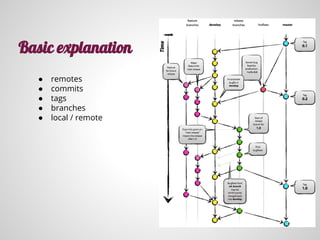
● remotes
● commits
● tags
● branches
● local / remote
Basic explanation
Good practices .
keep calm and take control
Commit often
Git can control only the code you commit, so commit
early and often, that's the way to have your code under
control and backed up.
Be reversible
Make commits atomically, use all the git potencial, to
make commits clear, by feature and reversible.
Git has all you need to commit changes grouped by
each, fix/feature you code.
Make clear and useful commit msgs
Besides making reversible, and atomic commits, ship
they with descriptive messages, so other teammates can
know exactly what each commit is about (especially
under stress)
Divide and conquer
If your code goes too large, divide it in repos by modules
or something depending on the software architecture
you are on.
You can use either submodules or separate repositories.
Get updated
Pull often, and before start working.
Remember your workflow
We have defined a workflow, remember it, and act
accord.
Be ware of changing public history
Git allows you to change the published history, but it can
be an annoyance for your teammates.
Better, fix the things by doing commits, maybe by revert,
or patching, etc. But going forward.
Don't freak
All your code is under control, any change is rollback-
able, any non - recursive merge, can be done with ease.
keep calm, things can look nasty, but belive me, is
simple.
Use a custom prompt
Use a custom unix prompt, that shows you info about
the repo you are working with, the branch you are, the
status and more things.
export PS1='[u@h W$(__git_ps1 " (%s)")]$ '
git has some ps1 variables and functions you can set up,
and if you prefer something more sophisticated take a
look at:
● https://github.com/nojhan/liquidprompt
● https://github.com/bpinto/oh-my-fish
Maintain your repo
Do some maintenance, sure someone has versioned a
mysql dump, and your repo is growing insanely. Take
care of that, and maintain the repo often.
Repack, delete weight files, and put order.
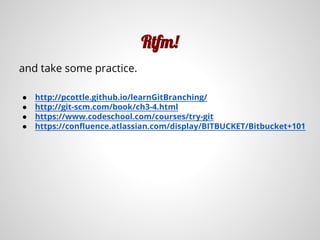
Rtfm!
and take some practice.
● http://pcottle.github.io/learnGitBranching/
● http://git-scm.com/book/ch3-4.html
● https://www.codeschool.com/courses/try-git
● https://confluence.atlassian.com/display/BITBUCKET/Bitbucket+101
Basic commands
and not only basic.
Get started
git clone [dest_dir] Clone a reopsitory
git init Initializes a new repo
Where we are
git remote show will show all your remotes
git remote show origin show information for remote named origin
git remote add [name] [url] add a remote named [name] with url [url]
git remote rm [name] removes a remote named [name]
git status show git status
git status -sb summarized status
git branch show list of local branches
git branch --all show list of local and remote branches
git fetch fetch a remote origin/branch
git checkout [-b new_branch] checks out to a existing branch, or new branch if
-b is used
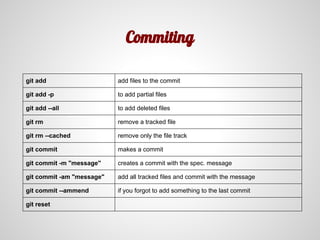
Commiting
git add add files to the commit
git add -p to add partial files
git add --all to add deleted files
git rm remove a tracked file
git rm --cached remove only the file track
git commit makes a commit
git commit -m "message" creates a commit with the spec. message
git commit -am "message" add all tracked files and commit with the message
git commit --ammend if you forgot to add something to the last commit
git reset
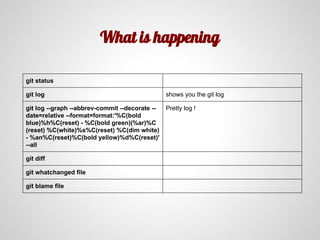
What is happening
git status
git log shows you the git log
git log --graph --abbrev-commit --decorate --
date=relative --format=format:'%C(bold
blue)%h%C(reset) - %C(bold green)(%ar)%C
(reset) %C(white)%s%C(reset) %C(dim white)
- %an%C(reset)%C(bold yellow)%d%C(reset)'
--all
Pretty log !
git diff
git whatchanged file
git blame file
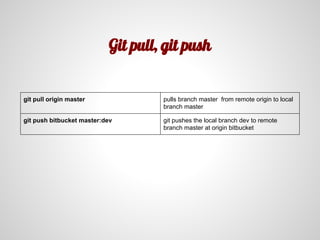
Git pull, git push
git pull origin master pulls branch master from remote origin to local
branch master
git push bitbucket master:dev git pushes the local branch dev to remote
branch master at origin bitbucket
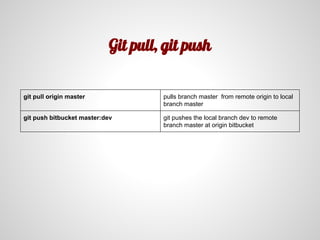
Git pull, git push
git pull origin master pulls branch master from remote origin to local
branch master
git push bitbucket master:dev git pushes the local branch dev to remote
branch master at origin bitbucket
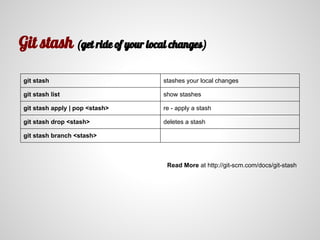
Git stash (get ride of your local changes)
git stash stashes your local changes
git stash list show stashes
git stash apply | pop <stash> re - apply a stash
git stash drop <stash> deletes a stash
git stash branch <stash>
Read More at http://git-scm.com/docs/git-stash
Git merge
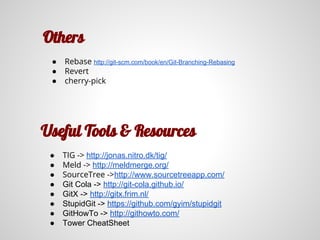
Others
● Rebase http://git-scm.com/book/en/Git-Branching-Rebasing
● Revert
● cherry-pick
Useful Tools & Resources
● TIG -> http://jonas.nitro.dk/tig/
● Meld -> http://meldmerge.org/
● SourceTree ->http://www.sourcetreeapp.com/
● Git Cola -> http://git-cola.github.io/
● GitX -> http://gitx.frim.nl/
● StupidGit -> https://github.com/gyim/stupidgit
● GitHowTo -> http://githowto.com/
● Tower CheatSheet
?>
End

Git why how when and more

  • 1.
    Git . Why, How,and more @gargrag | correo@gaston.com.uy
  • 2.
    PM -> trackworking PM -> control the team PM -> interact with the process. PM -> know wich issues is the team working on. DEV -> co-work DEV -> rollback DEV -> manipulate changes DEV -> parallel versions SUP -> know what code is deployed SUP -> see which are the latest changes SUP -> pull request some easy issues Why Git ?
  • 3.
    ● remotes ● commits ●tags ● branches ● local / remote Basic explanation
  • 4.
    Good practices . keepcalm and take control
  • 5.
    Commit often Git cancontrol only the code you commit, so commit early and often, that's the way to have your code under control and backed up.
  • 6.
    Be reversible Make commitsatomically, use all the git potencial, to make commits clear, by feature and reversible. Git has all you need to commit changes grouped by each, fix/feature you code.
  • 7.
    Make clear anduseful commit msgs Besides making reversible, and atomic commits, ship they with descriptive messages, so other teammates can know exactly what each commit is about (especially under stress)
  • 8.
    Divide and conquer Ifyour code goes too large, divide it in repos by modules or something depending on the software architecture you are on. You can use either submodules or separate repositories.
  • 9.
    Get updated Pull often,and before start working.
  • 10.
    Remember your workflow Wehave defined a workflow, remember it, and act accord.
  • 11.
    Be ware ofchanging public history Git allows you to change the published history, but it can be an annoyance for your teammates. Better, fix the things by doing commits, maybe by revert, or patching, etc. But going forward.
  • 12.
    Don't freak All yourcode is under control, any change is rollback- able, any non - recursive merge, can be done with ease. keep calm, things can look nasty, but belive me, is simple.
  • 13.
    Use a customprompt Use a custom unix prompt, that shows you info about the repo you are working with, the branch you are, the status and more things. export PS1='[u@h W$(__git_ps1 " (%s)")]$ ' git has some ps1 variables and functions you can set up, and if you prefer something more sophisticated take a look at: ● https://github.com/nojhan/liquidprompt ● https://github.com/bpinto/oh-my-fish
  • 14.
    Maintain your repo Dosome maintenance, sure someone has versioned a mysql dump, and your repo is growing insanely. Take care of that, and maintain the repo often. Repack, delete weight files, and put order.
  • 15.
    Rtfm! and take somepractice. ● http://pcottle.github.io/learnGitBranching/ ● http://git-scm.com/book/ch3-4.html ● https://www.codeschool.com/courses/try-git ● https://confluence.atlassian.com/display/BITBUCKET/Bitbucket+101
  • 16.
  • 17.
    Get started git clone[dest_dir] Clone a reopsitory git init Initializes a new repo
  • 18.
    Where we are gitremote show will show all your remotes git remote show origin show information for remote named origin git remote add [name] [url] add a remote named [name] with url [url] git remote rm [name] removes a remote named [name] git status show git status git status -sb summarized status git branch show list of local branches git branch --all show list of local and remote branches git fetch fetch a remote origin/branch git checkout [-b new_branch] checks out to a existing branch, or new branch if -b is used
  • 19.
    Commiting git add addfiles to the commit git add -p to add partial files git add --all to add deleted files git rm remove a tracked file git rm --cached remove only the file track git commit makes a commit git commit -m "message" creates a commit with the spec. message git commit -am "message" add all tracked files and commit with the message git commit --ammend if you forgot to add something to the last commit git reset
  • 20.
    What is happening gitstatus git log shows you the git log git log --graph --abbrev-commit --decorate -- date=relative --format=format:'%C(bold blue)%h%C(reset) - %C(bold green)(%ar)%C (reset) %C(white)%s%C(reset) %C(dim white) - %an%C(reset)%C(bold yellow)%d%C(reset)' --all Pretty log ! git diff git whatchanged file git blame file
  • 21.
    Git pull, gitpush git pull origin master pulls branch master from remote origin to local branch master git push bitbucket master:dev git pushes the local branch dev to remote branch master at origin bitbucket
  • 22.
    Git pull, gitpush git pull origin master pulls branch master from remote origin to local branch master git push bitbucket master:dev git pushes the local branch dev to remote branch master at origin bitbucket
  • 23.
    Git stash (getride of your local changes) git stash stashes your local changes git stash list show stashes git stash apply | pop <stash> re - apply a stash git stash drop <stash> deletes a stash git stash branch <stash> Read More at http://git-scm.com/docs/git-stash
  • 24.
  • 25.
    Others ● Rebase http://git-scm.com/book/en/Git-Branching-Rebasing ●Revert ● cherry-pick Useful Tools & Resources ● TIG -> http://jonas.nitro.dk/tig/ ● Meld -> http://meldmerge.org/ ● SourceTree ->http://www.sourcetreeapp.com/ ● Git Cola -> http://git-cola.github.io/ ● GitX -> http://gitx.frim.nl/ ● StupidGit -> https://github.com/gyim/stupidgit ● GitHowTo -> http://githowto.com/ ● Tower CheatSheet
  • 26.