Create	and	edit	online	images	and	photos
¡  Gimp	Online	uses	the	OffiDocs	www.offidocs.com	
platform.	
¡  OffiDocs	is	a	flexible	and	powerful	platform	that	
allows	you	to	work	online	with	desktop	apps	from	
everywhere	at	any	time	using	only	your	web	browser.		
¡  OffiDocs	provides	you	online	desktop	apps	like	
LibreOffice,	GIMP,	Dia,	...	through	your	web	browser.		
¡  No	more	local	desktop	installations	are	required.	
OffiDocs	gives	you	all	these	apps	online,	without	
needing	local	disk	space	or	computing	requirements.
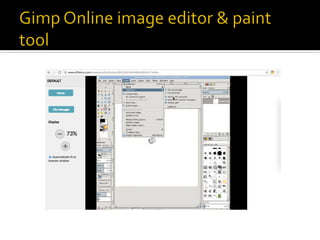
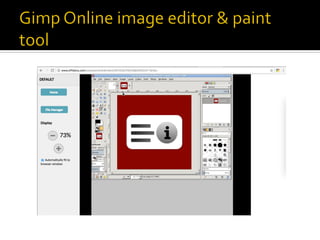
¡  You	can	create	and	edit	images	and	photos	with	our	app	
Gimp	Online.	
¡  http://www.offidocs.com/index.php/desktop-online-
images-graphics-apps/gimp-online-images-editor-paint-
tool	
¡  This	is	Gimp,	which	is	a	freely	distributed	program	for	
tasks	as	photo	retouching,	image	composition	and	image	
authoring.	It	can	be	used	as	a	simple	paint	program,	image	
editor,	an	expert	quality	photo	retouching	program,	an	
image	renderer,	or	an	image	format	converter.	to	create	or	
edit	vector	graphics	such	as	illustrations,	diagrams,	line	
arts,	charts,	logos	and	complex	paintings.
Gimp	Online	main	features	are:	
¡  -	Suite	of	painting	tools	including	Brush,	
Pencil,	Airbrush,	Clone,	etc.	
¡  		-	Image	editor.	
¡  		-	Sub-pixel	sampling	for	all	paint	tools	for	
high	quality	anti-aliasing.	
¡  		-	Extremely	powerful	gradient	editor	and	
blend	tool.	
¡  		-	Supports	custom	brushes	and	patterns.
¡  		-	Full	alpha	channel	support.	
¡  		-	Layers	and	channels.	
¡  		-	Multiple	Undo/Redo.	
¡  		-	Editable	text	layers.	
¡  		-	Transformation	tools	including	rotate,	
scale,	shear	and	flip.
¡  -	Multiple	operations	with	files	and	folders:		
¡  ·	Copy,	move,	upload,	create	folder/file,	
rename,		extract,	edit,	search,	etc.	
¡  ·	Display	the	details	of	the	file	or	directory:	
name,	location,	size,	date.	
¡  ·	Image	preview	support.
Gimp online image editor & paint tool

Gimp online image editor & paint tool