
Enterprise Mobility Solution
What is GeoPal
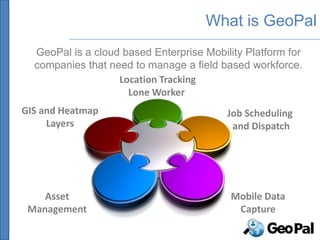
  GeoPal is a cloud based Enterprise Mobility Platform for
  companies that need to manage a field based workforce.
                   Location Tracking
                     Lone Worker
GIS and Heatmap                           Job Scheduling
     Layers                                and Dispatch


    Asset                                  Mobile Data
 Management                                 Capture
What is GeoPal


                  Location Tracking
                    Lone Worker
GIS and Heatmap                         Job Scheduling
     Layers                              and Dispatch


    Asset                                Mobile Data
 Management                               Capture
What is GeoPal
 There are two parts to GeoPal – a cloud service and a
 mobile application :


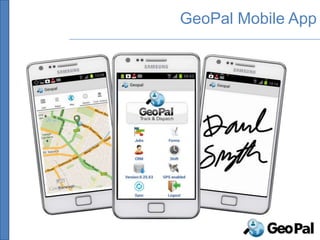
          GeoPal cloud service                           GeoPal Mobile app

  GeoPal provides a communication channel between the back office and field workers :

From the office to the field -> job schedules and workflows, customer details, Service Level
Agreements, GIS information, route plans and directions, asset details, files and images.

From the field to the office -> accurate and timely job reports, inspection and survey
results, shift details, photographs, signatures, bar code scans, updated customer and asset
details, GPS coordinates and annotated drawings and images.
Needs we are addressing

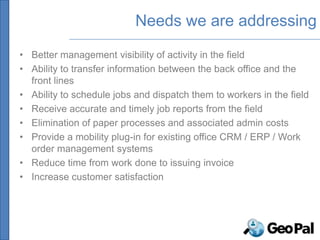
• Better management visibility of activity in the field
• Ability to transfer information between the back office and the
  front lines
• Ability to schedule jobs and dispatch them to workers in the field
• Receive accurate and timely job reports from the field
• Elimination of paper processes and associated admin costs
• Provide a mobility plug-in for existing office CRM / ERP / Work
  order management systems
• Reduce time from work done to issuing invoice
• Increase customer satisfaction
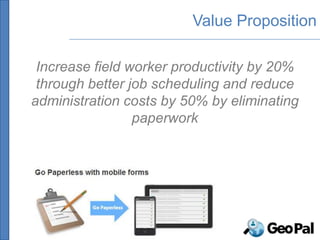
Value Proposition

 Increase field worker productivity by 20%
 through better job scheduling and reduce
administration costs by 50% by eliminating
                 paperwork
LOCATION TRACKING
LONE WORKER PROTECTION
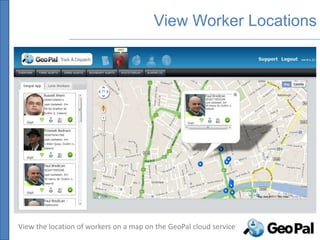
View Worker Locations


View the location of workers on a map on the GeoPal cloud service
Lone Worker Protection
GeoPal mobile app has features for Lone Worker protection

-Location : View real-time location of field workers.

- Regular Check-in : Worker prompted to check-in to app at regular intervals.
Alarm raised if check-in missed. Alert email and sms sent to designated list.

- Non movement alarm : The GeoPal app can raise an alarm when non-movement
detected. Local alarm on mobile device first, which can be reset. If not reset,
alarm raised to designated list.

- Fall detection : The GeoPal app can raise an alarm on detecting a fall using
accelerometers in the device.

- Panic Alarm : User can swipe an RFID fob across the phone to raise an alarm.
JOB SCHEDULING AND DISPATCH
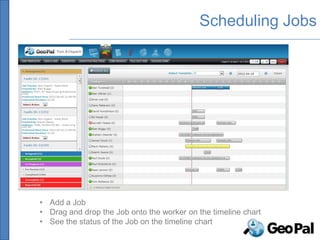
Scheduling Jobs


• Add a Job
• Drag and drop the Job onto the worker on the timeline chart
• See the status of the Job on the timeline chart
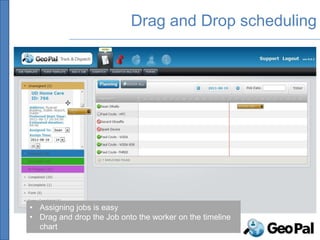
Drag and Drop scheduling


• Assigning jobs is easy
• Drag and drop the Job onto the worker on the timeline
  chart
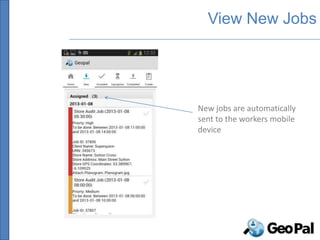
View New Jobs


New jobs are automatically
sent to the workers mobile
device
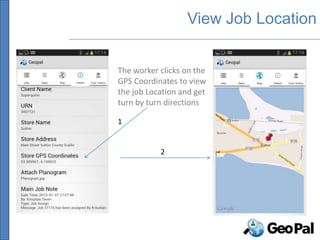
View Job Location


The worker clicks on the
GPS Coordinates to view
the job Location and get
turn by turn directions

1


           2
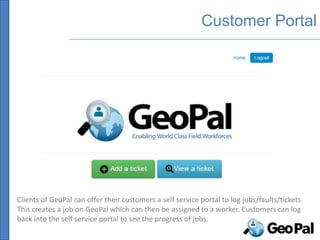
Customer Portal


Clients of GeoPal can offer their customers a self service portal to log jobs/faults/tickets
This creates a job on GeoPal which can then be assigned to a worker. Customers can log
back into the self service portal to see the progress of jobs.
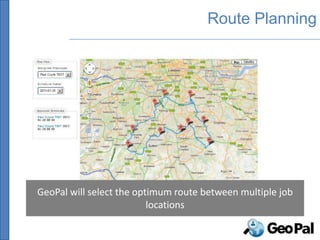
Route Planning


GeoPal will select the optimum route between multiple job
                          locations
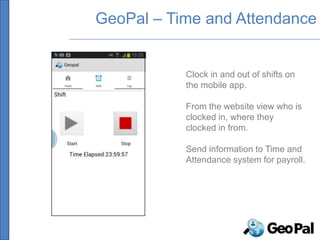
GeoPal – Time and Attendance


           Clock in and out of shifts on
           the mobile app.

           From the website view who is
           clocked in, where they
           clocked in from.

           Send information to Time and
           Attendance system for payroll.
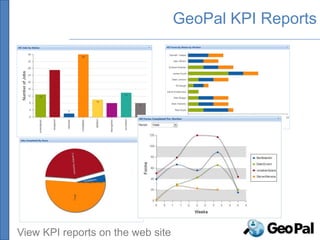
GeoPal KPI Reports


View KPI reports on the web site
MOBILE DATA CAPTURE
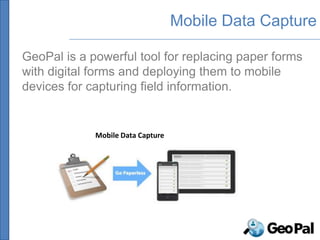
Mobile Data Capture

GeoPal is a powerful tool for replacing paper forms
with digital forms and deploying them to mobile
devices for capturing field information.


             Mobile Data Capture
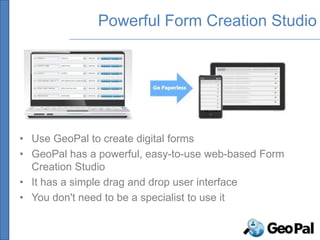
Powerful Form Creation Studio


• Use GeoPal to create digital forms
• GeoPal has a powerful, easy-to-use web-based Form
  Creation Studio
• It has a simple drag and drop user interface
• You don't need to be a specialist to use it
GeoPal Mobile App
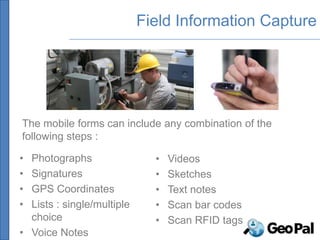
Field Information Capture


The mobile forms can include any combination of the
following steps :

• Photographs                 •   Videos
• Signatures                  •   Sketches
• GPS Coordinates             •   Text notes
• Lists : single/multiple     •   Scan bar codes
  choice                      •   Scan RFID tags
• Voice Notes
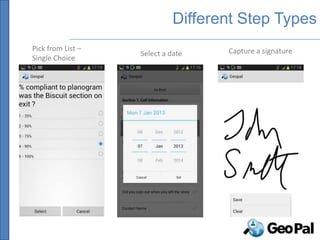
Different Step Types
Pick from List –                    Capture a signature
                   Select a date
Single Choice
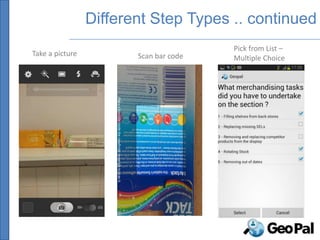
Different Step Types .. continued
                                        Pick from List –
Take a picture          Scan bar code   Multiple Choice
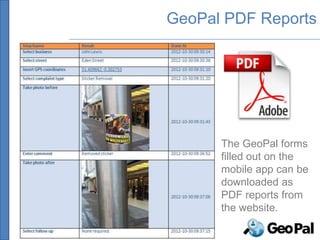
GeoPal PDF Reports


      The GeoPal forms
      filled out on the
      mobile app can be
      downloaded as
      PDF reports from
      the website.
ASSET MANAGEMENT
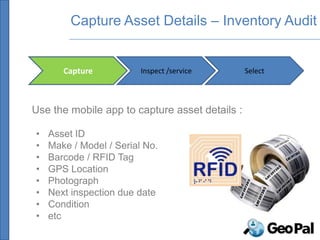
Capture Asset Details – Inventory Audit


       Capture           Inspect /service       Select


Use the mobile app to capture asset details :

•   Asset ID
•   Make / Model / Serial No.
•   Barcode / RFID Tag
•   GPS Location
•   Photograph
•   Next inspection due date
•   Condition
•   etc
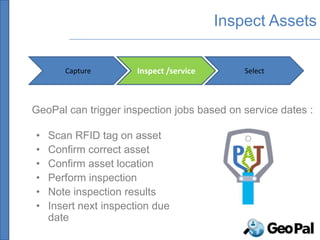
Inspect Assets

       Capture         Inspect /service       Select


GeoPal can trigger inspection jobs based on service dates :

•   Scan RFID tag on asset
•   Confirm correct asset
•   Confirm asset location
•   Perform inspection
•   Note inspection results
•   Insert next inspection due
    date
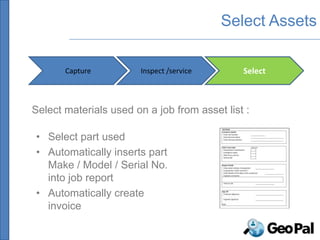
Select Assets

       Capture          Inspect /service      Select


Select materials used on a job from asset list :

• Select part used
• Automatically inserts part
  Make / Model / Serial No.
  into job report
• Automatically create
  invoice
GIS AND GEODIRECTORY
INTEGRATION
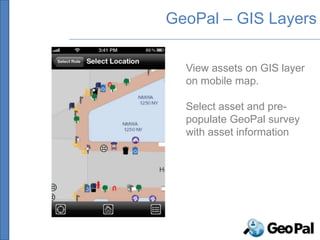
GeoPal – GIS Layers

  View assets on GIS layer
  on mobile map.

  Select asset and pre-
  populate GeoPal survey
  with asset information
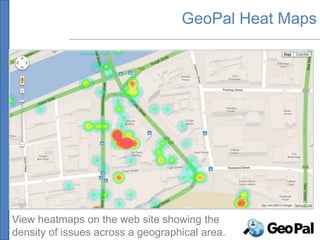
GeoPal Heat Maps


View heatmaps on the web site showing the
density of issues across a geographical area.
GEOPAL – AN INTEGRATED
SOLUTION
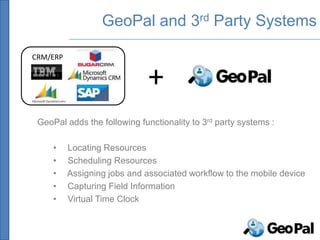
GeoPal and 3rd Party Systems

CRM/ERP


                              +
 GeoPal adds the following functionality to 3rd party systems :

     •    Locating Resources
     •    Scheduling Resources
     •    Assigning jobs and associated workflow to the mobile device
     •    Capturing Field Information
     •    Virtual Time Clock
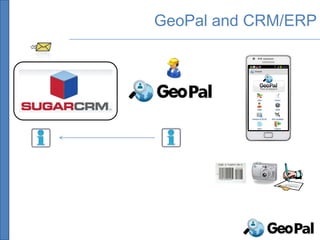
GeoPal and CRM/ERP
SECURITY AND
INFRASTRUCTURE
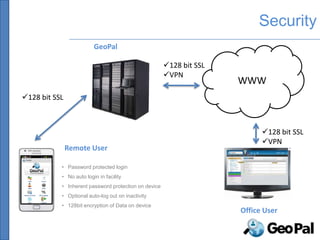
Security
                         GeoPal

                                                      128 bit SSL
                                                      VPN
                                                                     WWW
128 bit SSL


                                                                           128 bit SSL
                                                                           VPN
               Remote User

           • Password protected login
           • No auto login in facility
           • Inherent password protection on device
           • Optional auto-log out on inactivity
           • 128bit encryption of Data on device
                                                                     Office User
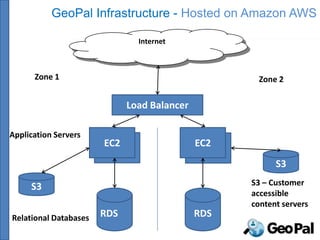
GeoPal Infrastructure - Hosted on Amazon AWS

                                Internet


      Zone 1                                          Zone 2

                              Load Balancer

Application Servers
                       EC2
                        EC2                   EC2
                                               EC2
                                                           S3

     S3                                              S3 – Customer
                                                     accessible
                                                     content servers
Relational Databases   RDS                    RDS
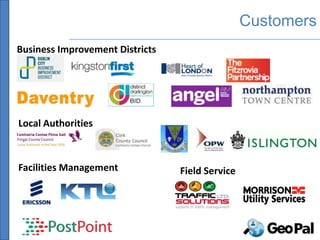
Customers
Business Improvement Districts


Local Authorities


Facilities Management            Field Service
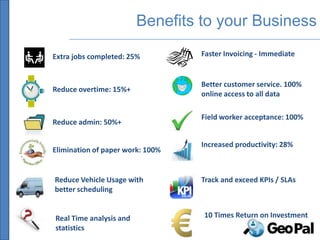
Benefits to your Business

Extra jobs completed: 25%         Faster Invoicing - Immediate


                                  Better customer service. 100%
Reduce overtime: 15%+
                                  online access to all data

                                  Field worker acceptance: 100%
Reduce admin: 50%+

                                  Increased productivity: 28%
Elimination of paper work: 100%


Reduce Vehicle Usage with         Track and exceed KPIs / SLAs
better scheduling


Real Time analysis and            10 Times Return on Investment
statistics
GeoPal Pricing

GeoPal Pricing

€300 per month for up to 10 users

€30 per additional user per month

Once off cost of €900 for setup and training

No software to install on office computers.

Download the free GeoPal mobile app from the app store

Free Trial – we offer a free trial of GeoPal for a month, so that you
can see if GeoPal is the right solution for you.
Thank You


Contact :
Gerard O’Keeffe
GeoPal Solutions
20 Lower Baggot Street,
Dublin 2
Ireland

Phone : +353 86 2492401
Email : gerard.okeeffe@geopal-solutions.com

GeoPal presentation

  • 1.
  • 2.
    What is GeoPal GeoPal is a cloud based Enterprise Mobility Platform for companies that need to manage a field based workforce. Location Tracking Lone Worker GIS and Heatmap Job Scheduling Layers and Dispatch Asset Mobile Data Management Capture
  • 3.
    What is GeoPal Location Tracking Lone Worker GIS and Heatmap Job Scheduling Layers and Dispatch Asset Mobile Data Management Capture
  • 4.
    What is GeoPal There are two parts to GeoPal – a cloud service and a mobile application : GeoPal cloud service GeoPal Mobile app GeoPal provides a communication channel between the back office and field workers : From the office to the field -> job schedules and workflows, customer details, Service Level Agreements, GIS information, route plans and directions, asset details, files and images. From the field to the office -> accurate and timely job reports, inspection and survey results, shift details, photographs, signatures, bar code scans, updated customer and asset details, GPS coordinates and annotated drawings and images.
  • 5.
    Needs we areaddressing • Better management visibility of activity in the field • Ability to transfer information between the back office and the front lines • Ability to schedule jobs and dispatch them to workers in the field • Receive accurate and timely job reports from the field • Elimination of paper processes and associated admin costs • Provide a mobility plug-in for existing office CRM / ERP / Work order management systems • Reduce time from work done to issuing invoice • Increase customer satisfaction
  • 6.
    Value Proposition Increasefield worker productivity by 20% through better job scheduling and reduce administration costs by 50% by eliminating paperwork
  • 7.
  • 8.
    View Worker Locations Viewthe location of workers on a map on the GeoPal cloud service
  • 9.
    Lone Worker Protection GeoPalmobile app has features for Lone Worker protection -Location : View real-time location of field workers. - Regular Check-in : Worker prompted to check-in to app at regular intervals. Alarm raised if check-in missed. Alert email and sms sent to designated list. - Non movement alarm : The GeoPal app can raise an alarm when non-movement detected. Local alarm on mobile device first, which can be reset. If not reset, alarm raised to designated list. - Fall detection : The GeoPal app can raise an alarm on detecting a fall using accelerometers in the device. - Panic Alarm : User can swipe an RFID fob across the phone to raise an alarm.
  • 10.
  • 11.
    Scheduling Jobs • Adda Job • Drag and drop the Job onto the worker on the timeline chart • See the status of the Job on the timeline chart
  • 12.
    Drag and Dropscheduling • Assigning jobs is easy • Drag and drop the Job onto the worker on the timeline chart
  • 13.
    View New Jobs Newjobs are automatically sent to the workers mobile device
  • 14.
    View Job Location Theworker clicks on the GPS Coordinates to view the job Location and get turn by turn directions 1 2
  • 15.
    Customer Portal Clients ofGeoPal can offer their customers a self service portal to log jobs/faults/tickets This creates a job on GeoPal which can then be assigned to a worker. Customers can log back into the self service portal to see the progress of jobs.
  • 16.
    Route Planning GeoPal willselect the optimum route between multiple job locations
  • 17.
    GeoPal – Timeand Attendance Clock in and out of shifts on the mobile app. From the website view who is clocked in, where they clocked in from. Send information to Time and Attendance system for payroll.
  • 18.
    GeoPal KPI Reports ViewKPI reports on the web site
  • 19.
  • 20.
    Mobile Data Capture GeoPalis a powerful tool for replacing paper forms with digital forms and deploying them to mobile devices for capturing field information. Mobile Data Capture
  • 21.
    Powerful Form CreationStudio • Use GeoPal to create digital forms • GeoPal has a powerful, easy-to-use web-based Form Creation Studio • It has a simple drag and drop user interface • You don't need to be a specialist to use it
  • 22.
  • 23.
    Field Information Capture Themobile forms can include any combination of the following steps : • Photographs • Videos • Signatures • Sketches • GPS Coordinates • Text notes • Lists : single/multiple • Scan bar codes choice • Scan RFID tags • Voice Notes
  • 24.
    Different Step Types Pickfrom List – Capture a signature Select a date Single Choice
  • 25.
    Different Step Types.. continued Pick from List – Take a picture Scan bar code Multiple Choice
  • 26.
    GeoPal PDF Reports The GeoPal forms filled out on the mobile app can be downloaded as PDF reports from the website.
  • 27.
  • 28.
    Capture Asset Details– Inventory Audit Capture Inspect /service Select Use the mobile app to capture asset details : • Asset ID • Make / Model / Serial No. • Barcode / RFID Tag • GPS Location • Photograph • Next inspection due date • Condition • etc
  • 29.
    Inspect Assets Capture Inspect /service Select GeoPal can trigger inspection jobs based on service dates : • Scan RFID tag on asset • Confirm correct asset • Confirm asset location • Perform inspection • Note inspection results • Insert next inspection due date
  • 30.
    Select Assets Capture Inspect /service Select Select materials used on a job from asset list : • Select part used • Automatically inserts part Make / Model / Serial No. into job report • Automatically create invoice
  • 31.
  • 32.
    GeoPal – GISLayers View assets on GIS layer on mobile map. Select asset and pre- populate GeoPal survey with asset information
  • 33.
    GeoPal Heat Maps Viewheatmaps on the web site showing the density of issues across a geographical area.
  • 34.
    GEOPAL – ANINTEGRATED SOLUTION
  • 35.
    GeoPal and 3rdParty Systems CRM/ERP + GeoPal adds the following functionality to 3rd party systems : • Locating Resources • Scheduling Resources • Assigning jobs and associated workflow to the mobile device • Capturing Field Information • Virtual Time Clock
  • 36.
  • 37.
  • 38.
    Security GeoPal 128 bit SSL VPN WWW 128 bit SSL 128 bit SSL VPN Remote User • Password protected login • No auto login in facility • Inherent password protection on device • Optional auto-log out on inactivity • 128bit encryption of Data on device Office User
  • 39.
    GeoPal Infrastructure -Hosted on Amazon AWS Internet Zone 1 Zone 2 Load Balancer Application Servers EC2 EC2 EC2 EC2 S3 S3 S3 – Customer accessible content servers Relational Databases RDS RDS
  • 40.
    Customers Business Improvement Districts LocalAuthorities Facilities Management Field Service
  • 41.
    Benefits to yourBusiness Extra jobs completed: 25% Faster Invoicing - Immediate Better customer service. 100% Reduce overtime: 15%+ online access to all data Field worker acceptance: 100% Reduce admin: 50%+ Increased productivity: 28% Elimination of paper work: 100% Reduce Vehicle Usage with Track and exceed KPIs / SLAs better scheduling Real Time analysis and 10 Times Return on Investment statistics
  • 42.
    GeoPal Pricing GeoPal Pricing €300per month for up to 10 users €30 per additional user per month Once off cost of €900 for setup and training No software to install on office computers. Download the free GeoPal mobile app from the app store Free Trial – we offer a free trial of GeoPal for a month, so that you can see if GeoPal is the right solution for you.
  • 43.
    Thank You Contact : GerardO’Keeffe GeoPal Solutions 20 Lower Baggot Street, Dublin 2 Ireland Phone : +353 86 2492401 Email : gerard.okeeffe@geopal-solutions.com