Esri International User Conference | San Diego, CA
Technical Workshops |
Geocoding – An Introduction
Miriam Schmidts
Agatha Wong
July 11 – 15, 2011
Agenda
• What is geocoding?
• ArcGIS geocoding components
• Geocoding workflow
What is Geocoding?
• Geocoding: A GIS operation to transform a
description of a location—such as a pair of
coordinates, an address, or a name of a place—to a
location on a map.
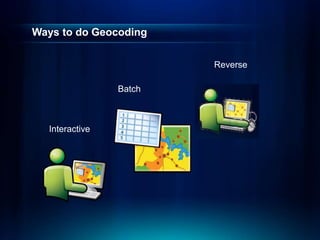
Ways to do Geocoding
Batch
Interactive
Reverse
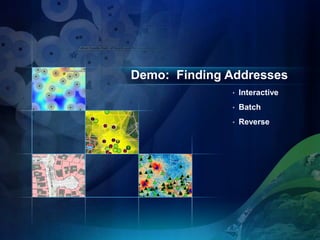
Demo: Finding Addresses
• Interactive
• Batch
• Reverse
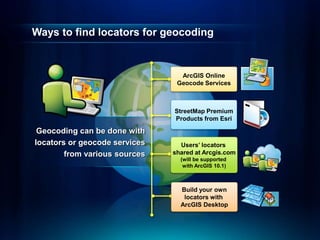
Ways to find locators for geocoding
Geocoding can be done with
locators or geocode services
from various sources
StreetMap Premium
Products from Esri
Build your own
locators with
ArcGIS Desktop
ArcGIS Online
Geocode Services
Users’ locators
shared at Arcgis.com
(will be supported
with ArcGIS 10.1)
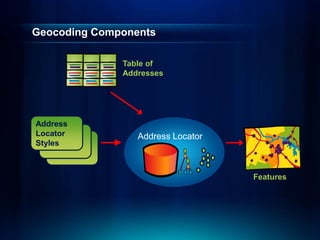
Geocoding Components
Features
Table of
Addresses
Address
Locator
Styles
Address Locator
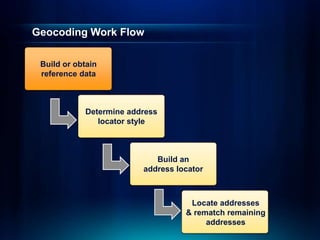
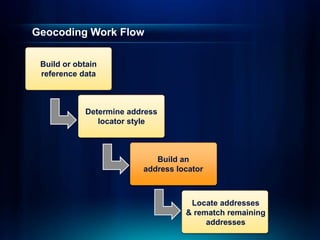
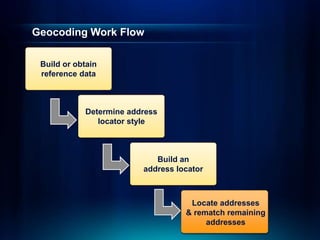
Geocoding Work Flow
Determine address
locator style
Build an
address locator
Locate addresses
& rematch remaining
addresses
Build or obtain
reference data
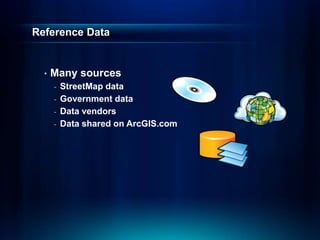
Reference Data
• Many sources
- StreetMap data
- Government data
- Data vendors
- Data shared on ArcGIS.com
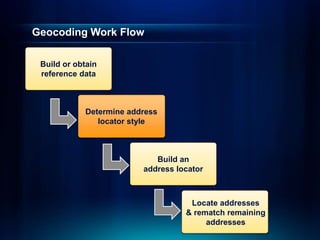
Geocoding Work Flow
Build an
address locator
Locate addresses
& rematch remaining
addresses
Build or obtain
reference data
Determine address
locator style
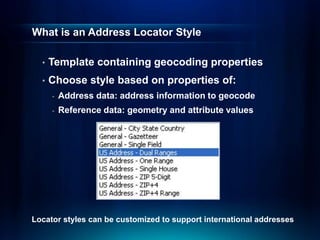
What is an Address Locator Style
• Template containing geocoding properties
• Choose style based on properties of:
- Address data: address information to geocode
- Reference data: geometry and attribute values
Locator styles can be customized to support international addresses
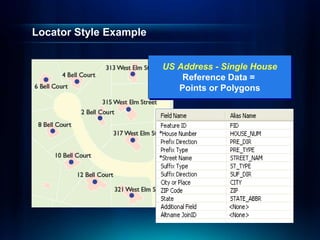
Locator Style Example
US Address - Single House
Reference Data =
Points or Polygons
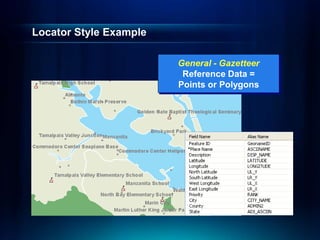
Locator Style Example
General - Gazetteer
Reference Data =
Points or Polygons
Geocoding Work Flow
Locate addresses
& rematch remaining
addresses
Build or obtain
reference data
Determine address
locator style
Build an
address locator
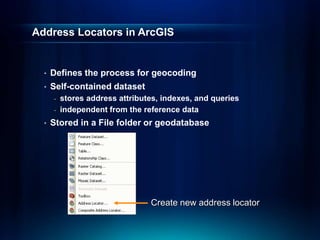
Address Locators in ArcGIS
• Defines the process for geocoding
• Self-contained dataset
- stores address attributes, indexes, and queries
- independent from the reference data
• Stored in a File folder or geodatabase
Create new address locator
Demonstration
• Create an address
locator
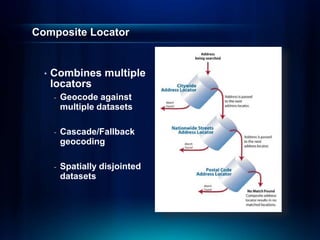
Composite Locator
• Combines multiple
locators
- Geocode against
multiple datasets
- Cascade/Fallback
geocoding
- Spatially disjointed
datasets
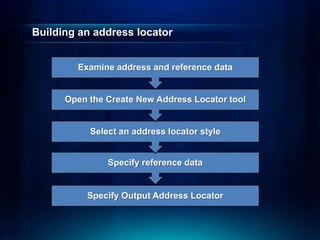
Building an address locator
Specify Output Address Locator
Specify reference data
Select an address locator style
Open the Create New Address Locator tool
Examine address and reference data
Demonstration
• Create a composite
address locator
Geocoding Work Flow
Build or obtain
reference data
Determine address
locator style
Build an
address locator
Locate addresses
& rematch remaining
addresses
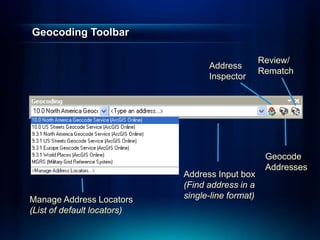
Geocoding Toolbar
Manage Address Locators
(List of default locators)
Address
Inspector
Geocode
Addresses
Review/
Rematch
Address Input box
(Find address in a
single-line format)
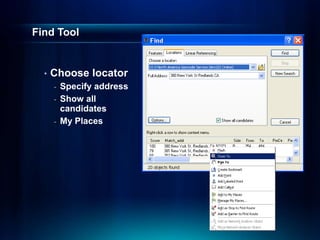
Find Tool
• Choose locator
- Specify address
- Show all
candidates
- My Places
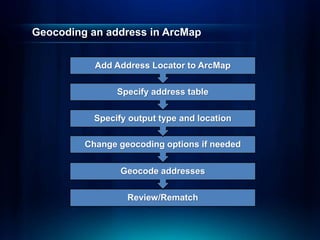
Geocoding an address in ArcMap
Review/Rematch
Geocode addresses
Change geocoding options if needed
Specify output type and location
Specify address table
Add Address Locator to ArcMap
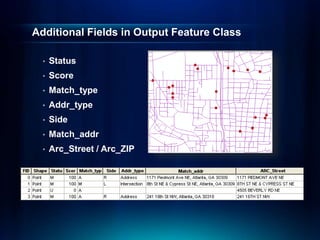
Additional Fields in Output Feature Class
• Status
• Score
• Match_type
• Addr_type
• Side
• Match_addr
• Arc_Street / Arc_ZIP
Why Won't Some Addresses Match
• Reference Data
- Not current
- Missing address ranges
• Address Data
- Spelling errors
- Incorrect information (e.g. zone, address out of range)
- Too much info, such as PO Box, company names etc.
Demonstration
• Geocode Addresses
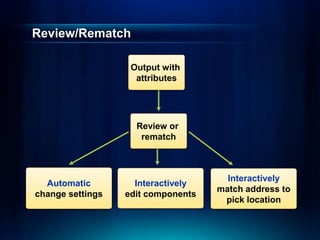
Review/Rematch
Output with
attributes
Review or
rematch
Automatic
change settings
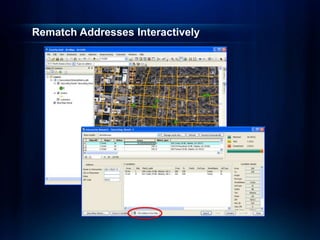
Interactively
edit components
Interactively
match address to
pick location
Rematch Addresses Interactively
Demonstration
• Rematch Addresses
Summary – Geocoding in ArcGIS 10
• What is geocoding?
• ArcGIS geocoding components
• Geocoding work flow
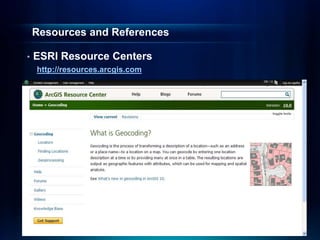
Resources and References
• ESRI Resource Centers
http://resources.arcgis.com
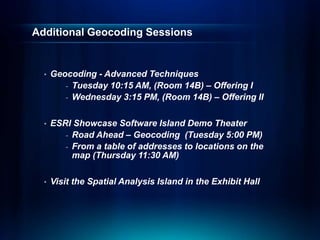
Additional Geocoding Sessions
• Geocoding - Advanced Techniques
- Tuesday 10:15 AM, (Room 14B) – Offering I
- Wednesday 3:15 PM, (Room 14B) – Offering II
• ESRI Showcase Software Island Demo Theater
- Road Ahead – Geocoding (Tuesday 5:00 PM)
- From a table of addresses to locations on the
map (Thursday 11:30 AM)
• Visit the Spatial Analysis Island in the Exhibit Hall
Questions ?
&
Thank you for attending
Please fill out and submit your evaluation form
www.esri.com/sessionevals
Session #: 1049
Geocoding -   An Introduction about GIS LOCATION

Geocoding - An Introduction about GIS LOCATION

  • 1.
    Esri International UserConference | San Diego, CA Technical Workshops | Geocoding – An Introduction Miriam Schmidts Agatha Wong July 11 – 15, 2011
  • 2.
    Agenda • What isgeocoding? • ArcGIS geocoding components • Geocoding workflow
  • 3.
    What is Geocoding? •Geocoding: A GIS operation to transform a description of a location—such as a pair of coordinates, an address, or a name of a place—to a location on a map.
  • 4.
    Ways to doGeocoding Batch Interactive Reverse
  • 5.
    Demo: Finding Addresses •Interactive • Batch • Reverse
  • 6.
    Ways to findlocators for geocoding Geocoding can be done with locators or geocode services from various sources StreetMap Premium Products from Esri Build your own locators with ArcGIS Desktop ArcGIS Online Geocode Services Users’ locators shared at Arcgis.com (will be supported with ArcGIS 10.1)
  • 7.
  • 8.
    Geocoding Work Flow Determineaddress locator style Build an address locator Locate addresses & rematch remaining addresses Build or obtain reference data
  • 9.
    Reference Data • Manysources - StreetMap data - Government data - Data vendors - Data shared on ArcGIS.com
  • 10.
    Geocoding Work Flow Buildan address locator Locate addresses & rematch remaining addresses Build or obtain reference data Determine address locator style
  • 11.
    What is anAddress Locator Style • Template containing geocoding properties • Choose style based on properties of: - Address data: address information to geocode - Reference data: geometry and attribute values Locator styles can be customized to support international addresses
  • 12.
    Locator Style Example USAddress - Single House Reference Data = Points or Polygons
  • 13.
    Locator Style Example General- Gazetteer Reference Data = Points or Polygons
  • 14.
    Geocoding Work Flow Locateaddresses & rematch remaining addresses Build or obtain reference data Determine address locator style Build an address locator
  • 15.
    Address Locators inArcGIS • Defines the process for geocoding • Self-contained dataset - stores address attributes, indexes, and queries - independent from the reference data • Stored in a File folder or geodatabase Create new address locator
  • 16.
  • 17.
    Composite Locator • Combinesmultiple locators - Geocode against multiple datasets - Cascade/Fallback geocoding - Spatially disjointed datasets
  • 18.
    Building an addresslocator Specify Output Address Locator Specify reference data Select an address locator style Open the Create New Address Locator tool Examine address and reference data
  • 19.
    Demonstration • Create acomposite address locator
  • 20.
    Geocoding Work Flow Buildor obtain reference data Determine address locator style Build an address locator Locate addresses & rematch remaining addresses
  • 21.
    Geocoding Toolbar Manage AddressLocators (List of default locators) Address Inspector Geocode Addresses Review/ Rematch Address Input box (Find address in a single-line format)
  • 22.
    Find Tool • Chooselocator - Specify address - Show all candidates - My Places
  • 23.
    Geocoding an addressin ArcMap Review/Rematch Geocode addresses Change geocoding options if needed Specify output type and location Specify address table Add Address Locator to ArcMap
  • 24.
    Additional Fields inOutput Feature Class • Status • Score • Match_type • Addr_type • Side • Match_addr • Arc_Street / Arc_ZIP
  • 25.
    Why Won't SomeAddresses Match • Reference Data - Not current - Missing address ranges • Address Data - Spelling errors - Incorrect information (e.g. zone, address out of range) - Too much info, such as PO Box, company names etc.
  • 26.
  • 27.
    Review/Rematch Output with attributes Review or rematch Automatic changesettings Interactively edit components Interactively match address to pick location
  • 28.
  • 29.
  • 30.
    Summary – Geocodingin ArcGIS 10 • What is geocoding? • ArcGIS geocoding components • Geocoding work flow
  • 31.
    Resources and References •ESRI Resource Centers http://resources.arcgis.com
  • 32.
    Additional Geocoding Sessions •Geocoding - Advanced Techniques - Tuesday 10:15 AM, (Room 14B) – Offering I - Wednesday 3:15 PM, (Room 14B) – Offering II • ESRI Showcase Software Island Demo Theater - Road Ahead – Geocoding (Tuesday 5:00 PM) - From a table of addresses to locations on the map (Thursday 11:30 AM) • Visit the Spatial Analysis Island in the Exhibit Hall
  • 33.
    Questions ? & Thank youfor attending Please fill out and submit your evaluation form www.esri.com/sessionevals Session #: 1049