Google Cloud Messaging
      for Android
 Luca Morettoni <luca@morettoni.net>
Google Cloud Messaging
Aggiornare i dati delle APP:
● Polling;
● Notifiche PUSH.

Vantaggi delle notifiche PUSH:
● Minor consumo di risorse (batteria/banda);
● Aggiornamenti (quasi) real-time;
● L'applicazione non deve essere attiva.
Google Cloud Messaging
Limiti/richieste di GCM:
● Android 2.2 o superiore;
● Google Play Store installato;
● L'utente deve avere almeno un profilo
  Google configurato (per versioni < 4.0.4);
● Payload dal server alle app limitato (~4K).
Google Cloud Messaging
Registrazione dei device


                               1

                           2


  3
Google Cloud Messaging
Invio di notifiche

                 1


                 2


                     3
Google Cloud Messaging
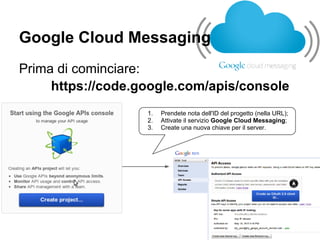
Prima di cominciare:
     https://code.google.com/apis/console
                   1.   Prendete nota dell'ID del progetto (nella URL);
                   2.   Attivate il servizio Google Cloud Messaging;
                   3.   Create una nuova chiave per il server.
Google Cloud Messaging
Android side:

1.   Registrare il device sui server GCM;
2.   Ottenere il device ID;
3.   Inviare il device ID al proprio server;
4.   Attendere le notifiche!
Google Cloud Messaging
AndroidManifest.XML

<uses-sdk android:minSdkVersion="8" android:targetSdkVersion="17"/>
<permission android:name="net.morettoni.terremoto.permission.C2D_MESSAGE" android:
protectionLevel="signature" />
<uses-permission android:name="net.morettoni.terremoto.permission.C2D_MESSAGE" />
<uses-permission   android:name="com.google.android.c2dm.permission.RECEIVE" />
<uses-permission   android:name="android.permission.INTERNET" />
<uses-permission   android:name="android.permission.GET_ACCOUNTS" />
<uses-permission   android:name="android.permission.WAKE_LOCK" />
<receiver android:name="com.google.android.gcm.GCMBroadcastReceiver" android:
permission="com.google.android.c2dm.permission.SEND" >
  <intent filter>
    <action android:name="com.google.android.c2dm.intent.RECEIVE" />
    <action android:name="com.google.android.c2dm.intent.REGISTRATION" />
    <category android:name="net.morettoni.terremoto" />
  </intent-filter>
</receiver>
<service android:name=".GCMIntentService" />
Google Cloud Messaging
Registrazione

GCMRegistrar.checkDevice(this);
GCMRegistrar.checkManifest(this);

final String regId = GCMRegistrar.getRegistrationId(this);
if (regId.equals("")) {
  GCMRegistrar.register(this, ID_PROGETTO);
} else {
  // controlliamo se siamo registrati sul nostro server
  if (!GCMRegistrar.isRegisteredOnServer(this))
    ...
  }
}
Google Cloud Messaging
GCMIntentService

public class GCMIntentService extends GCMBaseIntentService {
  protected void onError(Context context, String errorId) {}
  protected void onMessage(Context context, Intent intent) {}
  protected void onRegistered(Context context, String registrationId) {}
  protected void onUnregistered(Context context, String registrationId) {}
}
Google Cloud Messaging
Server side

1. Effettuare un POST al server GCM;
2. Eliminare/aggiornare i device ID.
Google Cloud Messaging
Server side (POST)
https://android.googleapis.com/gcm/send
header:
Authorization: key= CHIAVE_SERVER
Content-Type: application/json


body:
{
    registration_ids: ['device_1', 'device2', ..., 'device1000'],
    collapse_key: 'key',
    data: { 'payload_data': 'ABC123...' }
}
Google Cloud Messaging
Altri campi "interessanti":
"delay_while_idle": true| false

"time_to_live": seconds (default 4 settimane)

"dry_run": true| false
Google Cloud Messaging
Server side (RESPOSE)
{
    "multicast_id": 216,
    "success": 3,
    "failure": 3,
    "canonical_ids": 1,
    "results": [
      { "message_id": "1:0408" },
      { "error": "Unavailable" },
      { "error": "InvalidRegistration" },
      { "message_id": "1:1516" },
      { "message_id": "1:2342", "registration_id": "32" },
      { "error": "NotRegistered"}
    ]
}
Google Cloud Messaging
alcune risorse:

● http://developer.android.com/google/gcm/index.html
● https://groups.google.com/forum/?fromgroups#!
    forum/android-gcm
●   <SDK_ROOT>/extras/google/gcm/samples
●   https://plus.google.com/u/0/100229757360577322667/
    http://bit.ly/morettoni_plus

GCM aperitivo Android

  • 1.
    Google Cloud Messaging for Android Luca Morettoni <luca@morettoni.net>
  • 2.
    Google Cloud Messaging Aggiornarei dati delle APP: ● Polling; ● Notifiche PUSH. Vantaggi delle notifiche PUSH: ● Minor consumo di risorse (batteria/banda); ● Aggiornamenti (quasi) real-time; ● L'applicazione non deve essere attiva.
  • 3.
    Google Cloud Messaging Limiti/richiestedi GCM: ● Android 2.2 o superiore; ● Google Play Store installato; ● L'utente deve avere almeno un profilo Google configurato (per versioni < 4.0.4); ● Payload dal server alle app limitato (~4K).
  • 4.
  • 5.
    Google Cloud Messaging Inviodi notifiche 1 2 3
  • 6.
    Google Cloud Messaging Primadi cominciare: https://code.google.com/apis/console 1. Prendete nota dell'ID del progetto (nella URL); 2. Attivate il servizio Google Cloud Messaging; 3. Create una nuova chiave per il server.
  • 7.
    Google Cloud Messaging Androidside: 1. Registrare il device sui server GCM; 2. Ottenere il device ID; 3. Inviare il device ID al proprio server; 4. Attendere le notifiche!
  • 8.
    Google Cloud Messaging AndroidManifest.XML <uses-sdkandroid:minSdkVersion="8" android:targetSdkVersion="17"/> <permission android:name="net.morettoni.terremoto.permission.C2D_MESSAGE" android: protectionLevel="signature" /> <uses-permission android:name="net.morettoni.terremoto.permission.C2D_MESSAGE" /> <uses-permission android:name="com.google.android.c2dm.permission.RECEIVE" /> <uses-permission android:name="android.permission.INTERNET" /> <uses-permission android:name="android.permission.GET_ACCOUNTS" /> <uses-permission android:name="android.permission.WAKE_LOCK" /> <receiver android:name="com.google.android.gcm.GCMBroadcastReceiver" android: permission="com.google.android.c2dm.permission.SEND" > <intent filter> <action android:name="com.google.android.c2dm.intent.RECEIVE" /> <action android:name="com.google.android.c2dm.intent.REGISTRATION" /> <category android:name="net.morettoni.terremoto" /> </intent-filter> </receiver> <service android:name=".GCMIntentService" />
  • 9.
    Google Cloud Messaging Registrazione GCMRegistrar.checkDevice(this); GCMRegistrar.checkManifest(this); finalString regId = GCMRegistrar.getRegistrationId(this); if (regId.equals("")) { GCMRegistrar.register(this, ID_PROGETTO); } else { // controlliamo se siamo registrati sul nostro server if (!GCMRegistrar.isRegisteredOnServer(this)) ... } }
  • 10.
    Google Cloud Messaging GCMIntentService publicclass GCMIntentService extends GCMBaseIntentService { protected void onError(Context context, String errorId) {} protected void onMessage(Context context, Intent intent) {} protected void onRegistered(Context context, String registrationId) {} protected void onUnregistered(Context context, String registrationId) {} }
  • 11.
    Google Cloud Messaging Serverside 1. Effettuare un POST al server GCM; 2. Eliminare/aggiornare i device ID.
  • 12.
    Google Cloud Messaging Serverside (POST) https://android.googleapis.com/gcm/send header: Authorization: key= CHIAVE_SERVER Content-Type: application/json body: { registration_ids: ['device_1', 'device2', ..., 'device1000'], collapse_key: 'key', data: { 'payload_data': 'ABC123...' } }
  • 13.
    Google Cloud Messaging Altricampi "interessanti": "delay_while_idle": true| false "time_to_live": seconds (default 4 settimane) "dry_run": true| false
  • 14.
    Google Cloud Messaging Serverside (RESPOSE) { "multicast_id": 216, "success": 3, "failure": 3, "canonical_ids": 1, "results": [ { "message_id": "1:0408" }, { "error": "Unavailable" }, { "error": "InvalidRegistration" }, { "message_id": "1:1516" }, { "message_id": "1:2342", "registration_id": "32" }, { "error": "NotRegistered"} ] }
  • 15.
    Google Cloud Messaging alcunerisorse: ● http://developer.android.com/google/gcm/index.html ● https://groups.google.com/forum/?fromgroups#! forum/android-gcm ● <SDK_ROOT>/extras/google/gcm/samples ● https://plus.google.com/u/0/100229757360577322667/ http://bit.ly/morettoni_plus