흑마술
회전하는 마우스 커서와 처리중 메세지
‘ ’웹 기반 프로그래밍 분야에서 새로고침
백그라운드 프로세싱백그라운드 프로세싱
스레드스레드
3.
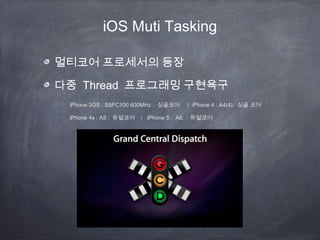
iOS Muti Tasking
멀티코어프로세서의 등장
다중 Thread 프로그래밍 구현욕구
iPhone 3GS : S5PC100 600MHz : 싱글코어 / iPhone 4 : A4(4): 싱글 코어
iPhone 4s : A5 : 듀얼코어 / iPhone 5 : A6: : 듀얼코어
4.
Apple 의 계획? 의도 ?
WWDC2009 처음 GCD 가 공개되는 순간
http://www.youtube.com/watch?v=nhbA9jZyYO4
GCC ==> LLVM ==> LLVM 2.0
LLVM 덕분에 가능해진 기술이 Block 과 GCD
5.
메모리 관리와 Block코딩
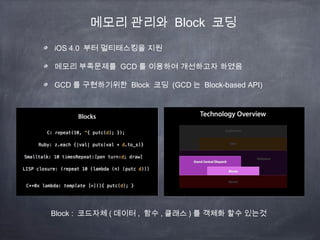
iOS 4.0 부터 멀티태스킹을 지원
메모리 부족문제를 GCD 를 이용하여 개선하고자 하였음
GCD 를 구현하기위한 Block 코딩 (GCD 는 Block-based API)
Block : 코드자체 ( 데이터 , 함수 , 클래스 ) 를 객체화 할수 있는것
ios Thread
NSOperation
* 전역변수에두개이상의 스래드에서 동시에 접근하는 경우
* 많은 수의 스래드 생성이 발생하였을때 리소스와 퍼포먼스의 저하
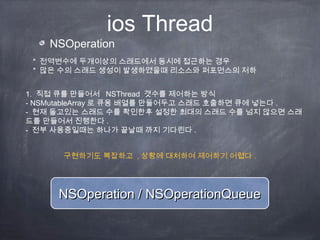
1. 직접 큐를 만들어서 NSThread 갯수를 제어하는 방식
- NSMutableArray 로 큐용 배열를 만들어두고 스래드 호출하면 큐에 넣는다 .
- 현재 돌고있는 스래드 수를 확인한후 설정한 최대의 스래드 수를 넘지 않으면 스래
드를 만들어서 진행한다 .
- 전부 사용중일때는 하나가 끝날때 까지 기다린다 .
NSOperation / NSOperationQueueNSOperation / NSOperationQueue
구현하기도 복잡하고 , 상황에 대처하여 제어하기 어렵다 .
9.
NSOperationQueue
LIFO : 스택/ FIFO : 큐
NSOperationQueue 는 NSOperation 을 담는 큐이며 FIFO 방식으로 들어간 순서대로 NSOperation 을 실행 시켜
주는 기능
NSOperation 은 NSThread 를 만들때 직접 함수와 그 함수가 들어있는 객체 (target) 를 지정해주는것과 대조
NSOperation 은 실행 함수도 직접 자기자신으로 지정해두는것이 NSThread 와 다른점
#import <Foundation/Foundation.h>
@interface TempOperation : NSOperation
@property(assign, nonatomic) int countNum;
@end
#import "TempOperation.h"
@implementation TempOperation
-(void) main
{
NSLog(@"Start : %i",_countNum);
[NSThread sleepForTimeInterval:1.0];
NSLog(@"End: %i",_countNum);
}
@end
@implementation ViewController
- (void)viewDidLoad
{
[super viewDidLoad];
NSOperationQueue *queue = [[NSOperationQueue alloc]init];
int i =0;
[queue setMaxConcurrentOperationCount:2]; // 최대 큐수
TempOperation *test = [[TempOperation alloc]init];
test.countNum = i++;
[queue addOperation:test];
test = [[TempOperation alloc]init];
test.countNum = i++;
[queue addOperation:test];
test = [[TempOperation alloc]init];
test.countNum = i++;
[queue addOperation:test];
test = [[TempOperation alloc]init];
test.countNum = i++;
[queue addOperation:test];
NSLog(@"queue adding complete");
}
10.
NSInvocationOperation Class
- (void)viewDidLoad{
[super viewDidLoad];
self.navigationItem.rightBarButtonItem = [[UIBarButtonItem alloc] initWithTitle:@"Load" style:UIBarButtonItemStyleDone target:self
action:@selector(loadData)];
NSMutableArray *_array = [[NSMutableArray alloc] initWithCapacity:10000];
self.array = _array;
[_array release];
}
- (void) loadData {
/* Operation Queue init (autorelease) */
NSOperationQueue *queue = [NSOperationQueue new];
/* Create our NSInvocationOperation to call loadDataWithOperation, passing in nil */
NSInvocationOperation *operation = [[NSInvocationOperation alloc] initWithTarget:self
selector:@selector(loadDataWithOperation)
object:nil];
/* Add the operation to the queue */
[queue addOperation:operation];
[operation release];
}
- (void) loadDataWithOperation {
NSURL *dataURL = [NSURL URLWithString:@"http://icodeblog.com/samples/nsoperation/data.plist"];
NSArray *tmp_array = [NSArray arrayWithContentsOfURL:dataURL];
for(NSString *str in tmp_array) {
[self.array addObject:str];
}
[self.tableView performSelectorOnMainThread:@selector(reloadData) withObject:nil waitUntilDone:YES];
}
The NSInvocationOperation class is a concrete subclass of NSOperation that manages the execution of a
single encapsulated task specified as an invocation
You can use this class to initiate an operation that consists of invoking a selector on a specified object
11.
Grand Central Dispatch
1.NSOperationQueue 가 있듯이 GCD 에는 dispatch_queue_t
NSOperationQueue *queue = [[[NSOperationQueue alloc] init] autorelease];
dispatch_queue_t dQueue = dispatch_queue_create(“com.apple.testQueue”, NULL);
dispatch_queue_create
dispatch_async(dQueue, ^{
...
}); // dispatch_async 는 큐에 블럭을 넣는 일을 하는
함수
dispatch_get_main_queue();
GCD 의 큐의 경우 무조건 한번에 하나만 실행 ~~!!!
12.
Grand Central Dispatch
메인큐는메인스레드상에서
dispatch_get_main_queue()
직접 만든 큐는 하나의 스레드를 할당 받고 사용
dispatch_queue_create
글로벌 큐는 큐에 넣는대로 바로 스레드를 만들어서 실행
dispatch_get_global_queue();
#import "ViewController.h"
#include <dispatch/dispatch.h>
@interface ViewController ()
@end
@implementation ViewController
- (void)viewDidLoad
{
[super viewDidLoad];
// Do any additional setup after loading the view, typically from a nib.
dispatch_queue_t dqueue = dispatch_queue_create("test01", NULL);
__block int i =0;
dispatch_async(dqueue, ^{
NSLog(@"GCD : %i",i);
[NSThread sleepForTimeInterval:2.0];
NSLog(@"GCD %i END",i);
i++;
});
dispatch_async(dqueue, ^{
NSLog(@"GCD : %i",i);
[NSThread sleepForTimeInterval:2.0];
NSLog(@"GCD %i END",i);
i++;
});
}
[queue setMaxConcurrentOperationCount:1];
dispatch_queue_create // 최대큐를 1 개로 지정한것과 같다 .
[queue setMaxConcurrentOperationCount:100];
dispatch_get_global_queue(); // 최대큐를 무한대까지 지정한 것과
같다 .
13.
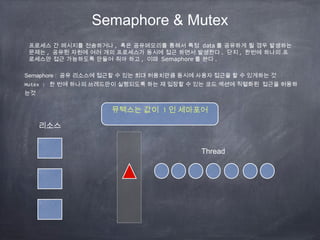
Semaphore & Mutex
Semaphore: 공유 리소스에 접근할 수 있는 최대 허용치만큼 동시에 사용자 접근을 할 수 있게하는 것
Mutex : 한 번에 하나의 쓰레드만이 실행되도록 하는 재 입장할 수 있는 코드 섹션에 직렬화된 접근을 허용하
는것
프로세스 간 메시지를 전송하거나 , 혹은 공유메모리를 통해서 특정 data 를 공유하게 될 경우 발생하는
문제는 , 공유된 자원에 여러 개의 프로세스가 동시에 접근 하면서 발생한다 . 단지 , 한번에 하나의 프
로세스만 접근 가능하도록 만들어 줘야 하고 , 이때 Semaphore 를 쓴다 .
뮤텍스는 값이 1 인 세마포어
리소스
Thread
Grand Central Dispatch
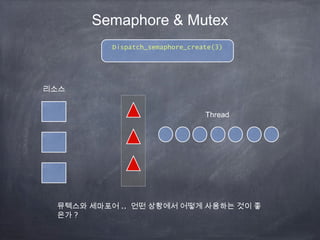
dispatch_semaphore_tTsemaphore = dispatch_semaphore_create(3);
dispatch_semaphore_wait ==> 먼저 하나의 블럭이 실행되면 wait 을 호출 ==> 내부 카운트를 1 올린다 .
그리고 내부 카운트가 먼저 생성할때 설정한 3 보다 적으면 바로 돌아가고 , 많을 경우 Sleep 을 걸어버린
다 .
dispatch_semaphore_signal ==> 내부 카운트 1 내린다 .
그리고 다른 블럭에서 작업이 끝날때 signal 을 날려주면 내부 카운트가 하나 줄게된다 .
내부 카운트가 줄었을때 설정한 3 보다 적으면 재우던 스레드를 깨워서 진행 시킨다 .
dispatch_semaphore_t Tsignal = dispatch_semaphore_create(2); //2 개 짜리 세마포어 생성
dispatch_async(dqueue, ^{
dispatch_semaphore_wait(Tsignal, DISPATCH_TIME_FOREVER);
dispatch_async(dispatch_get_global_queue(DISPATCH_QUEUE_PRIORITY_DEFAULT, 0), ^{
NSLog(@"GCD : %i 스레드 시작 ",i);
[NSThread sleepForTimeInterval:2.0];
NSLog(@"GCD : %i 스레드 끝 ",i);
dispatch_semaphore_signal(Tsignal);
});
});
16.
Grand Central Dispatch
-(void)viewDidLoad
{
[super viewDidLoad];
// Do any additional setup after loading the view, typically from a nib.
dispatch_queue_t dqueue = dispatch_queue_create("test01", NULL);
//__block int i =0;
int i =0;
dispatch_semaphore_t Tsignal = dispatch_semaphore_create(2); //2 개 짜리 세마포어 생성
dispatch_async(dqueue, ^{
dispatch_semaphore_wait(Tsignal, DISPATCH_TIME_FOREVER);
dispatch_async(dispatch_get_global_queue(DISPATCH_QUEUE_PRIORITY_DEFAULT, 0), ^{
NSLog(@"GCD : %i 스레드 시작 ",i);
[NSThread sleepForTimeInterval:2.0];
NSLog(@"GCD : %i 스레드 끝 ",i);
dispatch_semaphore_signal(Tsignal);
});
});
i++;
dispatch_async(dqueue, ^{
dispatch_semaphore_wait(Tsignal, DISPATCH_TIME_FOREVER);
dispatch_async(dispatch_get_global_queue(DISPATCH_QUEUE_PRIORITY_DEFAULT, 0), ^{
NSLog(@"GCD : %i 스레드 시작 ",i);
[NSThread sleepForTimeInterval:2.0];
NSLog(@"GCD : %i 스레드 끝 ",i);
dispatch_semaphore_signal(Tsignal);
});
});
i++;
...........
}



![ios Thread
NSThread 실험 1 (addSubview 와 Thread)
- (void)viewDidLoad
{
[super viewDidLoad];
_countlabel = [[UILabel alloc]initWithFrame:CGRectMake(100, 100, 150, 30)];
_countlabel.text = @"0";
[self.view addSubview:_countlabel];
_goBt =[UIButton buttonWithType:UIButtonTypeCustom];
_goBt.frame = CGRectMake(100, 200, 100, 30);
[_goBt setTitle:@"go Second page" forState:UIControlStateNormal];
[_goBt addTarget:self action:@selector(goSecondPage) forControlEvents:UIControlEventTouchUpInside];
[self.view addSubview:_goBt];
[NSThread detachNewThreadSelector:@selector(firstThread) toTarget:self withObject:nil];
}
-(void) firstThread
{
for (int i=0; i<100; i++){
NSString *t = [NSString stringWithFormat:@"%i",[_countlabel.text intValue]+1];
[self performSelectorOnMainThread:@selector(mainThreadSetText:) withObject:t waitUntilDone:YES];
[NSThread sleepForTimeInterval:1.0];
}
}
-(void)mainThreadSetText:(NSString *)text
{
_countlabel.text = text;
NSLog(@"count: %@",_countlabel.text);
}
-(void) goSecondPage
{
secondView *tempView = [[secondView alloc]init];
[self.view addSubview:tempView.view];
}](https://image.slidesharecdn.com/gcdppt-130507011900-phpapp02/85/Gcd-ppt-6-320.jpg)
![ios Thread
NSThread 실험 1 (addSubview 와 Thread)
- (void)viewDidLoad
{
[super viewDidLoad];
_countlabel = [[UILabel alloc]initWithFrame:CGRectMake(100, 100, 150, 30)];
_countlabel.text = @"0";
[self.view addSubview:_countlabel];
_goBt =[UIButton buttonWithType:UIButtonTypeCustom];
_goBt.frame = CGRectMake(100, 200, 100, 30);
[_goBt setTitle:@"go Second page" forState:UIControlStateNormal];
[_goBt addTarget:self action:@selector(goSecondPage) forControlEvents:UIControlEventTouchUpInside];
[self.view addSubview:_goBt];
[NSThread detachNewThreadSelector:@selector(firstThread) toTarget:self withObject:nil];
}
-(void) firstThread
{
for (int i=0; i<100; i++){
NSString *t = [NSString stringWithFormat:@"%i",[_countlabel.text intValue]+1];
[self performSelectorOnMainThread:@selector(mainThreadSetText:) withObject:t waitUntilDone:YES];
[NSThread sleepForTimeInterval:1.0];
}
}
-(void)mainThreadSetText:(NSString *)text
{
_countlabel.text = text;
NSLog(@"count: %@",_countlabel.text);
}
-(void) goSecondPage
{
secondView *tempView = [[secondView alloc]init];
[self.view addSubview:tempView.view];
}](https://image.slidesharecdn.com/gcdppt-130507011900-phpapp02/85/Gcd-ppt-7-320.jpg)
![NSOperationQueue
LIFO : 스택 / FIFO : 큐
NSOperationQueue 는 NSOperation 을 담는 큐이며 FIFO 방식으로 들어간 순서대로 NSOperation 을 실행 시켜
주는 기능
NSOperation 은 NSThread 를 만들때 직접 함수와 그 함수가 들어있는 객체 (target) 를 지정해주는것과 대조
NSOperation 은 실행 함수도 직접 자기자신으로 지정해두는것이 NSThread 와 다른점
#import <Foundation/Foundation.h>
@interface TempOperation : NSOperation
@property(assign, nonatomic) int countNum;
@end
#import "TempOperation.h"
@implementation TempOperation
-(void) main
{
NSLog(@"Start : %i",_countNum);
[NSThread sleepForTimeInterval:1.0];
NSLog(@"End: %i",_countNum);
}
@end
@implementation ViewController
- (void)viewDidLoad
{
[super viewDidLoad];
NSOperationQueue *queue = [[NSOperationQueue alloc]init];
int i =0;
[queue setMaxConcurrentOperationCount:2]; // 최대 큐수
TempOperation *test = [[TempOperation alloc]init];
test.countNum = i++;
[queue addOperation:test];
test = [[TempOperation alloc]init];
test.countNum = i++;
[queue addOperation:test];
test = [[TempOperation alloc]init];
test.countNum = i++;
[queue addOperation:test];
test = [[TempOperation alloc]init];
test.countNum = i++;
[queue addOperation:test];
NSLog(@"queue adding complete");
}](https://image.slidesharecdn.com/gcdppt-130507011900-phpapp02/85/Gcd-ppt-9-320.jpg)
![NSInvocationOperation Class
- (void)viewDidLoad {
[super viewDidLoad];
self.navigationItem.rightBarButtonItem = [[UIBarButtonItem alloc] initWithTitle:@"Load" style:UIBarButtonItemStyleDone target:self
action:@selector(loadData)];
NSMutableArray *_array = [[NSMutableArray alloc] initWithCapacity:10000];
self.array = _array;
[_array release];
}
- (void) loadData {
/* Operation Queue init (autorelease) */
NSOperationQueue *queue = [NSOperationQueue new];
/* Create our NSInvocationOperation to call loadDataWithOperation, passing in nil */
NSInvocationOperation *operation = [[NSInvocationOperation alloc] initWithTarget:self
selector:@selector(loadDataWithOperation)
object:nil];
/* Add the operation to the queue */
[queue addOperation:operation];
[operation release];
}
- (void) loadDataWithOperation {
NSURL *dataURL = [NSURL URLWithString:@"http://icodeblog.com/samples/nsoperation/data.plist"];
NSArray *tmp_array = [NSArray arrayWithContentsOfURL:dataURL];
for(NSString *str in tmp_array) {
[self.array addObject:str];
}
[self.tableView performSelectorOnMainThread:@selector(reloadData) withObject:nil waitUntilDone:YES];
}
The NSInvocationOperation class is a concrete subclass of NSOperation that manages the execution of a
single encapsulated task specified as an invocation
You can use this class to initiate an operation that consists of invoking a selector on a specified object](https://image.slidesharecdn.com/gcdppt-130507011900-phpapp02/85/Gcd-ppt-10-320.jpg)
![Grand Central Dispatch
1. NSOperationQueue 가 있듯이 GCD 에는 dispatch_queue_t
NSOperationQueue *queue = [[[NSOperationQueue alloc] init] autorelease];
dispatch_queue_t dQueue = dispatch_queue_create(“com.apple.testQueue”, NULL);
dispatch_queue_create
dispatch_async(dQueue, ^{
...
}); // dispatch_async 는 큐에 블럭을 넣는 일을 하는
함수
dispatch_get_main_queue();
GCD 의 큐의 경우 무조건 한번에 하나만 실행 ~~!!!](https://image.slidesharecdn.com/gcdppt-130507011900-phpapp02/85/Gcd-ppt-11-320.jpg)
![Grand Central Dispatch
메인큐는 메인스레드상에서
dispatch_get_main_queue()
직접 만든 큐는 하나의 스레드를 할당 받고 사용
dispatch_queue_create
글로벌 큐는 큐에 넣는대로 바로 스레드를 만들어서 실행
dispatch_get_global_queue();
#import "ViewController.h"
#include <dispatch/dispatch.h>
@interface ViewController ()
@end
@implementation ViewController
- (void)viewDidLoad
{
[super viewDidLoad];
// Do any additional setup after loading the view, typically from a nib.
dispatch_queue_t dqueue = dispatch_queue_create("test01", NULL);
__block int i =0;
dispatch_async(dqueue, ^{
NSLog(@"GCD : %i",i);
[NSThread sleepForTimeInterval:2.0];
NSLog(@"GCD %i END",i);
i++;
});
dispatch_async(dqueue, ^{
NSLog(@"GCD : %i",i);
[NSThread sleepForTimeInterval:2.0];
NSLog(@"GCD %i END",i);
i++;
});
}
[queue setMaxConcurrentOperationCount:1];
dispatch_queue_create // 최대큐를 1 개로 지정한것과 같다 .
[queue setMaxConcurrentOperationCount:100];
dispatch_get_global_queue(); // 최대큐를 무한대까지 지정한 것과
같다 .](https://image.slidesharecdn.com/gcdppt-130507011900-phpapp02/85/Gcd-ppt-12-320.jpg)
![Grand Central Dispatch
dispatch_semaphore_t Tsemaphore = dispatch_semaphore_create(3);
dispatch_semaphore_wait ==> 먼저 하나의 블럭이 실행되면 wait 을 호출 ==> 내부 카운트를 1 올린다 .
그리고 내부 카운트가 먼저 생성할때 설정한 3 보다 적으면 바로 돌아가고 , 많을 경우 Sleep 을 걸어버린
다 .
dispatch_semaphore_signal ==> 내부 카운트 1 내린다 .
그리고 다른 블럭에서 작업이 끝날때 signal 을 날려주면 내부 카운트가 하나 줄게된다 .
내부 카운트가 줄었을때 설정한 3 보다 적으면 재우던 스레드를 깨워서 진행 시킨다 .
dispatch_semaphore_t Tsignal = dispatch_semaphore_create(2); //2 개 짜리 세마포어 생성
dispatch_async(dqueue, ^{
dispatch_semaphore_wait(Tsignal, DISPATCH_TIME_FOREVER);
dispatch_async(dispatch_get_global_queue(DISPATCH_QUEUE_PRIORITY_DEFAULT, 0), ^{
NSLog(@"GCD : %i 스레드 시작 ",i);
[NSThread sleepForTimeInterval:2.0];
NSLog(@"GCD : %i 스레드 끝 ",i);
dispatch_semaphore_signal(Tsignal);
});
});](https://image.slidesharecdn.com/gcdppt-130507011900-phpapp02/85/Gcd-ppt-15-320.jpg)
![Grand Central Dispatch
- (void)viewDidLoad
{
[super viewDidLoad];
// Do any additional setup after loading the view, typically from a nib.
dispatch_queue_t dqueue = dispatch_queue_create("test01", NULL);
//__block int i =0;
int i =0;
dispatch_semaphore_t Tsignal = dispatch_semaphore_create(2); //2 개 짜리 세마포어 생성
dispatch_async(dqueue, ^{
dispatch_semaphore_wait(Tsignal, DISPATCH_TIME_FOREVER);
dispatch_async(dispatch_get_global_queue(DISPATCH_QUEUE_PRIORITY_DEFAULT, 0), ^{
NSLog(@"GCD : %i 스레드 시작 ",i);
[NSThread sleepForTimeInterval:2.0];
NSLog(@"GCD : %i 스레드 끝 ",i);
dispatch_semaphore_signal(Tsignal);
});
});
i++;
dispatch_async(dqueue, ^{
dispatch_semaphore_wait(Tsignal, DISPATCH_TIME_FOREVER);
dispatch_async(dispatch_get_global_queue(DISPATCH_QUEUE_PRIORITY_DEFAULT, 0), ^{
NSLog(@"GCD : %i 스레드 시작 ",i);
[NSThread sleepForTimeInterval:2.0];
NSLog(@"GCD : %i 스레드 끝 ",i);
dispatch_semaphore_signal(Tsignal);
});
});
i++;
...........
}](https://image.slidesharecdn.com/gcdppt-130507011900-phpapp02/85/Gcd-ppt-16-320.jpg)



![[NDC 2016] 유니티, iOS에서 LINQ 사용하기](https://cdn.slidesharecdn.com/ss_thumbnails/ioslinq-160429152640-thumbnail.jpg?width=640&height=640&fit=bounds)


![[2B7]시즌2 멀티쓰레드프로그래밍이 왜 이리 힘드나요](https://cdn.slidesharecdn.com/ss_thumbnails/2b72-140930004949-phpapp02-thumbnail.jpg?width=640&height=640&fit=bounds)


![[Windows via c/c++] 4장 프로세스](https://cdn.slidesharecdn.com/ss_thumbnails/windowsviacc4-120113132519-phpapp01-thumbnail.jpg?width=640&height=640&fit=bounds)


![[D2 CAMPUS] 안드로이드 오픈소스 스터디자료 - OkHttp](https://cdn.slidesharecdn.com/ss_thumbnails/nexters6-okhttp-160927092147-thumbnail.jpg?width=640&height=640&fit=bounds)


![[143] Modern C++ 무조건 써야 해?](https://cdn.slidesharecdn.com/ss_thumbnails/143deview2018modernc9-181011024146-thumbnail.jpg?width=640&height=640&fit=bounds)


![[112] 실전 스위프트 프로그래밍](https://cdn.slidesharecdn.com/ss_thumbnails/112-150913114147-lva1-app6891-thumbnail.jpg?width=640&height=640&fit=bounds)


