Current Web Design Practices
The Internet and World Wide Web domain
name
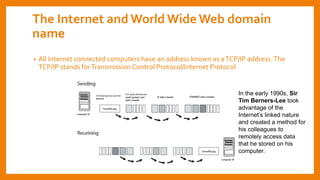
• All Internet connected computers have an address known as aTCP/IP address.The
TCP/IP stands forTransmission Control Protocol/Internet Protocol
In the early 1990s, Sir
Tim Berners-Lee took
advantage of the
Internet’s linked nature
and created a method for
his colleagues to
remotely access data
that he stored on his
computer.
Domain names exist because it’s not very convenient for you to use or remember
IP addresses.
Domain Name Servers (DNS) translate easy-to-understand domain names into IP
addresses. A DNS converts a familiar string of letters, the “domain name,” to the
numbered IP address. Instead of typing the IP address 72.32.147.166 into a web
browser, you can type the domain name
The evolution ofWeb andWeb Standards
• HTML is interpreted by web browsers, such as Internet Explorer, Firefox, Safari,
and Chrome.
• Web designers have discovered that the same HTML code might be displayed
differently on various web browsers.
• Because web browsers can interpret HTML code differently, you will need to
consider browser testing in your design considerations
• Soon designers discovered they could not rely on the same HTML code for all
browsers.
• Designers added “hacks,” extra code, to pages, making certain that layouts
worked in different browsers.
Understanding User Interface & User Experiene
Web editors versusWYSIWYG tools
• HTML and CSS use text as their foundation. Because of this, even the most simple
text editor, such asTextEdit on the Mac or Notepad on the PC, is capable of
creating web pages.
• These basic text editing tools, however, lack features that help with web design
and development such as checking code syntax, organizing your site folders, and
uploading fi les to web servers.
• In addition to text editors, there are also fully featured web editors and design
tools, such as Adobe Dreamweaver and Microsoft Expression Web.These are
WYSIWYG tools (“WhatYou See IsWhatYou Get”) that provide a visual layout
environment, code editing, along with website management tools.
Get used to different
browsers • Try making yourself use a different browser every day for a week or
so.
• Try alternating between, say, Mozilla Firefox, Google Chrome,
Opera, and Internet Explorer, particularly with sites you visit every
day.
• You may even find that different browsers are better for different
activities.
• OnWindows computers, I prefer Chrome for most of my daily use:
reading my Gmail account, posting toTwitter, and managing my
Web sites.
• On Mac, I prefer Safari (whoseWebKit engine is also used in
Chrome).And on all computers, I rely on Firefox forWeb design and
development.
• Because Firefox is open source, people have built many excellent
Web design add-ons for it, such as Chris Pederick’sWeb Developer
Add-on that’s will be discussed through this course
Many Browsers, Few Engines, OneWeb
• Mozilla Firefox is also what is known as an open-source browser: Firefox’s source
code is openly available to everyone. It is also developed and tested by a large
group of volunteers and a smaller group of paid individuals working for the Mozilla
Foundation.
• Opera, like Microsoft’s Internet Explorer and Apple’s Safari browser, is a
proprietary browser, meaning that most of its code is kept secret and is developed
almost exclusively by each company’s employees.
RENDER ENGINES
• The good news for adventurous readers of the Web is even better news forWeb
designers: mostWeb browsers use one of three rendering engines:
1. Mozilla’sGecko engine
2. WebKit engine (used in Apple Safari and GoogleChrome)
3. Microsoft’sTrident engine.
• In many respects, browsers based on Gecko and KHTML/WebKit generally display
Web pages very similarly. Firefox and Chrome, for example, tend to display pages
the same way; although depending on the operating system (Windows, Mac OS X,
Linux), each browser will have access to different fonts
• TheTrident engine, which tends to be the most unpredictable, is used in Internet
Explorer and AOL Explorer.
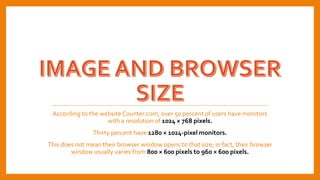
According to the website Counter.com, over 50 percent of users have monitors
with a resolution of 1024 × 768 pixels.
Thirty percent have 1280 × 1024-pixel monitors.
This does not mean their browser window opens to that size; in fact, their browser
window usually varies from 800 × 600 pixels to 960 × 600 pixels.
Various forms of website viewing is
available today
• The goal of every Web writer and designer should be to capitalize on the
differences and needs of a wide range of readers to make each unique view as
great as possible.
• (That means abandoning any attempts to make all experiences of aWeb site
exactly the same.)
Understanding different forms
of web viewing
• It is important thatWeb writers and designers appreciate just how differently a
page may appear under certain circumstances.
• Understanding these differences from a reader’s perspective will make you a
much more effective writer and designer when it comes to creating pages that
work optimally in many different browsing environments
Images for theWeb display according to their actual pixel dimensions so
coordinate those with your layout.
Different photographs will look best at different compression rates
The written content of your site is crucial to your site being found and
accessible. Even if you are a photographer or a visual artist, search
engines index and allow people to search the writing of your page.
Image searches aren’t image
searches at all, but rather searches
on “captions, descriptions, and
other contextual information.”
Conforming toWeb Standards
• Web standards are guidelines issued by the World Wide Web Consortium (W3C), an
inter national organization of people associated with technology companies and
universities.
• Does it stifle creativity? Discussion
Why we needWeb Standards?
Ghost from the past
• HTML tables to design pages. Used for their intended, structural purpose, HTML
tables are good for one thing: marking up tabular data.Tables for layout present
significant accessibility issues and make a page harder to repurpose or redesign
later
• Frames and framesets. Another accessibility nightmare, frames are artifacts from
an era before Web servers could easily include content shared over multiple pages
• Invisible GIF image spacers. Often used in tandem with HTML tables.
• “Save As HTML . . .” in a word processor. Just because the option is there doesn’t
mean it should be used.
• Adobe Flash for site design
InWeb design its all out in open
Web pages in HTML and CSS are all open source: go
to your favorite Web browser and choseView > Source
Advances inWeb design fall under the umbrella term of “Web
standards,” a term promoted by a grassroots movement formed in 1998 called the Web
Standards Project (WaSP).
WaSP, a group of influentialWeb designers who had had enough of browser-based
design practices, pressured Netscape and Microsoft to adopt theW3C’s specifications
for the Web’s many languages and protocols in the design of their browsers.
AWAY FROM CORPORATE CONTROL
• The idea behind Web standards is that no one company or browser manufacturer
controls XHTML, CSS, or any otherWeb language.
• At the same time, all browser manufacturers should support those standards in
their browsers (and all modern browsers do, to varying degrees).
• That means aWeb page can be authored in a browser neutral way, and designers
can be relatively certain that their pages will display and function acceptably in
any browser.
• Note that “acceptably” is very different from “exactly the same,” which will be
an important distinction when you begin to work with CSS.
In the heated battle between Microsoft and Netscape in the 1990s known as the “browser wars”
the term “recommendation” had limited influence.
Representatives from both Netscape and Microsoft served on the committees, or “working
groups,” that wrote theW3C “recommendations” for XHTML, CSS, and other key standards.
Yet both companies often ignored the standard specifications that they had helped to write.
The trouble is that what the WaSP calls
“standards” are actually issued under the term “recommendations” by theW3C.
YEARS OFTIRELESSACTIVISM
WaSP changed all of that through years of tireless activism.
With the stable releases of Internet Explorer 6 (IE6, in 2001) and Netscape
Navigator 6 (NN6, in 2002), both leading browsers provided viable support for
W3C standards, including XHTML and CSS, among other standards.
Web designers could begin to design and writeWeb pages to the
“recommendations” of theW3C
WEB STANDARDS:ATHREE-PART
APPROACH
• Jeffrey Zeldman describes these components as structure (XHTML), presentation
(CSS), and behavior (JavaScript).
• PLAY MEDIA ON JEFFREY ZELDMAN AND WEB STANDARDS

Fundamentals of Web

  • 1.
  • 2.
    The Internet andWorld Wide Web domain name • All Internet connected computers have an address known as aTCP/IP address.The TCP/IP stands forTransmission Control Protocol/Internet Protocol In the early 1990s, Sir Tim Berners-Lee took advantage of the Internet’s linked nature and created a method for his colleagues to remotely access data that he stored on his computer.
  • 3.
    Domain names existbecause it’s not very convenient for you to use or remember IP addresses. Domain Name Servers (DNS) translate easy-to-understand domain names into IP addresses. A DNS converts a familiar string of letters, the “domain name,” to the numbered IP address. Instead of typing the IP address 72.32.147.166 into a web browser, you can type the domain name
  • 4.
    The evolution ofWebandWeb Standards • HTML is interpreted by web browsers, such as Internet Explorer, Firefox, Safari, and Chrome. • Web designers have discovered that the same HTML code might be displayed differently on various web browsers. • Because web browsers can interpret HTML code differently, you will need to consider browser testing in your design considerations • Soon designers discovered they could not rely on the same HTML code for all browsers. • Designers added “hacks,” extra code, to pages, making certain that layouts worked in different browsers.
  • 9.
  • 12.
    Web editors versusWYSIWYGtools • HTML and CSS use text as their foundation. Because of this, even the most simple text editor, such asTextEdit on the Mac or Notepad on the PC, is capable of creating web pages. • These basic text editing tools, however, lack features that help with web design and development such as checking code syntax, organizing your site folders, and uploading fi les to web servers. • In addition to text editors, there are also fully featured web editors and design tools, such as Adobe Dreamweaver and Microsoft Expression Web.These are WYSIWYG tools (“WhatYou See IsWhatYou Get”) that provide a visual layout environment, code editing, along with website management tools.
  • 13.
    Get used todifferent browsers • Try making yourself use a different browser every day for a week or so. • Try alternating between, say, Mozilla Firefox, Google Chrome, Opera, and Internet Explorer, particularly with sites you visit every day. • You may even find that different browsers are better for different activities. • OnWindows computers, I prefer Chrome for most of my daily use: reading my Gmail account, posting toTwitter, and managing my Web sites. • On Mac, I prefer Safari (whoseWebKit engine is also used in Chrome).And on all computers, I rely on Firefox forWeb design and development. • Because Firefox is open source, people have built many excellent Web design add-ons for it, such as Chris Pederick’sWeb Developer Add-on that’s will be discussed through this course
  • 14.
    Many Browsers, FewEngines, OneWeb • Mozilla Firefox is also what is known as an open-source browser: Firefox’s source code is openly available to everyone. It is also developed and tested by a large group of volunteers and a smaller group of paid individuals working for the Mozilla Foundation. • Opera, like Microsoft’s Internet Explorer and Apple’s Safari browser, is a proprietary browser, meaning that most of its code is kept secret and is developed almost exclusively by each company’s employees.
  • 15.
    RENDER ENGINES • Thegood news for adventurous readers of the Web is even better news forWeb designers: mostWeb browsers use one of three rendering engines: 1. Mozilla’sGecko engine 2. WebKit engine (used in Apple Safari and GoogleChrome) 3. Microsoft’sTrident engine. • In many respects, browsers based on Gecko and KHTML/WebKit generally display Web pages very similarly. Firefox and Chrome, for example, tend to display pages the same way; although depending on the operating system (Windows, Mac OS X, Linux), each browser will have access to different fonts • TheTrident engine, which tends to be the most unpredictable, is used in Internet Explorer and AOL Explorer.
  • 16.
    According to thewebsite Counter.com, over 50 percent of users have monitors with a resolution of 1024 × 768 pixels. Thirty percent have 1280 × 1024-pixel monitors. This does not mean their browser window opens to that size; in fact, their browser window usually varies from 800 × 600 pixels to 960 × 600 pixels.
  • 17.
    Various forms ofwebsite viewing is available today • The goal of every Web writer and designer should be to capitalize on the differences and needs of a wide range of readers to make each unique view as great as possible. • (That means abandoning any attempts to make all experiences of aWeb site exactly the same.)
  • 18.
    Understanding different forms ofweb viewing • It is important thatWeb writers and designers appreciate just how differently a page may appear under certain circumstances. • Understanding these differences from a reader’s perspective will make you a much more effective writer and designer when it comes to creating pages that work optimally in many different browsing environments
  • 19.
    Images for theWebdisplay according to their actual pixel dimensions so coordinate those with your layout. Different photographs will look best at different compression rates
  • 20.
    The written contentof your site is crucial to your site being found and accessible. Even if you are a photographer or a visual artist, search engines index and allow people to search the writing of your page. Image searches aren’t image searches at all, but rather searches on “captions, descriptions, and other contextual information.”
  • 21.
    Conforming toWeb Standards •Web standards are guidelines issued by the World Wide Web Consortium (W3C), an inter national organization of people associated with technology companies and universities. • Does it stifle creativity? Discussion
  • 22.
    Why we needWebStandards?
  • 23.
    Ghost from thepast • HTML tables to design pages. Used for their intended, structural purpose, HTML tables are good for one thing: marking up tabular data.Tables for layout present significant accessibility issues and make a page harder to repurpose or redesign later • Frames and framesets. Another accessibility nightmare, frames are artifacts from an era before Web servers could easily include content shared over multiple pages • Invisible GIF image spacers. Often used in tandem with HTML tables. • “Save As HTML . . .” in a word processor. Just because the option is there doesn’t mean it should be used. • Adobe Flash for site design
  • 24.
    InWeb design itsall out in open Web pages in HTML and CSS are all open source: go to your favorite Web browser and choseView > Source Advances inWeb design fall under the umbrella term of “Web standards,” a term promoted by a grassroots movement formed in 1998 called the Web Standards Project (WaSP). WaSP, a group of influentialWeb designers who had had enough of browser-based design practices, pressured Netscape and Microsoft to adopt theW3C’s specifications for the Web’s many languages and protocols in the design of their browsers.
  • 25.
    AWAY FROM CORPORATECONTROL • The idea behind Web standards is that no one company or browser manufacturer controls XHTML, CSS, or any otherWeb language. • At the same time, all browser manufacturers should support those standards in their browsers (and all modern browsers do, to varying degrees). • That means aWeb page can be authored in a browser neutral way, and designers can be relatively certain that their pages will display and function acceptably in any browser. • Note that “acceptably” is very different from “exactly the same,” which will be an important distinction when you begin to work with CSS.
  • 26.
    In the heatedbattle between Microsoft and Netscape in the 1990s known as the “browser wars” the term “recommendation” had limited influence. Representatives from both Netscape and Microsoft served on the committees, or “working groups,” that wrote theW3C “recommendations” for XHTML, CSS, and other key standards. Yet both companies often ignored the standard specifications that they had helped to write. The trouble is that what the WaSP calls “standards” are actually issued under the term “recommendations” by theW3C.
  • 27.
    YEARS OFTIRELESSACTIVISM WaSP changedall of that through years of tireless activism. With the stable releases of Internet Explorer 6 (IE6, in 2001) and Netscape Navigator 6 (NN6, in 2002), both leading browsers provided viable support for W3C standards, including XHTML and CSS, among other standards. Web designers could begin to design and writeWeb pages to the “recommendations” of theW3C
  • 29.
    WEB STANDARDS:ATHREE-PART APPROACH • JeffreyZeldman describes these components as structure (XHTML), presentation (CSS), and behavior (JavaScript). • PLAY MEDIA ON JEFFREY ZELDMAN AND WEB STANDARDS