ES6 FP Cheat Sheet Ben Khalfallah Héla samedi 16 mars 2019
There are two ways of constructing a software design: One way is to make it so
simple that there are obviously no deficiencies, and the other way is to make it so
complicated that there are no obvious deficiencies. 

- C.A.R. Hoare, 1980 ACM Turing Award Lecture -

A large program is a costly program, and not just because of the time it takes to
build. Size almost always involves complexity, and complexity confuses
programmers. Confused programmers, in turn, introduce mistakes (bugs) into
programs. A large program then provides a lot of space for these bugs to hide,
making them hard to find.

- Eloquent Javascript -

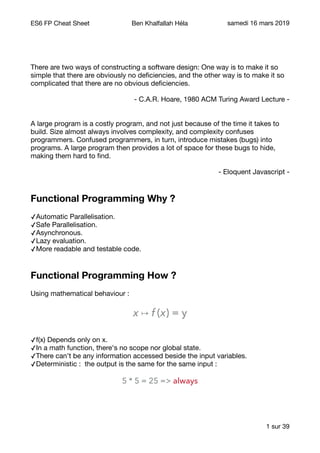
Functional Programming Why ?
✓Automatic Parallelisation.

✓Safe Parallelisation.

✓Asynchronous.

✓Lazy evaluation.

✓More readable and testable code.

Functional Programming How ?
Using mathematical behaviour :

x ↦ f (x) = y
✓f(x) Depends only on x.

✓In a math function, there's no scope nor global state. 

✓There can't be any information accessed beside the input variables.

✓Deterministic : the output is the same for the same input : 

5 * 5 = 25 => always
sur1 39
ES6 FP Cheat Sheet Ben Khalfallah Héla samedi 16 mars 2019
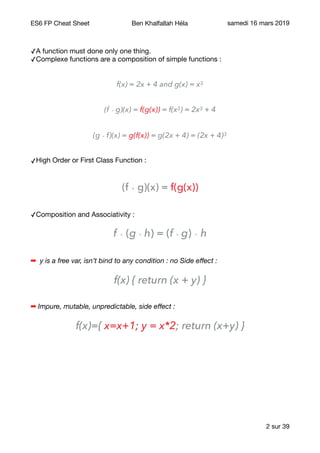
✓A function must done only one thing.

✓Complexe functions are a composition of simple functions :

f(x) = 2x + 4 and g(x) = x3
(f ∘ g)(x) = f(g(x)) = f(x3) = 2x3 + 4
(g ∘ f)(x) = g(f(x)) = g(2x + 4) = (2x + 4)3
✓High Order or First Class Function :

(f ∘ g)(x) = f(g(x))
✓Composition and Associativity :

f ∘ (g ∘ h) = (f ∘ g) ∘ h
➡ y is a free var, isn’t bind to any condition : no Side effect :
f(x) { return (x + y) }
➡ Impure, mutable, unpredictable, side effect :
f(x)={ x=x+1; y = x*2; return (x+y) }
sur2 39
ES6 FP Cheat Sheet Ben Khalfallah Héla samedi 16 mars 2019
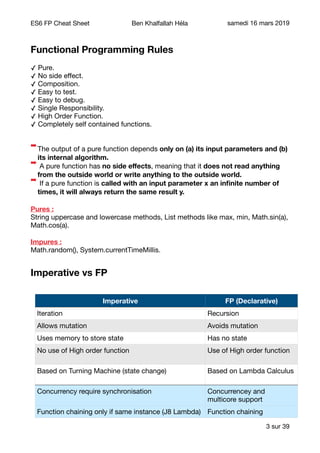
Functional Programming Rules
✓ Pure.

✓ No side effect.

✓ Composition.

✓ Easy to test.

✓ Easy to debug.

✓ Single Responsibility.

✓ High Order Function.

✓ Completely self contained functions.

➡The output of a pure function depends only on (a) its input parameters and (b)
its internal algorithm.
➡ A pure function has no side effects, meaning that it does not read anything
from the outside world or write anything to the outside world.
➡ If a pure function is called with an input parameter x an infinite number of
times, it will always return the same result y.
Pures : 

String uppercase and lowercase methods, List methods like max, min, Math.sin(a),
Math.cos(a).

Impures : 

Math.random(), System.currentTimeMillis.

Imperative vs FP
sur3 39
Imperative FP (Declarative)
Iteration Recursion
Allows mutation Avoids mutation
Uses memory to store state Has no state
No use of High order function Use of High order function
Based on Turning Machine (state change) Based on Lambda Calculus
Concurrency require synchronisation Concurrencey and
multicore support
Function chaining only if same instance (J8 Lambda) Function chaining
ES6 FP Cheat Sheet Ben Khalfallah Héla samedi 16 mars 2019
ES6
Array :
Primitive arrays :
// primitive array type
const tab1 = [1, 2, 3, 12, 4, 5, ‘A']
const tab2 = [1, 2, 78, 3, 189]
// find item
const findItem = (tab, query) =>
tab.filter(item => item === query)
// compare two array and return differences
// symmetric difference
// return elements from tab1 that don't exist
// on tab2 and elements from tab2
// that don't exist on tab1
const arrayDifference = (tab1, tab2) => [
...tab1.filter(item => findItem(tab2, item).length === 0),
...tab2.filter(item => findItem(tab1, item).length === 0),
]
➡ console.log('Differences : ', arrayDifference(tab1, tab2))
// [ 12, 4, 5, 'A', 78, 189 ]
// array intersections
// find common elements
const arrayIntersection = (tab1, tab2) =>
tab1.filter(item => findItem(tab2, item).length > 0)
➡ console.log('Intersection : ', arrayIntersection(tab1, tab2))
// [ 1, 2, 3 ]
sur4 39
ES6 FP Cheat Sheet Ben Khalfallah Héla samedi 16 mars 2019
// Union : merge arrays
// and eliminate duplication
const arrayUnion = (tab1, tab2) => [
...new Set([...tab1, ...tab2]),
]
➡ console.log('Union : ', arrayUnion(tab1, tab2))
// [ 1, 2, 3, 12, 4, 5, 'A', 78, 189 ]
// intersection + difference
// intersection is like a Set()
// to eliminate duplicated elements
const arrayUnion2 = (tab1, tab2) => [
...arrayIntersection(tab1, tab2),
...arrayDifference(tab1, tab2),
]
➡ console.log('Union 2 : ', arrayUnion2(tab1, tab2))
// [ 1, 2, 3, 12, 4, 5, 'A', 78, 189 ]
// keep only string
const keepOnlyString = tab =>
tab.filter(item => (typeof item === 'string'))
➡ console.log('Keep only string : ', keepOnlyString(tab1))
// [ 'A']
sur5 39
ES6 FP Cheat Sheet Ben Khalfallah Héla samedi 16 mars 2019
// count number of elements that are not string
const totalNotString = tab =>
tab.reduce((total, amount) =>
((typeof amount !== 'string') ? total + 1 : total), 0)
➡ console.log('Count number of elements that are not string (tab1):
', totalNotString(tab1)) // 6
➡ console.log('Count number of elements that are not string (tab2):
', totalNotString(tab2)) // 5
// compose function
const compose = x => y => f => g => g(f(x, y))
// compose : chaining operations
const composeUnionTotalNotString = compose(tab1)(tab2)(arrayUnion)
(totalNotString)
➡ console.log('union total not string 2: ‘,
composeUnionTotalNotString) // 8
// modify array values
const modifyArrayValues = array => (array.map(item => item + 2))
const tab3 = [1, 2, -2, -1, -4, 3, 4, 5, 6, 7, 0]
const modifiedArray = modifyArrayValues(tab3)
➡ console.log('Modified Array : ', modifiedArray)
// [ 3, 4, 0, 1, -2, 5, 6, 7, 8, 9, 2 ]
sur6 39
ES6 FP Cheat Sheet Ben Khalfallah Héla samedi 16 mars 2019
// check if all items in array
// satisfy a specific condition
const isAllItemsPositives = array =>
(array.every(item => item > 0))
// check if all array item satisfy
// a specific condition
const tab4 = [1, 2, -2, -1, -4, 3, 4, 5, 6, 7, 0]
➡ console.log('is All Items Positives : ',
isAllItemsPositives(tab4))
//false
const arrayPositive = [4, 8, 9, 12, 7]
➡ console.log('is All Items Positives : ',
isAllItemsPositives(arrayPositive))
// true
// combine/concat arrays
const tab1 = [1, 2, 3, 4, 5]
const tab2 = [7, 8, 9, 10, 11]
const tab3 = [...tab1, ...tab2]
➡ // [ 1, 2, 3, 4, 5, 7, 8, 9, 10, 11 ] : like arr3.concat(arr1, arr2)
// add at the end
const tab4 = ['a', 'b', 'c']
tab3.push(...tab4)
➡ // [ 1, 2, 3, 4, 5, 7, 8, 9, 10, 11, 'a', 'b', 'c' ] : like
arr3.push.apply(arr3, arr4)
// add at the begin
const tab5 = ['A', 'B', 'C']
tab3.unshift(...tab5)
➡ // [ 'A','B','C',1,2, 3, 4, 5, 7, 8, 9, 10, 11, 'a', 'b', 'c' ]
sur7 39
ES6 FP Cheat Sheet Ben Khalfallah Héla samedi 16 mars 2019
// get the max & min of an array
const numbers = [1, 25, 3, 4, 5]
const max = Math.max(numbers)
➡ // undefined
const min = Math.min(numbers)
➡ // undefined
const maxNumber = Math.max(...numbers)
➡ // 25 : like Math.max.apply(Math, [1, 25, 3, 4, 5])
const minNumer = Math.min(...numbers)
➡ // 1
// If you destruct an Array,
// you can choose to only extract a prefix
const [elm1, elm2] = ['a', 'b', 'c', 'f', 's']
➡ console.log('elm1 : ', elm1) // a
➡ console.log('elm2 : ', elm2) // b
// or skip
const [, , elm3, elm4] = ['a', 'b', 'c', 'd', 'f', 's']
➡ console.log('elm3 : ', elm3) // c
➡ console.log('elm4 : ', elm4) // d
// or skip & rest
const [, , ...rest] = ['a', 'b', 'c', 'd', 'f', 's']
➡ console.log('rest : ', rest) // [ 'c', 'd', 'f', 's']
// If the operator can’t find any elements,
// it matches its operand against the empty Array.
// That is, it never produces undefined or null
const [val1, val2, ...val3] = ['a']
➡ console.log('val1 : ', val1) // a
➡ console.log('val2 : ', val2) // undefined
➡ console.log('val3 : ', val3) // []
sur8 39
ES6 FP Cheat Sheet Ben Khalfallah Héla samedi 16 mars 2019
Deep arrays :
// deep arrays
const tabObject1 = [{
name: 'Héla',
lastName: 'Ben Khalfallah',
},
{
name: 'Steve',
lastName: 'Jobs',
},
{
name: 'Pablo',
lastName: 'Picasso',
}]
const tabObject2 = [{
name: 'Héla',
lastName: 'Ben Khalfallah',
note: 14,
},
{
name: 'Dan',
lastName: 'Abramov',
note: 17,
},
{
name: 'Steve',
lastName: 'Jobs',
note: 16,
},
{
name: 'Albert',
lastName: 'Einsten',
note: 18,
}]
sur9 39
ES6 FP Cheat Sheet Ben Khalfallah Héla samedi 16 mars 2019
// deep find item
const deepFindItem = (tab, query) =>
tab.filter(item => item.name === query.name)
// deep arrays difference
// 1. find tab1 difference
// 2. find tab2 difference
const deepArrayDifference = (tab1, tab2) => [
...tab1.filter(item => deepFindItem(tab2, item).length === 0),
...tab2.filter(item => deepFindItem(tab1, item).length === 0),
]
➡ console.log('Deep Difference : ', deepArrayDifference(tabObject1,
tabObject2))
// [ { name: 'Pablo', lastName: 'Picasso' },
// { name: 'Albert', lastName: 'Einsten' },
// { name: 'Dan', lastName: 'Abramov' } ]
// deep array intersections
// find common elements
const deepArrayIntersection = (tab1, tab2) =>
tab1.filter(item => deepFindItem(tab2, item).length > 0)
➡ console.log('Deep Intersection : ',
deepArrayIntersection(tabObject1, tabObject2))
// [ { name: 'Héla', lastName: 'Ben Khalfallah' },
// { name: 'Steve', lastName: 'Jobs' } ]
sur10 39
ES6 FP Cheat Sheet Ben Khalfallah Héla samedi 16 mars 2019
// 1. find common elements tab1 & tab2
// 2. find tab1 difference
// 3. find tab2 difference
// 4. merge result
// intersection + difference
// intersection is like a Set()
// to eliminate duplicated elements
const deepArrayUnion = (tab1, tab2) => [
...deepArrayIntersection(tab1, tab2),
...deepArrayDifference(tab1, tab2),
]
➡ console.log('Deep Union : ', deepArrayUnion(tabObject1,
tabObject2))
// [ { name: 'Héla', lastName: 'Ben Khalfallah' },
// { name: 'Steve', lastName: 'Jobs' },
// { name: 'Pablo', lastName: 'Picasso' },
// { name: 'Albert', lastName: 'Einsten' },
// { name: 'Dan', lastName: 'Abramov' } ]
// chaining operations
const sortChain = tabObject2
.filter(item => item.name.toLowerCase().includes('e'))
.sort((item, next) => {
if (item.name < next.name) { return -1 }
if (item.name > next.name) { return 1 }
return 0
})
➡ console.log('Sort Chain : ', sortChain)
// [ { name: 'Albert', lastName: 'Einsten', note: 18 },
// { name: 'Steve', lastName: 'Jobs', note: 16 } ]
sur11 39
ES6 FP Cheat Sheet Ben Khalfallah Héla samedi 16 mars 2019
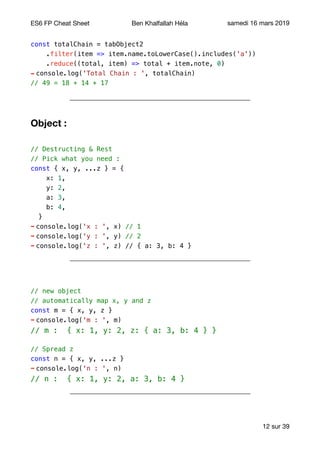
const totalChain = tabObject2
.filter(item => item.name.toLowerCase().includes('a'))
.reduce((total, item) => total + item.note, 0)
➡ console.log('Total Chain : ', totalChain)
// 49 = 18 + 14 + 17
Object :
// Destructing & Rest
// Pick what you need :
const { x, y, ...z } = {
x: 1,
y: 2,
a: 3,
b: 4,
}
➡ console.log('x : ', x) // 1
➡ console.log('y : ', y) // 2
➡ console.log('z : ', z) // { a: 3, b: 4 }
// new object
// automatically map x, y and z
const m = { x, y, z }
➡ console.log('m : ', m)
// m : { x: 1, y: 2, z: { a: 3, b: 4 } }
// Spread z
const n = { x, y, ...z }
➡ console.log('n : ', n)
// n : { x: 1, y: 2, a: 3, b: 4 }
sur12 39
ES6 FP Cheat Sheet Ben Khalfallah Héla samedi 16 mars 2019
// Nested Destructing
// define your pattern
const options = {
size: {
width: 100,
height: 200,
},
items: ['Cake', 'Donut'],
extra: true,
}
// nested destructing
const {
size: { // put size here
width,
height,
},
items: [item1, item2], // assign items here
title = 'Menu', // not present in the object (default value is used)
} = options
➡ console.log('title : ', title) // Menu
➡ console.log('width : ', width) // 100
➡ console.log('height : ', height)// 200
➡ console.log('item1 : ', item1) // Cake
➡ console.log('item2 : ', item2) // Donut
sur13 39
ES6 FP Cheat Sheet Ben Khalfallah Héla samedi 16 mars 2019
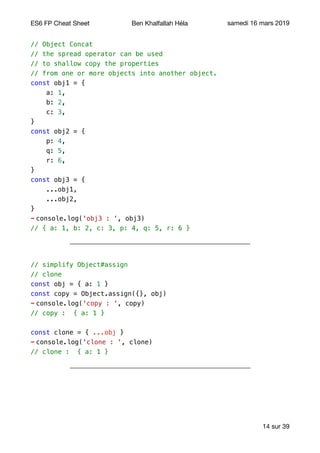
// Object Concat
// the spread operator can be used
// to shallow copy the properties
// from one or more objects into another object.
const obj1 = {
a: 1,
b: 2,
c: 3,
}
const obj2 = {
p: 4,
q: 5,
r: 6,
}
const obj3 = {
...obj1,
...obj2,
}
➡ console.log('obj3 : ', obj3)
// { a: 1, b: 2, c: 3, p: 4, q: 5, r: 6 }
// simplify Object#assign
// clone
const obj = { a: 1 }
const copy = Object.assign({}, obj)
➡ console.log('copy : ', copy)
// copy : { a: 1 }
const clone = { ...obj }
➡ console.log('clone : ', clone)
// clone : { a: 1 }
sur14 39
ES6 FP Cheat Sheet Ben Khalfallah Héla samedi 16 mars 2019
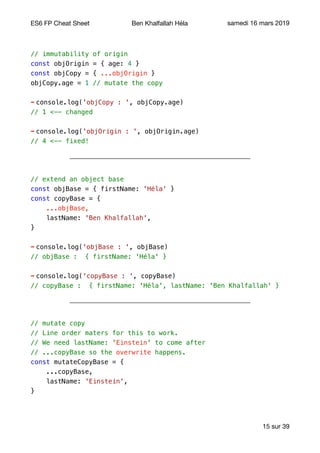
// immutability of origin
const objOrigin = { age: 4 }
const objCopy = { ...objOrigin }
objCopy.age = 1 // mutate the copy
➡ console.log('objCopy : ', objCopy.age)
// 1 <-- changed
➡ console.log('objOrigin : ', objOrigin.age)
// 4 <-- fixed!
// extend an object base
const objBase = { firstName: 'Héla' }
const copyBase = {
...objBase,
lastName: 'Ben Khalfallah',
}
➡ console.log('objBase : ', objBase)
// objBase : { firstName: 'Héla' }
➡ console.log('copyBase : ', copyBase)
// copyBase : { firstName: 'Héla', lastName: 'Ben Khalfallah' }
// mutate copy
// Line order maters for this to work.
// We need lastName: 'Einstein' to come after
// ...copyBase so the overwrite happens.
const mutateCopyBase = {
...copyBase,
lastName: 'Einstein',
}
sur15 39
ES6 FP Cheat Sheet Ben Khalfallah Héla samedi 16 mars 2019
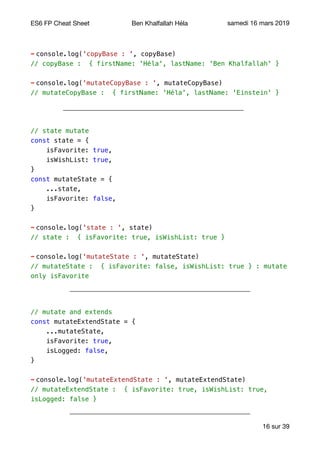
➡ console.log('copyBase : ', copyBase)
// copyBase : { firstName: 'Héla', lastName: 'Ben Khalfallah' }
➡ console.log('mutateCopyBase : ', mutateCopyBase)
// mutateCopyBase : { firstName: 'Héla', lastName: 'Einstein' }
// state mutate
const state = {
isFavorite: true,
isWishList: true,
}
const mutateState = {
...state,
isFavorite: false,
}
➡ console.log('state : ', state)
// state : { isFavorite: true, isWishList: true }
➡ console.log('mutateState : ', mutateState)
// mutateState : { isFavorite: false, isWishList: true } : mutate
only isFavorite
// mutate and extends
const mutateExtendState = {
...mutateState,
isFavorite: true,
isLogged: false,
}
➡ console.log('mutateExtendState : ', mutateExtendState)
// mutateExtendState : { isFavorite: true, isWishList: true,
isLogged: false }
sur16 39
ES6 FP Cheat Sheet Ben Khalfallah Héla samedi 16 mars 2019
String :
// Spread a string
// or convert string to char array
// or split
const strTemplate = 'Steve'
const chars = [...strTemplate] // like split('')
➡ console.log('chars : ', chars)
// chars : [ 'S', 't', 'e', 'v', 'e' ]
// reverse a string
const reverse = str => (
str
.split(' ')
.map(word => word.split('').reverse().join(''))
.reverse()
.join(' ')
)
➡ console.log('reverse :', reverse('Argument goes here'))
//reverse : ereh seog tnemugrA
// capitalise string words
const capitaliseWords = str => (
str
.split(' ')
.map(word =>
word.replace(word.charAt(0), word.charAt(0).toUpperCase()))
.join(' ')
)
➡ console.log('capitalise Words :', capitaliseWords('Argument goes
here'))
// capitalise Words : Argument Goes Here
sur17 39
ES6 FP Cheat Sheet Ben Khalfallah Héla samedi 16 mars 2019
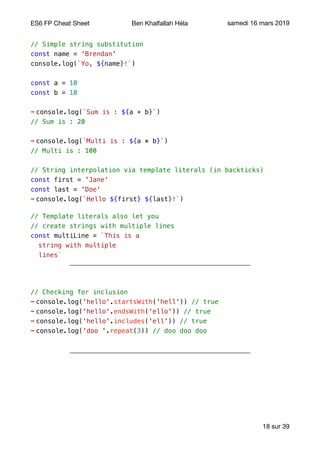
// Simple string substitution
const name = 'Brendan'
console.log(`Yo, ${name}!`)
const a = 10
const b = 10
➡ console.log(`Sum is : ${a + b}`)
// Sum is : 20
➡ console.log(`Multi is : ${a * b}`)
// Multi is : 100
// String interpolation via template literals (in backticks)
const first = 'Jane'
const last = 'Doe'
➡ console.log(`Hello ${first} ${last}!`)
// Template literals also let you
// create strings with multiple lines
const multiLine = `This is a
string with multiple
lines`
// Checking for inclusion
➡ console.log('hello'.startsWith('hell')) // true
➡ console.log('hello'.endsWith('ello')) // true
➡ console.log('hello'.includes('ell')) // true
➡ console.log('doo '.repeat(3)) // doo doo doo
sur18 39
ES6 FP Cheat Sheet Ben Khalfallah Héla samedi 16 mars 2019
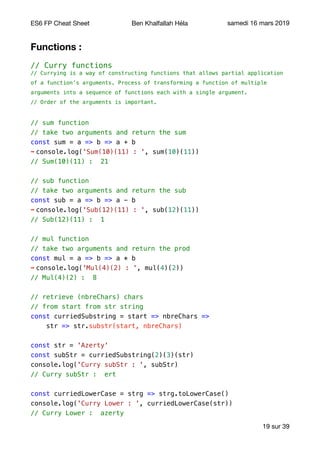
Functions :
// Curry functions
// Currying is a way of constructing functions that allows partial application
of a function’s arguments. Process of transforming a function of multiple
arguments into a sequence of functions each with a single argument.
// Order of the arguments is important.
// sum function
// take two arguments and return the sum
const sum = a => b => a + b
➡ console.log('Sum(10)(11) : ', sum(10)(11))
// Sum(10)(11) : 21
// sub function
// take two arguments and return the sub
const sub = a => b => a - b
➡ console.log('Sub(12)(11) : ', sub(12)(11))
// Sub(12)(11) : 1
// mul function
// take two arguments and return the prod
const mul = a => b => a * b
➡ console.log('Mul(4)(2) : ', mul(4)(2))
// Mul(4)(2) : 8
// retrieve (nbreChars) chars
// from start from str string
const curriedSubstring = start => nbreChars =>
str => str.substr(start, nbreChars)
const str = 'Azerty'
const subStr = curriedSubstring(2)(3)(str)
console.log('Curry subStr : ', subStr)
// Curry subStr : ert
const curriedLowerCase = strg => strg.toLowerCase()
console.log('Curry Lower : ', curriedLowerCase(str))
// Curry Lower : azerty
sur19 39
ES6 FP Cheat Sheet Ben Khalfallah Héla samedi 16 mars 2019
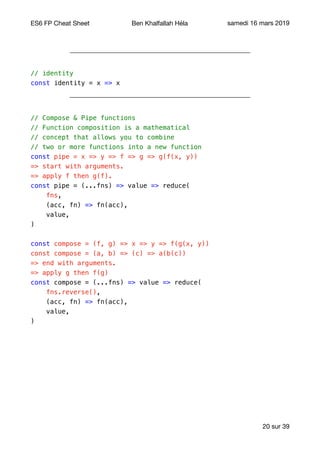
// identity
const identity = x => x
// Compose & Pipe functions
// Function composition is a mathematical
// concept that allows you to combine
// two or more functions into a new function
const pipe = x => y => f => g => g(f(x, y))
=> start with arguments.
=> apply f then g(f).
const pipe = (...fns) => value => reduce(
fns,
(acc, fn) => fn(acc),
value,
)
const compose = (f, g) => x => y => f(g(x, y))
const compose = (a, b) => (c) => a(b(c))
=> end with arguments.
=> apply g then f(g)
const compose = (...fns) => value => reduce(
fns.reverse(),
(acc, fn) => fn(acc),
value,
)
sur20 39
ES6 FP Cheat Sheet Ben Khalfallah Héla samedi 16 mars 2019
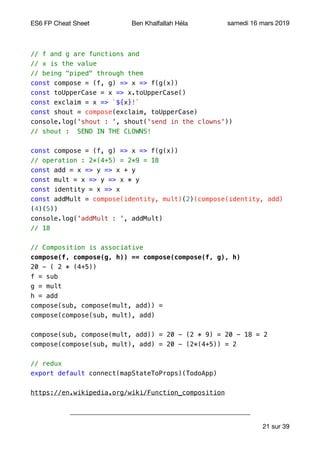
// f and g are functions and
// x is the value
// being "piped" through them
const compose = (f, g) => x => f(g(x))
const toUpperCase = x => x.toUpperCase()
const exclaim = x => `${x}!`
const shout = compose(exclaim, toUpperCase)
console.log('shout : ', shout('send in the clowns'))
// shout : SEND IN THE CLOWNS!
const compose = (f, g) => x => f(g(x))
// operation : 2*(4+5) = 2*9 = 18
const add = x => y => x + y
const mult = x => y => x * y
const identity = x => x
const addMult = compose(identity, mult)(2)(compose(identity, add)
(4)(5))
console.log('addMult : ', addMult)
// 18
// Composition is associative
compose(f, compose(g, h)) == compose(compose(f, g), h)
20 - ( 2 * (4+5))
f = sub
g = mult
h = add
compose(sub, compose(mult, add)) =
compose(compose(sub, mult), add)
compose(sub, compose(mult, add)) = 20 - (2 * 9) = 20 - 18 = 2
compose(compose(sub, mult), add) = 20 - (2*(4+5)) = 2
// redux
export default connect(mapStateToProps)(TodoApp)
https://en.wikipedia.org/wiki/Function_composition
sur21 39
ES6 FP Cheat Sheet Ben Khalfallah Héla samedi 16 mars 2019
High-Order Functions :
Functions that operate on other functions, either by taking them as arguments
or by returning them, are called higher-order functions.

- Eloquent Javascript -

const users = [
{ name: 'aaName', lastname: 'cclastName', note: 12 },
{ name: 'ccName', lastname: 'aalastName', note: 13 },
{ name: 'bbName', lastname: 'bblastName', note: 7 },
]
// sort by criteria
// partial arguments application
const sortBy = property => (a, b) => {
if (a[property] < b[property]) {
return -1
}
if (a[property] > b[property]) {
return 1
}
return 0
}
const sortedByNameUsers = users.sort(sortBy('firstname'))
➡ console.log('sort by name: ', sortedByNameUsers)
// [ { firstname: 'aaFirstName', lastname: 'cclastName' },
// { firstname: 'bbFirstName', lastname: 'bblastName' },
// { firstname: 'ccFirstName', lastname: 'aalastName' } ]
const sortedByNoteUsers = users.sort(sortBy('note'))
➡ console.log('sort by note: ', sortedByNoteUsers)
// [ { name: 'bbName', lastname: 'bblastName', note: 7 },
// { name: 'aaName', lastname: 'cclastName', note: 12 },
// { name: 'ccName', lastname: 'aalastName', note: 13 } ]
sur22 39
ES6 FP Cheat Sheet Ben Khalfallah Héla samedi 16 mars 2019
users.sort(sortBy('note'))
=> sort : function 1.
=> sortBy : function 2.
=> sort call sortBy that call compare.
Always composition over inheritance !
➡ reduces repetitive code
➡ easier reuse of code
➡ increases clarity of code meaning
// take function and arguments
// return function(arguments)
const transform = f => (...args) => f(...args)
const tranformMin = transform(Math.min)(3, 2, 1)
➡ console.log('tranform min: ', tranformMin)
// 1
const tranformSort = transform(Array.sort)(users, sortBy('name'))
➡ console.log('tranformSort: ', tranformSort)
// sort by name:
// [ { name: 'aaName', lastname: 'cclastName', note: 12 },
// { name: 'bbName', lastname: 'bblastName', note: 7 },
// { name: 'ccName', lastname: 'aalastName', note: 13 } ]
// tranformSort name :
// [ { name: 'aaName', lastname: 'cclastName', note: 12 },
// { name: 'bbName', lastname: 'bblastName', note: 7 },
// { name: 'ccName', lastname: 'aalastName', note: 13 } ]
sur23 39
ES6 FP Cheat Sheet Ben Khalfallah Héla samedi 16 mars 2019
// transform map
const tab = [1, 5, 2, 3, 4]
const transformMap = transform(Array.map)(tab, item => item * 2)
➡ console.log('transform map : ', transformMap)
// transform map : [ 2, 10, 4, 6, 8 ]
// tranform reduce
const transformReduce = transform(Array.reduce)(
tab,
(total, amount) => (total + amount),
)
➡ console.log('transform reduce : ', transformReduce)
// transform reduce : 15 (1 + 5 + 2 + 3 + 4)
Always composition over inheritance !
Higher-order functions start to shine when you need to compose
operations.
- Eloquent Javascript -

sur24 39
ES6 FP Cheat Sheet Ben Khalfallah Héla samedi 16 mars 2019
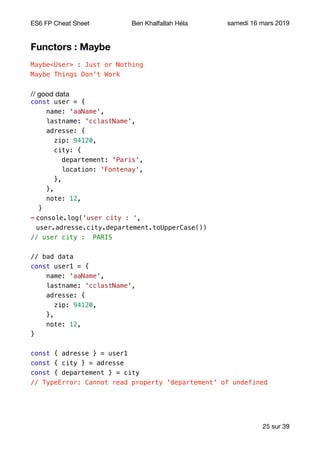
Functors : Maybe
Maybe<User> : Just or Nothing
Maybe Things Don’t Work
// good data

const user = {
name: 'aaName',
lastname: 'cclastName',
adresse: {
zip: 94120,
city: {
departement: 'Paris',
location: 'Fontenay',
},
},
note: 12,
}
➡ console.log('user city : ‘,
user.adresse.city.departement.toUpperCase())
// user city : PARIS
// bad data
const user1 = {
name: 'aaName',
lastname: 'cclastName',
adresse: {
zip: 94120,
},
note: 12,
}
const { adresse } = user1
const { city } = adresse
const { departement } = city
// TypeError: Cannot read property 'departement' of undefined
sur25 39
ES6 FP Cheat Sheet Ben Khalfallah Héla samedi 16 mars 2019
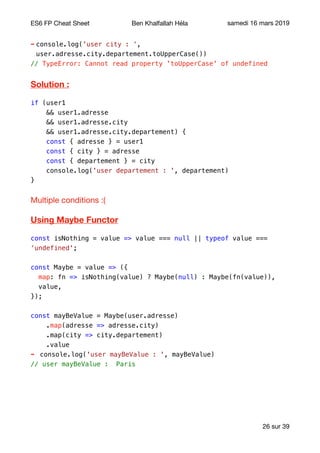
➡ console.log('user city : ‘,
user.adresse.city.departement.toUpperCase())
// TypeError: Cannot read property 'toUpperCase' of undefined
Solution :
if (user1
&& user1.adresse
&& user1.adresse.city
&& user1.adresse.city.departement) {
const { adresse } = user1
const { city } = adresse
const { departement } = city
console.log('user departement : ', departement)
}
Multiple conditions :(

Using Maybe Functor
const isNothing = value => value === null || typeof value ===
‘undefined';
const Maybe = value => ({
map: fn => isNothing(value) ? Maybe(null) : Maybe(fn(value)),
value,
});
const mayBeValue = Maybe(user.adresse)
.map(adresse => adresse.city)
.map(city => city.departement)
.value
➡ console.log('user mayBeValue : ', mayBeValue)
// user mayBeValue : Paris
sur26 39
ES6 FP Cheat Sheet Ben Khalfallah Héla samedi 16 mars 2019
const simpleMayBe = Maybe('George')
.map(x => x.toUpperCase())
.map(x => `Mr. ${x}`)
.value
➡ console.log('simpleMayBe : ', simpleMayBe)
// simpleMayBe : Mr. GEORGE
const mayFailBeValue = Maybe(user.adresse1)
.map(adresse1 => adresse1.city)
.map(city => city.departement)
.value
➡ console.log('user mayFailBeValue : ', mayFailBeValue)
// user mayFailBeValue : null
It keep context ! Pure and declarative Error Handling !
➡ A functor is simply something that can be mapped over. In OOP-
speak, we’d call it a ‘Mappable’ instead (array is a functor).

➡ The map method allows to compose functions.

➡ map must not have any side effects. It must only change the functor value,
and nothing else. 

➡ How can to be sure ? By testing that mapping the identity function (v => v)
returns the exact same functor. This is called the identity law.
functor.map(x => x) ≡ functor
Pure !

sur27 39
ES6 FP Cheat Sheet Ben Khalfallah Héla samedi 16 mars 2019
Identity
The identity function (v => v) returns the exact same functor :
const NumberBox = number => ({
map: fn => {
if (typeof number !== 'number') {
return NumberBox(NaN);
}
return NumberBox(fn(number))
},
value: number,
});
const numberValue = NumberBox(5)
.map(v => v * 2) // 10
.map(v => v + 1) // 10 + 1
.value;
➡ console.log('numberValue : ', numberValue)// 11
const numberIdentity = NumberBox(5).map(v => v).value
➡ console.log('numberIdentity : ', numberIdentity)// 5
➡ console.log('NumberBox(5) : ', NumberBox(5).value)// 5
functor.map(x => x) ≡ functor
console.log([ 0, 1, 2, 3 ].map(x => x))
// => [ 0, 1, 2, 3 ]
sur28 39
ES6 FP Cheat Sheet Ben Khalfallah Héla samedi 16 mars 2019
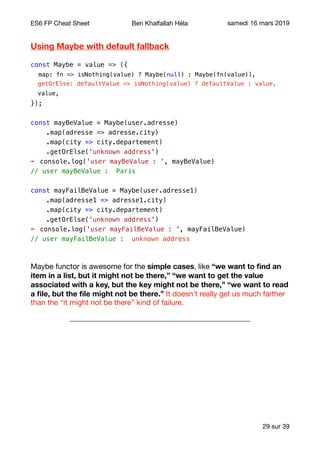
Using Maybe with default fallback
const Maybe = value => ({
map: fn => isNothing(value) ? Maybe(null) : Maybe(fn(value)),
getOrElse: defaultValue => isNothing(value) ? defaultValue : value,
value,
});
const mayBeValue = Maybe(user.adresse)
.map(adresse => adresse.city)
.map(city => city.departement)
.getOrElse('unknown address')
➡ console.log('user mayBeValue : ', mayBeValue)
// user mayBeValue : Paris
const mayFailBeValue = Maybe(user.adresse1)
.map(adresse1 => adresse1.city)
.map(city => city.departement)
.getOrElse('unknown address')
➡ console.log('user mayFailBeValue : ', mayFailBeValue)
// user mayFailBeValue : unknown address
Maybe functor is awesome for the simple cases, like “we want to find an
item in a list, but it might not be there,” “we want to get the value
associated with a key, but the key might not be there,” “we want to read
a file, but the file might not be there.” It doesn’t really get us much farther
than the “it might not be there” kind of failure.

sur29 39
ES6 FP Cheat Sheet Ben Khalfallah Héla samedi 16 mars 2019
Functors : Either
Either<Error, User>;

Sometimes our failures might be a little more complex, they might require a
little bit more of information to the developer, they might even encompass
several different types of failures! We just can’t model these kinds of
computations with the Maybe functor because the failure case doesn’t
accept any additional information.
We clearly need a new functor for this: meet Either, the functor that can
model a success and its associated value, or a failure and its associated
value! And the best of all, since Either is a functor, we can seamlessly
compose values using Either with the functions we’ve defined before for
the Maybe functor.
Generally, the use of exceptions for ordinary control flow is considered
an anti-pattern. We can choose a real life computation, which fails or
returns a value, and decorate it so it returns an Either.
Either(Error(Maybe), Success(Maybe))

Either(Left(Maybe), Right(Maybe))


const Left = value => ({
map: fn => Left(value),
value
});
const Right = value => ({
map: fn => Right(fn(value)),
value
});
const validateEmail = value => {
if (!value.match(/S+@S+.S+/)) {
return Left(new Error('The given email is invalid'));
}
return Right(value);
};
sur30 39
ES6 FP Cheat Sheet Ben Khalfallah Héla samedi 16 mars 2019
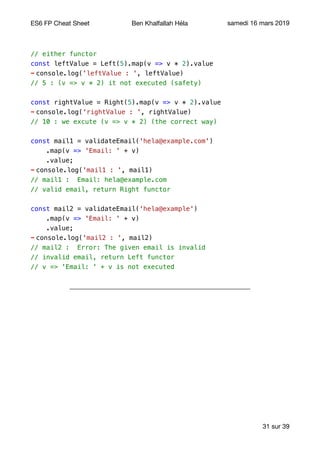
// either functor
const leftValue = Left(5).map(v => v * 2).value
➡ console.log('leftValue : ', leftValue)
// 5 : (v => v * 2) it not executed (safety)
const rightValue = Right(5).map(v => v * 2).value
➡ console.log('rightValue : ', rightValue)
// 10 : we excute (v => v * 2) (the correct way)
const mail1 = validateEmail('hela@example.com')
.map(v => 'Email: ' + v)
.value;
➡ console.log('mail1 : ', mail1)
// mail1 : Email: hela@example.com
// valid email, return Right functor
const mail2 = validateEmail('hela@example')
.map(v => 'Email: ' + v)
.value;
➡ console.log('mail2 : ', mail2)
// mail2 : Error: The given email is invalid
// invalid email, return Left functor
// v => 'Email: ' + v is not executed
sur31 39
ES6 FP Cheat Sheet Ben Khalfallah Héla samedi 16 mars 2019
Catching Errors
// on a Left, catch() should apply the function,
// and return a Right to allow further mapping
const Left = value => ({
map: fn => Left(value),
catch: fn => Right(fn(value)),
value
});
// on a Right, catch() should do nothing
const Right = value => ({
map: fn => Right(fn(value)),
catch: () => Right(value),
value
});
const catchRight = Right(5)
.catch(error => error.message)
.value
➡ console.log('catchRight : ', catchRight)
// catchRight : 5
// catch is ignored on a right
const catchLeft = Left(new Error('exception'))
.catch(error => error.message)
.value
➡ console.log('catchLeft : ', catchLeft)
// catchLeft : exception
sur32 39
ES6 FP Cheat Sheet Ben Khalfallah Héla samedi 16 mars 2019
const tryCatch = fn => value => {
try {
return Right(fn(value)); // everything went fine we go right
} catch (error) {
return Left(error); // oops there was an error let's go left.
}
};
const validateEmail2 = tryCatch(value => {
if (!value.match(/S+@S+.S+/)) {
throw new Error('The given email is invalid');
}
return value;
});
const get = key => value => value[key];
const emailVal1 = validateEmail2('hela@example.com')
.map(v => 'Email: ' + v)
.catch(get('message'))
.value;
➡ console.log('emailVal1 : ', emailVal1)
// emailVal1 : Email: hela@example.com
const emailVal2 = validateEmail2('hela@example')
.map(v => 'Email: ' + v)
.catch(get('message'))
.value;
➡ console.log('emailVal2 : ', emailVal2)
// emailVal2 : The given email is invalid
sur33 39
ES6 FP Cheat Sheet Ben Khalfallah Héla samedi 16 mars 2019
Combining Functors : Maybe + Either
const validateUser = user => Maybe(user)
.map(get('email'))
.map(v => validateEmail2(v).catch(get('message')));
const validUser1 = validateUser({
firstName: 'Hela',
email: 'hela@example.com',
});
➡ console.log('validUser1 : ', validUser1)
// Maybe(Right('hela@example.com'))
const validUser2 = validateUser({
firstName: 'Hela',
email: 'hela@example',
});
➡ console.log('validUser2 : ', validUser2)
// Maybe(Left('The given email is invalid'))
const validUser3 = validateUser({
firstName: 'Hela',
});
➡ console.log('validUser3 : ', validUser3)
// Maybe(null)
sur34 39
ES6 FP Cheat Sheet Ben Khalfallah Héla samedi 16 mars 2019
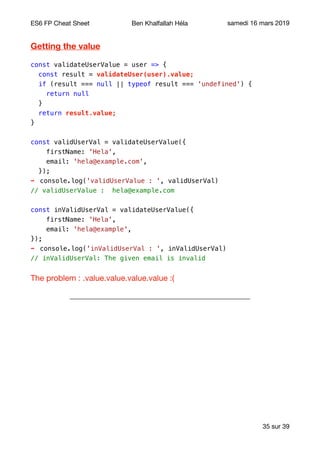
Getting the value
const validateUserValue = user => {
const result = validateUser(user).value;
if (result === null || typeof result === 'undefined') {
return null
}
return result.value;
}
const validUserVal = validateUserValue({
firstName: 'Hela',
email: 'hela@example.com',
});
➡ console.log('validUserValue : ', validUserVal)
// validUserValue : hela@example.com
const inValidUserVal = validateUserValue({
firstName: 'Hela',
email: 'hela@example',
});
➡ console.log('inValidUserVal : ', inValidUserVal)
// inValidUserVal: The given email is invalid
The problem : .value.value.value.value :( 

sur35 39
ES6 FP Cheat Sheet Ben Khalfallah Héla samedi 16 mars 2019
Map, Flatten and Chain
const Maybe = value => ({
map: fn => isNothing(value) ? Maybe(null) : Maybe(fn(value)),
getOrElse: defaultValue => isNothing(value) ? defaultValue : value,
// we could return the value, but then we would sometimes switch
functor type.
// This way Maybe.flatten will always return a Maybe
flatten: () => isNothing(value) ? Maybe(null) : Maybe(value.value),
value,
});
const validateFlattenUser = user => Maybe(user)
.map(get('email'))
.map(v => validateEmail2(v).catch(get('message')))
.flatten()
// since now I will always have a simple Maybe,
// I can use getOrElse to get the value
.getOrElse('The user has no mail’);
const validFlattenUser = validateFlattenUser({
firstName: 'Hela',
email: 'hela@example.com',
});
console.log('validFlattenUser : ', validFlattenUser)
// validFlattenUser : hela@example.com
map(v => validateEmail2(v).catch(get(‘message')))
=> { map: [Function: map],
catch: [Function: _catch],
value: 'hela@example.com' } }
.flatten()
=> value.value => hela@example.com
sur36 39
ES6 FP Cheat Sheet Ben Khalfallah Héla samedi 16 mars 2019
const Maybe = value => ({
map: fn => isNothing(value) ? Maybe(null) : Maybe(fn(value)),
getOrElse: defaultValue => isNothing(value) ? defaultValue : value,
flatten: () => isNothing(value) ? Maybe(null) : Maybe(value.value),
chain(fn) {
return this.map(fn).flatten();
},
value,
});
const validateChainUser = user => Maybe(user)
.map(get('email'))
.chain(v => validateEmail2(v).catch(get('message')))
.getOrElse('The user has no mail');
1/
.map(v => validateEmail2(v).catch(get('message')))
.flatten()
2/ .chain(v => validateEmail2(v).catch(get('message')))
1 = 2
map then flatten = flatMap : execute function and then return value.
map then flatten = flatMap = chain
const validChainUser = validateChainUser({
firstName: 'Hela',
email: 'hela@example.com',
});
➡ console.log('validChainUser : ', validChainUser)
// validChainUser : hela@example.com
sur37 39
ES6 FP Cheat Sheet Ben Khalfallah Héla samedi 16 mars 2019
const inValidChainUser = validateChainUser({
firstName: 'Hela',
email: 'hela@example',
});
➡ console.log('inValidChainUser : ', inValidChainUser)
// inValidChainUser : The given email is invalid
const inValidChainUser1 = validateChainUser({
firstName: 'Hela',
});
➡ console.log('inValidChainUser1 : ', inValidChainUser1)
// inValidChainUser1 : The user has no mail
Functor : rules
Identity :
functor.map(x => x) ≡ functor
console.log([ 0, 1, 2, 3 ].map(x => x))

// => [ 0, 1, 2, 3 ]

Composition :
functor.map(x => f(g(x))) ≡ functor.map(g).map(f)
const fullNameOfPerson = (person) => (

person.firstName + ' ' + person.lastName

)

const greetingForName = (name) => `Hello, ${name}!`

We want to do greetingForName(fullNameOfPerson(person)) :

map(person => fullNameOfPerson(person))

map(person => greetingForName(person)) => apply greetingForName to the
first result

sur38 39
ES6 FP Cheat Sheet Ben Khalfallah Héla samedi 16 mars 2019
Monads :
Monad = a functor that can flatten itself with a chain method.

Maybe is a monad.

Rules :
Left identity :
Monad(x).chain(f) === f(x)
// f being a function returning a monad

Chaining a function to a monad is the same as passing the value to the
function. This ensures that the encompassing monad is totally
removed by chain.
Right identity :
Monad(x).chain(Monad) === Monad(x)
Chaining the monad constructor should return the same monad.

This ensures that chain has no side effect.
Associativity :
monad.chain(f).chain(g) == monad.chain(x => f(x).chain(g));
// f and g being functions returning a monad

Chain must be associative: Using .chain(f).chain(g), is the same as using
.chain(v => f(v).chain(g)). This ensures that we can chain function
that uses chain themselves.
sur39 39

FP Using ES6+ (Cheat Sheet)

  • 1.
    ES6 FP CheatSheet Ben Khalfallah Héla samedi 16 mars 2019 There are two ways of constructing a software design: One way is to make it so simple that there are obviously no deficiencies, and the other way is to make it so complicated that there are no obvious deficiencies. - C.A.R. Hoare, 1980 ACM Turing Award Lecture - A large program is a costly program, and not just because of the time it takes to build. Size almost always involves complexity, and complexity confuses programmers. Confused programmers, in turn, introduce mistakes (bugs) into programs. A large program then provides a lot of space for these bugs to hide, making them hard to find. - Eloquent Javascript - Functional Programming Why ? ✓Automatic Parallelisation. ✓Safe Parallelisation. ✓Asynchronous. ✓Lazy evaluation. ✓More readable and testable code. Functional Programming How ? Using mathematical behaviour : x ↦ f (x) = y ✓f(x) Depends only on x. ✓In a math function, there's no scope nor global state. ✓There can't be any information accessed beside the input variables. ✓Deterministic : the output is the same for the same input : 5 * 5 = 25 => always sur1 39
  • 2.
    ES6 FP CheatSheet Ben Khalfallah Héla samedi 16 mars 2019 ✓A function must done only one thing. ✓Complexe functions are a composition of simple functions : f(x) = 2x + 4 and g(x) = x3 (f ∘ g)(x) = f(g(x)) = f(x3) = 2x3 + 4 (g ∘ f)(x) = g(f(x)) = g(2x + 4) = (2x + 4)3 ✓High Order or First Class Function : (f ∘ g)(x) = f(g(x)) ✓Composition and Associativity : f ∘ (g ∘ h) = (f ∘ g) ∘ h ➡ y is a free var, isn’t bind to any condition : no Side effect : f(x) { return (x + y) } ➡ Impure, mutable, unpredictable, side effect : f(x)={ x=x+1; y = x*2; return (x+y) } sur2 39
  • 3.
    ES6 FP CheatSheet Ben Khalfallah Héla samedi 16 mars 2019 Functional Programming Rules ✓ Pure. ✓ No side effect. ✓ Composition. ✓ Easy to test. ✓ Easy to debug. ✓ Single Responsibility. ✓ High Order Function. ✓ Completely self contained functions. ➡The output of a pure function depends only on (a) its input parameters and (b) its internal algorithm. ➡ A pure function has no side effects, meaning that it does not read anything from the outside world or write anything to the outside world. ➡ If a pure function is called with an input parameter x an infinite number of times, it will always return the same result y. Pures : String uppercase and lowercase methods, List methods like max, min, Math.sin(a), Math.cos(a). Impures : Math.random(), System.currentTimeMillis. Imperative vs FP sur3 39 Imperative FP (Declarative) Iteration Recursion Allows mutation Avoids mutation Uses memory to store state Has no state No use of High order function Use of High order function Based on Turning Machine (state change) Based on Lambda Calculus Concurrency require synchronisation Concurrencey and multicore support Function chaining only if same instance (J8 Lambda) Function chaining
  • 4.
    ES6 FP CheatSheet Ben Khalfallah Héla samedi 16 mars 2019 ES6 Array : Primitive arrays : // primitive array type const tab1 = [1, 2, 3, 12, 4, 5, ‘A'] const tab2 = [1, 2, 78, 3, 189] // find item const findItem = (tab, query) => tab.filter(item => item === query) // compare two array and return differences // symmetric difference // return elements from tab1 that don't exist // on tab2 and elements from tab2 // that don't exist on tab1 const arrayDifference = (tab1, tab2) => [ ...tab1.filter(item => findItem(tab2, item).length === 0), ...tab2.filter(item => findItem(tab1, item).length === 0), ] ➡ console.log('Differences : ', arrayDifference(tab1, tab2)) // [ 12, 4, 5, 'A', 78, 189 ] // array intersections // find common elements const arrayIntersection = (tab1, tab2) => tab1.filter(item => findItem(tab2, item).length > 0) ➡ console.log('Intersection : ', arrayIntersection(tab1, tab2)) // [ 1, 2, 3 ] sur4 39
  • 5.
    ES6 FP CheatSheet Ben Khalfallah Héla samedi 16 mars 2019 // Union : merge arrays // and eliminate duplication const arrayUnion = (tab1, tab2) => [ ...new Set([...tab1, ...tab2]), ] ➡ console.log('Union : ', arrayUnion(tab1, tab2)) // [ 1, 2, 3, 12, 4, 5, 'A', 78, 189 ] // intersection + difference // intersection is like a Set() // to eliminate duplicated elements const arrayUnion2 = (tab1, tab2) => [ ...arrayIntersection(tab1, tab2), ...arrayDifference(tab1, tab2), ] ➡ console.log('Union 2 : ', arrayUnion2(tab1, tab2)) // [ 1, 2, 3, 12, 4, 5, 'A', 78, 189 ] // keep only string const keepOnlyString = tab => tab.filter(item => (typeof item === 'string')) ➡ console.log('Keep only string : ', keepOnlyString(tab1)) // [ 'A'] sur5 39
  • 6.
    ES6 FP CheatSheet Ben Khalfallah Héla samedi 16 mars 2019 // count number of elements that are not string const totalNotString = tab => tab.reduce((total, amount) => ((typeof amount !== 'string') ? total + 1 : total), 0) ➡ console.log('Count number of elements that are not string (tab1): ', totalNotString(tab1)) // 6 ➡ console.log('Count number of elements that are not string (tab2): ', totalNotString(tab2)) // 5 // compose function const compose = x => y => f => g => g(f(x, y)) // compose : chaining operations const composeUnionTotalNotString = compose(tab1)(tab2)(arrayUnion) (totalNotString) ➡ console.log('union total not string 2: ‘, composeUnionTotalNotString) // 8 // modify array values const modifyArrayValues = array => (array.map(item => item + 2)) const tab3 = [1, 2, -2, -1, -4, 3, 4, 5, 6, 7, 0] const modifiedArray = modifyArrayValues(tab3) ➡ console.log('Modified Array : ', modifiedArray) // [ 3, 4, 0, 1, -2, 5, 6, 7, 8, 9, 2 ] sur6 39
  • 7.
    ES6 FP CheatSheet Ben Khalfallah Héla samedi 16 mars 2019 // check if all items in array // satisfy a specific condition const isAllItemsPositives = array => (array.every(item => item > 0)) // check if all array item satisfy // a specific condition const tab4 = [1, 2, -2, -1, -4, 3, 4, 5, 6, 7, 0] ➡ console.log('is All Items Positives : ', isAllItemsPositives(tab4)) //false const arrayPositive = [4, 8, 9, 12, 7] ➡ console.log('is All Items Positives : ', isAllItemsPositives(arrayPositive)) // true // combine/concat arrays const tab1 = [1, 2, 3, 4, 5] const tab2 = [7, 8, 9, 10, 11] const tab3 = [...tab1, ...tab2] ➡ // [ 1, 2, 3, 4, 5, 7, 8, 9, 10, 11 ] : like arr3.concat(arr1, arr2) // add at the end const tab4 = ['a', 'b', 'c'] tab3.push(...tab4) ➡ // [ 1, 2, 3, 4, 5, 7, 8, 9, 10, 11, 'a', 'b', 'c' ] : like arr3.push.apply(arr3, arr4) // add at the begin const tab5 = ['A', 'B', 'C'] tab3.unshift(...tab5) ➡ // [ 'A','B','C',1,2, 3, 4, 5, 7, 8, 9, 10, 11, 'a', 'b', 'c' ] sur7 39
  • 8.
    ES6 FP CheatSheet Ben Khalfallah Héla samedi 16 mars 2019 // get the max & min of an array const numbers = [1, 25, 3, 4, 5] const max = Math.max(numbers) ➡ // undefined const min = Math.min(numbers) ➡ // undefined const maxNumber = Math.max(...numbers) ➡ // 25 : like Math.max.apply(Math, [1, 25, 3, 4, 5]) const minNumer = Math.min(...numbers) ➡ // 1 // If you destruct an Array, // you can choose to only extract a prefix const [elm1, elm2] = ['a', 'b', 'c', 'f', 's'] ➡ console.log('elm1 : ', elm1) // a ➡ console.log('elm2 : ', elm2) // b // or skip const [, , elm3, elm4] = ['a', 'b', 'c', 'd', 'f', 's'] ➡ console.log('elm3 : ', elm3) // c ➡ console.log('elm4 : ', elm4) // d // or skip & rest const [, , ...rest] = ['a', 'b', 'c', 'd', 'f', 's'] ➡ console.log('rest : ', rest) // [ 'c', 'd', 'f', 's'] // If the operator can’t find any elements, // it matches its operand against the empty Array. // That is, it never produces undefined or null const [val1, val2, ...val3] = ['a'] ➡ console.log('val1 : ', val1) // a ➡ console.log('val2 : ', val2) // undefined ➡ console.log('val3 : ', val3) // [] sur8 39
  • 9.
    ES6 FP CheatSheet Ben Khalfallah Héla samedi 16 mars 2019 Deep arrays : // deep arrays const tabObject1 = [{ name: 'Héla', lastName: 'Ben Khalfallah', }, { name: 'Steve', lastName: 'Jobs', }, { name: 'Pablo', lastName: 'Picasso', }] const tabObject2 = [{ name: 'Héla', lastName: 'Ben Khalfallah', note: 14, }, { name: 'Dan', lastName: 'Abramov', note: 17, }, { name: 'Steve', lastName: 'Jobs', note: 16, }, { name: 'Albert', lastName: 'Einsten', note: 18, }] sur9 39
  • 10.
    ES6 FP CheatSheet Ben Khalfallah Héla samedi 16 mars 2019 // deep find item const deepFindItem = (tab, query) => tab.filter(item => item.name === query.name) // deep arrays difference // 1. find tab1 difference // 2. find tab2 difference const deepArrayDifference = (tab1, tab2) => [ ...tab1.filter(item => deepFindItem(tab2, item).length === 0), ...tab2.filter(item => deepFindItem(tab1, item).length === 0), ] ➡ console.log('Deep Difference : ', deepArrayDifference(tabObject1, tabObject2)) // [ { name: 'Pablo', lastName: 'Picasso' }, // { name: 'Albert', lastName: 'Einsten' }, // { name: 'Dan', lastName: 'Abramov' } ] // deep array intersections // find common elements const deepArrayIntersection = (tab1, tab2) => tab1.filter(item => deepFindItem(tab2, item).length > 0) ➡ console.log('Deep Intersection : ', deepArrayIntersection(tabObject1, tabObject2)) // [ { name: 'Héla', lastName: 'Ben Khalfallah' }, // { name: 'Steve', lastName: 'Jobs' } ] sur10 39
  • 11.
    ES6 FP CheatSheet Ben Khalfallah Héla samedi 16 mars 2019 // 1. find common elements tab1 & tab2 // 2. find tab1 difference // 3. find tab2 difference // 4. merge result // intersection + difference // intersection is like a Set() // to eliminate duplicated elements const deepArrayUnion = (tab1, tab2) => [ ...deepArrayIntersection(tab1, tab2), ...deepArrayDifference(tab1, tab2), ] ➡ console.log('Deep Union : ', deepArrayUnion(tabObject1, tabObject2)) // [ { name: 'Héla', lastName: 'Ben Khalfallah' }, // { name: 'Steve', lastName: 'Jobs' }, // { name: 'Pablo', lastName: 'Picasso' }, // { name: 'Albert', lastName: 'Einsten' }, // { name: 'Dan', lastName: 'Abramov' } ] // chaining operations const sortChain = tabObject2 .filter(item => item.name.toLowerCase().includes('e')) .sort((item, next) => { if (item.name < next.name) { return -1 } if (item.name > next.name) { return 1 } return 0 }) ➡ console.log('Sort Chain : ', sortChain) // [ { name: 'Albert', lastName: 'Einsten', note: 18 }, // { name: 'Steve', lastName: 'Jobs', note: 16 } ] sur11 39
  • 12.
    ES6 FP CheatSheet Ben Khalfallah Héla samedi 16 mars 2019 const totalChain = tabObject2 .filter(item => item.name.toLowerCase().includes('a')) .reduce((total, item) => total + item.note, 0) ➡ console.log('Total Chain : ', totalChain) // 49 = 18 + 14 + 17 Object : // Destructing & Rest // Pick what you need : const { x, y, ...z } = { x: 1, y: 2, a: 3, b: 4, } ➡ console.log('x : ', x) // 1 ➡ console.log('y : ', y) // 2 ➡ console.log('z : ', z) // { a: 3, b: 4 } // new object // automatically map x, y and z const m = { x, y, z } ➡ console.log('m : ', m) // m : { x: 1, y: 2, z: { a: 3, b: 4 } } // Spread z const n = { x, y, ...z } ➡ console.log('n : ', n) // n : { x: 1, y: 2, a: 3, b: 4 } sur12 39
  • 13.
    ES6 FP CheatSheet Ben Khalfallah Héla samedi 16 mars 2019 // Nested Destructing // define your pattern const options = { size: { width: 100, height: 200, }, items: ['Cake', 'Donut'], extra: true, } // nested destructing const { size: { // put size here width, height, }, items: [item1, item2], // assign items here title = 'Menu', // not present in the object (default value is used) } = options ➡ console.log('title : ', title) // Menu ➡ console.log('width : ', width) // 100 ➡ console.log('height : ', height)// 200 ➡ console.log('item1 : ', item1) // Cake ➡ console.log('item2 : ', item2) // Donut sur13 39
  • 14.
    ES6 FP CheatSheet Ben Khalfallah Héla samedi 16 mars 2019 // Object Concat // the spread operator can be used // to shallow copy the properties // from one or more objects into another object. const obj1 = { a: 1, b: 2, c: 3, } const obj2 = { p: 4, q: 5, r: 6, } const obj3 = { ...obj1, ...obj2, } ➡ console.log('obj3 : ', obj3) // { a: 1, b: 2, c: 3, p: 4, q: 5, r: 6 } // simplify Object#assign // clone const obj = { a: 1 } const copy = Object.assign({}, obj) ➡ console.log('copy : ', copy) // copy : { a: 1 } const clone = { ...obj } ➡ console.log('clone : ', clone) // clone : { a: 1 } sur14 39
  • 15.
    ES6 FP CheatSheet Ben Khalfallah Héla samedi 16 mars 2019 // immutability of origin const objOrigin = { age: 4 } const objCopy = { ...objOrigin } objCopy.age = 1 // mutate the copy ➡ console.log('objCopy : ', objCopy.age) // 1 <-- changed ➡ console.log('objOrigin : ', objOrigin.age) // 4 <-- fixed! // extend an object base const objBase = { firstName: 'Héla' } const copyBase = { ...objBase, lastName: 'Ben Khalfallah', } ➡ console.log('objBase : ', objBase) // objBase : { firstName: 'Héla' } ➡ console.log('copyBase : ', copyBase) // copyBase : { firstName: 'Héla', lastName: 'Ben Khalfallah' } // mutate copy // Line order maters for this to work. // We need lastName: 'Einstein' to come after // ...copyBase so the overwrite happens. const mutateCopyBase = { ...copyBase, lastName: 'Einstein', } sur15 39
  • 16.
    ES6 FP CheatSheet Ben Khalfallah Héla samedi 16 mars 2019 ➡ console.log('copyBase : ', copyBase) // copyBase : { firstName: 'Héla', lastName: 'Ben Khalfallah' } ➡ console.log('mutateCopyBase : ', mutateCopyBase) // mutateCopyBase : { firstName: 'Héla', lastName: 'Einstein' } // state mutate const state = { isFavorite: true, isWishList: true, } const mutateState = { ...state, isFavorite: false, } ➡ console.log('state : ', state) // state : { isFavorite: true, isWishList: true } ➡ console.log('mutateState : ', mutateState) // mutateState : { isFavorite: false, isWishList: true } : mutate only isFavorite // mutate and extends const mutateExtendState = { ...mutateState, isFavorite: true, isLogged: false, } ➡ console.log('mutateExtendState : ', mutateExtendState) // mutateExtendState : { isFavorite: true, isWishList: true, isLogged: false } sur16 39
  • 17.
    ES6 FP CheatSheet Ben Khalfallah Héla samedi 16 mars 2019 String : // Spread a string // or convert string to char array // or split const strTemplate = 'Steve' const chars = [...strTemplate] // like split('') ➡ console.log('chars : ', chars) // chars : [ 'S', 't', 'e', 'v', 'e' ] // reverse a string const reverse = str => ( str .split(' ') .map(word => word.split('').reverse().join('')) .reverse() .join(' ') ) ➡ console.log('reverse :', reverse('Argument goes here')) //reverse : ereh seog tnemugrA // capitalise string words const capitaliseWords = str => ( str .split(' ') .map(word => word.replace(word.charAt(0), word.charAt(0).toUpperCase())) .join(' ') ) ➡ console.log('capitalise Words :', capitaliseWords('Argument goes here')) // capitalise Words : Argument Goes Here sur17 39
  • 18.
    ES6 FP CheatSheet Ben Khalfallah Héla samedi 16 mars 2019 // Simple string substitution const name = 'Brendan' console.log(`Yo, ${name}!`) const a = 10 const b = 10 ➡ console.log(`Sum is : ${a + b}`) // Sum is : 20 ➡ console.log(`Multi is : ${a * b}`) // Multi is : 100 // String interpolation via template literals (in backticks) const first = 'Jane' const last = 'Doe' ➡ console.log(`Hello ${first} ${last}!`) // Template literals also let you // create strings with multiple lines const multiLine = `This is a string with multiple lines` // Checking for inclusion ➡ console.log('hello'.startsWith('hell')) // true ➡ console.log('hello'.endsWith('ello')) // true ➡ console.log('hello'.includes('ell')) // true ➡ console.log('doo '.repeat(3)) // doo doo doo sur18 39
  • 19.
    ES6 FP CheatSheet Ben Khalfallah Héla samedi 16 mars 2019 Functions : // Curry functions // Currying is a way of constructing functions that allows partial application of a function’s arguments. Process of transforming a function of multiple arguments into a sequence of functions each with a single argument. // Order of the arguments is important. // sum function // take two arguments and return the sum const sum = a => b => a + b ➡ console.log('Sum(10)(11) : ', sum(10)(11)) // Sum(10)(11) : 21 // sub function // take two arguments and return the sub const sub = a => b => a - b ➡ console.log('Sub(12)(11) : ', sub(12)(11)) // Sub(12)(11) : 1 // mul function // take two arguments and return the prod const mul = a => b => a * b ➡ console.log('Mul(4)(2) : ', mul(4)(2)) // Mul(4)(2) : 8 // retrieve (nbreChars) chars // from start from str string const curriedSubstring = start => nbreChars => str => str.substr(start, nbreChars) const str = 'Azerty' const subStr = curriedSubstring(2)(3)(str) console.log('Curry subStr : ', subStr) // Curry subStr : ert const curriedLowerCase = strg => strg.toLowerCase() console.log('Curry Lower : ', curriedLowerCase(str)) // Curry Lower : azerty sur19 39
  • 20.
    ES6 FP CheatSheet Ben Khalfallah Héla samedi 16 mars 2019 // identity const identity = x => x // Compose & Pipe functions // Function composition is a mathematical // concept that allows you to combine // two or more functions into a new function const pipe = x => y => f => g => g(f(x, y)) => start with arguments. => apply f then g(f). const pipe = (...fns) => value => reduce( fns, (acc, fn) => fn(acc), value, ) const compose = (f, g) => x => y => f(g(x, y)) const compose = (a, b) => (c) => a(b(c)) => end with arguments. => apply g then f(g) const compose = (...fns) => value => reduce( fns.reverse(), (acc, fn) => fn(acc), value, ) sur20 39
  • 21.
    ES6 FP CheatSheet Ben Khalfallah Héla samedi 16 mars 2019 // f and g are functions and // x is the value // being "piped" through them const compose = (f, g) => x => f(g(x)) const toUpperCase = x => x.toUpperCase() const exclaim = x => `${x}!` const shout = compose(exclaim, toUpperCase) console.log('shout : ', shout('send in the clowns')) // shout : SEND IN THE CLOWNS! const compose = (f, g) => x => f(g(x)) // operation : 2*(4+5) = 2*9 = 18 const add = x => y => x + y const mult = x => y => x * y const identity = x => x const addMult = compose(identity, mult)(2)(compose(identity, add) (4)(5)) console.log('addMult : ', addMult) // 18 // Composition is associative compose(f, compose(g, h)) == compose(compose(f, g), h) 20 - ( 2 * (4+5)) f = sub g = mult h = add compose(sub, compose(mult, add)) = compose(compose(sub, mult), add) compose(sub, compose(mult, add)) = 20 - (2 * 9) = 20 - 18 = 2 compose(compose(sub, mult), add) = 20 - (2*(4+5)) = 2 // redux export default connect(mapStateToProps)(TodoApp) https://en.wikipedia.org/wiki/Function_composition sur21 39
  • 22.
    ES6 FP CheatSheet Ben Khalfallah Héla samedi 16 mars 2019 High-Order Functions : Functions that operate on other functions, either by taking them as arguments or by returning them, are called higher-order functions. - Eloquent Javascript - const users = [ { name: 'aaName', lastname: 'cclastName', note: 12 }, { name: 'ccName', lastname: 'aalastName', note: 13 }, { name: 'bbName', lastname: 'bblastName', note: 7 }, ] // sort by criteria // partial arguments application const sortBy = property => (a, b) => { if (a[property] < b[property]) { return -1 } if (a[property] > b[property]) { return 1 } return 0 } const sortedByNameUsers = users.sort(sortBy('firstname')) ➡ console.log('sort by name: ', sortedByNameUsers) // [ { firstname: 'aaFirstName', lastname: 'cclastName' }, // { firstname: 'bbFirstName', lastname: 'bblastName' }, // { firstname: 'ccFirstName', lastname: 'aalastName' } ] const sortedByNoteUsers = users.sort(sortBy('note')) ➡ console.log('sort by note: ', sortedByNoteUsers) // [ { name: 'bbName', lastname: 'bblastName', note: 7 }, // { name: 'aaName', lastname: 'cclastName', note: 12 }, // { name: 'ccName', lastname: 'aalastName', note: 13 } ] sur22 39
  • 23.
    ES6 FP CheatSheet Ben Khalfallah Héla samedi 16 mars 2019 users.sort(sortBy('note')) => sort : function 1. => sortBy : function 2. => sort call sortBy that call compare. Always composition over inheritance ! ➡ reduces repetitive code ➡ easier reuse of code ➡ increases clarity of code meaning // take function and arguments // return function(arguments) const transform = f => (...args) => f(...args) const tranformMin = transform(Math.min)(3, 2, 1) ➡ console.log('tranform min: ', tranformMin) // 1 const tranformSort = transform(Array.sort)(users, sortBy('name')) ➡ console.log('tranformSort: ', tranformSort) // sort by name: // [ { name: 'aaName', lastname: 'cclastName', note: 12 }, // { name: 'bbName', lastname: 'bblastName', note: 7 }, // { name: 'ccName', lastname: 'aalastName', note: 13 } ] // tranformSort name : // [ { name: 'aaName', lastname: 'cclastName', note: 12 }, // { name: 'bbName', lastname: 'bblastName', note: 7 }, // { name: 'ccName', lastname: 'aalastName', note: 13 } ] sur23 39
  • 24.
    ES6 FP CheatSheet Ben Khalfallah Héla samedi 16 mars 2019 // transform map const tab = [1, 5, 2, 3, 4] const transformMap = transform(Array.map)(tab, item => item * 2) ➡ console.log('transform map : ', transformMap) // transform map : [ 2, 10, 4, 6, 8 ] // tranform reduce const transformReduce = transform(Array.reduce)( tab, (total, amount) => (total + amount), ) ➡ console.log('transform reduce : ', transformReduce) // transform reduce : 15 (1 + 5 + 2 + 3 + 4) Always composition over inheritance ! Higher-order functions start to shine when you need to compose operations. - Eloquent Javascript - sur24 39
  • 25.
    ES6 FP CheatSheet Ben Khalfallah Héla samedi 16 mars 2019 Functors : Maybe Maybe<User> : Just or Nothing Maybe Things Don’t Work // good data const user = { name: 'aaName', lastname: 'cclastName', adresse: { zip: 94120, city: { departement: 'Paris', location: 'Fontenay', }, }, note: 12, } ➡ console.log('user city : ‘, user.adresse.city.departement.toUpperCase()) // user city : PARIS // bad data const user1 = { name: 'aaName', lastname: 'cclastName', adresse: { zip: 94120, }, note: 12, } const { adresse } = user1 const { city } = adresse const { departement } = city // TypeError: Cannot read property 'departement' of undefined sur25 39
  • 26.
    ES6 FP CheatSheet Ben Khalfallah Héla samedi 16 mars 2019 ➡ console.log('user city : ‘, user.adresse.city.departement.toUpperCase()) // TypeError: Cannot read property 'toUpperCase' of undefined Solution : if (user1 && user1.adresse && user1.adresse.city && user1.adresse.city.departement) { const { adresse } = user1 const { city } = adresse const { departement } = city console.log('user departement : ', departement) } Multiple conditions :( Using Maybe Functor const isNothing = value => value === null || typeof value === ‘undefined'; const Maybe = value => ({ map: fn => isNothing(value) ? Maybe(null) : Maybe(fn(value)), value, }); const mayBeValue = Maybe(user.adresse) .map(adresse => adresse.city) .map(city => city.departement) .value ➡ console.log('user mayBeValue : ', mayBeValue) // user mayBeValue : Paris sur26 39
  • 27.
    ES6 FP CheatSheet Ben Khalfallah Héla samedi 16 mars 2019 const simpleMayBe = Maybe('George') .map(x => x.toUpperCase()) .map(x => `Mr. ${x}`) .value ➡ console.log('simpleMayBe : ', simpleMayBe) // simpleMayBe : Mr. GEORGE const mayFailBeValue = Maybe(user.adresse1) .map(adresse1 => adresse1.city) .map(city => city.departement) .value ➡ console.log('user mayFailBeValue : ', mayFailBeValue) // user mayFailBeValue : null It keep context ! Pure and declarative Error Handling ! ➡ A functor is simply something that can be mapped over. In OOP- speak, we’d call it a ‘Mappable’ instead (array is a functor). ➡ The map method allows to compose functions. ➡ map must not have any side effects. It must only change the functor value, and nothing else. ➡ How can to be sure ? By testing that mapping the identity function (v => v) returns the exact same functor. This is called the identity law. functor.map(x => x) ≡ functor Pure ! sur27 39
  • 28.
    ES6 FP CheatSheet Ben Khalfallah Héla samedi 16 mars 2019 Identity The identity function (v => v) returns the exact same functor : const NumberBox = number => ({ map: fn => { if (typeof number !== 'number') { return NumberBox(NaN); } return NumberBox(fn(number)) }, value: number, }); const numberValue = NumberBox(5) .map(v => v * 2) // 10 .map(v => v + 1) // 10 + 1 .value; ➡ console.log('numberValue : ', numberValue)// 11 const numberIdentity = NumberBox(5).map(v => v).value ➡ console.log('numberIdentity : ', numberIdentity)// 5 ➡ console.log('NumberBox(5) : ', NumberBox(5).value)// 5 functor.map(x => x) ≡ functor console.log([ 0, 1, 2, 3 ].map(x => x)) // => [ 0, 1, 2, 3 ] sur28 39
  • 29.
    ES6 FP CheatSheet Ben Khalfallah Héla samedi 16 mars 2019 Using Maybe with default fallback const Maybe = value => ({ map: fn => isNothing(value) ? Maybe(null) : Maybe(fn(value)), getOrElse: defaultValue => isNothing(value) ? defaultValue : value, value, }); const mayBeValue = Maybe(user.adresse) .map(adresse => adresse.city) .map(city => city.departement) .getOrElse('unknown address') ➡ console.log('user mayBeValue : ', mayBeValue) // user mayBeValue : Paris const mayFailBeValue = Maybe(user.adresse1) .map(adresse1 => adresse1.city) .map(city => city.departement) .getOrElse('unknown address') ➡ console.log('user mayFailBeValue : ', mayFailBeValue) // user mayFailBeValue : unknown address Maybe functor is awesome for the simple cases, like “we want to find an item in a list, but it might not be there,” “we want to get the value associated with a key, but the key might not be there,” “we want to read a file, but the file might not be there.” It doesn’t really get us much farther than the “it might not be there” kind of failure. sur29 39
  • 30.
    ES6 FP CheatSheet Ben Khalfallah Héla samedi 16 mars 2019 Functors : Either Either<Error, User>; Sometimes our failures might be a little more complex, they might require a little bit more of information to the developer, they might even encompass several different types of failures! We just can’t model these kinds of computations with the Maybe functor because the failure case doesn’t accept any additional information. We clearly need a new functor for this: meet Either, the functor that can model a success and its associated value, or a failure and its associated value! And the best of all, since Either is a functor, we can seamlessly compose values using Either with the functions we’ve defined before for the Maybe functor. Generally, the use of exceptions for ordinary control flow is considered an anti-pattern. We can choose a real life computation, which fails or returns a value, and decorate it so it returns an Either. Either(Error(Maybe), Success(Maybe)) Either(Left(Maybe), Right(Maybe)) const Left = value => ({ map: fn => Left(value), value }); const Right = value => ({ map: fn => Right(fn(value)), value }); const validateEmail = value => { if (!value.match(/S+@S+.S+/)) { return Left(new Error('The given email is invalid')); } return Right(value); }; sur30 39
  • 31.
    ES6 FP CheatSheet Ben Khalfallah Héla samedi 16 mars 2019 // either functor const leftValue = Left(5).map(v => v * 2).value ➡ console.log('leftValue : ', leftValue) // 5 : (v => v * 2) it not executed (safety) const rightValue = Right(5).map(v => v * 2).value ➡ console.log('rightValue : ', rightValue) // 10 : we excute (v => v * 2) (the correct way) const mail1 = validateEmail('hela@example.com') .map(v => 'Email: ' + v) .value; ➡ console.log('mail1 : ', mail1) // mail1 : Email: hela@example.com // valid email, return Right functor const mail2 = validateEmail('hela@example') .map(v => 'Email: ' + v) .value; ➡ console.log('mail2 : ', mail2) // mail2 : Error: The given email is invalid // invalid email, return Left functor // v => 'Email: ' + v is not executed sur31 39
  • 32.
    ES6 FP CheatSheet Ben Khalfallah Héla samedi 16 mars 2019 Catching Errors // on a Left, catch() should apply the function, // and return a Right to allow further mapping const Left = value => ({ map: fn => Left(value), catch: fn => Right(fn(value)), value }); // on a Right, catch() should do nothing const Right = value => ({ map: fn => Right(fn(value)), catch: () => Right(value), value }); const catchRight = Right(5) .catch(error => error.message) .value ➡ console.log('catchRight : ', catchRight) // catchRight : 5 // catch is ignored on a right const catchLeft = Left(new Error('exception')) .catch(error => error.message) .value ➡ console.log('catchLeft : ', catchLeft) // catchLeft : exception sur32 39
  • 33.
    ES6 FP CheatSheet Ben Khalfallah Héla samedi 16 mars 2019 const tryCatch = fn => value => { try { return Right(fn(value)); // everything went fine we go right } catch (error) { return Left(error); // oops there was an error let's go left. } }; const validateEmail2 = tryCatch(value => { if (!value.match(/S+@S+.S+/)) { throw new Error('The given email is invalid'); } return value; }); const get = key => value => value[key]; const emailVal1 = validateEmail2('hela@example.com') .map(v => 'Email: ' + v) .catch(get('message')) .value; ➡ console.log('emailVal1 : ', emailVal1) // emailVal1 : Email: hela@example.com const emailVal2 = validateEmail2('hela@example') .map(v => 'Email: ' + v) .catch(get('message')) .value; ➡ console.log('emailVal2 : ', emailVal2) // emailVal2 : The given email is invalid sur33 39
  • 34.
    ES6 FP CheatSheet Ben Khalfallah Héla samedi 16 mars 2019 Combining Functors : Maybe + Either const validateUser = user => Maybe(user) .map(get('email')) .map(v => validateEmail2(v).catch(get('message'))); const validUser1 = validateUser({ firstName: 'Hela', email: 'hela@example.com', }); ➡ console.log('validUser1 : ', validUser1) // Maybe(Right('hela@example.com')) const validUser2 = validateUser({ firstName: 'Hela', email: 'hela@example', }); ➡ console.log('validUser2 : ', validUser2) // Maybe(Left('The given email is invalid')) const validUser3 = validateUser({ firstName: 'Hela', }); ➡ console.log('validUser3 : ', validUser3) // Maybe(null) sur34 39
  • 35.
    ES6 FP CheatSheet Ben Khalfallah Héla samedi 16 mars 2019 Getting the value const validateUserValue = user => { const result = validateUser(user).value; if (result === null || typeof result === 'undefined') { return null } return result.value; } const validUserVal = validateUserValue({ firstName: 'Hela', email: 'hela@example.com', }); ➡ console.log('validUserValue : ', validUserVal) // validUserValue : hela@example.com const inValidUserVal = validateUserValue({ firstName: 'Hela', email: 'hela@example', }); ➡ console.log('inValidUserVal : ', inValidUserVal) // inValidUserVal: The given email is invalid The problem : .value.value.value.value :( sur35 39
  • 36.
    ES6 FP CheatSheet Ben Khalfallah Héla samedi 16 mars 2019 Map, Flatten and Chain const Maybe = value => ({ map: fn => isNothing(value) ? Maybe(null) : Maybe(fn(value)), getOrElse: defaultValue => isNothing(value) ? defaultValue : value, // we could return the value, but then we would sometimes switch functor type. // This way Maybe.flatten will always return a Maybe flatten: () => isNothing(value) ? Maybe(null) : Maybe(value.value), value, }); const validateFlattenUser = user => Maybe(user) .map(get('email')) .map(v => validateEmail2(v).catch(get('message'))) .flatten() // since now I will always have a simple Maybe, // I can use getOrElse to get the value .getOrElse('The user has no mail’); const validFlattenUser = validateFlattenUser({ firstName: 'Hela', email: 'hela@example.com', }); console.log('validFlattenUser : ', validFlattenUser) // validFlattenUser : hela@example.com map(v => validateEmail2(v).catch(get(‘message'))) => { map: [Function: map], catch: [Function: _catch], value: 'hela@example.com' } } .flatten() => value.value => hela@example.com sur36 39
  • 37.
    ES6 FP CheatSheet Ben Khalfallah Héla samedi 16 mars 2019 const Maybe = value => ({ map: fn => isNothing(value) ? Maybe(null) : Maybe(fn(value)), getOrElse: defaultValue => isNothing(value) ? defaultValue : value, flatten: () => isNothing(value) ? Maybe(null) : Maybe(value.value), chain(fn) { return this.map(fn).flatten(); }, value, }); const validateChainUser = user => Maybe(user) .map(get('email')) .chain(v => validateEmail2(v).catch(get('message'))) .getOrElse('The user has no mail'); 1/ .map(v => validateEmail2(v).catch(get('message'))) .flatten() 2/ .chain(v => validateEmail2(v).catch(get('message'))) 1 = 2 map then flatten = flatMap : execute function and then return value. map then flatten = flatMap = chain const validChainUser = validateChainUser({ firstName: 'Hela', email: 'hela@example.com', }); ➡ console.log('validChainUser : ', validChainUser) // validChainUser : hela@example.com sur37 39
  • 38.
    ES6 FP CheatSheet Ben Khalfallah Héla samedi 16 mars 2019 const inValidChainUser = validateChainUser({ firstName: 'Hela', email: 'hela@example', }); ➡ console.log('inValidChainUser : ', inValidChainUser) // inValidChainUser : The given email is invalid const inValidChainUser1 = validateChainUser({ firstName: 'Hela', }); ➡ console.log('inValidChainUser1 : ', inValidChainUser1) // inValidChainUser1 : The user has no mail Functor : rules Identity : functor.map(x => x) ≡ functor console.log([ 0, 1, 2, 3 ].map(x => x)) // => [ 0, 1, 2, 3 ] Composition : functor.map(x => f(g(x))) ≡ functor.map(g).map(f) const fullNameOfPerson = (person) => ( person.firstName + ' ' + person.lastName ) const greetingForName = (name) => `Hello, ${name}!` We want to do greetingForName(fullNameOfPerson(person)) : map(person => fullNameOfPerson(person)) map(person => greetingForName(person)) => apply greetingForName to the first result sur38 39
  • 39.
    ES6 FP CheatSheet Ben Khalfallah Héla samedi 16 mars 2019 Monads : Monad = a functor that can flatten itself with a chain method. Maybe is a monad. Rules : Left identity : Monad(x).chain(f) === f(x) // f being a function returning a monad Chaining a function to a monad is the same as passing the value to the function. This ensures that the encompassing monad is totally removed by chain. Right identity : Monad(x).chain(Monad) === Monad(x) Chaining the monad constructor should return the same monad. This ensures that chain has no side effect. Associativity : monad.chain(f).chain(g) == monad.chain(x => f(x).chain(g)); // f and g being functions returning a monad Chain must be associative: Using .chain(f).chain(g), is the same as using .chain(v => f(v).chain(g)). This ensures that we can chain function that uses chain themselves. sur39 39