Copyright © 2021
Palantir Technologies, Inc.
All Rights Reserved
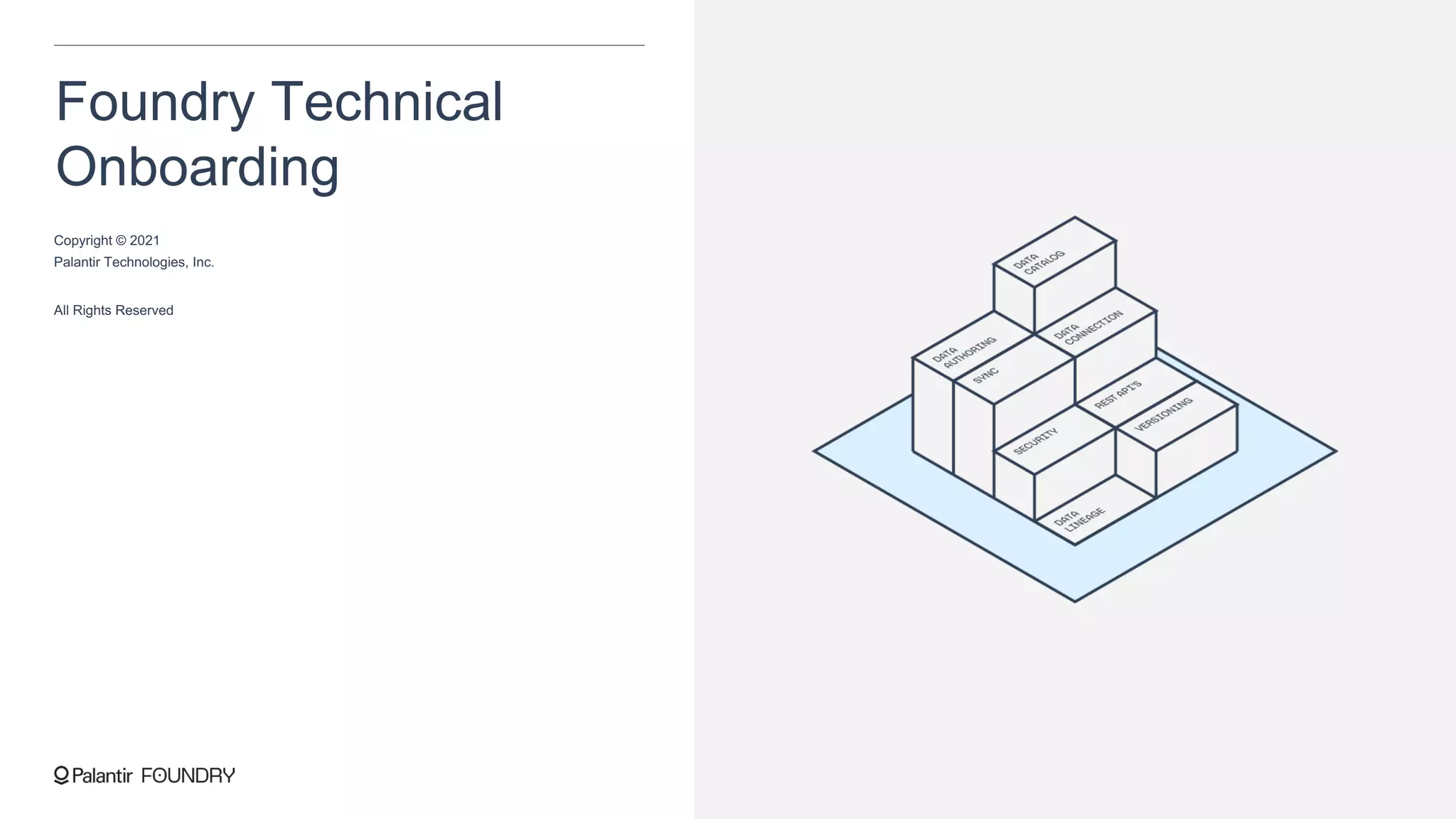
Foundry Technical
Onboarding
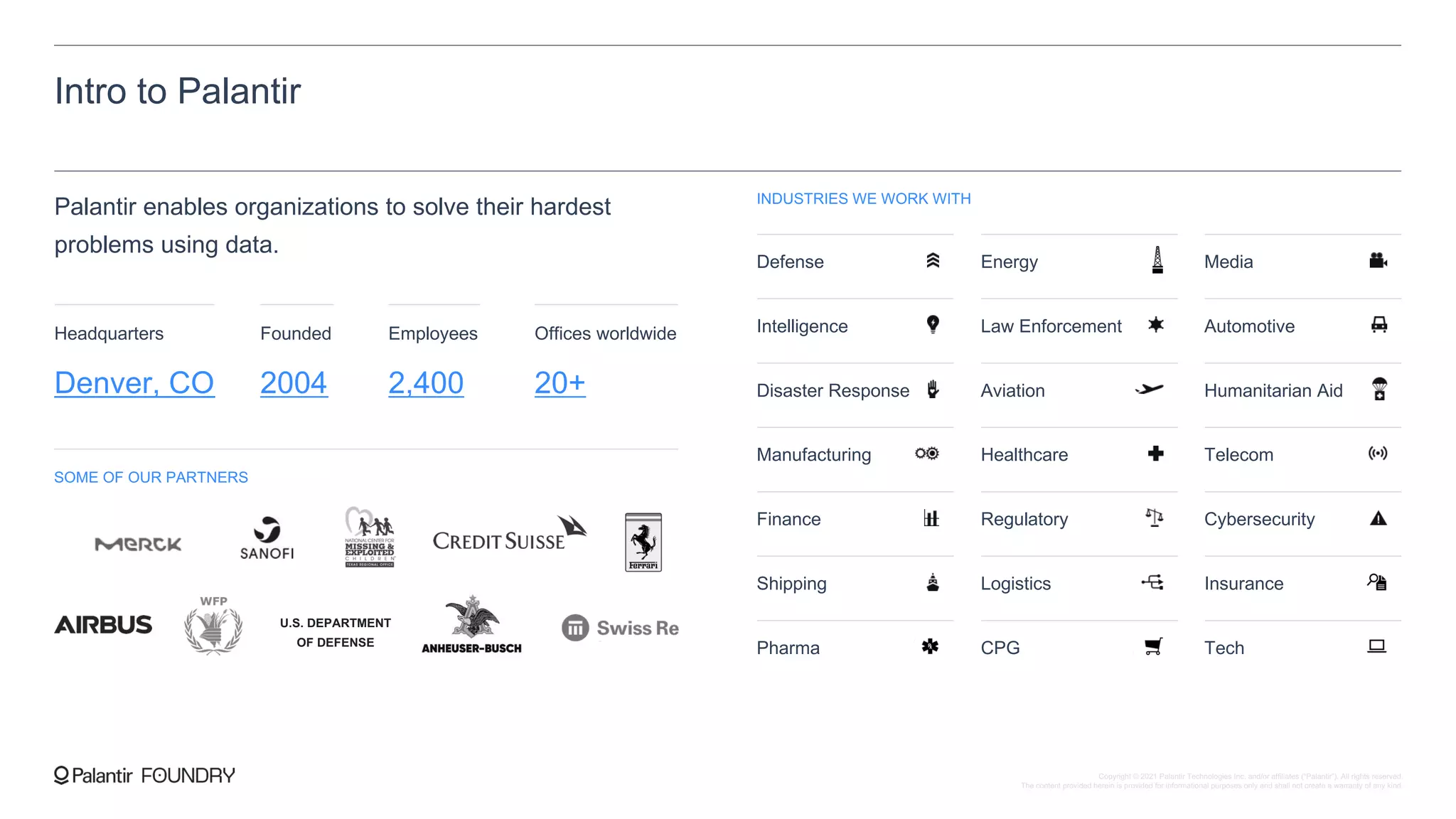
Intro to Palantir
Palantir enables organizations to solve their hardest
problems using data.
INDUSTRIES WE WORK WITH
Defense Energy Media
Intelligence Law Enforcement Automotive
Disaster Response Aviation Humanitarian Aid
Manufacturing Healthcare Telecom
Finance Regulatory Cybersecurity
Shipping Logistics Insurance
Pharma CPG Tech
SOME OF OUR PARTNERS
U.S. DEPARTMENT
OF DEFENSE
Headquarters Founded Employees
Denver, CO 2004 2,400
Offices worldwide
20+
Copyright © 2021 Palantir Technologies Inc. and/or affiliates (“Palantir”). All rights reserved.
The content provided herein is provided for informational purposes only and shall not create a warranty of any kind.
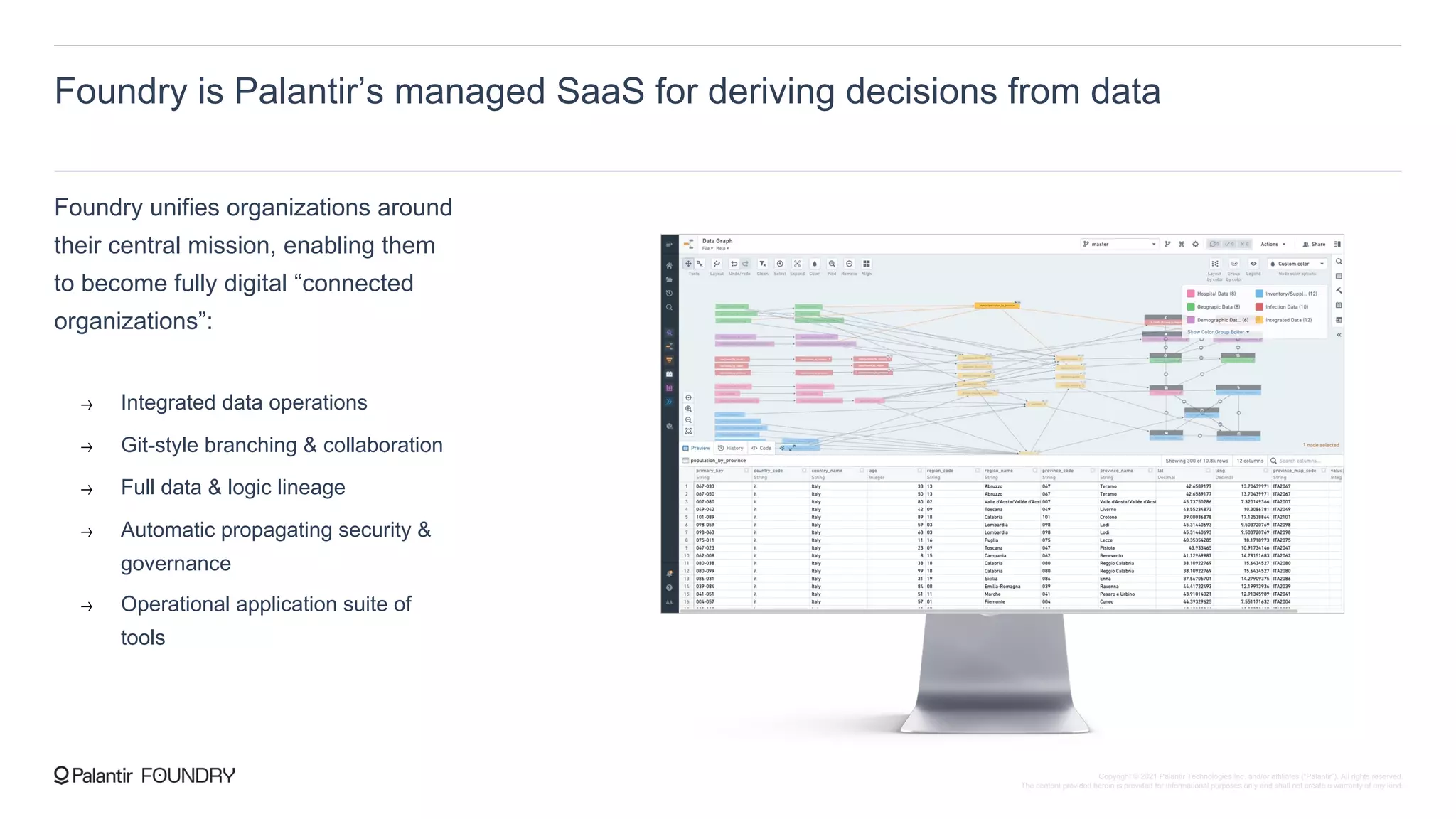
Foundry is Palantir’s managed SaaS for deriving decisions from data
Foundry unifies organizations around
their central mission, enabling them
to become fully digital “connected
organizations”:
Integrated data operations
Git-style branching & collaboration
Full data & logic lineage
Automatic propagating security &
governance
Operational application suite of
tools
Copyright © 2021 Palantir Technologies Inc. and/or affiliates (“Palantir”). All rights reserved.
The content provided herein is provided for informational purposes only and shall not create a warranty of any kind.
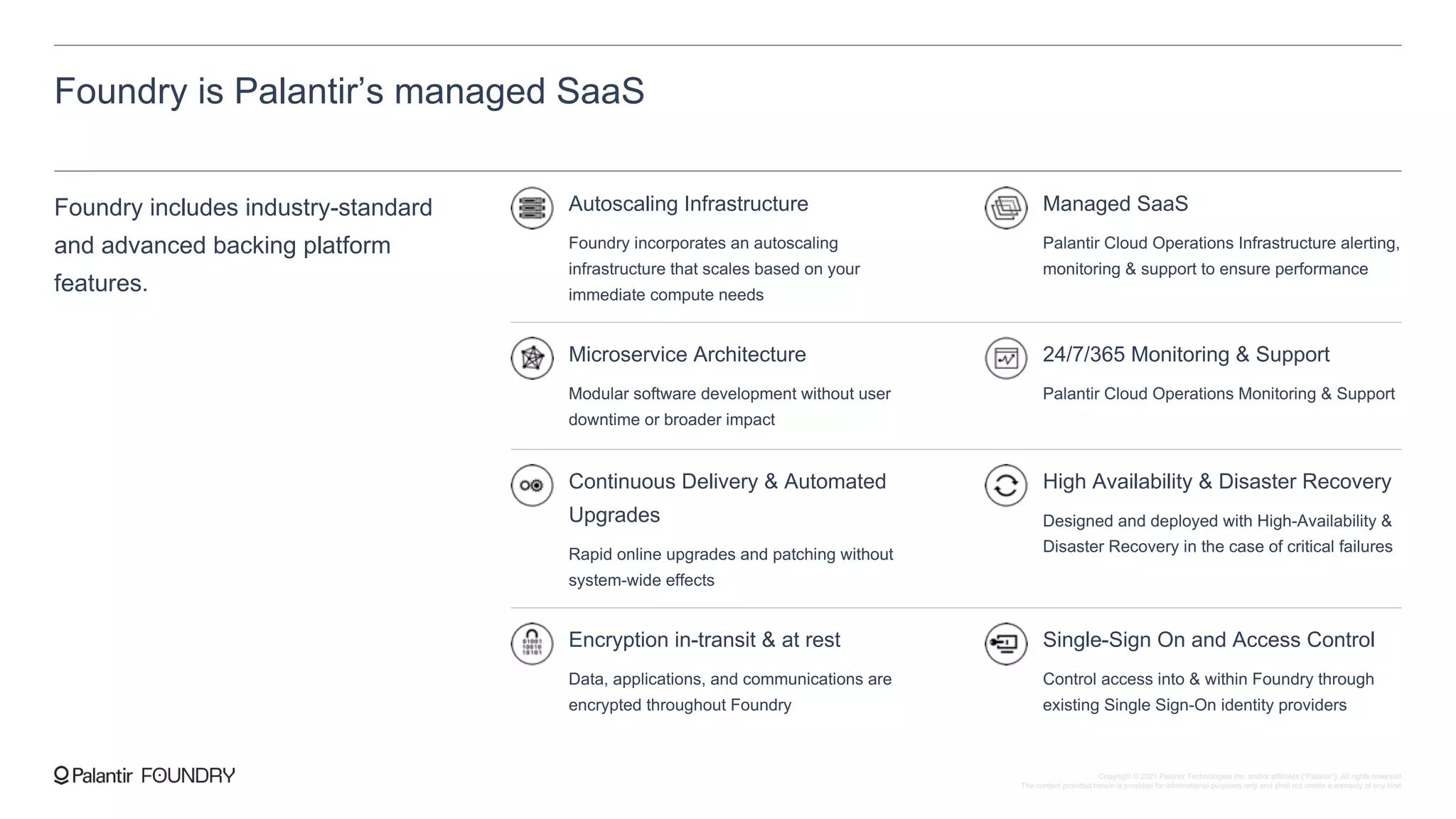
Foundry is Palantir’s managed SaaS
Foundry includes industry-standard
and advanced backing platform
features.
Autoscaling Infrastructure
Foundry incorporates an autoscaling
infrastructure that scales based on your
immediate compute needs
Managed SaaS
Palantir Cloud Operations Infrastructure alerting,
monitoring & support to ensure performance
Microservice Architecture
Modular software development without user
downtime or broader impact
24/7/365 Monitoring & Support
Palantir Cloud Operations Monitoring & Support
Continuous Delivery & Automated
Upgrades
Rapid online upgrades and patching without
system-wide effects
High Availability & Disaster Recovery
Designed and deployed with High-Availability &
Disaster Recovery in the case of critical failures
Encryption in-transit & at rest
Data, applications, and communications are
encrypted throughout Foundry
Single-Sign On and Access Control
Control access into & within Foundry through
existing Single Sign-On identity providers
Copyright © 2021 Palantir Technologies Inc. and/or affiliates (“Palantir”). All rights reserved.
The content provided herein is provided for informational purposes only and shall not create a warranty of any kind.
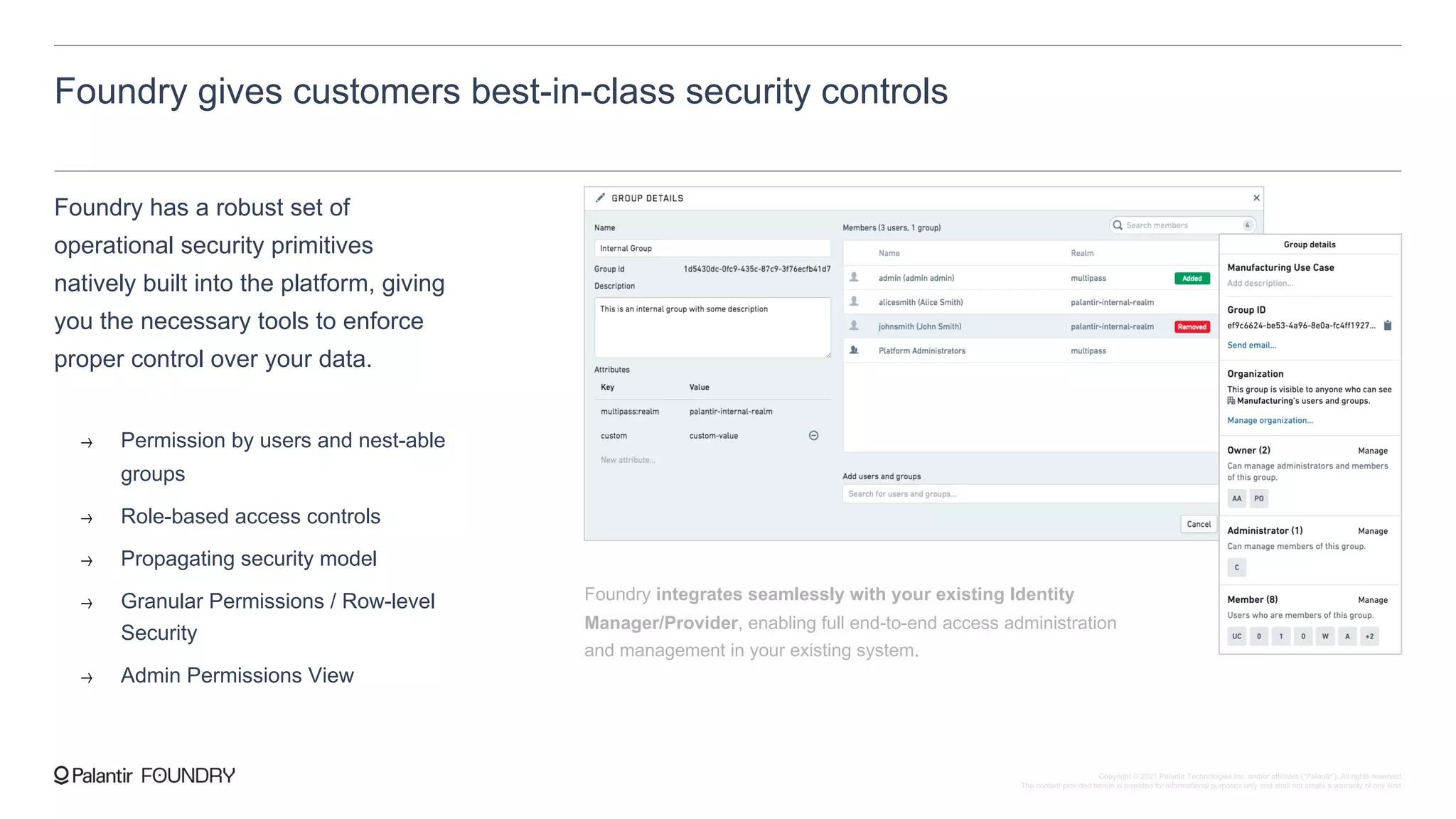
Foundry gives customers best-in-class security controls
Foundry has a robust set of
operational security primitives
natively built into the platform, giving
you the necessary tools to enforce
proper control over your data.
Permission by users and nest-able
groups
Role-based access controls
Propagating security model
Granular Permissions / Row-level
Security
Admin Permissions View
Foundry integrates seamlessly with your existing Identity
Manager/Provider, enabling full end-to-end access administration
and management in your existing system.
Copyright © 2021 Palantir Technologies Inc. and/or affiliates (“Palantir”). All rights reserved.
The content provided herein is provided for informational purposes only and shall not create a warranty of any kind.
Foundry’s environment is secured and monitored
Foundry operates with a robust
security-focused infrastructure,
leveraging state-of-the-art security
practices and protocols
Encryption in transit and at rest
Communication between services occurs over TLS 1.2+, only encrypted HTTPS
endpoints are exposed and strict Ingress/Egress rules are enforced for the platform
All storage layers, including object stores, block storage, and disk volumes, are secured
with server-side encryption
Audit logs
Application audit logs can be made available for the customer to ingest into their
existing SIEM for further analysis and monitoring of user actions within Foundry
Vulnerability management
Palantir’s Information Security team performs continuous internal penetration testing
and security reviews, as well annual third-party penetration tests that cover white, gray,
and black box testing of user interfaces and back-end APIs
Copyright © 2021 Palantir Technologies Inc. and/or affiliates (“Palantir”). All rights reserved.
The content provided herein is provided for informational purposes only and shall not create a warranty of any kind.
Certifications and Attestations
Palantir maintains rigorous,
externally verified infrastructure and
operations standards.
On top of those certifications, we
are aligned with the controls and
policies of:
1. NIST 800-53 and 800-171
2. ISO 27002, 27003
3. ISO Business Continuity and Risk Management Standards
In addition, Palantir has extensive
experience helping customers
meet specific regulatory and
industry requirements, including:
1. EU General Data Protection Regulation (GDPR)
2. US Health Insurance Portability and Accountability Act
(HIPAA)
3. California Consumer Privacy Act (CCPA)
4. Federal Information Security Modernization Act (FISMA)
Foundry is externally certified
for the following baselines:
1. SOC 2 Type II
2. ISO 27001, ISO 27017 and 27018
3. FedRAMP Moderate (Foundry for US Government)
4. US DoD Impact Level 5 (Foundry for US DoD)
Copyright © 2021 Palantir Technologies Inc. and/or affiliates (“Palantir”). All rights reserved.
The content provided herein is provided for informational purposes only and shall not create a warranty of any kind.
Choose the region for your Foundry.
Sign-up steps
There are six steps to complete in
signing up to Foundry.
1. Select your region à
Palantir can either generate a domain for you, or
we can have Foundry accessible through a
subdomain with your chosen customer domain.
2. Select your domain à
Configure either the on-premise or cloud Data
Connector to connect Foundry to your sources.
3. Configure the Data Connector à
Confirm attributes and send your organization’s
SSO identity provider metadata for easy access to
Foundry from your existing SAML system.
4. Set-up Single-Sign On à
This is for us to ensure that they can access
Foundry.
5. Share your users’ country
locations
à
Upon request, we will provide comprehensive
documentation required for standard security
reviews.
6. Review our standard security
assessments
à
Copyright © 2021 Palantir Technologies Inc. and/or affiliates (“Palantir”). All rights reserved.
The content provided herein is provided for informational purposes only and shall not create a warranty of any kind.
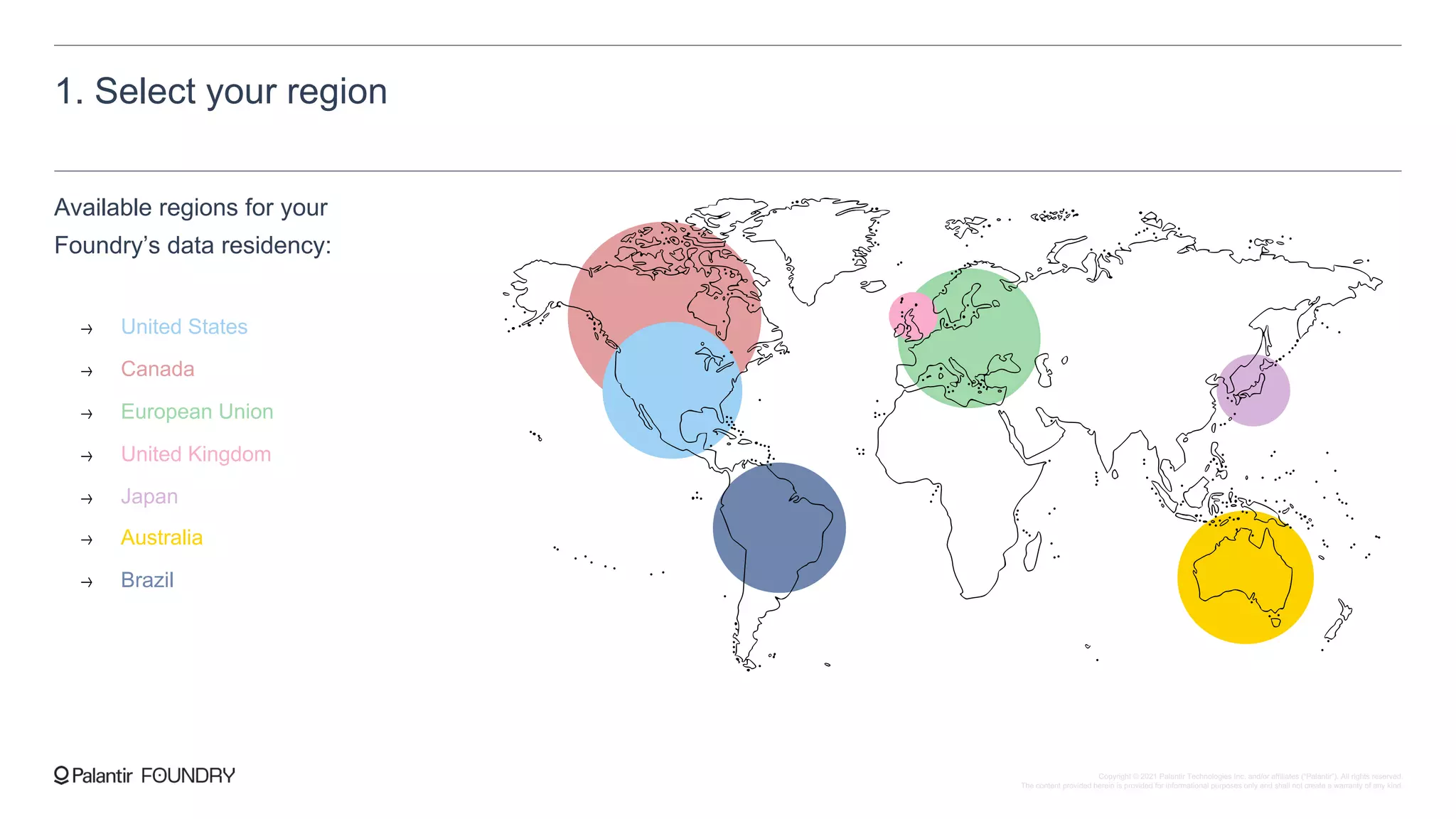
1. Select your region
Available regions for your
Foundry’s data residency:
United States
Canada
European Union
United Kingdom
Japan
Australia
Brazil
Copyright © 2021 Palantir Technologies Inc. and/or affiliates (“Palantir”). All rights reserved.
The content provided herein is provided for informational purposes only and shall not create a warranty of any kind.
2. Select your domain
There are two possible options
for your Foundry domain.
1. Customer-defined with Palantir domain
You choose a subdomain, and Palantir creates a unique domain for you with that subdomain, such as
https://<subdomain>.palantirfoundry.com
2. Palantir-generated domain
Palantir generated a unique domain code name for you, such as
https://<codename>.palantirfoundry.com
Copyright © 2021 Palantir Technologies Inc. and/or affiliates (“Palantir”). All rights reserved.
The content provided herein is provided for informational purposes only and shall not create a warranty of any kind.
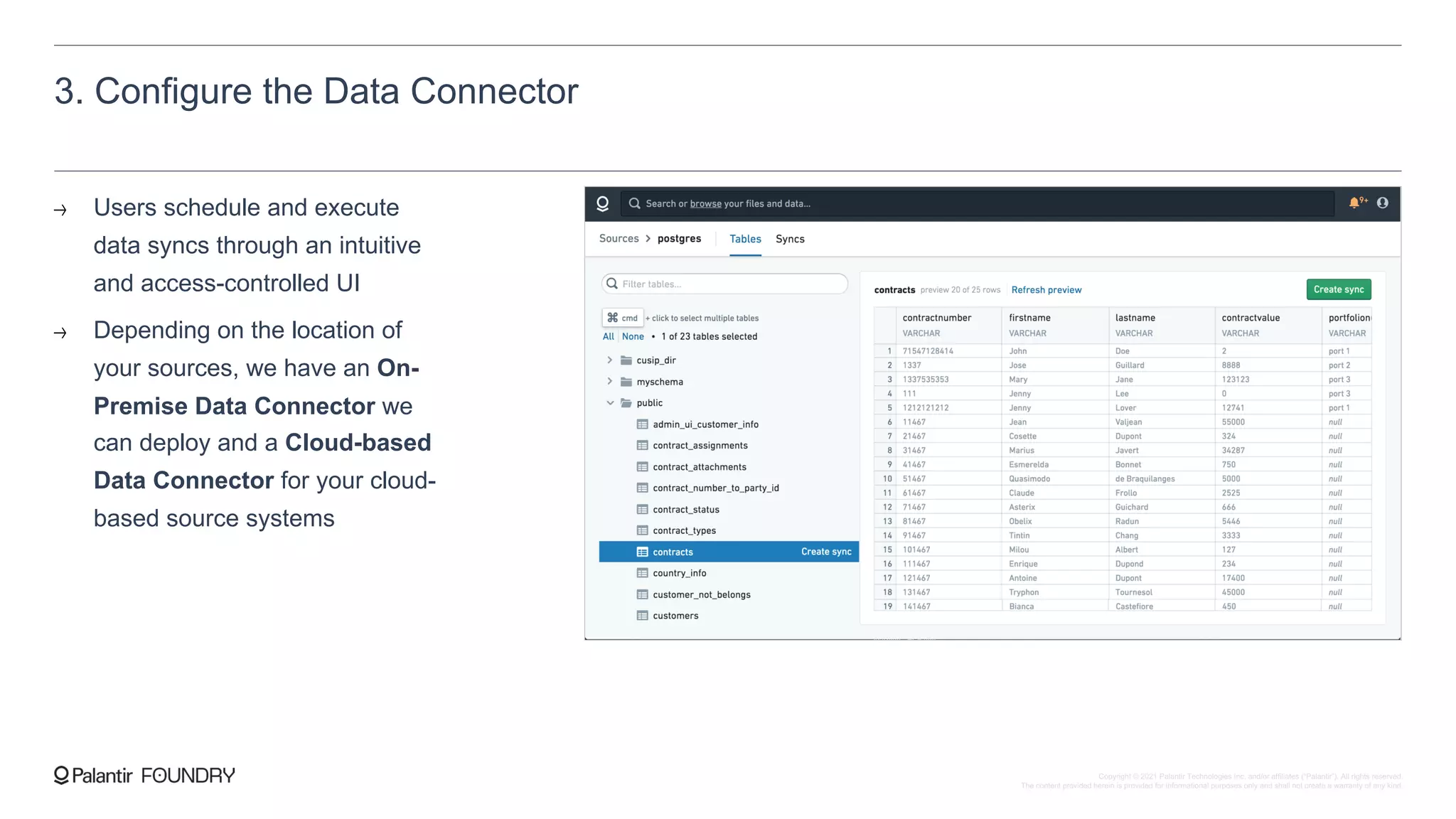
3. Configure the Data Connector
Users schedule and execute
data syncs through an intuitive
and access-controlled UI
Depending on the location of
your sources, we have an On-
Premise Data Connector we
can deploy and a Cloud-based
Data Connector for your cloud-
based source systems
Copyright © 2021 Palantir Technologies Inc. and/or affiliates (“Palantir”). All rights reserved.
The content provided herein is provided for informational purposes only and shall not create a warranty of any kind.
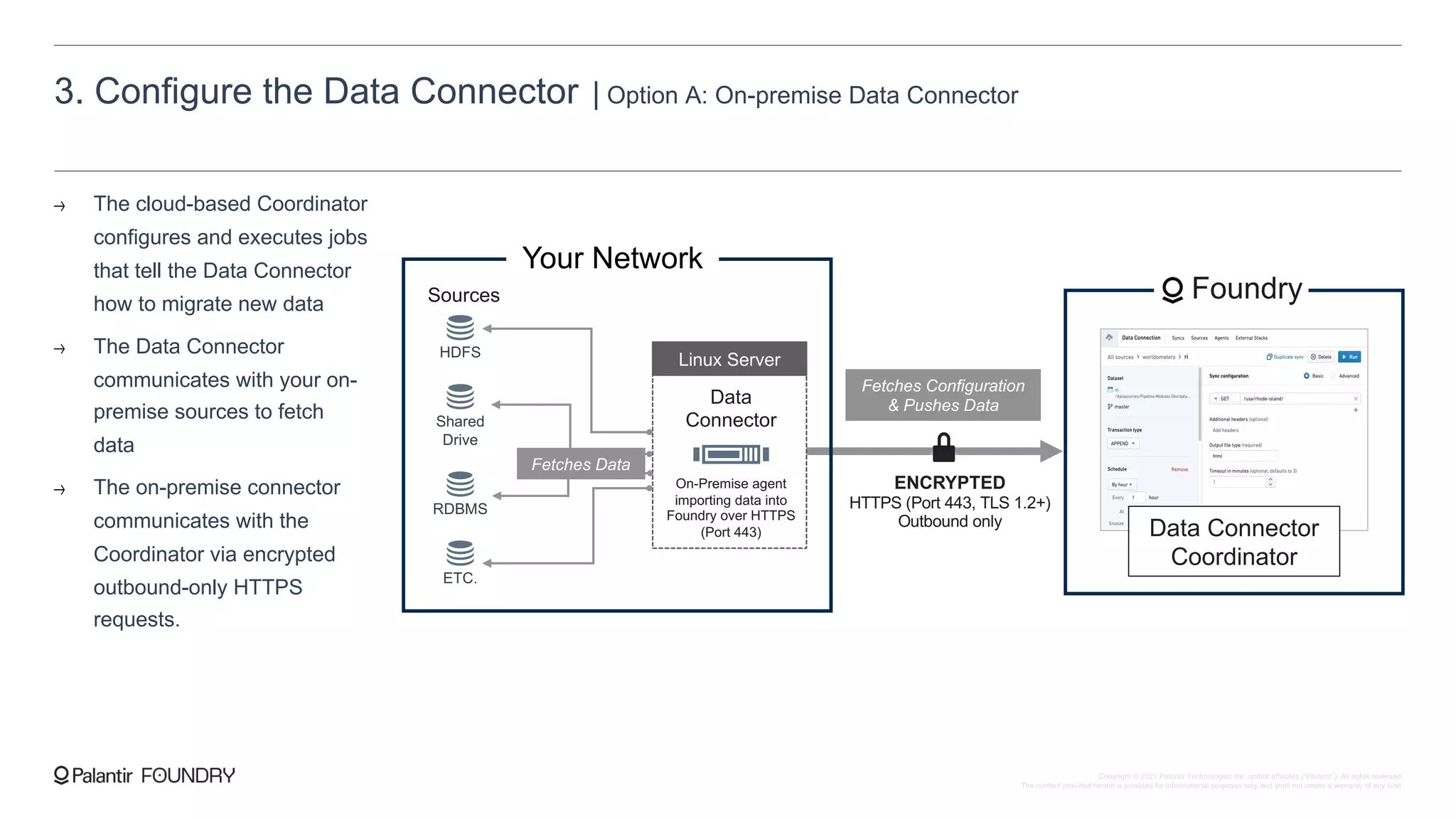
3. Configure the Data Connector | Option A: On-premise Data Connector
The cloud-based Coordinator
configures and executes jobs
that tell the Data Connector
how to migrate new data
The Data Connector
communicates with your on-
premise sources to fetch
data
The on-premise connector
communicates with the
Coordinator via encrypted
outbound-only HTTPS
requests.
ENCRYPTED
HTTPS (Port 443, TLS 1.2+)
Outbound only
Your Network
HDFS
Shared
Drive
RDBMS
ETC.
Sources
Data
Connector
On-Premise agent
importing data into
Foundry over HTTPS
(Port 443)
Linux Server
Foundry
Data Connector
Coordinator
Fetches Configuration
& Pushes Data
Fetches Data
Copyright © 2021 Palantir Technologies Inc. and/or affiliates (“Palantir”). All rights reserved.
The content provided herein is provided for informational purposes only and shall not create a warranty of any kind.
3. Configure the Data Connector | Option A: On-premise Data Connector
Common points of contact for
on-premise installation:
Networking/Infrastructure
Provisions server for Data Connection in
appropriate location, as well as remote access
Allowlist the Foundry IP addresses to the
provisioned server
Data Source Owners
Help identify data source for ingestion, as well
as supporting materials such as data
dictionaries
Obtain any required approvals for data and/or
source system access
Customer server provision — Provision a server for the Data Connector with appropriate
user accounts created and at least the following specs:
[4 Physical Cores] - [16 GB RAM] - [500 GB Hard disk] - [64-bit Unix-based operating system]
Palantir provides IPs — Palantir will provide the qualified domain name and IP addresses for
Foundry
Customer allowlist — Customer will allowlist the Foundry IPs in order to allow outbound
connections from the server to Foundry
Customer source networking access — Customer will enable open connections between the
Data Connector server and relevant Source Systems
Customer source connection information — Customer will share configuration options (e.g.
private IPs, ports, credentials) for the Data Connector to source system connection
Copyright © 2021 Palantir Technologies Inc. and/or affiliates (“Palantir”). All rights reserved.
The content provided herein is provided for informational purposes only and shall not create a warranty of any kind.
3. Configure the Data Connector | Option B: Cloud-based Data Connector
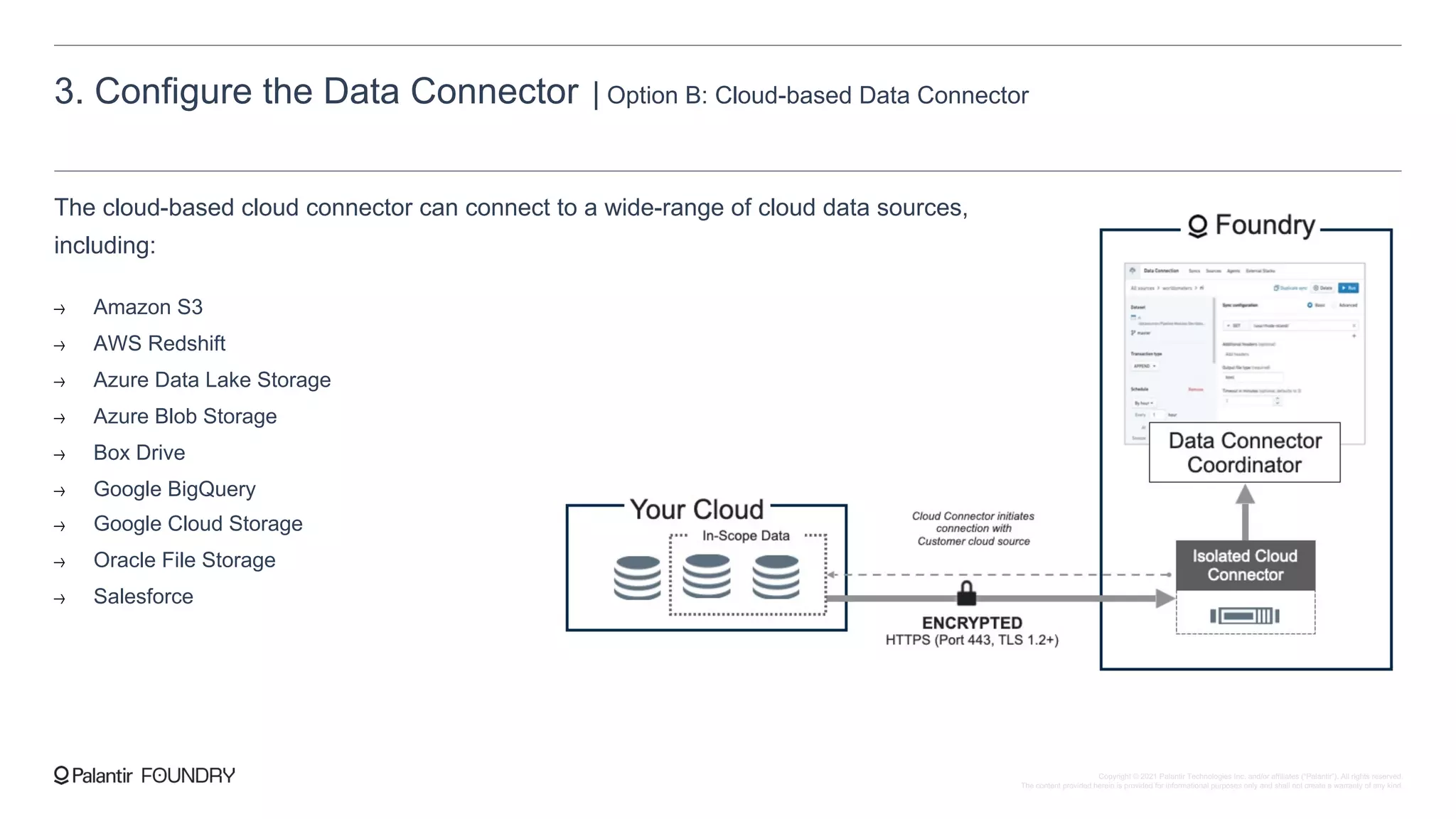
The cloud-based cloud connector can connect to a wide-range of cloud data sources,
including:
Amazon S3
AWS Redshift
Azure Data Lake Storage
Azure Blob Storage
Box Drive
Google BigQuery
Google Cloud Storage
Oracle File Storage
Salesforce
Copyright © 2021 Palantir Technologies Inc. and/or affiliates (“Palantir”). All rights reserved.
The content provided herein is provided for informational purposes only and shall not create a warranty of any kind.
4. Set-up Single Sign-On
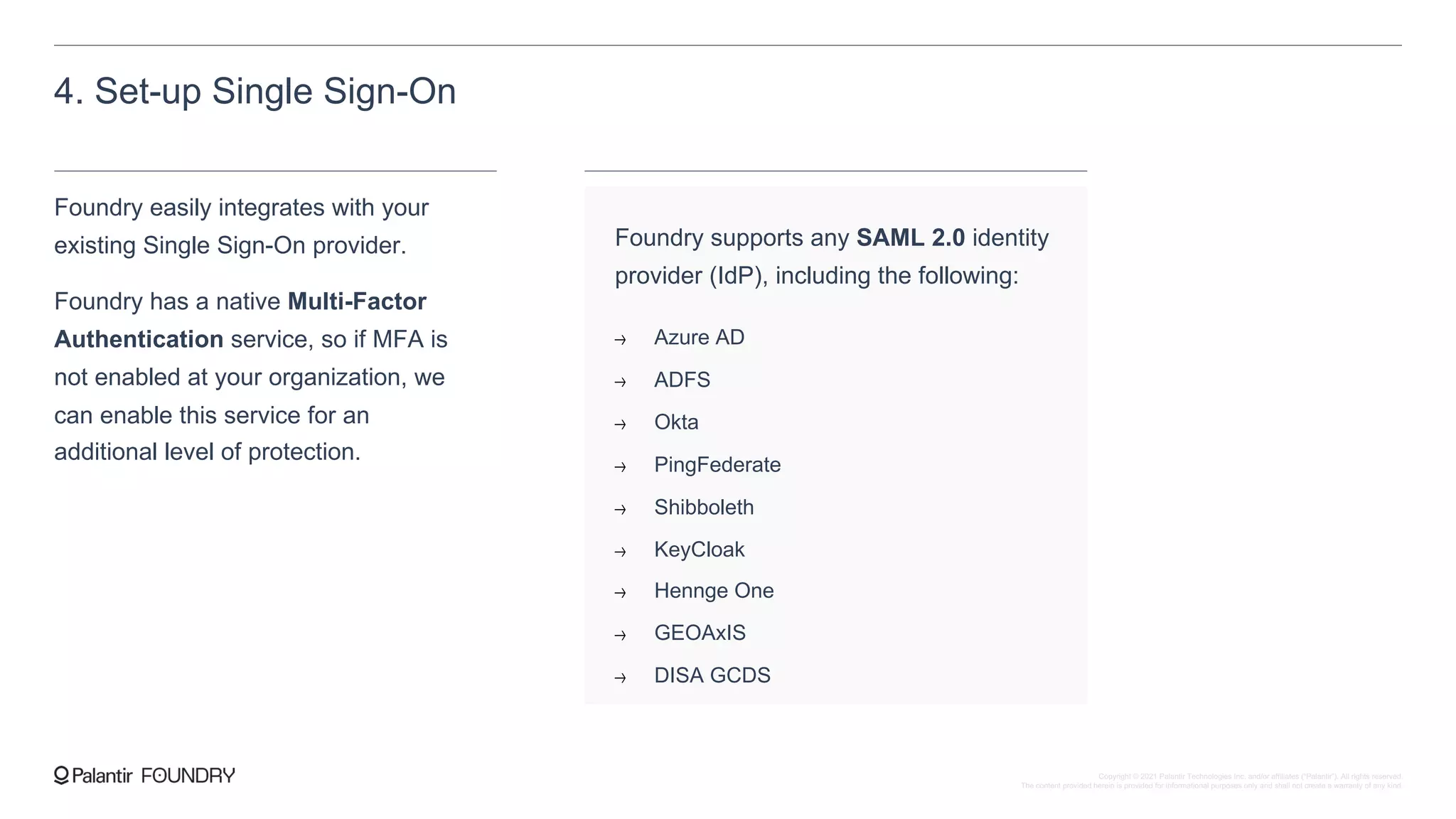
Foundry easily integrates with your
existing Single Sign-On provider.
Foundry has a native Multi-Factor
Authentication service, so if MFA is
not enabled at your organization, we
can enable this service for an
additional level of protection.
Foundry supports any SAML 2.0 identity
provider (IdP), including the following:
Azure AD
ADFS
Okta
PingFederate
Shibboleth
KeyCloak
Hennge One
GEOAxIS
DISA GCDS
Copyright © 2021 Palantir Technologies Inc. and/or affiliates (“Palantir”). All rights reserved.
The content provided herein is provided for informational purposes only and shall not create a warranty of any kind.
5. Share your users’ country locations
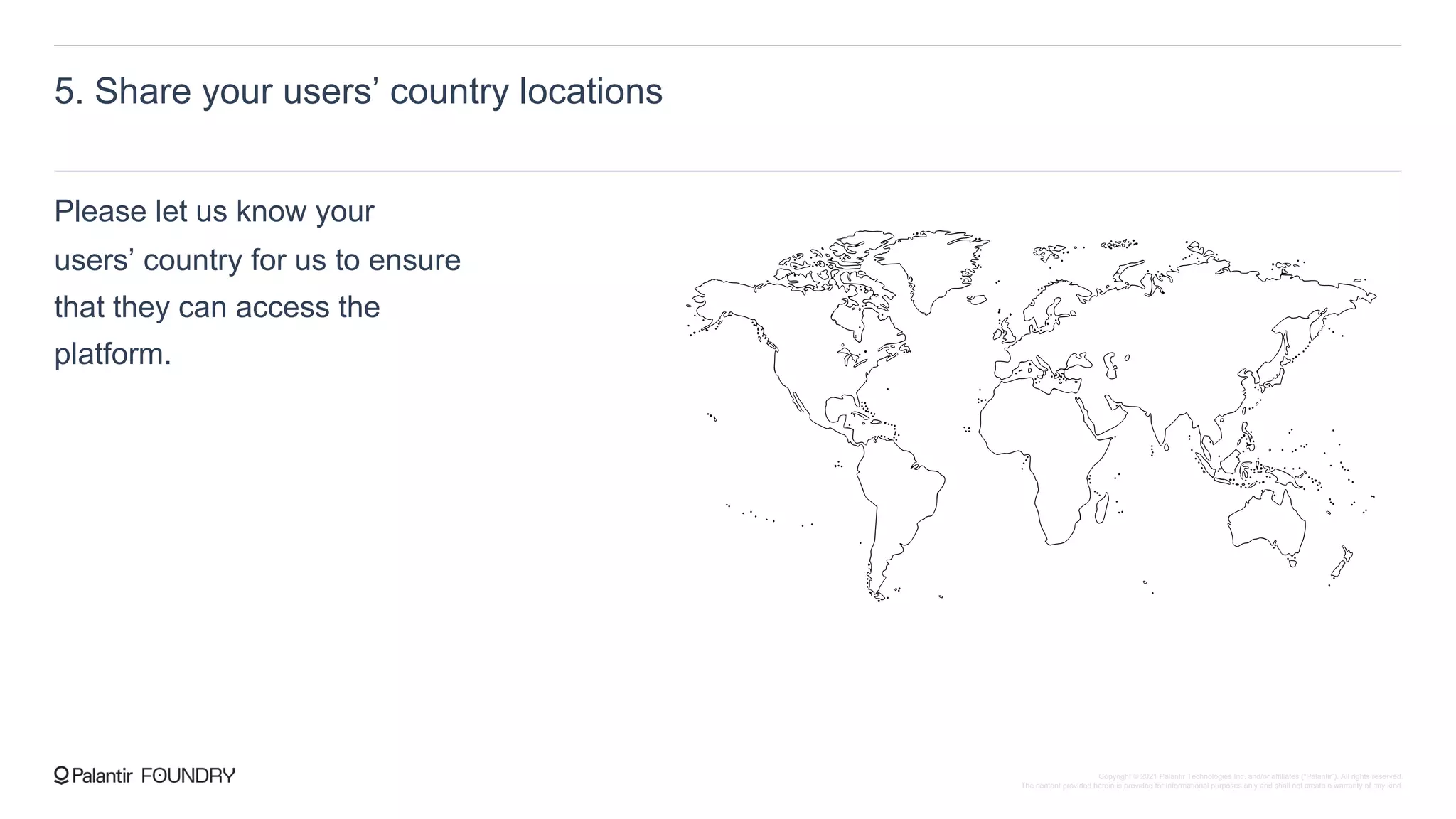
Please let us know your
users’ country for us to ensure
that they can access the
platform.
Copyright © 2021 Palantir Technologies Inc. and/or affiliates (“Palantir”). All rights reserved.
The content provided herein is provided for informational purposes only and shall not create a warranty of any kind.
Summary of Sign-up steps
1. Select your region
[United States] - [Canada] - [European Union] - [United Kingdom] - [Japan] - [Australia] - [Brazil]
2. Select your domain
Selecting a custom subdomain within a Palantir domain
Utilizing a Palantir randomly-generated domain
3. Configure the Data Connector
Depending on the sources, pursue an on-premise option or cloud option for data connection:
On-premise
Customer provisions the Linux Server
Customer allowlists Palantir-provided Foundry IPs
Customer shares source system configuration
Palantir and customer perform installation
Cloud
Customer shares source
system configuration
4. Configure Single Sign-On
Confirm the use of MFA in your SSO and:
Generate the appropriate SAML IdP metadata
Confirm the SAML attributes that will be passed
Upload SP metadata to your SSO once provided by Palantir
5. Share your users’ country locations
We will allowlist access to Foundry to the IPs from these
countries.
6. Fulfill any security assessments or SaaS
vendor evaluation forms
We can respond to any questionnaires your organization
requires to host data in the Foundry environment.
Copyright © 2021 Palantir Technologies Inc. and/or affiliates (“Palantir”). All rights reserved.
The content provided herein is provided for informational purposes only and shall not create a warranty of any kind.
Customer-owned domain
If your organization has specific
domain-name requirements or if
the customer requires DNSSEC,
your Foundry can be configured
to be accessible with a customer-
owned domain
To set up, create an appropriate record in your DNS management panel with your chosen domain,
pointing to the Palantir-provided domain and/or IP addresses.
Example: customer creates a record in their domain, https://foundry.customerdomain.gov
and points it to the Palantir-provided domain https://<codename>.palantirfoundry.com
Copyright © 2021 Palantir Technologies Inc. and/or affiliates (“Palantir”). All rights reserved.
The content provided herein is provided for informational purposes only and shall not create a warranty of any kind.
Audit logging
Application audit logs can be made available for the customer to ingest into
their existing SIEM for further analysis and monitoring of user actions within
Foundry
Customers can be provided read-only access to Application Audit Logs via a
cloud object store. The Application Audit Logs can then be ingested into a
customer-owned and customer-maintained SIEM.
Palantir’s Application Audit Logging event coverage and content follows
industry best practices and meets the requirements for standards such as
NIST 800-53, ISO 27001/17/18, and SOC2.
I. Customer shares IPs — Customer provides
IP range/CIDR from which they will be reading
the logs.
II. Palantir allowlists IPs — Palantir allows the
IP range/CIDR to the Palantir Platform.
III. Palantir provides access — Palantir
provides Customer with a read-only access key
pair to the cloud storage containing the logs.
SETUP STEPS
Copyright © 2021 Palantir Technologies Inc. and/or affiliates (“Palantir”). All rights reserved.
The content provided herein is provided for informational purposes only and shall not create a warranty of any kind.
Private connectivity to Foundry
Palantir Foundry supports
additional networking options.
1. Restricted IP space
We restrict front-door access to Foundry to your specific corporate IP range/CIDR so only users and
systems within your network can access Foundry
2. Connect via private IP space
We support PrivateLink private connectivity between your systems and Foundry
3. Dedicated network links to your systems
For dedicated bandwidth or consistent low bandwidth, we support deploying DirectConnect between
your on-premise systems and Foundry.
Copyright © 2021 Palantir Technologies Inc. and/or affiliates (“Palantir”). All rights reserved.
The content provided herein is provided for informational purposes only and shall not create a warranty of any kind.
Customer Key Management Options
Palantir Foundry enables the
customer to manage the keys for
the Foundry Filesystem.
1. Enterprise Key Management (EKM)
Palantir grants the customer a unique user to directly monitor, disable, or delete the underlying master
key that encrypts their data in the Foundry Filesystem. Once the master key is deleted, the data stored
in the Foundry Filesystem is unrecoverable, effectively functioning as a “kill switch”.
2. Bring-your-own-Key (BYOK)
The customer creates a new key in a customer-owned account. All encryption and
decryption for the Foundry Filesystem calls are routed through the customer key.
Copyright © 2021 Palantir Technologies Inc. and/or affiliates (“Palantir”). All rights reserved.
The content provided herein is provided for informational purposes only and shall not create a warranty of any kind.
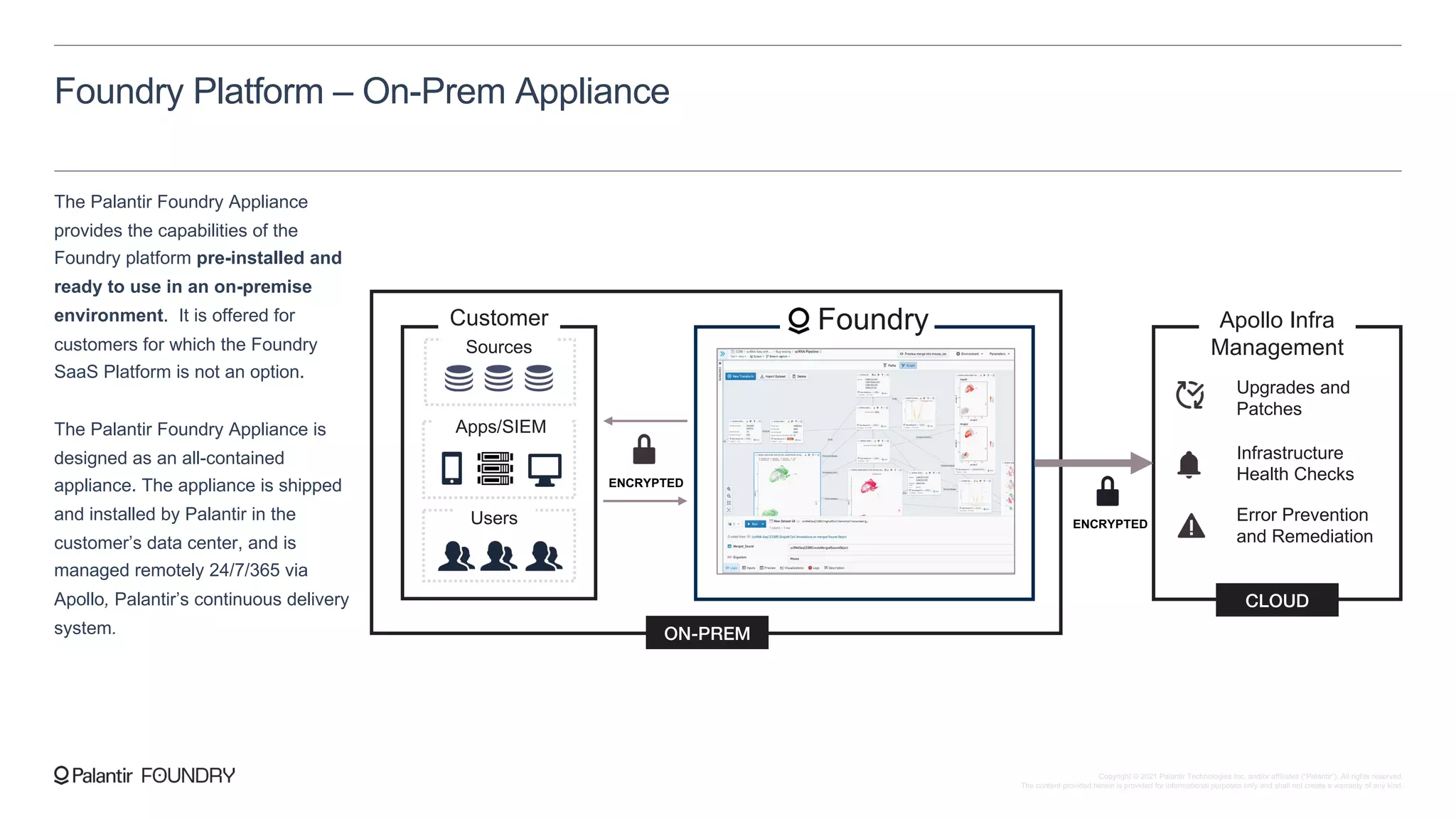
The Palantir Foundry Appliance
provides the capabilities of the
Foundry platform pre-installed and
ready to use in an on-premise
environment. It is offered for
customers for which the Foundry
SaaS Platform is not an option.
The Palantir Foundry Appliance is
designed as an all-contained
appliance. The appliance is shipped
and installed by Palantir in the
customer’s data center, and is
managed remotely 24/7/365 via
Apollo, Palantir’s continuous delivery
system.
Customer
Upgrades and
Patches
Infrastructure
Health Checks
Error Prevention
and Remediation
Foundry Apollo Infra
Management
CLOUD
Users
Apps/SIEM
Sources
ON-PREM
ENCRYPTED
ENCRYPTED
Foundry Platform – On-Prem Appliance
Copyright © 2021 Palantir Technologies Inc. and/or affiliates (“Palantir”). All rights reserved.
The content provided herein is provided for informational purposes only and shall not create a warranty of any kind.
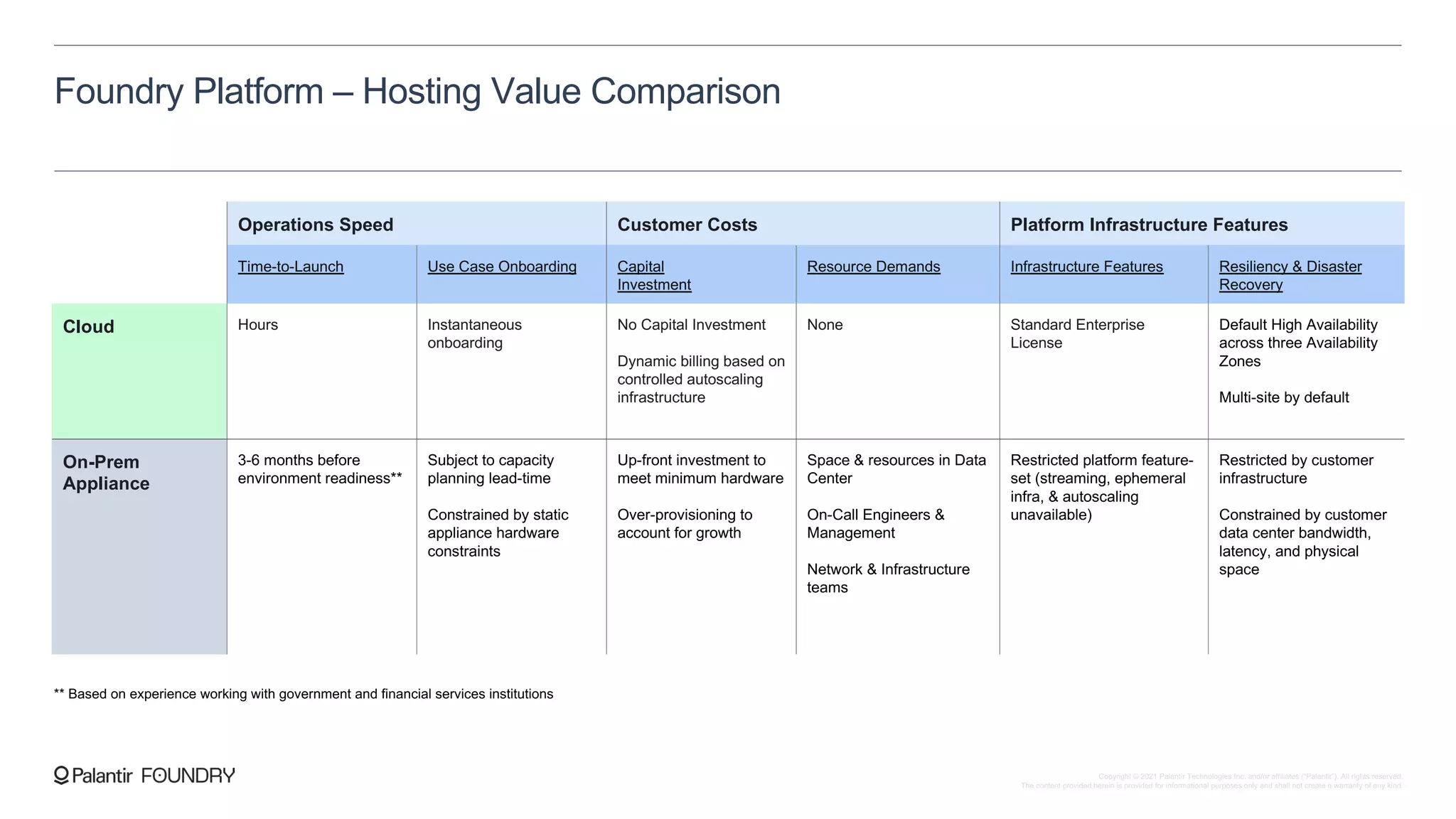
Foundry Platform – Hosting Value Comparison
Operations Speed Customer Costs Platform Infrastructure Features
Time-to-Launch Use Case Onboarding Capital
Investment
Resource Demands Infrastructure Features Resiliency & Disaster
Recovery
Cloud Hours Instantaneous
onboarding
No Capital Investment
Dynamic billing based on
controlled autoscaling
infrastructure
None Standard Enterprise
License
Default High Availability
across three Availability
Zones
Multi-site by default
On-Prem
Appliance
3-6 months before
environment readiness**
Subject to capacity
planning lead-time
Constrained by static
appliance hardware
constraints
Up-front investment to
meet minimum hardware
Over-provisioning to
account for growth
Space & resources in Data
Center
On-Call Engineers &
Management
Network & Infrastructure
teams
Restricted platform feature-
set (streaming, ephemeral
infra, & autoscaling
unavailable)
Restricted by customer
infrastructure
Constrained by customer
data center bandwidth,
latency, and physical
space
** Based on experience working with government and financial services institutions
Copyright © 2021 Palantir Technologies Inc. and/or affiliates (“Palantir”). All rights reserved.
The content provided herein is provided for informational purposes only and shall not create a warranty of any kind.
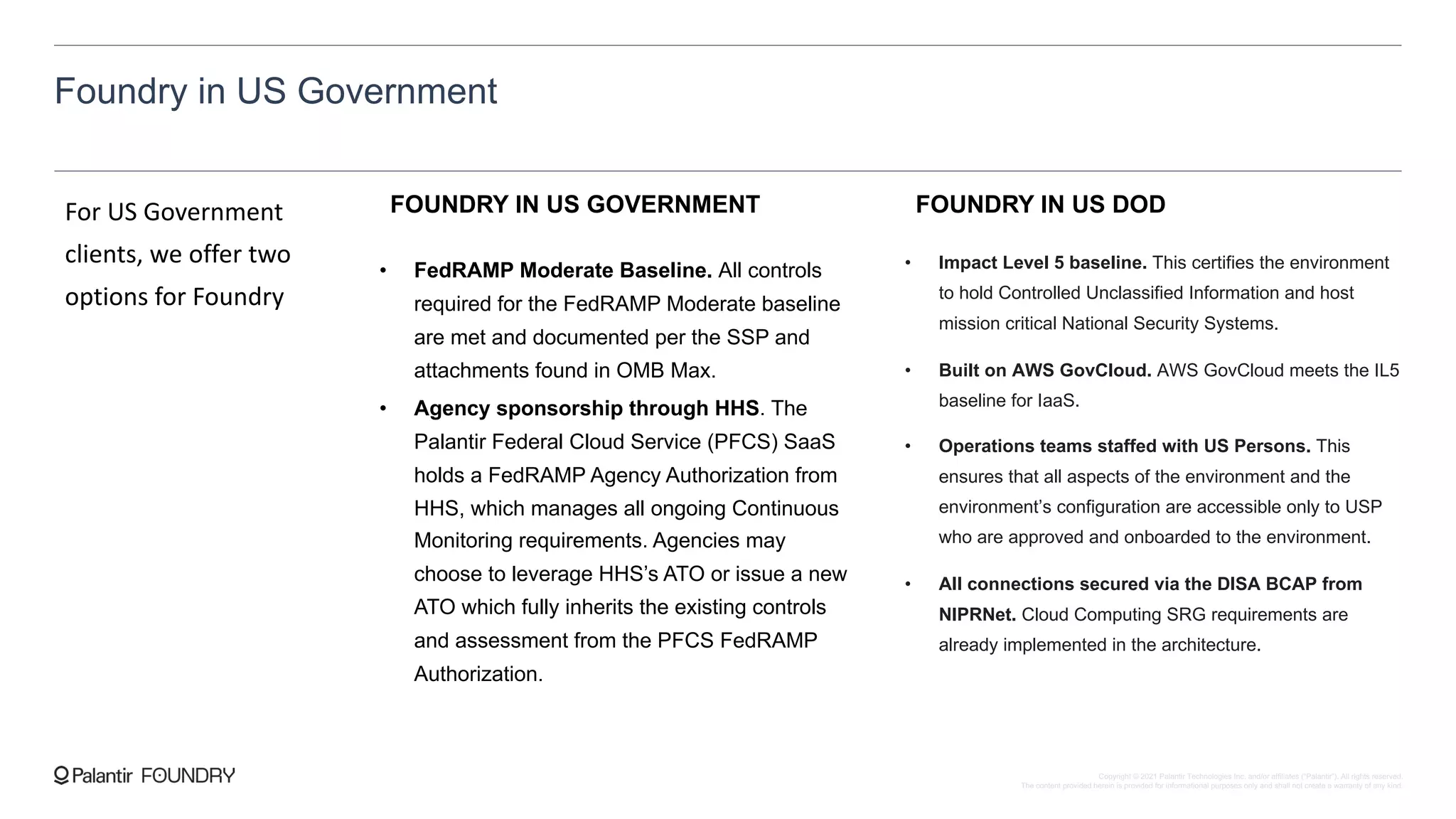
Foundry in US Government
For US Government
clients, we offer two
options for Foundry
FOUNDRY IN US GOVERNMENT
• FedRAMP Moderate Baseline. All controls
required for the FedRAMP Moderate baseline
are met and documented per the SSP and
attachments found in OMB Max.
• Agency sponsorship through HHS. The
Palantir Federal Cloud Service (PFCS) SaaS
holds a FedRAMP Agency Authorization from
HHS, which manages all ongoing Continuous
Monitoring requirements. Agencies may
choose to leverage HHS’s ATO or issue a new
ATO which fully inherits the existing controls
and assessment from the PFCS FedRAMP
Authorization.
FOUNDRY IN US DOD
• Impact Level 5 baseline. This certifies the environment
to hold Controlled Unclassified Information and host
mission critical National Security Systems.
• Built on AWS GovCloud. AWS GovCloud meets the IL5
baseline for IaaS.
• Operations teams staffed with US Persons. This
ensures that all aspects of the environment and the
environment’s configuration are accessible only to USP
who are approved and onboarded to the environment.
• All connections secured via the DISA BCAP from
NIPRNet. Cloud Computing SRG requirements are
already implemented in the architecture.
Copyright © 2021 Palantir Technologies Inc. and/or affiliates (“Palantir”). All rights reserved.
The content provided herein is provided for informational purposes only and shall not create a warranty of any kind.
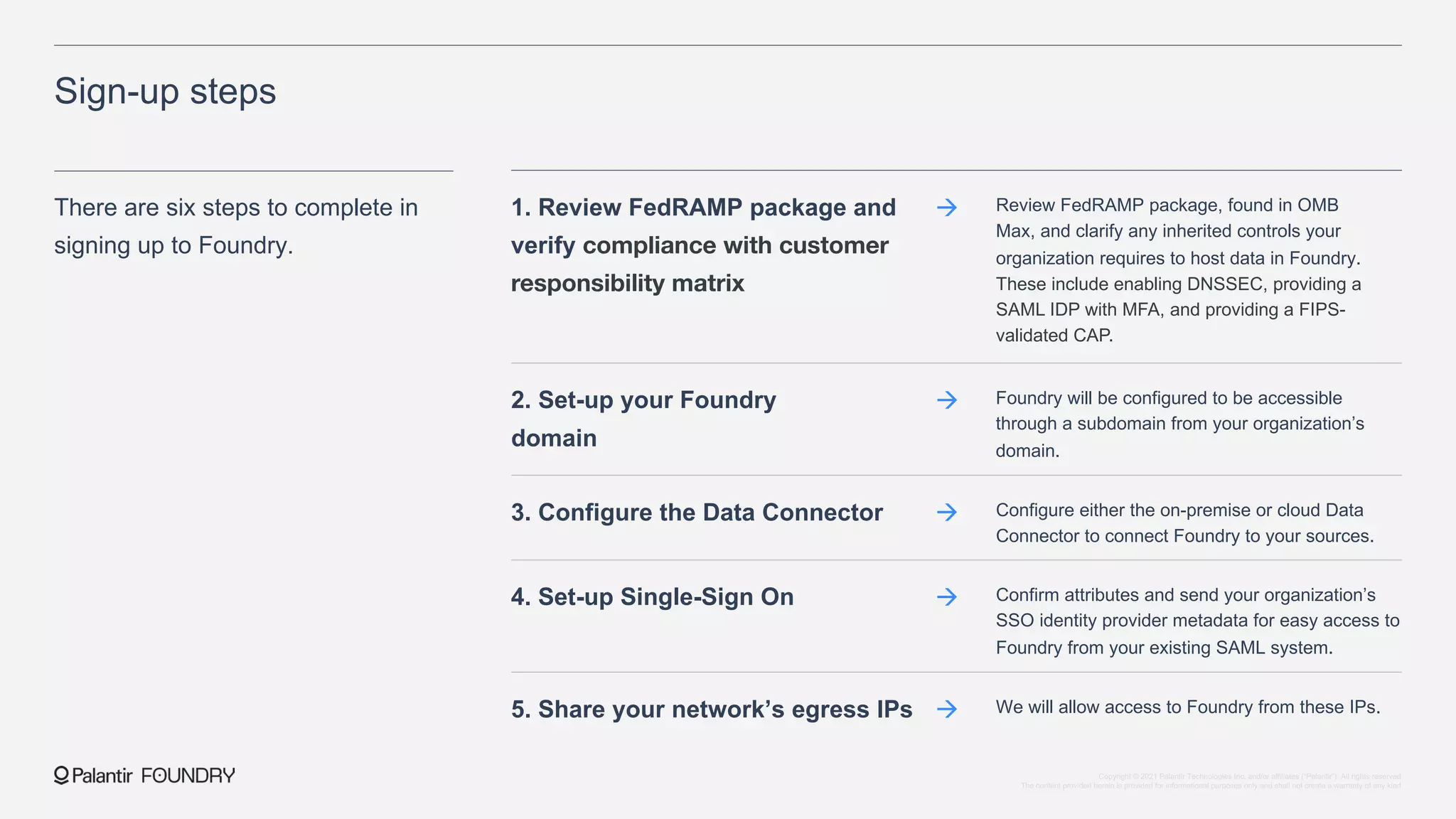
Review FedRAMP package, found in OMB
Max, and clarify any inherited controls your
organization requires to host data in Foundry.
These include enabling DNSSEC, providing a
SAML IDP with MFA, and providing a FIPS-
validated CAP.
Sign-up steps
There are six steps to complete in
signing up to Foundry.
1. Review FedRAMP package and
verify compliance with customer
responsibility matrix
à
Foundry will be configured to be accessible
through a subdomain from your organization’s
domain.
2. Set-up your Foundry
domain
à
Configure either the on-premise or cloud Data
Connector to connect Foundry to your sources.
3. Configure the Data Connector à
Confirm attributes and send your organization’s
SSO identity provider metadata for easy access to
Foundry from your existing SAML system.
4. Set-up Single-Sign On à
We will allow access to Foundry from these IPs.
5. Share your network’s egress IPs à
Copyright © 2021 Palantir Technologies Inc. and/or affiliates (“Palantir”). All rights reserved.
The content provided herein is provided for informational purposes only and shall not create a warranty of any kind.
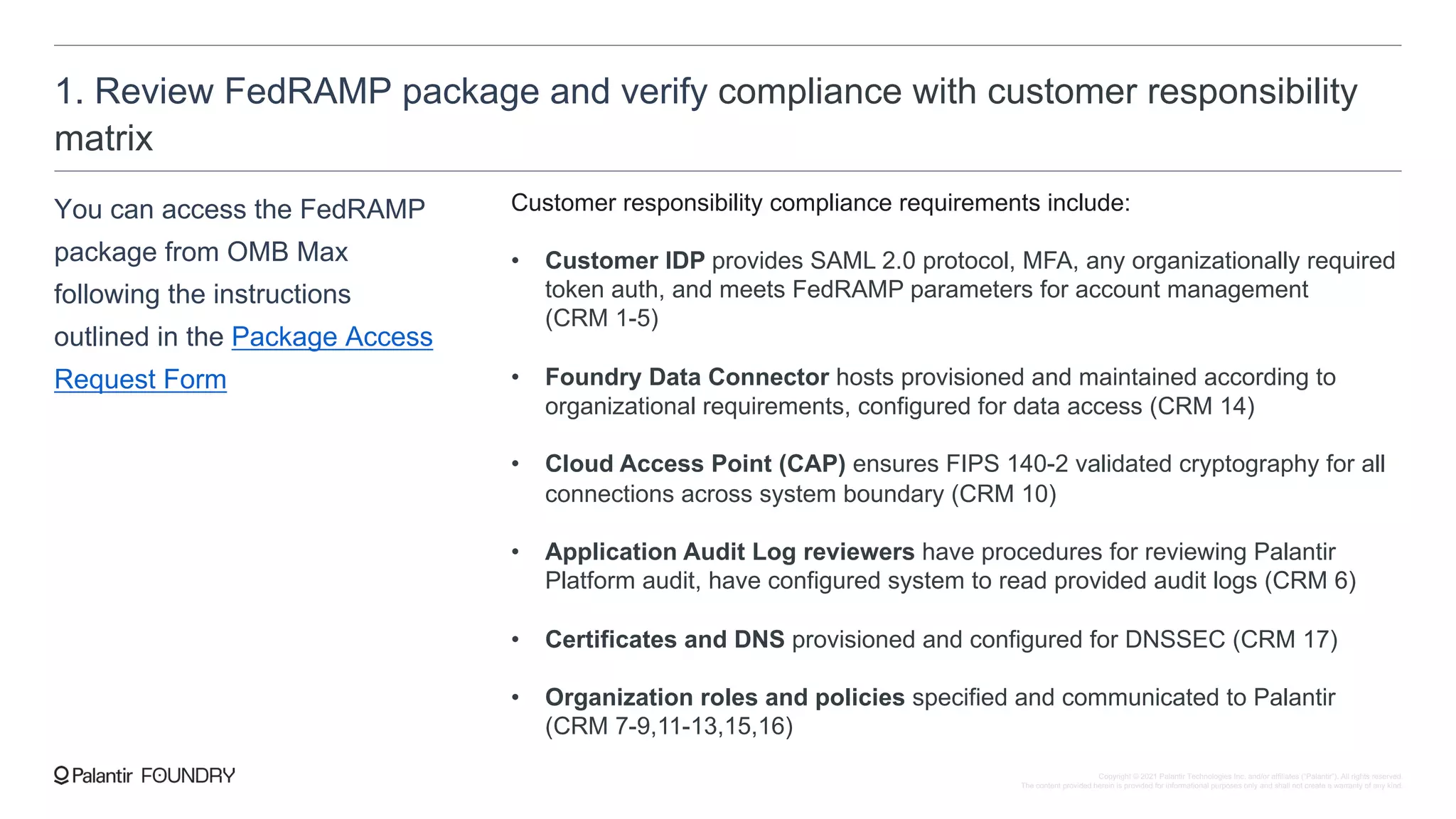
1. Review FedRAMP package and verify compliance with customer responsibility
matrix
You can access the FedRAMP
package from OMB Max
following the instructions
outlined in the Package Access
Request Form
Customer responsibility compliance requirements include:
• Customer IDP provides SAML 2.0 protocol, MFA, any organizationally required
token auth, and meets FedRAMP parameters for account management
(CRM 1-5)
• Foundry Data Connector hosts provisioned and maintained according to
organizational requirements, configured for data access (CRM 14)
• Cloud Access Point (CAP) ensures FIPS 140-2 validated cryptography for all
connections across system boundary (CRM 10)
• Application Audit Log reviewers have procedures for reviewing Palantir
Platform audit, have configured system to read provided audit logs (CRM 6)
• Certificates and DNS provisioned and configured for DNSSEC (CRM 17)
• Organization roles and policies specified and communicated to Palantir
(CRM 7-9,11-13,15,16)
Copyright © 2021 Palantir Technologies Inc. and/or affiliates (“Palantir”). All rights reserved.
The content provided herein is provided for informational purposes only and shall not create a warranty of any kind.
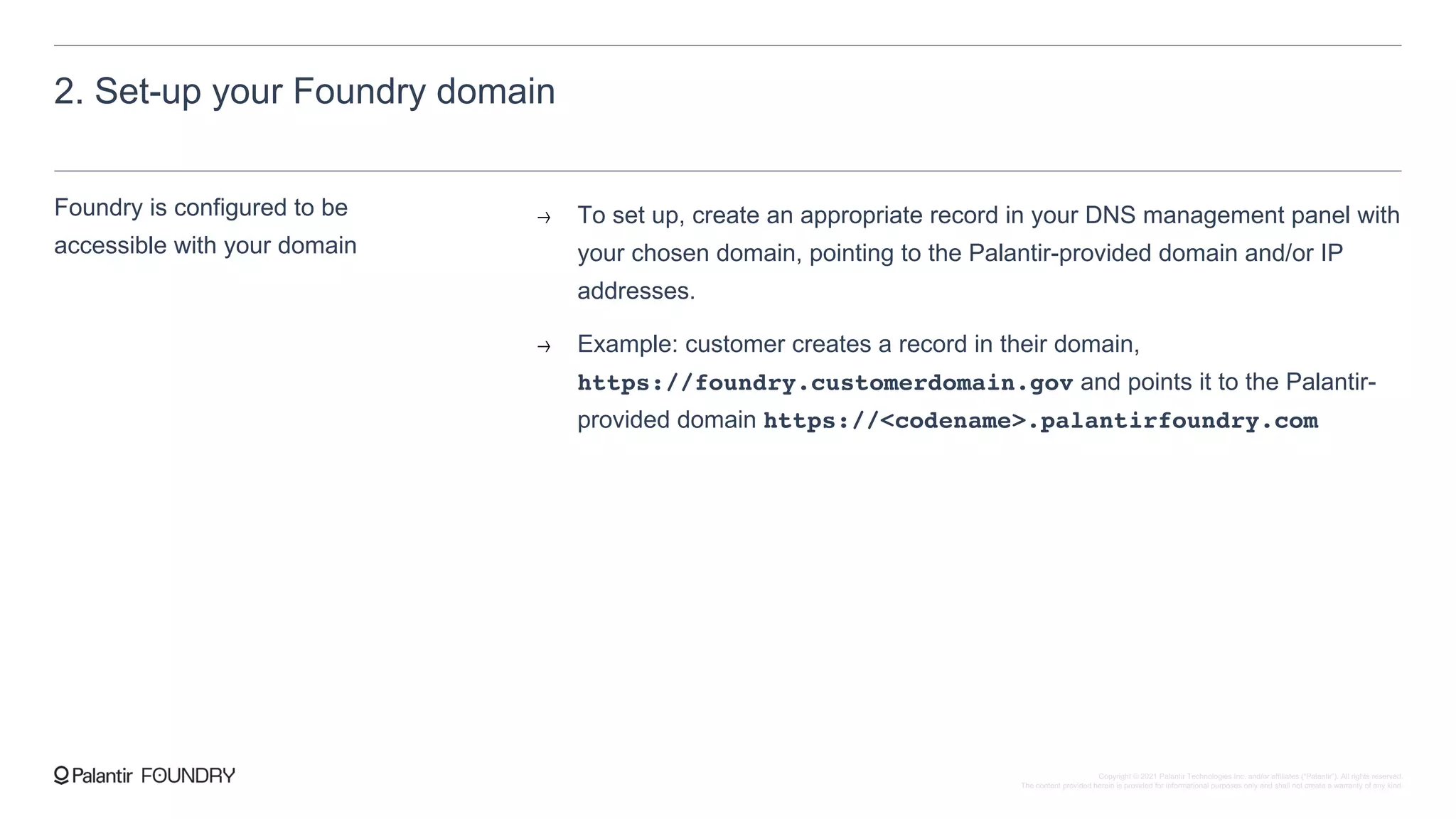
2. Set-up your Foundry domain
Foundry is configured to be
accessible with your domain
To set up, create an appropriate record in your DNS management panel with
your chosen domain, pointing to the Palantir-provided domain and/or IP
addresses.
Example: customer creates a record in their domain,
https://foundry.customerdomain.gov and points it to the Palantir-
provided domain https://<codename>.palantirfoundry.com
Copyright © 2021 Palantir Technologies Inc. and/or affiliates (“Palantir”). All rights reserved.
The content provided herein is provided for informational purposes only and shall not create a warranty of any kind.
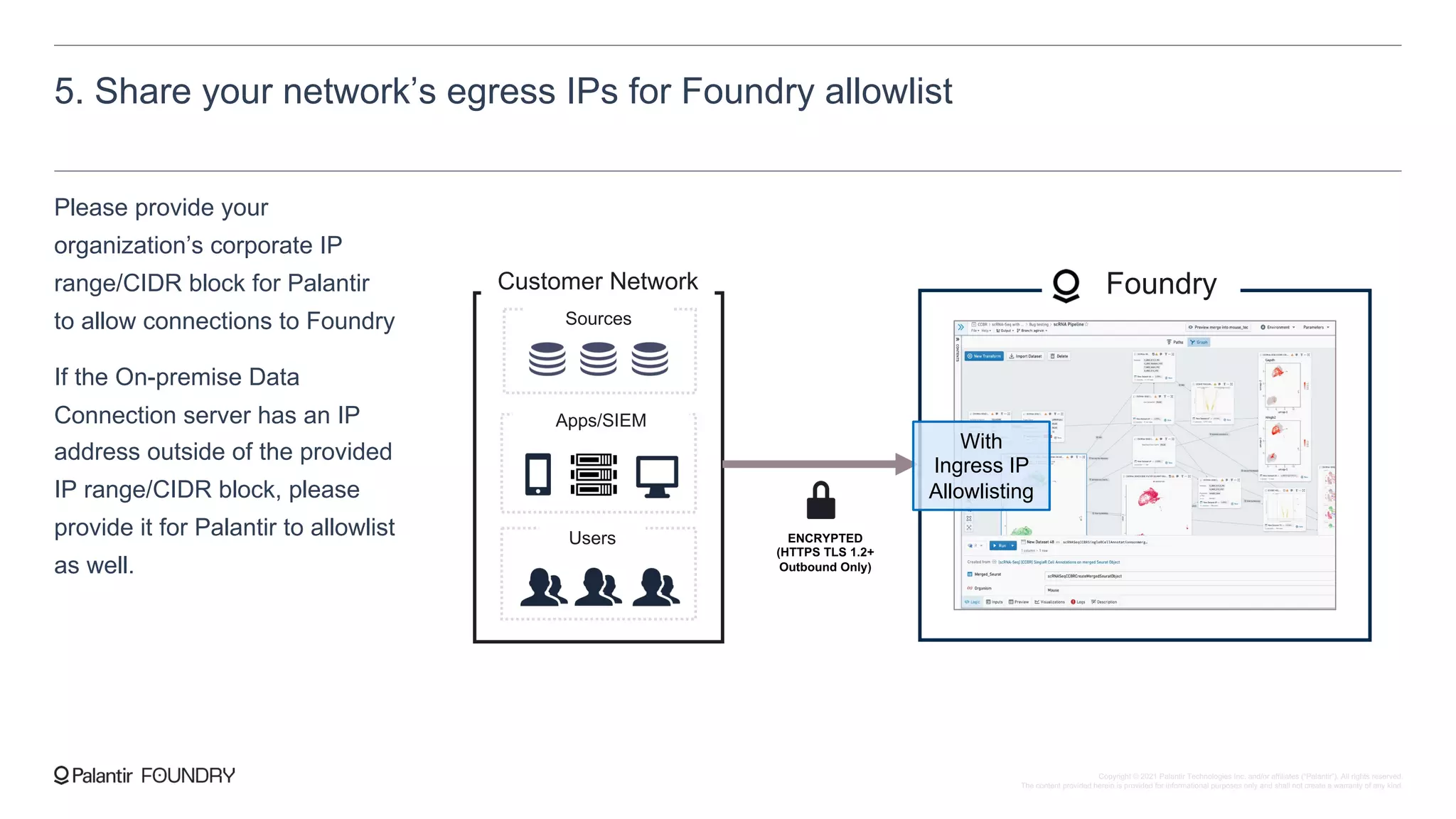
5. Share your network’s egress IPs for Foundry allowlist
Please provide your
organization’s corporate IP
range/CIDR block for Palantir
to allow connections to Foundry
If the On-premise Data
Connection server has an IP
address outside of the provided
IP range/CIDR block, please
provide it for Palantir to allowlist
as well.
Customer Network Foundry
Users
Apps/SIEM
Sources
ENCRYPTED
(HTTPS TLS 1.2+
Outbound Only)
With
Ingress IP
Allowlisting
Copyright © 2021 Palantir Technologies Inc. and/or affiliates (“Palantir”). All rights reserved.
The content provided herein is provided for informational purposes only and shall not create a warranty of any kind.
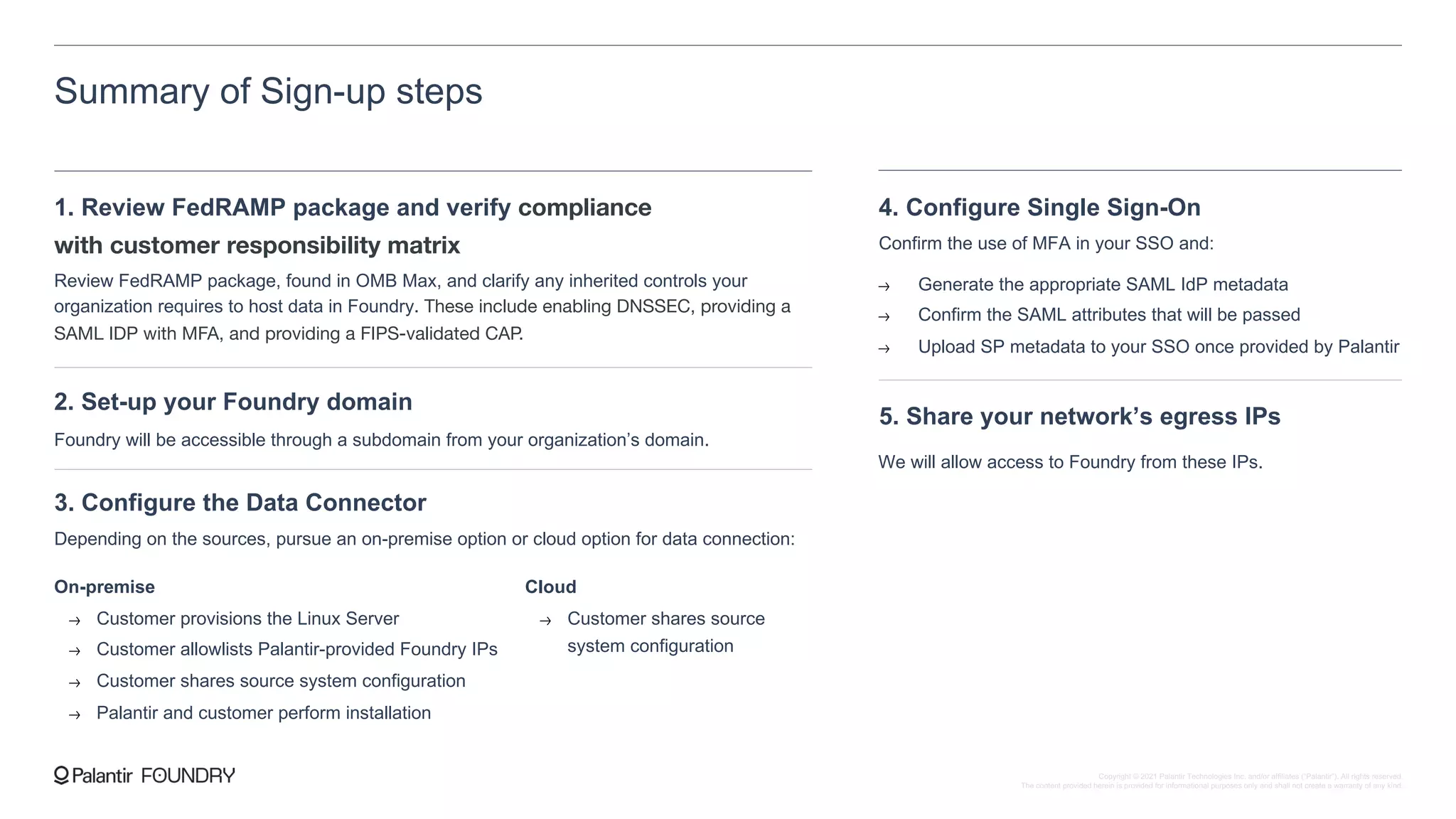
Summary of Sign-up steps
1. Review FedRAMP package and verify compliance
with customer responsibility matrix
Review FedRAMP package, found in OMB Max, and clarify any inherited controls your
organization requires to host data in Foundry. These include enabling DNSSEC, providing a
SAML IDP with MFA, and providing a FIPS-validated CAP.
2. Set-up your Foundry domain
Foundry will be accessible through a subdomain from your organization’s domain.
3. Configure the Data Connector
Depending on the sources, pursue an on-premise option or cloud option for data connection:
On-premise
Customer provisions the Linux Server
Customer allowlists Palantir-provided Foundry IPs
Customer shares source system configuration
Palantir and customer perform installation
Cloud
Customer shares source
system configuration
4. Configure Single Sign-On
Confirm the use of MFA in your SSO and:
Generate the appropriate SAML IdP metadata
Confirm the SAML attributes that will be passed
Upload SP metadata to your SSO once provided by Palantir
5. Share your network’s egress IPs
We will allow access to Foundry from these IPs.
Copyright © 2021 Palantir Technologies Inc. and/or affiliates (“Palantir”). All rights reserved.
The content provided herein is provided for informational purposes only and shall not create a warranty of any kind.

Foundry technical intro

  • 1.
    Copyright © 2021 PalantirTechnologies, Inc. All Rights Reserved Foundry Technical Onboarding
  • 2.
    Intro to Palantir Palantirenables organizations to solve their hardest problems using data. INDUSTRIES WE WORK WITH Defense Energy Media Intelligence Law Enforcement Automotive Disaster Response Aviation Humanitarian Aid Manufacturing Healthcare Telecom Finance Regulatory Cybersecurity Shipping Logistics Insurance Pharma CPG Tech SOME OF OUR PARTNERS U.S. DEPARTMENT OF DEFENSE Headquarters Founded Employees Denver, CO 2004 2,400 Offices worldwide 20+ Copyright © 2021 Palantir Technologies Inc. and/or affiliates (“Palantir”). All rights reserved. The content provided herein is provided for informational purposes only and shall not create a warranty of any kind.
  • 3.
    Foundry is Palantir’smanaged SaaS for deriving decisions from data Foundry unifies organizations around their central mission, enabling them to become fully digital “connected organizations”: Integrated data operations Git-style branching & collaboration Full data & logic lineage Automatic propagating security & governance Operational application suite of tools Copyright © 2021 Palantir Technologies Inc. and/or affiliates (“Palantir”). All rights reserved. The content provided herein is provided for informational purposes only and shall not create a warranty of any kind.
  • 4.
    Foundry is Palantir’smanaged SaaS Foundry includes industry-standard and advanced backing platform features. Autoscaling Infrastructure Foundry incorporates an autoscaling infrastructure that scales based on your immediate compute needs Managed SaaS Palantir Cloud Operations Infrastructure alerting, monitoring & support to ensure performance Microservice Architecture Modular software development without user downtime or broader impact 24/7/365 Monitoring & Support Palantir Cloud Operations Monitoring & Support Continuous Delivery & Automated Upgrades Rapid online upgrades and patching without system-wide effects High Availability & Disaster Recovery Designed and deployed with High-Availability & Disaster Recovery in the case of critical failures Encryption in-transit & at rest Data, applications, and communications are encrypted throughout Foundry Single-Sign On and Access Control Control access into & within Foundry through existing Single Sign-On identity providers Copyright © 2021 Palantir Technologies Inc. and/or affiliates (“Palantir”). All rights reserved. The content provided herein is provided for informational purposes only and shall not create a warranty of any kind.
  • 5.
    Foundry gives customersbest-in-class security controls Foundry has a robust set of operational security primitives natively built into the platform, giving you the necessary tools to enforce proper control over your data. Permission by users and nest-able groups Role-based access controls Propagating security model Granular Permissions / Row-level Security Admin Permissions View Foundry integrates seamlessly with your existing Identity Manager/Provider, enabling full end-to-end access administration and management in your existing system. Copyright © 2021 Palantir Technologies Inc. and/or affiliates (“Palantir”). All rights reserved. The content provided herein is provided for informational purposes only and shall not create a warranty of any kind.
  • 6.
    Foundry’s environment issecured and monitored Foundry operates with a robust security-focused infrastructure, leveraging state-of-the-art security practices and protocols Encryption in transit and at rest Communication between services occurs over TLS 1.2+, only encrypted HTTPS endpoints are exposed and strict Ingress/Egress rules are enforced for the platform All storage layers, including object stores, block storage, and disk volumes, are secured with server-side encryption Audit logs Application audit logs can be made available for the customer to ingest into their existing SIEM for further analysis and monitoring of user actions within Foundry Vulnerability management Palantir’s Information Security team performs continuous internal penetration testing and security reviews, as well annual third-party penetration tests that cover white, gray, and black box testing of user interfaces and back-end APIs Copyright © 2021 Palantir Technologies Inc. and/or affiliates (“Palantir”). All rights reserved. The content provided herein is provided for informational purposes only and shall not create a warranty of any kind.
  • 7.
    Certifications and Attestations Palantirmaintains rigorous, externally verified infrastructure and operations standards. On top of those certifications, we are aligned with the controls and policies of: 1. NIST 800-53 and 800-171 2. ISO 27002, 27003 3. ISO Business Continuity and Risk Management Standards In addition, Palantir has extensive experience helping customers meet specific regulatory and industry requirements, including: 1. EU General Data Protection Regulation (GDPR) 2. US Health Insurance Portability and Accountability Act (HIPAA) 3. California Consumer Privacy Act (CCPA) 4. Federal Information Security Modernization Act (FISMA) Foundry is externally certified for the following baselines: 1. SOC 2 Type II 2. ISO 27001, ISO 27017 and 27018 3. FedRAMP Moderate (Foundry for US Government) 4. US DoD Impact Level 5 (Foundry for US DoD) Copyright © 2021 Palantir Technologies Inc. and/or affiliates (“Palantir”). All rights reserved. The content provided herein is provided for informational purposes only and shall not create a warranty of any kind.
  • 8.
    Choose the regionfor your Foundry. Sign-up steps There are six steps to complete in signing up to Foundry. 1. Select your region à Palantir can either generate a domain for you, or we can have Foundry accessible through a subdomain with your chosen customer domain. 2. Select your domain à Configure either the on-premise or cloud Data Connector to connect Foundry to your sources. 3. Configure the Data Connector à Confirm attributes and send your organization’s SSO identity provider metadata for easy access to Foundry from your existing SAML system. 4. Set-up Single-Sign On à This is for us to ensure that they can access Foundry. 5. Share your users’ country locations à Upon request, we will provide comprehensive documentation required for standard security reviews. 6. Review our standard security assessments à Copyright © 2021 Palantir Technologies Inc. and/or affiliates (“Palantir”). All rights reserved. The content provided herein is provided for informational purposes only and shall not create a warranty of any kind.
  • 9.
    1. Select yourregion Available regions for your Foundry’s data residency: United States Canada European Union United Kingdom Japan Australia Brazil Copyright © 2021 Palantir Technologies Inc. and/or affiliates (“Palantir”). All rights reserved. The content provided herein is provided for informational purposes only and shall not create a warranty of any kind.
  • 10.
    2. Select yourdomain There are two possible options for your Foundry domain. 1. Customer-defined with Palantir domain You choose a subdomain, and Palantir creates a unique domain for you with that subdomain, such as https://<subdomain>.palantirfoundry.com 2. Palantir-generated domain Palantir generated a unique domain code name for you, such as https://<codename>.palantirfoundry.com Copyright © 2021 Palantir Technologies Inc. and/or affiliates (“Palantir”). All rights reserved. The content provided herein is provided for informational purposes only and shall not create a warranty of any kind.
  • 11.
    3. Configure theData Connector Users schedule and execute data syncs through an intuitive and access-controlled UI Depending on the location of your sources, we have an On- Premise Data Connector we can deploy and a Cloud-based Data Connector for your cloud- based source systems Copyright © 2021 Palantir Technologies Inc. and/or affiliates (“Palantir”). All rights reserved. The content provided herein is provided for informational purposes only and shall not create a warranty of any kind.
  • 12.
    3. Configure theData Connector | Option A: On-premise Data Connector The cloud-based Coordinator configures and executes jobs that tell the Data Connector how to migrate new data The Data Connector communicates with your on- premise sources to fetch data The on-premise connector communicates with the Coordinator via encrypted outbound-only HTTPS requests. ENCRYPTED HTTPS (Port 443, TLS 1.2+) Outbound only Your Network HDFS Shared Drive RDBMS ETC. Sources Data Connector On-Premise agent importing data into Foundry over HTTPS (Port 443) Linux Server Foundry Data Connector Coordinator Fetches Configuration & Pushes Data Fetches Data Copyright © 2021 Palantir Technologies Inc. and/or affiliates (“Palantir”). All rights reserved. The content provided herein is provided for informational purposes only and shall not create a warranty of any kind.
  • 13.
    3. Configure theData Connector | Option A: On-premise Data Connector Common points of contact for on-premise installation: Networking/Infrastructure Provisions server for Data Connection in appropriate location, as well as remote access Allowlist the Foundry IP addresses to the provisioned server Data Source Owners Help identify data source for ingestion, as well as supporting materials such as data dictionaries Obtain any required approvals for data and/or source system access Customer server provision — Provision a server for the Data Connector with appropriate user accounts created and at least the following specs: [4 Physical Cores] - [16 GB RAM] - [500 GB Hard disk] - [64-bit Unix-based operating system] Palantir provides IPs — Palantir will provide the qualified domain name and IP addresses for Foundry Customer allowlist — Customer will allowlist the Foundry IPs in order to allow outbound connections from the server to Foundry Customer source networking access — Customer will enable open connections between the Data Connector server and relevant Source Systems Customer source connection information — Customer will share configuration options (e.g. private IPs, ports, credentials) for the Data Connector to source system connection Copyright © 2021 Palantir Technologies Inc. and/or affiliates (“Palantir”). All rights reserved. The content provided herein is provided for informational purposes only and shall not create a warranty of any kind.
  • 14.
    3. Configure theData Connector | Option B: Cloud-based Data Connector The cloud-based cloud connector can connect to a wide-range of cloud data sources, including: Amazon S3 AWS Redshift Azure Data Lake Storage Azure Blob Storage Box Drive Google BigQuery Google Cloud Storage Oracle File Storage Salesforce Copyright © 2021 Palantir Technologies Inc. and/or affiliates (“Palantir”). All rights reserved. The content provided herein is provided for informational purposes only and shall not create a warranty of any kind.
  • 15.
    4. Set-up SingleSign-On Foundry easily integrates with your existing Single Sign-On provider. Foundry has a native Multi-Factor Authentication service, so if MFA is not enabled at your organization, we can enable this service for an additional level of protection. Foundry supports any SAML 2.0 identity provider (IdP), including the following: Azure AD ADFS Okta PingFederate Shibboleth KeyCloak Hennge One GEOAxIS DISA GCDS Copyright © 2021 Palantir Technologies Inc. and/or affiliates (“Palantir”). All rights reserved. The content provided herein is provided for informational purposes only and shall not create a warranty of any kind.
  • 16.
    5. Share yourusers’ country locations Please let us know your users’ country for us to ensure that they can access the platform. Copyright © 2021 Palantir Technologies Inc. and/or affiliates (“Palantir”). All rights reserved. The content provided herein is provided for informational purposes only and shall not create a warranty of any kind.
  • 17.
    Summary of Sign-upsteps 1. Select your region [United States] - [Canada] - [European Union] - [United Kingdom] - [Japan] - [Australia] - [Brazil] 2. Select your domain Selecting a custom subdomain within a Palantir domain Utilizing a Palantir randomly-generated domain 3. Configure the Data Connector Depending on the sources, pursue an on-premise option or cloud option for data connection: On-premise Customer provisions the Linux Server Customer allowlists Palantir-provided Foundry IPs Customer shares source system configuration Palantir and customer perform installation Cloud Customer shares source system configuration 4. Configure Single Sign-On Confirm the use of MFA in your SSO and: Generate the appropriate SAML IdP metadata Confirm the SAML attributes that will be passed Upload SP metadata to your SSO once provided by Palantir 5. Share your users’ country locations We will allowlist access to Foundry to the IPs from these countries. 6. Fulfill any security assessments or SaaS vendor evaluation forms We can respond to any questionnaires your organization requires to host data in the Foundry environment. Copyright © 2021 Palantir Technologies Inc. and/or affiliates (“Palantir”). All rights reserved. The content provided herein is provided for informational purposes only and shall not create a warranty of any kind.
  • 19.
    Customer-owned domain If yourorganization has specific domain-name requirements or if the customer requires DNSSEC, your Foundry can be configured to be accessible with a customer- owned domain To set up, create an appropriate record in your DNS management panel with your chosen domain, pointing to the Palantir-provided domain and/or IP addresses. Example: customer creates a record in their domain, https://foundry.customerdomain.gov and points it to the Palantir-provided domain https://<codename>.palantirfoundry.com Copyright © 2021 Palantir Technologies Inc. and/or affiliates (“Palantir”). All rights reserved. The content provided herein is provided for informational purposes only and shall not create a warranty of any kind.
  • 20.
    Audit logging Application auditlogs can be made available for the customer to ingest into their existing SIEM for further analysis and monitoring of user actions within Foundry Customers can be provided read-only access to Application Audit Logs via a cloud object store. The Application Audit Logs can then be ingested into a customer-owned and customer-maintained SIEM. Palantir’s Application Audit Logging event coverage and content follows industry best practices and meets the requirements for standards such as NIST 800-53, ISO 27001/17/18, and SOC2. I. Customer shares IPs — Customer provides IP range/CIDR from which they will be reading the logs. II. Palantir allowlists IPs — Palantir allows the IP range/CIDR to the Palantir Platform. III. Palantir provides access — Palantir provides Customer with a read-only access key pair to the cloud storage containing the logs. SETUP STEPS Copyright © 2021 Palantir Technologies Inc. and/or affiliates (“Palantir”). All rights reserved. The content provided herein is provided for informational purposes only and shall not create a warranty of any kind.
  • 21.
    Private connectivity toFoundry Palantir Foundry supports additional networking options. 1. Restricted IP space We restrict front-door access to Foundry to your specific corporate IP range/CIDR so only users and systems within your network can access Foundry 2. Connect via private IP space We support PrivateLink private connectivity between your systems and Foundry 3. Dedicated network links to your systems For dedicated bandwidth or consistent low bandwidth, we support deploying DirectConnect between your on-premise systems and Foundry. Copyright © 2021 Palantir Technologies Inc. and/or affiliates (“Palantir”). All rights reserved. The content provided herein is provided for informational purposes only and shall not create a warranty of any kind.
  • 22.
    Customer Key ManagementOptions Palantir Foundry enables the customer to manage the keys for the Foundry Filesystem. 1. Enterprise Key Management (EKM) Palantir grants the customer a unique user to directly monitor, disable, or delete the underlying master key that encrypts their data in the Foundry Filesystem. Once the master key is deleted, the data stored in the Foundry Filesystem is unrecoverable, effectively functioning as a “kill switch”. 2. Bring-your-own-Key (BYOK) The customer creates a new key in a customer-owned account. All encryption and decryption for the Foundry Filesystem calls are routed through the customer key. Copyright © 2021 Palantir Technologies Inc. and/or affiliates (“Palantir”). All rights reserved. The content provided herein is provided for informational purposes only and shall not create a warranty of any kind.
  • 23.
    The Palantir FoundryAppliance provides the capabilities of the Foundry platform pre-installed and ready to use in an on-premise environment. It is offered for customers for which the Foundry SaaS Platform is not an option. The Palantir Foundry Appliance is designed as an all-contained appliance. The appliance is shipped and installed by Palantir in the customer’s data center, and is managed remotely 24/7/365 via Apollo, Palantir’s continuous delivery system. Customer Upgrades and Patches Infrastructure Health Checks Error Prevention and Remediation Foundry Apollo Infra Management CLOUD Users Apps/SIEM Sources ON-PREM ENCRYPTED ENCRYPTED Foundry Platform – On-Prem Appliance Copyright © 2021 Palantir Technologies Inc. and/or affiliates (“Palantir”). All rights reserved. The content provided herein is provided for informational purposes only and shall not create a warranty of any kind.
  • 24.
    Foundry Platform –Hosting Value Comparison Operations Speed Customer Costs Platform Infrastructure Features Time-to-Launch Use Case Onboarding Capital Investment Resource Demands Infrastructure Features Resiliency & Disaster Recovery Cloud Hours Instantaneous onboarding No Capital Investment Dynamic billing based on controlled autoscaling infrastructure None Standard Enterprise License Default High Availability across three Availability Zones Multi-site by default On-Prem Appliance 3-6 months before environment readiness** Subject to capacity planning lead-time Constrained by static appliance hardware constraints Up-front investment to meet minimum hardware Over-provisioning to account for growth Space & resources in Data Center On-Call Engineers & Management Network & Infrastructure teams Restricted platform feature- set (streaming, ephemeral infra, & autoscaling unavailable) Restricted by customer infrastructure Constrained by customer data center bandwidth, latency, and physical space ** Based on experience working with government and financial services institutions Copyright © 2021 Palantir Technologies Inc. and/or affiliates (“Palantir”). All rights reserved. The content provided herein is provided for informational purposes only and shall not create a warranty of any kind.
  • 25.
    Foundry in USGovernment For US Government clients, we offer two options for Foundry FOUNDRY IN US GOVERNMENT • FedRAMP Moderate Baseline. All controls required for the FedRAMP Moderate baseline are met and documented per the SSP and attachments found in OMB Max. • Agency sponsorship through HHS. The Palantir Federal Cloud Service (PFCS) SaaS holds a FedRAMP Agency Authorization from HHS, which manages all ongoing Continuous Monitoring requirements. Agencies may choose to leverage HHS’s ATO or issue a new ATO which fully inherits the existing controls and assessment from the PFCS FedRAMP Authorization. FOUNDRY IN US DOD • Impact Level 5 baseline. This certifies the environment to hold Controlled Unclassified Information and host mission critical National Security Systems. • Built on AWS GovCloud. AWS GovCloud meets the IL5 baseline for IaaS. • Operations teams staffed with US Persons. This ensures that all aspects of the environment and the environment’s configuration are accessible only to USP who are approved and onboarded to the environment. • All connections secured via the DISA BCAP from NIPRNet. Cloud Computing SRG requirements are already implemented in the architecture. Copyright © 2021 Palantir Technologies Inc. and/or affiliates (“Palantir”). All rights reserved. The content provided herein is provided for informational purposes only and shall not create a warranty of any kind.
  • 26.
    Review FedRAMP package,found in OMB Max, and clarify any inherited controls your organization requires to host data in Foundry. These include enabling DNSSEC, providing a SAML IDP with MFA, and providing a FIPS- validated CAP. Sign-up steps There are six steps to complete in signing up to Foundry. 1. Review FedRAMP package and verify compliance with customer responsibility matrix à Foundry will be configured to be accessible through a subdomain from your organization’s domain. 2. Set-up your Foundry domain à Configure either the on-premise or cloud Data Connector to connect Foundry to your sources. 3. Configure the Data Connector à Confirm attributes and send your organization’s SSO identity provider metadata for easy access to Foundry from your existing SAML system. 4. Set-up Single-Sign On à We will allow access to Foundry from these IPs. 5. Share your network’s egress IPs à Copyright © 2021 Palantir Technologies Inc. and/or affiliates (“Palantir”). All rights reserved. The content provided herein is provided for informational purposes only and shall not create a warranty of any kind.
  • 27.
    1. Review FedRAMPpackage and verify compliance with customer responsibility matrix You can access the FedRAMP package from OMB Max following the instructions outlined in the Package Access Request Form Customer responsibility compliance requirements include: • Customer IDP provides SAML 2.0 protocol, MFA, any organizationally required token auth, and meets FedRAMP parameters for account management (CRM 1-5) • Foundry Data Connector hosts provisioned and maintained according to organizational requirements, configured for data access (CRM 14) • Cloud Access Point (CAP) ensures FIPS 140-2 validated cryptography for all connections across system boundary (CRM 10) • Application Audit Log reviewers have procedures for reviewing Palantir Platform audit, have configured system to read provided audit logs (CRM 6) • Certificates and DNS provisioned and configured for DNSSEC (CRM 17) • Organization roles and policies specified and communicated to Palantir (CRM 7-9,11-13,15,16) Copyright © 2021 Palantir Technologies Inc. and/or affiliates (“Palantir”). All rights reserved. The content provided herein is provided for informational purposes only and shall not create a warranty of any kind.
  • 28.
    2. Set-up yourFoundry domain Foundry is configured to be accessible with your domain To set up, create an appropriate record in your DNS management panel with your chosen domain, pointing to the Palantir-provided domain and/or IP addresses. Example: customer creates a record in their domain, https://foundry.customerdomain.gov and points it to the Palantir- provided domain https://<codename>.palantirfoundry.com Copyright © 2021 Palantir Technologies Inc. and/or affiliates (“Palantir”). All rights reserved. The content provided herein is provided for informational purposes only and shall not create a warranty of any kind.
  • 29.
    5. Share yournetwork’s egress IPs for Foundry allowlist Please provide your organization’s corporate IP range/CIDR block for Palantir to allow connections to Foundry If the On-premise Data Connection server has an IP address outside of the provided IP range/CIDR block, please provide it for Palantir to allowlist as well. Customer Network Foundry Users Apps/SIEM Sources ENCRYPTED (HTTPS TLS 1.2+ Outbound Only) With Ingress IP Allowlisting Copyright © 2021 Palantir Technologies Inc. and/or affiliates (“Palantir”). All rights reserved. The content provided herein is provided for informational purposes only and shall not create a warranty of any kind.
  • 30.
    Summary of Sign-upsteps 1. Review FedRAMP package and verify compliance with customer responsibility matrix Review FedRAMP package, found in OMB Max, and clarify any inherited controls your organization requires to host data in Foundry. These include enabling DNSSEC, providing a SAML IDP with MFA, and providing a FIPS-validated CAP. 2. Set-up your Foundry domain Foundry will be accessible through a subdomain from your organization’s domain. 3. Configure the Data Connector Depending on the sources, pursue an on-premise option or cloud option for data connection: On-premise Customer provisions the Linux Server Customer allowlists Palantir-provided Foundry IPs Customer shares source system configuration Palantir and customer perform installation Cloud Customer shares source system configuration 4. Configure Single Sign-On Confirm the use of MFA in your SSO and: Generate the appropriate SAML IdP metadata Confirm the SAML attributes that will be passed Upload SP metadata to your SSO once provided by Palantir 5. Share your network’s egress IPs We will allow access to Foundry from these IPs. Copyright © 2021 Palantir Technologies Inc. and/or affiliates (“Palantir”). All rights reserved. The content provided herein is provided for informational purposes only and shall not create a warranty of any kind.