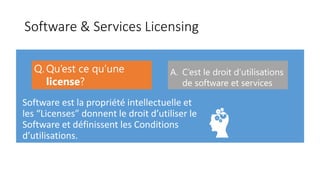
Software & Services Licensing
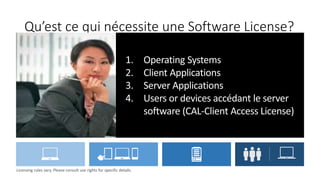
Qu’est ce qui nécessite une Software License?
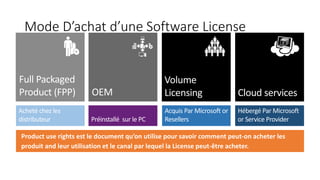
Mode D’achat d’une Software License
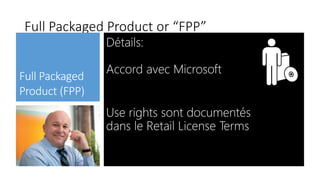
Full Packaged Product or “FPP”
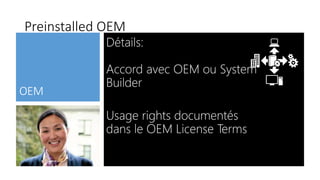
Preinstalled OEM
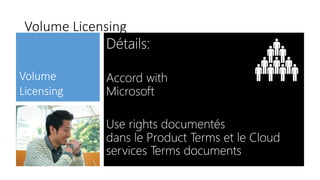
Volume Licensing
Volume Licensing
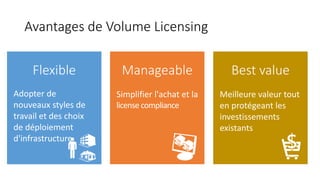
Avantages de Volume Licensing
Meilleure valeur tout
en protégeant les
investissements
existants
Simplifier l'achat et la
license compliance
Adopter de
nouveaux styles de
travail et des choix
de déploiement
d'infrastructure
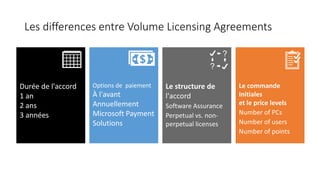
Les differences entre Volume Licensing Agreements
Durée de l'accord
1 an
2 ans
3 années
l'accord
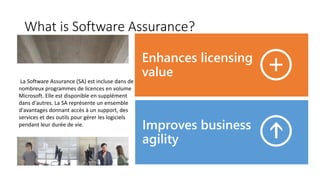
What is Software Assurance?
La Software Assurance (SA) est incluse dans de
nombreux programmes de licences en volume
Microsoft. Elle est disponible en supplément
dans d'autres. La SA représente un ensemble
d'avantages donnant accès à un support, des
services et des outils pour gérer les logiciels
pendant leur durée de vie.
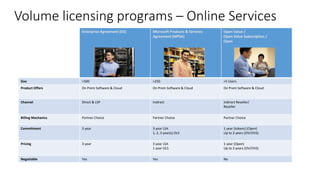
Volume licensing programs – Online Services
Enterprise Agreement (EA) Microsoft Products & Services
Agreement (MPSA)
Open Value /
Open Value Subscription /
Open
Size >500 >250 >5 Users
Product Offers On Prem Software & Cloud On Prem Software & Cloud On Prem Software & Cloud
Channel Direct & LSP Indirect Indirect Reseller/
Reseller
Billing Mechanics Partner Choice Partner Choice Partner Choice
Commitment 3 year 3 year LSA
1, 2, 3 year(s) OLS
1 year (tokens) (Open)
Up to 3 years (OV/OVS)
Pricing 3 year 3 year LSA
1 year OLS
1 year (Open)
Up to 3 years (OV/OVS)
Negotiable Yes Yes No
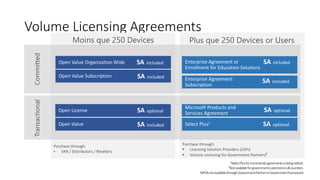
Volume Licensing Agreements
Purchase through:
• VAR / Distributors / Resellers
Purchase through:
 Licensing Solution Providers (LSPs)
 Volume Licensing for Government Partners2
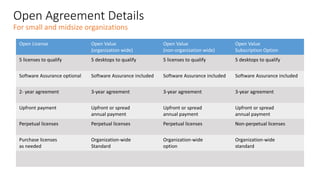
Open Agreement Details
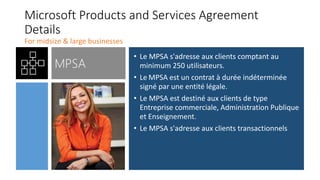
Microsoft Products and Services Agreement
Details
• Le MPSA s'adresse aux clients comptant au
minimum 250 utilisateurs.
• Le MPSA est un contrat à durée indéterminée
signé par une entité légale.
• Le MPSA est destiné aux clients de type
Entreprise commerciale, Administration Publique
et Enseignement.
• Le MPSA s'adresse aux clients transactionnels
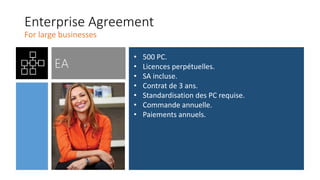
Enterprise Agreement
• 500 PC.
• Licences perpétuelles.
• SA incluse.
• Contrat de 3 ans.
• Standardisation des PC requise.
• Commande annuelle.
• Paiements annuels.
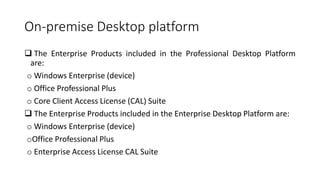
On-premise Desktop platform
 The Enterprise Products included in the Professional Desktop Platform
are:
o Windows Enterprise (device)
o Office Professional Plus
o Core Client Access License (CAL) Suite
 The Enterprise Products included in the Enterprise Desktop Platform are:
o Windows Enterprise (device)
oOffice Professional Plus
o Enterprise Access License CAL Suite
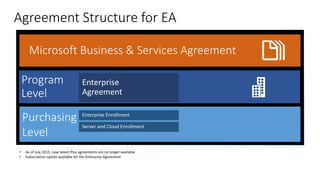
Agreement Structure for EA
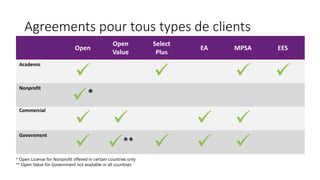
Agreements pour tous types de clients
Windows Server
Licensing
Overview
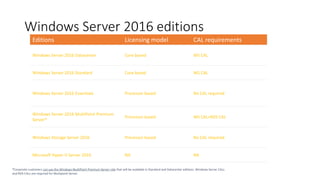
Editions Licensing model CAL requirements
Windows Server 2016 Datacenter Core based WS CAL
Windows Server 2016 Standard Core based WS CAL
Windows Server 2016 Essentials Processor based No CAL required
Windows Server 2016 MultiPoint Premium
Server*
Processor based WS CAL+RDS CAL
Windows Storage Server 2016 Processor based No CAL required
Microsoft Hyper-V Server 2016 NA NA
*Corporate customers can use the Windows MultiPoint Premium Server role that will be available in Standard and Datacenter editions. Windows Server CALs
and RDS CALs are required for Multipoint Server.
Windows Server 2016 editions
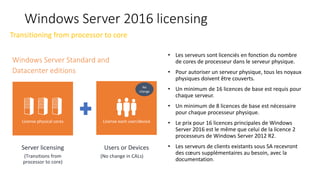
• Les serveurs sont licenciés en fonction du nombre
de cores de processeur dans le serveur physique.
• Pour autoriser un serveur physique, tous les noyaux
physiques doivent être couverts.
• Un minimum de 16 licences de base est requis pour
chaque serveur.
• Un minimum de 8 licences de base est nécessaire
pour chaque processeur physique.
• Le prix pour 16 licences principales de Windows
Server 2016 est le même que celui de la licence 2
processeurs de Windows Server 2012 R2.
• Les serveurs de clients existants sous SA recevront
des cœurs supplémentaires au besoin, avec la
documentation.
Windows Server 2016 licensing
License physical cores License each user/device
Server licensing
(Transitions from
processor to core)
Users or Devices
(No change in CALs)
No
change
Transitioning from processor to core
Windows Server Standard and
Datacenter editions
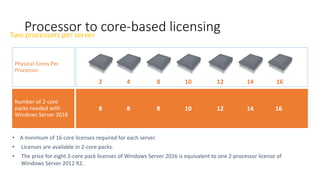
Processor to core-based licensing
Two processors per server
Physical Cores Per
Processor
Number of 2-core
packs needed with
Windows Server 2016
2 4 10
8
8 8 8 12
• A minimum of 16 core licenses required for each server.
• Licenses are available in 2-core packs.
• The price for eight 2-core pack licenses of Windows Server 2016 is equivalent to one 2-processor license of
Windows Server 2012 R2.
12 14 16
14 16
10
SQL Server 2016:
Licensing fundamentals
Licensing Server + CAL
Per core
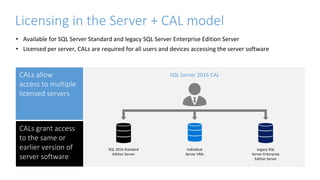
Licensing in the Server + CAL model
• Available for SQL Server Standard and legacy SQL Server Enterprise Edition Server
• Licensed per server, CALs are required for all users and devices accessing the server software
SQL Server 2016 CAL
CALs allow
access to multiple
licensed servers
CALs grant access
to the same or
earlier version of
server software
SQL 2016 Standard
Edition Server
Individual
Server VMs
Legacy SQL
Server Enterprise
Edition Server
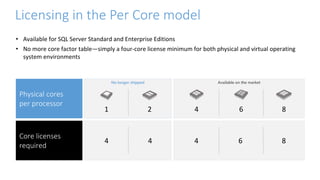
Available on the market
No longer shipped
4 6 8
4 4
Physical cores
per processor
Core licenses
required
8
2 6
1 4
Licensing in the Per Core model
• Available for SQL Server Standard and Enterprise Editions
• No more core factor table—simply a four-core license minimum for both physical and virtual operating
system environments
Office 365
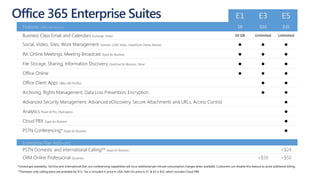
*Limited geo availability. Toll-free and International Dial-out conferencing capabilities will incur additional per minute consumption charges when available. Customers can disable this feature to avoid additional billing.
**Domestic only calling plans are available for $12. Tax is included in price in USA. Add-On price to E1 & E3 is $32, which includes Cloud PBX
Office 365 Enterprise Suites E1 E3 E5
Features Office 365 Services $8 $20 $35
Business Class Email and Calendars Exchange Online 50 GB Unlimited Unlimited
Social, Video, Sites, Work Management Yammer, O365 Video, SharePoint Online, Planner ● ● ●
IM, Online Meetings, Meeting Broadcast Skype for Business ● ● ●
File Storage, Sharing, Information Discovery OneDrive for Business, Delve ● ● ●
Office Online ● ● ●
Office Client Apps Office 365 ProPlus ● ●
Archiving, Rights Management, Data Loss Prevention, Encryption ● ●
Advanced Security Management, Advanced eDiscovery, Secure Attachments and URLs, Access Control ●
Analytics Power BI Pro, MyAnalytics ●
Cloud PBX Skype for Business ●
PSTN Conferencing* Skype for Business ●
Enterprise Plan Add-ons
PSTN Domestic and International Calling** Skype for Business +$24
CRM Online Professional Dynamics +$50 +$50
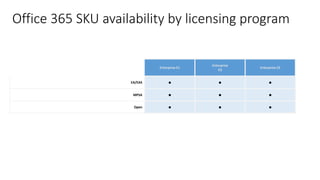
Office 365 SKU availability by licensing program
Enterprise E1
Enterprise
E3
Enterprise E5
EA/EAS
MPSA
Open
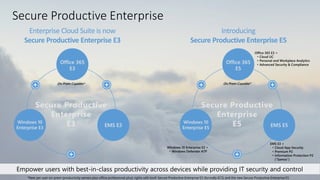
Secure Productive Enterprise
Office 365
E5
Office 365 E3 +
• Cloud UC
• Personal and Workplace Analytics
• Advanced Security & Compliance
EMS E3 +
• Cloud App Security
• Premium P2
• Information Protection P2
(“Samos”)
Windows 10 Enterprise E3 +
• Windows Defender ATP
Windows 10
Enterprise E5 EMS E5
Office 365
E3
Windows 10
Enterprise E3 EMS E3
Secure Productive
Enterprise
E3
Introducing
Secure Productive Enterprise E5
Enterprise Cloud Suite is now
Secure Productive Enterprise E3
Secure Productive
Enterprise
E5
On Prem Capable* On Prem Capable*
*New per user on-prem (productivity servers plus office professional plus) rights with both Secure Productive Enterprise E3 (formally ECS) and the new Secure Productive Enterprise E5
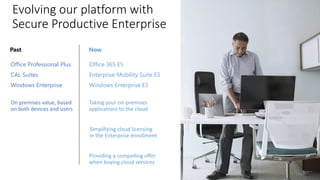
Evolving our platform with
Secure Productive Enterprise
Office Professional Plus
CAL Suites
Windows Enterprise
Now
Office 365 E5
Enterprise Mobility Suite E5
Windows Enterprise E5
Taking your on-premises
applications to the cloud
Simplifying cloud licensing
in the Enterprise enrollment
Providing a compelling offer
when buying cloud services
On premises value, based
on both devices and users
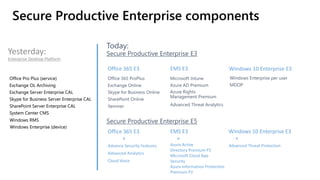
Secure Productive Enterprise components
Yesterday:
Enterprise Desktop Platform
Office 365 E3 EMS E3 Windows 10 Enterprise E3
Office 365 E3
+
Advance Security Features
Advanced Analytics
Cloud Voice
EMS E3
+
Azure Active
Directory Premium P2
Microsoft Cloud App
Security
Azure Information Protection
Premium P2
Windows 10 Enterprise E3
+
Advanced Threat Protection
Enterprise
SPE add-on
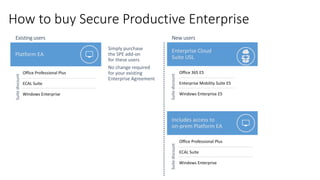
How to buy Secure Productive Enterprise
Platform EA
Enterprise Cloud
Suite USL
Includes access to
on-prem Platform EA
Enterprise SPE
add-on
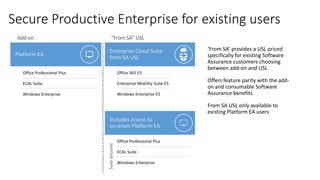
Secure Productive Enterprise for existing users
Platform EA
Enterprise Cloud Suite
from SA USL
‘From SA’ provides a USL priced
specifically for existing Software
Assurance customers choosing
between add-on and USL
Offers feature parity with the add-
on and consumable Software
Assurance benefits
From SA USL only available to
existing Platform EA users
Includes access to
on-prem Platform EA
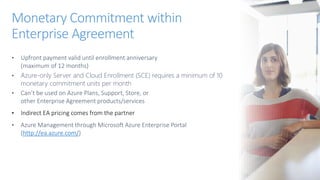
• Upfront payment valid until enrollment anniversary
(maximum of 12 months)
• Azure-only Server and Cloud Enrollment (SCE) requires a minimum of 10
monetary commitment units per month
• Can’t be used on Azure Plans, Support, Store, or
other Enterprise Agreement products/services
• Indirect EA pricing comes from the partner
• Azure Management through Microsoft Azure Enterprise Portal
(http://ea.azure.com/)
Monetary Commitment within
Enterprise Agreement
Additional usage beyond
Monetary Commitment
• Pay at the end of the year for unplanned growth
• If a customer goes 150% beyond their commitment,
the full additional usage starts to bill at the end of
each quarter.
• All additional usage is billed quarterly
Direct Enterprise Agreement
IndirectEnterpriseAgreement
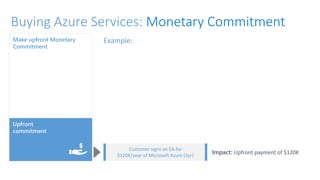
Example:
Impact: Upfront payment of $120K
Customer signs an EA for
$120K/year of Microsoft Azure (3yr)
Upfront
commitment
Make upfront Monetary
Commitment
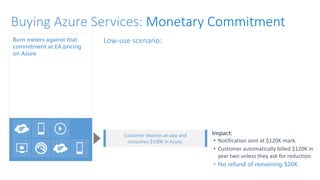
Buying Azure Services: Monetary Commitment
Burn meters against that
commitment at EA pricing
on Azure
Impact:
• Notification sent at $120K mark.
• Customer automatically billed $120K in
year two unless they ask for reduction.
• No refund of remaining $20K.
Customer deploys an app and
consumes $100K in Azure.
Low-use scenario:
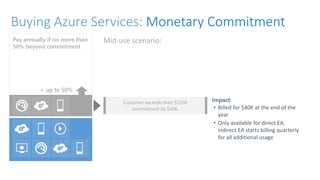
Pay annually if no more than
50% beyond commitment
Impact:
• Billed for $40K at the end of the
year
• Only available for direct EA,
indirect EA starts billing quarterly
for all additional usage
Customer exceeds their $120K
commitment by $40K.
Mid-use scenario:
+ up to 50%
Buying Azure Services: Monetary Commitment
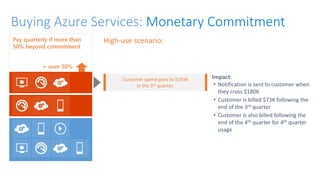
Pay quarterly if more than
50% beyond commitment
Impact:
• Notification is sent to customer when
they cross $180K
• Customer is billed $73K following the
end of the 3rd quarter
• Customer is also billed following the
end of the 4th quarter for 4th quarter
usage
Customer spend goes to $193K
in the 3rd quarter.
High-use scenario:
+ over 50%
FORMATION software LICENSING NEWS Microsoft

FORMATION software LICENSING NEWS Microsoft

  • 2.
  • 3.
    Qu’est ce quinécessite une Software License?
  • 4.
    Mode D’achat d’uneSoftware License
  • 5.
  • 6.
  • 7.
  • 8.
    Avantages de VolumeLicensing Meilleure valeur tout en protégeant les investissements existants Simplifier l'achat et la license compliance Adopter de nouveaux styles de travail et des choix de déploiement d'infrastructure
  • 9.
    Les differences entreVolume Licensing Agreements Durée de l'accord 1 an 2 ans 3 années l'accord
  • 10.
    What is SoftwareAssurance? La Software Assurance (SA) est incluse dans de nombreux programmes de licences en volume Microsoft. Elle est disponible en supplément dans d'autres. La SA représente un ensemble d'avantages donnant accès à un support, des services et des outils pour gérer les logiciels pendant leur durée de vie.
  • 12.
    Volume licensing programs– Online Services Enterprise Agreement (EA) Microsoft Products & Services Agreement (MPSA) Open Value / Open Value Subscription / Open Size >500 >250 >5 Users Product Offers On Prem Software & Cloud On Prem Software & Cloud On Prem Software & Cloud Channel Direct & LSP Indirect Indirect Reseller/ Reseller Billing Mechanics Partner Choice Partner Choice Partner Choice Commitment 3 year 3 year LSA 1, 2, 3 year(s) OLS 1 year (tokens) (Open) Up to 3 years (OV/OVS) Pricing 3 year 3 year LSA 1 year OLS 1 year (Open) Up to 3 years (OV/OVS) Negotiable Yes Yes No
  • 13.
    Volume Licensing Agreements Purchasethrough: • VAR / Distributors / Resellers Purchase through:  Licensing Solution Providers (LSPs)  Volume Licensing for Government Partners2
  • 14.
  • 15.
    Microsoft Products andServices Agreement Details • Le MPSA s'adresse aux clients comptant au minimum 250 utilisateurs. • Le MPSA est un contrat à durée indéterminée signé par une entité légale. • Le MPSA est destiné aux clients de type Entreprise commerciale, Administration Publique et Enseignement. • Le MPSA s'adresse aux clients transactionnels
  • 16.
    Enterprise Agreement • 500PC. • Licences perpétuelles. • SA incluse. • Contrat de 3 ans. • Standardisation des PC requise. • Commande annuelle. • Paiements annuels.
  • 17.
    On-premise Desktop platform The Enterprise Products included in the Professional Desktop Platform are: o Windows Enterprise (device) o Office Professional Plus o Core Client Access License (CAL) Suite  The Enterprise Products included in the Enterprise Desktop Platform are: o Windows Enterprise (device) oOffice Professional Plus o Enterprise Access License CAL Suite
  • 18.
  • 19.
    Agreements pour toustypes de clients
  • 20.
  • 21.
    Editions Licensing modelCAL requirements Windows Server 2016 Datacenter Core based WS CAL Windows Server 2016 Standard Core based WS CAL Windows Server 2016 Essentials Processor based No CAL required Windows Server 2016 MultiPoint Premium Server* Processor based WS CAL+RDS CAL Windows Storage Server 2016 Processor based No CAL required Microsoft Hyper-V Server 2016 NA NA *Corporate customers can use the Windows MultiPoint Premium Server role that will be available in Standard and Datacenter editions. Windows Server CALs and RDS CALs are required for Multipoint Server. Windows Server 2016 editions
  • 22.
    • Les serveurssont licenciés en fonction du nombre de cores de processeur dans le serveur physique. • Pour autoriser un serveur physique, tous les noyaux physiques doivent être couverts. • Un minimum de 16 licences de base est requis pour chaque serveur. • Un minimum de 8 licences de base est nécessaire pour chaque processeur physique. • Le prix pour 16 licences principales de Windows Server 2016 est le même que celui de la licence 2 processeurs de Windows Server 2012 R2. • Les serveurs de clients existants sous SA recevront des cœurs supplémentaires au besoin, avec la documentation. Windows Server 2016 licensing License physical cores License each user/device Server licensing (Transitions from processor to core) Users or Devices (No change in CALs) No change Transitioning from processor to core Windows Server Standard and Datacenter editions
  • 23.
    Processor to core-basedlicensing Two processors per server Physical Cores Per Processor Number of 2-core packs needed with Windows Server 2016 2 4 10 8 8 8 8 12 • A minimum of 16 core licenses required for each server. • Licenses are available in 2-core packs. • The price for eight 2-core pack licenses of Windows Server 2016 is equivalent to one 2-processor license of Windows Server 2012 R2. 12 14 16 14 16 10
  • 24.
    SQL Server 2016: Licensingfundamentals Licensing Server + CAL Per core
  • 25.
    Licensing in theServer + CAL model • Available for SQL Server Standard and legacy SQL Server Enterprise Edition Server • Licensed per server, CALs are required for all users and devices accessing the server software SQL Server 2016 CAL CALs allow access to multiple licensed servers CALs grant access to the same or earlier version of server software SQL 2016 Standard Edition Server Individual Server VMs Legacy SQL Server Enterprise Edition Server
  • 26.
    Available on themarket No longer shipped 4 6 8 4 4 Physical cores per processor Core licenses required 8 2 6 1 4 Licensing in the Per Core model • Available for SQL Server Standard and Enterprise Editions • No more core factor table—simply a four-core license minimum for both physical and virtual operating system environments
  • 27.
  • 28.
    *Limited geo availability.Toll-free and International Dial-out conferencing capabilities will incur additional per minute consumption charges when available. Customers can disable this feature to avoid additional billing. **Domestic only calling plans are available for $12. Tax is included in price in USA. Add-On price to E1 & E3 is $32, which includes Cloud PBX Office 365 Enterprise Suites E1 E3 E5 Features Office 365 Services $8 $20 $35 Business Class Email and Calendars Exchange Online 50 GB Unlimited Unlimited Social, Video, Sites, Work Management Yammer, O365 Video, SharePoint Online, Planner ● ● ● IM, Online Meetings, Meeting Broadcast Skype for Business ● ● ● File Storage, Sharing, Information Discovery OneDrive for Business, Delve ● ● ● Office Online ● ● ● Office Client Apps Office 365 ProPlus ● ● Archiving, Rights Management, Data Loss Prevention, Encryption ● ● Advanced Security Management, Advanced eDiscovery, Secure Attachments and URLs, Access Control ● Analytics Power BI Pro, MyAnalytics ● Cloud PBX Skype for Business ● PSTN Conferencing* Skype for Business ● Enterprise Plan Add-ons PSTN Domestic and International Calling** Skype for Business +$24 CRM Online Professional Dynamics +$50 +$50
  • 29.
    Office 365 SKUavailability by licensing program Enterprise E1 Enterprise E3 Enterprise E5 EA/EAS MPSA Open
  • 31.
    Secure Productive Enterprise Office365 E5 Office 365 E3 + • Cloud UC • Personal and Workplace Analytics • Advanced Security & Compliance EMS E3 + • Cloud App Security • Premium P2 • Information Protection P2 (“Samos”) Windows 10 Enterprise E3 + • Windows Defender ATP Windows 10 Enterprise E5 EMS E5 Office 365 E3 Windows 10 Enterprise E3 EMS E3 Secure Productive Enterprise E3 Introducing Secure Productive Enterprise E5 Enterprise Cloud Suite is now Secure Productive Enterprise E3 Secure Productive Enterprise E5 On Prem Capable* On Prem Capable* *New per user on-prem (productivity servers plus office professional plus) rights with both Secure Productive Enterprise E3 (formally ECS) and the new Secure Productive Enterprise E5
  • 32.
    Evolving our platformwith Secure Productive Enterprise Office Professional Plus CAL Suites Windows Enterprise Now Office 365 E5 Enterprise Mobility Suite E5 Windows Enterprise E5 Taking your on-premises applications to the cloud Simplifying cloud licensing in the Enterprise enrollment Providing a compelling offer when buying cloud services On premises value, based on both devices and users
  • 33.
    Secure Productive Enterprisecomponents Yesterday: Enterprise Desktop Platform Office 365 E3 EMS E3 Windows 10 Enterprise E3 Office 365 E3 + Advance Security Features Advanced Analytics Cloud Voice EMS E3 + Azure Active Directory Premium P2 Microsoft Cloud App Security Azure Information Protection Premium P2 Windows 10 Enterprise E3 + Advanced Threat Protection
  • 34.
    Enterprise SPE add-on How tobuy Secure Productive Enterprise Platform EA Enterprise Cloud Suite USL Includes access to on-prem Platform EA
  • 35.
    Enterprise SPE add-on Secure ProductiveEnterprise for existing users Platform EA Enterprise Cloud Suite from SA USL ‘From SA’ provides a USL priced specifically for existing Software Assurance customers choosing between add-on and USL Offers feature parity with the add- on and consumable Software Assurance benefits From SA USL only available to existing Platform EA users Includes access to on-prem Platform EA
  • 37.
    • Upfront paymentvalid until enrollment anniversary (maximum of 12 months) • Azure-only Server and Cloud Enrollment (SCE) requires a minimum of 10 monetary commitment units per month • Can’t be used on Azure Plans, Support, Store, or other Enterprise Agreement products/services • Indirect EA pricing comes from the partner • Azure Management through Microsoft Azure Enterprise Portal (http://ea.azure.com/) Monetary Commitment within Enterprise Agreement
  • 38.
    Additional usage beyond MonetaryCommitment • Pay at the end of the year for unplanned growth • If a customer goes 150% beyond their commitment, the full additional usage starts to bill at the end of each quarter. • All additional usage is billed quarterly Direct Enterprise Agreement IndirectEnterpriseAgreement
  • 39.
    Example: Impact: Upfront paymentof $120K Customer signs an EA for $120K/year of Microsoft Azure (3yr) Upfront commitment Make upfront Monetary Commitment Buying Azure Services: Monetary Commitment
  • 40.
    Buying Azure Services:Monetary Commitment Burn meters against that commitment at EA pricing on Azure Impact: • Notification sent at $120K mark. • Customer automatically billed $120K in year two unless they ask for reduction. • No refund of remaining $20K. Customer deploys an app and consumes $100K in Azure. Low-use scenario:
  • 41.
    Pay annually ifno more than 50% beyond commitment Impact: • Billed for $40K at the end of the year • Only available for direct EA, indirect EA starts billing quarterly for all additional usage Customer exceeds their $120K commitment by $40K. Mid-use scenario: + up to 50% Buying Azure Services: Monetary Commitment
  • 42.
    Buying Azure Services:Monetary Commitment Pay quarterly if more than 50% beyond commitment Impact: • Notification is sent to customer when they cross $180K • Customer is billed $73K following the end of the 3rd quarter • Customer is also billed following the end of the 4th quarter for 4th quarter usage Customer spend goes to $193K in the 3rd quarter. High-use scenario: + over 50%