

FLUID UI
Quick Notes
Anoop Savio
FLUID USER
INTERFACE OVERVIEW
Significant enhancement to the PeopleSoft’s “classic” user
interface.
Enhanced use of cascading style sheets (CSS3), HTML5, and
JavaScript.
Adjust the display based on the ‘Screen Size’ of the device.
IMPLEMENTING PEOPLESOFT
FLUID USER INTERFACE
PeopleSoft Application Designer
PeopleCode
PeopleTools Portal Technology
PeopleSoft Pure Internet Architecture
HTML 5.0
Cascading Style Sheets 3.0
JavaScript
NEED FOR A FLUID USER
INTERFACE
Traditional approach: WYSIWYG (what you see is what you
get)
Emergence and popularity of mobile devices
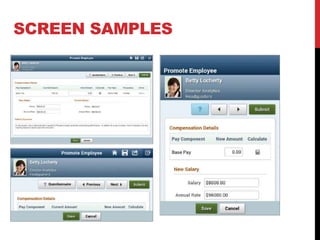
SCREEN SAMPLES
CONSIDERATIONS FOR PEOPLESOFT
FLUID APPLICATION
IMPLEMENTATION
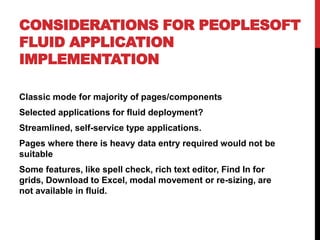
Classic mode for majority of pages/components
Selected applications for fluid deployment?
Streamlined, self-service type applications.
Pages where there is heavy data entry required would not be
suitable
Some features, like spell check, rich text editor, Find In for
grids, Download to Excel, modal movement or re-sizing, are
not available in fluid.
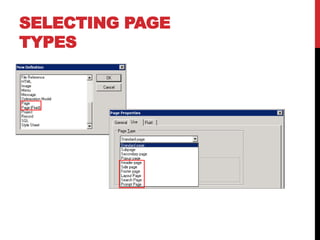
SELECTING PAGE
TYPES
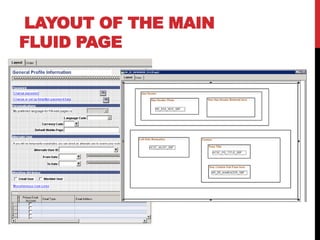
LAYOUT OF THE MAIN
FLUID PAGE
PEOPLESOFT DESIGN
ELEMENTS
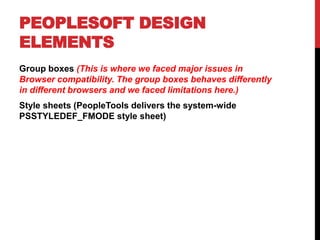
Group boxes (This is where we faced major issues in
Browser compatibility. The group boxes behaves differently
in different browsers and we faced limitations here.)
Style sheets (PeopleTools delivers the system-wide
PSSTYLEDEF_FMODE style sheet)
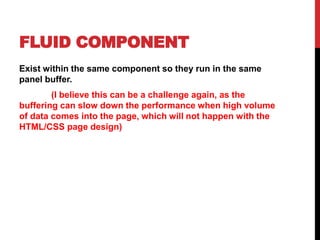
FLUID COMPONENT
Exist within the same component so they run in the same
panel buffer.
(I believe this can be a challenge again, as the
buffering can slow down the performance when high volume
of data comes into the page, which will not happen with the
HTML/CSS page design)
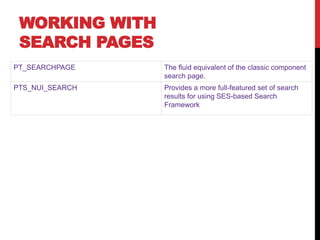
WORKING WITH
SEARCH PAGES
PT_SEARCHPAGE The fluid equivalent of the classic component
search page.
PTS_NUI_SEARCH Provides a more full-featured set of search
results for using SES-based Search
Framework
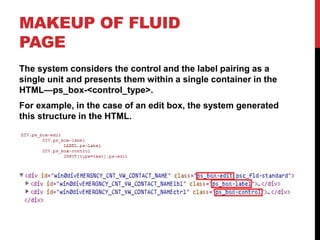
MAKEUP OF FLUID
PAGE
The system considers the control and the label pairing as a
single unit and presents them within a single container in the
HTML—ps_box-<control_type>.
For example, in the case of an edit box, the system generated
this structure in the HTML.
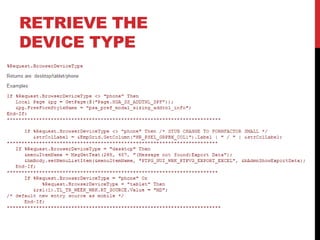
RETRIEVE THE
DEVICE TYPE

Fluid UI, Tips, Info

  • 1.
  • 2.
    FLUID USER INTERFACE OVERVIEW Significantenhancement to the PeopleSoft’s “classic” user interface. Enhanced use of cascading style sheets (CSS3), HTML5, and JavaScript. Adjust the display based on the ‘Screen Size’ of the device.
  • 3.
    IMPLEMENTING PEOPLESOFT FLUID USERINTERFACE PeopleSoft Application Designer PeopleCode PeopleTools Portal Technology PeopleSoft Pure Internet Architecture HTML 5.0 Cascading Style Sheets 3.0 JavaScript
  • 4.
    NEED FOR AFLUID USER INTERFACE Traditional approach: WYSIWYG (what you see is what you get) Emergence and popularity of mobile devices
  • 5.
  • 6.
    CONSIDERATIONS FOR PEOPLESOFT FLUIDAPPLICATION IMPLEMENTATION Classic mode for majority of pages/components Selected applications for fluid deployment? Streamlined, self-service type applications. Pages where there is heavy data entry required would not be suitable Some features, like spell check, rich text editor, Find In for grids, Download to Excel, modal movement or re-sizing, are not available in fluid.
  • 7.
  • 8.
    LAYOUT OF THEMAIN FLUID PAGE
  • 9.
    PEOPLESOFT DESIGN ELEMENTS Group boxes(This is where we faced major issues in Browser compatibility. The group boxes behaves differently in different browsers and we faced limitations here.) Style sheets (PeopleTools delivers the system-wide PSSTYLEDEF_FMODE style sheet)
  • 10.
    FLUID COMPONENT Exist withinthe same component so they run in the same panel buffer. (I believe this can be a challenge again, as the buffering can slow down the performance when high volume of data comes into the page, which will not happen with the HTML/CSS page design)
  • 11.
    WORKING WITH SEARCH PAGES PT_SEARCHPAGEThe fluid equivalent of the classic component search page. PTS_NUI_SEARCH Provides a more full-featured set of search results for using SES-based Search Framework
  • 12.
    MAKEUP OF FLUID PAGE Thesystem considers the control and the label pairing as a single unit and presents them within a single container in the HTML—ps_box-<control_type>. For example, in the case of an edit box, the system generated this structure in the HTML.
  • 13.