Bootcamp presentation
3D-Cities towards AR
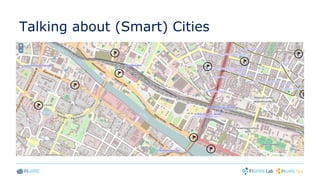
Talking about (Smart) Cities
Bootcamp presentation
POI Data Provider GE
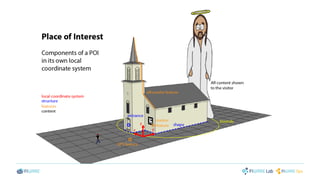
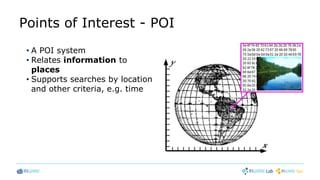
Points of Interest - POI
• A POI system
• Relates information to
places
• Supports searches by location
and other criteria, e.g. time
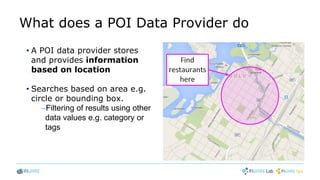
What does a POI Data Provider do
• A POI data provider stores
and provides information
based on location
• Searches based on area e.g.
circle or bounding box.
–Filtering of results using other
data values e.g. category or
tags
Why to use FIWARE POI Data Provider
• FIWARE POI Data Provider uses modular and distributed data.
This allow you to
• Combine your own data with public POI data
• Speed up mobile operation by fetching only the data your
application needs
• Use your own data structures, if need for extra flexibility
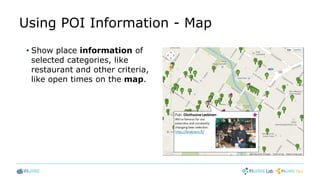
Using POI Information - Map
• Show place information of
selected categories, like
restaurant and other criteria,
like open times on the map.
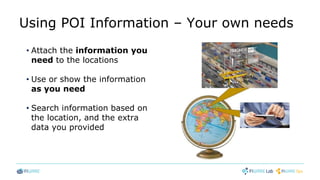
Using POI Information – Your own needs
• Attach the information you
need to the locations
• Use or show the information
as you need
• Search information based on
the location, and the extra
data you provided
Developing using FIWARE POI-DP GE
• Development prerequisites
• Modular and distributed data
• Components in JSON format
• Multilingual data items / Default language in multilingual data
• Spatial searches
• Additional data retrieval
• Creating / Updating / Deleting a new POI
Development prerequisites
• Basic JavaScript knowledge
–E.g. from here: http://www.w3schools.com/js/
• To show maps you may use e.g.
–Google Maps API https://developers.google.com/maps/
–OpenStreetMap http://wiki.openstreetmap.org/wiki/OpenLayers_Simple_Example
• Detailed instructions
–http://forge.fi-ware.org/plugins/mediawiki/wiki/fiware/index.php/POI_Data_Provider_-
_User_and_Programmers_Guide - later referred The Manual
Modular and Distributed Data
• Modular data to avoid unnecessary data transmission, by
requesting only the data components you want
• Data of a POI consists of components
fw_core, fw_time, fw_contact, fw_media, …
• HTTP Request defines wanted data components
• Different data components of the same POI may reside in
different servers.
• Application specific proprietary data components can be used
Components in JSON Format
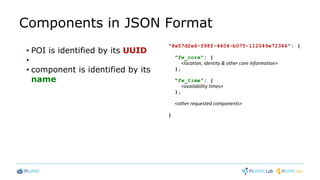
• POI is identified by its UUID
•
• component is identified by its
name
"8e57d2e6-f98f-4404-b075-112049e72346": {
"fw_core": {
<location, identity & other core information>
},
"fw_time": {
<availability times>
},
<other requested components>
}
Multilingual Data Items
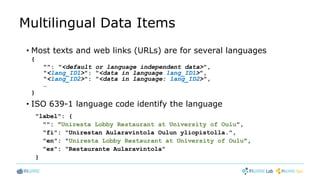
• Most texts and web links (URLs) are for several languages
{
"": "<default or language independent data>",
"<lang_ID1>": "<data in language lang_ID1>",
"<lang_ID2>": "<data in language: lang_ID2>",
…
}
• ISO 639-1 language code identify the language
"label": {
"": "Uniresta Lobby Restaurant at University of Oulu",
"fi": "Unirestan Aularavintola Oulun yliopistolla.",
"en": "Uniresta Lobby Restaurant at University of Oulu",
"es": "Restaurante Aularavintola"
}
Default language in Multilingual Data
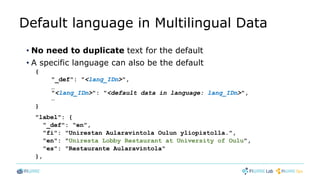
• No need to duplicate text for the default
• A specific language can also be the default
{
"_def": "<lang_IDn>",
…
"<lang_IDn>": "<default data in language: lang_IDn>",
…
}
"label": {
"_def": "en",
"fi": "Unirestan Aularavintola Oulun yliopistolla.",
"en": "Uniresta Lobby Restaurant at University of Oulu",
"es": "Restaurante Aularavintola"
},
Spatial Searches
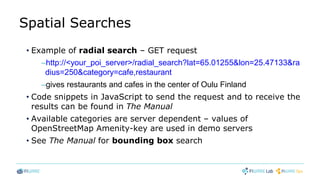
• Example of radial search – GET request
–http://<your_poi_server>/radial_search?lat=65.01255&lon=25.47133&ra
dius=250&category=cafe,restaurant
–gives restaurants and cafes in the center of Oulu Finland
• Code snippets in JavaScript to send the request and to receive the
results can be found in The Manual
• Available categories are server dependent – values of
OpenStreetMap Amenity-key are used in demo servers
• See The Manual for bounding box search
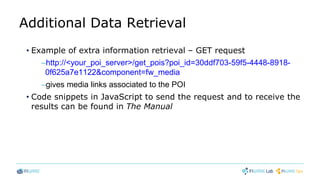
Additional Data Retrieval
• Example of extra information retrieval – GET request
–http://<your_poi_server>/get_pois?poi_id=30ddf703-59f5-4448-8918-
0f625a7e1122&component=fw_media
–gives media links associated to the POI
• Code snippets in JavaScript to send the request and to receive the
results can be found in The Manual
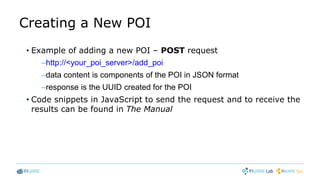
Creating a New POI
• Example of adding a new POI – POST request
–http://<your_poi_server>/add_poi
–data content is components of the POI in JSON format
–response is the UUID created for the POI
• Code snippets in JavaScript to send the request and to receive the
results can be found in The Manual
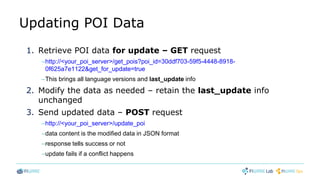
Updating POI Data
1. Retrieve POI data for update – GET request
–http://<your_poi_server>/get_pois?poi_id=30ddf703-59f5-4448-8918-
0f625a7e1122&get_for_update=true
–This brings all language versions and last_update info
2. Modify the data as needed – retain the last_update info
unchanged
3. Send updated data – POST request
–http://<your_poi_server>/update_poi
–data content is the modified data in JSON format
–response tells success or not
–update fails if a conflict happens
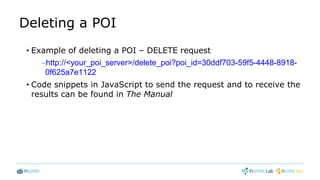
Deleting a POI
• Example of deleting a POI – DELETE request
–http://<your_poi_server>/delete_poi?poi_id=30ddf703-59f5-4448-8918-
0f625a7e1122
• Code snippets in JavaScript to send the request and to receive the
results can be found in The Manual
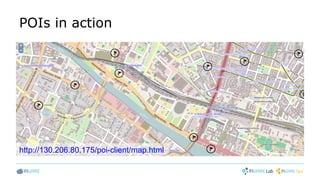
POIs in action
http://130.206.80.175/poi-client/map.html
Want to overcome these
(lame) 2D-maps?
Bootcamp presentation
GIS Data Provider GE
Rationale
● Create infrastructure to be used with next generation web based
3D GIS services
o Need for geographical system capable to provide data in 3D
form with correct geospatial information
GIS provider GE in nutshell
● GE provides the infrastructure to query and obtain geo-
referenced 3D models through RESTful Web Services
o Capability to provide 3D models of objects (e.g buildings, cars etc.)
and terrains with correct elevation information
● RESTful Interface for communication
o Implemented interface fulfills mandatory part of the Open Geospatial
Consortiums (OGC) OpenGIS® Web 3D Service Interface Standard
● GIS GE implemented as W3DS community module to Geoserver
o Module is extension to Geoserver
o Fully open sourced
Main features (1/2)
● Supports data in XML3D and octet-stream output formats
● Object query for specific layer based on bounding box, returned content:
– XML3D presentation of the queried terrain or
– Separate XML3D object(s) inside bounding box
● 3D terrain texture support (Satellite images, raster images, etc.)
● Level Of Details (LOD) support for 3D terrains
– Scale from 1 to 10
Main features (2/2)
● Internal & external data storage support
– Data storage in geoserver (e.g shapefiles, images)
– PostgreSQL + PostGIS
•Elevation data for terrains
•Object geospatial information and reference to 3D presentation
location
● Current fiware release contains support for metric coordinate systems
• Note: GIS Data Provider GE does not implement tools for all possible
data formats. These information types are customer and source specific
• However GIS GE provides sample geodataset in EPSG:3047
projection which is based on Finnish geographical Institute open data
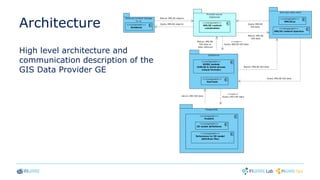
Architecture
High level architecture and
communication description of the
GIS Data Provider GE
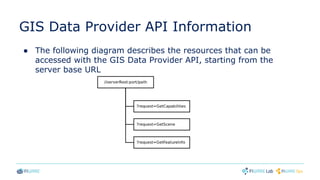
GIS Data Provider API Information
● The following diagram describes the resources that can be
accessed with the GIS Data Provider API, starting from the
server base URL
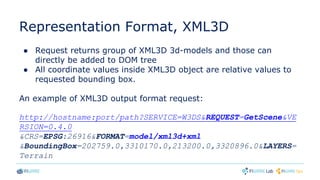
Representation Format, XML3D
● Request returns group of XML3D 3d-models and those can
directly be added to DOM tree
● All coordinate values inside XML3D object are relative values to
requested bounding box.
An example of XML3D output format request:
http://hostname:port/path?SERVICE=W3DS&REQUEST=GetScene&VE
RSION=0.4.0
&CRS=EPSG:26916&FORMAT=model/xml3d+xml
&BoundingBox=202759.0,3310170.0,213200.0,3320896.0&LAYERS=
Terrain
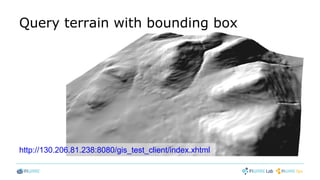
Query terrain with bounding box
http://130.206.81.238:8080/gis_test_client/index.xhtml
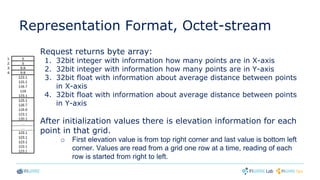
Representation Format, Octet-stream
Request returns byte array:
1. 32bit integer with information how many points are in X-axis
2. 32bit integer with information how many points are in Y-axis
3. 32bit float with information about average distance between points
in X-axis
4. 32bit float with information about average distance between points
in Y-axis
After initialization values there is elevation information for each
point in that grid.
o First elevation value is from top right corner and last value is bottom left
corner. Values are read from a grid one row at a time, reading of each
row is started from right to left.
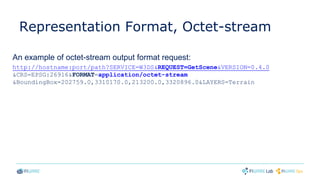
Representation Format, Octet-stream
An example of octet-stream output format request:
http://hostname:port/path?SERVICE=W3DS&REQUEST=GetScene&VERSION=0.4.0
&CRS=EPSG:26916&FORMAT=application/octet-stream
&BoundingBox=202759.0,3310170.0,213200.0,3320896.0&LAYERS=Terrain
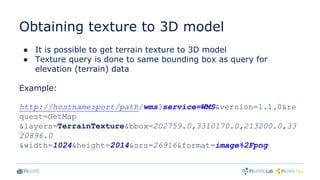
Obtaining texture to 3D model
● It is possible to get terrain texture to 3D model
● Texture query is done to same bounding box as query for
elevation (terrain) data
Example:
http://hostname:port/path/wms?service=WMS&version=1.1.0&re
quest=GetMap
&layers=TerrainTexture&bbox=202759.0,3310170.0,213200.0,33
20896.0
&width=1024&height=2014&srs=26916&format=image%2Fpng
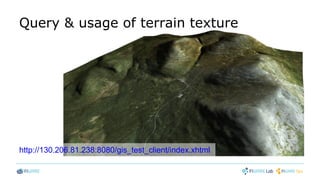
Query & usage of terrain texture
http://130.206.81.238:8080/gis_test_client/index.xhtml
Where to get more information
FIWARE Wiki
● GIS Data Provider - Installation and Administration Guide
o http://forge.fi-ware.org/plugins/mediawiki/wiki/fiware/index.php/GIS_Data_Provider_-
_Installation_and_Administration_Guide
● GIS Data Provider - User and Programmers Guide
o http://forge.fi-ware.org/plugins/mediawiki/wiki/fiware/index.php/GIS_Data_Provider_-
_User_and_Programmers_Guide
FIWARE Catalogue
• GIS Data Provider - Geoserver/3D
– http://catalogue.fi-ware.org/enablers/gis-data-provider-geoserver3d
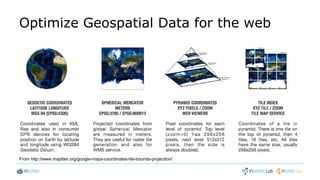
Optimize Geospatial Data for the web
From http://www.maptiler.org/google-maps-coordinates-tile-bounds-projection/
Bootcamp presentation
3D-Map Tiles SE
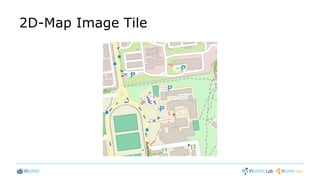
2D-Map Image Tile
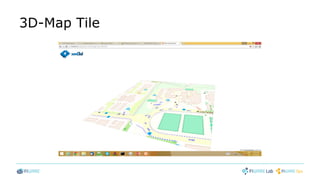
3D-Map Tile
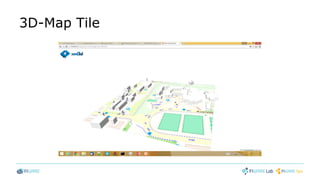
3D-Map Tile
Main features
• REST webservice
• based on OpenStreetMap's tile indexing scheme
• provide XML3D geometry for each map tile
• utilize backend services, such as OSM-tile-rendering server, geo-
information systems (e.g. GIS-DP GE)
• Example:
http://130.206.80.175/api/3d-map-tiles/sb/16/32089/24702.xml
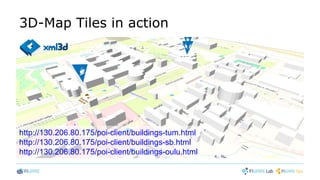
3D-Map Tiles in action
http://130.206.80.175/poi-client/buildings-tum.html
http://130.206.80.175/poi-client/buildings-sb.html
http://130.206.80.175/poi-client/buildings-oulu.html
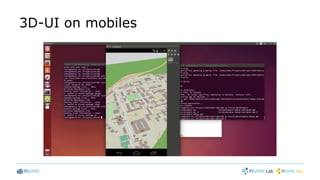
3D-UI on mobiles
Bootcamp presentation
App Generation SE
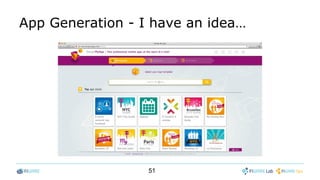
App Generation - I have an idea…
51
Now it is on you!
• We provide the platform
…and a few extra tools
• So you can worry about what matters:
your concepts, your apps, your business, your customers
• Are you ready?
http://concept.designmyapp.mobi
52
Bootcamp presentation
Augmented Reality GE
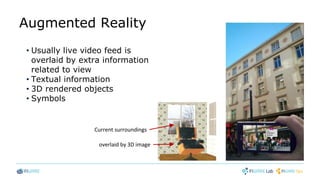
Augmented Reality
• Usually live video feed is
overlaid by extra information
related to view
• Textual information
• 3D rendered objects
• Symbols
Current surroundings
overlaid by 3D image
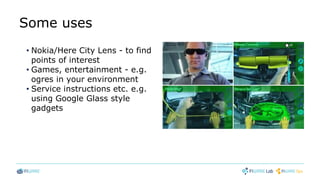
Some uses
• Nokia/Here City Lens - to find
points of interest
• Games, entertainment - e.g.
ogres in your environment
• Service instructions etc. e.g.
using Google Glass style
gadgets
FIWARE Augmented Reality GE
• High-level API for HTML5 AR applications
• Requires JavaScript support of suitable web browser
• No plug-ins required
• Single API provides everything needed to build an AR application
How to get it
• From FIWARE repository
–https://forge.fi-ware.org/frs/download.php/1205/MIWI-
AugmentedReality_3.3.3.zip
• From GitHub
–https://github.com/Chiru/FIWARE-AugmentedReality
• Introduction and Architecture
– http://forge.fi-
ware.org/plugins/mediawiki/wiki/fiware/index.php/FIWARE.OpenSpecificatio
n.MiWi.AugmentedReality
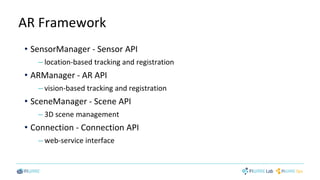
AR Framework
• SensorManager - Sensor API
– location-based tracking and registration
• ARManager - AR API
– vision-based tracking and registration
• SceneManager - Scene API
– 3D scene management
• Connection - Connection API
– web-service interface
Sensor API
• Provides list of available sensors
• Provides sensor data via callback routines
• Provides one-shot and repeatedly updated location info
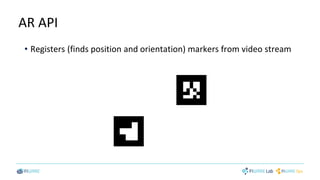
AR API
• Registers (finds position and orientation) markers from video stream
Bootcamp presentation
Reality Mixer SEs
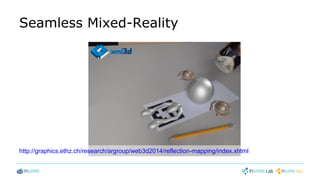
Seamless Mixed-Reality
http://graphics.ethz.ch/research/argroup/web3d2014/reflection-mapping/index.xhtml
Bootcamp presentation
Fast Feature Tracking SE
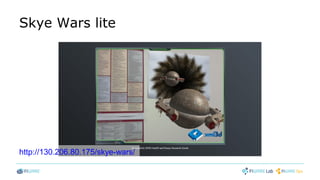
Skye Wars lite
http://130.206.80.175/skye-wars/
3D-Map
Tiles
GIS Data
Provider
POI Data
Provider
3D-UI
POI
Storage
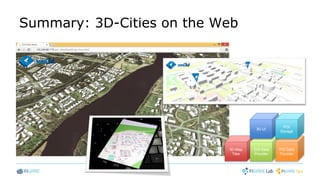
Summary: 3D-Cities on the Web
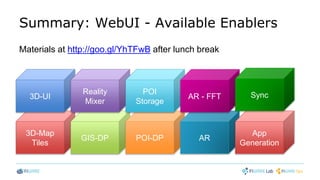
Summary: WebUI - Available Enablers
3D-Map
Tiles
GIS-DP POI-DP
3D-UI
Reality
Mixer
AR
POI
Storage
AR - FFT
App
Generation
Sync
Materials at http://goo.gl/YhTFwB after lunch break
Thanks

FIWARE Developers Week_BootcampWeBUI_presentation2

  • 1.
  • 2.
  • 4.
  • 5.
    Points of Interest- POI • A POI system • Relates information to places • Supports searches by location and other criteria, e.g. time
  • 6.
    What does aPOI Data Provider do • A POI data provider stores and provides information based on location • Searches based on area e.g. circle or bounding box. –Filtering of results using other data values e.g. category or tags
  • 7.
    Why to useFIWARE POI Data Provider • FIWARE POI Data Provider uses modular and distributed data. This allow you to • Combine your own data with public POI data • Speed up mobile operation by fetching only the data your application needs • Use your own data structures, if need for extra flexibility
  • 8.
    Using POI Information- Map • Show place information of selected categories, like restaurant and other criteria, like open times on the map.
  • 9.
    Using POI Information– Your own needs • Attach the information you need to the locations • Use or show the information as you need • Search information based on the location, and the extra data you provided
  • 10.
    Developing using FIWAREPOI-DP GE • Development prerequisites • Modular and distributed data • Components in JSON format • Multilingual data items / Default language in multilingual data • Spatial searches • Additional data retrieval • Creating / Updating / Deleting a new POI
  • 11.
    Development prerequisites • BasicJavaScript knowledge –E.g. from here: http://www.w3schools.com/js/ • To show maps you may use e.g. –Google Maps API https://developers.google.com/maps/ –OpenStreetMap http://wiki.openstreetmap.org/wiki/OpenLayers_Simple_Example • Detailed instructions –http://forge.fi-ware.org/plugins/mediawiki/wiki/fiware/index.php/POI_Data_Provider_- _User_and_Programmers_Guide - later referred The Manual
  • 12.
    Modular and DistributedData • Modular data to avoid unnecessary data transmission, by requesting only the data components you want • Data of a POI consists of components fw_core, fw_time, fw_contact, fw_media, … • HTTP Request defines wanted data components • Different data components of the same POI may reside in different servers. • Application specific proprietary data components can be used
  • 13.
    Components in JSONFormat • POI is identified by its UUID • • component is identified by its name "8e57d2e6-f98f-4404-b075-112049e72346": { "fw_core": { <location, identity & other core information> }, "fw_time": { <availability times> }, <other requested components> }
  • 14.
    Multilingual Data Items •Most texts and web links (URLs) are for several languages { "": "<default or language independent data>", "<lang_ID1>": "<data in language lang_ID1>", "<lang_ID2>": "<data in language: lang_ID2>", … } • ISO 639-1 language code identify the language "label": { "": "Uniresta Lobby Restaurant at University of Oulu", "fi": "Unirestan Aularavintola Oulun yliopistolla.", "en": "Uniresta Lobby Restaurant at University of Oulu", "es": "Restaurante Aularavintola" }
  • 15.
    Default language inMultilingual Data • No need to duplicate text for the default • A specific language can also be the default { "_def": "<lang_IDn>", … "<lang_IDn>": "<default data in language: lang_IDn>", … } "label": { "_def": "en", "fi": "Unirestan Aularavintola Oulun yliopistolla.", "en": "Uniresta Lobby Restaurant at University of Oulu", "es": "Restaurante Aularavintola" },
  • 16.
    Spatial Searches • Exampleof radial search – GET request –http://<your_poi_server>/radial_search?lat=65.01255&lon=25.47133&ra dius=250&category=cafe,restaurant –gives restaurants and cafes in the center of Oulu Finland • Code snippets in JavaScript to send the request and to receive the results can be found in The Manual • Available categories are server dependent – values of OpenStreetMap Amenity-key are used in demo servers • See The Manual for bounding box search
  • 17.
    Additional Data Retrieval •Example of extra information retrieval – GET request –http://<your_poi_server>/get_pois?poi_id=30ddf703-59f5-4448-8918- 0f625a7e1122&component=fw_media –gives media links associated to the POI • Code snippets in JavaScript to send the request and to receive the results can be found in The Manual
  • 18.
    Creating a NewPOI • Example of adding a new POI – POST request –http://<your_poi_server>/add_poi –data content is components of the POI in JSON format –response is the UUID created for the POI • Code snippets in JavaScript to send the request and to receive the results can be found in The Manual
  • 19.
    Updating POI Data 1.Retrieve POI data for update – GET request –http://<your_poi_server>/get_pois?poi_id=30ddf703-59f5-4448-8918- 0f625a7e1122&get_for_update=true –This brings all language versions and last_update info 2. Modify the data as needed – retain the last_update info unchanged 3. Send updated data – POST request –http://<your_poi_server>/update_poi –data content is the modified data in JSON format –response tells success or not –update fails if a conflict happens
  • 20.
    Deleting a POI •Example of deleting a POI – DELETE request –http://<your_poi_server>/delete_poi?poi_id=30ddf703-59f5-4448-8918- 0f625a7e1122 • Code snippets in JavaScript to send the request and to receive the results can be found in The Manual
  • 21.
  • 22.
    Want to overcomethese (lame) 2D-maps?
  • 23.
  • 24.
    Rationale ● Create infrastructureto be used with next generation web based 3D GIS services o Need for geographical system capable to provide data in 3D form with correct geospatial information
  • 25.
    GIS provider GEin nutshell ● GE provides the infrastructure to query and obtain geo- referenced 3D models through RESTful Web Services o Capability to provide 3D models of objects (e.g buildings, cars etc.) and terrains with correct elevation information ● RESTful Interface for communication o Implemented interface fulfills mandatory part of the Open Geospatial Consortiums (OGC) OpenGIS® Web 3D Service Interface Standard ● GIS GE implemented as W3DS community module to Geoserver o Module is extension to Geoserver o Fully open sourced
  • 26.
    Main features (1/2) ●Supports data in XML3D and octet-stream output formats ● Object query for specific layer based on bounding box, returned content: – XML3D presentation of the queried terrain or – Separate XML3D object(s) inside bounding box ● 3D terrain texture support (Satellite images, raster images, etc.) ● Level Of Details (LOD) support for 3D terrains – Scale from 1 to 10
  • 27.
    Main features (2/2) ●Internal & external data storage support – Data storage in geoserver (e.g shapefiles, images) – PostgreSQL + PostGIS •Elevation data for terrains •Object geospatial information and reference to 3D presentation location ● Current fiware release contains support for metric coordinate systems • Note: GIS Data Provider GE does not implement tools for all possible data formats. These information types are customer and source specific • However GIS GE provides sample geodataset in EPSG:3047 projection which is based on Finnish geographical Institute open data
  • 28.
    Architecture High level architectureand communication description of the GIS Data Provider GE
  • 29.
    GIS Data ProviderAPI Information ● The following diagram describes the resources that can be accessed with the GIS Data Provider API, starting from the server base URL
  • 30.
    Representation Format, XML3D ●Request returns group of XML3D 3d-models and those can directly be added to DOM tree ● All coordinate values inside XML3D object are relative values to requested bounding box. An example of XML3D output format request: http://hostname:port/path?SERVICE=W3DS&REQUEST=GetScene&VE RSION=0.4.0 &CRS=EPSG:26916&FORMAT=model/xml3d+xml &BoundingBox=202759.0,3310170.0,213200.0,3320896.0&LAYERS= Terrain
  • 31.
    Query terrain withbounding box http://130.206.81.238:8080/gis_test_client/index.xhtml
  • 32.
    Representation Format, Octet-stream Requestreturns byte array: 1. 32bit integer with information how many points are in X-axis 2. 32bit integer with information how many points are in Y-axis 3. 32bit float with information about average distance between points in X-axis 4. 32bit float with information about average distance between points in Y-axis After initialization values there is elevation information for each point in that grid. o First elevation value is from top right corner and last value is bottom left corner. Values are read from a grid one row at a time, reading of each row is started from right to left.
  • 33.
    Representation Format, Octet-stream Anexample of octet-stream output format request: http://hostname:port/path?SERVICE=W3DS&REQUEST=GetScene&VERSION=0.4.0 &CRS=EPSG:26916&FORMAT=application/octet-stream &BoundingBox=202759.0,3310170.0,213200.0,3320896.0&LAYERS=Terrain
  • 34.
    Obtaining texture to3D model ● It is possible to get terrain texture to 3D model ● Texture query is done to same bounding box as query for elevation (terrain) data Example: http://hostname:port/path/wms?service=WMS&version=1.1.0&re quest=GetMap &layers=TerrainTexture&bbox=202759.0,3310170.0,213200.0,33 20896.0 &width=1024&height=2014&srs=26916&format=image%2Fpng
  • 35.
    Query & usageof terrain texture http://130.206.81.238:8080/gis_test_client/index.xhtml
  • 36.
    Where to getmore information FIWARE Wiki ● GIS Data Provider - Installation and Administration Guide o http://forge.fi-ware.org/plugins/mediawiki/wiki/fiware/index.php/GIS_Data_Provider_- _Installation_and_Administration_Guide ● GIS Data Provider - User and Programmers Guide o http://forge.fi-ware.org/plugins/mediawiki/wiki/fiware/index.php/GIS_Data_Provider_- _User_and_Programmers_Guide FIWARE Catalogue • GIS Data Provider - Geoserver/3D – http://catalogue.fi-ware.org/enablers/gis-data-provider-geoserver3d
  • 37.
    Optimize Geospatial Datafor the web From http://www.maptiler.org/google-maps-coordinates-tile-bounds-projection/
  • 38.
  • 39.
  • 40.
  • 41.
  • 42.
    Main features • RESTwebservice • based on OpenStreetMap's tile indexing scheme • provide XML3D geometry for each map tile • utilize backend services, such as OSM-tile-rendering server, geo- information systems (e.g. GIS-DP GE) • Example: http://130.206.80.175/api/3d-map-tiles/sb/16/32089/24702.xml
  • 43.
    3D-Map Tiles inaction http://130.206.80.175/poi-client/buildings-tum.html http://130.206.80.175/poi-client/buildings-sb.html http://130.206.80.175/poi-client/buildings-oulu.html
  • 44.
  • 45.
  • 46.
    App Generation -I have an idea… 51
  • 47.
    Now it ison you! • We provide the platform …and a few extra tools • So you can worry about what matters: your concepts, your apps, your business, your customers • Are you ready? http://concept.designmyapp.mobi 52
  • 48.
  • 49.
    Augmented Reality • Usuallylive video feed is overlaid by extra information related to view • Textual information • 3D rendered objects • Symbols Current surroundings overlaid by 3D image
  • 50.
    Some uses • Nokia/HereCity Lens - to find points of interest • Games, entertainment - e.g. ogres in your environment • Service instructions etc. e.g. using Google Glass style gadgets
  • 51.
    FIWARE Augmented RealityGE • High-level API for HTML5 AR applications • Requires JavaScript support of suitable web browser • No plug-ins required • Single API provides everything needed to build an AR application
  • 52.
    How to getit • From FIWARE repository –https://forge.fi-ware.org/frs/download.php/1205/MIWI- AugmentedReality_3.3.3.zip • From GitHub –https://github.com/Chiru/FIWARE-AugmentedReality • Introduction and Architecture – http://forge.fi- ware.org/plugins/mediawiki/wiki/fiware/index.php/FIWARE.OpenSpecificatio n.MiWi.AugmentedReality
  • 53.
    AR Framework • SensorManager- Sensor API – location-based tracking and registration • ARManager - AR API – vision-based tracking and registration • SceneManager - Scene API – 3D scene management • Connection - Connection API – web-service interface
  • 54.
    Sensor API • Provideslist of available sensors • Provides sensor data via callback routines • Provides one-shot and repeatedly updated location info
  • 55.
    AR API • Registers(finds position and orientation) markers from video stream
  • 56.
  • 57.
  • 58.
  • 59.
  • 60.
  • 61.
    Summary: WebUI -Available Enablers 3D-Map Tiles GIS-DP POI-DP 3D-UI Reality Mixer AR POI Storage AR - FFT App Generation Sync Materials at http://goo.gl/YhTFwB after lunch break
  • 62.