COMPUTER HARDWARE
SYSTEM SERVICING
PRESENT BY:
JULIUS C. ALCARIA JR
COMPUTER PERIPHERAL DEVICES
OBJECTIVES: At the end of the lesson, the students will be able to:
• Identify the different parts of the computer; and its
function;
• label each part of the computer peripheral devices; and
• appreciate the computer parts according to their uses
and function.
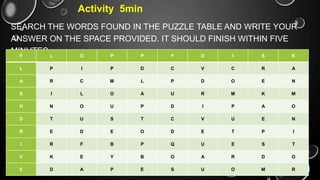
Activity 5min
SEARCH THE WORDS FOUND IN THE PUZZLE TABLE AND WRITE YOUR
ANSWER ON THE SPACE PROVIDED. IT SHOULD FINISH WITHIN FIVE
MINUTES.
F L O P P Y D I S K
L P I P D C V C R A
A R C M L P D O E N
S I L O A U R M K M
H N O U P D I P A O
D T U S T C V U E N
R E D E O D E T P I
I R F B P Q U E S T
V K E Y B O A R D O
E D A P E S U O M R
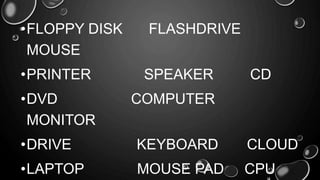
•FLOPPY DISK FLASHDRIVE
MOUSE
•PRINTER SPEAKER CD
•DVD COMPUTER
MONITOR
•DRIVE KEYBOARD CLOUD
•LAPTOP MOUSE PAD CPU
What do you think is the computer peripheral
device? Or what does peripheral device mean?
•A peripheral device is generally defined as
any auxiliary device such as
a computer mouse or keyboard that
connects to and works with the computer in
some way.
•Other examples of peripherals are image
scanners, tape drives, microphones,
loudspeakers, webcams, and digital
What are the components of peripheral devices
that make up a system?
Types of Peripheral Devices
There are many different peripheral devices, but they
fall into three general categories:
1. Input devices, such as a mouse and a keyboard
2. Output devices, such as a monitor and a printer
3. Storage devices, such as a hard drive or flash
drive
Why do you need to know the uses and functions
of peripheral devices?
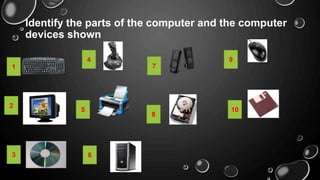
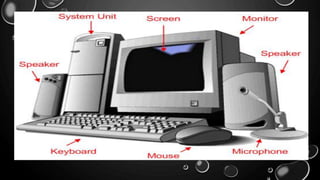
Identify the parts of the computer and the computer
devices shown
1
2
3
4
5
6
7
8
9
10
• INPUT DEVICES ARE
USED TO ENTER DATA,
SUCH AS WORDS AND
NUMBERS, INTO A
COMPUTER. THE
KEYBOARD, MOUSE AND
JOYSTICK ARE
EXAMPLES OF INPUT
DEVICES.
INPUT DEVICES
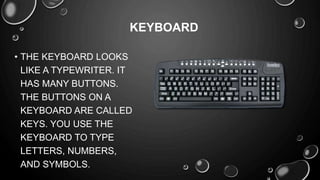
• THE KEYBOARD LOOKS
LIKE A TYPEWRITER. IT
HAS MANY BUTTONS.
THE BUTTONS ON A
KEYBOARD ARE CALLED
KEYS. YOU USE THE
KEYBOARD TO TYPE
LETTERS, NUMBERS,
AND SYMBOLS.
KEYBOARD
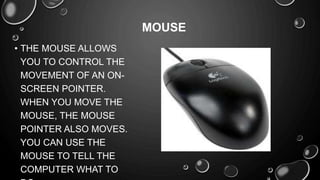
• THE MOUSE ALLOWS
YOU TO CONTROL THE
MOVEMENT OF AN ON-
SCREEN POINTER.
WHEN YOU MOVE THE
MOUSE, THE MOUSE
POINTER ALSO MOVES.
YOU CAN USE THE
MOUSE TO TELL THE
COMPUTER WHAT TO
MOUSE
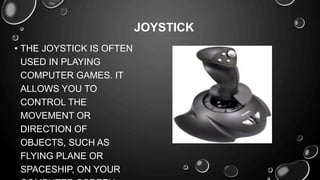
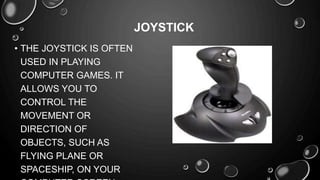
• THE JOYSTICK IS OFTEN
USED IN PLAYING
COMPUTER GAMES. IT
ALLOWS YOU TO
CONTROL THE
MOVEMENT OR
DIRECTION OF
OBJECTS, SUCH AS
FLYING PLANE OR
SPACESHIP, ON YOUR
JOYSTICK
• THE JOYSTICK IS OFTEN
USED IN PLAYING
COMPUTER GAMES. IT
ALLOWS YOU TO
CONTROL THE
MOVEMENT OR
DIRECTION OF
OBJECTS, SUCH AS
FLYING PLANE OR
SPACESHIP, ON YOUR
JOYSTICK
OUTPUT DEVICES
• When the computer sends information through one of its
parts, the information sent is called output. An output
device is used to show what the computer has done.
Monitors, printers, and speakers are examples of output
devices.
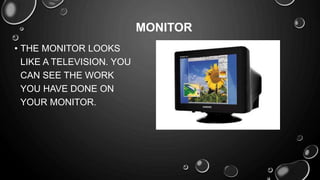
• THE MONITOR LOOKS
LIKE A TELEVISION. YOU
CAN SEE THE WORK
YOU HAVE DONE ON
YOUR MONITOR.
MONITOR
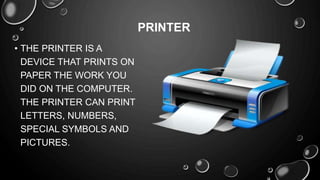
• THE PRINTER IS A
DEVICE THAT PRINTS ON
PAPER THE WORK YOU
DID ON THE COMPUTER.
THE PRINTER CAN PRINT
LETTERS, NUMBERS,
SPECIAL SYMBOLS AND
PICTURES.
PRINTER
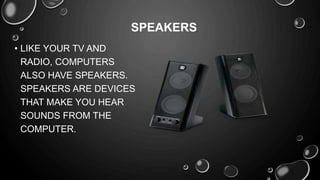
• LIKE YOUR TV AND
RADIO, COMPUTERS
ALSO HAVE SPEAKERS.
SPEAKERS ARE DEVICES
THAT MAKE YOU HEAR
SOUNDS FROM THE
COMPUTER.
SPEAKERS
STORAGE DEVICES
•You can keep or save the work you did on your
computer on a storage device. Examples of
storage devices are the hard disk, diskette and
compact disc (CD)
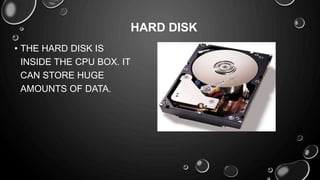
• THE HARD DISK IS
INSIDE THE CPU BOX. IT
CAN STORE HUGE
AMOUNTS OF DATA.
HARD DISK
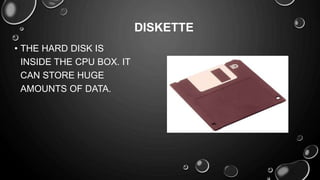
• THE HARD DISK IS
INSIDE THE CPU BOX. IT
CAN STORE HUGE
AMOUNTS OF DATA.
DISKETTE
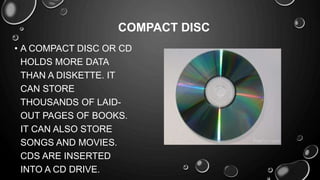
• A COMPACT DISC OR CD
HOLDS MORE DATA
THAN A DISKETTE. IT
CAN STORE
THOUSANDS OF LAID-
OUT PAGES OF BOOKS.
IT CAN ALSO STORE
SONGS AND MOVIES.
CDS ARE INSERTED
INTO A CD DRIVE.
COMPACT DISC
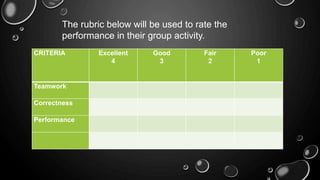
The rubric below will be used to rate the
performance in their group activity.
CRITERIA Excellent
4
Good
3
Fair
2
Poor
1
Teamwork
Correctness
Performance
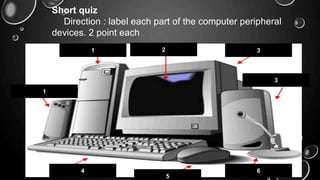
Short quiz
Direction : label each part of the computer peripheral
devices. 2 point each
1 2 3
1
3
4
5
6
FINAL-demo.pptx
FINAL-demo.pptx
FINAL-demo.pptx
FINAL-demo.pptx

FINAL-demo.pptx

  • 1.
  • 2.
    COMPUTER PERIPHERAL DEVICES OBJECTIVES:At the end of the lesson, the students will be able to: • Identify the different parts of the computer; and its function; • label each part of the computer peripheral devices; and • appreciate the computer parts according to their uses and function.
  • 3.
    Activity 5min SEARCH THEWORDS FOUND IN THE PUZZLE TABLE AND WRITE YOUR ANSWER ON THE SPACE PROVIDED. IT SHOULD FINISH WITHIN FIVE MINUTES. F L O P P Y D I S K L P I P D C V C R A A R C M L P D O E N S I L O A U R M K M H N O U P D I P A O D T U S T C V U E N R E D E O D E T P I I R F B P Q U E S T V K E Y B O A R D O E D A P E S U O M R
  • 4.
    •FLOPPY DISK FLASHDRIVE MOUSE •PRINTERSPEAKER CD •DVD COMPUTER MONITOR •DRIVE KEYBOARD CLOUD •LAPTOP MOUSE PAD CPU
  • 5.
    What do youthink is the computer peripheral device? Or what does peripheral device mean? •A peripheral device is generally defined as any auxiliary device such as a computer mouse or keyboard that connects to and works with the computer in some way. •Other examples of peripherals are image scanners, tape drives, microphones, loudspeakers, webcams, and digital
  • 6.
    What are thecomponents of peripheral devices that make up a system? Types of Peripheral Devices There are many different peripheral devices, but they fall into three general categories: 1. Input devices, such as a mouse and a keyboard 2. Output devices, such as a monitor and a printer 3. Storage devices, such as a hard drive or flash drive
  • 7.
    Why do youneed to know the uses and functions of peripheral devices?
  • 8.
    Identify the partsof the computer and the computer devices shown 1 2 3 4 5 6 7 8 9 10
  • 10.
    • INPUT DEVICESARE USED TO ENTER DATA, SUCH AS WORDS AND NUMBERS, INTO A COMPUTER. THE KEYBOARD, MOUSE AND JOYSTICK ARE EXAMPLES OF INPUT DEVICES. INPUT DEVICES
  • 11.
    • THE KEYBOARDLOOKS LIKE A TYPEWRITER. IT HAS MANY BUTTONS. THE BUTTONS ON A KEYBOARD ARE CALLED KEYS. YOU USE THE KEYBOARD TO TYPE LETTERS, NUMBERS, AND SYMBOLS. KEYBOARD
  • 12.
    • THE MOUSEALLOWS YOU TO CONTROL THE MOVEMENT OF AN ON- SCREEN POINTER. WHEN YOU MOVE THE MOUSE, THE MOUSE POINTER ALSO MOVES. YOU CAN USE THE MOUSE TO TELL THE COMPUTER WHAT TO MOUSE
  • 13.
    • THE JOYSTICKIS OFTEN USED IN PLAYING COMPUTER GAMES. IT ALLOWS YOU TO CONTROL THE MOVEMENT OR DIRECTION OF OBJECTS, SUCH AS FLYING PLANE OR SPACESHIP, ON YOUR JOYSTICK
  • 14.
    • THE JOYSTICKIS OFTEN USED IN PLAYING COMPUTER GAMES. IT ALLOWS YOU TO CONTROL THE MOVEMENT OR DIRECTION OF OBJECTS, SUCH AS FLYING PLANE OR SPACESHIP, ON YOUR JOYSTICK
  • 15.
    OUTPUT DEVICES • Whenthe computer sends information through one of its parts, the information sent is called output. An output device is used to show what the computer has done. Monitors, printers, and speakers are examples of output devices.
  • 16.
    • THE MONITORLOOKS LIKE A TELEVISION. YOU CAN SEE THE WORK YOU HAVE DONE ON YOUR MONITOR. MONITOR
  • 17.
    • THE PRINTERIS A DEVICE THAT PRINTS ON PAPER THE WORK YOU DID ON THE COMPUTER. THE PRINTER CAN PRINT LETTERS, NUMBERS, SPECIAL SYMBOLS AND PICTURES. PRINTER
  • 18.
    • LIKE YOURTV AND RADIO, COMPUTERS ALSO HAVE SPEAKERS. SPEAKERS ARE DEVICES THAT MAKE YOU HEAR SOUNDS FROM THE COMPUTER. SPEAKERS
  • 19.
    STORAGE DEVICES •You cankeep or save the work you did on your computer on a storage device. Examples of storage devices are the hard disk, diskette and compact disc (CD)
  • 20.
    • THE HARDDISK IS INSIDE THE CPU BOX. IT CAN STORE HUGE AMOUNTS OF DATA. HARD DISK
  • 21.
    • THE HARDDISK IS INSIDE THE CPU BOX. IT CAN STORE HUGE AMOUNTS OF DATA. DISKETTE
  • 22.
    • A COMPACTDISC OR CD HOLDS MORE DATA THAN A DISKETTE. IT CAN STORE THOUSANDS OF LAID- OUT PAGES OF BOOKS. IT CAN ALSO STORE SONGS AND MOVIES. CDS ARE INSERTED INTO A CD DRIVE. COMPACT DISC
  • 23.
    The rubric belowwill be used to rate the performance in their group activity. CRITERIA Excellent 4 Good 3 Fair 2 Poor 1 Teamwork Correctness Performance
  • 24.
    Short quiz Direction :label each part of the computer peripheral devices. 2 point each 1 2 3 1 3 4 5 6

Editor's Notes

  • #3 Stand up for a short prayer.