Penn State
Harrisburg
Basketball
Phase 5 - Final Project Presentation
By:
Cheng Yang
Guangnan Liu
Sean Groshens
Sothearin Kim
Mission
• Provide student athletes with a positive
experience academically and athletically,
readying them for life beyond the University.
• Program Thrives on these concepts:
• Being smart
• Being strong
• Working Hard
• Working Together
Problem
●Create a series of PDF documents that help organize the scouting
done for each basketball game
○ Practice Reports
○ Players Scouting Reports
○ Staff Scouting Report
●Old system was:
○ Slow, took too long to format
○ Little room for extra features
○ Used Microsoft Word
Usability Goals and User Experience Goals
Usability Goals
• Concerned with meeting specific usability criteria
• Effective to use
• Efficient to use
• Easy to learn
• Easy to remember how to use
Usability Goals and User Experience Goals
User Experience Goals
• largely concerned with explicating the quality of the user experience
• Satisfying
• Helpful
Functional Requirements
●It will allow user to edit in a PDF file directly.
●It will allow user to upload image into PDF file.
●It will allow user use calendar to select Date/Time.
●It will allow user to drawing in a PDF file directly.
●It will allow user use drop-down menu to select
information for the player.
●It will allow user use tab to through the different
text boxes for easy data inputting.
Non- Functional Requirements
●Execute very stable and smoothly
●Any invalid inputs will not cause
the system to crash or other
software issues
●Nice graphic design and better
format
●Easy to learn and use
Data Requirements
Data Data Type Ex/Format
Game Date Date
Oct 17,2015
PlayerFull
Name
Char(15):allow 15 digit
inputs
GuangNan Liu
Image Field Png,Jpg,PDF
Begin Time Time HH:MI AM/PM
Player height Decimal 5.5‘
Player number Number 10
Environmental Requirements
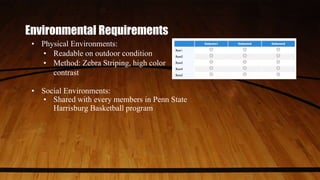
• Physical Environments:
• Readable on outdoor condition
• Method: Zebra Striping, high color
contrast
• Social Environments:
• Shared with every members in Penn State
Harrisburg Basketball program
Environmental Requirements
• Organizational Environments:
• Head coach have ultimate control
• Coach staffs will input data
• Players will view these practice or match stats
• Technical Environments:
• Can edit,save and view on Adobe Acrobat Reader
• Be able to run on any device or operating
system(installation of Adobe Acrobat Reader)
• Test result: Windows, Apple OS X, Android
Tasks
• Meant to keep data and be able
to change it at a moment's
notice
• Be able to keep variables neat
and organized
• Add to the functionality that the
originals did not
• Cut down on time formatting the
documents.
Initial Design
Design 1
• Bold headings
• Team Logos
• Player pictures
Design 2
- Team statistics
- Table/Row layout
Design 3
- Shot charts
- Top to bottom field structure
- Game information boxes
Evaluation
● Online survey on Google Forms
○ Yes/No Question
○ Open-Ended questions
○ Five point scale question
○ Five-star quality ratings question
● The purposes and tasks
○ Find out problems and weakness of our
product.
○ Ensure that requirements and objectives
are met.
○ Check whether our product is benefit to
Basketball program(usability and user
experience).
● The evaluation criteria were one to five
● Survey result
○ Our users generally very satisfied our
product.
○ Our users used our product almost
everyday
○ All of our user agree that our product
really help them work more efficiency
○ Our users rated our product between four
and five.
Evaluation result
Evaluation result
● Pro
○ like the fact that they can type
○ like the fact that they can import the image
and logo
● Con
○ complaints about the small text sizes.
○ Not enough space.
● Suggested
○ Better draw tool to draw x's and o'x on the
PDF easily。
○ Bigger text field for stat session
○ Inputting special symbols like #, or %
○ More space for text field.
Final prototype
Why we chose these prototypes as our final prototype?
To meet the requirement of better graphic design
• Will make the appearance look professional
Functionalities (Date Calendar, drawing tool )
• Will improve work efficiency
• Will help user saving time on doing additional works
Changes to the System
• After each prototype we would change somethings including:
• Making text boxes and labels separate
• Including some more watermarked backgrounds to every form (Penn State
Logo)
• Added a banner
• Use Adobe Livecycle in order to add image fields
• First prototypes used javascript code for images but that was ineffective.
• Added Drop down boxes for repeated information (Position, Height Weight,
Year)
• Added more room for certain text
• Rearranged tab order for faster data entry
Before
After
Lessons Learned
Final Project Demo
Questio

Final phase

  • 1.
    Penn State Harrisburg Basketball Phase 5- Final Project Presentation By: Cheng Yang Guangnan Liu Sean Groshens Sothearin Kim
  • 2.
    Mission • Provide studentathletes with a positive experience academically and athletically, readying them for life beyond the University. • Program Thrives on these concepts: • Being smart • Being strong • Working Hard • Working Together
  • 3.
    Problem ●Create a seriesof PDF documents that help organize the scouting done for each basketball game ○ Practice Reports ○ Players Scouting Reports ○ Staff Scouting Report ●Old system was: ○ Slow, took too long to format ○ Little room for extra features ○ Used Microsoft Word
  • 4.
    Usability Goals andUser Experience Goals Usability Goals • Concerned with meeting specific usability criteria • Effective to use • Efficient to use • Easy to learn • Easy to remember how to use
  • 5.
    Usability Goals andUser Experience Goals User Experience Goals • largely concerned with explicating the quality of the user experience • Satisfying • Helpful
  • 6.
    Functional Requirements ●It willallow user to edit in a PDF file directly. ●It will allow user to upload image into PDF file. ●It will allow user use calendar to select Date/Time. ●It will allow user to drawing in a PDF file directly. ●It will allow user use drop-down menu to select information for the player. ●It will allow user use tab to through the different text boxes for easy data inputting.
  • 7.
    Non- Functional Requirements ●Executevery stable and smoothly ●Any invalid inputs will not cause the system to crash or other software issues ●Nice graphic design and better format ●Easy to learn and use
  • 8.
    Data Requirements Data DataType Ex/Format Game Date Date Oct 17,2015 PlayerFull Name Char(15):allow 15 digit inputs GuangNan Liu Image Field Png,Jpg,PDF Begin Time Time HH:MI AM/PM Player height Decimal 5.5‘ Player number Number 10
  • 9.
    Environmental Requirements • PhysicalEnvironments: • Readable on outdoor condition • Method: Zebra Striping, high color contrast • Social Environments: • Shared with every members in Penn State Harrisburg Basketball program
  • 10.
    Environmental Requirements • OrganizationalEnvironments: • Head coach have ultimate control • Coach staffs will input data • Players will view these practice or match stats • Technical Environments: • Can edit,save and view on Adobe Acrobat Reader • Be able to run on any device or operating system(installation of Adobe Acrobat Reader) • Test result: Windows, Apple OS X, Android
  • 11.
    Tasks • Meant tokeep data and be able to change it at a moment's notice • Be able to keep variables neat and organized • Add to the functionality that the originals did not • Cut down on time formatting the documents.
  • 12.
    Initial Design Design 1 •Bold headings • Team Logos • Player pictures Design 2 - Team statistics - Table/Row layout Design 3 - Shot charts - Top to bottom field structure - Game information boxes
  • 13.
    Evaluation ● Online surveyon Google Forms ○ Yes/No Question ○ Open-Ended questions ○ Five point scale question ○ Five-star quality ratings question ● The purposes and tasks ○ Find out problems and weakness of our product. ○ Ensure that requirements and objectives are met. ○ Check whether our product is benefit to Basketball program(usability and user experience). ● The evaluation criteria were one to five ● Survey result ○ Our users generally very satisfied our product. ○ Our users used our product almost everyday ○ All of our user agree that our product really help them work more efficiency ○ Our users rated our product between four and five.
  • 14.
  • 15.
    Evaluation result ● Pro ○like the fact that they can type ○ like the fact that they can import the image and logo ● Con ○ complaints about the small text sizes. ○ Not enough space. ● Suggested ○ Better draw tool to draw x's and o'x on the PDF easily。 ○ Bigger text field for stat session ○ Inputting special symbols like #, or % ○ More space for text field.
  • 16.
    Final prototype Why wechose these prototypes as our final prototype? To meet the requirement of better graphic design • Will make the appearance look professional Functionalities (Date Calendar, drawing tool ) • Will improve work efficiency • Will help user saving time on doing additional works
  • 17.
    Changes to theSystem • After each prototype we would change somethings including: • Making text boxes and labels separate • Including some more watermarked backgrounds to every form (Penn State Logo) • Added a banner • Use Adobe Livecycle in order to add image fields • First prototypes used javascript code for images but that was ineffective. • Added Drop down boxes for repeated information (Position, Height Weight, Year) • Added more room for certain text • Rearranged tab order for faster data entry
  • 18.
  • 19.
  • 20.
  • 21.