More Related Content

PPT
same as the previos one that can be anything.ppt 
PPT

PPT
Lecture10-File Systems-PAfgfgfgfgfgfgf.ppt 
PPT
operating system notes for II year IV semester students 
PPT
Ch11 file system interface 
PPTX
file-system interface.pptx 
PDF
ch10operating e systemss.pdf 
PDF
Similar to Chapter 11 File-System Interface in os.ppt

PPTX
Chapter 13 silbershatz operating systems 
PPT

PPTX
ch11 File System Implementation.pptx important rdbms topic 
PPT
file system implementation in operating systems 
PPT
enginereing things that can be helpful for tthe engg.ppt 
PPT

PPTX
ch13 : file system interface (os slides) 
PPTX
ch12-File-System Implementation (1).pptx 
PPTX
File system interface ppt chapter 10 Operating systems 
PPTX
OS Module 4 Slides - File system (1).pptx 
PPTX
Ch11 file system implementation 
PDF

PPT
Unit 3 chapter 1-file management 
PDF

PPT
ch10.ppt of operating systems of vit bhopal 
PPT
638241896796578949.PPTcfrdrservbvmnbmnbjh 
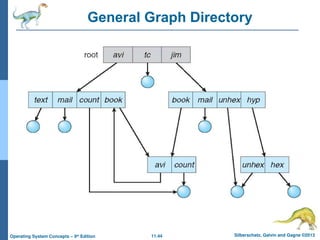
PPT

PPT

PPT
File_System_Fundamentals savitchAbsJavaPPT Java Programming Part 2 
PPT
More from vvsp1

PPT
ch14 protection use in operating sys.ppt 
PPT
Chapter 4 Threads used in operating s.ppt 
PPT
Chapter 3-Processes userd in operating sys.ppt 
PPTX
DEVOPS - Laxmi Itikala.pptx bridging the gap 
PPT
Chapter 5 Process Synchronization os.ppt 
PPTX
about deboves importa Krishna Chinthoju.pptx 
PPTX
devops presentation on introduction to unit 
PPTX
Power systems lightning arrestres foreee students Recently uploaded

PPTX
OCCULTISM IN JEHOVAH'S WITNESSES' ARTWORK 
PDF
BÀI GIẢNG POWERPOINT CHÍNH KHÓA PHIÊN BẢN AI TIẾNG ANH 6 CẢ NĂM, THEO TỪNG BÀ... 
PDF
BÀI GIẢNG POWERPOINT CHÍNH KHÓA PHIÊN BẢN AI TIẾNG ANH 6 CẢ NĂM, THEO TỪNG BÀ... 
PDF
PULSE according to Physiology special pdf for all medical sectors students & ... 
PDF
Winter Focus 5 All Student update by LDMMIA 
PDF
19 January 2026 Andreas Schleicher Digital Education Outlook 2026.pdf 
PDF
Q4_LE_English 8_Lesson 1_Week 1.pd Revised 
PPTX
Introduction Pharmacotherapeutics _ PT1 2026.pptx 
PPTX
THEORIES OF LEARNING Shilpa Hotakar.pptx 
PPTX
VITAMINS CHAPTER NO.05 PHARMACOGNOSY D. PHARMACY 
PDF
Fidelity to Energy: A Critical Analysis of Baz Luhrmann’s Intersemiotic Trans... 
PPTX
Complete Overview of Shopfloor in Odoo 18 
PDF
Halogen-Derivatives.pdf/BY K SANDEEP SWAMY/FOR ONLINE CLASSES CONTACT 9491878325 
PPTX
Ethiopian soil types , degradation and conservation 
PDF
Experiment No. 2 To synthesis and submit chlorobutanol. 
PPTX
what are the Talent pool in Odoo 19 Recruitment 
PPTX
GW4 BioMed Interview Support Webinar 2026 
PPTX
ANTI- RHEUMATICS CHAPTER NO.05 PHARMACOGNOSY 
PPTX
Blood, Blood Composition, Blood Groups, Disorders of Blood.pptx 
PPTX
OXYGEN ADMINISTRATION/THERAPY ......pptx Chapter 11 File-System Interface in os.ppt
- 1.
- 2.
11.2 Silberschatz, Galvinand Gagne ©2013
Operating System Concepts – 9th
Edition
Chapter 11: File-System Interface
File Concept
Access Methods
Disk and Directory Structure
File-System Mounting
File Sharing
Protection
- 3.
11.3 Silberschatz, Galvinand Gagne ©2013
Operating System Concepts – 9th
Edition
Objectives
To explain the function of file systems
To describe the interfaces to file systems
To discuss file-system design tradeoffs, including access
methods, file sharing, file locking, and directory structures
To explore file-system protection
- 4.
11.4 Silberschatz, Galvinand Gagne ©2013
Operating System Concepts – 9th
Edition
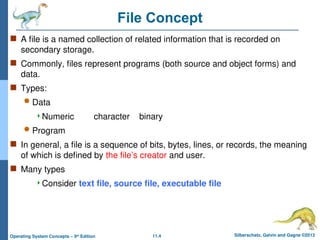
File Concept
A file is a named collection of related information that is recorded on
secondary storage.
Commonly, files represent programs (both source and object forms) and
data.
Types:
Data
Numeric character binary
Program
In general, a file is a sequence of bits, bytes, lines, or records, the meaning
of which is defined by the file’s creator and user.
Many types
Consider text file, source file, executable file
- 5.
11.5 Silberschatz, Galvinand Gagne ©2013
Operating System Concepts – 9th
Edition
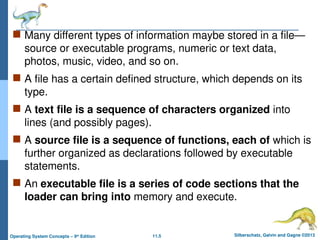
Many different types of information maybe stored in a file—
source or executable programs, numeric or text data,
photos, music, video, and so on.
A file has a certain defined structure, which depends on its
type.
A text file is a sequence of characters organized into
lines (and possibly pages).
A source file is a sequence of functions, each of which is
further organized as declarations followed by executable
statements.
An executable file is a series of code sections that the
loader can bring into memory and execute.
- 6.
11.6 Silberschatz, Galvinand Gagne ©2013
Operating System Concepts – 9th
Edition
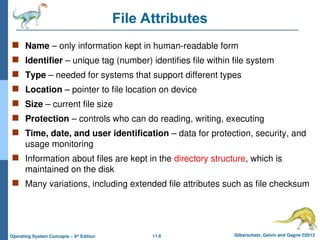
File Attributes
Name – only information kept in human-readable form
Identifier – unique tag (number) identifies file within file system
Type – needed for systems that support different types
Location – pointer to file location on device
Size – current file size
Protection – controls who can do reading, writing, executing
Time, date, and user identification – data for protection, security, and
usage monitoring
Information about files are kept in the directory structure, which is
maintained on the disk
Many variations, including extended file attributes such as file checksum
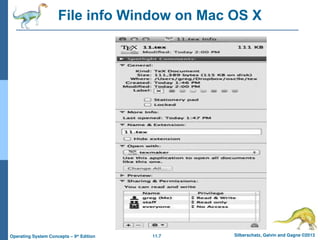
- 7.
- 8.
11.8 Silberschatz, Galvinand Gagne ©2013
Operating System Concepts – 9th
Edition
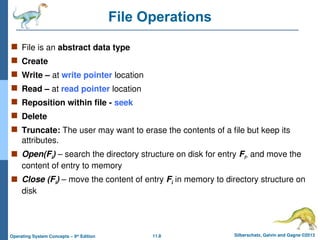
File Operations
File is an abstract data type
Create
Write – at write pointer location
Read – at read pointer location
Reposition within file - seek
Delete
Truncate: The user may want to erase the contents of a file but keep its
attributes.
Open(Fi) – search the directory structure on disk for entry Fi, and move the
content of entry to memory
Close (Fi) – move the content of entry Fi in memory to directory structure on
disk
- 9.
11.9 Silberschatz, Galvinand Gagne ©2013
Operating System Concepts – 9th
Edition
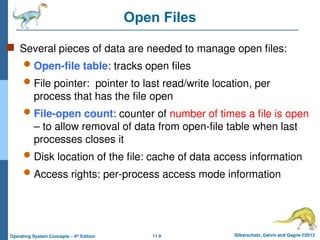
Open Files
Several pieces of data are needed to manage open files:
Open-file table: tracks open files
File pointer: pointer to last read/write location, per
process that has the file open
File-open count: counter of number of times a file is open
– to allow removal of data from open-file table when last
processes closes it
Disk location of the file: cache of data access information
Access rights: per-process access mode information
- 10.
11.10 Silberschatz, Galvinand Gagne ©2013
Operating System Concepts – 9th
Edition
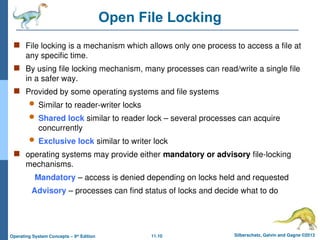
Open File Locking
File locking is a mechanism which allows only one process to access a file at
any specific time.
By using file locking mechanism, many processes can read/write a single file
in a safer way.
Provided by some operating systems and file systems
Similar to reader-writer locks
Shared lock similar to reader lock – several processes can acquire
concurrently
Exclusive lock similar to writer lock
operating systems may provide either mandatory or advisory file-locking
mechanisms.
Mandatory – access is denied depending on locks held and requested
Advisory – processes can find status of locks and decide what to do
- 11.
11.11 Silberschatz, Galvinand Gagne ©2013
Operating System Concepts – 9th
Edition
File Locking Example – Java API
import java.io.*;
import java.nio.channels.*;
public class LockingExample {
public static final boolean EXCLUSIVE = false;
public static final boolean SHARED = true;
public static void main(String arsg[]) throws IOException {
FileLock sharedLock = null;
FileLock exclusiveLock = null;
try {
RandomAccessFile raf = new RandomAccessFile("file.txt", "rw");
// get the channel for the file
FileChannel ch = raf.getChannel();
// this locks the first half of the file - exclusive
exclusiveLock = ch.lock(0, raf.length()/2, EXCLUSIVE);
/** Now modify the data . . . */
// release the lock
exclusiveLock.release();
- 12.
11.12 Silberschatz, Galvinand Gagne ©2013
Operating System Concepts – 9th
Edition
File Locking Example – Java API (Cont.)
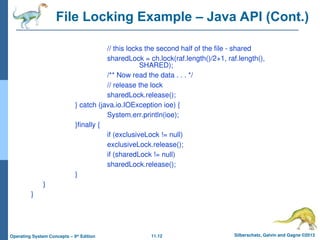
// this locks the second half of the file - shared
sharedLock = ch.lock(raf.length()/2+1, raf.length(),
SHARED);
/** Now read the data . . . */
// release the lock
sharedLock.release();
} catch (java.io.IOException ioe) {
System.err.println(ioe);
}finally {
if (exclusiveLock != null)
exclusiveLock.release();
if (sharedLock != null)
sharedLock.release();
}
}
}
- 13.
11.13 Silberschatz, Galvinand Gagne ©2013
Operating System Concepts – 9th
Edition
File Types – Name, Extension
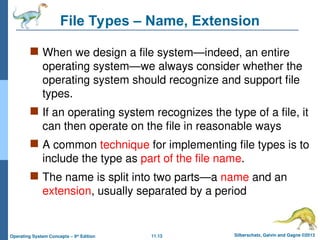
When we design a file system—indeed, an entire
operating system—we always consider whether the
operating system should recognize and support file
types.
If an operating system recognizes the type of a file, it
can then operate on the file in reasonable ways
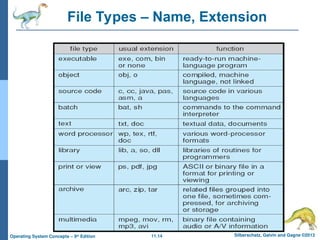
A common technique for implementing file types is to
include the type as part of the file name.
The name is split into two parts—a name and an
extension, usually separated by a period
- 14.
- 15.
11.15 Silberschatz, Galvinand Gagne ©2013
Operating System Concepts – 9th
Edition
Access Methods
Files store information.
When it is used, this information must be
accessed and read into computer memory.
The information in the file can be accessed in
several ways.
Some systems provide only one access
method for files.
while others support many access methods,
and choosing the right one for a particular
application is a major design problem.
- 16.
11.16 Silberschatz, Galvinand Gagne ©2013
Operating System Concepts – 9th
Edition
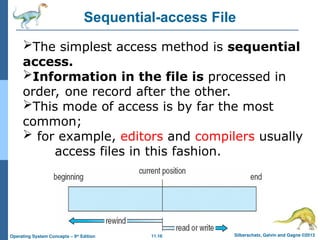
Sequential-access File
The simplest access method is sequential
access.
Information in the file is processed in
order, one record after the other.
This mode of access is by far the most
common;
for example, editors and compilers usually
access files in this fashion.
- 17.
11.17 Silberschatz, Galvinand Gagne ©2013
Operating System Concepts – 9th
Edition
Reads and writes make up the bulk of the
operations on a file.
A read operation—read next()—reads the next
portion of the file and automatically advances a file
pointer, which tracks the I/O location.
Similarly, the write operation—write next()—
appends to the end of the file and advances to the
end of the newly written material.
Such a file can be reset to the beginning, and on
some systems, a program may be able to skip
forward or backward n records for some integer.
- 18.
11.18 Silberschatz, Galvinand Gagne ©2013
Operating System Concepts – 9th
Edition
Direct Access
Another method is direct access (or relative access).
Here, a file is made up of fixed-length logical records
that allow programs to read and write records rapidly in
no particular order.
The direct-access method is based on a disk model of
a file, since disks allow random access to any file block.
For directaccess, the file is viewed as a umbered
sequence of blocks or records.
Thus, we may read block 14, then read block 53, and
then write block 7.
There are no restrictions on the order of reading or
writing for a direct-access file.
- 19.
11.19 Silberschatz, Galvinand Gagne ©2013
Operating System Concepts – 9th
Edition
Direct-access files are of great use for immediate
access to large amounts of information.
Databases are often of this type.
For the direct-access method, the file operations
must be modified to include the block number as a
parameter.
Thus, we have read(n), where n is the block
number, rather than read next(), and write(n)
rather than write next().
- 20.
11.20 Silberschatz, Galvinand Gagne ©2013
Operating System Concepts – 9th
Edition
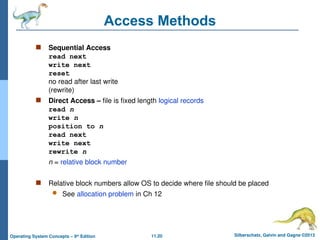
Access Methods
Sequential Access
read next
write next
reset
no read after last write
(rewrite)
Direct Access – file is fixed length logical records
read n
write n
position to n
read next
write next
rewrite n
n = relative block number
Relative block numbers allow OS to decide where file should be placed
See allocation problem in Ch 12
- 21.
11.21 Silberschatz, Galvinand Gagne ©2013
Operating System Concepts – 9th
Edition
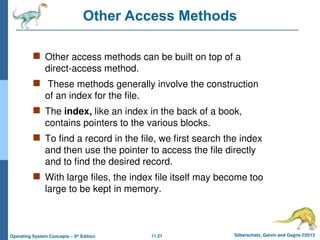
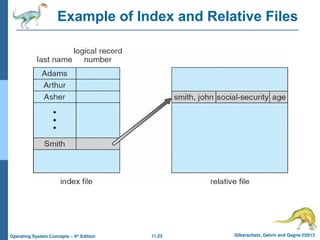
Other Access Methods
Other access methods can be built on top of a
direct-access method.
These methods generally involve the construction
of an index for the file.
The index, like an index in the back of a book,
contains pointers to the various blocks.
To find a record in the file, we first search the index
and then use the pointer to access the file directly
and to find the desired record.
With large files, the index file itself may become too
large to be kept in memory.
- 22.
11.22 Silberschatz, Galvinand Gagne ©2013
Operating System Concepts – 9th
Edition
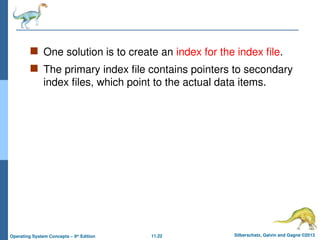
One solution is to create an index for the index file.
The primary index file contains pointers to secondary
index files, which point to the actual data items.
- 23.
- 24.
11.24 Silberschatz, Galvinand Gagne ©2013
Operating System Concepts – 9th
Edition
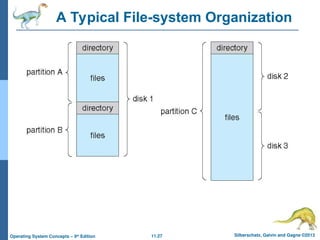
Directory Structure
Files are stored on random-access storage
devices.
A storage device can be used in its entirety
for a file system.
A disk can be partitioned into quarters,
and each quarter can hold a separate file
system.
Disk or partition can be used raw – without
a file system, or formatted with a file
system
Storage devices can also be collected
together into RAID sets that provide
protection from the failure of a single disk
- 25.
11.25 Silberschatz, Galvinand Gagne ©2013
Operating System Concepts – 9th
Edition
Directory and Disk Structure
Afile system can be created on each of these
parts of the disk.
Any entity containing a file system is generally
known as a volume
Each volume that contains a file system must
also contain information about the files in the
system.
This information is kept in entries in a device
directory or volume table of contents.
The device directory (more commonly
known simply as the directory) records
information—such as name, location,
size, and type—for all files on that volume
- 26.
11.26 Silberschatz, Galvinand Gagne ©2013
Operating System Concepts – 9th
Edition
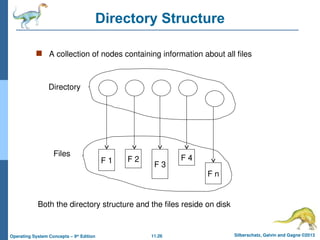
Directory Structure
A collection of nodes containing information about all files
F 1 F 2
F 3
F 4
F n
Directory
Files
Both the directory structure and the files reside on disk
- 27.
- 28.
11.28 Silberschatz, Galvinand Gagne ©2013
Operating System Concepts – 9th
Edition
Types of File Systems
We mostly talk of general-purpose file systems
But systems frequently have may file systems, some general- and
some special- purpose
Consider Solaris has
tmpfs—a “temporary” file system that is created in volatile main
memory and has its contents erased if the system reboots or crashes
objfs—a “virtual” file system (essentially an interface to the kernel
that looks like a file system) that gives debuggers access to kernel
symbols
ctfs—a virtual file system that maintains “contract” information to
manage which processes start when the system boots and must
continue to run during operation
- 29.
11.29 Silberschatz, Galvinand Gagne ©2013
Operating System Concepts – 9th
Edition
lofs—a “loop back” file system that
allows one file system to be accessed in
place of another one
procfs—a virtual file system that
presents information on all processes as
a file system
ufs, zfs—general-purpose file systems
- 30.
11.30 Silberschatz, Galvinand Gagne ©2013
Operating System Concepts – 9th
Edition
FILE DIRECTORIES:
Collection of files is a file directory.
The directory contains information about the files,
including attributes, location and ownership.
Much of this information, especially that is
concerned with storage, is managed by the
operating system.
The directory is itself a file, accessible by various
file management routines.
- 31.
11.31 Silberschatz, Galvinand Gagne ©2013
Operating System Concepts – 9th
Edition
Information contained in a device directory are:
Name
Type
Address
Current length
Maximum length
Date last accessed
Date last updated
Owner id
Protection information
- 32.
11.32 Silberschatz, Galvinand Gagne ©2013
Operating System Concepts – 9th
Edition
Operations Performed on Directory
The directory can be viewed as a symbol table that translates file names
into their directory entries.
If we take such a view,we see that the directory itself can be organized in
many ways.
Search for a file
Create a file
Delete a file
List a directory
Rename a file
Traverse the file system
- 33.
11.33 Silberschatz, Galvinand Gagne ©2013
Operating System Concepts – 9th
Edition
Directory Organization
Efficiency – locating a file quickly
Naming – convenient to users
Two users can have same name for
different files
The same file can have several different
names
Grouping – logical grouping of files by
properties, (e.g., all Java programs, all
games, …)
Advantages
- 34.
11.34 Silberschatz, Galvinand Gagne ©2013
Operating System Concepts – 9th
Edition
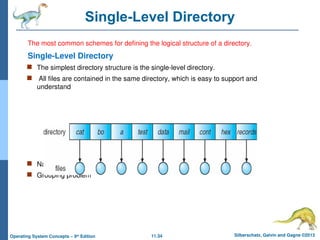
Single-Level Directory
The most common schemes for defining the logical structure of a directory.
Single-Level Directory
The simplest directory structure is the single-level directory.
All files are contained in the same directory, which is easy to support and
understand
Naming problem
Grouping problem
- 35.
11.35 Silberschatz, Galvinand Gagne ©2013
Operating System Concepts – 9th
Edition
A single-level directory has significant limitations,
when the number of files increases or when the
system has more than one user.Since all files are
in the same directory, they must have unique
names.
Even a single user on a single-level directory
may find it difficult to remember the names of all
the files as the number of files increases.
It is not uncommon for a user to have hundreds
of files on one computer system and an equal
number of additional files on another system.
- 36.
11.36 Silberschatz, Galvinand Gagne ©2013
Operating System Concepts – 9th
Edition
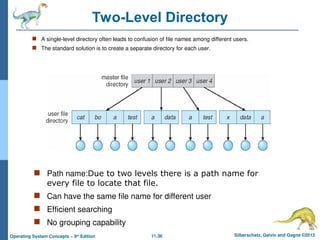
Two-Level Directory
A single-level directory often leads to confusion of file names among different users.
The standard solution is to create a separate directory for each user.
Path name:Due to two levels there is a path name for
every file to locate that file.
Can have the same file name for different user
Efficient searching
No grouping capability
- 37.
11.37 Silberschatz, Galvinand Gagne ©2013
Operating System Concepts – 9th
Edition
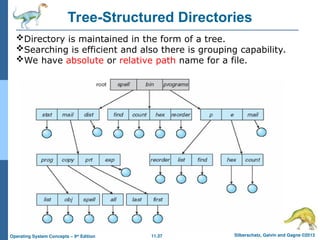
Tree-Structured Directories
Directory is maintained in the form of a tree.
Searching is efficient and also there is grouping capability.
We have absolute or relative path name for a file.
- 38.
11.38 Silberschatz, Galvinand Gagne ©2013
Operating System Concepts – 9th
Edition
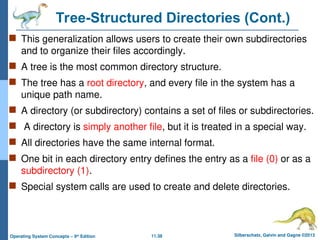
Tree-Structured Directories (Cont.)
This generalization allows users to create their own subdirectories
and to organize their files accordingly.
A tree is the most common directory structure.
The tree has a root directory, and every file in the system has a
unique path name.
A directory (or subdirectory) contains a set of files or subdirectories.
A directory is simply another file, but it is treated in a special way.
All directories have the same internal format.
One bit in each directory entry defines the entry as a file (0) or as a
subdirectory (1).
Special system calls are used to create and delete directories.
- 39.
11.39 Silberschatz, Galvinand Gagne ©2013
Operating System Concepts – 9th
Edition
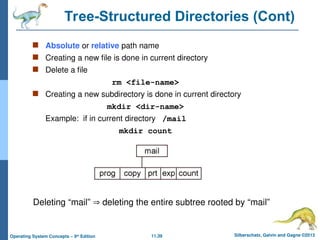
Tree-Structured Directories (Cont)
Absolute or relative path name
Creating a new file is done in current directory
Delete a file
rm <file-name>
Creating a new subdirectory is done in current directory
mkdir <dir-name>
Example: if in current directory /mail
mkdir count
Deleting “mail” deleting the entire subtree rooted by “mail”
- 40.
11.40 Silberschatz, Galvinand Gagne ©2013
Operating System Concepts – 9th
Edition
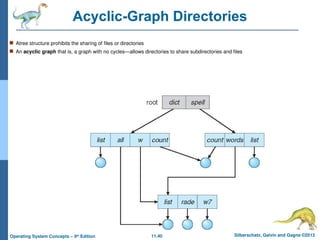
Acyclic-Graph Directories
Atree structure prohibits the sharing of files or directories
An acyclic graph that is, a graph with no cycles—allows directories to share subdirectories and files
- 41.
11.41 Silberschatz, Galvinand Gagne ©2013
Operating System Concepts – 9th
Edition
It is important to note that a shared file (or directory) is
not the same as two copies of the file.
With two copies, each programmer can view the copy
rather than the original, but if one programmer changes
the file, the changes will not appear in the other’s copy.
With a shared file, only one actual file exists, so any
changes made by one person are immediately visible to
the other.
Sharing is particularly important for subdirectories; a new
file created by one person will automatically appear in all
the shared subdirectories.
- 42.
11.42 Silberschatz, Galvinand Gagne ©2013
Operating System Concepts – 9th
Edition
Shared files and subdirectories can be implemented in
several ways.
A common way, exemplified by many of the UNIX
systems, is to create a new directory entry called a link.
A link is effectively a pointer to another file or
subdirectory.
When a reference to a file is made, we search the
directory.
If the directory entry is marked as a link, then the name
of the real file is included in the link information.
- 43.
11.43 Silberschatz, Galvinand Gagne ©2013
Operating System Concepts – 9th
Edition
Another common approach to implementing shared files
is simply to duplicate all information about them in both
sharing directories.
A major problem with duplicate directory entries is
maintaining consistency when a file is modified
- 44.
- 45.
11.45 Silberschatz, Galvinand Gagne ©2013
Operating System Concepts – 9th
Edition
General Graph Directory (Cont.)
A serious problem with using an acyclic-graph structure
is ensuring that there are no cycles.
If we start with a two-level directory and allow users to
create subdirectories, a tree-structured directory results.
However, when we add links, the tree structure is
destroyed, resulting in a simple graph structure .
The primary advantage of an acyclic graph is the
relative simplicity of the algorithms to traverse the graph
and to determine when there are no more references to
a file
- 46.
11.46 Silberschatz, Galvinand Gagne ©2013
Operating System Concepts – 9th
Edition
We want to avoid traversing shared sections of an
acyclic graph twice, mainly for performance
reasons
If cycles are allowed to exist in the directory, we
likewise want to avoid searching any component
twice, for reasons of correctness as well as
performance.
A poorly designed algorithm might result in an
infinite loop continually searching through the cycle
and never terminating.
- 47.
11.47 Silberschatz, Galvinand Gagne ©2013
Operating System Concepts – 9th
Edition
General Graph Directory (Cont.)
One solution is to limit arbitrarily the number
of directories that will be accessed during a
search.
How do we guarantee no cycles?
Allow only links to file not subdirectories
Every time a new link is added use a cycle
detection algorithm to determine whether it
is OK
- 48.
11.48 Silberschatz, Galvinand Gagne ©2013
Operating System Concepts – 9th
Edition
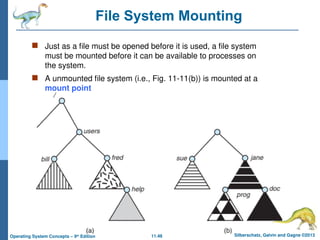
File System Mounting
Just as a file must be opened before it is used, a file system
must be mounted before it can be available to processes on
the system.
A unmounted file system (i.e., Fig. 11-11(b)) is mounted at a
mount point
- 49.
11.49 Silberschatz, Galvinand Gagne ©2013
Operating System Concepts – 9th
Edition
Mount Point
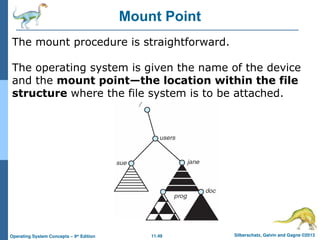
The mount procedure is straightforward.
The operating system is given the name of the device
and the mount point—the location within the file
structure where the file system is to be attached.
- 50.
11.50 Silberschatz, Galvinand Gagne ©2013
Operating System Concepts – 9th
Edition
File Sharing
Sharing of files on multi-user systems is desirable
Sharing may be done through a protection scheme
On distributed systems, files may be shared across a network
Network File System (NFS) is a common distributed file-sharing method
If multi-user system
User IDs identify users, allowing permissions and protections to be
per-user
Group IDs allow users to be in groups, permitting group access rights
Owner of a file / directory
Group of a file / directory
- 51.
11.51 Silberschatz, Galvinand Gagne ©2013
Operating System Concepts – 9th
Edition
File Sharing – Remote File Systems
Uses networking to allow file system access between systems
Manually via programs like FTP
Automatically, seamlessly using distributed file systems
Semi automatically via the world wide web
Client-server model allows clients to mount remote file systems from
servers
Server can serve multiple clients
Client and user-on-client identification is insecure or complicated
NFS is standard UNIX client-server file sharing protocol
CIFS is standard Windows protocol
Standard operating system file calls are translated into remote calls
Distributed Information Systems (distributed naming services) such as
LDAP, DNS, NIS, Active Directory implement unified access to information
needed for remote computing
- 52.
11.52 Silberschatz, Galvinand Gagne ©2013
Operating System Concepts – 9th
Edition
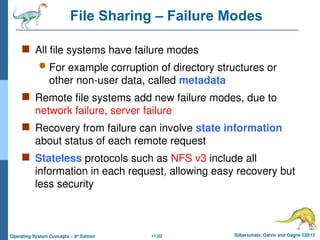
File Sharing – Failure Modes
All file systems have failure modes
For example corruption of directory structures or
other non-user data, called metadata
Remote file systems add new failure modes, due to
network failure, server failure
Recovery from failure can involve state information
about status of each remote request
Stateless protocols such as NFS v3 include all
information in each request, allowing easy recovery but
less security
- 53.
11.53 Silberschatz, Galvinand Gagne ©2013
Operating System Concepts – 9th
Edition
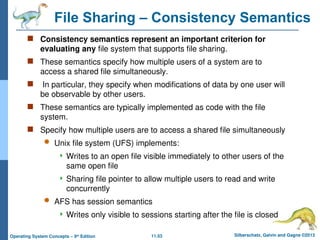
File Sharing – Consistency Semantics
Consistency semantics represent an important criterion for
evaluating any file system that supports file sharing.
These semantics specify how multiple users of a system are to
access a shared file simultaneously.
In particular, they specify when modifications of data by one user will
be observable by other users.
These semantics are typically implemented as code with the file
system.
Specify how multiple users are to access a shared file simultaneously
Unix file system (UFS) implements:
Writes to an open file visible immediately to other users of the
same open file
Sharing file pointer to allow multiple users to read and write
concurrently
AFS has session semantics
Writes only visible to sessions starting after the file is closed
- 54.
11.54 Silberschatz, Galvinand Gagne ©2013
Operating System Concepts – 9th
Edition
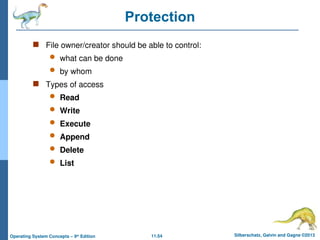
Protection
File owner/creator should be able to control:
what can be done
by whom
Types of access
Read
Write
Execute
Append
Delete
List
- 55.
11.55 Silberschatz, Galvinand Gagne ©2013
Operating System Concepts – 9th
Edition
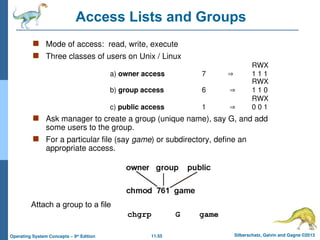
Access Lists and Groups
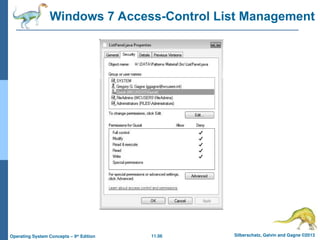
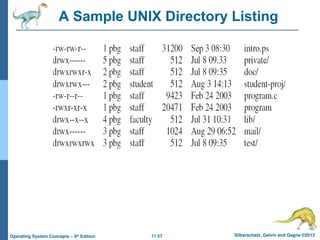
Mode of access: read, write, execute
Three classes of users on Unix / Linux
RWX
a) owner access 7 1 1 1
RWX
b) group access 6 1 1 0
RWX
c) public access 1 0 0 1
Ask manager to create a group (unique name), say G, and add
some users to the group.
For a particular file (say game) or subdirectory, define an
appropriate access.
Attach a group to a file
chgrp G game
- 56.
- 57.
- 58.
![11.11 Silberschatz, Galvin and Gagne ©2013
Operating System Concepts – 9th
Edition
File Locking Example – Java API
import java.io.*;
import java.nio.channels.*;
public class LockingExample {
public static final boolean EXCLUSIVE = false;
public static final boolean SHARED = true;
public static void main(String arsg[]) throws IOException {
FileLock sharedLock = null;
FileLock exclusiveLock = null;
try {
RandomAccessFile raf = new RandomAccessFile("file.txt", "rw");
// get the channel for the file
FileChannel ch = raf.getChannel();
// this locks the first half of the file - exclusive
exclusiveLock = ch.lock(0, raf.length()/2, EXCLUSIVE);
/** Now modify the data . . . */
// release the lock
exclusiveLock.release();](https://image.slidesharecdn.com/chapter11file-systeminterface-250415045858-2d1265bf/85/Chapter-11-File-System-Interface-in-os-ppt-11-320.jpg)