


RSYSLOG update
v7 and beyond
Rainer Gerhards
What's in this talk?
•
•
•
•

Security improvements in v7
A quick word on Journal integration
v8 engine improvements
Writing plugins in languages other than C

• I will probably “run out of time” - but that's fine, the
slides at the end are optional.
The rsyslog doc project
• The doc just sucks...
• Spawned a new project to create better one:
https://github.com/rsyslog/rsyslog-doc
• Lead by James Boylan (a sysadmin)
• Please help
▫ Complain ;-)
▫ open issues
▫ Write some doc...

• We are especially interested to learn what is hard for
beginners!
Rainer Gerhards

New security features in rsyslog
v7
Remeber, in pre-v7 we have
• TLS-encrypted syslog transport
▫ RFC5425
▫ Mutual authentication

• Trusted properties
▫ Take log message origin based on
SCM_CREDENTIALS
Signed Log Records
• Introduced in v7.4
• Protects log files on machine
• Generic approach by introducing a signature
provider interface
• Currently provider for “Keyless Signature
Infrastructure” (KSI)
• Hash chain for log record is created
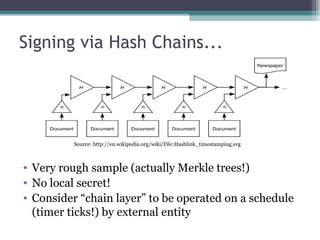
Signing via Hash Chains...

Source: http://en.wikipedia.org/wiki/File:Hashlink_timestamping.svg

• Very rough sample (actually Merkle trees!)
• No local secret!
• Consider “chain layer” to be operated on a schedule
(timer ticks!) by external entity
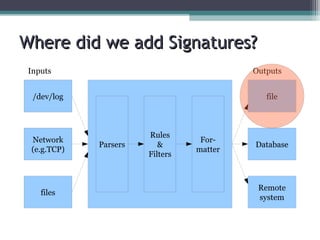
Where did we add Signatures?
Inputs

Outputs

/dev/log

Network
(e.g.TCP)

files

file

Parsers

Rules
&
Filters

Formatter

Database

Remote
system
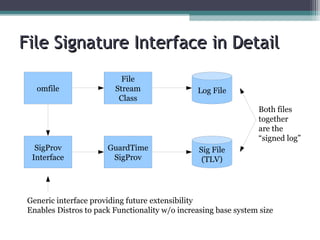
File Signature Interface in Detail
omfile

File
Stream
Class

Log File
Both files
together
are the
“signed log”

SigProv
Interface

GuardTime
SigProv

Sig File
(TLV)

Generic interface providing future extensibility
Enables Distros to pack Functionality w/o increasing base system size
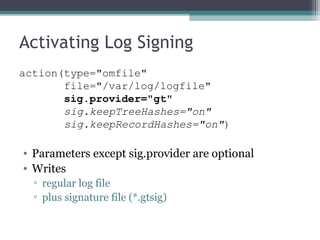
Activating Log Signing
action(type="omfile"
file="/var/log/logfile"
sig.provider="gt"
sig.keepTreeHashes="on"
sig.keepRecordHashes="on")

• Parameters except sig.provider are optional
• Writes
▫ regular log file
▫ plus signature file (*.gtsig)
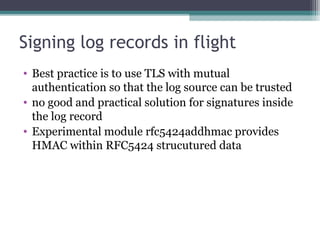
Signing log records in flight
• Best practice is to use TLS with mutual
authentication so that the log source can be trusted
• no good and practical solution for signatures inside
the log record
• Experimental module rfc5424addhmac provides
HMAC within RFC5424 strucutured data
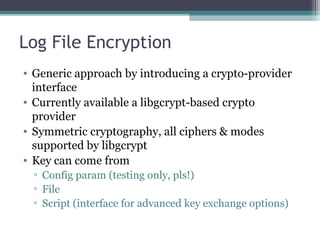
Log File Encryption
• Generic approach by introducing a crypto-provider
interface
• Currently available a libgcrypt-based crypto
provider
• Symmetric cryptography, all ciphers & modes
supported by libgcrypt
• Key can come from
▫ Config param (testing only, pls!)
▫ File
▫ Script (interface for advanced key exchange options)
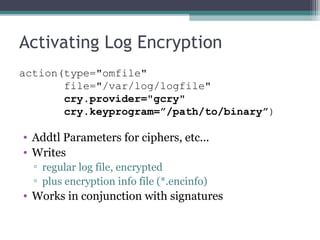
Activating Log Encryption
action(type="omfile"
file="/var/log/logfile"
       cry.provider="gcry"
       cry.keyprogram=”/path/to/binary”)

• Addtl Parameters for ciphers, etc...
• Writes
▫ regular log file, encrypted
▫ plus encryption info file (*.encinfo)

• Works in conjunction with signatures
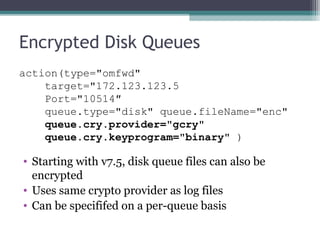
Encrypted Disk Queues
action(type="omfwd"
target="172.123.123.5
Port="10514″
queue.type="disk" queue.fileName="enc"
queue.cry.provider="gcry"
    queue.cry.keyprogram="binary" )

• Starting with v7.5, disk queue files can also be
encrypted
• Uses same crypto provider as log files
• Can be specififed on a per-queue basis
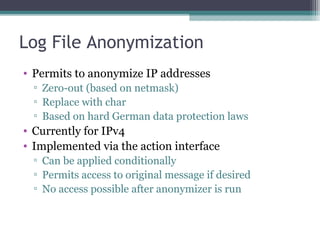
Log File Anonymization
• Permits to anonymize IP addresses
▫ Zero-out (based on netmask)
▫ Replace with char
▫ Based on hard German data protection laws

• Currently for IPv4
• Implemented via the action interface
▫ Can be applied conditionally
▫ Permits access to original message if desired
▫ No access possible after anonymizer is run
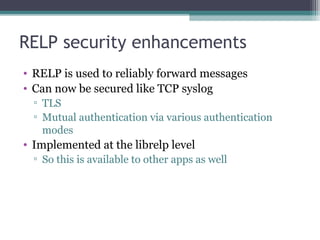
RELP security enhancements
• RELP is used to reliably forward messages
• Can now be secured like TCP syslog
▫ TLS
▫ Mutual authentication via various authentication
modes

• Implemented at the librelp level
▫ So this is available to other apps as well
Rainer Gerhards

rsyslog Journal Integration
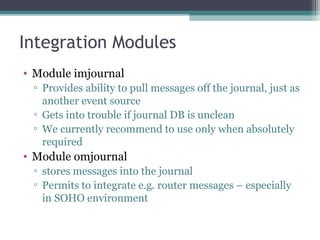
Integration Modules
• Module imjournal
▫ Provides ability to pull messages off the journal, just as
another event source
▫ Gets into trouble if journal DB is unclean
▫ We currently recommend to use only when absolutely
required

• Module omjournal
▫ stores messages into the journal
▫ Permits to integrate e.g. router messages – especially
in SOHO environment
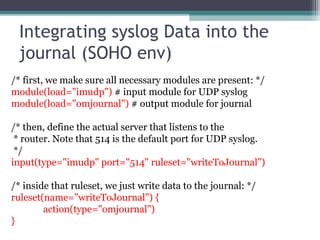
Integrating syslog Data into the
journal (SOHO env)
/* first, we make sure all necessary modules are present: */
module(load="imudp") # input module for UDP syslog
module(load="omjournal") # output module for journal
/* then, define the actual server that listens to the
* router. Note that 514 is the default port for UDP syslog.
*/
input(type="imudp" port="514" ruleset="writeToJournal")
/* inside that ruleset, we just write data to the journal: */
ruleset(name="writeToJournal") {
action(type="omjournal")
}
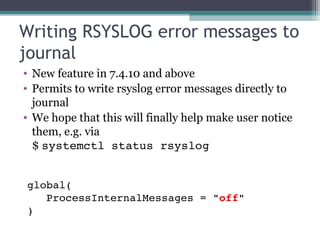
Writing RSYSLOG error messages to
journal
• New feature in 7.4.10 and above
• Permits to write rsyslog error messages directly to
journal
• We hope that this will finally help make user notice
them, e.g. via
$ systemctl status rsyslog
global(
   ProcessInternalMessages = "off"
)
Rainer Gerhards

The rsyslog v8 engine
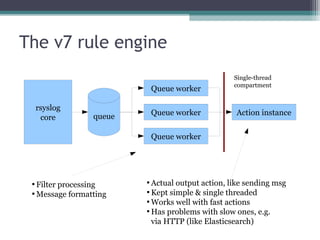
The v7 rule engine
Queue worker
rsyslog
core

Queue worker

queue

Single-thread
compartment

Action instance

Queue worker

Filter processing

Message formatting


Actual output action, like sending msg

Kept simple & single threaded

Works well with fast actions

Has problems with slow ones, e.g.
via HTTP (like Elasticsearch)

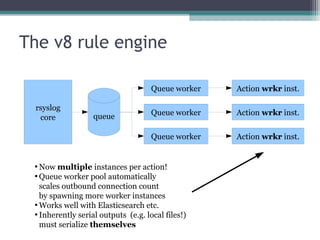
The v8 rule engine
Queue worker
queue

Queue worker

Action wrkr inst.

Queue worker

rsyslog
core

Action wrkr inst.

Action wrkr inst.

Now multiple instances per action!

Queue worker pool automatically
scales outbound connection count
by spawning more worker instances

Works well with Elasticsearch etc.

Inherently serial outputs (e.g. local files!)
must serialize themselves

Rainer Gerhards

Writing external output plugins
for RSysLog
IN 2 MINUTES
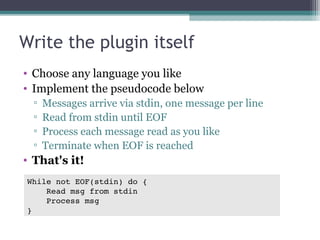
Write the plugin itself
• Choose any language you like
• Implement the pseudocode below
▫
▫
▫
▫

Messages arrive via stdin, one message per line
Read from stdin until EOF
Process each message read as you like
Terminate when EOF is reached

• That's it!
While not EOF(stdin) do {
    Read msg from stdin
    Process msg
}
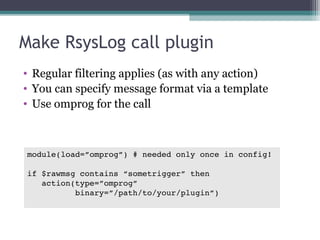
Make RsysLog call plugin
• Regular filtering applies (as with any action)
• You can specify message format via a template
• Use omprog for the call

module(load=”omprog”) # needed only once in config!
if $rawmsg contains “sometrigger” then
   action(type=”omprog”
          binary=”/path/to/your/plugin”)
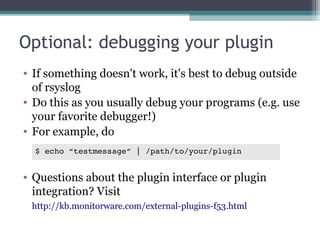
Optional: debugging your plugin
• If something doesn't work, it's best to debug outside
of rsyslog
• Do this as you usually debug your programs (e.g. use
your favorite debugger!)
• For example, do
$ echo “testmessage” | /path/to/your/plugin

• Questions about the plugin interface or plugin
integration? Visit
http://kb.monitorware.com/external-plugins-f53.html
Want to know more details?
• There is an additional presentation available at
http://www.slideshare.net/rainergerhards1/external-plugins

• The complete interface specification can be found
right inside the source repository:
https://github.com/rsyslog/rsyslog/blob/master/plugins/external/INTERFACE.md

• Check out the copy-templates
▫ Available for an increasing number of languages
▫ More advanced interface handling
▫ Ready to be copied
▫ https://github.com/rsyslog/rsyslog/tree/master/plugins/external
Questions?
rgerhards@adiscon.com
www.rsyslog.com
https://github.com/rsyslog

Please fill in the feedback questionnaire:
http://devconf.cz/f/107

Fedora Developer's Conference 2014 Talk

  • 1.
    RSYSLOG update v7 andbeyond Rainer Gerhards
  • 2.
    What's in thistalk? • • • • Security improvements in v7 A quick word on Journal integration v8 engine improvements Writing plugins in languages other than C • I will probably “run out of time” - but that's fine, the slides at the end are optional.
  • 3.
    The rsyslog docproject • The doc just sucks... • Spawned a new project to create better one: https://github.com/rsyslog/rsyslog-doc • Lead by James Boylan (a sysadmin) • Please help ▫ Complain ;-) ▫ open issues ▫ Write some doc... • We are especially interested to learn what is hard for beginners!
  • 4.
    Rainer Gerhards New securityfeatures in rsyslog v7
  • 5.
    Remeber, in pre-v7we have • TLS-encrypted syslog transport ▫ RFC5425 ▫ Mutual authentication • Trusted properties ▫ Take log message origin based on SCM_CREDENTIALS
  • 6.
    Signed Log Records •Introduced in v7.4 • Protects log files on machine • Generic approach by introducing a signature provider interface • Currently provider for “Keyless Signature Infrastructure” (KSI) • Hash chain for log record is created
  • 7.
    Signing via HashChains... Source: http://en.wikipedia.org/wiki/File:Hashlink_timestamping.svg • Very rough sample (actually Merkle trees!) • No local secret! • Consider “chain layer” to be operated on a schedule (timer ticks!) by external entity
  • 8.
    Where did weadd Signatures? Inputs Outputs /dev/log Network (e.g.TCP) files file Parsers Rules & Filters Formatter Database Remote system
  • 9.
    File Signature Interfacein Detail omfile File Stream Class Log File Both files together are the “signed log” SigProv Interface GuardTime SigProv Sig File (TLV) Generic interface providing future extensibility Enables Distros to pack Functionality w/o increasing base system size
  • 10.
    Activating Log Signing action(type="omfile" file="/var/log/logfile" sig.provider="gt" sig.keepTreeHashes="on" sig.keepRecordHashes="on") •Parameters except sig.provider are optional • Writes ▫ regular log file ▫ plus signature file (*.gtsig)
  • 11.
    Signing log recordsin flight • Best practice is to use TLS with mutual authentication so that the log source can be trusted • no good and practical solution for signatures inside the log record • Experimental module rfc5424addhmac provides HMAC within RFC5424 strucutured data
  • 12.
    Log File Encryption •Generic approach by introducing a crypto-provider interface • Currently available a libgcrypt-based crypto provider • Symmetric cryptography, all ciphers & modes supported by libgcrypt • Key can come from ▫ Config param (testing only, pls!) ▫ File ▫ Script (interface for advanced key exchange options)
  • 13.
    Activating Log Encryption action(type="omfile" file="/var/log/logfile"        cry.provider="gcry"        cry.keyprogram=”/path/to/binary”) •Addtl Parameters for ciphers, etc... • Writes ▫ regular log file, encrypted ▫ plus encryption info file (*.encinfo) • Works in conjunction with signatures
  • 14.
    Encrypted Disk Queues action(type="omfwd" target="172.123.123.5 Port="10514″ queue.type="disk"queue.fileName="enc" queue.cry.provider="gcry"     queue.cry.keyprogram="binary" ) • Starting with v7.5, disk queue files can also be encrypted • Uses same crypto provider as log files • Can be specififed on a per-queue basis
  • 15.
    Log File Anonymization •Permits to anonymize IP addresses ▫ Zero-out (based on netmask) ▫ Replace with char ▫ Based on hard German data protection laws • Currently for IPv4 • Implemented via the action interface ▫ Can be applied conditionally ▫ Permits access to original message if desired ▫ No access possible after anonymizer is run
  • 16.
    RELP security enhancements •RELP is used to reliably forward messages • Can now be secured like TCP syslog ▫ TLS ▫ Mutual authentication via various authentication modes • Implemented at the librelp level ▫ So this is available to other apps as well
  • 17.
  • 18.
    Integration Modules • Moduleimjournal ▫ Provides ability to pull messages off the journal, just as another event source ▫ Gets into trouble if journal DB is unclean ▫ We currently recommend to use only when absolutely required • Module omjournal ▫ stores messages into the journal ▫ Permits to integrate e.g. router messages – especially in SOHO environment
  • 19.
    Integrating syslog Datainto the journal (SOHO env) /* first, we make sure all necessary modules are present: */ module(load="imudp") # input module for UDP syslog module(load="omjournal") # output module for journal /* then, define the actual server that listens to the * router. Note that 514 is the default port for UDP syslog. */ input(type="imudp" port="514" ruleset="writeToJournal") /* inside that ruleset, we just write data to the journal: */ ruleset(name="writeToJournal") { action(type="omjournal") }
  • 20.
    Writing RSYSLOG errormessages to journal • New feature in 7.4.10 and above • Permits to write rsyslog error messages directly to journal • We hope that this will finally help make user notice them, e.g. via $ systemctl status rsyslog global(    ProcessInternalMessages = "off" )
  • 21.
  • 22.
    The v7 ruleengine Queue worker rsyslog core Queue worker queue Single-thread compartment Action instance Queue worker Filter processing  Message formatting  Actual output action, like sending msg  Kept simple & single threaded  Works well with fast actions  Has problems with slow ones, e.g. via HTTP (like Elasticsearch) 
  • 23.
    The v8 ruleengine Queue worker queue Queue worker Action wrkr inst. Queue worker rsyslog core Action wrkr inst. Action wrkr inst. Now multiple instances per action!  Queue worker pool automatically scales outbound connection count by spawning more worker instances  Works well with Elasticsearch etc.  Inherently serial outputs (e.g. local files!) must serialize themselves 
  • 24.
    Rainer Gerhards Writing externaloutput plugins for RSysLog IN 2 MINUTES
  • 25.
    Write the pluginitself • Choose any language you like • Implement the pseudocode below ▫ ▫ ▫ ▫ Messages arrive via stdin, one message per line Read from stdin until EOF Process each message read as you like Terminate when EOF is reached • That's it! While not EOF(stdin) do {     Read msg from stdin     Process msg }
  • 26.
    Make RsysLog callplugin • Regular filtering applies (as with any action) • You can specify message format via a template • Use omprog for the call module(load=”omprog”) # needed only once in config! if $rawmsg contains “sometrigger” then    action(type=”omprog”           binary=”/path/to/your/plugin”)
  • 27.
    Optional: debugging yourplugin • If something doesn't work, it's best to debug outside of rsyslog • Do this as you usually debug your programs (e.g. use your favorite debugger!) • For example, do $ echo “testmessage” | /path/to/your/plugin • Questions about the plugin interface or plugin integration? Visit http://kb.monitorware.com/external-plugins-f53.html
  • 28.
    Want to knowmore details? • There is an additional presentation available at http://www.slideshare.net/rainergerhards1/external-plugins • The complete interface specification can be found right inside the source repository: https://github.com/rsyslog/rsyslog/blob/master/plugins/external/INTERFACE.md • Check out the copy-templates ▫ Available for an increasing number of languages ▫ More advanced interface handling ▫ Ready to be copied ▫ https://github.com/rsyslog/rsyslog/tree/master/plugins/external
  • 29.