Faculty iPad Orientation
Brown Mackie College
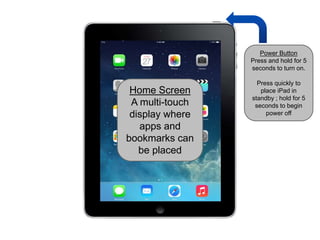
Home Screen
A multi-touch
display where
apps and
bookmarks can
be placed
Power Button
Press and hold for 5
seconds to turn on.
Press quickly to
place iPad in
standby ; hold for 5
seconds to begin
power off
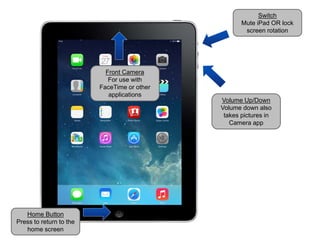
Home Button
Press to return to the
home screen
Front Camera
For use with
FaceTime or other
applications
Volume Up/Down
Volume down also
takes pictures in
Camera app
Switch
Mute iPad OR lock
screen rotation
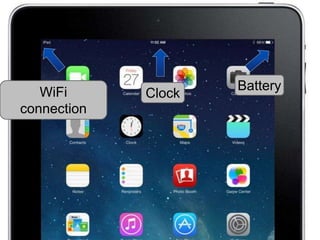
ClockWiFi
connection
Battery
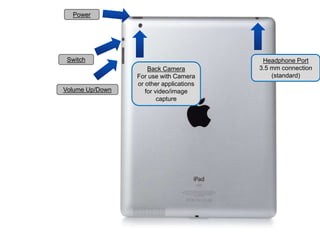
Volume Up/Down
Switch
Back Camera
For use with Camera
or other applications
for video/image
capture
Power
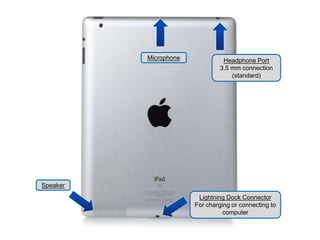
Headphone Port
3.5 mm connection
(standard)
Lightning Dock Connector
For charging or connecting to
computer
Headphone Port
3.5 mm connection
(standard)
Speaker
Microphone
Caring for the iPad
•Clean the screen with a soft cloth
•A microfiber cloth can be purchased for a
few dollars
•A soft cotton material, like mostT-shirts,
will work as well
•Do NOT use liquid cleaners of any kind
Caring for the iPad
Never leave your device unattended!
•All iPads look nearly identical
•If you misplace your iPad, or believe it stolen,
you can use the iCloud service to help.
•Login at iCloud.com
•Use the “Find my iPad” feature

Faculty 01 - i pad orientation

  • 1.
  • 2.
    Home Screen A multi-touch displaywhere apps and bookmarks can be placed Power Button Press and hold for 5 seconds to turn on. Press quickly to place iPad in standby ; hold for 5 seconds to begin power off
  • 3.
    Home Button Press toreturn to the home screen Front Camera For use with FaceTime or other applications Volume Up/Down Volume down also takes pictures in Camera app Switch Mute iPad OR lock screen rotation
  • 4.
  • 5.
    Volume Up/Down Switch Back Camera Foruse with Camera or other applications for video/image capture Power Headphone Port 3.5 mm connection (standard)
  • 6.
    Lightning Dock Connector Forcharging or connecting to computer Headphone Port 3.5 mm connection (standard) Speaker Microphone
  • 7.
    Caring for theiPad •Clean the screen with a soft cloth •A microfiber cloth can be purchased for a few dollars •A soft cotton material, like mostT-shirts, will work as well •Do NOT use liquid cleaners of any kind
  • 8.
    Caring for theiPad Never leave your device unattended! •All iPads look nearly identical •If you misplace your iPad, or believe it stolen, you can use the iCloud service to help. •Login at iCloud.com •Use the “Find my iPad” feature