Creating a Custom Audio Dataset with PyTorch
Extracting Mel Spectrograms with Pytorch and
Torchaudio: UrbanSound8K Dataset
[By KAHSAY]
August 22, 2024
1
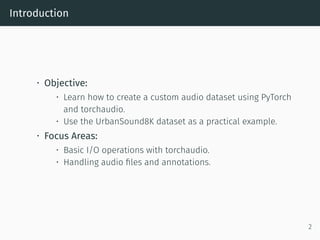
Introduction
• Objective:
• Learn how to create a custom audio dataset using PyTorch
and torchaudio.
• Use the UrbanSound8K dataset as a practical example.
• Focus Areas:
• Basic I/O operations with torchaudio.
• Handling audio files and annotations.
2
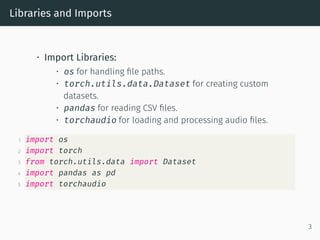
Libraries and Imports
• Import Libraries:
• os for handling file paths.
• torch.utils.data.Dataset for creating custom
datasets.
• pandas for reading CSV files.
• torchaudio for loading and processing audio files.
1 import os
2 import torch
3 from torch.utils.data import Dataset
4 import pandas as pd
5 import torchaudio
3
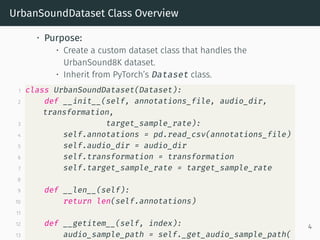
UrbanSoundDataset Class Overview
• Purpose:
• Create a custom dataset class that handles the
UrbanSound8K dataset.
• Inherit from PyTorch’s Dataset class.
1 class UrbanSoundDataset(Dataset):
2 def __init__(self, annotations_file, audio_dir,
transformation,
3 target_sample_rate):
4 self.annotations = pd.read_csv(annotations_file)
5 self.audio_dir = audio_dir
6 self.transformation = transformation
7 self.target_sample_rate = target_sample_rate
8
9 def __len__(self):
10 return len(self.annotations)
11
12 def __getitem__(self, index):
13 audio_sample_path = self._get_audio_sample_path(
4
Methods
• _resample_if_necessary():
• Resamples the audio signal to the target sample rate.
• _mix_down_if_necessary():
• Mixes down stereo audio to mono if necessary.
1 def _resample_if_necessary(self, signal, sr):
2 if sr != self.target_sample_rate:
3 resampler = torchaudio.transforms.Resample(
sr, self.target_sample_rate)
4 signal = resampler(signal)
5 return signal
6
7 def _mix_down_if_necessary(self, signal):
8 if signal.shape[0] > 1:
9 signal = torch.mean(signal, dim=0, keepdim=
True)
10 return signal
5
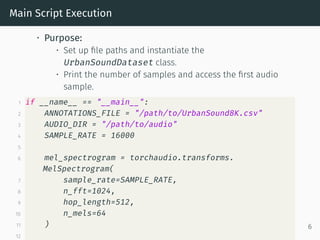
Main Script Execution
• Purpose:
• Set up file paths and instantiate the
UrbanSoundDataset class.
• Print the number of samples and access the first audio
sample.
1 if __name__ == "__main__":
2 ANNOTATIONS_FILE = "/path/to/UrbanSound8K.csv"
3 AUDIO_DIR = "/path/to/audio"
4 SAMPLE_RATE = 16000
5
6 mel_spectrogram = torchaudio.transforms.
MelSpectrogram(
7 sample_rate=SAMPLE_RATE,
8 n_fft=1024,
9 hop_length=512,
10 n_mels=64
11 )
12
6
Extracting Mel Spectrograms
• Mel Spectrogram: - A representation of the audio signal in
the Mel frequency scale. - Useful for capturing the
characteristics of audio signals for classification tasks.
• Using torchaudio: - Create a Mel Spectrogram using
torchaudio.transforms.MelSpectrogram().
7
Resampling Audio
• Resampling: - Adjusting the sample rate of audio signals
to a target sample rate. - Important for ensuring
consistent processing across different audio files.
• Using torchaudio: - Use
torchaudio.transforms.Resample() to resample
audio signals.
8
Common torchaudio Transforms
• MelSpectrogram: - Converts audio waveforms to Mel
spectrograms.
• Spectrogram: - Converts audio waveforms to regular
spectrograms.
• AmplitudeToDB: - Converts amplitude to decibels for
better visualization.
• TimeStretch: - Stretches the audio signal in time without
altering pitch.
• PitchShift: - Shifts the pitch of the audio signal by a
specified number of semitones.
• Apply Usage:
• Combine transforms using torch.nn.Sequential for a
pipeline.
9
Dataset Loading Workflow
• Workflow Steps:
1. Read Annotations:
• Load metadata from the CSV file using pandas.
2. Load Audio:
• Use torchaudio.load() to read audio files.
3. Return Data:
• Output the audio signal and its label.
10
UrbanSound8K Dataset
• Description:
• A dataset with 8,732 labeled sound excerpts from 10
classes.
• Useful for training audio classification models.
11
Conclusion
• Key Takeaways:
• Understanding the process of creating a custom audio
dataset.
• Importance of audio transformations for machine learning
tasks.
• Practical implementation using torchaudio.
12

Extracting Mel Spectrograms with Pytorch_and_Torchaudio.pdf

  • 1.
    Creating a CustomAudio Dataset with PyTorch Extracting Mel Spectrograms with Pytorch and Torchaudio: UrbanSound8K Dataset [By KAHSAY] August 22, 2024 1
  • 2.
    Introduction • Objective: • Learnhow to create a custom audio dataset using PyTorch and torchaudio. • Use the UrbanSound8K dataset as a practical example. • Focus Areas: • Basic I/O operations with torchaudio. • Handling audio files and annotations. 2
  • 3.
    Libraries and Imports •Import Libraries: • os for handling file paths. • torch.utils.data.Dataset for creating custom datasets. • pandas for reading CSV files. • torchaudio for loading and processing audio files. 1 import os 2 import torch 3 from torch.utils.data import Dataset 4 import pandas as pd 5 import torchaudio 3
  • 4.
    UrbanSoundDataset Class Overview •Purpose: • Create a custom dataset class that handles the UrbanSound8K dataset. • Inherit from PyTorch’s Dataset class. 1 class UrbanSoundDataset(Dataset): 2 def __init__(self, annotations_file, audio_dir, transformation, 3 target_sample_rate): 4 self.annotations = pd.read_csv(annotations_file) 5 self.audio_dir = audio_dir 6 self.transformation = transformation 7 self.target_sample_rate = target_sample_rate 8 9 def __len__(self): 10 return len(self.annotations) 11 12 def __getitem__(self, index): 13 audio_sample_path = self._get_audio_sample_path( 4
  • 5.
    Methods • _resample_if_necessary(): • Resamplesthe audio signal to the target sample rate. • _mix_down_if_necessary(): • Mixes down stereo audio to mono if necessary. 1 def _resample_if_necessary(self, signal, sr): 2 if sr != self.target_sample_rate: 3 resampler = torchaudio.transforms.Resample( sr, self.target_sample_rate) 4 signal = resampler(signal) 5 return signal 6 7 def _mix_down_if_necessary(self, signal): 8 if signal.shape[0] > 1: 9 signal = torch.mean(signal, dim=0, keepdim= True) 10 return signal 5
  • 6.
    Main Script Execution •Purpose: • Set up file paths and instantiate the UrbanSoundDataset class. • Print the number of samples and access the first audio sample. 1 if __name__ == "__main__": 2 ANNOTATIONS_FILE = "/path/to/UrbanSound8K.csv" 3 AUDIO_DIR = "/path/to/audio" 4 SAMPLE_RATE = 16000 5 6 mel_spectrogram = torchaudio.transforms. MelSpectrogram( 7 sample_rate=SAMPLE_RATE, 8 n_fft=1024, 9 hop_length=512, 10 n_mels=64 11 ) 12 6
  • 7.
    Extracting Mel Spectrograms •Mel Spectrogram: - A representation of the audio signal in the Mel frequency scale. - Useful for capturing the characteristics of audio signals for classification tasks. • Using torchaudio: - Create a Mel Spectrogram using torchaudio.transforms.MelSpectrogram(). 7
  • 8.
    Resampling Audio • Resampling:- Adjusting the sample rate of audio signals to a target sample rate. - Important for ensuring consistent processing across different audio files. • Using torchaudio: - Use torchaudio.transforms.Resample() to resample audio signals. 8
  • 9.
    Common torchaudio Transforms •MelSpectrogram: - Converts audio waveforms to Mel spectrograms. • Spectrogram: - Converts audio waveforms to regular spectrograms. • AmplitudeToDB: - Converts amplitude to decibels for better visualization. • TimeStretch: - Stretches the audio signal in time without altering pitch. • PitchShift: - Shifts the pitch of the audio signal by a specified number of semitones. • Apply Usage: • Combine transforms using torch.nn.Sequential for a pipeline. 9
  • 10.
    Dataset Loading Workflow •Workflow Steps: 1. Read Annotations: • Load metadata from the CSV file using pandas. 2. Load Audio: • Use torchaudio.load() to read audio files. 3. Return Data: • Output the audio signal and its label. 10
  • 11.
    UrbanSound8K Dataset • Description: •A dataset with 8,732 labeled sound excerpts from 10 classes. • Useful for training audio classification models. 11
  • 12.
    Conclusion • Key Takeaways: •Understanding the process of creating a custom audio dataset. • Importance of audio transformations for machine learning tasks. • Practical implementation using torchaudio. 12