Extracting Features and Classification
of Diseases in X-Ray Images Using
[Viola-Jones Algorithm]
Medical Image Processing
Syed Ebraiz Ali Chishti
P177001@nu.edu.pk
05/23/18 2
Contents
This Presentation Will Cover:
- What is Viola-Jones Algorithm?
- Haar Like Features Selection
- Creating Integral Images
- Adaboost Training
- Cascading Classifier
- Implementation With Python OpenCV?
- Results Statistics of Individual Diseases
- Results Statistics of All Diseases
05/23/18 3
Viola-Jones Algorithm
The Viola–Jones algorithm is the first object
detection framework to provide competitive object
detection rates in real-time proposed in 2001 by
Paul Viola and Michael Jones.
This algorithm is a well known method for
detecting faces, but It can also be trained to
detect various other types of objects.
05/23/18 4
Four Stages
1) Haar Feature Selection
2) Creating Integral Image
3) Adaboost Training
4) Cascading Classifier
05/23/18 5
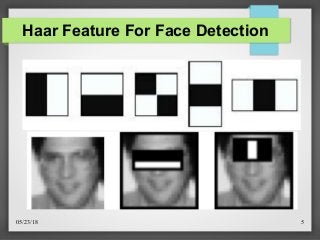
Haar Feature For Face Detection
05/23/18 6
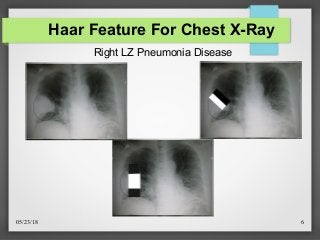
Haar Feature For Chest X-Ray
Right LZ Pneumonia Disease
05/23/18 7
Haar Feature Selection
Haar features are digital image features used in object
recognition.
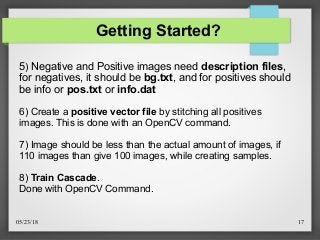
Each feature results in a single value which is
calculated by subtracting the sum of pixels under
white rectangle from the sum of pixels under black
rectangle.
Value = Σ (black area pixels) - Σ (white area pixels)
05/23/18 8
Integral Image Cont.
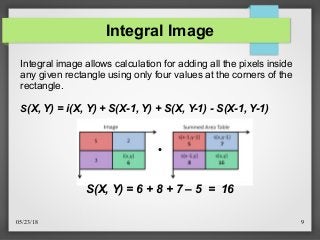
The Integral Image is used as a quick and effective way of
calculating the sum of values (pixel values) in a given
rectangular subset of a grid. In an integral image the value at
pixel (x,y) is the sum of pixels above and to the left of (x,y).
05/23/18 9
Integral Image
●
S(X, Y) = 6 + 8 + 7 – 5 = 16
Integral image allows calculation for adding all the pixels inside
any given rectangle using only four values at the corners of the
rectangle.
S(X, Y) = i(X, Y) + S(X-1, Y) + S(X, Y-1) - S(X-1, Y-1)
05/23/18 10
Adaboost Training Cont.
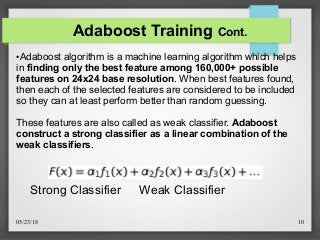
●Adaboost algorithm is a machine learning algorithm which helps
in finding only the best feature among 160,000+ possible
features on 24x24 base resolution. When best features found,
then each of the selected features are considered to be included
so they can at least perform better than random guessing.
These features are also called as weak classifier. Adaboost
construct a strong classifier as a linear combination of the
weak classifiers.
Weak ClassifierStrong Classifier
05/23/18 11
Adaboost Training
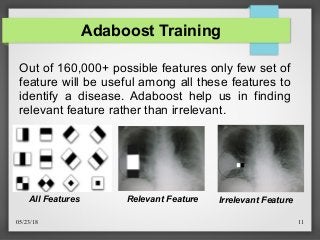
Relevant Feature
Out of 160,000+ possible features only few set of
feature will be useful among all these features to
identify a disease. Adaboost help us in finding
relevant feature rather than irrelevant.
Irrelevant FeatureAll Features
05/23/18 12
Cascading Classifier Cont.
Cascading is a particular case of ensemble
learning based on the concatenation of several
Classifiers, using all information collected from
the output from a given classifier as additional
information for the next classifier in the cascade.
Hence a single strong classifier formed out of
linear combination of all best features is not a
good to evaluate on each window because of
computation cost.
05/23/18 13
Cascading Classifier Cont.
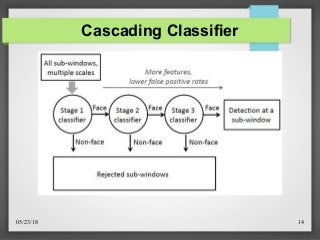
Therefore, a cascade classifier is composed
of stages each containing a strong classifier.
So all the features are grouped into several
stages where each stage has certain number of
features.
The job of each stages is used to determine
whether a given sub window has a disease or
not. If no disease, then discarded, otherwise
move to next stage.
05/23/18 14
Cascading Classifier
Implementation With Python
(OpenCV)
05/23/18 16
Getting Started? Cont.
1) Collect "Negative" or "background" images.
Any image, just make sure your object is not present in them.
2) Collect or create "positive" images.
Thousand of images of your object.
→ Viola-Jones Algorithm is very slow while training, with only 2000 images over 10-12 stages it
will take at least 2-4 hours to complete the training, so thats why I have trained the cascade
with only 320 images each for negative & positive image for all individual diseases.
3) Try to use small images, (eg. 100X100).
4) Have same number of positive and negative images for
training.
05/23/18 17
Getting Started?
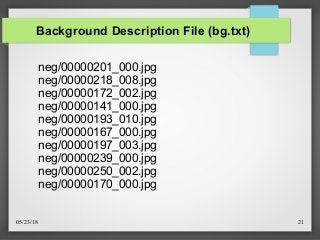
5) Negative and Positive images need description files,
for negatives, it should be bg.txt, and for positives should
be info or pos.txt or info.dat
6) Create a positive vector file by stitching all positives
images. This is done with an OpenCV command.
7) Image should be less than the actual amount of images, if
110 images than give 100 images, while creating samples.
8) Train Cascade.
Done with OpenCV Command.
05/23/18 18
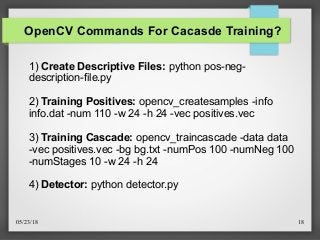
OpenCV Commands For Cacasde Training?
1) Create Descriptive Files: python pos-neg-
description-file.py
2) Training Positives: opencv_createsamples -info
info.dat -num 110 -w 24 -h 24 -vec positives.vec
3) Training Cascade: opencv_traincascade -data data
-vec positives.vec -bg bg.txt -numPos 100 -numNeg 100
-numStages 10 -w 24 -h 24
4) Detector: python detector.py
05/23/18 19
Code For Creating Description File
def create_pos_n_neg():
for file_type in ['neg','pos']:
for img in os.listdir(file_type):
if file_type == 'pos':
line = file_type+'/'+img+' 1 0 0 100 100n'
with open('info.dat','a') as f:
f.write(line)
elif file_type == 'neg':
line = file_type+'/'+img+'n'
with open('bg.txt','a') as f:
f.write(line)
05/23/18 20
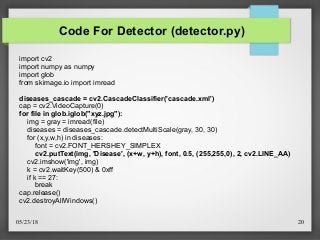
Code For Detector (detector.py)
import cv2
import numpy as numpy
import glob
from skimage.io import imread
diseases_cascade = cv2.CascadeClassifier('cascade.xml')
cap = cv2.VideoCapture(0)
for file in glob.iglob("xyz.jpg"):
img = gray = imread(file)
diseases = diseases_cascade.detectMultiScale(gray, 30, 30)
for (x,y,w,h) in diseases:
font = cv2.FONT_HERSHEY_SIMPLEX
cv2.putText(img, 'Disease', (x+w, y+h), font, 0.5, (255,255,0), 2, cv2.LINE_AA)
cv2.imshow('img', img)
k = cv2.waitKey(500) & 0xff
if k == 27:
break
cap.release()
cv2.destroyAllWindows()
05/23/18 21
Background Description File (bg.txt)
neg/00000201_000.jpg
neg/00000218_008.jpg
neg/00000172_002.jpg
neg/00000141_000.jpg
neg/00000193_010.jpg
neg/00000167_000.jpg
neg/00000197_003.jpg
neg/00000239_000.jpg
neg/00000250_002.jpg
neg/00000170_000.jpg
05/23/18 22
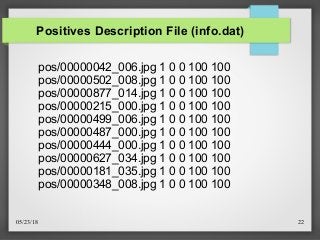
Positives Description File (info.dat)
pos/00000042_006.jpg 1 0 0 100 100
pos/00000502_008.jpg 1 0 0 100 100
pos/00000877_014.jpg 1 0 0 100 100
pos/00000215_000.jpg 1 0 0 100 100
pos/00000499_006.jpg 1 0 0 100 100
pos/00000487_000.jpg 1 0 0 100 100
pos/00000444_000.jpg 1 0 0 100 100
pos/00000627_034.jpg 1 0 0 100 100
pos/00000181_035.jpg 1 0 0 100 100
pos/00000348_008.jpg 1 0 0 100 100
05/23/18 23
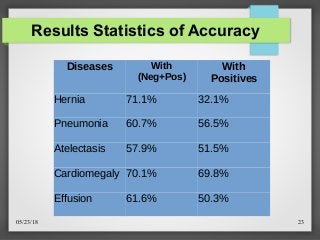
Results Statistics of Accuracy
Diseases With
(Neg+Pos)
With
Positives
Hernia 71.1% 32.1%
Pneumonia 60.7% 56.5%
Atelectasis 57.9% 51.5%
Cardiomegaly 70.1% 69.8%
Effusion 61.6% 50.3%
05/23/18 24
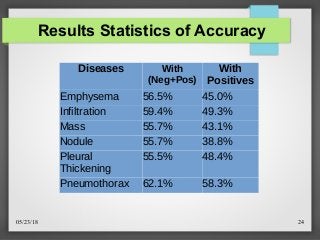
Results Statistics of Accuracy
Diseases With
(Neg+Pos)
With
Positives
Emphysema 56.5% 45.0%
Infiltration 59.4% 49.3%
Mass 55.7% 43.1%
Nodule 55.7% 38.8%
Pleural
Thickening
55.5% 48.4%
Pneumothorax 62.1% 58.3%
05/23/18 25
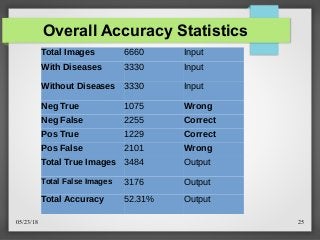
Overall Accuracy Statistics
Total Images 6660 Input
With Diseases 3330 Input
Without Diseases 3330 Input
Neg True 1075 Wrong
Neg False 2255 Correct
Pos True 1229 Correct
Pos False 2101 Wrong
Total True Images 3484 Output
Total False Images 3176 Output
Total Accuracy 52.31% Output
05/23/18 26
References
Pythonprogramming.net. (2018). Python Programming Tutorials.
[online] Available at: https://pythonprogramming.net/haar-cascade-
object-detection-python-opencv-tutorial/ [Accessed 5 May 2018]
Docs.opencv.org (2018). Cascade Classifier Training — OpenCV
2.4.13.0 documentation [online] Available
at:https://docs.opencv.org/2.4.13/doc/user_guide/ug_traincascade.htm
l/ [Accessed 5 May 2018]
Youtube.com (2018). VIOLA JONES FACE DETECTION
EXPLAINED [online] Available at:https://www.youtube.com/watch?
v=_QZLbR67fUU/ [Accessed 22 May 2018]
05/23/18 27
Summary
We have briefly explain the concept of Viola-
Jones Algorithm, it’s four major stages, which
includes Haar like features, Creating Integral
Images, AdaBoost Training and Cascade
Classifier.
We have also implement this algorithm to extract
features and classify 14 different diseases from x-
ray images using Python (OpenCV)
05/23/18 28
Any Questions?

Extract Features and Classification of Diseases from X-Ray Images Using Viola-Jones Algorithm

  • 1.
    Extracting Features andClassification of Diseases in X-Ray Images Using [Viola-Jones Algorithm] Medical Image Processing Syed Ebraiz Ali Chishti P177001@nu.edu.pk
  • 2.
    05/23/18 2 Contents This PresentationWill Cover: - What is Viola-Jones Algorithm? - Haar Like Features Selection - Creating Integral Images - Adaboost Training - Cascading Classifier - Implementation With Python OpenCV? - Results Statistics of Individual Diseases - Results Statistics of All Diseases
  • 3.
    05/23/18 3 Viola-Jones Algorithm TheViola–Jones algorithm is the first object detection framework to provide competitive object detection rates in real-time proposed in 2001 by Paul Viola and Michael Jones. This algorithm is a well known method for detecting faces, but It can also be trained to detect various other types of objects.
  • 4.
    05/23/18 4 Four Stages 1)Haar Feature Selection 2) Creating Integral Image 3) Adaboost Training 4) Cascading Classifier
  • 5.
    05/23/18 5 Haar FeatureFor Face Detection
  • 6.
    05/23/18 6 Haar FeatureFor Chest X-Ray Right LZ Pneumonia Disease
  • 7.
    05/23/18 7 Haar FeatureSelection Haar features are digital image features used in object recognition. Each feature results in a single value which is calculated by subtracting the sum of pixels under white rectangle from the sum of pixels under black rectangle. Value = Σ (black area pixels) - Σ (white area pixels)
  • 8.
    05/23/18 8 Integral ImageCont. The Integral Image is used as a quick and effective way of calculating the sum of values (pixel values) in a given rectangular subset of a grid. In an integral image the value at pixel (x,y) is the sum of pixels above and to the left of (x,y).
  • 9.
    05/23/18 9 Integral Image ● S(X,Y) = 6 + 8 + 7 – 5 = 16 Integral image allows calculation for adding all the pixels inside any given rectangle using only four values at the corners of the rectangle. S(X, Y) = i(X, Y) + S(X-1, Y) + S(X, Y-1) - S(X-1, Y-1)
  • 10.
    05/23/18 10 Adaboost TrainingCont. ●Adaboost algorithm is a machine learning algorithm which helps in finding only the best feature among 160,000+ possible features on 24x24 base resolution. When best features found, then each of the selected features are considered to be included so they can at least perform better than random guessing. These features are also called as weak classifier. Adaboost construct a strong classifier as a linear combination of the weak classifiers. Weak ClassifierStrong Classifier
  • 11.
    05/23/18 11 Adaboost Training RelevantFeature Out of 160,000+ possible features only few set of feature will be useful among all these features to identify a disease. Adaboost help us in finding relevant feature rather than irrelevant. Irrelevant FeatureAll Features
  • 12.
    05/23/18 12 Cascading ClassifierCont. Cascading is a particular case of ensemble learning based on the concatenation of several Classifiers, using all information collected from the output from a given classifier as additional information for the next classifier in the cascade. Hence a single strong classifier formed out of linear combination of all best features is not a good to evaluate on each window because of computation cost.
  • 13.
    05/23/18 13 Cascading ClassifierCont. Therefore, a cascade classifier is composed of stages each containing a strong classifier. So all the features are grouped into several stages where each stage has certain number of features. The job of each stages is used to determine whether a given sub window has a disease or not. If no disease, then discarded, otherwise move to next stage.
  • 14.
  • 15.
  • 16.
    05/23/18 16 Getting Started?Cont. 1) Collect "Negative" or "background" images. Any image, just make sure your object is not present in them. 2) Collect or create "positive" images. Thousand of images of your object. → Viola-Jones Algorithm is very slow while training, with only 2000 images over 10-12 stages it will take at least 2-4 hours to complete the training, so thats why I have trained the cascade with only 320 images each for negative & positive image for all individual diseases. 3) Try to use small images, (eg. 100X100). 4) Have same number of positive and negative images for training.
  • 17.
    05/23/18 17 Getting Started? 5)Negative and Positive images need description files, for negatives, it should be bg.txt, and for positives should be info or pos.txt or info.dat 6) Create a positive vector file by stitching all positives images. This is done with an OpenCV command. 7) Image should be less than the actual amount of images, if 110 images than give 100 images, while creating samples. 8) Train Cascade. Done with OpenCV Command.
  • 18.
    05/23/18 18 OpenCV CommandsFor Cacasde Training? 1) Create Descriptive Files: python pos-neg- description-file.py 2) Training Positives: opencv_createsamples -info info.dat -num 110 -w 24 -h 24 -vec positives.vec 3) Training Cascade: opencv_traincascade -data data -vec positives.vec -bg bg.txt -numPos 100 -numNeg 100 -numStages 10 -w 24 -h 24 4) Detector: python detector.py
  • 19.
    05/23/18 19 Code ForCreating Description File def create_pos_n_neg(): for file_type in ['neg','pos']: for img in os.listdir(file_type): if file_type == 'pos': line = file_type+'/'+img+' 1 0 0 100 100n' with open('info.dat','a') as f: f.write(line) elif file_type == 'neg': line = file_type+'/'+img+'n' with open('bg.txt','a') as f: f.write(line)
  • 20.
    05/23/18 20 Code ForDetector (detector.py) import cv2 import numpy as numpy import glob from skimage.io import imread diseases_cascade = cv2.CascadeClassifier('cascade.xml') cap = cv2.VideoCapture(0) for file in glob.iglob("xyz.jpg"): img = gray = imread(file) diseases = diseases_cascade.detectMultiScale(gray, 30, 30) for (x,y,w,h) in diseases: font = cv2.FONT_HERSHEY_SIMPLEX cv2.putText(img, 'Disease', (x+w, y+h), font, 0.5, (255,255,0), 2, cv2.LINE_AA) cv2.imshow('img', img) k = cv2.waitKey(500) & 0xff if k == 27: break cap.release() cv2.destroyAllWindows()
  • 21.
    05/23/18 21 Background DescriptionFile (bg.txt) neg/00000201_000.jpg neg/00000218_008.jpg neg/00000172_002.jpg neg/00000141_000.jpg neg/00000193_010.jpg neg/00000167_000.jpg neg/00000197_003.jpg neg/00000239_000.jpg neg/00000250_002.jpg neg/00000170_000.jpg
  • 22.
    05/23/18 22 Positives DescriptionFile (info.dat) pos/00000042_006.jpg 1 0 0 100 100 pos/00000502_008.jpg 1 0 0 100 100 pos/00000877_014.jpg 1 0 0 100 100 pos/00000215_000.jpg 1 0 0 100 100 pos/00000499_006.jpg 1 0 0 100 100 pos/00000487_000.jpg 1 0 0 100 100 pos/00000444_000.jpg 1 0 0 100 100 pos/00000627_034.jpg 1 0 0 100 100 pos/00000181_035.jpg 1 0 0 100 100 pos/00000348_008.jpg 1 0 0 100 100
  • 23.
    05/23/18 23 Results Statisticsof Accuracy Diseases With (Neg+Pos) With Positives Hernia 71.1% 32.1% Pneumonia 60.7% 56.5% Atelectasis 57.9% 51.5% Cardiomegaly 70.1% 69.8% Effusion 61.6% 50.3%
  • 24.
    05/23/18 24 Results Statisticsof Accuracy Diseases With (Neg+Pos) With Positives Emphysema 56.5% 45.0% Infiltration 59.4% 49.3% Mass 55.7% 43.1% Nodule 55.7% 38.8% Pleural Thickening 55.5% 48.4% Pneumothorax 62.1% 58.3%
  • 25.
    05/23/18 25 Overall AccuracyStatistics Total Images 6660 Input With Diseases 3330 Input Without Diseases 3330 Input Neg True 1075 Wrong Neg False 2255 Correct Pos True 1229 Correct Pos False 2101 Wrong Total True Images 3484 Output Total False Images 3176 Output Total Accuracy 52.31% Output
  • 26.
    05/23/18 26 References Pythonprogramming.net. (2018).Python Programming Tutorials. [online] Available at: https://pythonprogramming.net/haar-cascade- object-detection-python-opencv-tutorial/ [Accessed 5 May 2018] Docs.opencv.org (2018). Cascade Classifier Training — OpenCV 2.4.13.0 documentation [online] Available at:https://docs.opencv.org/2.4.13/doc/user_guide/ug_traincascade.htm l/ [Accessed 5 May 2018] Youtube.com (2018). VIOLA JONES FACE DETECTION EXPLAINED [online] Available at:https://www.youtube.com/watch? v=_QZLbR67fUU/ [Accessed 22 May 2018]
  • 27.
    05/23/18 27 Summary We havebriefly explain the concept of Viola- Jones Algorithm, it’s four major stages, which includes Haar like features, Creating Integral Images, AdaBoost Training and Cascade Classifier. We have also implement this algorithm to extract features and classify 14 different diseases from x- ray images using Python (OpenCV)
  • 28.