Internet data in Mobile applications Sheik Dawood Jainullabudeen  ( sheikd  at vishwak.com) Vishwak Solutions Pvt Ltd
Types of Internet Data Web Service JSON XML (RSS feed)
Web Service Web services are typically application programming interfaces (API) or web APIs that can be accessed over Internet, and executed on a remote system hosting the requested services
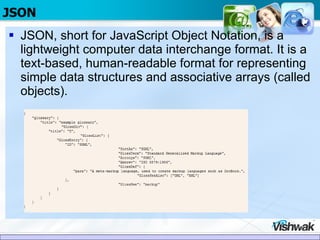
JSON JSON, short for JavaScript Object Notation, is a lightweight computer data interchange format. It is a text-based, human-readable format for representing simple data structures and associative arrays (called objects).
RSS RSS (most commonly expanded as Really Simple Syndication) is a family of web feed formats used to publish frequently updated works—such as blog entries, news headlines, audio, and video—in a standardized format
UI Elements Screen1: Lists the Category Titles  Screen2 : On Select of category ,2 nd  screen shows the Description of the RSS story
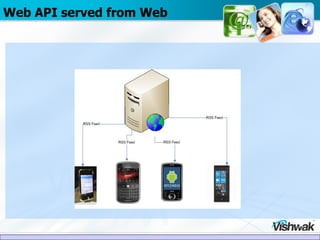
Web API served from Web
Mobile RSS Reader Choose the Data Source  Retrieve the RSS feed from webserver  Parse the RSS Feed  Store the RSS data as local objects(Array, List) Display the RSS feed in to Mobile UI Components
Choose the Data Source  (RSS feed ) Here we are connecting to RSS feed  http://rss.cnn.com/rss/edition.rss
Retrieve the VVF feed from webserver Before we do parsing and data manipulation of an RSS feed, the application should talk to internet and retrieve the RSS feed The Application connect to the site hosting RSS feed through an Internet connection (GPRS or Wi-Fi) and perform an  HTTP GET  operation to retrieve the RSS data.  The data which comes back is not a file, it is a stream of XML data. The URL class is employed to fetch the data.
Parse the RSS Feed(XML) We can parse XML data with multiple mechanisms.  All of them involve the navigation of the data stream and moving of one data element from another with the opportunity to store the data.
Parse the RSS Feed(XML) Two most popular approaches used for parsing the XML namely the DOM Parser, SAX Parser.  The DOM approach is well suited for complex XML documents as it builds a node-oriented representation of the XML data in memory.  The SAX approach uses callbacks whenever new tags are encountered, allowing the application to store only the data it is interested in.
Store the RSS data as local objects(Array, List) The RSS feed extracted from the XML data stream must be put into a Mobile application (SDK) understandable form.  RSSFee d and  RSSItem , which store the parsed form of the RSS XML data stream in memory.  Once the XML data stream is fully parsed, the application interacts with these classes to render the information.
Display the RSS feed in to Android UI Components This RSS Application employs two Activity classes to provide the user interface.  The primary screen lists the RSS feed title and publication date followed by a list of the RSS items.  Once an item is selected through a tap, or enter in the Android Emulator, the  ShowDescription  Activity displays the full detail including the Title, Publication Date, Description and Link elements of the RSS item.
Mobile Components Comparison
Challenges Faced – Minimal data exchange between mobile & internet Internet Data in mobile connection (GPRS) environment is very slow. The application cannot retrieve the data using mobile internet(GPRS) fast as internet connectivity. So the application should be talking to quick and minimal data  Mobile Applications quickly get the data from the feed and process it for display.
Challenges Faced – Minimal data exchange between mobile & internet Mobile Application in Offline mode. When user tries to connect Mobile application which suppose to connect to internet should have interface to show case the cached information available in the device Caching of data will help user to navigate minimum level of information and when internet is available the rest of the information will be shown.
XML   VS JSON Data Bytes Various API’s and their size in XML, JSON format’s
Uncompressed XML vs Compressed JSON Data Comparison between XML vs Compressed JSON format.  The JSON compressed data size is reduced compared to XML format
PhoneGap PhoneGap is an open source development tool for building fast, easy mobile apps with JavaScript Mobile Development with different SDK , IDE iPhone SDK(using Objective-C) Android SDK (using Java) Blackberry SDK (using JavaME) Phonegap supports cross-platform framework for device-neutral mobile development. Application is developed using Javascript libraries.
VVF on Iphone
VVF on Android
VVF on Blackberry
Thank you

Internet data in mobile applications

  • 1.
    Internet data inMobile applications Sheik Dawood Jainullabudeen ( sheikd at vishwak.com) Vishwak Solutions Pvt Ltd
  • 2.
    Types of InternetData Web Service JSON XML (RSS feed)
  • 3.
    Web Service Webservices are typically application programming interfaces (API) or web APIs that can be accessed over Internet, and executed on a remote system hosting the requested services
  • 4.
    JSON JSON, shortfor JavaScript Object Notation, is a lightweight computer data interchange format. It is a text-based, human-readable format for representing simple data structures and associative arrays (called objects).
  • 5.
    RSS RSS (mostcommonly expanded as Really Simple Syndication) is a family of web feed formats used to publish frequently updated works—such as blog entries, news headlines, audio, and video—in a standardized format
  • 6.
    UI Elements Screen1:Lists the Category Titles Screen2 : On Select of category ,2 nd screen shows the Description of the RSS story
  • 7.
  • 8.
    Mobile RSS ReaderChoose the Data Source Retrieve the RSS feed from webserver Parse the RSS Feed Store the RSS data as local objects(Array, List) Display the RSS feed in to Mobile UI Components
  • 9.
    Choose the DataSource (RSS feed ) Here we are connecting to RSS feed http://rss.cnn.com/rss/edition.rss
  • 10.
    Retrieve the VVFfeed from webserver Before we do parsing and data manipulation of an RSS feed, the application should talk to internet and retrieve the RSS feed The Application connect to the site hosting RSS feed through an Internet connection (GPRS or Wi-Fi) and perform an HTTP GET operation to retrieve the RSS data. The data which comes back is not a file, it is a stream of XML data. The URL class is employed to fetch the data.
  • 11.
    Parse the RSSFeed(XML) We can parse XML data with multiple mechanisms. All of them involve the navigation of the data stream and moving of one data element from another with the opportunity to store the data.
  • 12.
    Parse the RSSFeed(XML) Two most popular approaches used for parsing the XML namely the DOM Parser, SAX Parser. The DOM approach is well suited for complex XML documents as it builds a node-oriented representation of the XML data in memory. The SAX approach uses callbacks whenever new tags are encountered, allowing the application to store only the data it is interested in.
  • 13.
    Store the RSSdata as local objects(Array, List) The RSS feed extracted from the XML data stream must be put into a Mobile application (SDK) understandable form. RSSFee d and RSSItem , which store the parsed form of the RSS XML data stream in memory. Once the XML data stream is fully parsed, the application interacts with these classes to render the information.
  • 14.
    Display the RSSfeed in to Android UI Components This RSS Application employs two Activity classes to provide the user interface. The primary screen lists the RSS feed title and publication date followed by a list of the RSS items. Once an item is selected through a tap, or enter in the Android Emulator, the ShowDescription Activity displays the full detail including the Title, Publication Date, Description and Link elements of the RSS item.
  • 15.
  • 16.
    Challenges Faced –Minimal data exchange between mobile & internet Internet Data in mobile connection (GPRS) environment is very slow. The application cannot retrieve the data using mobile internet(GPRS) fast as internet connectivity. So the application should be talking to quick and minimal data Mobile Applications quickly get the data from the feed and process it for display.
  • 17.
    Challenges Faced –Minimal data exchange between mobile & internet Mobile Application in Offline mode. When user tries to connect Mobile application which suppose to connect to internet should have interface to show case the cached information available in the device Caching of data will help user to navigate minimum level of information and when internet is available the rest of the information will be shown.
  • 18.
    XML VS JSON Data Bytes Various API’s and their size in XML, JSON format’s
  • 19.
    Uncompressed XML vsCompressed JSON Data Comparison between XML vs Compressed JSON format. The JSON compressed data size is reduced compared to XML format
  • 20.
    PhoneGap PhoneGap isan open source development tool for building fast, easy mobile apps with JavaScript Mobile Development with different SDK , IDE iPhone SDK(using Objective-C) Android SDK (using Java) Blackberry SDK (using JavaME) Phonegap supports cross-platform framework for device-neutral mobile development. Application is developed using Javascript libraries.
  • 21.
  • 22.
  • 23.
  • 24.