How to check your
exemptions
Please follow our short step-by-step guide to find out how to check what exemptions you may be
eligible to claim.


Step 1 – Searching for the institution where you studied


                                                   1	 Enter one or more words from the name of the institution
                                                      that you want to search for, eg Birmingham for University
                                                      of Birmingham.

                              1                    2	 You may also wish to select a country from the drop-down list.
                                  2                   If you leave this blank, institution names meeting the search
                                                      criteria in all countries will be displayed.

                                                   3	 If you do not wish to search for a specific institution, but
                                                      want to view minimum entry requirements for one or more
                                       3
                                                      countries, this link will launch a document covering the
                                                      requirements for all countries.


Step 2 – Selecting an institution


                                                   1	 The list of institutions your search has generated are
                                                      displayed. Simply click on the institution you wish to select
                                                      and you will be taken to view details about that institution.

                                                   2	 Institutions will be displayed in alphabetical order by
                                                      institution name. However, you can view the institutions in
                                                      country order by clicking on the ‘COUNTRY’ title at the top of
                                                      the column.


Step 3 – Selecting an accredited programme and assessment


                                                   1	 All accredited programmes for the institution you selected are
                                                      displayed. Click on the programme you want to view and it
                                                      will be highlighted in bold.

                                                   2	 Assessments for the selected programme are displayed
                                                      directly below – the information in this part of the screen
                                                      changes depending on which programme has been selected,
                                                      and the selected programme title is displayed in the title bar
                                                      of the table.
              1
                                                   3	 You can view exemption information for the ACCA Qualification
                                                      and Certified Accounting Technician for each assessment by
                                                      clicking on the links for either of these qualifications next to
                                                      the appropriate assessment. You will then be taken directly to
               2
                                                      the relevant exemption information.
                                           3


2
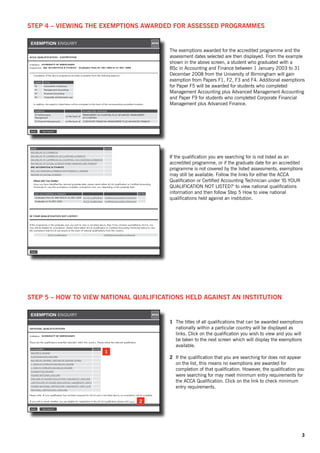
Step 4 – Viewing the exemptions awarded for assessed programmes


                                        The exemptions awarded for the accredited programme and the
                                        assessment dates selected are then displayed. From the example
                                        shown in the above screen, a student who graduated with a
                                        BSc in Accounting and Finance between 1 January 2003 to 31
                                        December 2008 from the University of Birmingham will gain
                                        exemption from Papers F1, F2, F3 and F4. Additional exemptions
                                        for Paper F5 will be awarded for students who completed
                                        Management Accounting plus Advanced Management Accounting
                                        and Paper F9 for students who completed Corporate Financial
                                        Management plus Advanced Finance.


                                        If the qualification you are searching for is not listed as an
                                        accredited programme, or if the graduate date for an accredited
                                        programme is not covered by the listed assessments, exemptions
                                        may still be available. Follow the links for either the ACCA
                                        Qualification or Certified Accounting Technician under ‘IS YOUR
                                        QUALIFICATION NOT LISTED?’ to view national qualifications
                                        information and then follow Step 5 How to view national
                                        qualifications held against an institution.


Step 5 – How to view national qualifications held against an institution


                                        1	 The titles of all qualifications that can be awarded exemptions
                                           nationally within a particular country will be displayed as
                                           links. Click on the qualification you wish to view and you will
                                           be taken to the next screen which will display the exemptions
                                           available.
                     1
                                        2	 If the qualification that you are searching for does not appear
                                           on the list, this means no exemptions are awarded for
                                           completion of that qualification. However, the qualification you
                                           were searching for may meet minimum entry requirements for
                                           the ACCA Qualification. Click on the link to check minimum
                                           entry requirements.

                               2


                                                                                                         3
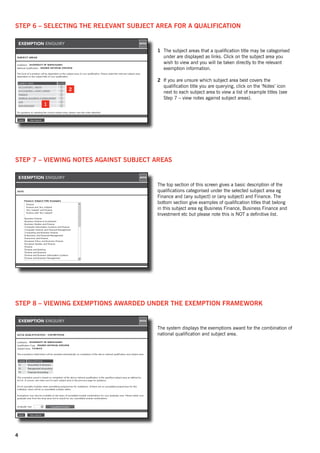
Step 6 – Selecting the relevant subject area for a qualification


                                        1	 The subject areas that a qualification title may be categorised
                                           under are displayed as links. Click on the subject area you
                                           wish to view and you will be taken directly to the relevant
                                           exemption information.

                                        2	 If you are unsure which subject area best covers the
                                           qualification title you are querying, click on the ‘Notes’ icon
               2
                                           next to each subject area to view a list of example titles (see
                                           Step 7 – view notes against subject areas).
        1


Step 7 – Viewing notes against subject areas


                                        The top section of this screen gives a basic description of the
                                        qualifications categorised under the selected subject area eg
                                        Finance and (any subject) or (any subject) and Finance. The
                                        bottom section give examples of qualification titles that belong
                                        in this subject area eg Business Finance, Business Finance and
                                        Investment etc but please note this is NOT a definitive list.


Step 8 – Viewing exemptions awarded under the exemption framework


                                        The system displays the exemptions award for the combination of
                                        national qualification and subject area.


4
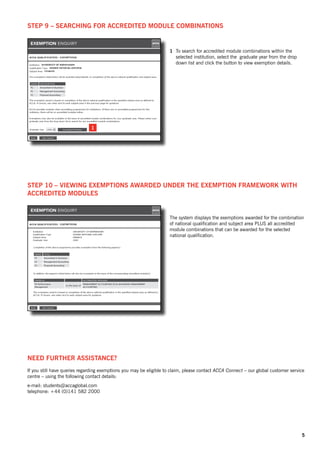
Step 9 – Searching for accredited module combinations


                                                                    1	 To search for accredited module combinations within the
                                                                       selected institution, select the graduate year from the drop
                                                                       down list and click the button to view exemption details.


                              1


Step 10 – Viewing exemptions awarded under the exemption framework with
accredited modules


                                                                    The system displays the exemptions awarded for the combination
                                                                    of national qualification and subject area PLUS all accredited
                                                                    module combinations that can be awarded for the selected
                                                                    national qualification.


NEED FURTHER ASSISTANCE?
If you still have queries regarding exemptions you may be eligible to claim, please contact ACCA Connect – our global customer service
centre – using the following contact details:
e-mail: students@accaglobal.com
telephone: +44 (0)141 582 2000


                                                                                                                                      5

Exempt user guide ACCA

  • 1.
    How to checkyour exemptions
  • 2.
    Please follow ourshort step-by-step guide to find out how to check what exemptions you may be eligible to claim. Step 1 – Searching for the institution where you studied 1 Enter one or more words from the name of the institution that you want to search for, eg Birmingham for University of Birmingham. 1 2 You may also wish to select a country from the drop-down list. 2 If you leave this blank, institution names meeting the search criteria in all countries will be displayed. 3 If you do not wish to search for a specific institution, but want to view minimum entry requirements for one or more 3 countries, this link will launch a document covering the requirements for all countries. Step 2 – Selecting an institution 1 The list of institutions your search has generated are displayed. Simply click on the institution you wish to select and you will be taken to view details about that institution. 2 Institutions will be displayed in alphabetical order by institution name. However, you can view the institutions in country order by clicking on the ‘COUNTRY’ title at the top of the column. Step 3 – Selecting an accredited programme and assessment 1 All accredited programmes for the institution you selected are displayed. Click on the programme you want to view and it will be highlighted in bold. 2 Assessments for the selected programme are displayed directly below – the information in this part of the screen changes depending on which programme has been selected, and the selected programme title is displayed in the title bar of the table. 1 3 You can view exemption information for the ACCA Qualification and Certified Accounting Technician for each assessment by clicking on the links for either of these qualifications next to the appropriate assessment. You will then be taken directly to 2 the relevant exemption information. 3 2
  • 3.
    Step 4 –Viewing the exemptions awarded for assessed programmes The exemptions awarded for the accredited programme and the assessment dates selected are then displayed. From the example shown in the above screen, a student who graduated with a BSc in Accounting and Finance between 1 January 2003 to 31 December 2008 from the University of Birmingham will gain exemption from Papers F1, F2, F3 and F4. Additional exemptions for Paper F5 will be awarded for students who completed Management Accounting plus Advanced Management Accounting and Paper F9 for students who completed Corporate Financial Management plus Advanced Finance. If the qualification you are searching for is not listed as an accredited programme, or if the graduate date for an accredited programme is not covered by the listed assessments, exemptions may still be available. Follow the links for either the ACCA Qualification or Certified Accounting Technician under ‘IS YOUR QUALIFICATION NOT LISTED?’ to view national qualifications information and then follow Step 5 How to view national qualifications held against an institution. Step 5 – How to view national qualifications held against an institution 1 The titles of all qualifications that can be awarded exemptions nationally within a particular country will be displayed as links. Click on the qualification you wish to view and you will be taken to the next screen which will display the exemptions available. 1 2 If the qualification that you are searching for does not appear on the list, this means no exemptions are awarded for completion of that qualification. However, the qualification you were searching for may meet minimum entry requirements for the ACCA Qualification. Click on the link to check minimum entry requirements. 2 3
  • 4.
    Step 6 –Selecting the relevant subject area for a qualification 1 The subject areas that a qualification title may be categorised under are displayed as links. Click on the subject area you wish to view and you will be taken directly to the relevant exemption information. 2 If you are unsure which subject area best covers the qualification title you are querying, click on the ‘Notes’ icon 2 next to each subject area to view a list of example titles (see Step 7 – view notes against subject areas). 1 Step 7 – Viewing notes against subject areas The top section of this screen gives a basic description of the qualifications categorised under the selected subject area eg Finance and (any subject) or (any subject) and Finance. The bottom section give examples of qualification titles that belong in this subject area eg Business Finance, Business Finance and Investment etc but please note this is NOT a definitive list. Step 8 – Viewing exemptions awarded under the exemption framework The system displays the exemptions award for the combination of national qualification and subject area. 4
  • 5.
    Step 9 –Searching for accredited module combinations 1 To search for accredited module combinations within the selected institution, select the graduate year from the drop down list and click the button to view exemption details. 1 Step 10 – Viewing exemptions awarded under the exemption framework with accredited modules The system displays the exemptions awarded for the combination of national qualification and subject area PLUS all accredited module combinations that can be awarded for the selected national qualification. NEED FURTHER ASSISTANCE? If you still have queries regarding exemptions you may be eligible to claim, please contact ACCA Connect – our global customer service centre – using the following contact details: e-mail: students@accaglobal.com telephone: +44 (0)141 582 2000 5