1
Exception Types – Uncaught Exceptions –
Using Try Catch – Multiple Catch – Nested Try
– throw- throws- finally – Built in Exceptions-
Using Exceptions
2
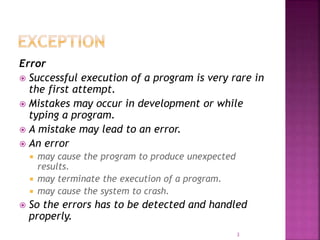
Error
 Successful execution of a program is very rare in
the first attempt.
 Mistakes may occur in development or while
typing a program.
 A mistake may lead to an error.
 An error
 may cause the program to produce unexpected
results.
 may terminate the execution of a program.
 may cause the system to crash.
 So the errors has to be detected and handled
properly.
3
Types of Errors
 Compile-time errors
 Run-time errors
4
 Errors detected during compile time.
 All syntax errors will be detected and
displayed by the Java compiler.
 .class file will not be created if the compiler
detects errors.
 Java compiler also tells us where the errors
are in the program.
 A single error may be the source of multiple
errors.
 Most of the compile time errors are due to
typing mistakes.
5
Example
class Example {
public static void main(String args[])
{
System.out.println("This is a simple Java
program.")
// Missing ;
}
} So while compiling, it will result in an error
Example.java:6: ';' expected
}
^
1 error
6
 Missing semicolons
 Missing brackets in classes and methods
 Misspelling of identifiers and keywords
 Missing double quotes in strings
 Use of undeclared variables
 Incompatible types in assignments / initialization
 Use of = in place of == operator
 Errors related to directory paths
 ‘javac’ is not recognized as an internal or external command,
operable program or batch file.
 Path must include the directory where the java executables
are stored.

7
 Errors detected during run time.
 .class files may be created as a result of
successful compilation.
 But the program may result in incorrect
output due to wrong logic or the program
may terminate due to errors such as stack
overflow.
 When run-time error occurs, Java run-time
generates an error condition and causes the
program to stop after displaying the
appropriate message.

8
Example
class Example
{
public static void main(String args[]) {
int a = 10;
int b = 0;
int c = a/b;
System.out.println(c); }
}
So while compiling, it will not result in an error. But while
running, it will result in the following error.
Exception in thread "main" java.lang.ArithmeticException: / by
zero
at Example.main(Example.java:7)
9
 Dividing an integer by zero
 Accessing an element that is out of the
bounds of an array
 Trying to store a value into an array of
incompatible class or type
 Passing a parameter that is not in a valid
range or value for a method
10
 An exception is an abnormal condition that
arises in a code sequence at run time.
 An exception is caused by a run-time error.
 When Java interpreter encounters an error,
it creates an exception object and throws it.
 If the exception object is not caught and
handled properly, the interpreter will
display an error message and terminate the
program.
11
 A Java exception is an object that describes an
exceptional (that is, error) condition that has occurred
in a piece of code.
 When an exceptional condition arises, an object
representing that exception is created and thrown in
the method that caused the error.
 That method may choose to handle the exception
itself, or pass it on.
 Either way, at some point, the exception is caught and
processed.
 Exceptions can be generated by the Java run-time
system, or they can be manually generated by your
code.
12
When a program throws an exception, it comes
to a stop. This exception should be caught by
exception handler and dealt with immediately. If
there is no default java runtime system provides
default handlers. This displays a string, which
describes the exception and the point.
13
14
// Usage of default exception handler
Class DefException {
public static void main(String srgs[]) {
int i[]={2};
i[10]=20;
}
}
It tries to set the value to the tenth element of the
integer array, which generates
ArrayIndexOutOfBoundsException.
Output
Java.lang. ArrayIndexOutOfBoundsException : 10
15
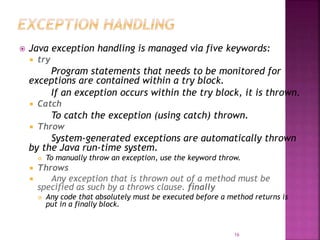
 Java exception handling is managed via five keywords:
 try
Program statements that needs to be monitored for
exceptions are contained within a try block.
If an exception occurs within the try block, it is thrown.
 Catch
To catch the exception (using catch) thrown.
 Throw
System-generated exceptions are automatically thrown
by the Java run-time system.
 To manually throw an exception, use the keyword throw.
 Throws
 Any exception that is thrown out of a method must be
specified as such by a throws clause. finally
 Any code that absolutely must be executed before a method returns is
put in a finally block.
16
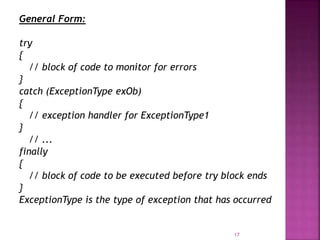
General Form:
try
{
// block of code to monitor for errors
}
catch (ExceptionType exOb)
{
// exception handler for ExceptionType1
}
// ...
finally
{
// block of code to be executed before try block ends
}
ExceptionType is the type of exception that has occurred
17
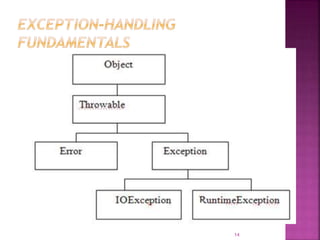
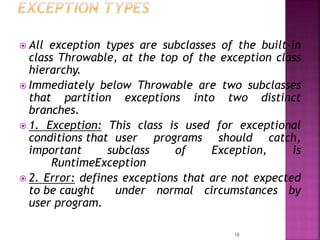
 All exception types are subclasses of the built-in
class Throwable, at the top of the exception class
hierarchy.
 Immediately below Throwable are two subclasses
that partition exceptions into two distinct
branches.
 1. Exception: This class is used for exceptional
conditions that user programs should catch,
important subclass of Exception, is
RuntimeException
 2. Error: defines exceptions that are not expected
to be caught under normal circumstances by
user program.
18
19
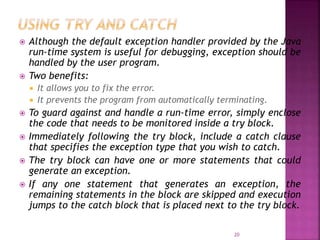
 Although the default exception handler provided by the Java
run-time system is useful for debugging, exception should be
handled by the user program.
 Two benefits:
 It allows you to fix the error.
 It prevents the program from automatically terminating.
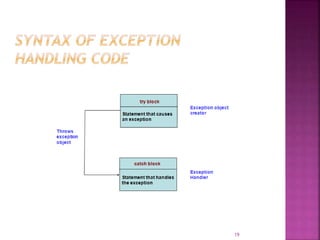
 To guard against and handle a run-time error, simply enclose
the code that needs to be monitored inside a try block.
 Immediately following the try block, include a catch clause
that specifies the exception type that you wish to catch.
 The try block can have one or more statements that could
generate an exception.
 If any one statement that generates an exception, the
remaining statements in the block are skipped and execution
jumps to the catch block that is placed next to the try block.
20
class Ex {
public static void main(String args[]) {
int d, a;
try
{ // monitor a block of code.
d = 0;
a = 42 / d;
System.out.println("This will not be printed.");
}
catch (ArithmeticException e)
{ // catch divide-by-zero error
System.out.println("Division by zero.");
}
System.out.println("After catch statement.");
}}
Output:
Division by zero.
After catch statement.
21
 // Usage of try and catch block
class NegTest{
public static void main(String args[]) {
try
{ // monitor a block of code.
Int arr[]=new int[-2];
System.out.println("first element :”+arr[0]);
}
Catch(NegativeArraySizeException n)
{
System.out.println("Generated Exception :” +n);
}
System.out.println("after the try block”);
}
}
Output:
This tries to print the first element in the array arr that is created. Since the array declaration
as negative, an exception is generated.
Generated Exception : java.lang.NegativeSizeArrayException
After the try block.
22
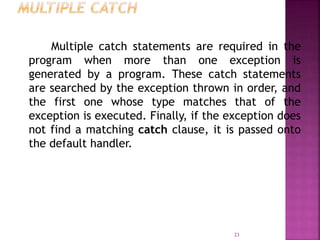
Multiple catch statements are required in the
program when more than one exception is
generated by a program. These catch statements
are searched by the exception thrown in order, and
the first one whose type matches that of the
exception is executed. Finally, if the exception does
not find a matching catch clause, it is passed onto
the default handler.
23
class MultiCatch {
public static void main(String args[ ]){
try
{
int a = args.length;
System.out.println("a = " + a);
int b = 42 / a;
24
int c[ ] = { 1 };
c[42] = 99;
}
catch(ArithmeticException e)
{
System.out.println("Divide by 0: " + e);
}
catch(ArrayIndexOutOfBoundsException e)
{
System.out.println("Array index: " + e);
}
System.out.println("After try/catch.");
}}
25
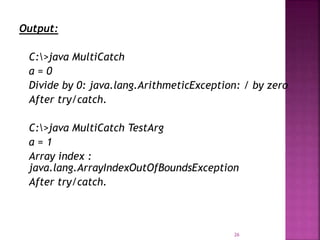
Output:
C:>java MultiCatch
a = 0
Divide by 0: java.lang.ArithmeticException: / by zero
After try/catch.
C:>java MultiCatch TestArg
a = 1
Array index :
java.lang.ArrayIndexOutOfBoundsException
After try/catch.
26
// The try statement can be nested.
class NestTry {
public static void main(String args[]) {
try
{
int a = args.length;
int b = 42 / a;
System.out.println("a = " + a);
27
try
{ // nested try block
if(a == 1)
a = a / (a - a); // division by 0
if(a == 2)
{
int c[ ] = { 1 };
c[42] = 99; // out-of-bounds exception
}
}
catch(ArrayIndexOutOfBoundsException e)
{
System.out.println("Array index outofbounds: " + e);
}
}
catch(ArithmeticException e)
{
System.out.println("Divide by 0: " + e);
}
}}
28
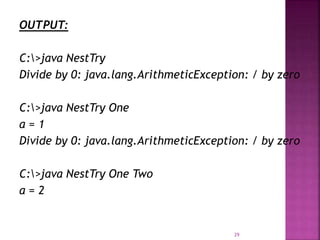
OUTPUT:
C:>java NestTry
Divide by 0: java.lang.ArithmeticException: / by zero
C:>java NestTry One
a = 1
Divide by 0: java.lang.ArithmeticException: / by zero
C:>java NestTry One Two
a = 2
29
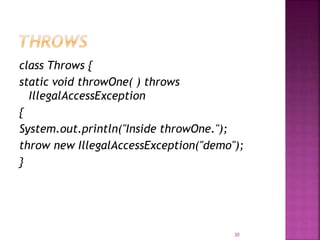
class Throws {
static void throwOne( ) throws
IllegalAccessException
{
System.out.println("Inside throwOne.");
throw new IllegalAccessException("demo");
}
30
public static void main(String args[ ]) {
try
{
throwOne();
}
catch (IllegalAccessException e)
{
System.out.println("Caught " + e);
}
}}
Note:
// A throws clause lists
 the types of exceptions that a method might throw.
31
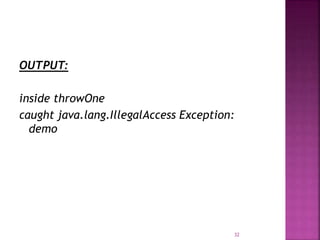
OUTPUT:
inside throwOne
caught java.lang.IllegalAccess Exception:
demo
32
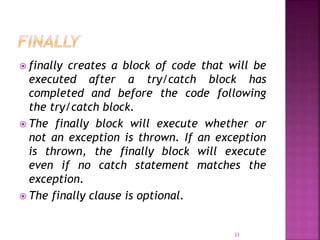
 finally creates a block of code that will be
executed after a try/catch block has
completed and before the code following
the try/catch block.
 The finally block will execute whether or
not an exception is thrown. If an exception
is thrown, the finally block will execute
even if no catch statement matches the
exception.
 The finally clause is optional.
33
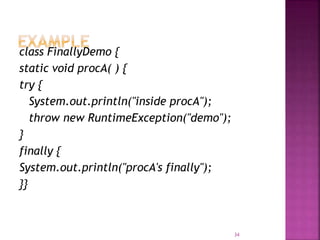
class FinallyDemo {
static void procA( ) {
try {
System.out.println("inside procA");
throw new RuntimeException("demo");
}
finally {
System.out.println("procA's finally");
}}
34
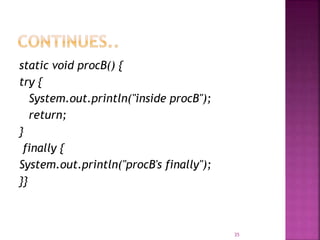
static void procB() {
try {
System.out.println("inside procB");
return;
}
finally {
System.out.println("procB's finally");
}}
35
static void procC() {
try {
System.out.println("inside procC");
}
finally {
System.out.println("procC's finally");
}}
public static void main(String args[ ]) {
try {
procA();
} catch (Exception e) {
System.out.println("Exception caught");
}
procB();
procC();
}}
36
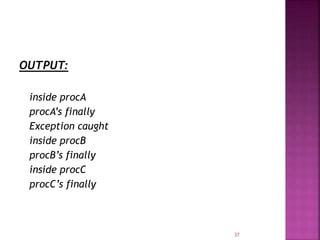
OUTPUT:
inside procA
procA’s finally
Exception caught
inside procB
procB’s finally
inside procC
procC’s finally
37

Exception handling in java

  • 1.
  • 2.
    Exception Types –Uncaught Exceptions – Using Try Catch – Multiple Catch – Nested Try – throw- throws- finally – Built in Exceptions- Using Exceptions 2
  • 3.
    Error  Successful executionof a program is very rare in the first attempt.  Mistakes may occur in development or while typing a program.  A mistake may lead to an error.  An error  may cause the program to produce unexpected results.  may terminate the execution of a program.  may cause the system to crash.  So the errors has to be detected and handled properly. 3
  • 4.
    Types of Errors Compile-time errors  Run-time errors 4
  • 5.
     Errors detectedduring compile time.  All syntax errors will be detected and displayed by the Java compiler.  .class file will not be created if the compiler detects errors.  Java compiler also tells us where the errors are in the program.  A single error may be the source of multiple errors.  Most of the compile time errors are due to typing mistakes. 5
  • 6.
    Example class Example { publicstatic void main(String args[]) { System.out.println("This is a simple Java program.") // Missing ; } } So while compiling, it will result in an error Example.java:6: ';' expected } ^ 1 error 6
  • 7.
     Missing semicolons Missing brackets in classes and methods  Misspelling of identifiers and keywords  Missing double quotes in strings  Use of undeclared variables  Incompatible types in assignments / initialization  Use of = in place of == operator  Errors related to directory paths  ‘javac’ is not recognized as an internal or external command, operable program or batch file.  Path must include the directory where the java executables are stored.  7
  • 8.
     Errors detectedduring run time.  .class files may be created as a result of successful compilation.  But the program may result in incorrect output due to wrong logic or the program may terminate due to errors such as stack overflow.  When run-time error occurs, Java run-time generates an error condition and causes the program to stop after displaying the appropriate message.  8
  • 9.
    Example class Example { public staticvoid main(String args[]) { int a = 10; int b = 0; int c = a/b; System.out.println(c); } } So while compiling, it will not result in an error. But while running, it will result in the following error. Exception in thread "main" java.lang.ArithmeticException: / by zero at Example.main(Example.java:7) 9
  • 10.
     Dividing aninteger by zero  Accessing an element that is out of the bounds of an array  Trying to store a value into an array of incompatible class or type  Passing a parameter that is not in a valid range or value for a method 10
  • 11.
     An exceptionis an abnormal condition that arises in a code sequence at run time.  An exception is caused by a run-time error.  When Java interpreter encounters an error, it creates an exception object and throws it.  If the exception object is not caught and handled properly, the interpreter will display an error message and terminate the program. 11
  • 12.
     A Javaexception is an object that describes an exceptional (that is, error) condition that has occurred in a piece of code.  When an exceptional condition arises, an object representing that exception is created and thrown in the method that caused the error.  That method may choose to handle the exception itself, or pass it on.  Either way, at some point, the exception is caught and processed.  Exceptions can be generated by the Java run-time system, or they can be manually generated by your code. 12
  • 13.
    When a programthrows an exception, it comes to a stop. This exception should be caught by exception handler and dealt with immediately. If there is no default java runtime system provides default handlers. This displays a string, which describes the exception and the point. 13
  • 14.
  • 15.
    // Usage ofdefault exception handler Class DefException { public static void main(String srgs[]) { int i[]={2}; i[10]=20; } } It tries to set the value to the tenth element of the integer array, which generates ArrayIndexOutOfBoundsException. Output Java.lang. ArrayIndexOutOfBoundsException : 10 15
  • 16.
     Java exceptionhandling is managed via five keywords:  try Program statements that needs to be monitored for exceptions are contained within a try block. If an exception occurs within the try block, it is thrown.  Catch To catch the exception (using catch) thrown.  Throw System-generated exceptions are automatically thrown by the Java run-time system.  To manually throw an exception, use the keyword throw.  Throws  Any exception that is thrown out of a method must be specified as such by a throws clause. finally  Any code that absolutely must be executed before a method returns is put in a finally block. 16
  • 17.
    General Form: try { // blockof code to monitor for errors } catch (ExceptionType exOb) { // exception handler for ExceptionType1 } // ... finally { // block of code to be executed before try block ends } ExceptionType is the type of exception that has occurred 17
  • 18.
     All exceptiontypes are subclasses of the built-in class Throwable, at the top of the exception class hierarchy.  Immediately below Throwable are two subclasses that partition exceptions into two distinct branches.  1. Exception: This class is used for exceptional conditions that user programs should catch, important subclass of Exception, is RuntimeException  2. Error: defines exceptions that are not expected to be caught under normal circumstances by user program. 18
  • 19.
  • 20.
     Although thedefault exception handler provided by the Java run-time system is useful for debugging, exception should be handled by the user program.  Two benefits:  It allows you to fix the error.  It prevents the program from automatically terminating.  To guard against and handle a run-time error, simply enclose the code that needs to be monitored inside a try block.  Immediately following the try block, include a catch clause that specifies the exception type that you wish to catch.  The try block can have one or more statements that could generate an exception.  If any one statement that generates an exception, the remaining statements in the block are skipped and execution jumps to the catch block that is placed next to the try block. 20
  • 21.
    class Ex { publicstatic void main(String args[]) { int d, a; try { // monitor a block of code. d = 0; a = 42 / d; System.out.println("This will not be printed."); } catch (ArithmeticException e) { // catch divide-by-zero error System.out.println("Division by zero."); } System.out.println("After catch statement."); }} Output: Division by zero. After catch statement. 21
  • 22.
     // Usageof try and catch block class NegTest{ public static void main(String args[]) { try { // monitor a block of code. Int arr[]=new int[-2]; System.out.println("first element :”+arr[0]); } Catch(NegativeArraySizeException n) { System.out.println("Generated Exception :” +n); } System.out.println("after the try block”); } } Output: This tries to print the first element in the array arr that is created. Since the array declaration as negative, an exception is generated. Generated Exception : java.lang.NegativeSizeArrayException After the try block. 22
  • 23.
    Multiple catch statementsare required in the program when more than one exception is generated by a program. These catch statements are searched by the exception thrown in order, and the first one whose type matches that of the exception is executed. Finally, if the exception does not find a matching catch clause, it is passed onto the default handler. 23
  • 24.
    class MultiCatch { publicstatic void main(String args[ ]){ try { int a = args.length; System.out.println("a = " + a); int b = 42 / a; 24
  • 25.
    int c[ ]= { 1 }; c[42] = 99; } catch(ArithmeticException e) { System.out.println("Divide by 0: " + e); } catch(ArrayIndexOutOfBoundsException e) { System.out.println("Array index: " + e); } System.out.println("After try/catch."); }} 25
  • 26.
    Output: C:>java MultiCatch a =0 Divide by 0: java.lang.ArithmeticException: / by zero After try/catch. C:>java MultiCatch TestArg a = 1 Array index : java.lang.ArrayIndexOutOfBoundsException After try/catch. 26
  • 27.
    // The trystatement can be nested. class NestTry { public static void main(String args[]) { try { int a = args.length; int b = 42 / a; System.out.println("a = " + a); 27
  • 28.
    try { // nestedtry block if(a == 1) a = a / (a - a); // division by 0 if(a == 2) { int c[ ] = { 1 }; c[42] = 99; // out-of-bounds exception } } catch(ArrayIndexOutOfBoundsException e) { System.out.println("Array index outofbounds: " + e); } } catch(ArithmeticException e) { System.out.println("Divide by 0: " + e); } }} 28
  • 29.
    OUTPUT: C:>java NestTry Divide by0: java.lang.ArithmeticException: / by zero C:>java NestTry One a = 1 Divide by 0: java.lang.ArithmeticException: / by zero C:>java NestTry One Two a = 2 29
  • 30.
    class Throws { staticvoid throwOne( ) throws IllegalAccessException { System.out.println("Inside throwOne."); throw new IllegalAccessException("demo"); } 30
  • 31.
    public static voidmain(String args[ ]) { try { throwOne(); } catch (IllegalAccessException e) { System.out.println("Caught " + e); } }} Note: // A throws clause lists  the types of exceptions that a method might throw. 31
  • 32.
  • 33.
     finally createsa block of code that will be executed after a try/catch block has completed and before the code following the try/catch block.  The finally block will execute whether or not an exception is thrown. If an exception is thrown, the finally block will execute even if no catch statement matches the exception.  The finally clause is optional. 33
  • 34.
    class FinallyDemo { staticvoid procA( ) { try { System.out.println("inside procA"); throw new RuntimeException("demo"); } finally { System.out.println("procA's finally"); }} 34
  • 35.
    static void procB(){ try { System.out.println("inside procB"); return; } finally { System.out.println("procB's finally"); }} 35
  • 36.
    static void procC(){ try { System.out.println("inside procC"); } finally { System.out.println("procC's finally"); }} public static void main(String args[ ]) { try { procA(); } catch (Exception e) { System.out.println("Exception caught"); } procB(); procC(); }} 36
  • 37.
    OUTPUT: inside procA procA’s finally Exceptioncaught inside procB procB’s finally inside procC procC’s finally 37