
Excelling with Microsoft ExcelSirui Wang, Ph.D. studentTaralynnHartsell, Ph.D, Associate Professor, Instructional Technology and DesignThe University of Southern Mississippi February, 2011
What is Microsoft Excel?Microsoft Excel is a spreadsheetprogramthat allows one to enter numerical values or data into rows or columns of a spreadsheet, and to use these numericalentries for tasks such as calculations,graphs, and statistical analysis.
SpreadsheetA spreadsheet is a computer application thatsimulates a paper, accounting worksheet.
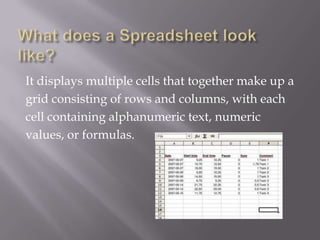
What does a Spreadsheet look like?It displays multiple cells that together make up agrid consisting of rows and columns, with eachcell containing alphanumeric text, numericvalues, or formulas.
How does Spreadsheet work?A formula defines how the content of a cell is tobe calculated from the contents of any other cell(or combination of cells) each time any cell isupdated. Spreadsheets are frequently used forfinancial information because of their ability tore-calculate the entire sheet automatically after achange.
What could a Spreadsheet be used for?Here are some resources: Educational usages of spreadsheetsTitle:  Spreadsheets, Mathematics, Science, and Statistics EducationURL: http://sunsite.univie.ac.at/Spreadsite/ A case study of lesson plans for middle schoolTitle: Using Graphs to Investigate Candy Color DistributionURL: http://www.microsoft.com/education/candy.mspx#EDC Education World @ Professional Development ChannelTitle: Spreadsheets: A Dynamic Path to Understanding MathURL: http://www.educationworld.com/a_curr/mathchat/mathchat025.shtml Integrating spreadsheets in the classroomTitle: Spreadsheet in ClassroomURL: http://www.amphi.com/~psteffen/excel.html
How to use excel in classroom instruction?According to Microsoft's Education Website, Excel offers teachers numerous ways for creating engaging lessons and to enhance instruction.  Teachers can: construct a pictograph with Excel, which is a graph that uses pictures to represent the values being graphed.create time-lines with Excel to help students visualize and understand trends.use Microsoft Excel to analyze survey data. (above examples are cited from http://www.ehow.co.uk/how_6778578_use-excel-classroom-instruction.html) With so many demands on a teacher's time, Excel is an efficient tool for creating activities to make classroom instruction more engaging and to encourage student participation.
~Read More~The following are Excel resources available on the Web for education: Word files:a)  Using Excel for Classroom Activities (An Internet Hotlist on Excel)b)  Spreadsheets in the Classroom Using Excelc)   WaystoUseExcel.docd)   Spinning the Big Wheel_ Spreadsheet simulation.pdfe)   Boundary-Value Problems in Electromagnetics.pdff)    Washington State's Tiers of Technology Integration (PowerPoint) Web links: a) Lee's Summit, MO School District Excel resources lists (Web link)b) Amphitheater Public Schools' Integrating Spreadsheets in the Classroom (Web link)c) Sabine Parish School District's Classrooms thatExcelResources (Web link)d) internet4classrooms.com's Microsoft Excel Modules (Web link)e) Washington State's Tiers of Technology Integration (PowerPoint)
Excel for instructional activitiesFor Gradebooks GradeBooks: http://www.mygradebook.com/Title: Create an Electronic GradebookURL: http://office.microsoft.com/en-us/excel-help/create-an-electronic-gradebook-HA010069070.aspxNew resource: http://docs.moodle.org/en/Gradebook
For Timeline Title: Using Excel to Create a TimelineURL: http://lifehacker.com/201523/use-excel-to-make-a-timeline 
For Crossword How to create crosswords games by Microsoft Excel? URL: http://learngen.org/resources/leobjects/lg0006ta.htmlFor creating a simple excel crossword puzzle:http://www.internet4classrooms.com/excel_puzzle.htm
Excelling Your Instruction with Excel!Thank you!

Excelling with Microsoft Excel

  • 1.
    Excelling with MicrosoftExcelSirui Wang, Ph.D. studentTaralynnHartsell, Ph.D, Associate Professor, Instructional Technology and DesignThe University of Southern Mississippi February, 2011
  • 2.
    What is MicrosoftExcel?Microsoft Excel is a spreadsheetprogramthat allows one to enter numerical values or data into rows or columns of a spreadsheet, and to use these numericalentries for tasks such as calculations,graphs, and statistical analysis.
  • 3.
    SpreadsheetA spreadsheet isa computer application thatsimulates a paper, accounting worksheet.
  • 4.
    What does aSpreadsheet look like?It displays multiple cells that together make up agrid consisting of rows and columns, with eachcell containing alphanumeric text, numericvalues, or formulas.
  • 5.
    How does Spreadsheetwork?A formula defines how the content of a cell is tobe calculated from the contents of any other cell(or combination of cells) each time any cell isupdated. Spreadsheets are frequently used forfinancial information because of their ability tore-calculate the entire sheet automatically after achange.
  • 6.
    What could aSpreadsheet be used for?Here are some resources: Educational usages of spreadsheetsTitle: Spreadsheets, Mathematics, Science, and Statistics EducationURL: http://sunsite.univie.ac.at/Spreadsite/ A case study of lesson plans for middle schoolTitle: Using Graphs to Investigate Candy Color DistributionURL: http://www.microsoft.com/education/candy.mspx#EDC Education World @ Professional Development ChannelTitle: Spreadsheets: A Dynamic Path to Understanding MathURL: http://www.educationworld.com/a_curr/mathchat/mathchat025.shtml Integrating spreadsheets in the classroomTitle: Spreadsheet in ClassroomURL: http://www.amphi.com/~psteffen/excel.html
  • 7.
    How to useexcel in classroom instruction?According to Microsoft's Education Website, Excel offers teachers numerous ways for creating engaging lessons and to enhance instruction. Teachers can: construct a pictograph with Excel, which is a graph that uses pictures to represent the values being graphed.create time-lines with Excel to help students visualize and understand trends.use Microsoft Excel to analyze survey data. (above examples are cited from http://www.ehow.co.uk/how_6778578_use-excel-classroom-instruction.html) With so many demands on a teacher's time, Excel is an efficient tool for creating activities to make classroom instruction more engaging and to encourage student participation.
  • 8.
    ~Read More~The followingare Excel resources available on the Web for education: Word files:a) Using Excel for Classroom Activities (An Internet Hotlist on Excel)b) Spreadsheets in the Classroom Using Excelc) WaystoUseExcel.docd) Spinning the Big Wheel_ Spreadsheet simulation.pdfe) Boundary-Value Problems in Electromagnetics.pdff) Washington State's Tiers of Technology Integration (PowerPoint) Web links: a) Lee's Summit, MO School District Excel resources lists (Web link)b) Amphitheater Public Schools' Integrating Spreadsheets in the Classroom (Web link)c) Sabine Parish School District's Classrooms thatExcelResources (Web link)d) internet4classrooms.com's Microsoft Excel Modules (Web link)e) Washington State's Tiers of Technology Integration (PowerPoint)
  • 9.
    Excel for instructionalactivitiesFor Gradebooks GradeBooks: http://www.mygradebook.com/Title: Create an Electronic GradebookURL: http://office.microsoft.com/en-us/excel-help/create-an-electronic-gradebook-HA010069070.aspxNew resource: http://docs.moodle.org/en/Gradebook
  • 10.
    For Timeline Title: UsingExcel to Create a TimelineURL: http://lifehacker.com/201523/use-excel-to-make-a-timeline 
  • 11.
    For Crossword How tocreate crosswords games by Microsoft Excel? URL: http://learngen.org/resources/leobjects/lg0006ta.htmlFor creating a simple excel crossword puzzle:http://www.internet4classrooms.com/excel_puzzle.htm
  • 12.
    Excelling Your Instructionwith Excel!Thank you!