New Features Overview
May 2016
• New MDM AirPrint feature
• Support for XenMobile MDM
• Single-sign-on support for MDM solutions
(AirWatch, Good and MobileIron)
• New HP MFP panel display release terminal
• New API calls to script creation of printers and Wide
Area
• Mobile Print configurations, job submission and
more
• Added Estonian language
.. And many many more smaller features and
improvements! 2
EveryonePrint 4.1 - What’s new?
• Get native printing on Apple iOS devices, across
very large and complex environments, with
extreme ease, using the new EveryonePrint MDM
AirPrint feature.
• Feature available with nearly all MDM solutions
• Show only relevant printers to users based on attributes like: Geo location (geofencing),
AD membership and organizational groups, Security policies, BYOD (Bring Your Own
Device) vs corporate owned, Custom tags/groups or time schedules
3
New MDM AirPrint feature
4
Support for XenMobile MDM
• Deploy and manage the EveryonePrint iOS and
Android Apps using popular mobile device
management (MDM) or enterprise mobility
management (EMM) systems
• Now also support for XenMobile
Your favorite not mentioned? Fear not, we have
numerous in pipeline, email support@everyoneprint.com
to inquire about your MDM solution’s status.
Single-sign-on for MDM solutions
(AirWatch, Good, MobileIron and XenMobile)
5
• EveryonePrint Apps pushed to mobile devices using
an MDM solution, now support single-sign-on, so
App is automatically configured and logged on
when used
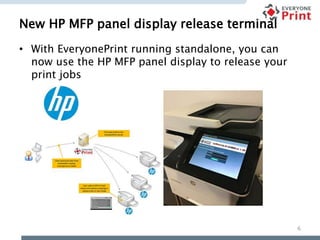
New HP MFP panel display release terminal
6
• With EveryonePrint running standalone, you can
now use the HP MFP panel display to release your
print jobs
Expanded API for automation and integration
7
• Use EveryonePrint API to automate large scale
deployments by scripting creation and
management of print queues and Wide Area Mobile
Print features
• Open EveryonePrint for customer’s or third party
applications to send jobs directly into EveryonePrint
using the API
Added Estonian language
8
• Now 23 languages available in total!
Other new features
9
• Added support for single-sign-on with OKI panel
display release terminals (use USB card reader
authentication etc)
• Friendly LDAP error messages in Admin UI
• Ability to show/hide the username line in welcome
emails
• Ability to have custom QR/bar codes
• Equitrac guest integration, ability to set email
address as “full name”
• Xafax is official EveryonePrint distributor in the Benelux.
• Find us on the EveryonePrint website
10
More information?

EveryonePrint 4.1

  • 1.
  • 2.
    • New MDMAirPrint feature • Support for XenMobile MDM • Single-sign-on support for MDM solutions (AirWatch, Good and MobileIron) • New HP MFP panel display release terminal • New API calls to script creation of printers and Wide Area • Mobile Print configurations, job submission and more • Added Estonian language .. And many many more smaller features and improvements! 2 EveryonePrint 4.1 - What’s new?
  • 3.
    • Get nativeprinting on Apple iOS devices, across very large and complex environments, with extreme ease, using the new EveryonePrint MDM AirPrint feature. • Feature available with nearly all MDM solutions • Show only relevant printers to users based on attributes like: Geo location (geofencing), AD membership and organizational groups, Security policies, BYOD (Bring Your Own Device) vs corporate owned, Custom tags/groups or time schedules 3 New MDM AirPrint feature
  • 4.
    4 Support for XenMobileMDM • Deploy and manage the EveryonePrint iOS and Android Apps using popular mobile device management (MDM) or enterprise mobility management (EMM) systems • Now also support for XenMobile Your favorite not mentioned? Fear not, we have numerous in pipeline, email support@everyoneprint.com to inquire about your MDM solution’s status.
  • 5.
    Single-sign-on for MDMsolutions (AirWatch, Good, MobileIron and XenMobile) 5 • EveryonePrint Apps pushed to mobile devices using an MDM solution, now support single-sign-on, so App is automatically configured and logged on when used
  • 6.
    New HP MFPpanel display release terminal 6 • With EveryonePrint running standalone, you can now use the HP MFP panel display to release your print jobs
  • 7.
    Expanded API forautomation and integration 7 • Use EveryonePrint API to automate large scale deployments by scripting creation and management of print queues and Wide Area Mobile Print features • Open EveryonePrint for customer’s or third party applications to send jobs directly into EveryonePrint using the API
  • 8.
    Added Estonian language 8 •Now 23 languages available in total!
  • 9.
    Other new features 9 •Added support for single-sign-on with OKI panel display release terminals (use USB card reader authentication etc) • Friendly LDAP error messages in Admin UI • Ability to show/hide the username line in welcome emails • Ability to have custom QR/bar codes • Equitrac guest integration, ability to set email address as “full name”
  • 10.
    • Xafax isofficial EveryonePrint distributor in the Benelux. • Find us on the EveryonePrint website 10 More information?