Evaluation Questions
3. What have you learned from your
                audience feedback?

                             Documentary


Question on powerpoint in background
and shown on evaluation video
Documentary


  1. List your audience feedback comments:
•Conventions:
•Music:
•Interview styling:
•Sounds:
•Shots:
Mise-en-scene:

Screenshots of some of the conventions, shots and mise en scene that the
audience like and then show the ones they didn't like
clips of two or three audience feedback
Documentary


2. Who is your target audience?
show clips from our research of target audience and tv
  channel
and show clips of the people interviewed who liked the
  documentary and their age
Documentary
 A. what did you do to attract your target
audience?

•   Forms


•   Conventions

show images of the forms and conventions
Documentary
 3. What did you learn from your audience
feedback?

• images from documentary and ancillary of
   what learnt
Documentary
 3. What did their comments show/teach
you?

•
•   What they liked


•   What they didn't like

talk about what did they like - why and ways to change it

what they didn't like - why and ways to change it
Documentary
 4. What changes need to be made to
improve?
3. What have you learned from your
                 audience feedback?

                                 Ancillary


Question on powerpoint in background
and shown on evaluation video
Ancillary


    1. List your audience feedback comments:

•   Conventions:

•   Music:

•   Interview styling:

•   Sounds:

•   Shots:               Screenshots of some of the conventions,
                         shots and mise en scene that the audience
                         like and then show the ones they didn't like
•   Mise-en-scene:       clips of two or three audience feedback
Ancillary


   2. Who is your target audience?

show clips from our research of target
  audience and tv channel
and show clips of the people interviewed
  who liked the documentary and their age
Ancillary
 A. what did you do to attract your target
audience?

• (forms and conventions)
Ancillary
 3. What did you learn from your audience
feedback?

show images of the forms and conventions
Ancillary
 3. What did their comments show/teach
you?

•
•   What they liked


•   What they didn't like


                            talk about what did they like - why and
                            ways to change it

                            what they didn't like - why and ways to
                            change it
Ancillary
 4. What changes need to be made to
improve?
Who would be your audience for
        your media product?
Our media product is about the
Evolution of video games. It explores
how video games have changed over
the years in terms of its image, gender
representation and its themes.

                                          Our target audience is 16-24 year
                                          olds;
                                          •Outgoing
                                          •Knowledge of popular culture
                                          •Interested in Television
                                          •Interested in different types of
                                          technology e.g.-mobile phones
                                          •Interested in documentaries.
What is ‘film rated’/ guidance
         /warnings etc, in relation with
                     OFCOM
•According to OFCOM material shown on TV before the watershed should be
suitable for under eighteens. i.e.-no swearing, nudity, offensive language, horror or
drug use.
•The watershed in the UK is 9pm.
Some of the video games
we’ll be showing footage
from are assassins creed,
grand theft auto and god of
war.
These video games are
17+ so is suitable for our
target audience because
they are between 16-24.
What channel is it shown on and why?
              •We have chosen to show our documentary on channel
              5.
              •The shows mainly shown on channel five are
              entertainment shows like reality TV, US drama, game
              shows, children's programmes and Australian soaps.


        The gadget show             Neighbours


        CSI                          Big brother
Channel five also have shows like the gadget show
which is a show that gives people the latest technology
news and gives the consumer information of how to get
the most out of their gadgets.


  Our documentary is also about technology so
  we decided to put it on channel five because it
  has a similar programme.


The gadget show target knowledgeable people and
also a more casual audience so people who watch
the gadget show would be interested in our
documentary.
Time of documentary
We’ve scheduled our documentary at 9pm because some of the footage we will
be showing are from video games which have an age rating of 17+

 This is suitable for our target audience because they are between
 16 and 24.

 9pm is when the watershed in the UK begins so if we show our
 documentary at this time we wont be breeching any OFCOM regulations.
How did you attract/address
  your target audience?
Documentary

   A - Prove how audience will be attracted
•Proof they will be attracted is through results from the
questionnaire – have a shot of our questionnaire with a voice
over, or film our target audience
B - Watching the documentary
•Film different people watching our documentary. Voice over of
how they are our target audience.
C - Interviews with audience
•Interviews of target audience. Example questions:
Does the documentary relate to the overall topic of the evolution
of technology?
Is the what is being discussed in the episode clear?
After watching the 5 minutes, are you persuaded to watch the
rest of the episode/series?
If they mention something specific, use a voiceover and match it
to the clip
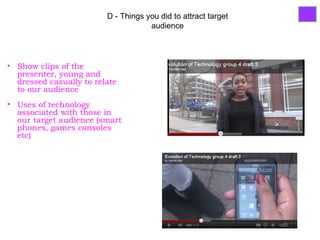
D - Things you did to attract target
                                     audience


• Show clips of the
  presenter, young and
  dressed casually to relate
  to our audience
• Uses of technology
  associated with those in
  our target audience (smart
  phones, games consoles
  etc)
Ancillaries
   A – Prove audience will be attracted
•Film our target audience and ask if the ancillaries makes them
want to watch the documentary
B – Looking at the ancillaries
•Brief clips of them looking at the ancillaries
C – Interviews with audience
•Examples of questions we could ask are:
What does the ancillaries communicate to you?
Would the advert and double page spread convince you to watch
the documentary?
Do you think the images are appropriate to the idea? If not what
images would be better?
D – We attracted our target audience by:
Using images that relate to the audience and our topic
Images on double page spread would attract our target audience as they
often use them (computers, consoles.)
What have you learned from
   audience feedback?
Draft 1
Documentary:
Too much game footage
Awkward filming at the start – see the back of presenter
Distracting people in background (argos)
Clearer structure


Ancillaries:
Good image in advert.
Double page spread not good – no clear layout and no image.
Draft 3
Documentary:
Good channel 5 start
Music related to the topic
Voiceover and public interview clashes
Not edited properly (mistake of presenter)


Ancillaries:
Images relate to topic            We improved from draft 1 to 3 by:
                                  •Having more interaction with the
                                  presenter
                                  •Added music
                                  •Used less footage of games
                                  •Less distractions around presenter
What have you learnt form your
         audience feedback?
 Draft one
                                              All the things we learnt from
What I learnt;                                draft one we made sure we
oWe needed to follow the documentary          had it in draft three:
structure                                     We added more footage of
oWe had too much footage of video games and   the presenter.
not enough clips of the presenter.            We added music
oOur montage editing didn’t flow.             We changed the script in
oWe had good co-ordination when comparing     order to make the presenter
Mario and Tetris games.                       sound more enthusiastic.
oWe needed to add music.
oThe presenter sounded dull
Draft three                               For draft four considering all the
What we learnt;                           things we learnt from draft 3;
oWe still need to follow documentary      oWe need to follow a structure by
structure following the time structure.   setting out the number of seconds
oWe shouldn’t zoom in on things           for each section.
oMontage of locations didn’t fit in       oWe will use a member of the
with our topic                            group to be our expert sociologist.
oWe need to work on sound control         oWe need to change the music to
oOur expert sociologist wasn't            something more game like. E.g.-
saying anything that related to our       music like the ones you find in
topic.                                    video games like Mario and tetris.
How did you use media technologies
 in the construction and research,
 planning and evaluation stages?
Documentary – technologies used for
       research and planning
• Youtube/4od to watch inspirational documentaries
  – brief clips of searching for documentaries
• Powerpoint to present ideas with print screens of
  documentaries as evidence of inspirations – use
  still shots or brief clips
• Flash to create examples of titles – film, but not too
  long
• Camera to both film and take pictures – show some
  of the pictures taken
• Macs to edit – Adding transitions, sound, voice
  overs and titles. Film
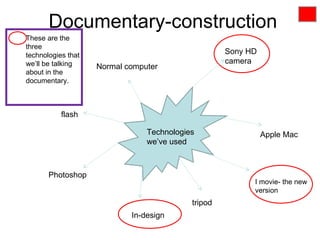
Documentary-construction
These are the
three
technologies that                                   Sony HD
we’ll be talking                                    camera
                    Normal computer
about in the
documentary.


           flash

                                Technologies                  Apple Mac
                                we’ve used


       Photoshop
                                                          I movie- the new
                                                          version
                                           tripod
                            In-design
How we would film and edit this
                                                   We could film a member of
                                                   our group editing a picture
On I movie we could also                           on indesign with a
show how we uploaded                               voiceover describing the
videos and images from                             action as well as showing
the internet. E.g.- we got                         the different functions on
our vice city cover and                            indesign. Also we would
video game footage from                            show how to convert the in
the internet.                                      design files to PDF’s
                                     Filming and
                                     editing
                                                     When talking about I
                                                     movie we could record
                                                     a short clip and show
  To describe the ways in which we used the          the different editing
  Sony HD cameras we could list the                  features by editing the
  different ways in which we used them. E.g.-        short clip. We would
  we used it to take pictures for the                use a voiceover to
  ancillaries. We could take a picture of the        describe what is going
  camera and have it appear as a still image         on.
  in our evaluation with arrows pointing to the
  different functions.
Part 2: How did you use media
         technologies in the construction and
           research, planning and evaluation
                        stages?

                                 Ancillaries


question shown on powerpoint on the
computer behind us
and at the start make question come up on
the video
Technologies used in research and
   planning.
   • Internet
   • Magazines and newspapers - to
      research different magazines


   • Microsoft Word
   • Text font - research the specific
      type of fonts in each magazine and
      channel advert
Voiceover with images/screenshots of the
technologies
Show the chosen ones on the
                            PowerPoint.
                            Vioceover explaining what we did:
                            Show clips working on the
    We chose these three:   internet(looking at online magazines)
                            Clips of word document
                            experimenting fonts (comparing text
                            to ad and newspaper text)
•   Internet


•   Microsoft Word
Technologies used for the
construction
•Editing:


•Indesign
•Photoshop - used to edit photos to import to indesign
•Images:
•Camera - to take pictures for the double page spread and
advert
•Game consoles - images for the advert
•Scanner - used to copy detailed version of double page
spread drawing.
when we start talking show us in front of computer with
powerpoint
then have voiceover with images of indesign, photoshop,
camera(taking pictures), scanner(show scanning drawn images)
We chose these three:
• In Design

• Photoshop
                Vioceover saying the effects used:
                Clip of how Indesign was used (created
                new files, imported images, layout of text,
                layering images and shapes)
• Camera        Clip of editing on Photoshop (brightened
                the images,layering, deleted and put colour
                in background)
                clips of us using the camera (taking
                photographs of game console(game boy))

Evaluation plan

  • 1.
  • 2.
    3. What haveyou learned from your audience feedback? Documentary Question on powerpoint in background and shown on evaluation video
  • 3.
    Documentary 1.List your audience feedback comments: •Conventions: •Music: •Interview styling: •Sounds: •Shots: Mise-en-scene: Screenshots of some of the conventions, shots and mise en scene that the audience like and then show the ones they didn't like clips of two or three audience feedback
  • 4.
    Documentary 2. Who isyour target audience? show clips from our research of target audience and tv channel and show clips of the people interviewed who liked the documentary and their age
  • 5.
    Documentary A. whatdid you do to attract your target audience? • Forms • Conventions show images of the forms and conventions
  • 6.
    Documentary 3. Whatdid you learn from your audience feedback? • images from documentary and ancillary of what learnt
  • 7.
    Documentary 3. Whatdid their comments show/teach you? • • What they liked • What they didn't like talk about what did they like - why and ways to change it what they didn't like - why and ways to change it
  • 8.
    Documentary 4. Whatchanges need to be made to improve?
  • 9.
    3. What haveyou learned from your audience feedback? Ancillary Question on powerpoint in background and shown on evaluation video
  • 10.
    Ancillary 1. List your audience feedback comments: • Conventions: • Music: • Interview styling: • Sounds: • Shots: Screenshots of some of the conventions, shots and mise en scene that the audience like and then show the ones they didn't like • Mise-en-scene: clips of two or three audience feedback
  • 11.
    Ancillary 2. Who is your target audience? show clips from our research of target audience and tv channel and show clips of the people interviewed who liked the documentary and their age
  • 12.
    Ancillary A. whatdid you do to attract your target audience? • (forms and conventions)
  • 13.
    Ancillary 3. Whatdid you learn from your audience feedback? show images of the forms and conventions
  • 14.
    Ancillary 3. Whatdid their comments show/teach you? • • What they liked • What they didn't like talk about what did they like - why and ways to change it what they didn't like - why and ways to change it
  • 15.
    Ancillary 4. Whatchanges need to be made to improve?
  • 16.
    Who would beyour audience for your media product? Our media product is about the Evolution of video games. It explores how video games have changed over the years in terms of its image, gender representation and its themes. Our target audience is 16-24 year olds; •Outgoing •Knowledge of popular culture •Interested in Television •Interested in different types of technology e.g.-mobile phones •Interested in documentaries.
  • 17.
    What is ‘filmrated’/ guidance /warnings etc, in relation with OFCOM •According to OFCOM material shown on TV before the watershed should be suitable for under eighteens. i.e.-no swearing, nudity, offensive language, horror or drug use. •The watershed in the UK is 9pm. Some of the video games we’ll be showing footage from are assassins creed, grand theft auto and god of war. These video games are 17+ so is suitable for our target audience because they are between 16-24.
  • 18.
    What channel isit shown on and why? •We have chosen to show our documentary on channel 5. •The shows mainly shown on channel five are entertainment shows like reality TV, US drama, game shows, children's programmes and Australian soaps. The gadget show Neighbours CSI Big brother
  • 19.
    Channel five alsohave shows like the gadget show which is a show that gives people the latest technology news and gives the consumer information of how to get the most out of their gadgets. Our documentary is also about technology so we decided to put it on channel five because it has a similar programme. The gadget show target knowledgeable people and also a more casual audience so people who watch the gadget show would be interested in our documentary.
  • 20.
    Time of documentary We’vescheduled our documentary at 9pm because some of the footage we will be showing are from video games which have an age rating of 17+ This is suitable for our target audience because they are between 16 and 24. 9pm is when the watershed in the UK begins so if we show our documentary at this time we wont be breeching any OFCOM regulations.
  • 21.
    How did youattract/address your target audience?
  • 22.
    Documentary A - Prove how audience will be attracted •Proof they will be attracted is through results from the questionnaire – have a shot of our questionnaire with a voice over, or film our target audience B - Watching the documentary •Film different people watching our documentary. Voice over of how they are our target audience. C - Interviews with audience •Interviews of target audience. Example questions: Does the documentary relate to the overall topic of the evolution of technology? Is the what is being discussed in the episode clear? After watching the 5 minutes, are you persuaded to watch the rest of the episode/series? If they mention something specific, use a voiceover and match it to the clip
  • 23.
    D - Thingsyou did to attract target audience • Show clips of the presenter, young and dressed casually to relate to our audience • Uses of technology associated with those in our target audience (smart phones, games consoles etc)
  • 24.
    Ancillaries A – Prove audience will be attracted •Film our target audience and ask if the ancillaries makes them want to watch the documentary B – Looking at the ancillaries •Brief clips of them looking at the ancillaries C – Interviews with audience •Examples of questions we could ask are: What does the ancillaries communicate to you? Would the advert and double page spread convince you to watch the documentary? Do you think the images are appropriate to the idea? If not what images would be better?
  • 25.
    D – Weattracted our target audience by: Using images that relate to the audience and our topic Images on double page spread would attract our target audience as they often use them (computers, consoles.)
  • 26.
    What have youlearned from audience feedback?
  • 27.
    Draft 1 Documentary: Too muchgame footage Awkward filming at the start – see the back of presenter Distracting people in background (argos) Clearer structure Ancillaries: Good image in advert. Double page spread not good – no clear layout and no image.
  • 28.
    Draft 3 Documentary: Good channel5 start Music related to the topic Voiceover and public interview clashes Not edited properly (mistake of presenter) Ancillaries: Images relate to topic We improved from draft 1 to 3 by: •Having more interaction with the presenter •Added music •Used less footage of games •Less distractions around presenter
  • 29.
    What have youlearnt form your audience feedback? Draft one All the things we learnt from What I learnt; draft one we made sure we oWe needed to follow the documentary had it in draft three: structure We added more footage of oWe had too much footage of video games and the presenter. not enough clips of the presenter. We added music oOur montage editing didn’t flow. We changed the script in oWe had good co-ordination when comparing order to make the presenter Mario and Tetris games. sound more enthusiastic. oWe needed to add music. oThe presenter sounded dull
  • 30.
    Draft three For draft four considering all the What we learnt; things we learnt from draft 3; oWe still need to follow documentary oWe need to follow a structure by structure following the time structure. setting out the number of seconds oWe shouldn’t zoom in on things for each section. oMontage of locations didn’t fit in oWe will use a member of the with our topic group to be our expert sociologist. oWe need to work on sound control oWe need to change the music to oOur expert sociologist wasn't something more game like. E.g.- saying anything that related to our music like the ones you find in topic. video games like Mario and tetris.
  • 31.
    How did youuse media technologies in the construction and research, planning and evaluation stages?
  • 32.
    Documentary – technologiesused for research and planning • Youtube/4od to watch inspirational documentaries – brief clips of searching for documentaries • Powerpoint to present ideas with print screens of documentaries as evidence of inspirations – use still shots or brief clips • Flash to create examples of titles – film, but not too long • Camera to both film and take pictures – show some of the pictures taken • Macs to edit – Adding transitions, sound, voice overs and titles. Film
  • 33.
    Documentary-construction These are the three technologiesthat Sony HD we’ll be talking camera Normal computer about in the documentary. flash Technologies Apple Mac we’ve used Photoshop I movie- the new version tripod In-design
  • 34.
    How we wouldfilm and edit this We could film a member of our group editing a picture On I movie we could also on indesign with a show how we uploaded voiceover describing the videos and images from action as well as showing the internet. E.g.- we got the different functions on our vice city cover and indesign. Also we would video game footage from show how to convert the in the internet. design files to PDF’s Filming and editing When talking about I movie we could record a short clip and show To describe the ways in which we used the the different editing Sony HD cameras we could list the features by editing the different ways in which we used them. E.g.- short clip. We would we used it to take pictures for the use a voiceover to ancillaries. We could take a picture of the describe what is going camera and have it appear as a still image on. in our evaluation with arrows pointing to the different functions.
  • 35.
    Part 2: Howdid you use media technologies in the construction and research, planning and evaluation stages? Ancillaries question shown on powerpoint on the computer behind us and at the start make question come up on the video
  • 36.
    Technologies used inresearch and planning. • Internet • Magazines and newspapers - to research different magazines • Microsoft Word • Text font - research the specific type of fonts in each magazine and channel advert Voiceover with images/screenshots of the technologies
  • 37.
    Show the chosenones on the PowerPoint. Vioceover explaining what we did: Show clips working on the We chose these three: internet(looking at online magazines) Clips of word document experimenting fonts (comparing text to ad and newspaper text) • Internet • Microsoft Word
  • 38.
    Technologies used forthe construction •Editing: •Indesign •Photoshop - used to edit photos to import to indesign •Images: •Camera - to take pictures for the double page spread and advert •Game consoles - images for the advert •Scanner - used to copy detailed version of double page spread drawing. when we start talking show us in front of computer with powerpoint then have voiceover with images of indesign, photoshop, camera(taking pictures), scanner(show scanning drawn images)
  • 39.
    We chose thesethree: • In Design • Photoshop Vioceover saying the effects used: Clip of how Indesign was used (created new files, imported images, layout of text, layering images and shapes) • Camera Clip of editing on Photoshop (brightened the images,layering, deleted and put colour in background) clips of us using the camera (taking photographs of game console(game boy))