
Done by:
Khalid al Shabibi “88733”
Ayoob Alshukaili “90376"
Course: Evaluation in Educational Technology
TypingMaster
Pro
Courseware Title
 TypingMaster pro
http://www.typingmaster.com/typing-
tutor/
 Vender
TypingMaster
How this software is used to help
students to learn?
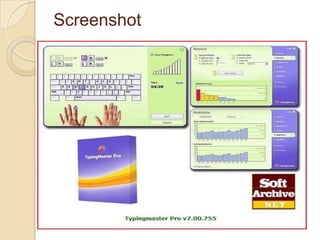
 With Typing Master Pro Student can learn the
touch typing technique and bring their
keyboarding to a whole new level.
 Their typing will become as easy and fluent
as speaking, enabling them to complete
writing tasks with a new level of efficiency.
they will save loads of time as they create
reports, emails and presentations much
faster.
 Additionally, students can stop hunting for
keys and focus solely on their text and ideas,
giving themselves more freedom for
creativity.
Screenshot
Screenshot
Screenshot
Short Description
 Meet TypingMaster Pro, the personal
touch typing tutor that adapts to
unique needs. The program provides
customized exercises and helpful
feedback to guide step by step to
professional keyboarding. As a result,
typing speed will increase significantly
saving you a lot of valuable work time.

,
6
,
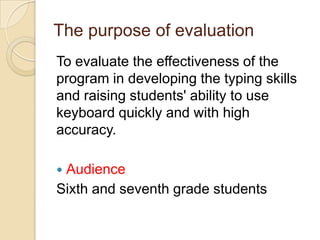
The purpose of evaluation
To evaluate the effectiveness of the
program in developing the typing skills
and raising students' ability to use
keyboard quickly and with high
accuracy.
 Audience
Sixth and seventh grade students
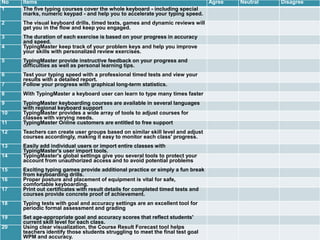
No Items Agree Neutral Disagree
1 The five typing courses cover the whole keyboard - including special
marks, numeric keypad - and help you to accelerate your typing speed.
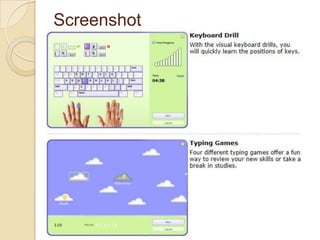
2 The visual keyboard drills, timed texts, games and dynamic reviews will
get you in the flow and keep you engaged.
3 The duration of each exercise is based on your progress in accuracy
and speed.
4 TypingMaster keep track of your problem keys and help you improve
your skills with personalized review exercises.
5 TypingMaster provide instructive feedback on your progress and
difficulties as well as personal learning tips.
6 Test your typing speed with a professional timed tests and view your
results with a detailed report.
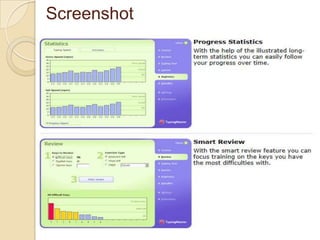
7 Follow your progress with graphical long-term statistics.
8 With TypingMaster a keyboard user can learn to type many times faster
9 TypingMaster keyboarding courses are available in several languages
with regional keyboard support
10 TypingMaster provides a wide array of tools to adjust courses for
classes with varying needs.
11 TypingMaster Online customers are entitled to free support
12 Teachers can create user groups based on similar skill level and adjust
courses accordingly, making it easy to monitor each class' progress.
13 Easily add individual users or import entire classes with
TypingMaster's user import tools.
14 TypingMaster's global settings give you several tools to protect your
account from unauthorized access and to avoid potential problems
15 Exciting typing games provide additional practice or simply a fun break
from keyboarding drills.
16 Proper posture and placement of equipment is vital for safe,
comfortable keyboarding.
17 Print out certificates with result details for completed timed tests and
courses provide concrete proof of achievement.
18 Typing tests with goal and accuracy settings are an excellent tool for
periodic formal assessment and grading
19 Set age-appropriate goal and accuracy scores that reflect students'
current skill level for each class.
20 Using clear visualization, the Course Result Forecast tool helps
teachers identify those students struggling to meet the final test goal
WPM and accuracy.
References
 http://soft.sptechs.com/46883-
TypingMaster-Pro-typing-tutor.html
 http://www.typingmaster.com/typing-
tutor/support.asp

Evaluation of computer based instruction

  • 1.
    Done by: Khalid alShabibi “88733” Ayoob Alshukaili “90376" Course: Evaluation in Educational Technology TypingMaster Pro
  • 2.
    Courseware Title  TypingMasterpro http://www.typingmaster.com/typing- tutor/  Vender TypingMaster
  • 3.
    How this softwareis used to help students to learn?  With Typing Master Pro Student can learn the touch typing technique and bring their keyboarding to a whole new level.  Their typing will become as easy and fluent as speaking, enabling them to complete writing tasks with a new level of efficiency. they will save loads of time as they create reports, emails and presentations much faster.  Additionally, students can stop hunting for keys and focus solely on their text and ideas, giving themselves more freedom for creativity.
  • 4.
  • 5.
  • 6.
  • 7.
    Short Description  MeetTypingMaster Pro, the personal touch typing tutor that adapts to unique needs. The program provides customized exercises and helpful feedback to guide step by step to professional keyboarding. As a result, typing speed will increase significantly saving you a lot of valuable work time.
  • 8.
  • 9.
    The purpose ofevaluation To evaluate the effectiveness of the program in developing the typing skills and raising students' ability to use keyboard quickly and with high accuracy.  Audience Sixth and seventh grade students
  • 10.
    No Items AgreeNeutral Disagree 1 The five typing courses cover the whole keyboard - including special marks, numeric keypad - and help you to accelerate your typing speed. 2 The visual keyboard drills, timed texts, games and dynamic reviews will get you in the flow and keep you engaged. 3 The duration of each exercise is based on your progress in accuracy and speed. 4 TypingMaster keep track of your problem keys and help you improve your skills with personalized review exercises. 5 TypingMaster provide instructive feedback on your progress and difficulties as well as personal learning tips. 6 Test your typing speed with a professional timed tests and view your results with a detailed report. 7 Follow your progress with graphical long-term statistics. 8 With TypingMaster a keyboard user can learn to type many times faster 9 TypingMaster keyboarding courses are available in several languages with regional keyboard support 10 TypingMaster provides a wide array of tools to adjust courses for classes with varying needs. 11 TypingMaster Online customers are entitled to free support 12 Teachers can create user groups based on similar skill level and adjust courses accordingly, making it easy to monitor each class' progress. 13 Easily add individual users or import entire classes with TypingMaster's user import tools. 14 TypingMaster's global settings give you several tools to protect your account from unauthorized access and to avoid potential problems 15 Exciting typing games provide additional practice or simply a fun break from keyboarding drills. 16 Proper posture and placement of equipment is vital for safe, comfortable keyboarding. 17 Print out certificates with result details for completed timed tests and courses provide concrete proof of achievement. 18 Typing tests with goal and accuracy settings are an excellent tool for periodic formal assessment and grading 19 Set age-appropriate goal and accuracy scores that reflect students' current skill level for each class. 20 Using clear visualization, the Course Result Forecast tool helps teachers identify those students struggling to meet the final test goal WPM and accuracy.
  • 11.