



All about Electronic
verification code
(EvC)
CA DK Bholusaria
dk@bholusaria.com
Contents
• Understand what is EvC and its
role.
• Who can and who can not use
EvC?
• Different methods to generate
EvC.
• How to Link/Seed PAN to Aadhar?
• How to login using net banking?
• How to generate EvC?
• How to e-verify ITR using EvC?
dk bholusaria 2
What is EvC?
• Electronic Verification Code or EVC is a
code generated for the purpose of e-
verification of the person furnishing the
income tax return.
• EVC will be a unique number linked to
assessee’s PAN.
• It cannot be used for filing ITR of any other
PAN.
• One EVC can be used to validate one
return, irrespective, of assessment year or
type of return.
• EVC generated via Adhaar Card will be
valid only for 10 minutes and in any
other case, it will be valid for 72 hours.
• EVC is valid for AY 2015-2016 onwards.
dk bholusaria 3
Who can use
EvC?
• All kinds of assessee’s can use EVC
to validate ITR;
• Except in following cases, where
verification of ITR is mandatory
through class-II / class-III digital
signatures:
– Persons, whose accounts are
required to be audited under
Section 44AB
– Companies
– Political parties
dk bholusaria 4
Different Methods of e-
verification of Income Tax
return using EvC
Different
methods of
e-verification
through
EvC
• EvC through Aadhar
Number.
• EvC through Net banking.
• EvC directly from ITD
portal (only where Total income <= 5
Lacs and there is no refund).
Linking Aadhar to PAN
• Before generating EvC, Aadhar
number must first be seeded /
linked to PAN.
• One time linking / seeding.
• Goto Profile Settings – choose
“Aadhar Linked to PAN”.
• Enter your 12 digit Aadhar Number.
• Aadhar will be linked if data as per
PAN database matches with UIDAI
database.
EvC through
Aadhar
Number
dk bholusaria 9
When you first login… you will be welcomed with this screen.
Menu option to link Aadhar
(if not linked earlier)
dk bholusaria 10
Fill in your 12 digit Aadhar number
dk bholusaria 11
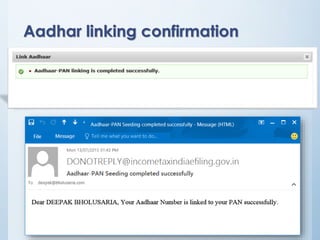
Aadhar linking confirmation
dk bholusaria 12
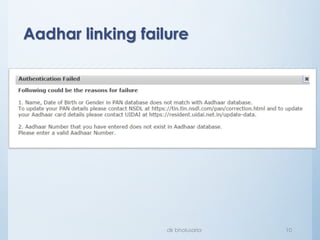
Aadhar linking failure
dk bholusaria 13
Generation of EvC from ITD portal
(even if you do not have Aadhar)
If you do not have aadhar?
You have two options to generate your EvC:
1. Login to e-filing portal through net banking
account and then generate EvC. This EvC will
be valid for ITRs even if total income > 5 lac as
well as in case of refunds.
2. Login directly to e-filing portal (non-net
banking mode) and then generate EvC.
However EvC obtained through this option will
be valid for ITRs where Total Income <=5 Lacs
and there is no refund
Login to ITD portal through
Net banking
Login to e-
filing portal
through Net
banking
• Make sure that your bank offers
facility to login to e-filing portal and
your bank account is linked to your
PAN
• After login through net banking, you
may either verify your return directly
(since by logging through net banking
account, you have proved your identity to
ITD) (See slide # 31); or
• Generate EvC, to be used for e-
verification immediately or within 72
hours of generation
(See slide # 23~26 & 30).
Goto login page of bank
dk bholusaria 18
dk bholusaria 19
dk bholusaria 20
Finally logged in…
dk bholusaria 21
Generation of EvC
(either through net banking account or
directly on e-filing portal)
First login to e-filing portal
- Either through net banking account; or
- Directly using PAN and password (non-net banking)
dk bholusaria 23
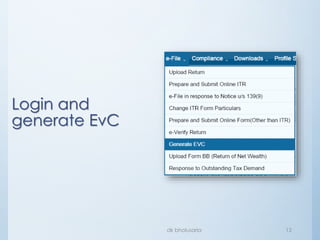
Generate EvC
(common for both logins)
Menu option:
e-file  Generate EVC
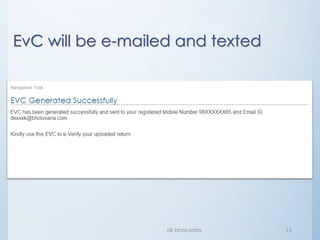
EvC will be e-mailed and texted
dk bholusaria 24
If you had logged through net banking:
If you had logged otherwise (non net-banking mode):
dk bholusaria 25
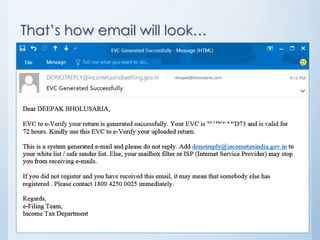
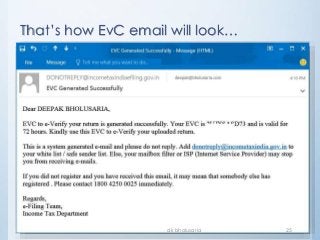
That’s how EvC email will look…
dk bholusaria 26
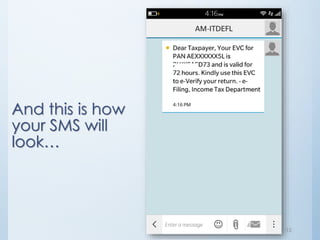
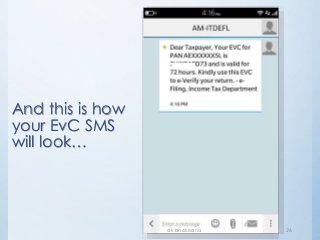
And this is how
your EvC SMS
will look…
E-verify your return using EvC
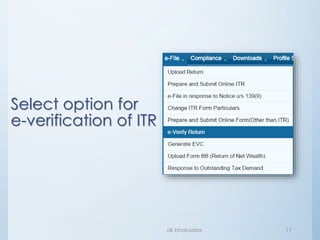
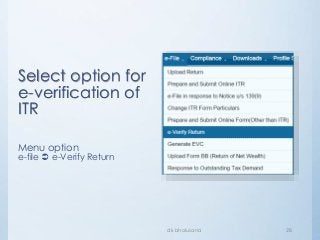
Select option for
e-verification of
ITR
Menu option
e-file  e-Verify Return
dk bholusaria 28
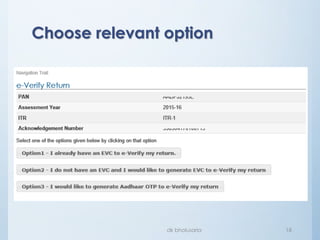
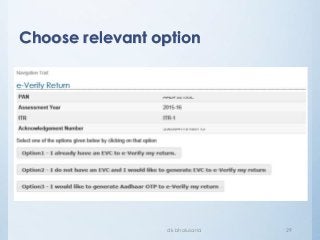
Choose relevant option
dk bholusaria 29
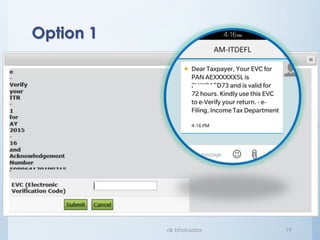
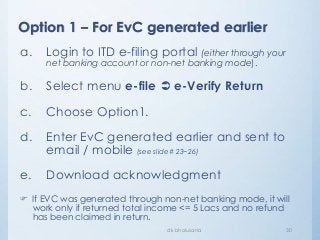
Option 1 – For EvC generated earlier
dk bholusaria 30
a. Login to ITD e-filing portal (either through your
net banking account or non-net banking mode).
b. Select menu e-file  e-Verify Return
c. Choose Option1.
d. Enter EvC generated earlier and sent to
email / mobile (see slide# 23~26)
e. Download acknowledgment
 If EVC was generated through non-net banking mode, it will
work only if returned total income <= 5 Lacs and no refund
has been claimed in return.
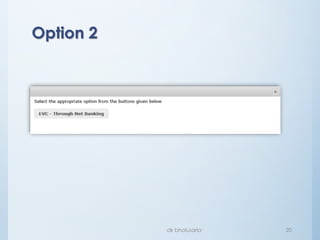
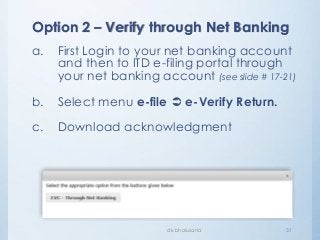
Option 2 – Verify through Net Banking
dk bholusaria 31
a. First Login to your net banking account
and then to ITD e-filing portal through
your net banking account (see slide # 17-21)
b. Select menu e-file  e-Verify Return.
c. Download acknowledgment
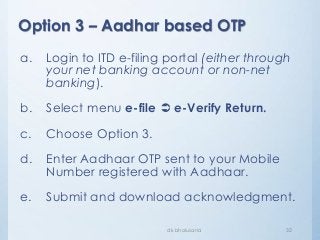
Option 3 – Aadhar based OTP
dk bholusaria 32
a. Login to ITD e-filing portal (either through
your net banking account or non-net
banking).
b. Select menu e-file  e-Verify Return.
c. Choose Option 3.
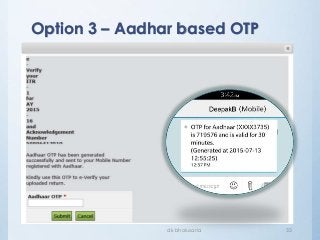
d. Enter Aadhaar OTP sent to your Mobile
Number registered with Aadhaar.
e. Submit and download acknowledgment.
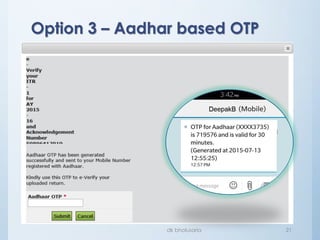
Option 3 – Aadhar based OTP
dk bholusaria 33
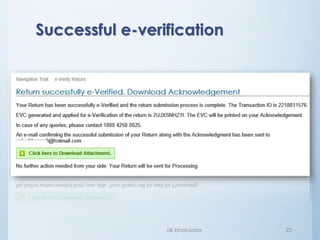
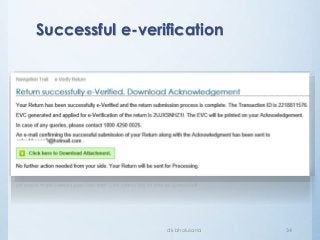
Successful e-verification
dk bholusaria 34
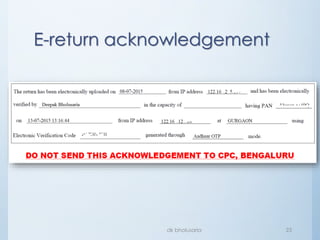
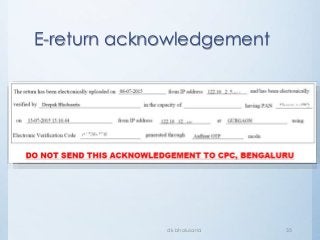
E-return acknowledgement
dk bholusaria 35
To download copy
of this presentation,
logon to:
http://www.slideshare.net/deepakbholusaria
Thank you!

Practical Guide on Electronic Verification Code (EVC)

  • 1.
    All about Electronic verificationcode (EvC) CA DK Bholusaria dk@bholusaria.com
  • 2.
    Contents • Understand whatis EvC and its role. • Who can and who can not use EvC? • Different methods to generate EvC. • How to Link/Seed PAN to Aadhar? • How to login using net banking? • How to generate EvC? • How to e-verify ITR using EvC? dk bholusaria 2
  • 3.
    What is EvC? •Electronic Verification Code or EVC is a code generated for the purpose of e- verification of the person furnishing the income tax return. • EVC will be a unique number linked to assessee’s PAN. • It cannot be used for filing ITR of any other PAN. • One EVC can be used to validate one return, irrespective, of assessment year or type of return. • EVC generated via Adhaar Card will be valid only for 10 minutes and in any other case, it will be valid for 72 hours. • EVC is valid for AY 2015-2016 onwards. dk bholusaria 3
  • 4.
    Who can use EvC? •All kinds of assessee’s can use EVC to validate ITR; • Except in following cases, where verification of ITR is mandatory through class-II / class-III digital signatures: – Persons, whose accounts are required to be audited under Section 44AB – Companies – Political parties dk bholusaria 4
  • 5.
    Different Methods ofe- verification of Income Tax return using EvC
  • 6.
    Different methods of e-verification through EvC • EvCthrough Aadhar Number. • EvC through Net banking. • EvC directly from ITD portal (only where Total income <= 5 Lacs and there is no refund).
  • 7.
  • 8.
    • Before generatingEvC, Aadhar number must first be seeded / linked to PAN. • One time linking / seeding. • Goto Profile Settings – choose “Aadhar Linked to PAN”. • Enter your 12 digit Aadhar Number. • Aadhar will be linked if data as per PAN database matches with UIDAI database. EvC through Aadhar Number
  • 9.
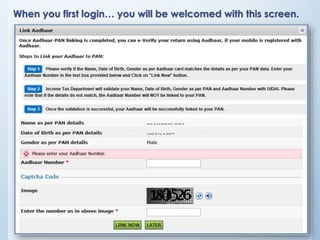
    dk bholusaria 9 Whenyou first login… you will be welcomed with this screen.
  • 10.
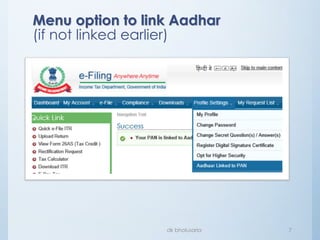
    Menu option tolink Aadhar (if not linked earlier) dk bholusaria 10
  • 11.
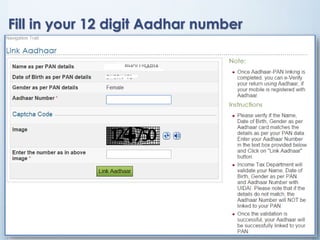
    Fill in your12 digit Aadhar number dk bholusaria 11
  • 12.
  • 13.
  • 14.
    Generation of EvCfrom ITD portal (even if you do not have Aadhar)
  • 15.
    If you donot have aadhar? You have two options to generate your EvC: 1. Login to e-filing portal through net banking account and then generate EvC. This EvC will be valid for ITRs even if total income > 5 lac as well as in case of refunds. 2. Login directly to e-filing portal (non-net banking mode) and then generate EvC. However EvC obtained through this option will be valid for ITRs where Total Income <=5 Lacs and there is no refund
  • 16.
    Login to ITDportal through Net banking
  • 17.
    Login to e- filingportal through Net banking • Make sure that your bank offers facility to login to e-filing portal and your bank account is linked to your PAN • After login through net banking, you may either verify your return directly (since by logging through net banking account, you have proved your identity to ITD) (See slide # 31); or • Generate EvC, to be used for e- verification immediately or within 72 hours of generation (See slide # 23~26 & 30).
  • 18.
    Goto login pageof bank dk bholusaria 18
  • 19.
  • 20.
  • 21.
  • 22.
    Generation of EvC (eitherthrough net banking account or directly on e-filing portal)
  • 23.
    First login toe-filing portal - Either through net banking account; or - Directly using PAN and password (non-net banking) dk bholusaria 23 Generate EvC (common for both logins) Menu option: e-file  Generate EVC
  • 24.
    EvC will bee-mailed and texted dk bholusaria 24 If you had logged through net banking: If you had logged otherwise (non net-banking mode):
  • 25.
    dk bholusaria 25 That’show EvC email will look…
  • 26.
    dk bholusaria 26 Andthis is how your EvC SMS will look…
  • 27.
  • 28.
    Select option for e-verificationof ITR Menu option e-file  e-Verify Return dk bholusaria 28
  • 29.
  • 30.
    Option 1 –For EvC generated earlier dk bholusaria 30 a. Login to ITD e-filing portal (either through your net banking account or non-net banking mode). b. Select menu e-file  e-Verify Return c. Choose Option1. d. Enter EvC generated earlier and sent to email / mobile (see slide# 23~26) e. Download acknowledgment  If EVC was generated through non-net banking mode, it will work only if returned total income <= 5 Lacs and no refund has been claimed in return.
  • 31.
    Option 2 –Verify through Net Banking dk bholusaria 31 a. First Login to your net banking account and then to ITD e-filing portal through your net banking account (see slide # 17-21) b. Select menu e-file  e-Verify Return. c. Download acknowledgment
  • 32.
    Option 3 –Aadhar based OTP dk bholusaria 32 a. Login to ITD e-filing portal (either through your net banking account or non-net banking). b. Select menu e-file  e-Verify Return. c. Choose Option 3. d. Enter Aadhaar OTP sent to your Mobile Number registered with Aadhaar. e. Submit and download acknowledgment.
  • 33.
    Option 3 –Aadhar based OTP dk bholusaria 33
  • 34.
  • 35.
  • 36.
    To download copy ofthis presentation, logon to: http://www.slideshare.net/deepakbholusaria
  • 37.