E- Filing of Tax Audit Report
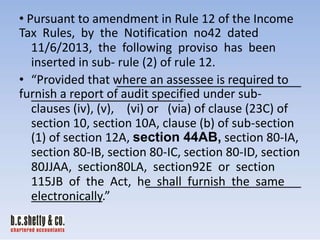
• Pursuant to amendment in Rule 12 of the Income
Tax Rules, by the Notification no42 dated
11/6/2013, the following proviso has been
inserted in sub- rule (2) of rule 12.
• “Provided that where an assessee is required to
furnish a report of audit specified under subclauses (iv), (v), (vi) or (via) of clause (23C) of
section 10, section 10A, clause (b) of sub-section
(1) of section 12A, section 44AB, section 80-IA,
section 80-IB, section 80-IC, section 80-ID, section
80JJAA, section80LA, section92E or section
115JB of the Act, he shall furnish the same
electronically.”
WHY E -FILING OF TAX AUDIT REPORT

• Minimize chances of mismatch between the
return and report
• CA can keep track of his limit of tax audit. (45)
• There may be cases where Assessee
deliberately do not disclose the disallowance/
remarks of tax auditor
• Earlier since signed report was not available, it
was difficult for the Income Tax Department to
trace such instances.
SYSTEM REQUIREMENTS TO OPERATE
E- UTILITY
• At least your system configuration Microsoft
XP Service Pack 3 or Higher like windows 7 /8.
• RAM 2 GB for faster data entry and speed your
work on e-utility.
• Java Run Time Environment Version 7 update
6 to be downloaded from e- filing web sites.
• Remove All Previous Versions Of Java from
Your PC.
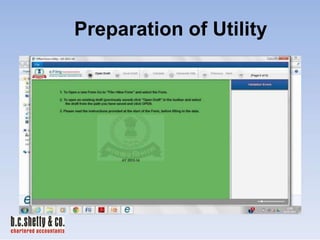
Preparation of Utility
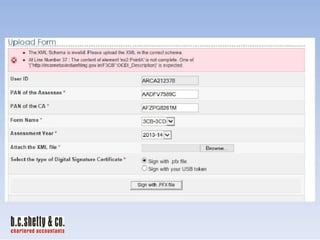
Uploading of form- First Screen
Uploading of form- After Input of DATA
FOUR ATTACHMENTS REQUIRED TO BE
UPLOADED ALONG WITH TAX AUDIT REPORT
• 1. Balance Sheet (Mandatory)
• 2. Profit & Loss Account (Mandatory)
• 3. Cost Audit Report
• 4. Excise Audit/other audit report
• Attachments must be either in “tiff” or “pdf”
format and with size up to 20 MB
• Though Notes to Accounts are not mandatory but
as a prudent practice they should also be
submitted along with these documents as they
are parts of BS & PL.
Error message- if any
ERROR ON UPLOADING & ITS
IDENTIFICATION
• The E-filing Site Sometimes Shows Error While
Uploading Xml Of TAR, ITR & Other Forms.

• The error is in XML language and cannot be
easily identifiable. Error can be located by
opening xml file in internet explorer and using
search option
e.g.:- 1. <OCDI_Description>

•
•

2. <Related PAN>
3. <RelatedParyType>
Confirmation of uploading
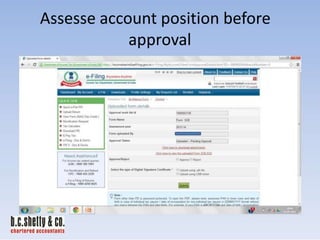
Assesse account position before
approval
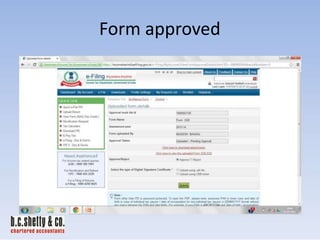
Form approved
Form rejected- reasons to be given
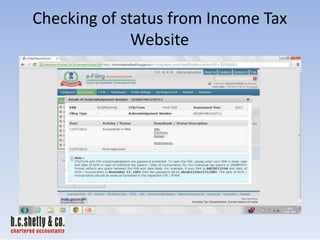
Checking of status from Income Tax
Website
My Account----View Forms
View Forms displays the list of Forms uploaded by CA
for an assesse. The CA will type the PAN of the
assesse and clicks SUBMIT button
PENALTY
• Penalty U/s 271B for non- filing of Tax Audit
Report becomes live again.
• It is necessary for assessee to approve the
tax audit report uploaded by CA before
the due date of filing the tax audit
report else it will be assumed that no
tax audit report has been furnished by the
assessee.
NO PRINT OPTION TO CHECK FILLED
DATA IN E UTILITY
• The E-PR 7 Utility Is Only For Saving the
Draft In Xml Format. It Is Not For

Viewing The Filled Data.
• As Such The Tax Auditor Is Not In A Position To
Check Possible Inconsistency/ Error.
• View The Data Using Microsoft Access 2010 Or

Higher. The Process Is As Below:-
• Step 1: Creating a Blank Database
• Open MS Access- Create a Blank Database File
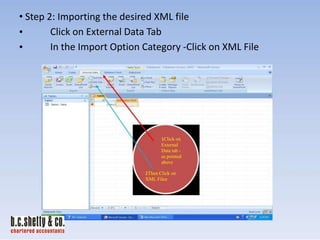
• Step 2: Importing the desired XML file
Click on External Data Tab
•
In the Import Option Category -Click on XML File
•

1Click on
External
Data tab as pointed
above

2Then Click on
XML Filee
• Browse for the relevant xml file location
• Step 3- Browse the location of the XML file to be imported

Browse for
the relevant
xml file
location
Step 4 - Select “Structure and D T ” in the Import XM
L option that pops up and Click on OK.
Step 5 - The Desired XML files stands imported in a gets
listed in a tabular manner in the left hand.

And Here you Go !!
The tables gets listed here.
Click on the respective tables and see
the desired details as filled by you in
the e-PR7 utility under those heads.
Signed Copy Vs. SD/- Copy Vs. Digitally
Signed
• In E -Filing Website It Is Clearly Given That “Where there is
a requirement in the form to submit a signed copy of
documents by an assessee/CA as an attachment, Upload
the Scan Copy of the attachments.
• In My View it is safer to upload Physically Signed Copy Of
Audit Report + Balance Sheet + Statement of Profit And
Loss +Notes To Accounts.
• Sd/- Signed Copy is to be Avoided.
• You can upload digitally signed Copy of Audit Report +
Balance Sheet + Statement of Profit And Loss +Notes To
Accounts.
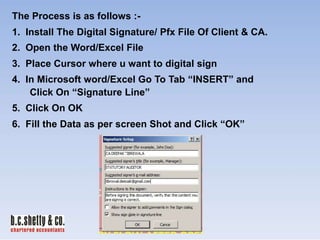
The Process is as follows :1. Install The Digital Signature/ Pfx File Of Client & CA.

2. Open the Word/Excel File
3. Place Cursor where u want to digital sign
4. In Microsoft word/Excel Go To Tab “INSERT” and
Click On “Signature Line”
5. Click On OK
6. Fill the Data as per screen Shot and Click “OK”
7. Repeat the same process 3 to 6 for Putting Digital
Sign of Your Client by placing cursor at another place
8. After the Process your file appears as follows:-
9. Click on each symbol and Fill the Name in X and Select
the Digital signature by using Change Option and
SIGN

10. Repeat the process Stated In 9 for your client also.
11. Convert the word/Excel File In PDF.
DIGITAL SIGNATURE IN PDF FILE
• You can digitally sign your pdf documents from the
following link:-

• https://www.globalsign.com/en-in/pdf-signingtool/
• Create a JPG Image of your Signature.
• Follow the steps required in the following link like
showing the path of your Digital Signature, Show
the files you wish to sign and choose location
where you sign in the page (Preferable last page).
• After Signing Save the documents.
TAX AUDIT UNDER SECTION 44AD,
44AE AND 44AF

• Tax Audits conducted under section 44AD,
44AE and 44AF of the Income-Tax act, 1961
shall not be taken into account for the

purpose of reckoning the “specified number
of tax audit assignments”.i.e..... 45 Limits.
STRINGENT ACTION BY ICAI
If any member uploads more than 45 Tax
Audit reports of 44AB then later on ICAI may take stringent
action. ICAI Allowed todata of members uploaded the
access
Tax Audit

Report.
WHETHER PARTNER CAN SIGN & UPLOAD
TAR ON BEHALF OF ANOTHER PARTNER

Yes One Partner can sign on behalf of another
partner and upload it to e filing web site
subject to condition that the overall limit
does not exceed.
COMPUTER VERY SLOW AFTER
OPENING E- UTILITY
• If your system is getting slow down during
the working on e-utility it may be due to 2 or
more versions of java on the system; remove
old version of java to improve performance.
• After removal data entry becomes very fast.
INHERITENT ERROR FOR YES /NO
OPTION
• The e-filing utility has some inherent errors to the
extent that after a draft saved file is reopened at
least 10 fields asking for „yes” or “no” has to be
re-entered as many number of times one
reopens the draft saved data xml file. These
fields are clause no's 7(b), 8(b),9(a),10, 11(d), 12
(b), 21(note), 22(a), 22 and 23.
• Do not Worry the XML File Contains Right Data.
INHERITENT ERROR FOR
QUANTITATIVE DETAILS
• The display in clause no 28 of Tax Audit Report
(quantitative details) also shows only one row
on reopening of the draft leading to misbelieve
that whether data in only one row was
entered?. The other rows gets themselves hide
in the software resulting into unnecessary
embarrassment to the person feeding the data.
• Do not worry the XML File Contains All Data. You
can view your data by opening XML File In Internet
Explorer or by using Microsoft Access.
INHERITENT ERROR FOR 269SS &
269T DETAILS
• In case the no of entries therein exceed 25
items, the same are not appearing in the pdf
downloaded by the assessee however, the
same is appearing in the xml file uploaded by the auditor.
• In such a situation, the assessee will always
be tempted to reject the 3cd uploaded by the
auditor
REJECTION OF TAR UPLOADED NEEDS
FRESH DATA ENTRY IN UTILITY
• The e-filing web site does not allow the tax
auditor to upload the same xml file which has
been rejected by the assessee due to any
error.
• The e filing site flashing a reason that the DSC

of the tax auditor is invalid instead of
creation of new xml file.
ADDRESS ERROR
• While Filing Address In Form 3CA,3CB, PARTA of Form 3CD, and in 269SS & 269T the use
of special characters like ,(Comma) - (Minus)
is to be avoided.

• E- Filing Site Shows Errors at the time of
Uploading.
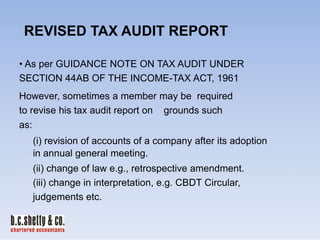
REVISED TAX AUDIT REPORT
• As per GUIDANCE NOTE ON TAX AUDIT UNDER
SECTION 44AB OF THE INCOME-TAX ACT, 1961
However, sometimes a member may be required
to revise his tax audit report on grounds such
as:
(i) revision of accounts of a company after its adoption
in annual general meeting.
(ii) change of law e.g., retrospective amendment.
(iii) change in interpretation, e.g. CBDT Circular,
judgements etc.
PROBLEM OF FAKE PATH FOR DSC
•
•
•
•

This problem is due to your internet explorer browser settings.
Please do the following:OPTION-1
IN INTERNET EXPLORER-> TOOLS ->INTERNET OPTION >SECURITY -> CUSTOM LEVEL-> ENABLE "INCLUDE LOCAL
DIRECTORY PATH WHEN UPLOADING FILE TO THE SERVER".
• OPTION-2
• CREATE FOLDER IN THE "C" DRIVE C LLED “F KEP TH”
(C:FAKEPATH) AND COPY THE XML FILES TO THIS FOLDER.
• IN GOOGLE CHROME SECOND OPTION WILL WORK.
PROBLEM OF “C NNOT RE DXML FILE”
THE

In case of windows vista/windows 7,
•Go to start-->control panel--> program--> java-> general tab.

• click on “settings” button in 'temporary internet files'.
• kindly uncheck the “keep temporary files on my computer” and
• click the “delete files” button and press ok.
• close your existing browser and open a new
browser.
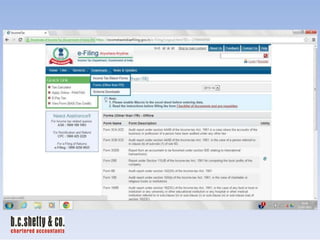
Offline Forms (Other than ITR) Given
In E-Utility
Form
Name

Form Description

Form3CA/3CB-3CD

Tax Audit Report

Form 3CEB

International Transaction(s)

Form 29B

Report Under Section 115JB

Form 6B

Audit Report Under Section 142(2A)

Form 10B

Charitable Or Religious Trusts Or
Institutions

Form 10BB

Institution Or Any University Or Other
Educational Institution
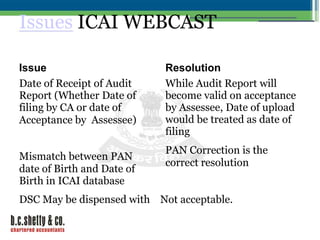
Issues ICAI WEBCAST
Issue
Date of Receipt of Audit
Report (Whether Date of
filing by CA or date of
Acceptance by Assessee)
Mismatch between PAN
date of Birth and Date of
Birth in ICAI database

Resolution
While Audit Report will
become valid on acceptance
by Assessee, Date of upload
would be treated as date of
filing
PAN Correction is the
correct resolution

DSC May be dispensed with Not acceptable.
10/19/1
2
Issues ICAI WEBCAST
Issues

Resolution

Guidance Note on tax audit ICAI had suggested that
u/s 44AB of the Income-tax separate column may be
Act, 1961” requires the tax No. created withof Form
in Para 3 of Form
3CA/ Para 3(a) the clause
auditor to meNo.3CB,his
itself; this would require a
observations/reservations, if change in the form by TPL.
any, in respect of various
More space is being created.

clauses of Form No.3CD in
Form No.3CD itself for the
ease of the AOs

A sub Committee of ICAI
and ITD examining the
additional space in Para 3
of Form No. 3CA/ Para
3(a) of Form No.3CB,
10/19/1
2
ICAI WEBCAST
Issues

Resolution

Word limit has been fixed for More space is being created.
reporting in the e-filing
A sub Committee of ICAI
schema like under eachForm No. and ITD 3(a) of Form the
in Para 3 of
3CA/ Para examining
clause of ForNo.3CB, 3CD limit additional space
is set at 100, for observations requirements
and comments the limit is
fixed at 1000/2000, for
ratios and computation
thereof the limit is 30

10/19/1
2
ICAI WEB CAST
Issues

Resolution

Capturing Signatures of
ICAI pointed out that only
More than one CA in the
in the case of disagreement
Capturing Signatures of More than one CA in
instance of joint instance of joint Audits. Para 3(a) of separate reports
Audits.
would two Form
the
be required to be filed. Thus
Revised AuditAccording to the institute in case joint Auditors
disagree there may be more than one Audit report
enabled
under DSC of different CAs
are enabled
Revised Reports can be filed

10/19/1
2
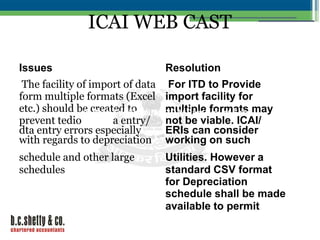
ICAI WEB CAST
Issues

Resolution

The facility of import of data For ITD to Provide
form multiple formats (Excel import facility for
etc.) should be created to No. multiple3(a) of Formmay
in Para 3 of Form
3CA/ Para formats
prevent tedioNo.3CB,a entry/ not be viable. ICAI/
dta entry errors especially
ERIs can consider
with regards to depreciation working on such

schedule and other large
schedules

Utilities. However a
standard CSV format
for Depreciation
schedule shall be made
available to permit
10/19/1
2
ICAI WEB CAST
Issues

Resolution

17- Separate disclosure
While a change in the
for different nature of
form is being suggested
disallowance is not of Form No. to TPL 3(a) of Form
in Para 3
3CA/ Para
No.3CB,
possible
Increasing space for
Under this clause only single remarks at the end of
amount of disallowance can the form is being
be specified in sub-clauses
worked out subject to
17(a)/ (b)/ (c)/ (d)/ (e)/ (f).
overall limit of 50MB

10/19/1
2
ICAI WEB CAST
Issues

Resolution

•PAN to not be a mandatory
field in the 206A cases

These issues stand
resolved.

. 3CA/ Para 3(a) of Form
•No order nu in Para 3 of Form No
brought forwNo.3CB,ss
reference order
PDF documents/ Text or
•Difficulty in uploading
Excel documents can be
scanned P&L accounts and
uploaded. Working on
balance sheets
convergence with MCA

10/19/1
2
Tax e filing

Tax e filing

  • 1.
    E- Filing ofTax Audit Report
  • 3.
    • Pursuant toamendment in Rule 12 of the Income Tax Rules, by the Notification no42 dated 11/6/2013, the following proviso has been inserted in sub- rule (2) of rule 12. • “Provided that where an assessee is required to furnish a report of audit specified under subclauses (iv), (v), (vi) or (via) of clause (23C) of section 10, section 10A, clause (b) of sub-section (1) of section 12A, section 44AB, section 80-IA, section 80-IB, section 80-IC, section 80-ID, section 80JJAA, section80LA, section92E or section 115JB of the Act, he shall furnish the same electronically.”
  • 4.
    WHY E -FILINGOF TAX AUDIT REPORT • Minimize chances of mismatch between the return and report • CA can keep track of his limit of tax audit. (45) • There may be cases where Assessee deliberately do not disclose the disallowance/ remarks of tax auditor • Earlier since signed report was not available, it was difficult for the Income Tax Department to trace such instances.
  • 18.
    SYSTEM REQUIREMENTS TOOPERATE E- UTILITY • At least your system configuration Microsoft XP Service Pack 3 or Higher like windows 7 /8. • RAM 2 GB for faster data entry and speed your work on e-utility. • Java Run Time Environment Version 7 update 6 to be downloaded from e- filing web sites. • Remove All Previous Versions Of Java from Your PC.
  • 20.
  • 21.
    Uploading of form-First Screen
  • 22.
    Uploading of form-After Input of DATA
  • 23.
    FOUR ATTACHMENTS REQUIREDTO BE UPLOADED ALONG WITH TAX AUDIT REPORT • 1. Balance Sheet (Mandatory) • 2. Profit & Loss Account (Mandatory) • 3. Cost Audit Report • 4. Excise Audit/other audit report • Attachments must be either in “tiff” or “pdf” format and with size up to 20 MB • Though Notes to Accounts are not mandatory but as a prudent practice they should also be submitted along with these documents as they are parts of BS & PL.
  • 24.
  • 25.
    ERROR ON UPLOADING& ITS IDENTIFICATION • The E-filing Site Sometimes Shows Error While Uploading Xml Of TAR, ITR & Other Forms. • The error is in XML language and cannot be easily identifiable. Error can be located by opening xml file in internet explorer and using search option e.g.:- 1. <OCDI_Description> • • 2. <Related PAN> 3. <RelatedParyType>
  • 27.
  • 28.
    Assesse account positionbefore approval
  • 29.
  • 30.
  • 31.
    Checking of statusfrom Income Tax Website
  • 32.
    My Account----View Forms ViewForms displays the list of Forms uploaded by CA for an assesse. The CA will type the PAN of the assesse and clicks SUBMIT button
  • 33.
    PENALTY • Penalty U/s271B for non- filing of Tax Audit Report becomes live again. • It is necessary for assessee to approve the tax audit report uploaded by CA before the due date of filing the tax audit report else it will be assumed that no tax audit report has been furnished by the assessee.
  • 34.
    NO PRINT OPTIONTO CHECK FILLED DATA IN E UTILITY • The E-PR 7 Utility Is Only For Saving the Draft In Xml Format. It Is Not For Viewing The Filled Data. • As Such The Tax Auditor Is Not In A Position To Check Possible Inconsistency/ Error. • View The Data Using Microsoft Access 2010 Or Higher. The Process Is As Below:-
  • 35.
    • Step 1:Creating a Blank Database • Open MS Access- Create a Blank Database File
  • 36.
    • Step 2:Importing the desired XML file Click on External Data Tab • In the Import Option Category -Click on XML File • 1Click on External Data tab as pointed above 2Then Click on XML Filee
  • 37.
    • Browse forthe relevant xml file location • Step 3- Browse the location of the XML file to be imported Browse for the relevant xml file location
  • 38.
    Step 4 -Select “Structure and D T ” in the Import XM L option that pops up and Click on OK.
  • 39.
    Step 5 -The Desired XML files stands imported in a gets listed in a tabular manner in the left hand. And Here you Go !! The tables gets listed here. Click on the respective tables and see the desired details as filled by you in the e-PR7 utility under those heads.
  • 40.
    Signed Copy Vs.SD/- Copy Vs. Digitally Signed • In E -Filing Website It Is Clearly Given That “Where there is a requirement in the form to submit a signed copy of documents by an assessee/CA as an attachment, Upload the Scan Copy of the attachments. • In My View it is safer to upload Physically Signed Copy Of Audit Report + Balance Sheet + Statement of Profit And Loss +Notes To Accounts. • Sd/- Signed Copy is to be Avoided. • You can upload digitally signed Copy of Audit Report + Balance Sheet + Statement of Profit And Loss +Notes To Accounts.
  • 41.
    The Process isas follows :1. Install The Digital Signature/ Pfx File Of Client & CA. 2. Open the Word/Excel File 3. Place Cursor where u want to digital sign 4. In Microsoft word/Excel Go To Tab “INSERT” and Click On “Signature Line” 5. Click On OK 6. Fill the Data as per screen Shot and Click “OK”
  • 42.
    7. Repeat thesame process 3 to 6 for Putting Digital Sign of Your Client by placing cursor at another place 8. After the Process your file appears as follows:-
  • 43.
    9. Click oneach symbol and Fill the Name in X and Select the Digital signature by using Change Option and SIGN 10. Repeat the process Stated In 9 for your client also. 11. Convert the word/Excel File In PDF.
  • 44.
    DIGITAL SIGNATURE INPDF FILE • You can digitally sign your pdf documents from the following link:- • https://www.globalsign.com/en-in/pdf-signingtool/ • Create a JPG Image of your Signature. • Follow the steps required in the following link like showing the path of your Digital Signature, Show the files you wish to sign and choose location where you sign in the page (Preferable last page). • After Signing Save the documents.
  • 45.
    TAX AUDIT UNDERSECTION 44AD, 44AE AND 44AF • Tax Audits conducted under section 44AD, 44AE and 44AF of the Income-Tax act, 1961 shall not be taken into account for the purpose of reckoning the “specified number of tax audit assignments”.i.e..... 45 Limits.
  • 46.
    STRINGENT ACTION BYICAI If any member uploads more than 45 Tax Audit reports of 44AB then later on ICAI may take stringent action. ICAI Allowed todata of members uploaded the access Tax Audit Report.
  • 47.
    WHETHER PARTNER CANSIGN & UPLOAD TAR ON BEHALF OF ANOTHER PARTNER Yes One Partner can sign on behalf of another partner and upload it to e filing web site subject to condition that the overall limit does not exceed.
  • 48.
    COMPUTER VERY SLOWAFTER OPENING E- UTILITY • If your system is getting slow down during the working on e-utility it may be due to 2 or more versions of java on the system; remove old version of java to improve performance. • After removal data entry becomes very fast.
  • 49.
    INHERITENT ERROR FORYES /NO OPTION • The e-filing utility has some inherent errors to the extent that after a draft saved file is reopened at least 10 fields asking for „yes” or “no” has to be re-entered as many number of times one reopens the draft saved data xml file. These fields are clause no's 7(b), 8(b),9(a),10, 11(d), 12 (b), 21(note), 22(a), 22 and 23. • Do not Worry the XML File Contains Right Data.
  • 50.
    INHERITENT ERROR FOR QUANTITATIVEDETAILS • The display in clause no 28 of Tax Audit Report (quantitative details) also shows only one row on reopening of the draft leading to misbelieve that whether data in only one row was entered?. The other rows gets themselves hide in the software resulting into unnecessary embarrassment to the person feeding the data. • Do not worry the XML File Contains All Data. You can view your data by opening XML File In Internet Explorer or by using Microsoft Access.
  • 51.
    INHERITENT ERROR FOR269SS & 269T DETAILS • In case the no of entries therein exceed 25 items, the same are not appearing in the pdf downloaded by the assessee however, the same is appearing in the xml file uploaded by the auditor. • In such a situation, the assessee will always be tempted to reject the 3cd uploaded by the auditor
  • 52.
    REJECTION OF TARUPLOADED NEEDS FRESH DATA ENTRY IN UTILITY • The e-filing web site does not allow the tax auditor to upload the same xml file which has been rejected by the assessee due to any error. • The e filing site flashing a reason that the DSC of the tax auditor is invalid instead of creation of new xml file.
  • 53.
    ADDRESS ERROR • WhileFiling Address In Form 3CA,3CB, PARTA of Form 3CD, and in 269SS & 269T the use of special characters like ,(Comma) - (Minus) is to be avoided. • E- Filing Site Shows Errors at the time of Uploading.
  • 54.
    REVISED TAX AUDITREPORT • As per GUIDANCE NOTE ON TAX AUDIT UNDER SECTION 44AB OF THE INCOME-TAX ACT, 1961 However, sometimes a member may be required to revise his tax audit report on grounds such as: (i) revision of accounts of a company after its adoption in annual general meeting. (ii) change of law e.g., retrospective amendment. (iii) change in interpretation, e.g. CBDT Circular, judgements etc.
  • 55.
    PROBLEM OF FAKEPATH FOR DSC • • • • This problem is due to your internet explorer browser settings. Please do the following:OPTION-1 IN INTERNET EXPLORER-> TOOLS ->INTERNET OPTION >SECURITY -> CUSTOM LEVEL-> ENABLE "INCLUDE LOCAL DIRECTORY PATH WHEN UPLOADING FILE TO THE SERVER". • OPTION-2 • CREATE FOLDER IN THE "C" DRIVE C LLED “F KEP TH” (C:FAKEPATH) AND COPY THE XML FILES TO THIS FOLDER. • IN GOOGLE CHROME SECOND OPTION WILL WORK.
  • 56.
    PROBLEM OF “CNNOT RE DXML FILE” THE In case of windows vista/windows 7, •Go to start-->control panel--> program--> java-> general tab. • click on “settings” button in 'temporary internet files'. • kindly uncheck the “keep temporary files on my computer” and • click the “delete files” button and press ok. • close your existing browser and open a new browser.
  • 57.
    Offline Forms (Otherthan ITR) Given In E-Utility Form Name Form Description Form3CA/3CB-3CD Tax Audit Report Form 3CEB International Transaction(s) Form 29B Report Under Section 115JB Form 6B Audit Report Under Section 142(2A) Form 10B Charitable Or Religious Trusts Or Institutions Form 10BB Institution Or Any University Or Other Educational Institution
  • 58.
    Issues ICAI WEBCAST Issue Dateof Receipt of Audit Report (Whether Date of filing by CA or date of Acceptance by Assessee) Mismatch between PAN date of Birth and Date of Birth in ICAI database Resolution While Audit Report will become valid on acceptance by Assessee, Date of upload would be treated as date of filing PAN Correction is the correct resolution DSC May be dispensed with Not acceptable. 10/19/1 2
  • 59.
    Issues ICAI WEBCAST Issues Resolution GuidanceNote on tax audit ICAI had suggested that u/s 44AB of the Income-tax separate column may be Act, 1961” requires the tax No. created withof Form in Para 3 of Form 3CA/ Para 3(a) the clause auditor to meNo.3CB,his itself; this would require a observations/reservations, if change in the form by TPL. any, in respect of various More space is being created. clauses of Form No.3CD in Form No.3CD itself for the ease of the AOs A sub Committee of ICAI and ITD examining the additional space in Para 3 of Form No. 3CA/ Para 3(a) of Form No.3CB, 10/19/1 2
  • 60.
    ICAI WEBCAST Issues Resolution Word limithas been fixed for More space is being created. reporting in the e-filing A sub Committee of ICAI schema like under eachForm No. and ITD 3(a) of Form the in Para 3 of 3CA/ Para examining clause of ForNo.3CB, 3CD limit additional space is set at 100, for observations requirements and comments the limit is fixed at 1000/2000, for ratios and computation thereof the limit is 30 10/19/1 2
  • 61.
    ICAI WEB CAST Issues Resolution CapturingSignatures of ICAI pointed out that only More than one CA in the in the case of disagreement Capturing Signatures of More than one CA in instance of joint instance of joint Audits. Para 3(a) of separate reports Audits. would two Form the be required to be filed. Thus Revised AuditAccording to the institute in case joint Auditors disagree there may be more than one Audit report enabled under DSC of different CAs are enabled Revised Reports can be filed 10/19/1 2
  • 62.
    ICAI WEB CAST Issues Resolution Thefacility of import of data For ITD to Provide form multiple formats (Excel import facility for etc.) should be created to No. multiple3(a) of Formmay in Para 3 of Form 3CA/ Para formats prevent tedioNo.3CB,a entry/ not be viable. ICAI/ dta entry errors especially ERIs can consider with regards to depreciation working on such schedule and other large schedules Utilities. However a standard CSV format for Depreciation schedule shall be made available to permit 10/19/1 2
  • 63.
    ICAI WEB CAST Issues Resolution 17-Separate disclosure While a change in the for different nature of form is being suggested disallowance is not of Form No. to TPL 3(a) of Form in Para 3 3CA/ Para No.3CB, possible Increasing space for Under this clause only single remarks at the end of amount of disallowance can the form is being be specified in sub-clauses worked out subject to 17(a)/ (b)/ (c)/ (d)/ (e)/ (f). overall limit of 50MB 10/19/1 2
  • 64.
    ICAI WEB CAST Issues Resolution •PANto not be a mandatory field in the 206A cases These issues stand resolved. . 3CA/ Para 3(a) of Form •No order nu in Para 3 of Form No brought forwNo.3CB,ss reference order PDF documents/ Text or •Difficulty in uploading Excel documents can be scanned P&L accounts and uploaded. Working on balance sheets convergence with MCA 10/19/1 2