How to do DevOps with the
SharePoint Framework and why
it matters?
European SharePoint Conference 2019
By: Vincent Biret
Passionate about technologies, development and community
Vincent Biret
@baywet
bit.ly/vince365
Microsoft Office Dev MVP
Azure and Office 365 developer @ 2toLead
Devs, Product Owners, Deciders, QA, Project Managers…
For whom this session is?
Agenda
Intro to Software lifecycle + DevOps
Intro to Azure DevOps
Azure Pipelines
Unit tests with SPFx
Conclusion
Ready?
Software lifecycle
Where it all begins
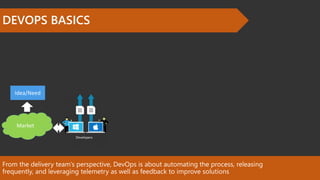
From the delivery team’s perspective, DevOps is about automating the process, releasing
frequently, and leveraging telemetry as well as feedback to improve solutions
DEVOPS BASICS
Idea/Need
Market
Azure DevOps
Let’s talk about tooling
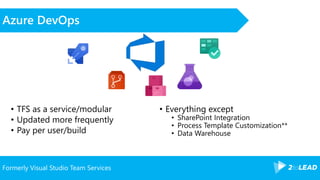
Formerly Visual Studio Team Services
Azure DevOps
• TFS as a service/modular
• Updated more frequently
• Pay per user/build
• Everything except
• SharePoint Integration
• Process Template Customization**
• Data Warehouse
Branch
management
Code as a team, not a guy in a cave
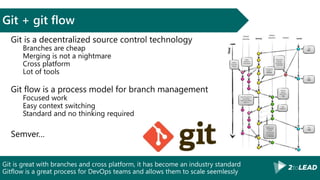
Git is great with branches and cross platform, it has become an industry standard
Gitflow is a great process for DevOps teams and allows them to scale seemlessly
Git + git flow
Git is a decentralized source control technology
Branches are cheap
Merging is not a nightmare
Cross platform
Lot of tools
Git flow is a process model for branch management
Focused work
Easy context switching
Standard and no thinking required
Semver…
Pull requests are a great way to help your team grow and to improve the quality of the
code
Peer reviews and quality
« Here are a bunch of changes in the code, please review it and make it
part of the main code »
Also check if changes:
Build
Pass unit tests
Pass static analysis gate (code quality)
Have associated work items (context/documentation)
And allows:
For discussion
The team to grow together
Build
Let’s increase the quality of releases
Implementing automated builds solves multiple concerns for a development team
Automated builds
Predictable result
Constant quality
Time saving
Avoid XAML builds (very old) and 2015/JSON builds (previous model)
Pipelines
YAML definition
Web edition
Lot of third-parties integrations
Tasks on GitHub!
Agent auto updates!
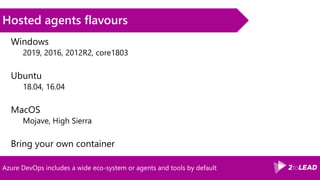
Hosted agents are VM’s ready to use in the cloud with lots of pre-installed tools.
Agents
Hosted Agents
BaaS
Installed Agents
Azure, or anywhere else
Azure DevOps includes a wide eco-system or agents and tools by default
Hosted agents flavours
Windows
2019, 2016, 2012R2, core1803
Ubuntu
18.04, 16.04
MacOS
Mojave, High Sierra
Bring your own container
Build pipelines
Demo
Deploy
Automate all the things!
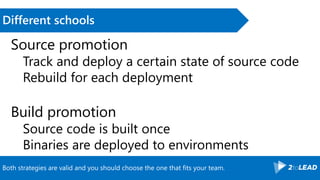
Both strategies are valid and you should choose the one that fits your team.
Different schools
Source promotion
Track and deploy a certain state of source code
Rebuild for each deployment
Build promotion
Source code is built once
Binaries are deployed to environments
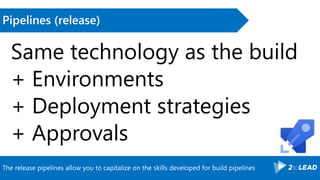
The release pipelines allow you to capitalize on the skills developed for build pipelines
Pipelines (release)
Same technology as the build
+ Environments
+ Deployment strategies
+ Approvals
Release Pipelines
Demo
Tests
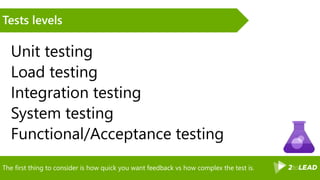
The first thing to consider is how quick you want feedback vs how complex the test is.
Tests levels
Unit testing
Load testing
Integration testing
System testing
Functional/Acceptance testing
The second thing to consider is the aspect of the solution you want to test for.
Tests types
Installation
Compatibility
Regression
Destructive
Security
L17N/I13N
A/B
…..
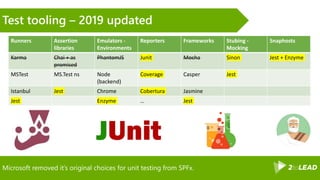
Microsoft removed it’s original choices for unit testing from SPFx.
Test tooling – 2019 updated
Runners Assertion
libraries
Emulators -
Environments
Reporters Frameworks Stubing -
Mocking
Snaphosts
Karma Chai + as
promised
PhantomJS Junit Mocha Sinon Jest + Enzyme
MSTest MS.Test ns Node
(backend)
Coverage Casper Jest
Istanbul Jest Chrome Cobertura Jasmine
Jest Enzyme … Jest
Unit tests of demo webpart
Demo
Conclusion
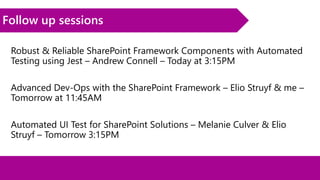
Follow up sessions
Robust & Reliable SharePoint Framework Components with Automated
Testing using Jest – Andrew Connell – Today at 3:15PM
Advanced Dev-Ops with the SharePoint Framework – Elio Struyf & me –
Tomorrow at 11:45AM
Automated UI Test for SharePoint Solutions – Melanie Culver & Elio
Struyf – Tomorrow 3:15PM
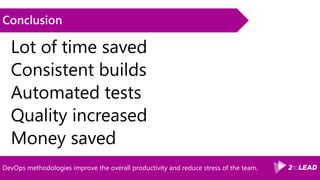
DevOps methodologies improve the overall productivity and reduce stress of the team.
Conclusion
Lot of time saved
Consistent builds
Automated tests
Quality increased
Money saved
Bit.ly/vince365 @baywet slideshare.net/VincentBIRET
Thanks!/Questions?
Vincent Biret
Office 365 and Azure
Developer, 2toLead
@baywet
Bit.ly/vince365
http://bit.ly/az-sq
http://bit.ly/spfx-devops

#ESPC19 How to do #DevOps with #SPFx

  • 1.
    How to doDevOps with the SharePoint Framework and why it matters? European SharePoint Conference 2019 By: Vincent Biret
  • 2.
    Passionate about technologies,development and community Vincent Biret @baywet bit.ly/vince365 Microsoft Office Dev MVP Azure and Office 365 developer @ 2toLead
  • 3.
    Devs, Product Owners,Deciders, QA, Project Managers… For whom this session is?
  • 4.
    Agenda Intro to Softwarelifecycle + DevOps Intro to Azure DevOps Azure Pipelines Unit tests with SPFx Conclusion
  • 5.
  • 6.
  • 7.
    From the deliveryteam’s perspective, DevOps is about automating the process, releasing frequently, and leveraging telemetry as well as feedback to improve solutions DEVOPS BASICS Idea/Need Market
  • 8.
  • 9.
    Formerly Visual StudioTeam Services Azure DevOps • TFS as a service/modular • Updated more frequently • Pay per user/build • Everything except • SharePoint Integration • Process Template Customization** • Data Warehouse
  • 10.
    Branch management Code as ateam, not a guy in a cave
  • 11.
    Git is greatwith branches and cross platform, it has become an industry standard Gitflow is a great process for DevOps teams and allows them to scale seemlessly Git + git flow Git is a decentralized source control technology Branches are cheap Merging is not a nightmare Cross platform Lot of tools Git flow is a process model for branch management Focused work Easy context switching Standard and no thinking required Semver…
  • 12.
    Pull requests area great way to help your team grow and to improve the quality of the code Peer reviews and quality « Here are a bunch of changes in the code, please review it and make it part of the main code » Also check if changes: Build Pass unit tests Pass static analysis gate (code quality) Have associated work items (context/documentation) And allows: For discussion The team to grow together
  • 13.
    Build Let’s increase thequality of releases
  • 14.
    Implementing automated buildssolves multiple concerns for a development team Automated builds Predictable result Constant quality Time saving
  • 15.
    Avoid XAML builds(very old) and 2015/JSON builds (previous model) Pipelines YAML definition Web edition Lot of third-parties integrations Tasks on GitHub! Agent auto updates!
  • 16.
    Hosted agents areVM’s ready to use in the cloud with lots of pre-installed tools. Agents Hosted Agents BaaS Installed Agents Azure, or anywhere else
  • 17.
    Azure DevOps includesa wide eco-system or agents and tools by default Hosted agents flavours Windows 2019, 2016, 2012R2, core1803 Ubuntu 18.04, 16.04 MacOS Mojave, High Sierra Bring your own container
  • 18.
  • 19.
  • 20.
    Both strategies arevalid and you should choose the one that fits your team. Different schools Source promotion Track and deploy a certain state of source code Rebuild for each deployment Build promotion Source code is built once Binaries are deployed to environments
  • 21.
    The release pipelinesallow you to capitalize on the skills developed for build pipelines Pipelines (release) Same technology as the build + Environments + Deployment strategies + Approvals
  • 22.
  • 23.
  • 24.
    The first thingto consider is how quick you want feedback vs how complex the test is. Tests levels Unit testing Load testing Integration testing System testing Functional/Acceptance testing
  • 25.
    The second thingto consider is the aspect of the solution you want to test for. Tests types Installation Compatibility Regression Destructive Security L17N/I13N A/B …..
  • 26.
    Microsoft removed it’soriginal choices for unit testing from SPFx. Test tooling – 2019 updated Runners Assertion libraries Emulators - Environments Reporters Frameworks Stubing - Mocking Snaphosts Karma Chai + as promised PhantomJS Junit Mocha Sinon Jest + Enzyme MSTest MS.Test ns Node (backend) Coverage Casper Jest Istanbul Jest Chrome Cobertura Jasmine Jest Enzyme … Jest
  • 27.
    Unit tests ofdemo webpart Demo
  • 28.
  • 29.
    Follow up sessions Robust& Reliable SharePoint Framework Components with Automated Testing using Jest – Andrew Connell – Today at 3:15PM Advanced Dev-Ops with the SharePoint Framework – Elio Struyf & me – Tomorrow at 11:45AM Automated UI Test for SharePoint Solutions – Melanie Culver & Elio Struyf – Tomorrow 3:15PM
  • 30.
    DevOps methodologies improvethe overall productivity and reduce stress of the team. Conclusion Lot of time saved Consistent builds Automated tests Quality increased Money saved
  • 31.
    Bit.ly/vince365 @baywet slideshare.net/VincentBIRET Thanks!/Questions? VincentBiret Office 365 and Azure Developer, 2toLead @baywet Bit.ly/vince365 http://bit.ly/az-sq http://bit.ly/spfx-devops

Editor's Notes

  • #4 Devs, devops, qa people, deciders Why should you care? ALM = time saved, happy devs, money saved and better products/services
  • #7 Gestion des questions, interaction, ok avec ce programme?
  • #11 https://www.visualstudio.com/get-started/overview-of-get-started-tasks-vs Unlimited storage, team projects, everything, 5 free users, free for users with msdn subscriptions, free for stakeholders Data Warehouse can be replaced by powerbi or dashboard being delivered http://blog-eng.dbtek.it/2014/03/visual-studio-online-vso-vs-team.html https://azure.microsoft.com/en-us/pricing/details/devops/azure-devops-services/
  • #17 New, hasn’t yet the build quality information and integration with RM + tests manager. https://github.com/Microsoft/vsts-agent-tasks Don’t use XAML builds! It’s old and difficult Don’t use the 2015/JSON model, Microsoft is transitioning away from that to align with industry
  • #18 Build as a Service (billed by minutes building), Hosted agents have foundation edition of sharepoint installed. Installed agents only need internet access. https://docs.microsoft.com/en-us/azure/devops/pipelines/agents/hosted?view=azure-devops
  • #22 Source promotion is generally more flexible
  • #23 powershell + Tasks = quick win Tip: use –verbose everywhere!
  • #25 Authentication and authorization is a whole session by itself and is advanced. For the interest of time, we’ll skip it today
  • #27 Goal of this section is not to cover everything, but more what we can achieve in the SharePoint world
  • #28 Runners: take care of running the tests and provide the infrastructure for (memory, processes…) Asseration libraries: « ways » to write your unit tests Emulators (or environments): context within the tests will run (server with node, browser, emulated browser…) Reporters: take care of writing down tests results in comprenhensive format Frameworks: provide a suite of functionnalities to help implement testing Stubing/Mocking-Faking/Spying: allows you to isolate the tested code and/or observe behavior
  • #32 If the static analysis could be automated, wouldn’t be it great?
  • #36 Money save = dev time saved, less support to provide, better product/service