Ramco ERP Suite Enterprise Edition
Enterprise Asset Management
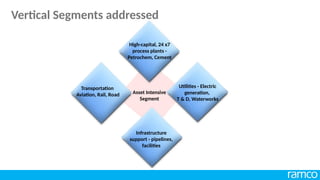
Asset Intensive
Segment
Transportation
Aviation, Rail, Road
High-capital, 24 x7
process plants -
Petrochem, Cement
Utilities - Electric
generation,
T & D, Waterworks
Infrastructure
support - pipelines,
facilities
Vertical Segments addressed
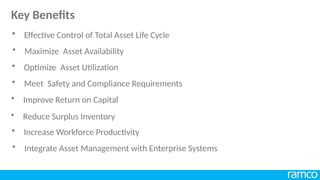
• Maximize Asset Availability
• Optimize Asset Utilization
• Meet Safety and Compliance Requirements
• Improve Return on Capital
• Reduce Surplus Inventory
• Increase Workforce Productivity
• Integrate Asset Management with Enterprise Systems
• Effective Control of Total Asset Life Cycle
Key Benefits
Asset Induction & Work Management
• Work Elements
• Work Groups
• Employee
• Other Key Masters
• Location Structure
• Equipment Profile
• Equipment Registry
Key Benefits
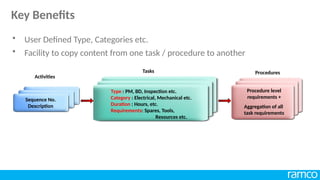
• User Defined Type, Categories etc.
• Facility to copy content from one task / procedure to another
Sequence No.
Description
Sequence No.
Description
Sequence No.
Description
Type : PM, BD, Inspection etc.
Category : Electrical, Mechanical etc.
Duration : Hours, etc.
Requirements: Spares, Tools,
Resources etc.
Type : PM, BD, Inspection etc.
Category : Electrical, Mechanical etc.
Duration : Hours, etc.
Requirements: Spares, Tools,
Resources etc.
Type : PM, BD, Inspection etc.
Category : Electrical, Mechanical etc.
Duration : Hours, etc.
Requirements: Spares, Tools,
Resources etc.
Procedure level
requirements +
Aggregation of all
task requirements
Tasks
Activities
Procedures
Key Benefits
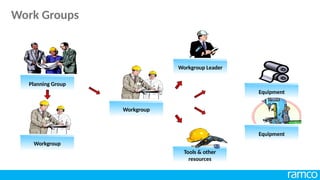
Tools & other
resources
Workgroup
Workgroup Leader
Equipment
Planning Group
Workgroup
Equipment
Work Groups
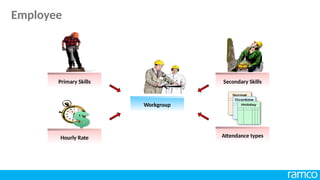
Workgroup
Primary Skills
Hourly Rate Attendance types
Secondary Skills
Employee
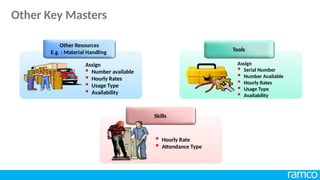
Other Resources
E.g. : Material Handling Tools
Skills
Assign
 Number available
 Hourly Rates
 Usage Type
 Availability
Assign
 Serial Number
 Number Available
 Hourly Rates
 Usage Type
 Availability
 Hourly Rate
 Attendance Type
Other Key Masters
Child Location
Level 1 Turbine
500 MW Unit 1
Boiler
500 MW Unit 1
500 MW Unit 1
Apex Location
Child Location
Level 2
• Build hierarchy of location structure to mimic organization structure
• Cost views and roll-ups
• Build location profile by attaching attributes such as planning groups, trouble
shooting guides, inspection point
Coal Mill
500 MW Unit 1
Location Structure
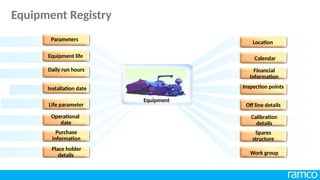
Installation date
Life parameter
Daily run hours
Location
Work group
Purchase
information
Calendar
Financial
Information
Equipment life
Place holder
details
Operational
date
Spares
structure
Inspection points
Parameters
Off line details
Calibration
details
Equipment
Equipment Registry
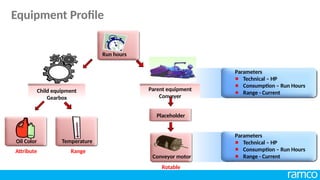
Parent equipment
Conveyer
Child equipment
Gearbox
Run hours
Oil Color Temperature
Range
Attribute
Placeholder
Conveyor motor
Rotable
Parameters
Technical – HP
Consumption – Run Hours
Range - Current
Parameters
Technical – HP
Consumption – Run Hours
Range - Current
Equipment Profile
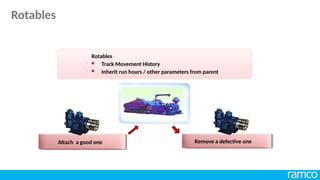
Rotables
 Track Movement History
 Inherit run hours / other parameters from parent
Remove a defective one
Attach a good one
Rotables
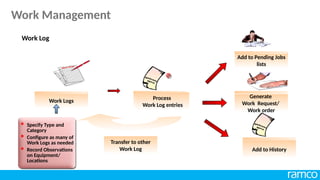
Work Logs
Add to History
Add to Pending Jobs
lists
Generate
Work Request/
Work order
Process
Work Log entries
Transfer to other
Work Log
 Specify Type and
Category
 Configure as many of
Work Logs as needed
 Record Observations
on Equipment/
Locations
Work Log

Work Management
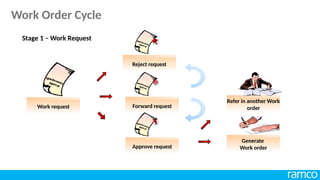
Reject request
Work request Forward request
Approve request



Refer in another Work
order
Generate
Work order
Stage 1 – Work Request
Work Order Cycle
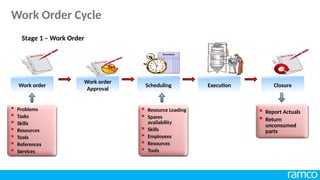
Work order
Work order
Approval
Scheduling Execution Closure
 Problems
 Tasks
 Skills
 Resources
 Tools
 References
 Services
 Resource Loading
 Spares
availability
 Skills
 Employees
 Resources
 Tools
 Report Actuals
 Return
unconsumed
parts
Stage 1 – Work Order
Work Order Cycle
• Match Job Requirements and Skill assignments
• Plan and Ensure Spares availability
• Control Costs
• Provide Right Solutions for the Maintenance Problems
• Reduce Search Time and Increase Wrench Time
• Maintain Comprehensive Asset Information
Key Benefits
Asset Induction and Work Management
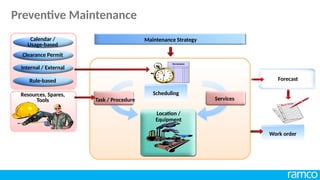
Work order
Maintenance Strategy
Scheduling
Location /
Equipment
Services
Task / Procedure
Resources, Spares,
Tools
Calendar /
Usage-based
Clearance Permit
Internal / External
Rule-based Forecast
Preventive Maintenance
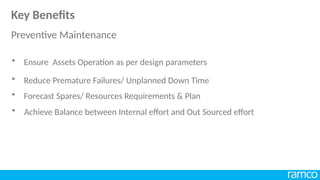
• Reduce Premature Failures/ Unplanned Down Time
• Forecast Spares/ Resources Requirements & Plan
• Achieve Balance between Internal effort and Out Sourced effort
• Ensure Assets Operation as per design parameters
Key Benefits
Preventive Maintenance
Predictive Maintenance
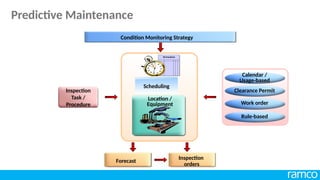
Calendar /
Usage-based
Clearance Permit
Work order
Rule-based
Forecast
Inspection
orders
Condition Monitoring Strategy
Inspection
Task /
Procedure
Scheduling
Location /
Equipment
Predictive Maintenance
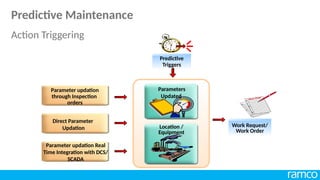
Parameter updation
through Inspection
orders
Parameter updation Real
Time Integration with DCS/
SCADA
Direct Parameter
Updation Work Request/
Work Order
Location /
Equipment
Parameters
Updated
Predictive
Triggers
Predictive Maintenance
Action Triggering
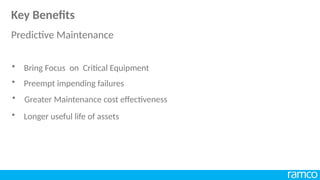
• Preempt impending failures
• Greater Maintenance cost effectiveness
• Bring Focus on Critical Equipment
• Longer useful life of assets
Key Benefits
Predictive Maintenance
Reliability
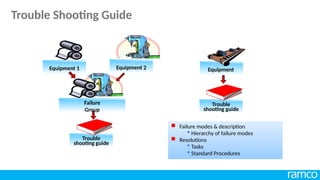
Failure
Group
Equipment 1 Equipment 2 Equipment
Trouble
shooting guide
Trouble
shooting guide
 Failure modes & description
 Hierarchy of failure modes
 Resolutions
 Tasks
 Standard Procedures
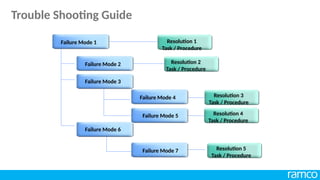
Trouble Shooting Guide
Failure Mode 1
Failure Mode 2
Failure Mode 3
Failure Mode 4
Failure Mode 5
Failure Mode 6
Failure Mode 7
Resolution 1
Task / Procedure
Resolution 2
Task / Procedure
Resolution 3
Task / Procedure
Resolution 5
Task / Procedure
Resolution 4
Task / Procedure
Trouble Shooting Guide
• Severity based on weighted average of
- Production Down Hours
- Maintenance Expenses
- Safety Rating
• Occurrence of Failures
• Detectability (chances of detecting failure)
Risk Factor = Severity Rating * Occurrence Rating * Detectability Rating
 Can be done at

Equipment Level

Equipment - Problem level
Failure Analysis
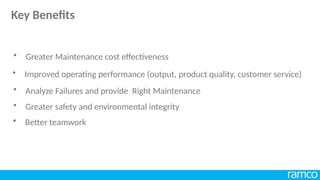
• Analyze Failures and provide Right Maintenance
• Greater safety and environmental integrity
• Greater Maintenance cost effectiveness
• Better teamwork
• Improved operating performance (output, product quality, customer service)
Key Benefits
Shut Down Management
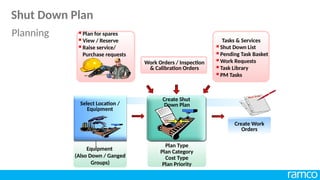
Equipment
(Also Down / Ganged
Groups)
Plan Type
Plan Category
Cost Type
Plan Priority
 Shut Down List
 Pending Task Basket
 Work Requests
 Task Library
 PM Tasks
Tasks & Services
 Plan for spares
 View / Reserve
 Raise service/
Purchase requests
Work Orders / Inspection
& Calibration Orders
Create Shut
Down Plan
Select Location /
Equipment
Create Work
Orders
Planning
Shut Down Plan
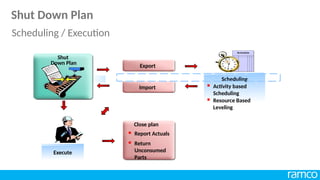
Export
Import
Execute
Close plan
 Report Actuals
 Return
Unconsumed
Parts
Scheduling
 Activity based
Scheduling
 Resource Based
Leveling
Shut
Down Plan
Shut Down Plan
Scheduling / Execution
• Ensure Availability of Men and Materials
• Monitor effectively the Progress of Shut Down Jobs
• Complete Shutdown Activities with in budgeted Time and Cost
• Plan and Schedule effectively
Key Benefits
Permits
Sequence No.
Description
Sequence No.
Description
Description
Status
Type : PM, BD, Inspection etc.
Category : Electrical, Mechanical etc.
Duration : Hours, etc.
Requirements: Spares, Tools,
Resources etc.
Type : PM, BD, Inspection etc.
Category : Electrical, Mechanical etc.
Duration : Hours, etc.
Requirements: Spares, Tools,
Resources etc.
Type : Hot, Cold, etc..
Category : Electrical, Mechanical etc.
Activity on : Equipment / Location
Activity Type : Lock Out/ Tag Out
Clearance Procedures
Activities
Sequence No.
Description
Sequence No.
Description
Description
Type
Status
Type : Hot, Cold, etc..
Category : Electrical,
Mechanical etc.
Safety Procedures
Hazards
Clearance
Permit
Key Benefits
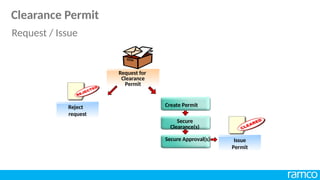
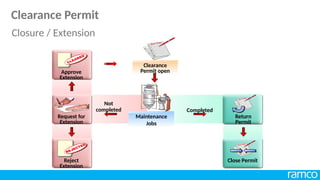
Issue
Permit
Request for
Clearance
Permit
Reject
request
Create Permit
Secure
Clearance(s)
Secure Approval(s)
Clearance Permit
Request / Issue
Clearance
Permit open
Maintenance
Jobs
Completed
Not
completed
Request for
Extension
Reject
Extension
Approve
Extension
Return
Permit
Close Permit
Clearance Permit
Closure / Extension
• Achieve Coordination between Operations and Maintenance
• Ensure Safety and Statutory Compliance
Key Benefits
Calibration
Calendar /
Usage-based
Clearance Permit
Work order
Rule-based
Internal / external
Calibration
Schedule
Equipment
Forecast
Calibration
orders
Calibration
Task /
Procedure
Calibration requirements of equipment
Calibration
Calibration
order
Record pre-
calibration values
Calibrate
Record post
calibration values
 Master Instrument
used
 Person calibrating
Calibration
Certificate
Passed
Calibration
• Ensure proper functioning of Equipment
• Maintain Equipment health and Quality Output
• Perform Calibration Tasks on time
Key Benefits
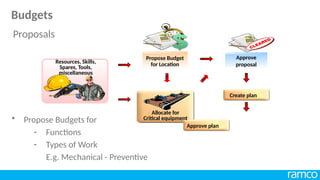
Budgets
Approve
proposal
Propose Budget
for Location
Resources, Skills,
Spares, Tools,
miscellaneous
Create plan
Approve plan
Allocate for
Critical equipment
• Propose Budgets for
- Functions
- Types of Work
E.g. Mechanical - Preventive
Proposals
Budgets
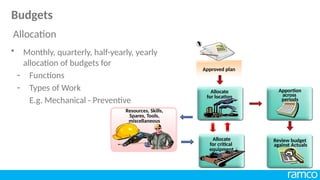
Approved plan

Allocate
for location
Apportion
across
periods
Review budget
against Actuals
Allocate
for critical
equipment
Resources, Skills,
Spares, Tools,
miscellaneous
• Monthly, quarterly, half-yearly, yearly
allocation of budgets for
- Functions
- Types of Work
E.g. Mechanical - Preventive
Allocation
Budgets
• Cater for Spares/ Resources/ Miscellaneous Costs
• Ensure that the actual cost is within the Budgets
• Control Overall Maintenance Costs
• Propose Fund Requirements at Location/ Equipment level
Key Benefits
Contracts
Maintenance plan
PM Schedule
 Service Items
 Bills of materials
 Standard Rate
Service Request
Work order
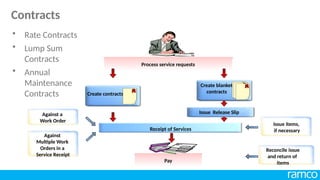
Contracts
Process service requests
Create contracts
Receipt of Services
Create blanket
contracts
Issue Release Slip
Against a
Work Order
Against
Multiple Work
Orders in a
Service Receipt
Issue items,
if necessary
Pay
Reconcile issue
and return of
items
• Rate Contracts
• Lump Sum
Contracts
• Annual
Maintenance
Contracts
Contracts
• Achieve a Balance between Internal and External mix
• Ensure Coordination
• Reduce Total Maintenance Costs
• Leverage Maintenance Task Outsourcing
Key Benefits
MRO and After Sales Service
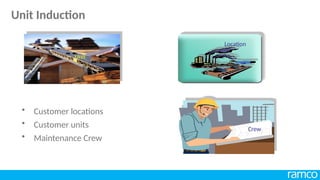
• Customer locations
• Customer units
• Maintenance Crew
Unit
Location
Crew
Unit Induction
• Customer centric service levels
• Multi Unit-Service level agreement
• Types of Service level
• Auto –Renewal
• Escalation for Agreement
• Multiple Payment plans
• PM Visits->SWO
Service Level Agreement
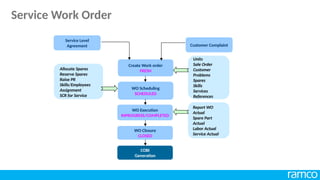
Report WO
Actual
Spare Part
Actual
Labor Actual
Service Actual
Allocate Spares
Reserve Spares
Raise PR
Skills/Employees
Assignment
SCR for Service
Service Level
Agreement
Create Work order
FRESH
WO Scheduling
SCHEDULED
Customer Complaint
WO Execution
INPROGRESS/COMPLETED
WO Closure
CLOSED
Units
Sale Order
Customer
Problems
Spares
Skills
Services
References
COBI
Generation
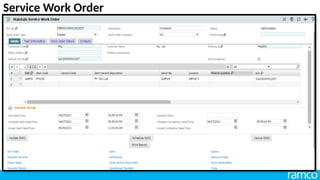
Service Work Order
• Billing based on either reported parameter value or reported hours
• Supports both Parameter and Skill reporting
• Consolidation of the reported value for billing
Service Level Agreement Reporting for Billing
• Improves Customer Satisfaction
• Supports both Service and Sales & Service Industry
• Supports Repair, Preventive Maintenance, Installation and Movement of
Customers Units
• Minimal data capture through simplified User interface screens
Key Benefits
Equipment Rental Management
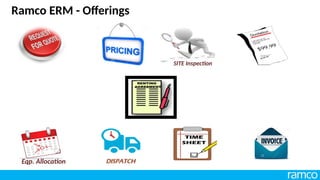
Ramco ERM - Offerings
SITE Inspection
Eqp. Allocation
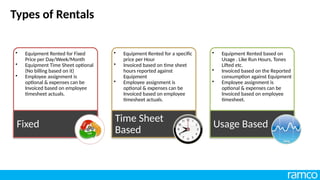
Types of Rentals
• Equipment Rented for Fixed
Price per Day/Week/Month
• Equipment Time Sheet optional
(No billing based on it)
• Employee assignment is
optional & expenses can be
Invoiced based on employee
timesheet actuals.
Fixed
• Equipment Rented for a specific
price per Hour
• Invoiced based on time sheet
hours reported against
Equipment
• Employee assignment is
optional & expenses can be
Invoiced based on employee
timesheet actuals.
Time Sheet
Based
• Equipment Rented based on
Usage . Like Run Hours, Tones
Lifted etc.
• Invoiced based on the Reported
consumption against Equipment
• Employee assignment is
optional & expenses can be
Invoiced based on employee
timesheet.
Usage Based
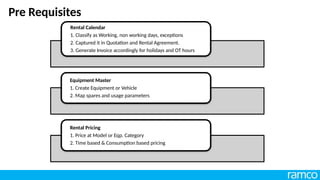
Pre Requisites
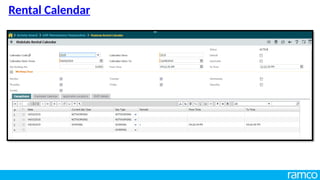
Rental Calendar
1. Classify as Working, non working days, exceptions
2. Captured it in Quotation and Rental Agreement.
3. Generate Invoice accordingly for holidays and OT hours
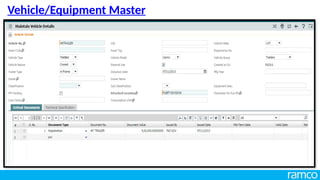
Equipment Master
1. Create Equipment or Vehicle
2. Map spares and usage parameters
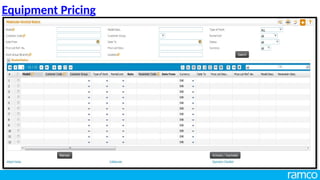
Rental Pricing
1. Price at Model or Eqp. Category
2. Time based & Consumption based pricing
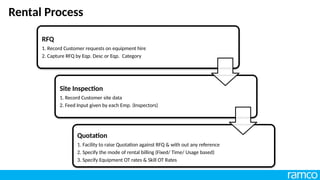
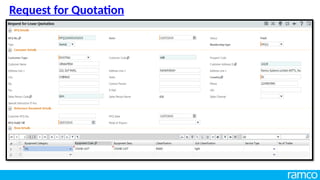
RFQ
1. Record Customer requests on equipment hire
2. Capture RFQ by Eqp. Desc or Eqp. Category
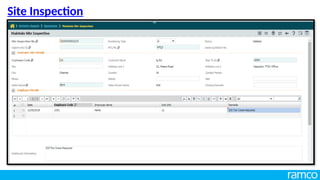
Site Inspection
1. Record Customer site data
2. Feed Input given by each Emp. (Inspectors)
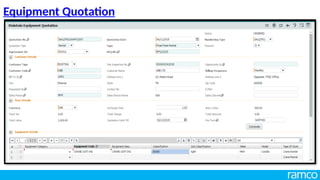
Quotation
1. Facility to raise Quotation against RFQ & with out any reference
2. Specify the mode of rental billing (Fixed/ Time/ Usage based)
3. Specify Equipment OT rates & Skill OT Rates
Rental Process
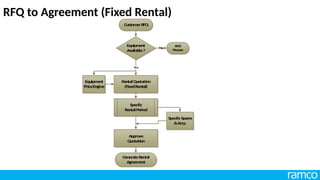
RFQ to Agreement (Fixed Rental)
Custom
erRFQ
Equipm
ent
Available?
Equipm
ent
PriceEngine
EN
D
Proce
ss
N
o
Re
ntalQ
uotati
on
(Fixe
dRental)
Specify
Re
ntalPeriod
Approve
Q
uotation
G
enerateR
ental
Agreem
ent
Yes
SpecifySpares
&Accy.
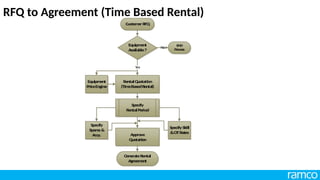
RFQ to Agreement (Time Based Rental)
Custom
erRFQ
Equipm
ent
Available?
Equipm
ent
PriceEngine
EN
D
Proce
ss
N
o
Re
ntalQ
uotati
on
(Tim
eBasedRental)
Specify
Re
ntalPeriod
Approve
Q
uotation
G
enerateRental
Agreem
ent
Yes
SpecifySkill
&OTRates
Specify
Spares&
Accy.
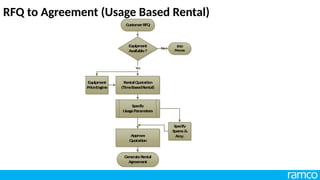
RFQ to Agreement (Usage Based Rental)
Custom
erRFQ
Equipm
ent
Available?
Equipm
ent
PriceEngine
EN
D
Pr
oce
ss
N
o
Re
ntalQ
uotati
on
(Tim
eBasedRental)
Specify
UsageParam
eters
Approve
Q
uotation
G
enerateRental
Agreem
ent
Yes
Specify
Spare
s&
Accy.
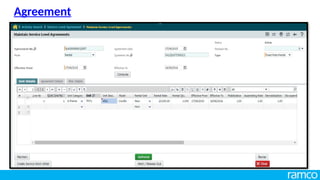
Agreement
1. Create Agreement against Lease Quotation
2. Assign Billing Frequency
3. Assign Mobilization & Assembly rates
4. Specify Additional Lease Details
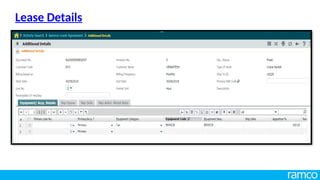
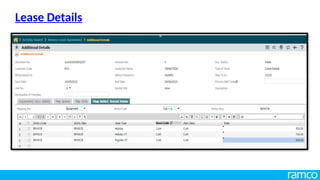
Lease Details
1. Assign Equipments
2. Assign Skills
3. Assign OT & Holiday Rates for Equipment & Labour
Rental Process
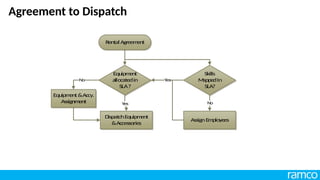
Agreement to Dispatch
Rental Agreem
ent
Skills
M
appe
dIn
SLA?
AssignEm
ploye
es
Equipm
ent&Accy.
Assignm
ent N
o
Equipm
ent
allocatedin
SLA?
DispatchEquipm
ent
&Accessorie
s
Yes
N
o Yes
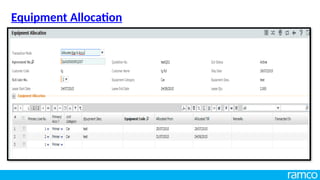
Equipment Allocation
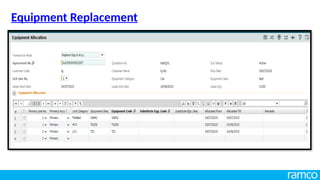
1. Equipment & Accessory Allocation
2. Equipment & Accessory Replacement
3. Equipment & Accessory Deallocation
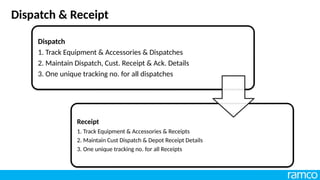
Dispatch
1. Track Equipment & Accessories & Dispatches
2. Maintain Dispatch, Cust. Receipt & Ack. Details
3. One unique tracking no. for all dispatches
Receipt
1. Track Equipment & Accessories & Receipts
2. Maintain Cust Dispatch & Depot Receipt Details
3. One unique tracking no. for all Receipts
Dispatch & Receipt
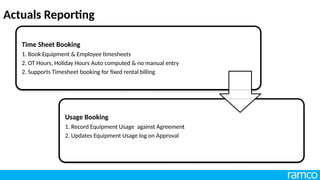
Time Sheet Booking
1. Book Equipment & Employee timesheets
2. OT Hours, Holiday Hours Auto computed & no manual entry
2. Supports Timesheet booking for fixed rental billing
Usage Booking
1. Record Equipment Usage against Agreement
2. Updates Equipment Usage log on Approval
Actuals Reporting
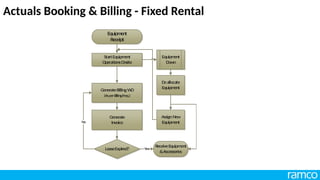
Actuals Booking & Billing - Fixed Rental
GenerateBillingW
O
(Asp
erBillingFreq.)
G
enerate
Invoice
ReceiveEquipm
ent
&Accessories
LeaseExpired?
No
AssignN
ew
Equipm
ent
StartEquipm
ent
OperationsOnsite
Yes
Equipm
ent
Down
Deallocate
Equipm
ent
Equipm
en
t
Receipt
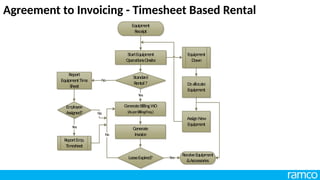
Agreement to Invoicing - Timesheet Based Rental
GenerateBillingW
O
(AsperBillingFreq.)
Generate
Invoice
ReceiveEquipment
&Accessories
LeaseExpired?
No
AssignNew
Equipm
ent
StartEquipm
ent
OperationsOnsite
Yes
Equipm
ent
Down
Deallocate
Equipm
ent
ReportEm
p.
Tim
esheet
Em
ployee
Assigned?
Yes
Standard
Rental?
Report
Equipm
entTime
Sheet
Yes
No
No
Equipm
ent
Receipt
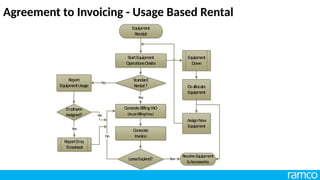
Agreement to Invoicing - Usage Based Rental
GenerateBillingW
O
(Asp
erBillingFreq.)
Generate
Invoice
ReceiveEquipment
&Accessories
LeaseExpired?
No
AssignN
ew
Equipm
ent
StartEquipm
ent
OperationsOnsite
Yes
Equipm
ent
Down
Deallocate
Equipm
ent
ReportEm
p.
Tim
esheet
Em
ployee
Assigned?
Yes
Standard
Rental?
Report
Equipm
entUsage
Yes
No
No
Equipm
ent
Receipt
Rental Calendar
Vehicle/Equipment Master
Equipment Pricing
Request for Quotation
Site Inspection
Equipment Quotation
Agreement
Lease Details
Lease Details
Dispatch
Receipt
Reporting Entry Page
Time Sheet Booking
Equipment Allocation
Equipment Replacement
Equipment Deallocation
Rental Invoice Generation
Service Work Order
Thank you

Enterprise Asset Management_Training PPT.pptx

  • 2.
    Ramco ERP SuiteEnterprise Edition Enterprise Asset Management
  • 3.
    Asset Intensive Segment Transportation Aviation, Rail,Road High-capital, 24 x7 process plants - Petrochem, Cement Utilities - Electric generation, T & D, Waterworks Infrastructure support - pipelines, facilities Vertical Segments addressed
  • 4.
    • Maximize AssetAvailability • Optimize Asset Utilization • Meet Safety and Compliance Requirements • Improve Return on Capital • Reduce Surplus Inventory • Increase Workforce Productivity • Integrate Asset Management with Enterprise Systems • Effective Control of Total Asset Life Cycle Key Benefits
  • 5.
    Asset Induction &Work Management
  • 6.
    • Work Elements •Work Groups • Employee • Other Key Masters • Location Structure • Equipment Profile • Equipment Registry Key Benefits
  • 7.
    • User DefinedType, Categories etc. • Facility to copy content from one task / procedure to another Sequence No. Description Sequence No. Description Sequence No. Description Type : PM, BD, Inspection etc. Category : Electrical, Mechanical etc. Duration : Hours, etc. Requirements: Spares, Tools, Resources etc. Type : PM, BD, Inspection etc. Category : Electrical, Mechanical etc. Duration : Hours, etc. Requirements: Spares, Tools, Resources etc. Type : PM, BD, Inspection etc. Category : Electrical, Mechanical etc. Duration : Hours, etc. Requirements: Spares, Tools, Resources etc. Procedure level requirements + Aggregation of all task requirements Tasks Activities Procedures Key Benefits
  • 8.
    Tools & other resources Workgroup WorkgroupLeader Equipment Planning Group Workgroup Equipment Work Groups
  • 9.
    Workgroup Primary Skills Hourly RateAttendance types Secondary Skills Employee
  • 10.
    Other Resources E.g. :Material Handling Tools Skills Assign  Number available  Hourly Rates  Usage Type  Availability Assign  Serial Number  Number Available  Hourly Rates  Usage Type  Availability  Hourly Rate  Attendance Type Other Key Masters
  • 11.
    Child Location Level 1Turbine 500 MW Unit 1 Boiler 500 MW Unit 1 500 MW Unit 1 Apex Location Child Location Level 2 • Build hierarchy of location structure to mimic organization structure • Cost views and roll-ups • Build location profile by attaching attributes such as planning groups, trouble shooting guides, inspection point Coal Mill 500 MW Unit 1 Location Structure
  • 12.
    Installation date Life parameter Dailyrun hours Location Work group Purchase information Calendar Financial Information Equipment life Place holder details Operational date Spares structure Inspection points Parameters Off line details Calibration details Equipment Equipment Registry
  • 13.
    Parent equipment Conveyer Child equipment Gearbox Runhours Oil Color Temperature Range Attribute Placeholder Conveyor motor Rotable Parameters Technical – HP Consumption – Run Hours Range - Current Parameters Technical – HP Consumption – Run Hours Range - Current Equipment Profile
  • 14.
    Rotables  Track MovementHistory  Inherit run hours / other parameters from parent Remove a defective one Attach a good one Rotables
  • 15.
    Work Logs Add toHistory Add to Pending Jobs lists Generate Work Request/ Work order Process Work Log entries Transfer to other Work Log  Specify Type and Category  Configure as many of Work Logs as needed  Record Observations on Equipment/ Locations Work Log  Work Management
  • 16.
    Reject request Work requestForward request Approve request    Refer in another Work order Generate Work order Stage 1 – Work Request Work Order Cycle
  • 17.
    Work order Work order Approval SchedulingExecution Closure  Problems  Tasks  Skills  Resources  Tools  References  Services  Resource Loading  Spares availability  Skills  Employees  Resources  Tools  Report Actuals  Return unconsumed parts Stage 1 – Work Order Work Order Cycle
  • 18.
    • Match JobRequirements and Skill assignments • Plan and Ensure Spares availability • Control Costs • Provide Right Solutions for the Maintenance Problems • Reduce Search Time and Increase Wrench Time • Maintain Comprehensive Asset Information Key Benefits Asset Induction and Work Management
  • 19.
    Work order Maintenance Strategy Scheduling Location/ Equipment Services Task / Procedure Resources, Spares, Tools Calendar / Usage-based Clearance Permit Internal / External Rule-based Forecast Preventive Maintenance
  • 20.
    • Reduce PrematureFailures/ Unplanned Down Time • Forecast Spares/ Resources Requirements & Plan • Achieve Balance between Internal effort and Out Sourced effort • Ensure Assets Operation as per design parameters Key Benefits Preventive Maintenance
  • 21.
  • 22.
    Calendar / Usage-based Clearance Permit Workorder Rule-based Forecast Inspection orders Condition Monitoring Strategy Inspection Task / Procedure Scheduling Location / Equipment Predictive Maintenance
  • 23.
    Parameter updation through Inspection orders Parameterupdation Real Time Integration with DCS/ SCADA Direct Parameter Updation Work Request/ Work Order Location / Equipment Parameters Updated Predictive Triggers Predictive Maintenance Action Triggering
  • 24.
    • Preempt impendingfailures • Greater Maintenance cost effectiveness • Bring Focus on Critical Equipment • Longer useful life of assets Key Benefits Predictive Maintenance
  • 25.
  • 26.
    Failure Group Equipment 1 Equipment2 Equipment Trouble shooting guide Trouble shooting guide  Failure modes & description  Hierarchy of failure modes  Resolutions  Tasks  Standard Procedures Trouble Shooting Guide
  • 27.
    Failure Mode 1 FailureMode 2 Failure Mode 3 Failure Mode 4 Failure Mode 5 Failure Mode 6 Failure Mode 7 Resolution 1 Task / Procedure Resolution 2 Task / Procedure Resolution 3 Task / Procedure Resolution 5 Task / Procedure Resolution 4 Task / Procedure Trouble Shooting Guide
  • 28.
    • Severity basedon weighted average of - Production Down Hours - Maintenance Expenses - Safety Rating • Occurrence of Failures • Detectability (chances of detecting failure) Risk Factor = Severity Rating * Occurrence Rating * Detectability Rating  Can be done at  Equipment Level  Equipment - Problem level Failure Analysis
  • 29.
    • Analyze Failuresand provide Right Maintenance • Greater safety and environmental integrity • Greater Maintenance cost effectiveness • Better teamwork • Improved operating performance (output, product quality, customer service) Key Benefits
  • 30.
  • 31.
    Equipment (Also Down /Ganged Groups) Plan Type Plan Category Cost Type Plan Priority  Shut Down List  Pending Task Basket  Work Requests  Task Library  PM Tasks Tasks & Services  Plan for spares  View / Reserve  Raise service/ Purchase requests Work Orders / Inspection & Calibration Orders Create Shut Down Plan Select Location / Equipment Create Work Orders Planning Shut Down Plan
  • 32.
    Export Import Execute Close plan  ReportActuals  Return Unconsumed Parts Scheduling  Activity based Scheduling  Resource Based Leveling Shut Down Plan Shut Down Plan Scheduling / Execution
  • 33.
    • Ensure Availabilityof Men and Materials • Monitor effectively the Progress of Shut Down Jobs • Complete Shutdown Activities with in budgeted Time and Cost • Plan and Schedule effectively Key Benefits
  • 34.
  • 35.
    Sequence No. Description Sequence No. Description Description Status Type: PM, BD, Inspection etc. Category : Electrical, Mechanical etc. Duration : Hours, etc. Requirements: Spares, Tools, Resources etc. Type : PM, BD, Inspection etc. Category : Electrical, Mechanical etc. Duration : Hours, etc. Requirements: Spares, Tools, Resources etc. Type : Hot, Cold, etc.. Category : Electrical, Mechanical etc. Activity on : Equipment / Location Activity Type : Lock Out/ Tag Out Clearance Procedures Activities Sequence No. Description Sequence No. Description Description Type Status Type : Hot, Cold, etc.. Category : Electrical, Mechanical etc. Safety Procedures Hazards Clearance Permit Key Benefits
  • 36.
  • 37.
  • 38.
    • Achieve Coordinationbetween Operations and Maintenance • Ensure Safety and Statutory Compliance Key Benefits
  • 39.
  • 40.
    Calendar / Usage-based Clearance Permit Workorder Rule-based Internal / external Calibration Schedule Equipment Forecast Calibration orders Calibration Task / Procedure Calibration requirements of equipment Calibration
  • 41.
    Calibration order Record pre- calibration values Calibrate Recordpost calibration values  Master Instrument used  Person calibrating Calibration Certificate Passed Calibration
  • 42.
    • Ensure properfunctioning of Equipment • Maintain Equipment health and Quality Output • Perform Calibration Tasks on time Key Benefits
  • 43.
  • 44.
    Approve proposal Propose Budget for Location Resources,Skills, Spares, Tools, miscellaneous Create plan Approve plan Allocate for Critical equipment • Propose Budgets for - Functions - Types of Work E.g. Mechanical - Preventive Proposals Budgets
  • 45.
    Approved plan  Allocate for location Apportion across periods Reviewbudget against Actuals Allocate for critical equipment Resources, Skills, Spares, Tools, miscellaneous • Monthly, quarterly, half-yearly, yearly allocation of budgets for - Functions - Types of Work E.g. Mechanical - Preventive Allocation Budgets
  • 46.
    • Cater forSpares/ Resources/ Miscellaneous Costs • Ensure that the actual cost is within the Budgets • Control Overall Maintenance Costs • Propose Fund Requirements at Location/ Equipment level Key Benefits
  • 47.
  • 48.
    Maintenance plan PM Schedule Service Items  Bills of materials  Standard Rate Service Request Work order Contracts
  • 49.
    Process service requests Createcontracts Receipt of Services Create blanket contracts Issue Release Slip Against a Work Order Against Multiple Work Orders in a Service Receipt Issue items, if necessary Pay Reconcile issue and return of items • Rate Contracts • Lump Sum Contracts • Annual Maintenance Contracts Contracts
  • 50.
    • Achieve aBalance between Internal and External mix • Ensure Coordination • Reduce Total Maintenance Costs • Leverage Maintenance Task Outsourcing Key Benefits
  • 51.
    MRO and AfterSales Service
  • 52.
    • Customer locations •Customer units • Maintenance Crew Unit Location Crew Unit Induction
  • 53.
    • Customer centricservice levels • Multi Unit-Service level agreement • Types of Service level • Auto –Renewal • Escalation for Agreement • Multiple Payment plans • PM Visits->SWO Service Level Agreement
  • 54.
    Report WO Actual Spare Part Actual LaborActual Service Actual Allocate Spares Reserve Spares Raise PR Skills/Employees Assignment SCR for Service Service Level Agreement Create Work order FRESH WO Scheduling SCHEDULED Customer Complaint WO Execution INPROGRESS/COMPLETED WO Closure CLOSED Units Sale Order Customer Problems Spares Skills Services References COBI Generation Service Work Order
  • 55.
    • Billing basedon either reported parameter value or reported hours • Supports both Parameter and Skill reporting • Consolidation of the reported value for billing Service Level Agreement Reporting for Billing
  • 56.
    • Improves CustomerSatisfaction • Supports both Service and Sales & Service Industry • Supports Repair, Preventive Maintenance, Installation and Movement of Customers Units • Minimal data capture through simplified User interface screens Key Benefits
  • 57.
  • 58.
    Ramco ERM -Offerings SITE Inspection Eqp. Allocation
  • 59.
    Types of Rentals •Equipment Rented for Fixed Price per Day/Week/Month • Equipment Time Sheet optional (No billing based on it) • Employee assignment is optional & expenses can be Invoiced based on employee timesheet actuals. Fixed • Equipment Rented for a specific price per Hour • Invoiced based on time sheet hours reported against Equipment • Employee assignment is optional & expenses can be Invoiced based on employee timesheet actuals. Time Sheet Based • Equipment Rented based on Usage . Like Run Hours, Tones Lifted etc. • Invoiced based on the Reported consumption against Equipment • Employee assignment is optional & expenses can be Invoiced based on employee timesheet. Usage Based
  • 60.
    Pre Requisites Rental Calendar 1.Classify as Working, non working days, exceptions 2. Captured it in Quotation and Rental Agreement. 3. Generate Invoice accordingly for holidays and OT hours Equipment Master 1. Create Equipment or Vehicle 2. Map spares and usage parameters Rental Pricing 1. Price at Model or Eqp. Category 2. Time based & Consumption based pricing
  • 61.
    RFQ 1. Record Customerrequests on equipment hire 2. Capture RFQ by Eqp. Desc or Eqp. Category Site Inspection 1. Record Customer site data 2. Feed Input given by each Emp. (Inspectors) Quotation 1. Facility to raise Quotation against RFQ & with out any reference 2. Specify the mode of rental billing (Fixed/ Time/ Usage based) 3. Specify Equipment OT rates & Skill OT Rates Rental Process
  • 62.
    RFQ to Agreement(Fixed Rental) Custom erRFQ Equipm ent Available? Equipm ent PriceEngine EN D Proce ss N o Re ntalQ uotati on (Fixe dRental) Specify Re ntalPeriod Approve Q uotation G enerateR ental Agreem ent Yes SpecifySpares &Accy.
  • 63.
    RFQ to Agreement(Time Based Rental) Custom erRFQ Equipm ent Available? Equipm ent PriceEngine EN D Proce ss N o Re ntalQ uotati on (Tim eBasedRental) Specify Re ntalPeriod Approve Q uotation G enerateRental Agreem ent Yes SpecifySkill &OTRates Specify Spares& Accy.
  • 64.
    RFQ to Agreement(Usage Based Rental) Custom erRFQ Equipm ent Available? Equipm ent PriceEngine EN D Pr oce ss N o Re ntalQ uotati on (Tim eBasedRental) Specify UsageParam eters Approve Q uotation G enerateRental Agreem ent Yes Specify Spare s& Accy.
  • 65.
    Agreement 1. Create Agreementagainst Lease Quotation 2. Assign Billing Frequency 3. Assign Mobilization & Assembly rates 4. Specify Additional Lease Details Lease Details 1. Assign Equipments 2. Assign Skills 3. Assign OT & Holiday Rates for Equipment & Labour Rental Process
  • 66.
    Agreement to Dispatch RentalAgreem ent Skills M appe dIn SLA? AssignEm ploye es Equipm ent&Accy. Assignm ent N o Equipm ent allocatedin SLA? DispatchEquipm ent &Accessorie s Yes N o Yes
  • 67.
    Equipment Allocation 1. Equipment& Accessory Allocation 2. Equipment & Accessory Replacement 3. Equipment & Accessory Deallocation
  • 68.
    Dispatch 1. Track Equipment& Accessories & Dispatches 2. Maintain Dispatch, Cust. Receipt & Ack. Details 3. One unique tracking no. for all dispatches Receipt 1. Track Equipment & Accessories & Receipts 2. Maintain Cust Dispatch & Depot Receipt Details 3. One unique tracking no. for all Receipts Dispatch & Receipt
  • 69.
    Time Sheet Booking 1.Book Equipment & Employee timesheets 2. OT Hours, Holiday Hours Auto computed & no manual entry 2. Supports Timesheet booking for fixed rental billing Usage Booking 1. Record Equipment Usage against Agreement 2. Updates Equipment Usage log on Approval Actuals Reporting
  • 70.
    Actuals Booking &Billing - Fixed Rental GenerateBillingW O (Asp erBillingFreq.) G enerate Invoice ReceiveEquipm ent &Accessories LeaseExpired? No AssignN ew Equipm ent StartEquipm ent OperationsOnsite Yes Equipm ent Down Deallocate Equipm ent Equipm en t Receipt
  • 71.
    Agreement to Invoicing- Timesheet Based Rental GenerateBillingW O (AsperBillingFreq.) Generate Invoice ReceiveEquipment &Accessories LeaseExpired? No AssignNew Equipm ent StartEquipm ent OperationsOnsite Yes Equipm ent Down Deallocate Equipm ent ReportEm p. Tim esheet Em ployee Assigned? Yes Standard Rental? Report Equipm entTime Sheet Yes No No Equipm ent Receipt
  • 72.
    Agreement to Invoicing- Usage Based Rental GenerateBillingW O (Asp erBillingFreq.) Generate Invoice ReceiveEquipment &Accessories LeaseExpired? No AssignN ew Equipm ent StartEquipm ent OperationsOnsite Yes Equipm ent Down Deallocate Equipm ent ReportEm p. Tim esheet Em ployee Assigned? Yes Standard Rental? Report Equipm entUsage Yes No No Equipm ent Receipt

  • 73.
  • 74.
  • 75.
  • 76.
  • 77.
  • 78.
  • 79.
  • 80.
  • 81.
  • 82.
  • 83.
  • 84.
  • 85.
  • 86.
  • 87.
  • 88.
  • 89.
  • 90.
  • 91.